> ## Documentation Index
> Fetch the complete documentation index at: https://arize-ax.mintlify.site/docs/llms.txt
> Use this file to discover all available pages before exploring further.
# Anatomy of an Evaluator
> What an evaluator is made of — the inputs it consumes (prompt, model, data) and the outputs it emits (label, score, explanation).
Every evaluator has the same shape. Whether it's an LLM-as-a-judge running in the Arize AX UI, a Python class running offline, or a human filling in a rubric — they all consume the same kind of inputs and emit the same kind of outputs.
This page is about that shape. The pieces don't change between evaluator types; what changes is who fills each piece in.
# The components
An evaluator is a function from three inputs to three outputs:

# Inputs
## Eval prompt
The eval prompt is the instruction the evaluator follows. For an LLM-as-a-judge it's a literal prompt template; for a code evaluator it's the body of the scoring function. Either way, it answers two questions: *what are we judging?* and *what shape should the answer take?*
A well-formed eval prompt:
* Describes the criteria explicitly. *"Judge whether the response is factually correct, given the retrieved context"* is better than *"score the response"*.
* Names the data fields it expects. Templates use `{variable}` placeholders in the UI (or `{{variable}}` on the `ax` CLI's `--template` flag) that get filled in from the span attributes at evaluation time.
* Specifies the output shape. *"Output only `correct` or `incorrect`"* is better than *"give your assessment"*. The shape constrains the judge's freedom and makes the output machine-parseable.
For the design patterns that make prompts work, see [Evaluator best practices](/docs/ax/concepts/evaluators/evaluator-best-practices).
## Eval model
The eval model is what runs the prompt. For LLM-as-a-judge, it's a configured LLM provider — OpenAI, Anthropic, Bedrock, Vertex AI, etc. For code evaluators, the "model" is implicit — your Python function is both the prompt and the model.
The model is independent of the data being judged. An LLM-as-a-judge evaluating a `gpt-5.4` application doesn't have to use `gpt-5.4`; you can (and often should) use a different model for the judge — see [Evaluator best practices](/docs/ax/concepts/evaluators/evaluator-best-practices) for the *don't use the same model* rule and the perplexity-bias reason behind it.
Models are registered once as [AI integrations](/docs/ax/security-and-settings/integrations-playground/overview) in Arize AX and referenced by name from any evaluator. The underlying knob on the CLI is `--ai-integration-id` and `--model-name`.
## Data to evaluate
The data is whatever the evaluator reads in order to make its judgment. The shape depends on the [evaluation level](/docs/ax/concepts/evaluators/evaluation-levels):
* A **span-level** evaluator sees one span's attributes.
* A **trace-level** evaluator sees all spans in a trace.
* A **session-level** evaluator sees all traces in a session.
Within each, the evaluator picks out specific attributes via placeholders in the prompt template. For example, a span-level summarization eval might use `{summary} = attributes.llm.output_messages.0.message.content` and `{original} = attributes.llm.input_messages.1.message.content`. The platform fills these in at evaluation time.
This is where [filters](/docs/ax/concepts/evaluators/filters-scope-and-cadence) come in — they decide which spans, traces, or sessions actually get passed to the evaluator.
# Outputs
The three outputs every evaluator emits:
## Label
The label is the categorical answer. It can be binary (`correct` / `incorrect`, `relevant` / `irrelevant`, `good` / `bad`) or multi-class (`fully_relevant` / `partially_relevant` / `not_relevant`).
Labels are arbitrary strings — you choose them when you create the evaluator. The CLI flag is `--classification-choices`, which takes a JSON object mapping each label to its numeric score (see below).
## Score
The score is the numerical representation of the label. A binary `correct` / `incorrect` evaluator typically maps to `1` / `0`. A multi-class evaluator might map to `1.0` / `0.5` / `0.0`. Custom mappings are supported — you can weight labels however you want.
Why scores matter even when you also emit labels:
* **Aggregation.** "Average score over the last 24 hours" requires numbers, not categories.
* **Weighted combinations.** When you combine multiple evaluators, you combine scores.
* **Filtering.** Filtering for spans where `score < 0.5` is a common debugging pattern.
The `--direction` flag tells Arize AX whether higher scores are better (`maximize`) or worse (`minimize`). This shapes how the UI surfaces aggregates — for an evaluator measuring `toxicity`, lower is better; for `correctness`, higher is better.
Although optional in principle, scores are strongly encouraged. Many of the most useful workflows depend on them.
## Explanation
The explanation is a paragraph of free-text reasoning describing *why* the evaluator gave the label it did. For LLM-as-a-judge it comes from the model. For code evaluators it can be set programmatically.
Explanations are off by default but worth turning on for almost every evaluator — they're how you debug a wrong score. *"Why did this span get labeled hallucination?"* is unanswerable without one. The CLI flag is `--include-explanations`.
The token cost of generating explanations is non-trivial — they roughly double the cost of an LLM-as-a-judge eval. For high-volume production evaluators, a common pattern is to enable explanations during development and validation, then disable them once the evaluator is stable.
# Where evaluator outputs land
Evaluator outputs are written back to the span they were run against as a triplet of attributes:
| Attribute | What it holds |
| :----------------------------- | :------------------------------------- |
| `eval..label` | The categorical label |
| `eval..score` | The numerical score |
| `eval..explanation` | The free-text explanation (if enabled) |
Trace- and session-level evaluators use slightly different prefixes (`trace_eval..*` and `session_eval..*` respectively) so the Arize AX UI can disambiguate scope at a glance. Span-level evaluators use the plain `eval.*` prefix. The triplet structure is the same in all three cases.
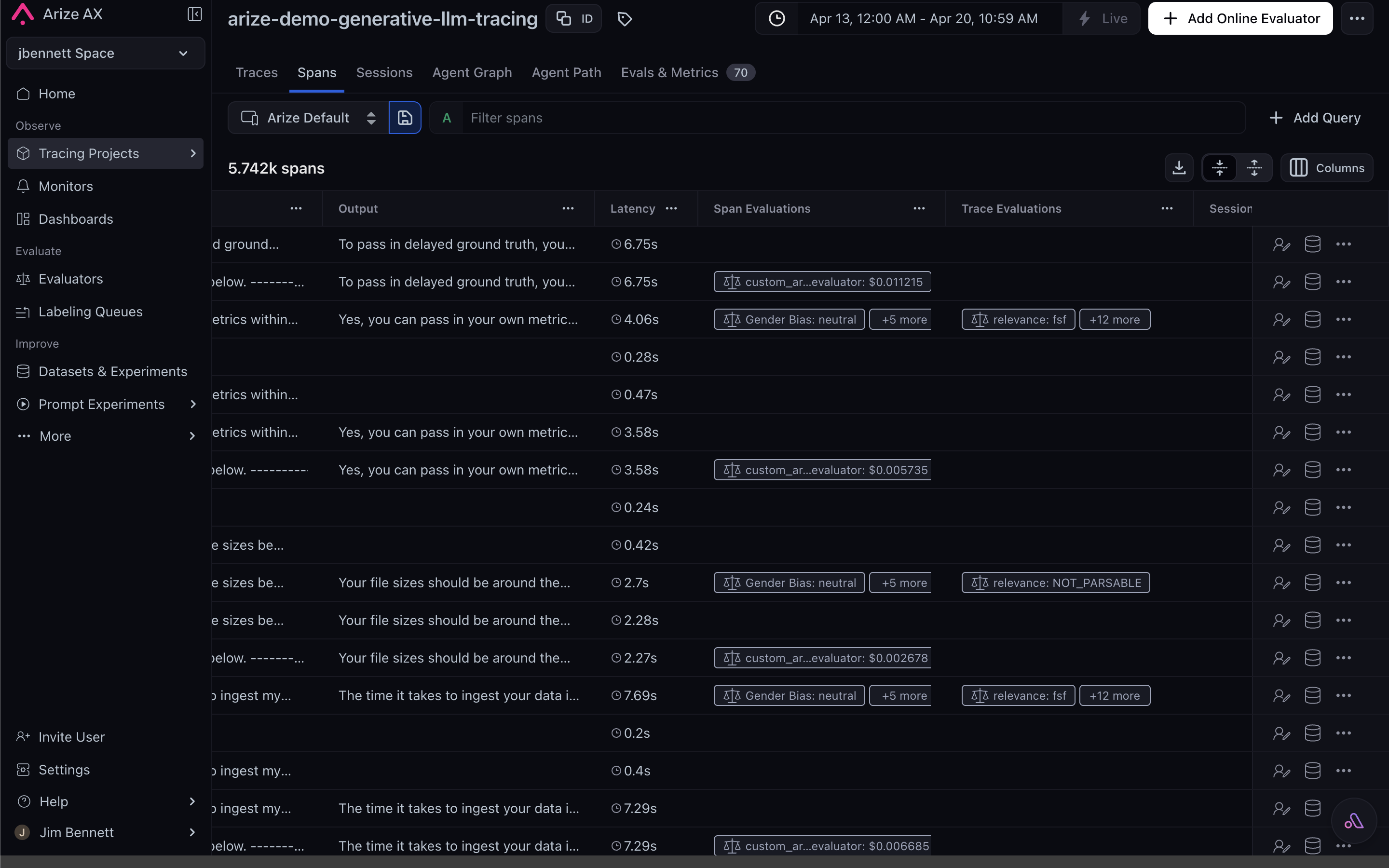
In the Arize AX UI, eval results appear inline on every span — surfaced as their own columns in the Spans tab and as a dedicated **Evaluations** tab on the span detail drawer:
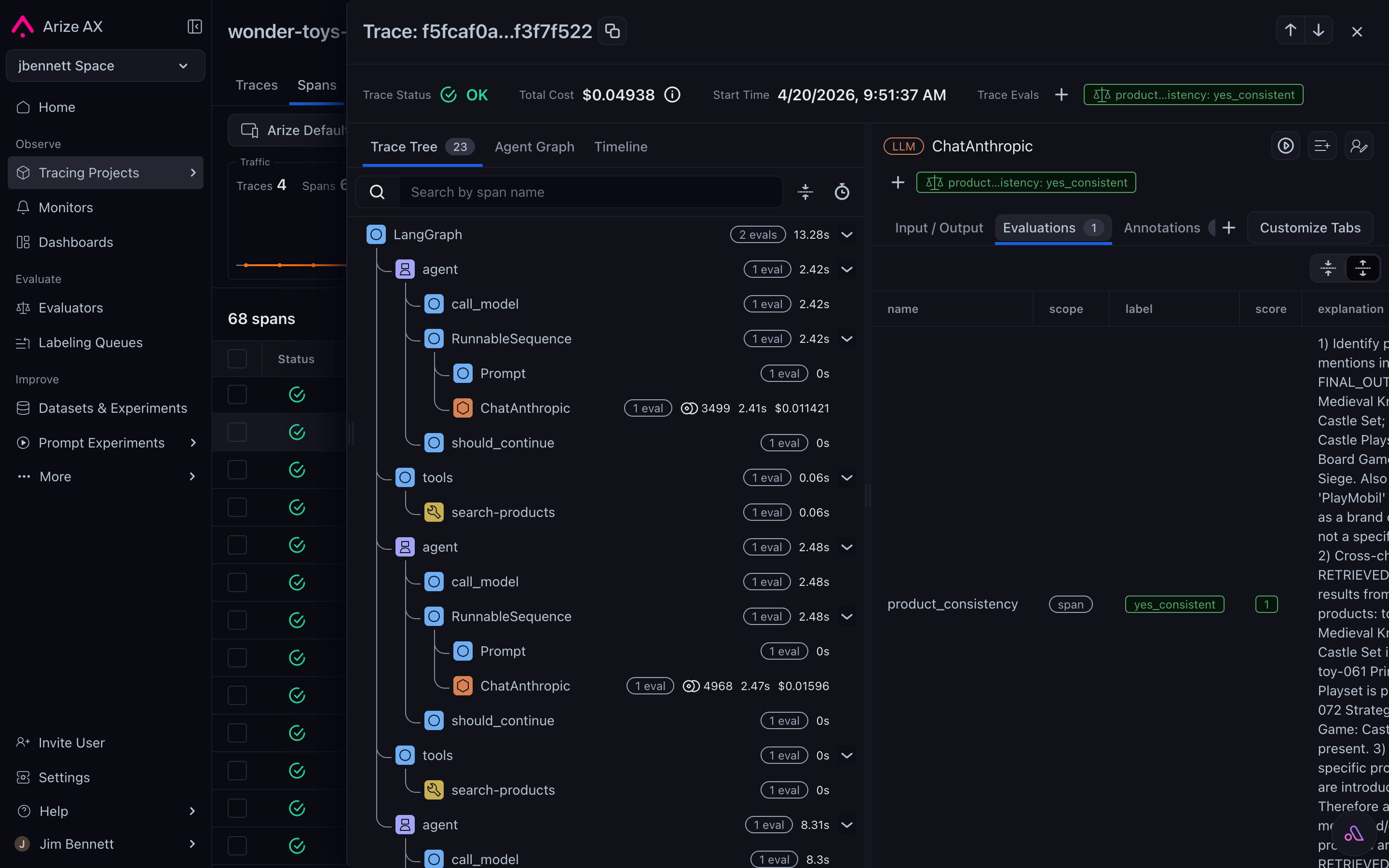
When you select a span, the detail drawer's **Evaluations** sub-tab shows the full label, score, and explanation for every evaluator that ran on it:
These follow the standard [OpenInference semantic conventions](/docs/ax/concepts/otel-openinference/semantic-conventions), which means anything that can read OpenTelemetry spans — the Arize AX UI, the Spans tab filter expressions, the export-to-dataframe API, downstream OTel pipelines — can read evaluator results the same way it reads any other attribute.
# The flexibility lives in the inputs
The whole pipeline is flexible because the inputs are. For LLM-as-a-judge:
* The prompt is a natural-language template you control.
* The model is any provider you have configured.
* The data is any combination of span attributes addressed via placeholders.
That flexibility is what makes LLM-as-a-judge worth the non-determinism — you can build new evaluators with no training, no infrastructure, and no labeled data, just a prompt that describes the question.
***
## Next step
You now know what evaluators are made of. The next page covers *where* they run — on the Arize AX platform or off it — and what each choice gives you: