> ## Documentation Index
> Fetch the complete documentation index at: https://arize-ax.mintlify.site/docs/llms.txt
> Use this file to discover all available pages before exploring further.
# Filters, Scope, and Cadence
> How to control which spans get evaluated and how often — the two-filter model (task data filter vs evaluator data filter), sampling, cadence, and variable mapping.
When an evaluator task runs, three questions get answered before the judge sees a single token: *which* spans qualify for evaluation, *how much* of the qualifying population gets evaluated, and *when* the evaluation happens. This page covers all three.
The controls map cleanly to CLI flags on `ax tasks create` and `ax evaluators create`. Concept-side, they break down into four ideas: scope, filters, sampling, and cadence.
# Scope: the level the evaluator runs at
Scope is the [evaluation level](/docs/ax/concepts/evaluators/evaluation-levels) the evaluator runs at — span, trace, or session. The underlying knob on the evaluator is `--data-granularity span|trace|session`.
Scope is set on the **evaluator template**, not the task. Once an evaluator is created at span scope, every task using it runs at span scope. To evaluate the same question at a different scope, you build a different evaluator.
# Filters: which spans qualify
All three controls — filters, cadence, and sampling — are configured in the same place: the **New Task** form when an evaluator gets deployed to a project.
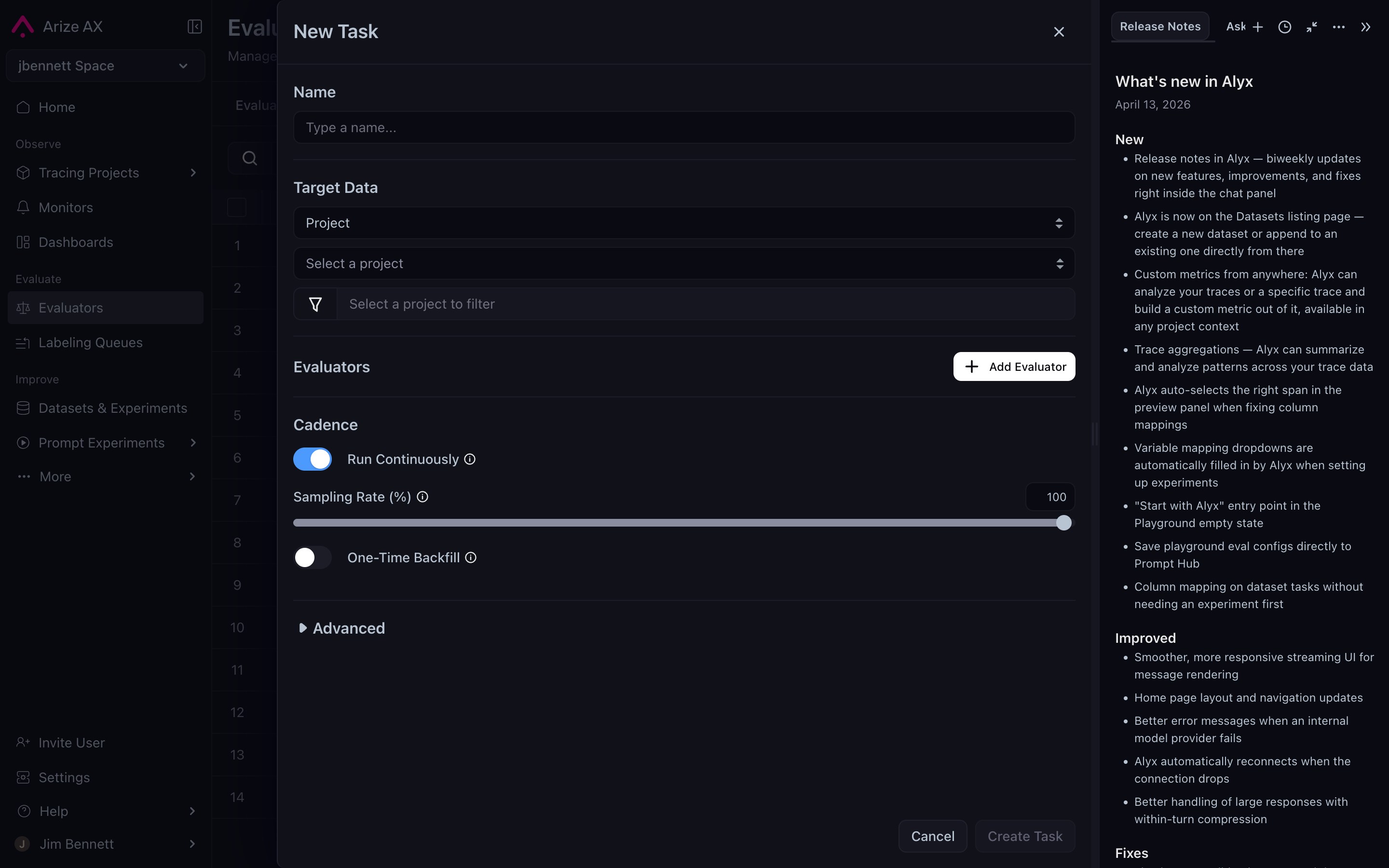
For trace and session evaluators, the platform exposes **two** filter slots — and the distinction matters more than it looks.
| Filter | Applies to | What it selects | Available for |
| :------------------------ | :---------------------------- | :-------------------------------------------------------------------------------- | :------------------- |
| **Task data filter** | The task as a whole | Sessions, traces, or spans that contain at least one span matching the criteria | Span, trace, session |
| **Evaluator data filter** | The evaluator inside the task | Which spans within the selected sessions/traces actually get passed to the prompt | Trace, session only |
For span-level evaluators, the task data filter is enough — there's nothing inside a span to further filter, so the evaluator data filter doesn't apply.
For trace and session evaluators, the two filters chain. Read them as a pipeline:
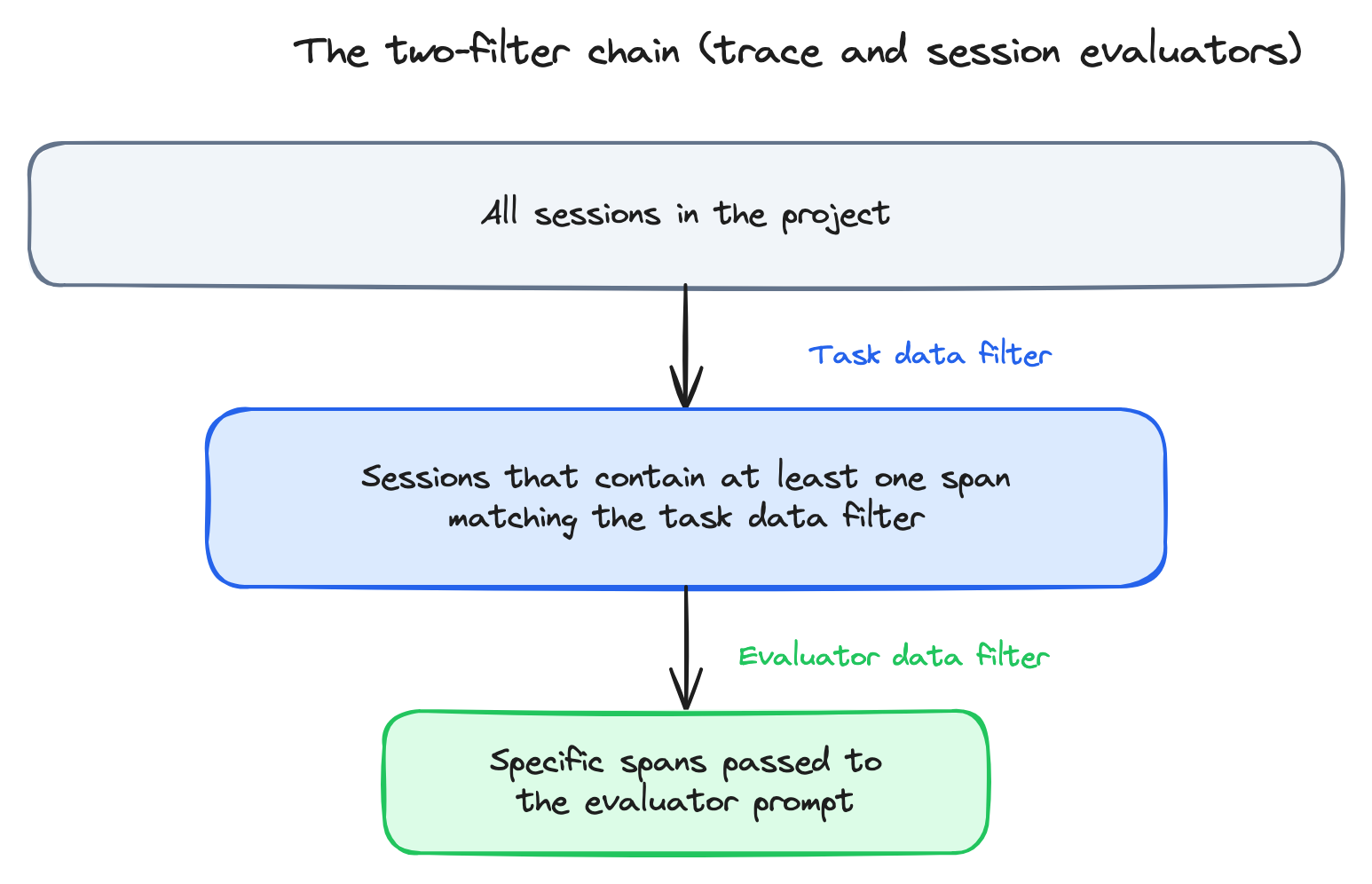
A worked example. Imagine a multi-agent chatbot where you want to evaluate the **tone of the conversation** — but only for conversations where a `financial_data_agent` was involved.
* **Task data filter** = `name = "financial_data_agent"` — restricts the task to sessions that touched the financial agent.
* **Evaluator data filter** = `parent_id IS NULL` — within each qualifying session, pass only the root spans to the prompt (the user-facing messages).
Without the second filter, the evaluator would receive every span in every qualifying session — including internal LLM calls, tool spans, and retrieval spans. None of that is useful for judging tone, and all of it costs tokens.
The two-filter pattern is what makes session evaluators usable. *Find sessions that match a criterion, then pass only the relevant subset of spans to the judge.*
# Sampling: how much of the population
Most production applications generate more traces than you want to evaluate. Sampling lets you score a representative fraction instead of all of them. The CLI flag is `--sampling-rate` (a float between 0 and 1).
When to sample below 100%:
* **High volume + LLM-as-a-judge.** A continuous evaluator running on 100% of traces in a high-volume application can run up a serious LLM bill. 1–10% is a common production setting.
* **Cost-controlled experiments.** When you're validating a new evaluator and don't yet trust the prompt, sampling protects you from a runaway loop.
When to stay at 100%:
* **Code evaluators.** Effectively free; sample for completeness.
* **Low volume.** A small project might generate hundreds of traces a day; sampling buys nothing.
* **Guardrail-style evaluators.** If the eval is meant to detect rare failures (a competitor mention, a policy violation), sampling defeats the purpose — the rare failures get sampled out.
Sampling applies to **project tasks**. Dataset/experiment tasks evaluate every example by design.
# Cadence: when the evaluation runs
Cadence is the answer to *when does the evaluator fire?* Two options:
| Cadence | What it does | When to use |
| :------------------- | :---------------------------------------------------- | :---------------------------------------------------------------------------------------------------------------- |
| **Historical batch** | Evaluator runs once over a fixed window of past data. | Validating a new evaluator before deploying it; one-off analyses; back-filling scores after launching a new eval. |
| **Continuous** | Evaluator fires as new traces arrive. | Production monitoring; regression detection; anything you want scored automatically. |
The CLI flag is `--is-continuous` / `--no-continuous`. The recommended workflow when launching a new evaluator: **run historical first, verify the scores look right, then switch to continuous.**
Running historical first catches the cases where the prompt looks reasonable but the evaluator scores everything `correct` (or `incorrect`) — i.e., the judge isn't actually doing the work. Catching that against a known batch of traces is cheap; catching it after a week of continuous production runs is not.
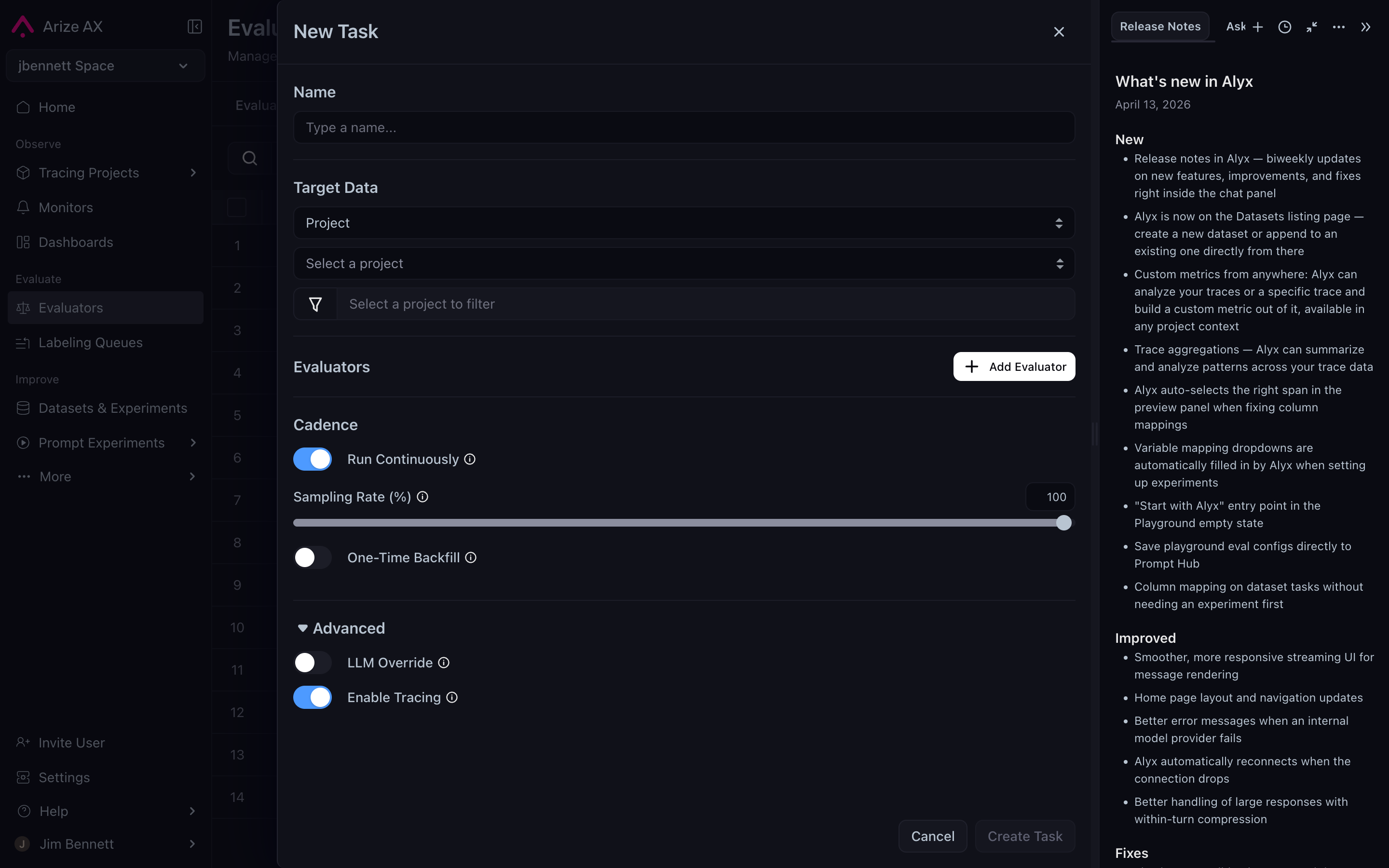
Expanding the **Advanced** disclosure on the task form exposes the remaining levers — LLM override (use a different judge model than the template's default for this specific task) and Enable Tracing (capture traces of the evaluator's own LLM calls, useful when debugging a misbehaving judge):
# Variable mapping: reusing templates across projects
The other knob on the task — easy to miss — is **variable mapping**. The evaluator template names placeholders like `{summary}` and `{original}`. The mapping says, *in this specific task, fill `{summary}` from `attributes.llm.output_messages.0.message.content`, and `{original}` from `attributes.llm.input_messages.1.message.content`.*
Mappings live on the task, not the template. The same template can be deployed against many projects whose attribute paths differ — a summarization agent in one project might emit its output as `attributes.llm.output_messages.0`; another might emit it as `attributes.output.value`. The template stays the same; the mapping changes per task. For the full attribute namespace, see [Semantic conventions](/docs/ax/concepts/otel-openinference/semantic-conventions).
This is part of why authoring with Alyx is a meaningful productivity unlock — Alyx auto-detects the right attribute paths when you point it at a project, so the variable mapping fills itself in. See [Online LLM-as-a-judge](/docs/ax/concepts/evaluators/online-llm-as-judge#authoring-with-alyx).
# The full set of knobs
A summary table. Every knob here corresponds to a real flag on the `ax` CLI, which means every concept on this page maps to a verifiable underlying mechanism:
| Concept | CLI flag |
| :----------------------------------- | :--------------------------------------------------------------- |
| Evaluator scope (span/trace/session) | `ax evaluators create --data-granularity` |
| Task data filter | `ax tasks create --query-filter` |
| Evaluator data filter | per-evaluator `query_filter` field in the `--evaluators` JSON |
| Variable mapping | per-evaluator `column_mappings` field in the `--evaluators` JSON |
| Sampling rate | `ax tasks create --sampling-rate` |
| Cadence (continuous on/off) | `ax tasks create --is-continuous` / `--no-continuous` |
You don't need to use the CLI to use evaluators — the Arize AX UI exposes everything here through forms — but the CLI flags are the canonical names for these controls and a useful disambiguation when documentation gets ambiguous.
***
## Next step
Online evaluators get you most of the way. For everything you can't express in a UI form — multi-stage pipelines, parallel evaluators, custom data shaping — there's offline: