> ## Documentation Index
> Fetch the complete documentation index at: https://arize-ax.mintlify.site/docs/llms.txt
> Use this file to discover all available pages before exploring further.
# Span Processor
> The OpenTelemetry component that intercepts spans at the start and end of their lifecycle — how BatchSpanProcessor and SimpleSpanProcessor differ, and how to tune them.
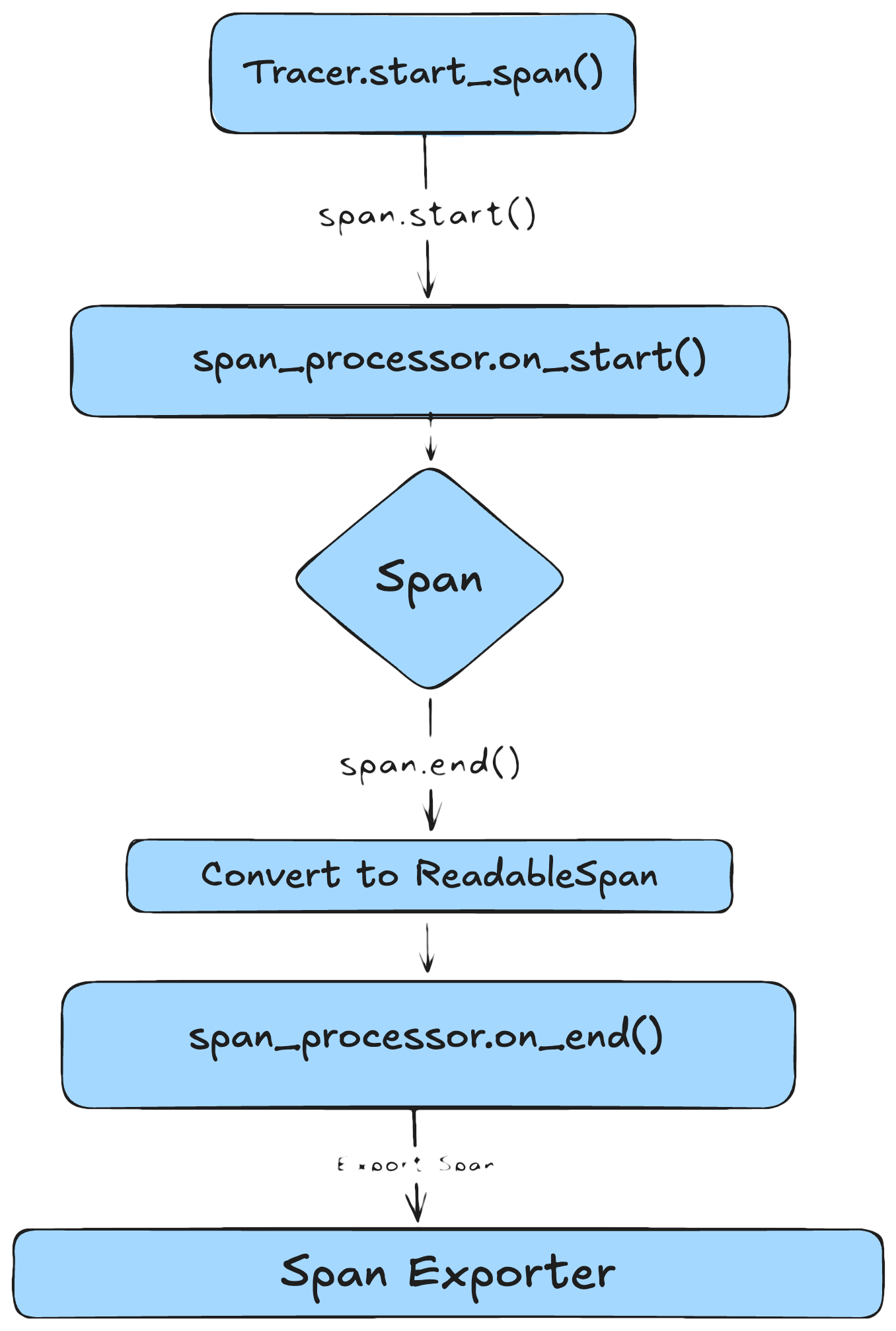
A **span processor** sits between your code and the [Exporter](/ax/concepts/otel-openinference/exporter). It intercepts spans at two key lifecycle points and decides what to do with them before they leave the process — filter, enrich, batch, or export immediately.
# The Two Lifecycle Hooks
Every span processor implements two methods:
| Hook | When it fires | Span state | Common uses |
| :------------------------------- | :------------------------------- | :-------------------------------------------------------- | :--------------------------------------------------------------- |
| `on_start(span, parent_context)` | Right after the span is created. | Mutable. Attributes may not be set yet. | Add context-scoped attributes (session ID, user ID, request ID). |
| `on_end(span)` | After `span.end()` is called. | Passed in as a `ReadableSpan` — intended to be immutable. | Filter, enrich, or modify attributes; forward to the exporter. |
> A new processor method, `on_ending`, is in development. It fires before `on_end` and gives you a mutable span — useful for modifying attributes at the last moment without the workarounds described below.
## Modifying Attributes in `on_end`
The `ReadableSpan` passed to `on_end` is *intended* to be immutable, but language implementations vary:
* **Python** — nothing is truly immutable. Attributes and context can be edited directly.
* **TypeScript** — `ReadableSpan` properties are `readonly`, so the object can't be reassigned, but properties can be mutated in place.
Editing a `ReadableSpan` in place can have unintended side effects. If multiple span processors are attached to the Tracer Provider, every downstream processor sees the modification. If you need to modify a span, prefer copying it with the edited attributes rather than mutating the original.
# Configuring a Span Processor
The most common processor for production is `BatchSpanProcessor`, which queues spans and exports them in batches:
```python theme={null}
from opentelemetry.exporter.otlp.proto.http.trace_exporter import OTLPSpanExporter
from opentelemetry.sdk.trace.export import BatchSpanProcessor
otlp_exporter = OTLPSpanExporter(...)
span_processor = BatchSpanProcessor(
span_exporter=otlp_exporter,
max_queue_size=2048, # env: OTEL_BSP_MAX_QUEUE_SIZE
schedule_delay_millis=5000, # env: OTEL_BSP_SCHEDULE_DELAY
max_export_batch_size=512, # env: OTEL_BSP_MAX_EXPORT_BATCH_SIZE
export_timeout_millis=30000, # env: OTEL_BSP_EXPORT_TIMEOUT
)
```
Each parameter has a matching environment variable, so you can leave the code unchanged and tune at deploy time. See the [BatchSpanProcessor API reference](https://opentelemetry-python.readthedocs.io/en/latest/sdk/trace.export.html#opentelemetry.sdk.trace.export.BatchSpanProcessor) for current defaults.
# BatchSpanProcessor vs SimpleSpanProcessor
OpenTelemetry ships two built-in processors. The difference is fundamental — when each span leaves your process.
| Property | BatchSpanProcessor | SimpleSpanProcessor |
| :---------------------- | :----------------------------------------- | :--------------------------------- |
| **Best for** | Production and staging | Local debugging, demos, CI |
| **Export behavior** | Async, in batches | Each span immediately (sync) |
| **Impact on latency** | Low — work done off the request path | Higher — export blocks the request |
| **Throughput** | High, optimized for volume | Low, can bottleneck under load |
| **Reliability on exit** | Requires `force_flush()` / `shutdown()` | Spans exported immediately |
| **Visibility speed** | Slight delay (buffering) | Immediate |
| **Failure surfacing** | Export failures logged in background | Failures raised inline |
| **Tuning** | Configurable (batch size, delay, timeouts) | Minimal |
`SimpleSpanProcessor` is synchronous and blocking. It exports each span before your code continues, which adds latency to every traced operation. Use `BatchSpanProcessor` for production.
# Common Pitfalls
A few span-processor failure modes worth knowing about:
* **Using `SimpleSpanProcessor` in production** — exports every span synchronously. Under load, this adds latency to every traced operation.
* **`export_timeout_millis` too short** — in Python, export failures trigger exponential backoff up to 32 seconds. During that backoff, no other batches can export, the queue fills up, and spans get dropped. Set the timeout high enough that transient slowdowns don't trigger retries.
* **`max_queue_size`, `max_export_batch_size`, or `schedule_delay_millis` too high** — spans accumulate in memory, creating memory pressure. Big batches may also exceed the backend's per-request size limit (see the >4 MB gRPC pitfall on the [Exporter page](/ax/concepts/otel-openinference/exporter#common-pitfalls)).
* **Forgetting that processors run in order** — multiple processors execute in the order they were added. If one mutates a `ReadableSpan` in `on_end`, every later processor sees the mutation.
# Where Span Processor Fits in the Pipeline
The processor is the middle stage of the export pipeline. Spans flow:
```
Your code → Tracer → Span Processor → Exporter → Arize AX
```
The processor is owned by the [Tracer Provider](/ax/concepts/otel-openinference/tracer-provider). You can attach multiple processors — each one independently decides whether and when to forward spans to its exporter.
***
## Next step
The span processor decides when spans leave. The Tracer Provider holds it all together: