> ## Documentation Index
> Fetch the complete documentation index at: https://arize-ax.mintlify.site/docs/llms.txt
> Use this file to discover all available pages before exploring further.
# The Prompt Hub
> The centralized repository for Prompt Objects — what it stores, who reaches it, how it connects to the rest of the platform.
The **Prompt Hub** is the centralized repository for every Prompt Object your team owns. It's the source of truth — the place every other Arize AX surface (Playground, experiments, the SDK, your application at runtime) reaches into when it needs a prompt.
If the [Prompt Object](/docs/ax/concepts/prompts/prompt-object) is the *unit* and [versioning](/docs/ax/concepts/prompts/versioning-and-tags) is the *control plane*, the Hub is the *storage layer* that holds them all and makes them addressable.
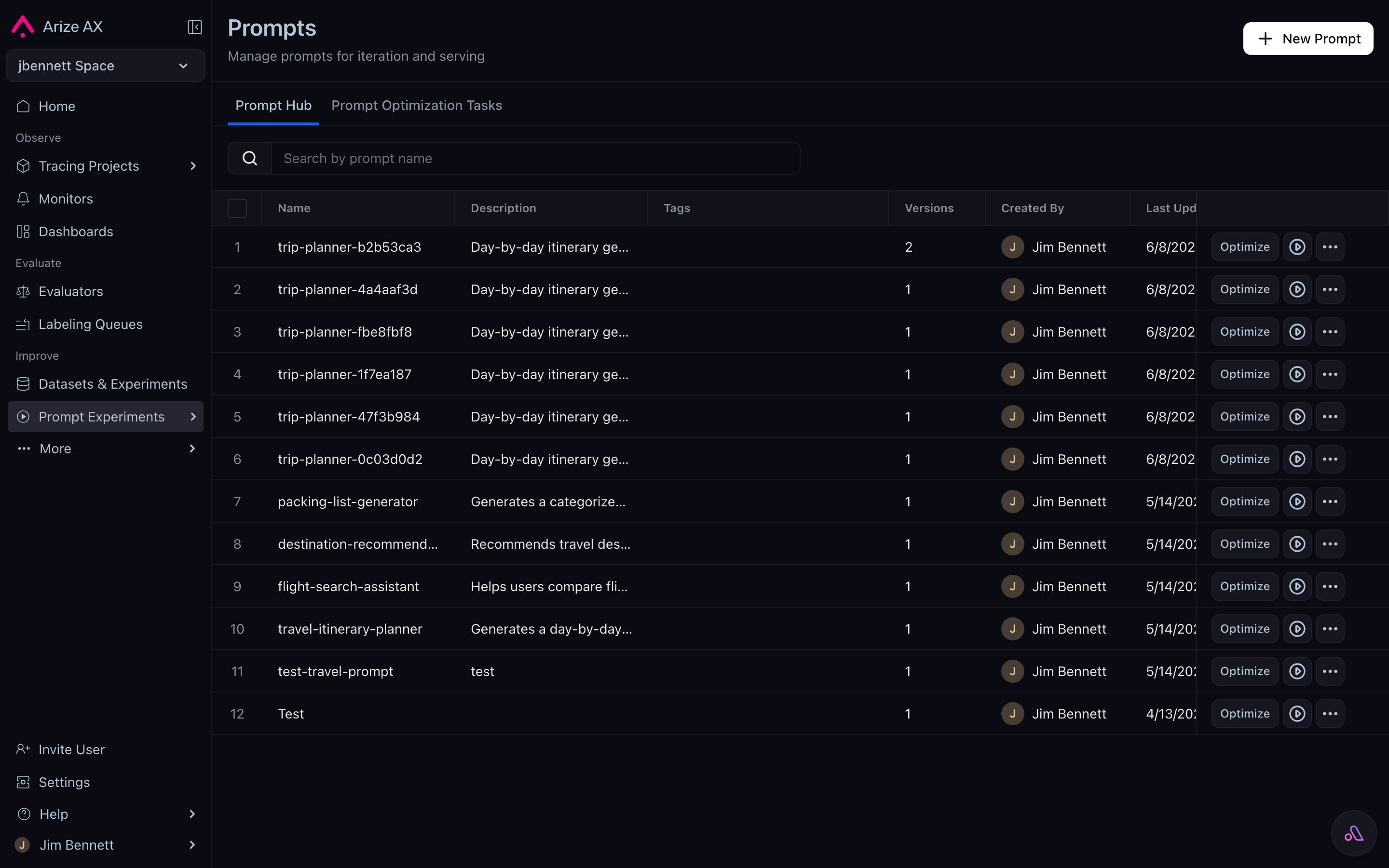 # What lives in the Hub
The Hub stores Prompt Objects, not raw strings. Each prompt in the Hub has:
* A **name** (e.g., `support-agent`, `tool-selection-router`).
* A **description** that captures intent ("Routes inbound queries to the right downstream skill").
* A **version history** — every save lands here as a new immutable record.
* **Tags** that point at specific versions (`production`, `staging`, `dev`, `prod-v1.2`, …).
* The current state of all five Prompt Object parts at each version.
You can search and filter the Hub by name, tag, model, and last-updated time. Tags make it possible to ask the Hub things like *"show me every prompt that has a `production` tag and uses `gpt-5.4`."*
# Five pillars of the Hub
The Hub is shaped around five guarantees:
* **Unified prompt ecosystem** — stop hunting through Slack messages or codebase comments. Every Prompt Object — template, parameters, tools, response format — lives in one searchable place. Past, present, and future versions sit together.
* **Immutable version control** — every save creates a hashed, immutable version. Tags move; versions don't. Rollback is a tag move, not a restore.
* **Rapid experimentation and comparison** — load any version into the Playground, run against a dataset, score with evaluators, compare side-by-side, save the winner back as a new version. The loop closes inside one tool.
* **Compatible, easy-to-use SDK** — Python, TypeScript, Go, and CLI clients can list, fetch, create, and tag prompts. Your application reads from the Hub at runtime; your CI script can push new versions and move tags.
* **Path to automated optimization** — once versions and eval feedback live in the Hub, [Prompt Learning](/docs/ax/improve/optimize-a-prompt) and other optimization paths can consume them as inputs.
# Where the Hub sits in the platform
Three other Arize AX surfaces talk to the Hub:
| Surface | What it does with the Hub |
| :-------------------- | :---------------------------------------------------------------------------------------------------------------------------------------------------- |
| **Prompt Playground** | Loads any prompt version for interactive iteration; saves new versions back when you save a Playground state. |
| **Experiments** | An experiment run records *which prompt version* (by hash) was tested. That hash is permanent — re-running the experiment always uses the same input. |
| **Your application** | Reads prompts via the SDK by name + tag (or by name + version hash). The SDK fetches from the Hub and caches locally. |
The Hub's role is to be the one source-of-truth that all of these reach. If two teammates load `support-agent` with tag `production`, they get the same version. If you re-run an experiment from three weeks ago, the same prompt version comes back. If you move the `production` tag, your live application picks up the new version on its next refresh.
# What the Hub is not
A few things the Hub doesn't try to be:
* **Not a prompt engineering tool.** The Playground is where iteration happens. The Hub is where results land.
* **Not a runtime execution surface.** The Hub stores Prompt Objects; it doesn't run them. The Playground, experiments, and your application do the running.
* **Not a folder of strings.** Don't think of it as a file tree of template text. Think of it as a database of versioned objects with rich metadata.
# Reaching the Hub
You can interact with the Hub from anywhere that suits the moment:
* **UI** — browse, search, diff, tag, and edit visually from the **Prompts** section in the left nav.
* **Playground** — load and save during iteration.
* **SDK** — fetch in your application, push new versions from your CI script.
* **CLI** — `ax prompts list`, `ax prompts get`, `ax prompts create-version`, etc.
* **REST API** — same operations available over HTTP.
The next page covers the SDK path in depth, including the local-cache pattern that keeps the Hub off your inference hot path.
***
## Next step
The Hub is where prompts live. The next question is how your application reaches them safely.
# What lives in the Hub
The Hub stores Prompt Objects, not raw strings. Each prompt in the Hub has:
* A **name** (e.g., `support-agent`, `tool-selection-router`).
* A **description** that captures intent ("Routes inbound queries to the right downstream skill").
* A **version history** — every save lands here as a new immutable record.
* **Tags** that point at specific versions (`production`, `staging`, `dev`, `prod-v1.2`, …).
* The current state of all five Prompt Object parts at each version.
You can search and filter the Hub by name, tag, model, and last-updated time. Tags make it possible to ask the Hub things like *"show me every prompt that has a `production` tag and uses `gpt-5.4`."*
# Five pillars of the Hub
The Hub is shaped around five guarantees:
* **Unified prompt ecosystem** — stop hunting through Slack messages or codebase comments. Every Prompt Object — template, parameters, tools, response format — lives in one searchable place. Past, present, and future versions sit together.
* **Immutable version control** — every save creates a hashed, immutable version. Tags move; versions don't. Rollback is a tag move, not a restore.
* **Rapid experimentation and comparison** — load any version into the Playground, run against a dataset, score with evaluators, compare side-by-side, save the winner back as a new version. The loop closes inside one tool.
* **Compatible, easy-to-use SDK** — Python, TypeScript, Go, and CLI clients can list, fetch, create, and tag prompts. Your application reads from the Hub at runtime; your CI script can push new versions and move tags.
* **Path to automated optimization** — once versions and eval feedback live in the Hub, [Prompt Learning](/docs/ax/improve/optimize-a-prompt) and other optimization paths can consume them as inputs.
# Where the Hub sits in the platform
Three other Arize AX surfaces talk to the Hub:
| Surface | What it does with the Hub |
| :-------------------- | :---------------------------------------------------------------------------------------------------------------------------------------------------- |
| **Prompt Playground** | Loads any prompt version for interactive iteration; saves new versions back when you save a Playground state. |
| **Experiments** | An experiment run records *which prompt version* (by hash) was tested. That hash is permanent — re-running the experiment always uses the same input. |
| **Your application** | Reads prompts via the SDK by name + tag (or by name + version hash). The SDK fetches from the Hub and caches locally. |
The Hub's role is to be the one source-of-truth that all of these reach. If two teammates load `support-agent` with tag `production`, they get the same version. If you re-run an experiment from three weeks ago, the same prompt version comes back. If you move the `production` tag, your live application picks up the new version on its next refresh.
# What the Hub is not
A few things the Hub doesn't try to be:
* **Not a prompt engineering tool.** The Playground is where iteration happens. The Hub is where results land.
* **Not a runtime execution surface.** The Hub stores Prompt Objects; it doesn't run them. The Playground, experiments, and your application do the running.
* **Not a folder of strings.** Don't think of it as a file tree of template text. Think of it as a database of versioned objects with rich metadata.
# Reaching the Hub
You can interact with the Hub from anywhere that suits the moment:
* **UI** — browse, search, diff, tag, and edit visually from the **Prompts** section in the left nav.
* **Playground** — load and save during iteration.
* **SDK** — fetch in your application, push new versions from your CI script.
* **CLI** — `ax prompts list`, `ax prompts get`, `ax prompts create-version`, etc.
* **REST API** — same operations available over HTTP.
The next page covers the SDK path in depth, including the local-cache pattern that keeps the Hub off your inference hot path.
***
## Next step
The Hub is where prompts live. The next question is how your application reaches them safely.