> ## Documentation Index
> Fetch the complete documentation index at: https://arize-ax.mintlify.site/docs/llms.txt
> Use this file to discover all available pages before exploring further.
# Agents Built with the Anthropic SDK
> Trace an agent built with the Anthropic SDK in Arize AX: auto-instrument Claude calls and add manual agent and tool spans for the full trace tree.
An agent built directly on the [Anthropic SDK](https://docs.claude.com/en/api/client-sdks) is a tool-use loop you write yourself: call `messages.create` with a set of tools, and while Claude returns `stop_reason: "tool_use"`, run the requested tools, feed the results back, and call again until Claude finishes. You own the loop, so you decide what runs and when.
That ownership shapes how you trace it. Auto-instrumentation captures the model calls, but the loop and the tool executions are your code, so they are invisible until you add spans for them. The two layers combine: the OpenInference Anthropic instrumentor captures each Claude call as an LLM span automatically, and you wrap the loop and each tool call in manual spans. Together they produce a complete agent trace in Arize AX.
If your agent is built with the [Claude Agent SDK](/ax/cookbooks/instrument/claude-agent-sdk-guide) rather than the Anthropic SDK, use that guide instead. The Agent SDK runs the loop for you and emits agent and tool spans automatically, so it does not need the manual spans shown here.
## Overview
You will auto-instrument the Anthropic SDK, add manual spans around your agent loop and tools, run the agent, and read the resulting trace tree in Arize AX. The pattern applies to any agent built on the Messages API, in Python or TypeScript.
Intended for developers who have built, or are building, an agent on the Anthropic SDK and want production observability for it. It assumes you are comfortable with:
* Python or TypeScript, including `async`/`await`
* The Anthropic Messages API and the tool-use loop (`messages.create`, `tool_use`, `tool_result`, `stop_reason`)
* Environment variables and package installation
By the end, you will be able to:
* Auto-instrument Anthropic SDK calls so each Claude request is captured as an LLM span
* Add manual AGENT and TOOL spans so the loop and tool executions appear in the trace
* Group traces by conversation using session IDs
* Verify and read the full agent trace tree in Arize AX
## Before you start
You need:
* An Arize AX account ([sign up](https://arize.com/sign-up/))
* An `ANTHROPIC_API_KEY` from the [Claude Console](https://console.anthropic.com/)
## Get your Arize AX credentials
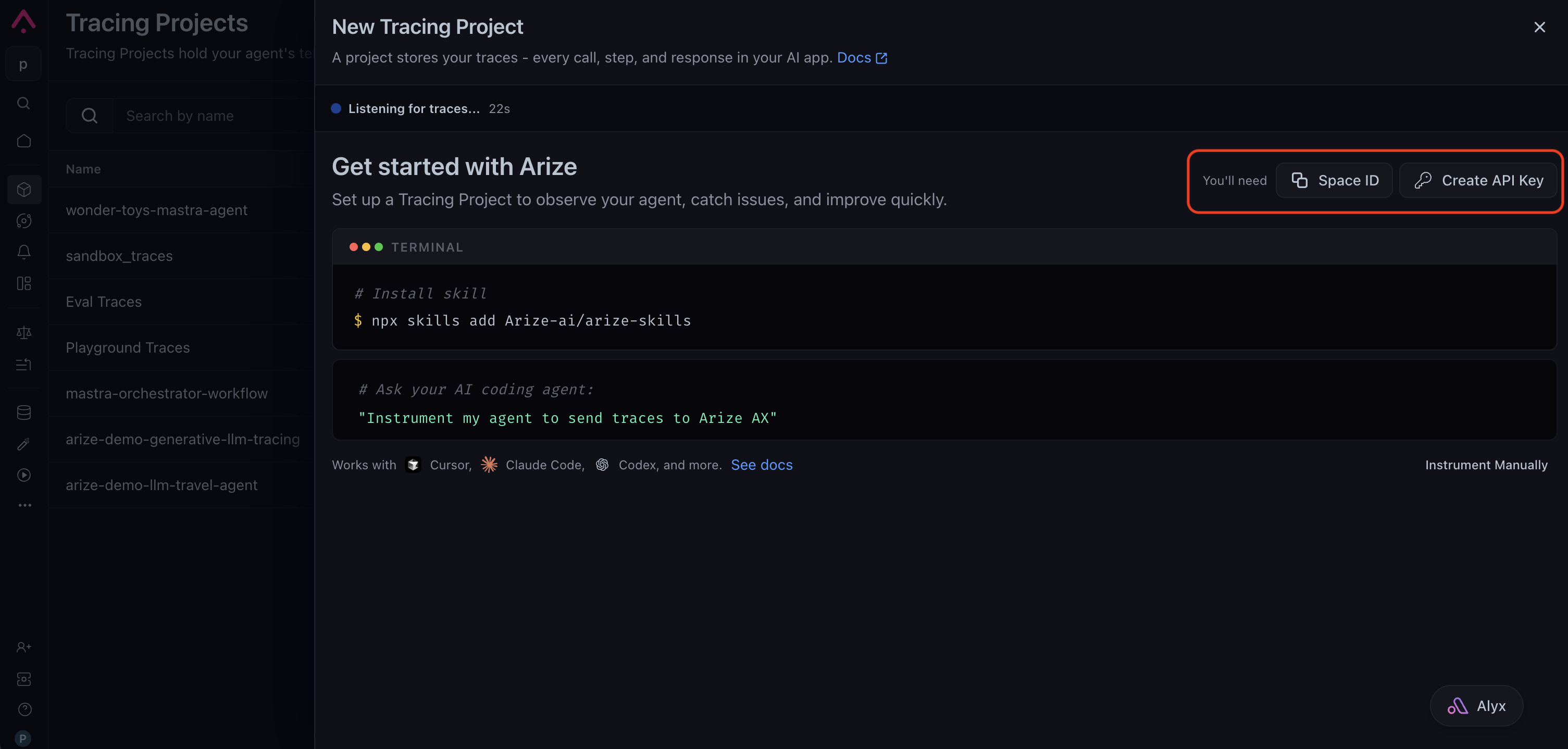
Sign in to your [Arize AX account](https://app.arize.com/) and create a tracing project from **Projects → New Tracing Project**. The setup page shows the credentials you need: copy your **Space ID**, then click **Create API Key** to generate a key and save it somewhere safe. You set them as `ARIZE_SPACE_ID` and `ARIZE_API_KEY` when you configure your environment below, and they route your traces to the correct space.
 You need **Python 3.10 or later** and an existing (or in-progress) agent built on the `anthropic` package.
Install the Anthropic instrumentor, the OpenInference helpers for manual spans, and the SDK you already use.
```bash theme={null}
pip install arize-otel \
openinference-instrumentation-anthropic \
openinference-instrumentation \
anthropic
```
Set your Arize AX and Anthropic credentials as environment variables. The tracing setup reads them at startup, so you keep secrets out of your source.
```bash theme={null}
export ARIZE_SPACE_ID=""
export ARIZE_API_KEY=""
export ARIZE_PROJECT_NAME="anthropic-sdk-agent"
export ANTHROPIC_API_KEY=""
```
`ARIZE_PROJECT_NAME` is the project your traces land in. Name it for the app so runs stay grouped where you expect them.
Set up tracing in a dedicated module so it runs once, before your agent uses the SDK. This registers a tracer provider with your Arize credentials and attaches the Anthropic instrumentor, which captures every `messages.create` call as an LLM span.
```python instrumentation.py theme={null}
import os
from arize.otel import register
from openinference.instrumentation.anthropic import AnthropicInstrumentor
# register() reads ARIZE_SPACE_ID and ARIZE_API_KEY from the environment
# when the arguments are omitted. Pass them explicitly if you prefer.
tracer_provider = register(
space_id=os.environ["ARIZE_SPACE_ID"],
api_key=os.environ["ARIZE_API_KEY"],
project_name=os.environ.get("ARIZE_PROJECT_NAME", "anthropic-sdk-agent"),
)
# Auto-instrument the Anthropic SDK: each messages.create call becomes an LLM span.
AnthropicInstrumentor().instrument(tracer_provider=tracer_provider)
```
Get a tracer from the same provider, then wrap the loop in an AGENT span and each tool execution in a TOOL span. The `messages.create` calls inside the AGENT span are auto-instrumented, so they nest underneath it as LLM spans automatically. The OpenInference attributes are set as string keys (`"openinference.span.kind"`, `"input.value"`).
```python theme={null}
import json
import anthropic
from opentelemetry import trace
from opentelemetry.trace import Status, StatusCode
import instrumentation # noqa: F401 - runs the tracing setup first
client = anthropic.Anthropic()
tracer = trace.get_tracer(__name__)
TOOLS = [
{
"name": "get_daily_calories",
"description": "Recommended daily calorie intake for an age and activity level.",
"input_schema": {
"type": "object",
"properties": {
"age": {"type": "integer"},
"activity_level": {
"type": "string",
"enum": ["low", "moderate", "high"],
},
},
"required": ["age", "activity_level"],
},
}
]
def run_tool(name: str, args: dict) -> str:
# Replace with your real tool implementation.
if name == "get_daily_calories":
base = {"low": 1800, "moderate": 2200, "high": 2600}[args["activity_level"]]
return json.dumps({"recommended_calories": base})
return json.dumps({"error": f"unknown tool {name}"})
def run_agent(user_input: str) -> str:
with tracer.start_as_current_span("nutrition-agent") as agent_span:
agent_span.set_attribute("openinference.span.kind", "AGENT")
agent_span.set_attribute("input.value", user_input)
messages = [{"role": "user", "content": user_input}]
while True:
# Auto-instrumented: each call appears as a child LLM span.
response = client.messages.create(
model="claude-opus-4-8",
max_tokens=1024,
tools=TOOLS,
messages=messages,
)
messages.append({"role": "assistant", "content": response.content})
if response.stop_reason != "tool_use":
break
tool_results = []
for block in response.content:
if block.type == "tool_use":
# Manual TOOL span for each tool execution.
with tracer.start_as_current_span(block.name) as tool_span:
tool_span.set_attribute("openinference.span.kind", "TOOL")
tool_span.set_attribute("tool.name", block.name)
tool_span.set_attribute("input.value", json.dumps(block.input))
result = run_tool(block.name, block.input)
tool_span.set_attribute("output.value", result)
tool_results.append(
{
"type": "tool_result",
"tool_use_id": block.id,
"content": result,
}
)
messages.append({"role": "user", "content": tool_results})
final_text = "".join(b.text for b in response.content if b.type == "text")
agent_span.set_attribute("output.value", final_text)
agent_span.set_status(Status(StatusCode.OK))
return final_text
print(run_agent("I'm 34 and moderately active. What's my daily calorie target?"))
# Short-lived script: flush batched spans before the process exits.
instrumentation.tracer_provider.force_flush()
```
To follow a multi-turn conversation as a single thread, tag its runs with a shared session ID that is stable for the conversation, such as the user or thread ID. Wrap the agent call in the `using_session()` context manager. Every span emitted inside, manual and auto, carries the same `session.id`.
```python theme={null}
from openinference.instrumentation import using_session
def handle_turn(session_id: str, user_input: str) -> str:
with using_session(session_id):
return run_agent(user_input)
```
Arize AX groups the tagged runs together, so you can replay a full conversation.
Open your Arize AX space and select the project you set in `ARIZE_PROJECT_NAME`. Within about 30 seconds of a run, a new trace appears with this shape:
* An **AGENT** root span (`nutrition-agent`) carrying the user input and final answer.
* One or more **LLM** child spans, one per `messages.create` call, with the prompt, response, model name, and token counts filled in automatically by the Anthropic instrumentor.
* A **TOOL** child span for each tool the agent ran, with the tool inputs and outputs.
Without the manual spans you would see only the LLM calls. The AGENT and TOOL spans are what turn a set of model calls into a readable agent trace.
If no traces appear, see [Troubleshooting](#troubleshooting).
You need **Node.js 18 or later** and an existing (or in-progress) agent built on the `@anthropic-ai/sdk` package.
Install the Anthropic instrumentor, the OpenInference helpers for manual spans, and the SDK you already use.
```bash theme={null}
npm install @anthropic-ai/sdk \
@arizeai/openinference-instrumentation-anthropic \
@arizeai/openinference-semantic-conventions \
@arizeai/openinference-core \
@opentelemetry/api \
@opentelemetry/sdk-trace-node \
@opentelemetry/exporter-trace-otlp-proto \
@opentelemetry/resources \
@opentelemetry/instrumentation
```
Set your Arize AX and Anthropic credentials as environment variables. The tracing setup reads them at startup, so you keep secrets out of your source.
```bash theme={null}
export ARIZE_SPACE_ID=""
export ARIZE_API_KEY=""
export ARIZE_PROJECT_NAME="anthropic-sdk-agent"
export ANTHROPIC_API_KEY=""
```
`ARIZE_PROJECT_NAME` is the project your traces land in. Name it for the app so runs stay grouped where you expect them.
Set up tracing in a dedicated module so it runs once, before your agent uses the SDK. This registers a tracer provider with your Arize credentials and attaches the Anthropic instrumentor, which captures every `messages.create` call as an LLM span.
```typescript instrumentation.ts theme={null}
import { NodeTracerProvider, SimpleSpanProcessor } from "@opentelemetry/sdk-trace-node";
import { resourceFromAttributes } from "@opentelemetry/resources";
import { OTLPTraceExporter } from "@opentelemetry/exporter-trace-otlp-proto";
import { registerInstrumentations } from "@opentelemetry/instrumentation";
import { AnthropicInstrumentation } from "@arizeai/openinference-instrumentation-anthropic";
import Anthropic from "@anthropic-ai/sdk";
const projectName = process.env.ARIZE_PROJECT_NAME ?? "anthropic-sdk-agent";
export const provider = new NodeTracerProvider({
resource: resourceFromAttributes({
"openinference.project.name": projectName,
}),
spanProcessors: [
new SimpleSpanProcessor(
new OTLPTraceExporter({
url: "https://otlp.arize.com/v1/traces",
headers: {
"arize-space-id": process.env.ARIZE_SPACE_ID ?? "",
"arize-api-key": process.env.ARIZE_API_KEY ?? "",
},
}),
),
],
});
provider.register();
const instrumentation = new AnthropicInstrumentation();
instrumentation.manuallyInstrument(Anthropic);
registerInstrumentations({ instrumentations: [instrumentation] });
```
Get a tracer from the same provider, then wrap the loop in an AGENT span and each tool execution in a TOOL span. The `messages.create` calls inside the AGENT span are auto-instrumented, so they nest underneath it as LLM spans automatically. The OpenInference attributes are set with the `SemanticConventions` constants.
```typescript theme={null}
import { provider } from "./instrumentation"; // runs the tracing setup first
import Anthropic from "@anthropic-ai/sdk";
import { trace, SpanStatusCode } from "@opentelemetry/api";
import {
SemanticConventions,
OpenInferenceSpanKind,
} from "@arizeai/openinference-semantic-conventions";
const client = new Anthropic();
const tracer = trace.getTracer("nutrition-agent");
const tools: Anthropic.Tool[] = [
{
name: "get_daily_calories",
description:
"Recommended daily calorie intake for an age and activity level.",
input_schema: {
type: "object",
properties: {
age: { type: "integer" },
activity_level: { type: "string", enum: ["low", "moderate", "high"] },
},
required: ["age", "activity_level"],
},
},
];
function runTool(name: string, args: any): string {
// Replace with your real tool implementation.
if (name === "get_daily_calories") {
const table: Record = {
low: 1800,
moderate: 2200,
high: 2600,
};
const base = table[args.activity_level];
return JSON.stringify({ recommended_calories: base });
}
return JSON.stringify({ error: `unknown tool ${name}` });
}
async function runAgent(userInput: string): Promise {
return tracer.startActiveSpan("nutrition-agent", async (agentSpan) => {
agentSpan.setAttribute(
SemanticConventions.OPENINFERENCE_SPAN_KIND,
OpenInferenceSpanKind.AGENT,
);
agentSpan.setAttribute(SemanticConventions.INPUT_VALUE, userInput);
const messages: Anthropic.MessageParam[] = [
{ role: "user", content: userInput },
];
let response: Anthropic.Message;
while (true) {
// Auto-instrumented: each call appears as a child LLM span.
response = await client.messages.create({
model: "claude-opus-4-8",
max_tokens: 1024,
tools,
messages,
});
messages.push({ role: "assistant", content: response.content });
if (response.stop_reason !== "tool_use") break;
const toolResults: Anthropic.ToolResultBlockParam[] = [];
for (const block of response.content) {
if (block.type === "tool_use") {
// Manual TOOL span for each tool execution.
await tracer.startActiveSpan(block.name, async (toolSpan) => {
toolSpan.setAttribute(
SemanticConventions.OPENINFERENCE_SPAN_KIND,
OpenInferenceSpanKind.TOOL,
);
toolSpan.setAttribute(SemanticConventions.TOOL_NAME, block.name);
toolSpan.setAttribute(
SemanticConventions.INPUT_VALUE,
JSON.stringify(block.input),
);
const result = runTool(block.name, block.input);
toolSpan.setAttribute(SemanticConventions.OUTPUT_VALUE, result);
toolSpan.end();
toolResults.push({
type: "tool_result",
tool_use_id: block.id,
content: result,
});
});
}
}
messages.push({ role: "user", content: toolResults });
}
const finalText = response.content
.filter((b): b is Anthropic.TextBlock => b.type === "text")
.map((b) => b.text)
.join("");
agentSpan.setAttribute(SemanticConventions.OUTPUT_VALUE, finalText);
agentSpan.setStatus({ code: SpanStatusCode.OK });
agentSpan.end();
return finalText;
});
}
runAgent(
"I'm 34 and moderately active. What's my daily calorie target?",
).then(async (answer) => {
console.log(answer);
// Short-lived script: wait for pending span exports to finish before exit.
await provider.forceFlush();
});
```
To follow a multi-turn conversation as a single thread, tag its runs with a shared session ID that is stable for the conversation, such as the user or thread ID. Set the session on the active context with `setSession`, then run the agent inside `context.with`.
```typescript theme={null}
import { context } from "@opentelemetry/api";
import { setSession } from "@arizeai/openinference-core";
async function handleTurn(sessionId: string, userInput: string): Promise {
return context.with(setSession(context.active(), { sessionId }), () =>
runAgent(userInput),
);
}
```
Arize AX groups the tagged runs together, so you can replay a full conversation.
Open your Arize AX space and select the project you set in `ARIZE_PROJECT_NAME`. Within about 30 seconds of a run, a new trace appears with this shape:
* An **AGENT** root span (`nutrition-agent`) carrying the user input and final answer.
* One or more **LLM** child spans, one per `messages.create` call, with the prompt, response, model name, and token counts filled in automatically by the Anthropic instrumentor.
* A **TOOL** child span for each tool the agent ran, with the tool inputs and outputs.
Without the manual spans you would see only the LLM calls. The AGENT and TOOL spans are what turn a set of model calls into a readable agent trace.
If no traces appear, see [Troubleshooting](#troubleshooting).
## What gets captured
The two layers combine into one trace:
* **LLM spans (automatic).** The Anthropic instrumentor records each `messages.create` call: prompt, response, the `tool_use` blocks Claude emits, the model name, and token usage.
* **AGENT and TOOL spans (manual).** Your spans record the loop as a whole and each tool execution, so the trace shows what the agent decided to do and what each tool returned, not just the raw model calls.
* **Session grouping.** The `session.id` you set threads related runs into one conversation.
Because the manual and auto spans share the same tracer provider, the LLM spans nest under your AGENT span automatically as long as the `messages.create` calls run inside it.
## Troubleshooting
* **No traces in Arize AX.** Confirm `ARIZE_SPACE_ID` and `ARIZE_API_KEY` are set in the same shell that runs your app. Enable OpenTelemetry debug logs with `export OTEL_LOG_LEVEL=debug` and rerun.
* **LLM spans missing.** `AnthropicInstrumentor().instrument(...)` must run before the first `messages.create` call. Import the tracing module first.
* **LLM spans not nested under the agent span.** The `messages.create` call must run inside the active AGENT span. Keep it inside the `with tracer.start_as_current_span(...)` block.
* **`401` or `404` from Anthropic.** Verify `ANTHROPIC_API_KEY` is set and valid, and that your key has access to the model in the example. Swap `claude-opus-4-8` for a model your key can call.
* **A short-lived script exports nothing.** Spans are batched by default, so a script that exits right after the run can quit before they flush. Call `tracer_provider.force_flush()` before the process exits. Long-running apps and servers flush on their own.
* **`wrap_function_wrapper() got an unexpected keyword argument 'module'`.** A `wrapt` 2.x release changed that function's signature, which older instrumentor pins do not yet account for. Pin `wrapt` below 2 until the pins catch up: `pip install "wrapt<2"`.
* **No traces in Arize AX.** Confirm `ARIZE_SPACE_ID` and `ARIZE_API_KEY` are set in the same shell that runs your app. Enable OpenTelemetry debug logs with `export OTEL_LOG_LEVEL=debug` and rerun.
* **LLM spans missing.** `AnthropicInstrumentation().manuallyInstrument(Anthropic)` must run before the first `messages.create` call. Import the tracing module first.
* **LLM spans not nested under the agent span.** The `messages.create` call must run inside the active AGENT span. Keep it inside the `startActiveSpan` callback.
* **`401` or `404` from Anthropic.** Verify `ANTHROPIC_API_KEY` is set and valid, and that your key has access to the model in the example. Swap `claude-opus-4-8` for a model your key can call.
* **A short-lived script exports nothing.** A script that exits right after the run can quit before its spans finish exporting. Call `await provider.forceFlush()` before the process exits. Long-running apps and servers flush on their own.
* **Wrong headers.** The HTTP OTLP endpoint expects `arize-space-id` and `arize-api-key`. Using the gRPC-style `space_id` / `api_key` names fails silently with no spans.
## Next steps
The general pattern for mixing auto LLM spans with manual spans.
Render the agent's execution as an interactive graph.
Group multi-turn runs into conversations with session and user IDs.
The reference page for the Anthropic instrumentor across Python, TypeScript, and Go.
You need **Python 3.10 or later** and an existing (or in-progress) agent built on the `anthropic` package.
Install the Anthropic instrumentor, the OpenInference helpers for manual spans, and the SDK you already use.
```bash theme={null}
pip install arize-otel \
openinference-instrumentation-anthropic \
openinference-instrumentation \
anthropic
```
Set your Arize AX and Anthropic credentials as environment variables. The tracing setup reads them at startup, so you keep secrets out of your source.
```bash theme={null}
export ARIZE_SPACE_ID=""
export ARIZE_API_KEY=""
export ARIZE_PROJECT_NAME="anthropic-sdk-agent"
export ANTHROPIC_API_KEY=""
```
`ARIZE_PROJECT_NAME` is the project your traces land in. Name it for the app so runs stay grouped where you expect them.
Set up tracing in a dedicated module so it runs once, before your agent uses the SDK. This registers a tracer provider with your Arize credentials and attaches the Anthropic instrumentor, which captures every `messages.create` call as an LLM span.
```python instrumentation.py theme={null}
import os
from arize.otel import register
from openinference.instrumentation.anthropic import AnthropicInstrumentor
# register() reads ARIZE_SPACE_ID and ARIZE_API_KEY from the environment
# when the arguments are omitted. Pass them explicitly if you prefer.
tracer_provider = register(
space_id=os.environ["ARIZE_SPACE_ID"],
api_key=os.environ["ARIZE_API_KEY"],
project_name=os.environ.get("ARIZE_PROJECT_NAME", "anthropic-sdk-agent"),
)
# Auto-instrument the Anthropic SDK: each messages.create call becomes an LLM span.
AnthropicInstrumentor().instrument(tracer_provider=tracer_provider)
```
Get a tracer from the same provider, then wrap the loop in an AGENT span and each tool execution in a TOOL span. The `messages.create` calls inside the AGENT span are auto-instrumented, so they nest underneath it as LLM spans automatically. The OpenInference attributes are set as string keys (`"openinference.span.kind"`, `"input.value"`).
```python theme={null}
import json
import anthropic
from opentelemetry import trace
from opentelemetry.trace import Status, StatusCode
import instrumentation # noqa: F401 - runs the tracing setup first
client = anthropic.Anthropic()
tracer = trace.get_tracer(__name__)
TOOLS = [
{
"name": "get_daily_calories",
"description": "Recommended daily calorie intake for an age and activity level.",
"input_schema": {
"type": "object",
"properties": {
"age": {"type": "integer"},
"activity_level": {
"type": "string",
"enum": ["low", "moderate", "high"],
},
},
"required": ["age", "activity_level"],
},
}
]
def run_tool(name: str, args: dict) -> str:
# Replace with your real tool implementation.
if name == "get_daily_calories":
base = {"low": 1800, "moderate": 2200, "high": 2600}[args["activity_level"]]
return json.dumps({"recommended_calories": base})
return json.dumps({"error": f"unknown tool {name}"})
def run_agent(user_input: str) -> str:
with tracer.start_as_current_span("nutrition-agent") as agent_span:
agent_span.set_attribute("openinference.span.kind", "AGENT")
agent_span.set_attribute("input.value", user_input)
messages = [{"role": "user", "content": user_input}]
while True:
# Auto-instrumented: each call appears as a child LLM span.
response = client.messages.create(
model="claude-opus-4-8",
max_tokens=1024,
tools=TOOLS,
messages=messages,
)
messages.append({"role": "assistant", "content": response.content})
if response.stop_reason != "tool_use":
break
tool_results = []
for block in response.content:
if block.type == "tool_use":
# Manual TOOL span for each tool execution.
with tracer.start_as_current_span(block.name) as tool_span:
tool_span.set_attribute("openinference.span.kind", "TOOL")
tool_span.set_attribute("tool.name", block.name)
tool_span.set_attribute("input.value", json.dumps(block.input))
result = run_tool(block.name, block.input)
tool_span.set_attribute("output.value", result)
tool_results.append(
{
"type": "tool_result",
"tool_use_id": block.id,
"content": result,
}
)
messages.append({"role": "user", "content": tool_results})
final_text = "".join(b.text for b in response.content if b.type == "text")
agent_span.set_attribute("output.value", final_text)
agent_span.set_status(Status(StatusCode.OK))
return final_text
print(run_agent("I'm 34 and moderately active. What's my daily calorie target?"))
# Short-lived script: flush batched spans before the process exits.
instrumentation.tracer_provider.force_flush()
```
To follow a multi-turn conversation as a single thread, tag its runs with a shared session ID that is stable for the conversation, such as the user or thread ID. Wrap the agent call in the `using_session()` context manager. Every span emitted inside, manual and auto, carries the same `session.id`.
```python theme={null}
from openinference.instrumentation import using_session
def handle_turn(session_id: str, user_input: str) -> str:
with using_session(session_id):
return run_agent(user_input)
```
Arize AX groups the tagged runs together, so you can replay a full conversation.
Open your Arize AX space and select the project you set in `ARIZE_PROJECT_NAME`. Within about 30 seconds of a run, a new trace appears with this shape:
* An **AGENT** root span (`nutrition-agent`) carrying the user input and final answer.
* One or more **LLM** child spans, one per `messages.create` call, with the prompt, response, model name, and token counts filled in automatically by the Anthropic instrumentor.
* A **TOOL** child span for each tool the agent ran, with the tool inputs and outputs.
Without the manual spans you would see only the LLM calls. The AGENT and TOOL spans are what turn a set of model calls into a readable agent trace.
If no traces appear, see [Troubleshooting](#troubleshooting).
You need **Node.js 18 or later** and an existing (or in-progress) agent built on the `@anthropic-ai/sdk` package.
Install the Anthropic instrumentor, the OpenInference helpers for manual spans, and the SDK you already use.
```bash theme={null}
npm install @anthropic-ai/sdk \
@arizeai/openinference-instrumentation-anthropic \
@arizeai/openinference-semantic-conventions \
@arizeai/openinference-core \
@opentelemetry/api \
@opentelemetry/sdk-trace-node \
@opentelemetry/exporter-trace-otlp-proto \
@opentelemetry/resources \
@opentelemetry/instrumentation
```
Set your Arize AX and Anthropic credentials as environment variables. The tracing setup reads them at startup, so you keep secrets out of your source.
```bash theme={null}
export ARIZE_SPACE_ID=""
export ARIZE_API_KEY=""
export ARIZE_PROJECT_NAME="anthropic-sdk-agent"
export ANTHROPIC_API_KEY=""
```
`ARIZE_PROJECT_NAME` is the project your traces land in. Name it for the app so runs stay grouped where you expect them.
Set up tracing in a dedicated module so it runs once, before your agent uses the SDK. This registers a tracer provider with your Arize credentials and attaches the Anthropic instrumentor, which captures every `messages.create` call as an LLM span.
```typescript instrumentation.ts theme={null}
import { NodeTracerProvider, SimpleSpanProcessor } from "@opentelemetry/sdk-trace-node";
import { resourceFromAttributes } from "@opentelemetry/resources";
import { OTLPTraceExporter } from "@opentelemetry/exporter-trace-otlp-proto";
import { registerInstrumentations } from "@opentelemetry/instrumentation";
import { AnthropicInstrumentation } from "@arizeai/openinference-instrumentation-anthropic";
import Anthropic from "@anthropic-ai/sdk";
const projectName = process.env.ARIZE_PROJECT_NAME ?? "anthropic-sdk-agent";
export const provider = new NodeTracerProvider({
resource: resourceFromAttributes({
"openinference.project.name": projectName,
}),
spanProcessors: [
new SimpleSpanProcessor(
new OTLPTraceExporter({
url: "https://otlp.arize.com/v1/traces",
headers: {
"arize-space-id": process.env.ARIZE_SPACE_ID ?? "",
"arize-api-key": process.env.ARIZE_API_KEY ?? "",
},
}),
),
],
});
provider.register();
const instrumentation = new AnthropicInstrumentation();
instrumentation.manuallyInstrument(Anthropic);
registerInstrumentations({ instrumentations: [instrumentation] });
```
Get a tracer from the same provider, then wrap the loop in an AGENT span and each tool execution in a TOOL span. The `messages.create` calls inside the AGENT span are auto-instrumented, so they nest underneath it as LLM spans automatically. The OpenInference attributes are set with the `SemanticConventions` constants.
```typescript theme={null}
import { provider } from "./instrumentation"; // runs the tracing setup first
import Anthropic from "@anthropic-ai/sdk";
import { trace, SpanStatusCode } from "@opentelemetry/api";
import {
SemanticConventions,
OpenInferenceSpanKind,
} from "@arizeai/openinference-semantic-conventions";
const client = new Anthropic();
const tracer = trace.getTracer("nutrition-agent");
const tools: Anthropic.Tool[] = [
{
name: "get_daily_calories",
description:
"Recommended daily calorie intake for an age and activity level.",
input_schema: {
type: "object",
properties: {
age: { type: "integer" },
activity_level: { type: "string", enum: ["low", "moderate", "high"] },
},
required: ["age", "activity_level"],
},
},
];
function runTool(name: string, args: any): string {
// Replace with your real tool implementation.
if (name === "get_daily_calories") {
const table: Record = {
low: 1800,
moderate: 2200,
high: 2600,
};
const base = table[args.activity_level];
return JSON.stringify({ recommended_calories: base });
}
return JSON.stringify({ error: `unknown tool ${name}` });
}
async function runAgent(userInput: string): Promise {
return tracer.startActiveSpan("nutrition-agent", async (agentSpan) => {
agentSpan.setAttribute(
SemanticConventions.OPENINFERENCE_SPAN_KIND,
OpenInferenceSpanKind.AGENT,
);
agentSpan.setAttribute(SemanticConventions.INPUT_VALUE, userInput);
const messages: Anthropic.MessageParam[] = [
{ role: "user", content: userInput },
];
let response: Anthropic.Message;
while (true) {
// Auto-instrumented: each call appears as a child LLM span.
response = await client.messages.create({
model: "claude-opus-4-8",
max_tokens: 1024,
tools,
messages,
});
messages.push({ role: "assistant", content: response.content });
if (response.stop_reason !== "tool_use") break;
const toolResults: Anthropic.ToolResultBlockParam[] = [];
for (const block of response.content) {
if (block.type === "tool_use") {
// Manual TOOL span for each tool execution.
await tracer.startActiveSpan(block.name, async (toolSpan) => {
toolSpan.setAttribute(
SemanticConventions.OPENINFERENCE_SPAN_KIND,
OpenInferenceSpanKind.TOOL,
);
toolSpan.setAttribute(SemanticConventions.TOOL_NAME, block.name);
toolSpan.setAttribute(
SemanticConventions.INPUT_VALUE,
JSON.stringify(block.input),
);
const result = runTool(block.name, block.input);
toolSpan.setAttribute(SemanticConventions.OUTPUT_VALUE, result);
toolSpan.end();
toolResults.push({
type: "tool_result",
tool_use_id: block.id,
content: result,
});
});
}
}
messages.push({ role: "user", content: toolResults });
}
const finalText = response.content
.filter((b): b is Anthropic.TextBlock => b.type === "text")
.map((b) => b.text)
.join("");
agentSpan.setAttribute(SemanticConventions.OUTPUT_VALUE, finalText);
agentSpan.setStatus({ code: SpanStatusCode.OK });
agentSpan.end();
return finalText;
});
}
runAgent(
"I'm 34 and moderately active. What's my daily calorie target?",
).then(async (answer) => {
console.log(answer);
// Short-lived script: wait for pending span exports to finish before exit.
await provider.forceFlush();
});
```
To follow a multi-turn conversation as a single thread, tag its runs with a shared session ID that is stable for the conversation, such as the user or thread ID. Set the session on the active context with `setSession`, then run the agent inside `context.with`.
```typescript theme={null}
import { context } from "@opentelemetry/api";
import { setSession } from "@arizeai/openinference-core";
async function handleTurn(sessionId: string, userInput: string): Promise {
return context.with(setSession(context.active(), { sessionId }), () =>
runAgent(userInput),
);
}
```
Arize AX groups the tagged runs together, so you can replay a full conversation.
Open your Arize AX space and select the project you set in `ARIZE_PROJECT_NAME`. Within about 30 seconds of a run, a new trace appears with this shape:
* An **AGENT** root span (`nutrition-agent`) carrying the user input and final answer.
* One or more **LLM** child spans, one per `messages.create` call, with the prompt, response, model name, and token counts filled in automatically by the Anthropic instrumentor.
* A **TOOL** child span for each tool the agent ran, with the tool inputs and outputs.
Without the manual spans you would see only the LLM calls. The AGENT and TOOL spans are what turn a set of model calls into a readable agent trace.
If no traces appear, see [Troubleshooting](#troubleshooting).
## What gets captured
The two layers combine into one trace:
* **LLM spans (automatic).** The Anthropic instrumentor records each `messages.create` call: prompt, response, the `tool_use` blocks Claude emits, the model name, and token usage.
* **AGENT and TOOL spans (manual).** Your spans record the loop as a whole and each tool execution, so the trace shows what the agent decided to do and what each tool returned, not just the raw model calls.
* **Session grouping.** The `session.id` you set threads related runs into one conversation.
Because the manual and auto spans share the same tracer provider, the LLM spans nest under your AGENT span automatically as long as the `messages.create` calls run inside it.
## Troubleshooting
* **No traces in Arize AX.** Confirm `ARIZE_SPACE_ID` and `ARIZE_API_KEY` are set in the same shell that runs your app. Enable OpenTelemetry debug logs with `export OTEL_LOG_LEVEL=debug` and rerun.
* **LLM spans missing.** `AnthropicInstrumentor().instrument(...)` must run before the first `messages.create` call. Import the tracing module first.
* **LLM spans not nested under the agent span.** The `messages.create` call must run inside the active AGENT span. Keep it inside the `with tracer.start_as_current_span(...)` block.
* **`401` or `404` from Anthropic.** Verify `ANTHROPIC_API_KEY` is set and valid, and that your key has access to the model in the example. Swap `claude-opus-4-8` for a model your key can call.
* **A short-lived script exports nothing.** Spans are batched by default, so a script that exits right after the run can quit before they flush. Call `tracer_provider.force_flush()` before the process exits. Long-running apps and servers flush on their own.
* **`wrap_function_wrapper() got an unexpected keyword argument 'module'`.** A `wrapt` 2.x release changed that function's signature, which older instrumentor pins do not yet account for. Pin `wrapt` below 2 until the pins catch up: `pip install "wrapt<2"`.
* **No traces in Arize AX.** Confirm `ARIZE_SPACE_ID` and `ARIZE_API_KEY` are set in the same shell that runs your app. Enable OpenTelemetry debug logs with `export OTEL_LOG_LEVEL=debug` and rerun.
* **LLM spans missing.** `AnthropicInstrumentation().manuallyInstrument(Anthropic)` must run before the first `messages.create` call. Import the tracing module first.
* **LLM spans not nested under the agent span.** The `messages.create` call must run inside the active AGENT span. Keep it inside the `startActiveSpan` callback.
* **`401` or `404` from Anthropic.** Verify `ANTHROPIC_API_KEY` is set and valid, and that your key has access to the model in the example. Swap `claude-opus-4-8` for a model your key can call.
* **A short-lived script exports nothing.** A script that exits right after the run can quit before its spans finish exporting. Call `await provider.forceFlush()` before the process exits. Long-running apps and servers flush on their own.
* **Wrong headers.** The HTTP OTLP endpoint expects `arize-space-id` and `arize-api-key`. Using the gRPC-style `space_id` / `api_key` names fails silently with no spans.
## Next steps
The general pattern for mixing auto LLM spans with manual spans.
Render the agent's execution as an interactive graph.
Group multi-turn runs into conversations with session and user IDs.
The reference page for the Anthropic instrumentor across Python, TypeScript, and Go.