> ## Documentation Index
> Fetch the complete documentation index at: https://arize-ax.mintlify.site/docs/llms.txt
> Use this file to discover all available pages before exploring further.
# Instrument Mastra agents
> Trace Mastra agents, tools, and workflows in Arize AX with the official @mastra/arize exporter, in a TypeScript walkthrough.
[Mastra](https://mastra.ai/) is an open-source TypeScript framework for building AI-powered applications and agents. Learn how to instrument Mastra agents to capture every agent run, tool call, and workflow so you can observe, evaluate, and improve quality. This guide wires the official [`@mastra/arize`](https://mastra.ai/docs/observability/tracing/exporters/arize) exporter into a Mastra app to send traces to Arize AX.
## Overview
You will configure the Arize AX exporter on a Mastra app, run an agent workflow, and read the resulting traces in Arize AX. The exporter setup applies to any Mastra app, whether you run it with `mastra dev`, inside a web framework such as Next.js, or as a script.
This guide assumes familiarity with:
* TypeScript, including `async`/`await`
* The Mastra building blocks: `Agent`, tools created with `createTool`, and workflows built with `createWorkflow`
* Environment variables and package installation with `npm`
By the end of this guide, you will be able to:
* Register the `@mastra/arize` exporter so Mastra emits traces to Arize AX
* Capture agent runs and tool calls as traces with no changes to your agent logic
* Capture workflow runs and their steps as their own trace tree
* Verify and read the traces in Arize AX
* Wire the exporter into a production Next.js deployment
## Before you start
You need:
* An existing agent built with Mastra
* **Node.js 22.13 or later** (required by the current `@mastra/*` packages)
* An Arize AX account ([sign up](https://arize.com/sign-up/))
* An `ANTHROPIC_API_KEY`, or a key for any other provider [supported by Mastra](https://mastra.ai/docs/getting-started/model-providers).
### Get your Arize AX credentials
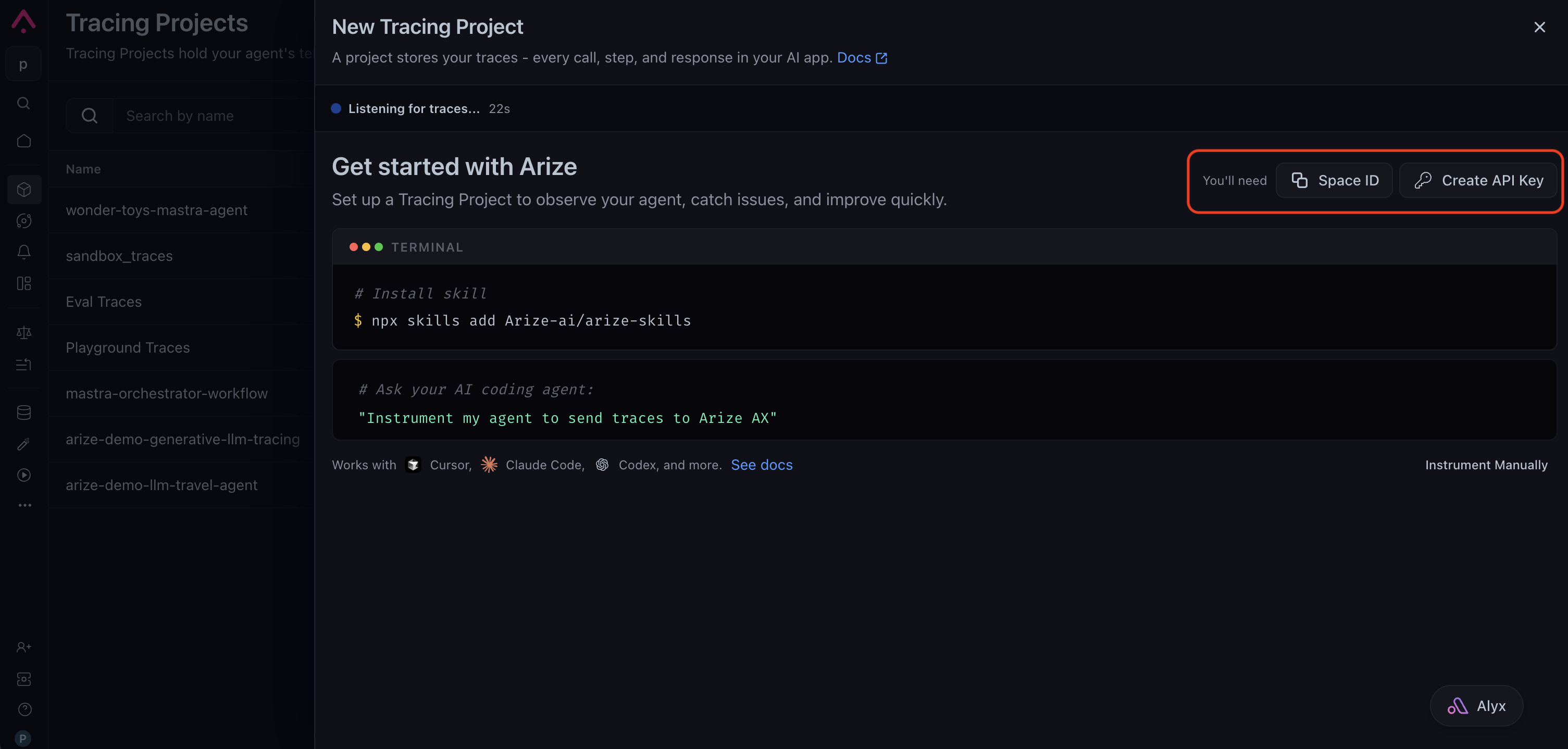
Sign in to your [Arize AX account](https://app.arize.com/) and create a tracing project from **Projects → New Tracing Project**. The setup page shows the credentials you need: copy your **Space ID**, then click **Create API Key** to generate a key and save it somewhere safe. You set them as `ARIZE_SPACE_ID` and `ARIZE_API_KEY` below, and they route your traces to the correct space.
 The steps below instrument a small example agent, a health coach with a single nutrition-lookup tool, so the trace shows the AGENT → LLM → TOOL shape end to end. Register the `@mastra/arize` exporter once on your `Mastra` instance and from there, every agent, tool, and workflow on that instance is traced automatically, with no manual spans and no changes to your agent logic.
Install the Arize AX exporter and Mastra's observability package alongside `@mastra/core`. Add a model provider (`@ai-sdk/anthropic` here) and `zod` if your app does not already have them. The `mastra` dev CLI, added as a dev dependency, runs the local server you use to trigger agents below; a project created with `npm create mastra@latest` already has it.
```bash theme={null}
npm install @mastra/arize @mastra/observability @mastra/core \
@ai-sdk/anthropic ai zod
npm install --save-dev mastra tsx
```
The `@mastra/arize` package builds on OpenInference and OpenTelemetry semantic conventions, so the traces it emits carry standardized agent, LLM, tool, and workflow attributes that Arize AX reads directly.
Set your Arize AX and model-provider credentials as environment variables. The exporter reads them at startup, so you keep secrets out of your source.
```bash theme={null}
export ARIZE_SPACE_ID=""
export ARIZE_API_KEY=""
export ARIZE_PROJECT_NAME="mastra-health-coach"
export ANTHROPIC_API_KEY=""
```
`ARIZE_PROJECT_NAME` is the project your traces land in. Name it for the app so runs stay grouped where you expect them.
Configure `observability` on your `Mastra` instance, typically in `src/mastra/index.ts`. Passing an `Observability` instance with an `ArizeExporter` registers the OpenTelemetry SDK and the exporter when the `Mastra` constructor runs, so any entry point that imports this `mastra` value emits spans to Arize AX.
```typescript src/mastra/index.ts theme={null}
import { Mastra } from "@mastra/core";
import { Observability } from "@mastra/observability";
import { ArizeExporter } from "@mastra/arize";
import { coachAgent } from "./agents/coach-agent";
import { dailyPlanWorkflow } from "./workflows/daily-plan";
export const mastra = new Mastra({
agents: { coachAgent },
workflows: { dailyPlanWorkflow },
observability: new Observability({
configs: {
arize: {
serviceName: process.env.ARIZE_PROJECT_NAME ?? "mastra-health-coach",
exporters: [new ArizeExporter()],
},
},
}),
});
```
With no arguments, `ArizeExporter` reads `ARIZE_SPACE_ID`, `ARIZE_API_KEY`, and `ARIZE_PROJECT_NAME` from the environment. The presence of `spaceId` is what routes traces to Arize AX. To pass the values explicitly instead, hand them to the constructor:
```typescript theme={null}
new ArizeExporter({
spaceId: process.env.ARIZE_SPACE_ID,
apiKey: process.env.ARIZE_API_KEY,
projectName: process.env.ARIZE_PROJECT_NAME,
})
```
You do not add anything to your agent or its tools to trace them. The `ArizeExporter` you configured in the previous step captures any agent registered on the `Mastra` instance, so if you already have an agent, it is covered and you can skip ahead to running it. The example below shows how the pieces connect, so you can map it to your own app.
`get-nutrition` returns calories and protein for a food from a static lookup table:
```typescript src/mastra/tools/get-nutrition.ts theme={null}
import { createTool } from "@mastra/core/tools";
import { z } from "zod";
const NUTRITION: Record = {
oatmeal: { calories: 150, proteinG: 5 },
banana: { calories: 105, proteinG: 1 },
"greek yogurt": { calories: 100, proteinG: 17 },
salmon: { calories: 208, proteinG: 20 },
};
export const getNutrition = createTool({
id: "get-nutrition",
description: "Look up calories and grams of protein for a single food item.",
inputSchema: z.object({
food: z.string().describe("The food name, e.g. 'oatmeal' or 'salmon'"),
}),
outputSchema: z.object({
food: z.string(),
calories: z.number(),
proteinG: z.number(),
found: z.boolean(),
}),
execute: async (inputData) => {
const entry = NUTRITION[inputData.food.trim().toLowerCase()];
if (!entry) {
return { food: inputData.food, calories: 0, proteinG: 0, found: false };
}
return { food: inputData.food, ...entry, found: true };
},
});
```
The tool is passed to an agent, and the agent is registered on the instrumented `Mastra` instance. That chain is the entire setup:
```typescript src/mastra/agents/coach-agent.ts theme={null}
import { Agent } from "@mastra/core/agent";
import { anthropic } from "@ai-sdk/anthropic";
import { getNutrition } from "../tools/get-nutrition";
export const coachAgent = new Agent({
id: "coachAgent",
name: "Health Coach",
instructions: `You are a friendly, practical health coach. When the user mentions a food, call get-nutrition to look up its calories and protein before commenting on it. Keep replies short, and never invent nutrition numbers; use the tool result.`,
model: anthropic("claude-sonnet-4-6"),
tools: { getNutrition },
});
```
When this agent runs, the exporter turns it into a trace: the run becomes an AGENT span, the `get-nutrition` call becomes a child TOOL span with its input and output, and the model calls appear as LLM spans in between.
Workflows trace the same way. The example below is a two-step workflow built with `createWorkflow` and `createStep`. Registering it on the instrumented `Mastra` instance is all it takes:
```typescript src/mastra/workflows/daily-plan.ts theme={null}
import { createWorkflow, createStep } from "@mastra/core/workflows";
import { z } from "zod";
// Step 1: turn a goal into a daily calorie target.
const setTarget = createStep({
id: "set-target",
inputSchema: z.object({ goal: z.enum(["lose", "maintain", "gain"]) }),
outputSchema: z.object({ calorieTarget: z.number() }),
execute: async ({ inputData }) => {
const targets = { lose: 1800, maintain: 2200, gain: 2600 };
return { calorieTarget: targets[inputData.goal] };
},
});
// Step 2: turn the target into a short plan.
const writePlan = createStep({
id: "write-plan",
inputSchema: z.object({ calorieTarget: z.number() }),
outputSchema: z.object({ plan: z.string() }),
execute: async ({ inputData }) => ({
plan: `Aim for about ${inputData.calorieTarget} kcal today, split across three meals.`,
}),
});
export const dailyPlanWorkflow = createWorkflow({
id: "dailyPlanWorkflow",
inputSchema: z.object({ goal: z.enum(["lose", "maintain", "gain"]) }),
outputSchema: z.object({ plan: z.string() }),
})
.then(setTarget)
.then(writePlan)
.commit();
```
When this workflow runs, it produces its own trace: an `invoke_workflow` root span wrapping one span per step, each carrying the step's input and output. A workflow in your own app traces the same way once it is registered.
Start the Mastra dev server. It bundles your code, registers the exporter, and serves the Studio web UI locally.
```bash theme={null}
npx mastra dev
```
Open Studio, select your agent or workflow, and send it a message. Each run exports to Arize AX. Because the dev server stays alive, it flushes spans on its own, so there is nothing extra to wait for.
Open your Arize AX space and select the project you set in `ARIZE_PROJECT_NAME`. Within about 30 seconds of a run, new traces appear:
* The agent run shows an `invoke_agent` root span (AGENT) carrying the prompt, the final reply, the model name, and token counts. Each tool call appears as an `execute_tool` child span (TOOL) with its arguments and result, and the underlying model calls appear as LLM spans.
* The workflow run shows an `invoke_workflow` root span wrapping one child span per step, each carrying the step's input and output.
If no traces appear, see [Troubleshooting](#troubleshooting).
## What gets captured
The `@mastra/arize` exporter records the shape of each run using OpenTelemetry and OpenInference semantic conventions:
* **Agent spans.** One `invoke_agent` root span per agent run, carrying the input messages, the final output, the model name, and token counts.
* **Tool spans.** One `execute_tool` child span per tool invocation, with the tool name, arguments, and result, so you can see what the agent decided to do and what each tool returned.
* **LLM spans.** The model generations behind each run, with prompt, response, model name, and token usage attached.
* **Workflow spans.** One `invoke_workflow` root span per workflow run, wrapping a child span for each step with the step's input and output.
Arize AX reads these attributes to classify each span by kind (AGENT, LLM, TOOL) and to populate the token and latency views without any extra configuration on your side. Cost is derived once Arize AX recognizes the model's pricing.
## Trace tool usage
Because Mastra owns the agent loop, the exporter traces both the model's decision to call a tool and your app actually running it. Every tool you register with an agent, or invoke from a workflow step, produces an `execute_tool` span (TOOL) nested under the run, carrying the tool name, the arguments the model passed, and the value the tool returned. You get this with no manual instrumentation.
To trace work that sits outside Mastra, such as a database query or an HTTP call inside a tool's `execute` function, add your own spans with the [OpenTelemetry API](/docs/ax/instrument/manual-instrumentation). They nest under the active Mastra span automatically. See [Combine auto and manual instrumentation](/docs/ax/instrument/combining-auto-and-manual) for more information.
## Run programmatically
For CI, tests, batch jobs, or any code without the dev server, import the configured `mastra` value and call an agent or workflow directly. The import triggers exporter registration, so runs are traced exactly as they are under `mastra dev`.
```typescript run-agent.ts theme={null}
import { mastra } from "./src/mastra/index";
async function main() {
const agent = mastra.getAgent("coachAgent");
const result = await agent.generate([
{ role: "user", content: "What should I eat before a run?" },
]);
console.log(result.text);
// Spans are batched before export. In a short-lived process, wait for the
// batch to drain before exiting so the wrapping agent span is not lost.
await new Promise((r) => setTimeout(r, 8000));
}
main();
```
Run it with `npx tsx run-agent.ts`. Workflows run the same way, through `mastra.getWorkflow("dailyPlanWorkflow").createRun()` and `run.start({ inputData })`. A long-running server flushes on its own; only short-lived processes need the wait above.
## Run in production
In a deployed app, the same import-time registration applies: import your configured `mastra` value wherever you invoke agents, and the exporter starts on the first import. One adjustment matters for Next.js.
For **Next.js**, the observability packages rely on native OpenTelemetry modules that must not be bundled by the server compiler. Add them to `serverExternalPackages` in `next.config.ts`, and import `mastra` from your route handlers as usual.
```typescript next.config.ts theme={null}
import type { NextConfig } from "next";
const nextConfig: NextConfig = {
serverExternalPackages: ["@mastra/core", "@mastra/observability", "@mastra/arize"],
};
export default nextConfig;
```
Then import the configured `mastra` value in the code that serves requests. The import registers the exporter, so the agent call inside the handler is traced like any run in the walkthrough above. Keep the handler on the Node.js runtime, since the OpenTelemetry SDK needs Node APIs that the Edge runtime does not provide:
```typescript app/api/chat/route.ts theme={null}
import { mastra } from "@/mastra"; // the Next.js "@/*" alias for src/*
export const runtime = "nodejs";
const coachAgent = mastra.getAgent("coachAgent");
export async function POST(req: Request) {
const { message } = await req.json();
const result = await coachAgent.generate([{ role: "user", content: message }]);
return Response.json({ reply: result.text });
}
```
## Troubleshooting
* **No traces in Arize AX.** Confirm `ARIZE_SPACE_ID` and `ARIZE_API_KEY` are set in the same shell that starts your app, and that you import the configured `mastra` value before invoking an agent. A script that imports an agent directly from `./agents/` without ever touching the `mastra` instance runs the agent but never registers the exporter.
* **Partial traces, or a missing root span.** A short-lived script exited before the batch flushed. Add `await new Promise((r) => setTimeout(r, 8000))` after your final call so the exporter can drain. `mastra dev` and long-running servers handle this automatically.
* **See what the exporter is doing.** Pass `new ArizeExporter({ logLevel: "debug" })` to log each queued span and confirm `Export completed: N spans sent successfully`. Remove it once you have confirmed traces flow.
* **Auth errors from Arize AX.** Re-check `ARIZE_SPACE_ID` and `ARIZE_API_KEY`. Already-running processes do not pick up new environment variables, so restart after exporting them.
* **`401` or `404` from your model provider.** Verify the provider key (for example `ANTHROPIC_API_KEY`) is set and valid, and that your key has access to the model your agent requests.
* **Spans missing under Next.js.** Confirm the observability packages are listed in `serverExternalPackages` and that the route runs on the Node.js runtime, not Edge.
## Next steps
The concise reference for the exporter, including Phoenix configuration.
Group multi-turn runs into conversations with session and user IDs.
Attach metadata, tags, and custom attributes to your spans.
Score tool selection, tool results, and goal completion.
The steps below instrument a small example agent, a health coach with a single nutrition-lookup tool, so the trace shows the AGENT → LLM → TOOL shape end to end. Register the `@mastra/arize` exporter once on your `Mastra` instance and from there, every agent, tool, and workflow on that instance is traced automatically, with no manual spans and no changes to your agent logic.
Install the Arize AX exporter and Mastra's observability package alongside `@mastra/core`. Add a model provider (`@ai-sdk/anthropic` here) and `zod` if your app does not already have them. The `mastra` dev CLI, added as a dev dependency, runs the local server you use to trigger agents below; a project created with `npm create mastra@latest` already has it.
```bash theme={null}
npm install @mastra/arize @mastra/observability @mastra/core \
@ai-sdk/anthropic ai zod
npm install --save-dev mastra tsx
```
The `@mastra/arize` package builds on OpenInference and OpenTelemetry semantic conventions, so the traces it emits carry standardized agent, LLM, tool, and workflow attributes that Arize AX reads directly.
Set your Arize AX and model-provider credentials as environment variables. The exporter reads them at startup, so you keep secrets out of your source.
```bash theme={null}
export ARIZE_SPACE_ID=""
export ARIZE_API_KEY=""
export ARIZE_PROJECT_NAME="mastra-health-coach"
export ANTHROPIC_API_KEY=""
```
`ARIZE_PROJECT_NAME` is the project your traces land in. Name it for the app so runs stay grouped where you expect them.
Configure `observability` on your `Mastra` instance, typically in `src/mastra/index.ts`. Passing an `Observability` instance with an `ArizeExporter` registers the OpenTelemetry SDK and the exporter when the `Mastra` constructor runs, so any entry point that imports this `mastra` value emits spans to Arize AX.
```typescript src/mastra/index.ts theme={null}
import { Mastra } from "@mastra/core";
import { Observability } from "@mastra/observability";
import { ArizeExporter } from "@mastra/arize";
import { coachAgent } from "./agents/coach-agent";
import { dailyPlanWorkflow } from "./workflows/daily-plan";
export const mastra = new Mastra({
agents: { coachAgent },
workflows: { dailyPlanWorkflow },
observability: new Observability({
configs: {
arize: {
serviceName: process.env.ARIZE_PROJECT_NAME ?? "mastra-health-coach",
exporters: [new ArizeExporter()],
},
},
}),
});
```
With no arguments, `ArizeExporter` reads `ARIZE_SPACE_ID`, `ARIZE_API_KEY`, and `ARIZE_PROJECT_NAME` from the environment. The presence of `spaceId` is what routes traces to Arize AX. To pass the values explicitly instead, hand them to the constructor:
```typescript theme={null}
new ArizeExporter({
spaceId: process.env.ARIZE_SPACE_ID,
apiKey: process.env.ARIZE_API_KEY,
projectName: process.env.ARIZE_PROJECT_NAME,
})
```
You do not add anything to your agent or its tools to trace them. The `ArizeExporter` you configured in the previous step captures any agent registered on the `Mastra` instance, so if you already have an agent, it is covered and you can skip ahead to running it. The example below shows how the pieces connect, so you can map it to your own app.
`get-nutrition` returns calories and protein for a food from a static lookup table:
```typescript src/mastra/tools/get-nutrition.ts theme={null}
import { createTool } from "@mastra/core/tools";
import { z } from "zod";
const NUTRITION: Record = {
oatmeal: { calories: 150, proteinG: 5 },
banana: { calories: 105, proteinG: 1 },
"greek yogurt": { calories: 100, proteinG: 17 },
salmon: { calories: 208, proteinG: 20 },
};
export const getNutrition = createTool({
id: "get-nutrition",
description: "Look up calories and grams of protein for a single food item.",
inputSchema: z.object({
food: z.string().describe("The food name, e.g. 'oatmeal' or 'salmon'"),
}),
outputSchema: z.object({
food: z.string(),
calories: z.number(),
proteinG: z.number(),
found: z.boolean(),
}),
execute: async (inputData) => {
const entry = NUTRITION[inputData.food.trim().toLowerCase()];
if (!entry) {
return { food: inputData.food, calories: 0, proteinG: 0, found: false };
}
return { food: inputData.food, ...entry, found: true };
},
});
```
The tool is passed to an agent, and the agent is registered on the instrumented `Mastra` instance. That chain is the entire setup:
```typescript src/mastra/agents/coach-agent.ts theme={null}
import { Agent } from "@mastra/core/agent";
import { anthropic } from "@ai-sdk/anthropic";
import { getNutrition } from "../tools/get-nutrition";
export const coachAgent = new Agent({
id: "coachAgent",
name: "Health Coach",
instructions: `You are a friendly, practical health coach. When the user mentions a food, call get-nutrition to look up its calories and protein before commenting on it. Keep replies short, and never invent nutrition numbers; use the tool result.`,
model: anthropic("claude-sonnet-4-6"),
tools: { getNutrition },
});
```
When this agent runs, the exporter turns it into a trace: the run becomes an AGENT span, the `get-nutrition` call becomes a child TOOL span with its input and output, and the model calls appear as LLM spans in between.
Workflows trace the same way. The example below is a two-step workflow built with `createWorkflow` and `createStep`. Registering it on the instrumented `Mastra` instance is all it takes:
```typescript src/mastra/workflows/daily-plan.ts theme={null}
import { createWorkflow, createStep } from "@mastra/core/workflows";
import { z } from "zod";
// Step 1: turn a goal into a daily calorie target.
const setTarget = createStep({
id: "set-target",
inputSchema: z.object({ goal: z.enum(["lose", "maintain", "gain"]) }),
outputSchema: z.object({ calorieTarget: z.number() }),
execute: async ({ inputData }) => {
const targets = { lose: 1800, maintain: 2200, gain: 2600 };
return { calorieTarget: targets[inputData.goal] };
},
});
// Step 2: turn the target into a short plan.
const writePlan = createStep({
id: "write-plan",
inputSchema: z.object({ calorieTarget: z.number() }),
outputSchema: z.object({ plan: z.string() }),
execute: async ({ inputData }) => ({
plan: `Aim for about ${inputData.calorieTarget} kcal today, split across three meals.`,
}),
});
export const dailyPlanWorkflow = createWorkflow({
id: "dailyPlanWorkflow",
inputSchema: z.object({ goal: z.enum(["lose", "maintain", "gain"]) }),
outputSchema: z.object({ plan: z.string() }),
})
.then(setTarget)
.then(writePlan)
.commit();
```
When this workflow runs, it produces its own trace: an `invoke_workflow` root span wrapping one span per step, each carrying the step's input and output. A workflow in your own app traces the same way once it is registered.
Start the Mastra dev server. It bundles your code, registers the exporter, and serves the Studio web UI locally.
```bash theme={null}
npx mastra dev
```
Open Studio, select your agent or workflow, and send it a message. Each run exports to Arize AX. Because the dev server stays alive, it flushes spans on its own, so there is nothing extra to wait for.
Open your Arize AX space and select the project you set in `ARIZE_PROJECT_NAME`. Within about 30 seconds of a run, new traces appear:
* The agent run shows an `invoke_agent` root span (AGENT) carrying the prompt, the final reply, the model name, and token counts. Each tool call appears as an `execute_tool` child span (TOOL) with its arguments and result, and the underlying model calls appear as LLM spans.
* The workflow run shows an `invoke_workflow` root span wrapping one child span per step, each carrying the step's input and output.
If no traces appear, see [Troubleshooting](#troubleshooting).
## What gets captured
The `@mastra/arize` exporter records the shape of each run using OpenTelemetry and OpenInference semantic conventions:
* **Agent spans.** One `invoke_agent` root span per agent run, carrying the input messages, the final output, the model name, and token counts.
* **Tool spans.** One `execute_tool` child span per tool invocation, with the tool name, arguments, and result, so you can see what the agent decided to do and what each tool returned.
* **LLM spans.** The model generations behind each run, with prompt, response, model name, and token usage attached.
* **Workflow spans.** One `invoke_workflow` root span per workflow run, wrapping a child span for each step with the step's input and output.
Arize AX reads these attributes to classify each span by kind (AGENT, LLM, TOOL) and to populate the token and latency views without any extra configuration on your side. Cost is derived once Arize AX recognizes the model's pricing.
## Trace tool usage
Because Mastra owns the agent loop, the exporter traces both the model's decision to call a tool and your app actually running it. Every tool you register with an agent, or invoke from a workflow step, produces an `execute_tool` span (TOOL) nested under the run, carrying the tool name, the arguments the model passed, and the value the tool returned. You get this with no manual instrumentation.
To trace work that sits outside Mastra, such as a database query or an HTTP call inside a tool's `execute` function, add your own spans with the [OpenTelemetry API](/docs/ax/instrument/manual-instrumentation). They nest under the active Mastra span automatically. See [Combine auto and manual instrumentation](/docs/ax/instrument/combining-auto-and-manual) for more information.
## Run programmatically
For CI, tests, batch jobs, or any code without the dev server, import the configured `mastra` value and call an agent or workflow directly. The import triggers exporter registration, so runs are traced exactly as they are under `mastra dev`.
```typescript run-agent.ts theme={null}
import { mastra } from "./src/mastra/index";
async function main() {
const agent = mastra.getAgent("coachAgent");
const result = await agent.generate([
{ role: "user", content: "What should I eat before a run?" },
]);
console.log(result.text);
// Spans are batched before export. In a short-lived process, wait for the
// batch to drain before exiting so the wrapping agent span is not lost.
await new Promise((r) => setTimeout(r, 8000));
}
main();
```
Run it with `npx tsx run-agent.ts`. Workflows run the same way, through `mastra.getWorkflow("dailyPlanWorkflow").createRun()` and `run.start({ inputData })`. A long-running server flushes on its own; only short-lived processes need the wait above.
## Run in production
In a deployed app, the same import-time registration applies: import your configured `mastra` value wherever you invoke agents, and the exporter starts on the first import. One adjustment matters for Next.js.
For **Next.js**, the observability packages rely on native OpenTelemetry modules that must not be bundled by the server compiler. Add them to `serverExternalPackages` in `next.config.ts`, and import `mastra` from your route handlers as usual.
```typescript next.config.ts theme={null}
import type { NextConfig } from "next";
const nextConfig: NextConfig = {
serverExternalPackages: ["@mastra/core", "@mastra/observability", "@mastra/arize"],
};
export default nextConfig;
```
Then import the configured `mastra` value in the code that serves requests. The import registers the exporter, so the agent call inside the handler is traced like any run in the walkthrough above. Keep the handler on the Node.js runtime, since the OpenTelemetry SDK needs Node APIs that the Edge runtime does not provide:
```typescript app/api/chat/route.ts theme={null}
import { mastra } from "@/mastra"; // the Next.js "@/*" alias for src/*
export const runtime = "nodejs";
const coachAgent = mastra.getAgent("coachAgent");
export async function POST(req: Request) {
const { message } = await req.json();
const result = await coachAgent.generate([{ role: "user", content: message }]);
return Response.json({ reply: result.text });
}
```
## Troubleshooting
* **No traces in Arize AX.** Confirm `ARIZE_SPACE_ID` and `ARIZE_API_KEY` are set in the same shell that starts your app, and that you import the configured `mastra` value before invoking an agent. A script that imports an agent directly from `./agents/` without ever touching the `mastra` instance runs the agent but never registers the exporter.
* **Partial traces, or a missing root span.** A short-lived script exited before the batch flushed. Add `await new Promise((r) => setTimeout(r, 8000))` after your final call so the exporter can drain. `mastra dev` and long-running servers handle this automatically.
* **See what the exporter is doing.** Pass `new ArizeExporter({ logLevel: "debug" })` to log each queued span and confirm `Export completed: N spans sent successfully`. Remove it once you have confirmed traces flow.
* **Auth errors from Arize AX.** Re-check `ARIZE_SPACE_ID` and `ARIZE_API_KEY`. Already-running processes do not pick up new environment variables, so restart after exporting them.
* **`401` or `404` from your model provider.** Verify the provider key (for example `ANTHROPIC_API_KEY`) is set and valid, and that your key has access to the model your agent requests.
* **Spans missing under Next.js.** Confirm the observability packages are listed in `serverExternalPackages` and that the route runs on the Node.js runtime, not Edge.
## Next steps
The concise reference for the exporter, including Phoenix configuration.
Group multi-turn runs into conversations with session and user IDs.
Attach metadata, tags, and custom attributes to your spans.
Score tool selection, tool results, and goal completion.