> ## Documentation Index
> Fetch the complete documentation index at: https://arize-ax.mintlify.site/docs/llms.txt
> Use this file to discover all available pages before exploring further.
# Trace an Agent Built with the OpenAI SDK
> Build a tool-calling agent directly on the OpenAI SDK and trace its full trajectory in Arize AX with OpenInference auto and manual spans.
The OpenAI [SDK](https://platform.openai.com/docs/libraries) gives you direct access to the [Responses API](https://platform.openai.com/docs/api-reference/responses) and tool calling, which is all you need to build an agent: a loop where the model requests a tool, you run it and feed the result back, and repeat until the model returns a final answer. Because you build the loop yourself, its structure lives in your code, so you have to tell the tracer where the agent boundaries are.
This guide builds that loop and makes it observable in Arize AX. You auto-instrument the OpenAI SDK to capture every model call, then add a few manual spans so the agent run and each tool execution appear in the trace too.
**Plain SDK or the Agents SDK?** Reach for the OpenAI Agents SDK when you want handoffs, guardrails, and sessions out of the box, and its instrumentor traces all of that for you. See the [OpenAI Agents SDK guide](/ax/cookbooks/instrument/openai-agents-cookbook). Use the plain OpenAI SDK when you want a minimal dependency footprint and explicit control over the loop, which is what this guide covers.
## What you'll build
You will build a small math-solving agent that answers arithmetic questions by calling a `solve_equation` tool, then trace it end to end. By the end of this guide, you will be able to:
* Build a tool-calling agent on the OpenAI SDK using a manual reasoning loop.
* Auto-instrument OpenAI SDK calls so every model request and response is captured.
* Add manual `AGENT` and `TOOL` spans so the full agent trajectory, not just the LLM calls, is visible.
* Read the resulting trace tree in Arize AX to debug and evaluate agent behavior.
This guide takes about 20 minutes and assumes you are comfortable with Python or TypeScript and have made an OpenAI API call before.
## Get your Arize credentials
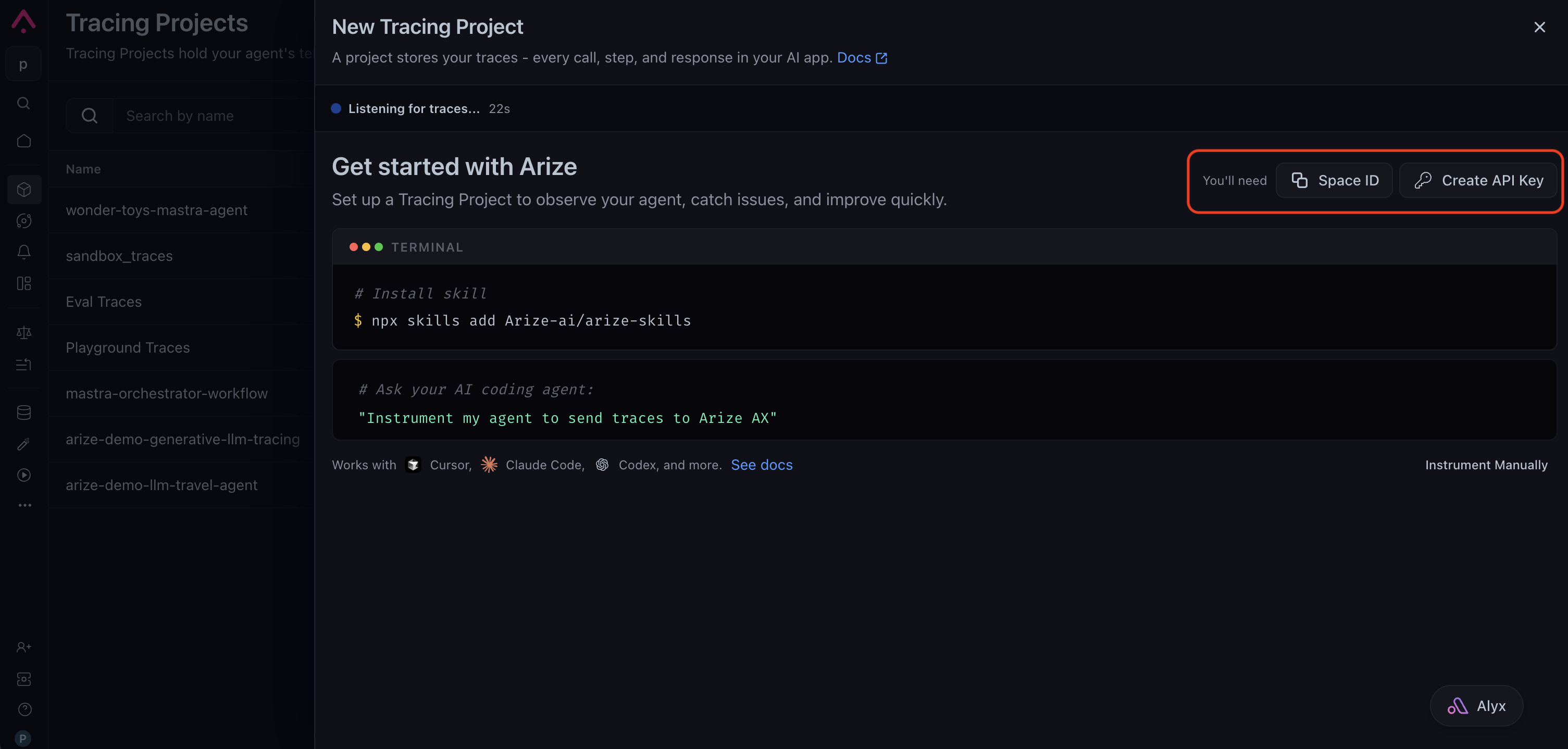
Create a tracing project from **Projects → New Tracing Project**. The setup page shows the credentials you need: copy your **Space ID** and click **Create API Key** to generate a key. Save the key somewhere safe. You'll plug both into whichever path you choose below.
 ### Requirements
* Python 3.9+
* An Arize AX account ([sign up](https://arize.com/sign-up/))
* An OpenAI API key from the [OpenAI Platform](https://platform.openai.com/api-keys)
```bash theme={null}
pip install arize-otel openinference-instrumentation-openai openai
```
First, export your credentials so the code below can read them from the environment:
```bash theme={null}
export ARIZE_SPACE_ID=""
export ARIZE_API_KEY=""
export ARIZE_PROJECT_NAME="openai-sdk-agent-example"
export OPENAI_API_KEY=""
```
Tracing has two parts, and this step wires up the first: auto-instrumentation for the OpenAI SDK. `register()` configures an OpenTelemetry tracer provider that exports spans to Arize AX, and `OpenAIInstrumentor` patches the SDK so every Responses API call emits an LLM span with the prompt, response, tool calls, and token usage. You do not have to write any span code for the model calls themselves.
```python theme={null}
# instrumentation.py
import os
from arize.otel import register
from openinference.instrumentation.openai import OpenAIInstrumentor
# register() returns a tracer provider that exports spans to Arize
# AX, using the credentials and project name you pass in.
tracer_provider = register(
space_id=os.environ["ARIZE_SPACE_ID"],
api_key=os.environ["ARIZE_API_KEY"],
project_name=os.environ["ARIZE_PROJECT_NAME"],
)
# Auto-instrument the OpenAI SDK. Every Responses API call now
# emits an LLM span on its own.
OpenAIInstrumentor().instrument(tracer_provider=tracer_provider)
print("Arize AX tracing initialized for the OpenAI SDK.")
```
Now build the agent loop. Auto-instrumentation captures the model calls, but it cannot see the parts that live in your code: the overall agent run and the tool executions. Those run outside the OpenAI SDK, so no span is emitted for them at all. This is the second part of tracing: you add manual spans to fill the gaps.
Two manual spans do the job:
* An `AGENT` span wraps the whole loop and becomes the root of the trajectory. Every model call and tool execution nests underneath it.
* A `TOOL` span wraps each tool execution, capturing its arguments and result.
Because the manual spans and the auto-instrumented LLM spans share the same tracer provider, they stitch together into a single trace automatically.
```python theme={null}
# agent.py
import json
import openai
from opentelemetry import trace
# Uses the tracer provider registered in instrumentation.py, so these
# manual spans join the same traces as the auto-instrumented calls.
tracer = trace.get_tracer(__name__)
client = openai.OpenAI()
MODEL = "gpt-5.5"
def solve_equation(equation: str) -> str:
"""Evaluate a math expression and return the result."""
# Illustrative only: never call eval() on model-provided input in
# production. Use a sandboxed math parser instead.
return str(eval(equation))
# The tool schema advertised to the model on every request.
TOOLS = [
{
"type": "function",
"name": "solve_equation",
"description": (
"Evaluate a math expression, such as '15 + 28', "
"and return the numeric result."
),
"parameters": {
"type": "object",
"properties": {
"equation": {
"type": "string",
"description": "The expression to evaluate.",
},
},
"required": ["equation"],
"additionalProperties": False,
},
},
]
TOOL_IMPLEMENTATIONS = {"solve_equation": solve_equation}
def run_agent(question: str) -> str:
"""Run a tool-calling loop until the model returns an answer."""
# The AGENT span is the root of the trajectory. Every LLM call
# and tool execution below nests underneath it.
with tracer.start_as_current_span("Math Solver Agent") as span:
span.set_attribute("openinference.span.kind", "AGENT")
span.set_attribute("input.value", question)
instructions = (
"You solve math problems. Use the solve_equation tool "
"to compute results instead of doing arithmetic yourself."
)
input_list = [{"role": "user", "content": question}]
while True:
# Auto-instrumented: emits an LLM span on its own.
response = client.responses.create(
model=MODEL,
instructions=instructions,
input=input_list,
tools=TOOLS,
)
# Carry the model's output items into the next turn.
input_list += response.output
function_calls = [
item
for item in response.output
if item.type == "function_call"
]
# No function calls means this is the final answer.
if not function_calls:
span.set_attribute(
"output.value", response.output_text
)
return response.output_text
# Otherwise run each requested tool and feed results back.
for call in function_calls:
arguments = json.loads(call.arguments)
# Manual TOOL span: captures the execution the OpenAI
# instrumentor cannot see, since it runs in our code.
with tracer.start_as_current_span(
call.name
) as tool_span:
tool_span.set_attribute(
"openinference.span.kind", "TOOL"
)
tool_span.set_attribute("tool.name", call.name)
tool_span.set_attribute(
"input.value", call.arguments
)
result = TOOL_IMPLEMENTATIONS[call.name](**arguments)
tool_span.set_attribute("output.value", result)
input_list.append(
{
"type": "function_call_output",
"call_id": call.call_id,
"output": result,
}
)
```
The entry point imports the instrumentation module first. This guarantees tracing is configured before the OpenAI client is used, so no early spans are missed.
```python theme={null}
# example.py
# Import instrumentation first so tracing is set up before the
# OpenAI client is used.
from instrumentation import tracer_provider
from agent import run_agent
answer = run_agent("What is 15 + 28?")
print(answer)
# Flush any pending spans before the process exits.
tracer_provider.force_flush()
```
Run it with `python example.py`. You should see:
```text wrap theme={null}
Arize AX tracing initialized for the OpenAI SDK.
15 + 28 = 43.
```
1. Open your Arize AX space and select project **`openai-sdk-agent-example`**.
2. Within \~30 seconds you will see a trace shaped like the trajectory itself: a **`Math Solver Agent`** span (`AGENT`) at the root, an **LLM** span for the first Responses API call that returns the tool request, a **`solve_equation`** span (`TOOL`) holding the arguments and result, and a second **LLM** span where the model turns the tool result into the final answer.
3. Select any span to inspect its inputs, outputs, and token usage.
The manual `AGENT` and `TOOL` spans are what make this trace readable as an agent run. Without them you would still see the two LLM calls, but nothing would tie them together or show the tool execution between them. This is the [combine auto and manual instrumentation](/ax/instrument/combining-auto-and-manual) pattern applied to an agent loop.
### Requirements
* Node.js 18+
* An Arize AX account ([sign up](https://arize.com/sign-up/))
* An OpenAI API key from the [OpenAI Platform](https://platform.openai.com/api-keys)
```bash theme={null}
npm install openai \
@arizeai/openinference-instrumentation-openai \
@arizeai/openinference-semantic-conventions \
@opentelemetry/api \
@opentelemetry/exporter-trace-otlp-proto \
@opentelemetry/instrumentation \
@opentelemetry/resources \
@opentelemetry/sdk-trace-base \
@opentelemetry/sdk-trace-node \
@opentelemetry/semantic-conventions
```
First, export your credentials so the code below can read them from the environment:
```bash theme={null}
export ARIZE_SPACE_ID=""
export ARIZE_API_KEY=""
export ARIZE_PROJECT_NAME="openai-sdk-agent-example"
export OPENAI_API_KEY=""
```
Tracing has two parts, and this step wires up the first: auto-instrumentation for the OpenAI SDK. You configure an OpenTelemetry tracer provider that exports spans to Arize AX, and `OpenAIInstrumentation` patches the SDK so every Responses API call emits an LLM span with the prompt, response, tool calls, and token usage. You do not have to write any span code for the model calls themselves.
```typescript theme={null}
// instrumentation.ts
import { OTLPTraceExporter } from "@opentelemetry/exporter-trace-otlp-proto";
import { resourceFromAttributes } from "@opentelemetry/resources";
import { SimpleSpanProcessor } from "@opentelemetry/sdk-trace-base";
import { NodeTracerProvider } from "@opentelemetry/sdk-trace-node";
import { ATTR_SERVICE_NAME } from "@opentelemetry/semantic-conventions";
import {
SEMRESATTRS_PROJECT_NAME,
} from "@arizeai/openinference-semantic-conventions";
import { registerInstrumentations } from "@opentelemetry/instrumentation";
import {
OpenAIInstrumentation,
} from "@arizeai/openinference-instrumentation-openai";
import OpenAI from "openai";
const projectName =
process.env.ARIZE_PROJECT_NAME ?? "openai-sdk-agent-example";
export const provider = new NodeTracerProvider({
resource: resourceFromAttributes({
[ATTR_SERVICE_NAME]: projectName,
[SEMRESATTRS_PROJECT_NAME]: projectName,
}),
spanProcessors: [
new SimpleSpanProcessor(
new OTLPTraceExporter({
url: "https://otlp.arize.com/v1/traces",
headers: {
"arize-space-id": process.env.ARIZE_SPACE_ID ?? "",
"arize-api-key": process.env.ARIZE_API_KEY ?? "",
},
}),
),
],
});
provider.register();
// Auto-instrument the OpenAI SDK. Every Responses API call now
// emits an LLM span on its own.
const instrumentation = new OpenAIInstrumentation();
instrumentation.manuallyInstrument(OpenAI);
registerInstrumentations({ instrumentations: [instrumentation] });
console.log("Arize AX tracing initialized for the OpenAI SDK.");
```
Now build the agent loop. Auto-instrumentation captures the model calls, but it cannot see the parts that live in your code: the overall agent run and the tool executions. Those run outside the OpenAI SDK, so no span is emitted for them at all. This is the second part of tracing: you add manual spans to fill the gaps.
Two manual spans do the job:
* An `AGENT` span wraps the whole loop and becomes the root of the trajectory. Every model call and tool execution nests underneath it.
* A `TOOL` span wraps each tool execution, capturing its arguments and result.
Because the manual spans and the auto-instrumented LLM spans share the same tracer provider, they stitch together into a single trace automatically.
```typescript theme={null}
// agent.ts
import { trace } from "@opentelemetry/api";
import {
INPUT_VALUE,
OUTPUT_VALUE,
TOOL_NAME,
OpenInferenceSpanKind,
SemanticConventions,
} from "@arizeai/openinference-semantic-conventions";
import OpenAI from "openai";
// Uses the tracer provider registered in instrumentation.ts, so these
// manual spans join the same traces as the auto-instrumented calls.
const tracer = trace.getTracer("openai-sdk-agent");
const client = new OpenAI();
const MODEL = "gpt-5.5";
function solveEquation(equation: string): string {
// Illustrative only: never call eval() on model-provided input in
// production. Use a sandboxed math parser instead.
return String(eval(equation));
}
// The tool schema advertised to the model on every request.
const tools: OpenAI.Responses.Tool[] = [
{
type: "function",
name: "solve_equation",
description:
"Evaluate a math expression, such as '15 + 28', and " +
"return the numeric result.",
parameters: {
type: "object",
properties: {
equation: {
type: "string",
description: "The expression to evaluate.",
},
},
required: ["equation"],
additionalProperties: false,
},
strict: true,
},
];
export async function runAgent(question: string): Promise {
// The AGENT span is the root of the trajectory. Every LLM call
// and tool execution below nests underneath it.
return tracer.startActiveSpan("Math Solver Agent", async (span) => {
span.setAttribute(
SemanticConventions.OPENINFERENCE_SPAN_KIND,
OpenInferenceSpanKind.AGENT,
);
span.setAttribute(INPUT_VALUE, question);
const instructions =
"You solve math problems. Use the solve_equation tool to " +
"compute results instead of doing arithmetic yourself.";
const input: OpenAI.Responses.ResponseInputItem[] = [
{ role: "user", content: question },
];
while (true) {
// Auto-instrumented: emits an LLM span on its own.
const response = await client.responses.create({
model: MODEL,
instructions,
input,
tools,
});
// Carry the model's output items into the next turn's input.
// The SDK's output-item type is wider than its input-item
// type, but these items are valid input, so we assert the type.
input.push(
...(response.output as OpenAI.Responses.ResponseInputItem[]),
);
const functionCalls = response.output.filter(
(item) => item.type === "function_call",
);
// No function calls means this is the final answer.
if (functionCalls.length === 0) {
const answer = response.output_text;
span.setAttribute(OUTPUT_VALUE, answer);
span.end();
return answer;
}
// Otherwise run each requested tool and feed results back.
for (const call of functionCalls) {
const args = JSON.parse(call.arguments);
// Manual TOOL span: captures the execution the OpenAI
// instrumentor cannot see, since it runs in our code.
const result = tracer.startActiveSpan(call.name, (toolSpan) => {
toolSpan.setAttribute(
SemanticConventions.OPENINFERENCE_SPAN_KIND,
OpenInferenceSpanKind.TOOL,
);
toolSpan.setAttribute(TOOL_NAME, call.name);
toolSpan.setAttribute(INPUT_VALUE, call.arguments);
const output = solveEquation(args.equation);
toolSpan.setAttribute(OUTPUT_VALUE, output);
toolSpan.end();
return output;
});
input.push({
type: "function_call_output",
call_id: call.call_id,
output: result,
});
}
}
});
}
```
The entry point imports the instrumentation module first. This guarantees tracing is configured before the OpenAI client is used, so no early spans are missed.
```typescript theme={null}
// example.ts
// Import instrumentation first so tracing is set up before the
// OpenAI client is used.
import { provider } from "./instrumentation";
import { runAgent } from "./agent";
const answer = await runAgent("What is 15 + 28?");
console.log(answer);
// Flush any pending spans before the process exits.
await provider.forceFlush();
```
Run it with `npx tsx example.ts`. You should see:
```text wrap theme={null}
Arize AX tracing initialized for the OpenAI SDK.
15 + 28 = 43.
```
1. Open your Arize AX space and select project **`openai-sdk-agent-example`**.
2. Within \~30 seconds you will see a trace shaped like the trajectory itself: a **`Math Solver Agent`** span (`AGENT`) at the root, an **LLM** span for the first Responses API call that returns the tool request, a **`solve_equation`** span (`TOOL`) holding the arguments and result, and a second **LLM** span where the model turns the tool result into the final answer.
3. Select any span to inspect its inputs, outputs, and token usage.
The manual `AGENT` and `TOOL` spans are what make this trace readable as an agent run. Without them you would still see the two LLM calls, but nothing would tie them together or show the tool execution between them. This is the [combine auto and manual instrumentation](/ax/instrument/combining-auto-and-manual) pattern applied to an agent loop.
## Next steps
Build the same kind of agent with the OpenAI Agents SDK and let its instrumentor trace handoffs and tools for you.
Score tool-call accuracy, tool results, and goal completion once your agent is emitting traces.
Go deeper on span kinds, attributes, sessions, and agent trajectories.
### Requirements
* Python 3.9+
* An Arize AX account ([sign up](https://arize.com/sign-up/))
* An OpenAI API key from the [OpenAI Platform](https://platform.openai.com/api-keys)
```bash theme={null}
pip install arize-otel openinference-instrumentation-openai openai
```
First, export your credentials so the code below can read them from the environment:
```bash theme={null}
export ARIZE_SPACE_ID=""
export ARIZE_API_KEY=""
export ARIZE_PROJECT_NAME="openai-sdk-agent-example"
export OPENAI_API_KEY=""
```
Tracing has two parts, and this step wires up the first: auto-instrumentation for the OpenAI SDK. `register()` configures an OpenTelemetry tracer provider that exports spans to Arize AX, and `OpenAIInstrumentor` patches the SDK so every Responses API call emits an LLM span with the prompt, response, tool calls, and token usage. You do not have to write any span code for the model calls themselves.
```python theme={null}
# instrumentation.py
import os
from arize.otel import register
from openinference.instrumentation.openai import OpenAIInstrumentor
# register() returns a tracer provider that exports spans to Arize
# AX, using the credentials and project name you pass in.
tracer_provider = register(
space_id=os.environ["ARIZE_SPACE_ID"],
api_key=os.environ["ARIZE_API_KEY"],
project_name=os.environ["ARIZE_PROJECT_NAME"],
)
# Auto-instrument the OpenAI SDK. Every Responses API call now
# emits an LLM span on its own.
OpenAIInstrumentor().instrument(tracer_provider=tracer_provider)
print("Arize AX tracing initialized for the OpenAI SDK.")
```
Now build the agent loop. Auto-instrumentation captures the model calls, but it cannot see the parts that live in your code: the overall agent run and the tool executions. Those run outside the OpenAI SDK, so no span is emitted for them at all. This is the second part of tracing: you add manual spans to fill the gaps.
Two manual spans do the job:
* An `AGENT` span wraps the whole loop and becomes the root of the trajectory. Every model call and tool execution nests underneath it.
* A `TOOL` span wraps each tool execution, capturing its arguments and result.
Because the manual spans and the auto-instrumented LLM spans share the same tracer provider, they stitch together into a single trace automatically.
```python theme={null}
# agent.py
import json
import openai
from opentelemetry import trace
# Uses the tracer provider registered in instrumentation.py, so these
# manual spans join the same traces as the auto-instrumented calls.
tracer = trace.get_tracer(__name__)
client = openai.OpenAI()
MODEL = "gpt-5.5"
def solve_equation(equation: str) -> str:
"""Evaluate a math expression and return the result."""
# Illustrative only: never call eval() on model-provided input in
# production. Use a sandboxed math parser instead.
return str(eval(equation))
# The tool schema advertised to the model on every request.
TOOLS = [
{
"type": "function",
"name": "solve_equation",
"description": (
"Evaluate a math expression, such as '15 + 28', "
"and return the numeric result."
),
"parameters": {
"type": "object",
"properties": {
"equation": {
"type": "string",
"description": "The expression to evaluate.",
},
},
"required": ["equation"],
"additionalProperties": False,
},
},
]
TOOL_IMPLEMENTATIONS = {"solve_equation": solve_equation}
def run_agent(question: str) -> str:
"""Run a tool-calling loop until the model returns an answer."""
# The AGENT span is the root of the trajectory. Every LLM call
# and tool execution below nests underneath it.
with tracer.start_as_current_span("Math Solver Agent") as span:
span.set_attribute("openinference.span.kind", "AGENT")
span.set_attribute("input.value", question)
instructions = (
"You solve math problems. Use the solve_equation tool "
"to compute results instead of doing arithmetic yourself."
)
input_list = [{"role": "user", "content": question}]
while True:
# Auto-instrumented: emits an LLM span on its own.
response = client.responses.create(
model=MODEL,
instructions=instructions,
input=input_list,
tools=TOOLS,
)
# Carry the model's output items into the next turn.
input_list += response.output
function_calls = [
item
for item in response.output
if item.type == "function_call"
]
# No function calls means this is the final answer.
if not function_calls:
span.set_attribute(
"output.value", response.output_text
)
return response.output_text
# Otherwise run each requested tool and feed results back.
for call in function_calls:
arguments = json.loads(call.arguments)
# Manual TOOL span: captures the execution the OpenAI
# instrumentor cannot see, since it runs in our code.
with tracer.start_as_current_span(
call.name
) as tool_span:
tool_span.set_attribute(
"openinference.span.kind", "TOOL"
)
tool_span.set_attribute("tool.name", call.name)
tool_span.set_attribute(
"input.value", call.arguments
)
result = TOOL_IMPLEMENTATIONS[call.name](**arguments)
tool_span.set_attribute("output.value", result)
input_list.append(
{
"type": "function_call_output",
"call_id": call.call_id,
"output": result,
}
)
```
The entry point imports the instrumentation module first. This guarantees tracing is configured before the OpenAI client is used, so no early spans are missed.
```python theme={null}
# example.py
# Import instrumentation first so tracing is set up before the
# OpenAI client is used.
from instrumentation import tracer_provider
from agent import run_agent
answer = run_agent("What is 15 + 28?")
print(answer)
# Flush any pending spans before the process exits.
tracer_provider.force_flush()
```
Run it with `python example.py`. You should see:
```text wrap theme={null}
Arize AX tracing initialized for the OpenAI SDK.
15 + 28 = 43.
```
1. Open your Arize AX space and select project **`openai-sdk-agent-example`**.
2. Within \~30 seconds you will see a trace shaped like the trajectory itself: a **`Math Solver Agent`** span (`AGENT`) at the root, an **LLM** span for the first Responses API call that returns the tool request, a **`solve_equation`** span (`TOOL`) holding the arguments and result, and a second **LLM** span where the model turns the tool result into the final answer.
3. Select any span to inspect its inputs, outputs, and token usage.
The manual `AGENT` and `TOOL` spans are what make this trace readable as an agent run. Without them you would still see the two LLM calls, but nothing would tie them together or show the tool execution between them. This is the [combine auto and manual instrumentation](/ax/instrument/combining-auto-and-manual) pattern applied to an agent loop.
### Requirements
* Node.js 18+
* An Arize AX account ([sign up](https://arize.com/sign-up/))
* An OpenAI API key from the [OpenAI Platform](https://platform.openai.com/api-keys)
```bash theme={null}
npm install openai \
@arizeai/openinference-instrumentation-openai \
@arizeai/openinference-semantic-conventions \
@opentelemetry/api \
@opentelemetry/exporter-trace-otlp-proto \
@opentelemetry/instrumentation \
@opentelemetry/resources \
@opentelemetry/sdk-trace-base \
@opentelemetry/sdk-trace-node \
@opentelemetry/semantic-conventions
```
First, export your credentials so the code below can read them from the environment:
```bash theme={null}
export ARIZE_SPACE_ID=""
export ARIZE_API_KEY=""
export ARIZE_PROJECT_NAME="openai-sdk-agent-example"
export OPENAI_API_KEY=""
```
Tracing has two parts, and this step wires up the first: auto-instrumentation for the OpenAI SDK. You configure an OpenTelemetry tracer provider that exports spans to Arize AX, and `OpenAIInstrumentation` patches the SDK so every Responses API call emits an LLM span with the prompt, response, tool calls, and token usage. You do not have to write any span code for the model calls themselves.
```typescript theme={null}
// instrumentation.ts
import { OTLPTraceExporter } from "@opentelemetry/exporter-trace-otlp-proto";
import { resourceFromAttributes } from "@opentelemetry/resources";
import { SimpleSpanProcessor } from "@opentelemetry/sdk-trace-base";
import { NodeTracerProvider } from "@opentelemetry/sdk-trace-node";
import { ATTR_SERVICE_NAME } from "@opentelemetry/semantic-conventions";
import {
SEMRESATTRS_PROJECT_NAME,
} from "@arizeai/openinference-semantic-conventions";
import { registerInstrumentations } from "@opentelemetry/instrumentation";
import {
OpenAIInstrumentation,
} from "@arizeai/openinference-instrumentation-openai";
import OpenAI from "openai";
const projectName =
process.env.ARIZE_PROJECT_NAME ?? "openai-sdk-agent-example";
export const provider = new NodeTracerProvider({
resource: resourceFromAttributes({
[ATTR_SERVICE_NAME]: projectName,
[SEMRESATTRS_PROJECT_NAME]: projectName,
}),
spanProcessors: [
new SimpleSpanProcessor(
new OTLPTraceExporter({
url: "https://otlp.arize.com/v1/traces",
headers: {
"arize-space-id": process.env.ARIZE_SPACE_ID ?? "",
"arize-api-key": process.env.ARIZE_API_KEY ?? "",
},
}),
),
],
});
provider.register();
// Auto-instrument the OpenAI SDK. Every Responses API call now
// emits an LLM span on its own.
const instrumentation = new OpenAIInstrumentation();
instrumentation.manuallyInstrument(OpenAI);
registerInstrumentations({ instrumentations: [instrumentation] });
console.log("Arize AX tracing initialized for the OpenAI SDK.");
```
Now build the agent loop. Auto-instrumentation captures the model calls, but it cannot see the parts that live in your code: the overall agent run and the tool executions. Those run outside the OpenAI SDK, so no span is emitted for them at all. This is the second part of tracing: you add manual spans to fill the gaps.
Two manual spans do the job:
* An `AGENT` span wraps the whole loop and becomes the root of the trajectory. Every model call and tool execution nests underneath it.
* A `TOOL` span wraps each tool execution, capturing its arguments and result.
Because the manual spans and the auto-instrumented LLM spans share the same tracer provider, they stitch together into a single trace automatically.
```typescript theme={null}
// agent.ts
import { trace } from "@opentelemetry/api";
import {
INPUT_VALUE,
OUTPUT_VALUE,
TOOL_NAME,
OpenInferenceSpanKind,
SemanticConventions,
} from "@arizeai/openinference-semantic-conventions";
import OpenAI from "openai";
// Uses the tracer provider registered in instrumentation.ts, so these
// manual spans join the same traces as the auto-instrumented calls.
const tracer = trace.getTracer("openai-sdk-agent");
const client = new OpenAI();
const MODEL = "gpt-5.5";
function solveEquation(equation: string): string {
// Illustrative only: never call eval() on model-provided input in
// production. Use a sandboxed math parser instead.
return String(eval(equation));
}
// The tool schema advertised to the model on every request.
const tools: OpenAI.Responses.Tool[] = [
{
type: "function",
name: "solve_equation",
description:
"Evaluate a math expression, such as '15 + 28', and " +
"return the numeric result.",
parameters: {
type: "object",
properties: {
equation: {
type: "string",
description: "The expression to evaluate.",
},
},
required: ["equation"],
additionalProperties: false,
},
strict: true,
},
];
export async function runAgent(question: string): Promise {
// The AGENT span is the root of the trajectory. Every LLM call
// and tool execution below nests underneath it.
return tracer.startActiveSpan("Math Solver Agent", async (span) => {
span.setAttribute(
SemanticConventions.OPENINFERENCE_SPAN_KIND,
OpenInferenceSpanKind.AGENT,
);
span.setAttribute(INPUT_VALUE, question);
const instructions =
"You solve math problems. Use the solve_equation tool to " +
"compute results instead of doing arithmetic yourself.";
const input: OpenAI.Responses.ResponseInputItem[] = [
{ role: "user", content: question },
];
while (true) {
// Auto-instrumented: emits an LLM span on its own.
const response = await client.responses.create({
model: MODEL,
instructions,
input,
tools,
});
// Carry the model's output items into the next turn's input.
// The SDK's output-item type is wider than its input-item
// type, but these items are valid input, so we assert the type.
input.push(
...(response.output as OpenAI.Responses.ResponseInputItem[]),
);
const functionCalls = response.output.filter(
(item) => item.type === "function_call",
);
// No function calls means this is the final answer.
if (functionCalls.length === 0) {
const answer = response.output_text;
span.setAttribute(OUTPUT_VALUE, answer);
span.end();
return answer;
}
// Otherwise run each requested tool and feed results back.
for (const call of functionCalls) {
const args = JSON.parse(call.arguments);
// Manual TOOL span: captures the execution the OpenAI
// instrumentor cannot see, since it runs in our code.
const result = tracer.startActiveSpan(call.name, (toolSpan) => {
toolSpan.setAttribute(
SemanticConventions.OPENINFERENCE_SPAN_KIND,
OpenInferenceSpanKind.TOOL,
);
toolSpan.setAttribute(TOOL_NAME, call.name);
toolSpan.setAttribute(INPUT_VALUE, call.arguments);
const output = solveEquation(args.equation);
toolSpan.setAttribute(OUTPUT_VALUE, output);
toolSpan.end();
return output;
});
input.push({
type: "function_call_output",
call_id: call.call_id,
output: result,
});
}
}
});
}
```
The entry point imports the instrumentation module first. This guarantees tracing is configured before the OpenAI client is used, so no early spans are missed.
```typescript theme={null}
// example.ts
// Import instrumentation first so tracing is set up before the
// OpenAI client is used.
import { provider } from "./instrumentation";
import { runAgent } from "./agent";
const answer = await runAgent("What is 15 + 28?");
console.log(answer);
// Flush any pending spans before the process exits.
await provider.forceFlush();
```
Run it with `npx tsx example.ts`. You should see:
```text wrap theme={null}
Arize AX tracing initialized for the OpenAI SDK.
15 + 28 = 43.
```
1. Open your Arize AX space and select project **`openai-sdk-agent-example`**.
2. Within \~30 seconds you will see a trace shaped like the trajectory itself: a **`Math Solver Agent`** span (`AGENT`) at the root, an **LLM** span for the first Responses API call that returns the tool request, a **`solve_equation`** span (`TOOL`) holding the arguments and result, and a second **LLM** span where the model turns the tool result into the final answer.
3. Select any span to inspect its inputs, outputs, and token usage.
The manual `AGENT` and `TOOL` spans are what make this trace readable as an agent run. Without them you would still see the two LLM calls, but nothing would tie them together or show the tool execution between them. This is the [combine auto and manual instrumentation](/ax/instrument/combining-auto-and-manual) pattern applied to an agent loop.
## Next steps
Build the same kind of agent with the OpenAI Agents SDK and let its instrumentor trace handoffs and tools for you.
Score tool-call accuracy, tool results, and goal completion once your agent is emitting traces.
Go deeper on span kinds, attributes, sessions, and agent trajectories.