> ## Documentation Index
> Fetch the complete documentation index at: https://arize-ax.mintlify.site/docs/llms.txt
> Use this file to discover all available pages before exploring further.
# Core Workflows
> How Arize AX connects observe, annotate, evaluate, hypothesize, experiment, and ship—from traces through experiments and production online evals.
Arize AX is an AI engineering platform that brings together observability, experimentation, and evaluation so teams can build and improve AI agents and applications with confidence.
## The improvement loop
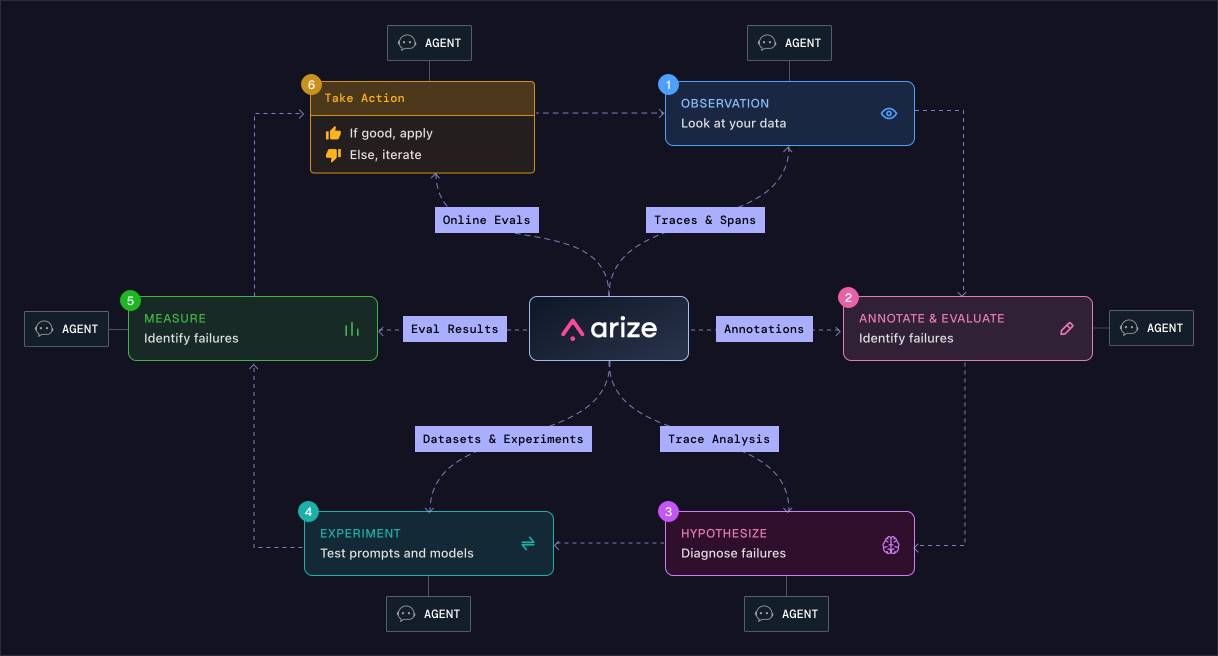
Your agent produces a bad output. You find out through a support ticket, a user complaint, or by systematically scanning for problems. Arize AX gives you everything you need to get from that moment to a fix: a centralized place to observe what happened, understand why it went wrong, run controlled experiments, and ship with confidence. Each step below maps to a part of the platform and they are designed to feed into each other.
## Observe
Every run generates [traces](/docs/ax/instrument/what-are-traces) and spans capturing the full record of what happened: inputs, tool calls, model outputs, latency, token counts, and more. This is the starting point for everything else. You cannot improve what you cannot see.
From here, the question becomes: which of these runs went wrong?

## Annotate and evaluate
Reviewing traces and flagging bad outputs builds a record of what failure looks like in your agent. Over time that record becomes a golden dataset and a starting point for figuring out which error patterns are common enough to automate using evals. See [Human review](/docs/ax/evaluate/human-review) and [Labeling queues](/docs/ax/evaluate/labeling-queues).
Once you know which outputs are bad, you need to understand why.

## Hypothesize
Trace analysis lets you look across many runs to find the pattern before you change anything. Is retrieval pulling the wrong chunks for a particular query type? Is a tool call failing upstream and corrupting everything downstream? A clear hypothesis is the difference between an experiment and a guess. [Alyx](/docs/ax/alyx/meet-alyx) and [AI Search](/docs/ax/alyx/using/search-bar-agent) can help you explore patterns at scale.
With a hypothesis in hand, you can test it properly.

## Experiment on your agent
Change the prompt, swap the model, adjust the retrieval config, and run it against a curated dataset. Arize AX tracks every variant so you can compare results directly.
The experiment tells you what changed. The [Measure step](#measure) tells you whether that change was actually better.

## Measure
You define [evals](/docs/ax/evaluate/evaluators) so every variant is scored against the same criteria, either using an LLM-as-a-judge or a code evaluator. Scores are surfaced in the platform so you can see which variant actually performed better, and by how much.

If the results are good, you apply the change. If not, you have more information than you started with and the loop continues.
## Apply or iterate
Once your experiment results look good, you apply the change to your agent. If they do not, you go back to hypothesizing with what you have learned. Either way, the work does not stop at deployment.
[Online evals](/docs/ax/evaluate/online-evals) keep running against live production traffic after you ship, using the same scoring criteria you defined during development. When a new failure pattern emerges, it surfaces as a new trace and the loop starts again from the top.
## Agents at every step
At each step, an agent can help execute the work. Every part of the loop is accessible via the UI, code, Alyx, or the AX CLI, so you can choose how much to automate and where.
### Alyx
**The AI engineering agent built into Arize AX**
1. Ask questions in natural language: which tool calls are failing, what users are asking that the agent cannot handle, where response times are spiking
2. Executes against your data directly in the UI and tells you what to look at
Learn more in the [Alyx](/docs/ax/alyx) documentation.
### AX CLI
The AX CLI makes AX features available directly inside your coding agent. Instead of switching to the browser, your agent can query your traces, spans, experiments, and datasets from within your editor and use that context to help you debug and improve your agent. Use it to do things like:
1. Surface the most common failure patterns across recent traces
2. Identify which tool calls are failing and why
3. Pull experiment results and compare variants
4. Query datasets to build context for a fix
Install the [Arize skills plugin](/docs/ax/set-up-with-ai-assistants) and use **[Set Up Arize AX with Skills](/docs/ax/set-up-with-ai-assistants)** to wire AX into your workflow.
### Agents (AX Agent Improvement Loop)
**Managed workers on traces, evals, and optional repos**
1. **[Signal](/docs/ax/observe/signal)** — scheduled scan of project traces; ranked issues with evidence.
2. **[Agent Swarms](/docs/ax/agents/manage-agents)** — monitor workers, browse sessions and automations; **+ New Agent** opens [Agent Studio](/docs/ax/agents/agent-studio).
3. **[Agent Presets](/docs/ax/agents/agent-presets)** — save reusable harness, sandbox, repo, and skill settings (**More → Agent Presets**).
See [AX Agent Improvement Loop](/docs/ax/agents).