> ## Documentation Index
> Fetch the complete documentation index at: https://arize-ax.mintlify.site/docs/llms.txt
> Use this file to discover all available pages before exploring further.
# Jev-as-a-judge
> Score traces with TypeSafe AI's Jev decision model — typed boolean, choice, and score questions in one call, without a free-text LLM judge.
**Jev-as-a-Judge** evaluates traces with [TypeSafe AI](https://typesafe.ai)'s **Jev** model — a System One **decision model** for classification, scoring, and routing, not text generation. You send one shared **state** plus typed **questions**; Jev returns structured labels and confidence (or rubric) scores in a single call, with no free-text explanation.
For when to choose Jev over an [LLM-as-a-judge](/docs/ax/evaluate/evaluators/llm-as-a-judge), see [TypeSafe's Jev: Can decision models replace LLM judges?](https://arize.com/blog/typesafe-jev-llm-judge/).
 ## Question types
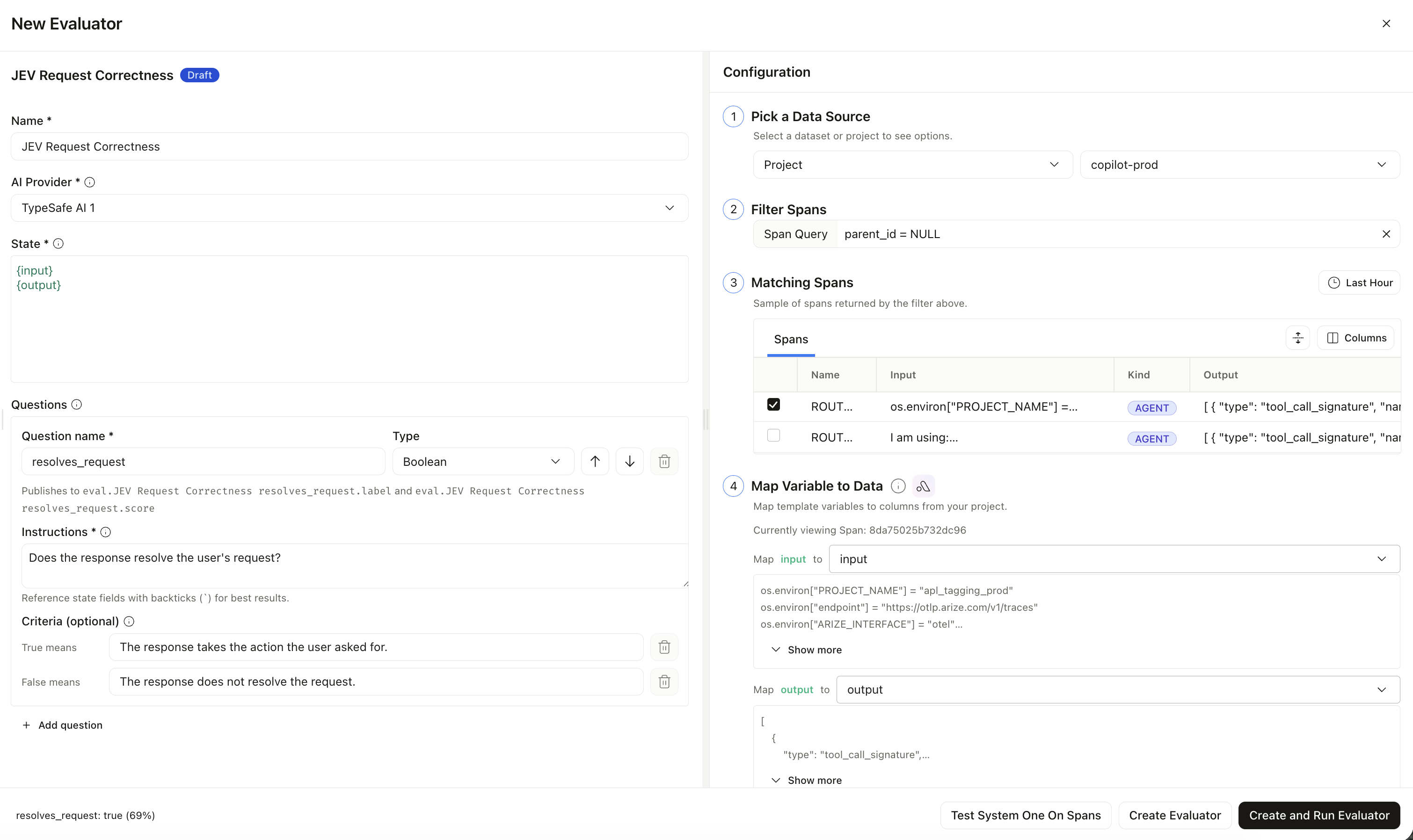
Each question needs a **name** (for the published column only) and **instructions** (what Jev actually judges). Results land on:
`eval. .{label,score,...}`
| Type | Returns | Score |
| :---------- | :------------------------------ | :-------------------------------- |
| **Boolean** | `true` / `false` | Confidence in the winning answer |
| **Choice** | Selected option (2–255 options) | Confidence in the selected option |
| **Score** | Rubric position (2–10 levels) | Position on your levels |
## Create a Jev-as-a-Judge evaluator
Go to **Settings → [AI Providers](https://app.arize.com/account/ai-providers)** and add [TypeSafe AI](/docs/ax/security-and-settings/integrations-playground/typesafe) with your API key. You can also create it inline from the evaluator form. TypeSafe is eval-only — it does not appear in the prompt playground.
Go to **Evaluators → Create → Jev-As-A-Judge**. Select your TypeSafe integration.
Define the shared **state** (plain text or JSON with `{variables}`), map variables to span columns, then add one or more boolean, choice, or score questions. Put the full judgment in **instructions**.
When you refer to a state field in a question, wrap it in backticks (for example `` `output` ``) so Jev treats it as data, not as part of the instruction text.
Optionally run **Test System One On Spans**, then **Create Evaluator** or **Create and Run Evaluator**. Attach it to an [online eval task](/docs/ax/evaluate/run-evals-on-traces) like any other evaluator.
Jev-as-a-Judge cannot run in the prompt playground yet. Model is always `jev-latest`. Do not mix Jev and [remote evaluators](/docs/ax/evaluate/remote-evaluators) on the same task.
## Question types
Each question needs a **name** (for the published column only) and **instructions** (what Jev actually judges). Results land on:
`eval. .{label,score,...}`
| Type | Returns | Score |
| :---------- | :------------------------------ | :-------------------------------- |
| **Boolean** | `true` / `false` | Confidence in the winning answer |
| **Choice** | Selected option (2–255 options) | Confidence in the selected option |
| **Score** | Rubric position (2–10 levels) | Position on your levels |
## Create a Jev-as-a-Judge evaluator
Go to **Settings → [AI Providers](https://app.arize.com/account/ai-providers)** and add [TypeSafe AI](/docs/ax/security-and-settings/integrations-playground/typesafe) with your API key. You can also create it inline from the evaluator form. TypeSafe is eval-only — it does not appear in the prompt playground.
Go to **Evaluators → Create → Jev-As-A-Judge**. Select your TypeSafe integration.
Define the shared **state** (plain text or JSON with `{variables}`), map variables to span columns, then add one or more boolean, choice, or score questions. Put the full judgment in **instructions**.
When you refer to a state field in a question, wrap it in backticks (for example `` `output` ``) so Jev treats it as data, not as part of the instruction text.
Optionally run **Test System One On Spans**, then **Create Evaluator** or **Create and Run Evaluator**. Attach it to an [online eval task](/docs/ax/evaluate/run-evals-on-traces) like any other evaluator.
Jev-as-a-Judge cannot run in the prompt playground yet. Model is always `jev-latest`. Do not mix Jev and [remote evaluators](/docs/ax/evaluate/remote-evaluators) on the same task.