> ## Documentation Index
> Fetch the complete documentation index at: https://arize-ax.mintlify.site/docs/llms.txt
> Use this file to discover all available pages before exploring further.
# What are evals?
> A trace tells you what your AI agent did. An eval tells you whether what it did was good.
An eval is an automated check on your agent's output. The judge can be an LLM scoring against criteria you wrote, deterministic code, an agent harness that reads your traces at run time, or an HTTP endpoint you host. Whichever you use, it returns some combination of a **label** (e.g. correct, incorrect), a numeric **score**, and an **explanation**.
Results attach to the data you scored and behave like any other attribute: filter traces by eval results, chart them in a [dashboard](/docs/ax/observe/dashboards), or set a [monitor](/docs/ax/observe/production-monitoring) that fires when a label starts trending the wrong way.
Evals run in two modes: continuously against live production traces, or on demand against a dataset or experiment. See [Run evals on your data](/docs/ax/evaluate/run-evals) to learn more.
 ## Why evaluate
AI agents fail in ways traditional software doesn't: confident falsehoods, plausible reasoning that lands on the wrong answer, the wrong context retrieved, the wrong tool called, a prompt tweak that quietly degrades quality for users whose traces you never read.
None of it surfaces as an error. Your agent returns a 200, the trace looks fine, and the user gets a bad answer. Evals are how you catch it.
## Human review vs. evals
Human review and evals do different jobs, and you need both.
| | **Human review** | **Evals** |
| :------------ | :-------------------------------------- | :------------------------------------------------------------ |
| **Judged by** | A human (often a subject matter expert) | An LLM judge, code, an agent harness, or an endpoint you host |
| **Good for** | Finding what's broken, defining "good" | Assessing quality at scale |
| **Produces** | Annotations that become ground truth | Labels, scores, and explanations |
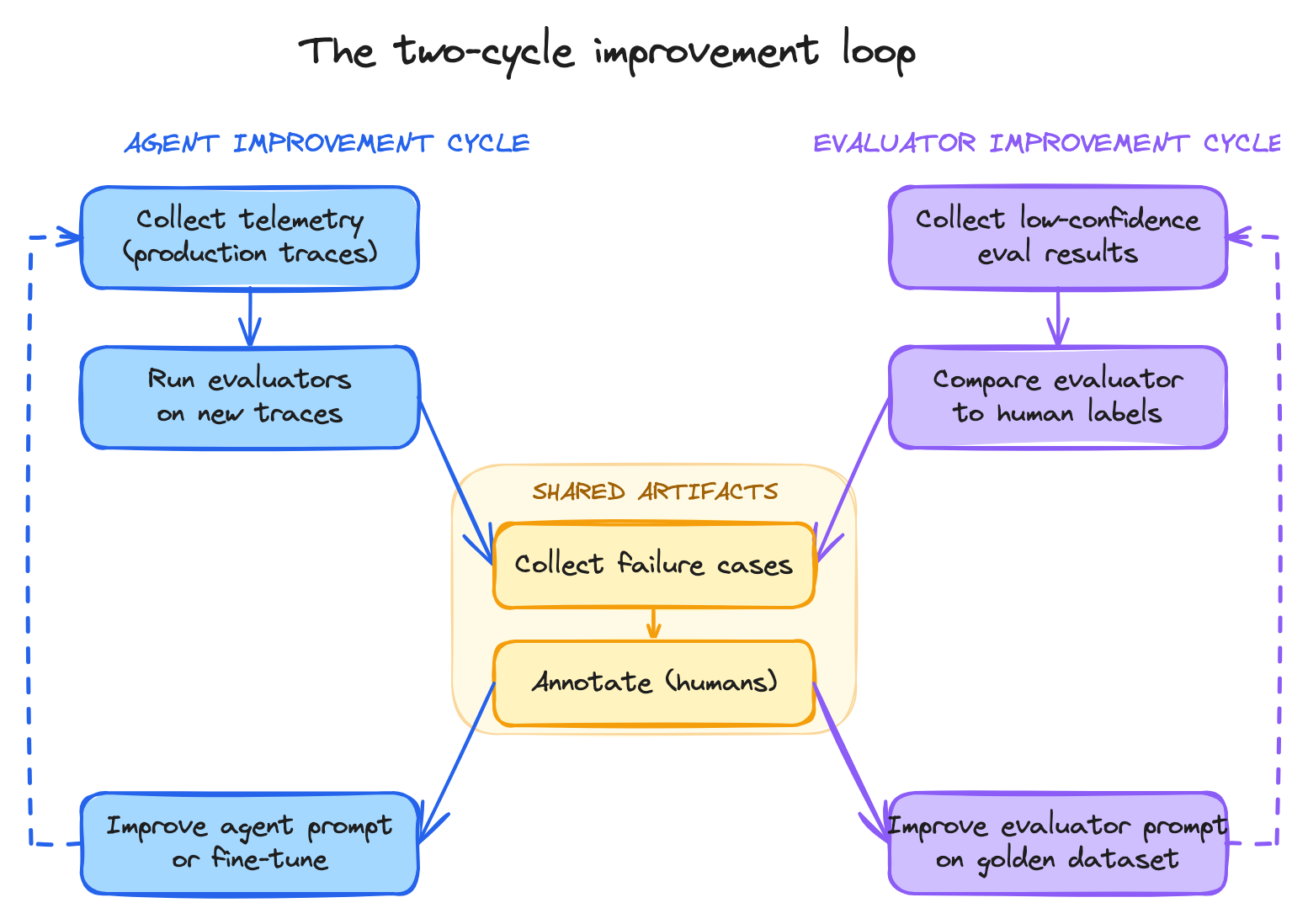
The two work together. Read traces by hand to learn how your agent fails, then encode each failure mode as an eval. Reviewing a sample by hand afterwards tells you whether the judge agrees with you, which is what makes its scores trustworthy on the traces you never read. See [Align to human review](/docs/ax/evaluate/align-evals-to-human-feedback).
## Why evaluate
AI agents fail in ways traditional software doesn't: confident falsehoods, plausible reasoning that lands on the wrong answer, the wrong context retrieved, the wrong tool called, a prompt tweak that quietly degrades quality for users whose traces you never read.
None of it surfaces as an error. Your agent returns a 200, the trace looks fine, and the user gets a bad answer. Evals are how you catch it.
## Human review vs. evals
Human review and evals do different jobs, and you need both.
| | **Human review** | **Evals** |
| :------------ | :-------------------------------------- | :------------------------------------------------------------ |
| **Judged by** | A human (often a subject matter expert) | An LLM judge, code, an agent harness, or an endpoint you host |
| **Good for** | Finding what's broken, defining "good" | Assessing quality at scale |
| **Produces** | Annotations that become ground truth | Labels, scores, and explanations |
The two work together. Read traces by hand to learn how your agent fails, then encode each failure mode as an eval. Reviewing a sample by hand afterwards tells you whether the judge agrees with you, which is what makes its scores trustworthy on the traces you never read. See [Align to human review](/docs/ax/evaluate/align-evals-to-human-feedback).
 ## Where evals live
Evaluators are stored in the **Eval Hub**, under **Evaluators** in the left nav. The Hub is what makes an evaluator reusable rather than a one-off:
* **Define once, reuse anywhere** - attach the same evaluator to online monitoring, offline batch runs, or dataset experiments without rewriting the prompt.
* **Versioned** - every change tracked with commit messages.
* **Portable** - map template variables to each data source's columns, so one evaluator works across projects, datasets, and experiments with different shapes.
A second tab, **Running Tasks**, is where tasks execute those evaluators against your data. Building an evaluator and running it are deliberately separate: see [Build evals](/docs/ax/evaluate/create-evaluators), then [Run evals on your data](/docs/ax/evaluate/run-evals).
## Where evals live
Evaluators are stored in the **Eval Hub**, under **Evaluators** in the left nav. The Hub is what makes an evaluator reusable rather than a one-off:
* **Define once, reuse anywhere** - attach the same evaluator to online monitoring, offline batch runs, or dataset experiments without rewriting the prompt.
* **Versioned** - every change tracked with commit messages.
* **Portable** - map template variables to each data source's columns, so one evaluator works across projects, datasets, and experiments with different shapes.
A second tab, **Running Tasks**, is where tasks execute those evaluators against your data. Building an evaluator and running it are deliberately separate: see [Build evals](/docs/ax/evaluate/create-evaluators), then [Run evals on your data](/docs/ax/evaluate/run-evals).
 ## Next
Find failures by hand so you know what's worth automating.
Compare the four evaluator types and build one.
Attach an evaluator to live traces or a dataset.
Read results, chart them, control judge spend.
## Next
Find failures by hand so you know what's worth automating.
Compare the four evaluator types and build one.
Attach an evaluator to live traces or a dataset.
Read results, chart them, control judge spend.