> ## Documentation Index
> Fetch the complete documentation index at: https://arize-ax.mintlify.site/docs/llms.txt
> Use this file to discover all available pages before exploring further.
# Space rate limiting
> Track per-space monthly ingestion and limits from Organization settings.
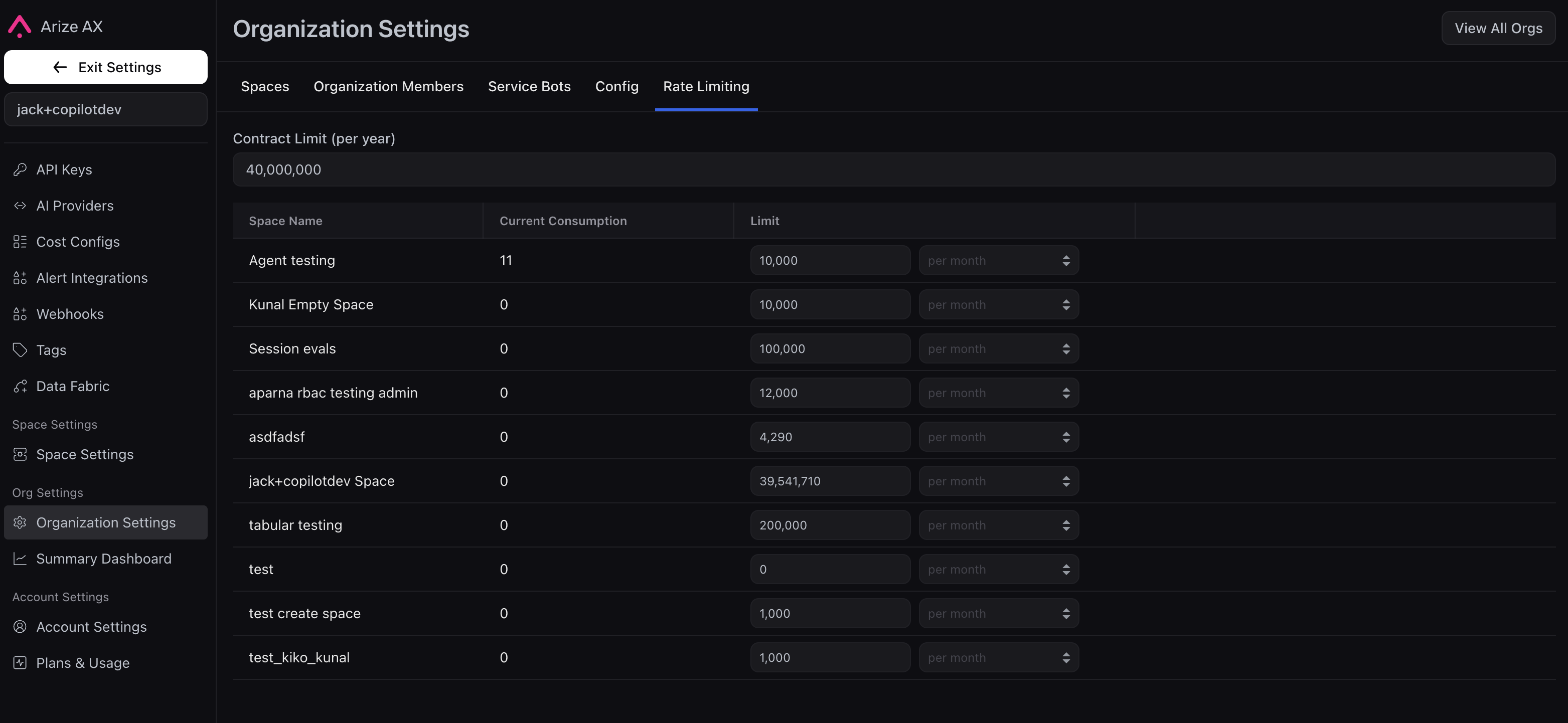
When several spaces live under one organization—production, staging, experiments, another team—you often want each area to have a predictable share of ingestion instead of one blended total. The **Rate Limiting** tab under **Organization settings** shows that split: your **annual** contract at the top, then each space’s **monthly** usage and cap in a table.
 Rate Limiting is an **enterprise**, **opt-in** feature. If you do not see the tab, email [support@arize.com](mailto:support@arize.com) or contact your **support team**. They can explain which ingestion paths feed these totals. If usage looks wrong, include your **account name**, **organization**, and **spaces** involved.
## Open the Rate Limiting tab
1. Open **Organization settings** for the organization you care about (org-wide settings, not a single space).
2. Select **Rate Limiting**.
You need to be an **account administrator** or **organization administrator** on that organization.
## Read the table
**Contract limit (per year)** — Total annual ingestion for this org under your agreement. **Arize** sets and maintains this number; it is **not** editable in the product. To **raise** your overall contract budget, work with your **support team**.
Each row is one **space**:
* **Current consumption** — How much of that space’s budget has been used in the **current monthly** window.
* **Limit** — The **monthly** cap for that space (often labeled **per month**). **Account** and **organization administrators** can change these values to **redistribute** volume across spaces, as long as the splits stay within your contract.
Yearly at the top is the contract snapshot; the rows are how you track **this month** per team or environment. If per-space caps are not configured yet, the product will say that everything still runs under **account-level** limits only—that is normal until those rows are in use.
## When a space nears or hits its cap
You get **warnings** in the UI as usage approaches the monthly limit and when the limit is **reached**. After the cap is hit, ingestion that is gated by these quotas may **fail** until the window **resets** or a **space limit** (or contract) is **updated**. Exact client errors depend on your integration; see [Python SDK](/api-clients/python/overview), [TypeScript SDK](/api-clients/typescript/version-1/overview), and [REST API](/ax/rest-reference/overview).
Only **Arize** can change the **contract limit (per year)**. Customers cannot edit that field. Need a **larger** annual allotment? Talk to your **support team**.
## See also
* [Cost tracking](/ax/instrument/track-costs) — token and model spend in traces
* [API keys](/ax/security-and-settings/api-keys) — keys your services use to send data
* [Arize Community Slack](https://join.slack.com/t/arize-ai/shared_invite/zt-1pxv6hdvk-eK0IC2f7qwq~BG_8lj~tfw)
Rate Limiting is an **enterprise**, **opt-in** feature. If you do not see the tab, email [support@arize.com](mailto:support@arize.com) or contact your **support team**. They can explain which ingestion paths feed these totals. If usage looks wrong, include your **account name**, **organization**, and **spaces** involved.
## Open the Rate Limiting tab
1. Open **Organization settings** for the organization you care about (org-wide settings, not a single space).
2. Select **Rate Limiting**.
You need to be an **account administrator** or **organization administrator** on that organization.
## Read the table
**Contract limit (per year)** — Total annual ingestion for this org under your agreement. **Arize** sets and maintains this number; it is **not** editable in the product. To **raise** your overall contract budget, work with your **support team**.
Each row is one **space**:
* **Current consumption** — How much of that space’s budget has been used in the **current monthly** window.
* **Limit** — The **monthly** cap for that space (often labeled **per month**). **Account** and **organization administrators** can change these values to **redistribute** volume across spaces, as long as the splits stay within your contract.
Yearly at the top is the contract snapshot; the rows are how you track **this month** per team or environment. If per-space caps are not configured yet, the product will say that everything still runs under **account-level** limits only—that is normal until those rows are in use.
## When a space nears or hits its cap
You get **warnings** in the UI as usage approaches the monthly limit and when the limit is **reached**. After the cap is hit, ingestion that is gated by these quotas may **fail** until the window **resets** or a **space limit** (or contract) is **updated**. Exact client errors depend on your integration; see [Python SDK](/api-clients/python/overview), [TypeScript SDK](/api-clients/typescript/version-1/overview), and [REST API](/ax/rest-reference/overview).
Only **Arize** can change the **contract limit (per year)**. Customers cannot edit that field. Need a **larger** annual allotment? Talk to your **support team**.
## See also
* [Cost tracking](/ax/instrument/track-costs) — token and model spend in traces
* [API keys](/ax/security-and-settings/api-keys) — keys your services use to send data
* [Arize Community Slack](https://join.slack.com/t/arize-ai/shared_invite/zt-1pxv6hdvk-eK0IC2f7qwq~BG_8lj~tfw)