> ## Documentation Index
> Fetch the complete documentation index at: https://arizeai-433a7140.mintlify.site/llms.txt
> Use this file to discover all available pages before exploring further.
# Dataset Evaluators
> Attach evaluators to datasets for automatic scoring during experiments.
Dataset Evaluators are evaluators attached directly to a dataset that automatically run when you execute experiments from the Phoenix UI. They act as reusable test cases that validate task outputs every time you iterate on a prompt or model.
Dataset evaluators currently run automatically only for experiments executed from the Phoenix UI (e.g., the Playground). For programmatic experiments, pass evaluators explicitly to `run_experiment`. See [Using Evaluators](/docs/phoenix/datasets-and-experiments/how-to-experiments/using-evaluators) for details.
## Why Use Dataset Evaluators
When iterating on prompts in the Playground, dataset evaluators eliminate the need to manually configure evaluators each time. Attach them once to your dataset, and they run automatically on every experiment.
* **Consistent evaluation**: The same criteria applied every time you test
* **Faster iteration**: No setup required when running experiments from the UI
* **Built-in tracing**: Each evaluator captures traces for debugging and refinement
## Creating a Dataset Evaluator
1. Navigate to your dataset and click the **Evaluators** tab
2. Click **Add evaluator** and choose:
* **LLM evaluator**: Use an LLM to judge outputs (e.g., correctness, relevance)
* **Built-in code evaluator**: Use deterministic checks (e.g., exact match, regex, contains)
3. Configure the input mapping to connect evaluator variables to dataset fields
4. Test with an example, then save
## Input Mapping Reference
Dataset evaluators use the same input mapping concepts as the evals library, but the UI exposes them as dataset field paths. You can map evaluator inputs from any of these sources:
* `input`: the example input payload
* `output`: the example output payload
* `reference`: the expected output value
* `metadata`: example metadata for filtering, grouping, or scoring context
If your dataset fields are nested, use dot notation (for example `input.query`, `output.response`, `metadata.intent`). For additional mapping patterns and transformation examples, see [Input Mapping](/docs/phoenix/evaluation/concepts-evals/input-mapping).
## Built-In Code Evaluators
Built-in evaluators are designed for fast, deterministic checks and are configured directly in the UI. Available built-ins and their key settings:
| Evaluator | What it checks | Key settings |
| ------------------------------------------------------------------------------------------------------- | ---------------------------------------------- | ------------------------------------------ |
| [`contains`](/docs/phoenix/evaluation/server-evals/builtin-evaluators#contains) | Whether a text contains one or more words | Case sensitivity, require all words |
| [`exact_match`](/docs/phoenix/evaluation/server-evals/builtin-evaluators#exact_match) | Whether two values match exactly | Case sensitivity |
| [`regex`](/docs/phoenix/evaluation/server-evals/builtin-evaluators#regex) | Whether a text matches a regex pattern | Pattern validation, full match vs. partial |
| [`levenshtein_distance`](/docs/phoenix/evaluation/server-evals/builtin-evaluators#levenshtein_distance) | Edit distance between expected and actual text | Case sensitivity |
| [`json_distance`](/docs/phoenix/evaluation/server-evals/builtin-evaluators#json_distance) | Structural differences between two JSON values | Parse strings as JSON toggle |
You can map evaluator inputs from dataset fields or supply literal values (for example, a fixed regex pattern). For full parameter details, defaults, and behavior notes, see [Built-in Evaluators](/docs/phoenix/evaluation/server-evals/builtin-evaluators).
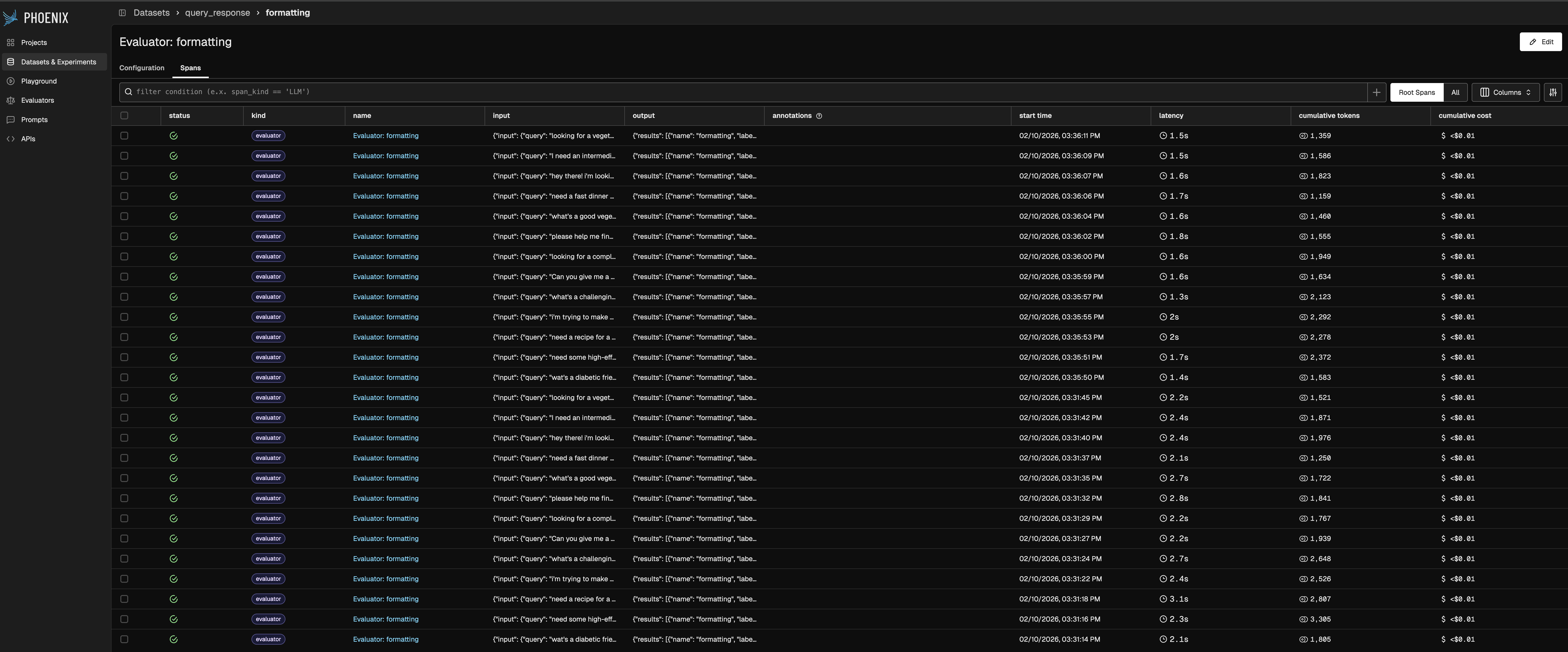
## Evaluator Traces
Each dataset evaluator has its own project that captures traces. Use these traces to:
* Debug unexpected evaluation results
* Identify where your evaluator prompt needs refinement
* Track how evaluator behavior changes over time
Access traces from the **Traces** tab in any evaluator's detail page.
 ## Workflow
```mermaid theme={null}
flowchart LR
subgraph dataset [Dataset]
Examples[Examples]
Evaluators[Evaluators]
end
Task[Playground/UI Task]
subgraph results [Results]
Annotations[Scores]
Traces[Evaluator Traces]
end
Examples --> Task
Task --> Evaluators
Evaluators --> Annotations
Evaluators --> Traces
```
When you run an experiment from the Playground against a dataset with evaluators attached, scores are automatically recorded and evaluator traces are captured for debugging.
## Workflow
```mermaid theme={null}
flowchart LR
subgraph dataset [Dataset]
Examples[Examples]
Evaluators[Evaluators]
end
Task[Playground/UI Task]
subgraph results [Results]
Annotations[Scores]
Traces[Evaluator Traces]
end
Examples --> Task
Task --> Evaluators
Evaluators --> Annotations
Evaluators --> Traces
```
When you run an experiment from the Playground against a dataset with evaluators attached, scores are automatically recorded and evaluator traces are captured for debugging.