> ## Documentation Index
> Fetch the complete documentation index at: https://arizeai-433a7140.mintlify.site/llms.txt
> Use this file to discover all available pages before exploring further.
# Retrieval (RAG) Relevance
**Legacy Evaluator:** This evaluator is from phoenix-evals 1.x and will be removed in a future version. For RAG evaluation, consider using the [Document Relevance](/docs/phoenix/evaluation/pre-built-metrics/document-relevance) evaluator instead. You can migrate the template to a custom evaluator as shown below.
## When To Use RAG Eval Template
This Eval evaluates whether a retrieved chunk contains an answer to the query. It's extremely useful for evaluating retrieval systems.
## RAG Eval Template
```
You are comparing a reference text to a question and trying to determine if the reference text
contains information relevant to answering the question. Here is the data:
{query}
{reference}
Compare the question above to the reference text. You must determine whether the reference text
contains information that can answer the question. Please focus on whether the very specific
question can be answered by the information in the reference text.
Your response must be single word, either "relevant" or "unrelated",
and should not contain any text or characters aside from that word.
"unrelated" means that the reference text does not contain an answer to the question.
"relevant" means the reference text contains an answer to the question.
```
## How To Run the RAG Relevance Eval
```python theme={null}
from phoenix.evals import ClassificationEvaluator
from phoenix.evals.llm import LLM
RAG_RELEVANCY_TEMPLATE = """You are comparing a reference text to a question and trying to determine if the reference text
contains information relevant to answering the question. Here is the data:
{query}
{reference}
Compare the question above to the reference text. You must determine whether the reference text
contains information that can answer the question. Please focus on whether the very specific
question can be answered by the information in the reference text.
"unrelated" means that the reference text does not contain an answer to the question.
"relevant" means the reference text contains an answer to the question."""
rag_relevance_evaluator = ClassificationEvaluator(
name="rag_relevance",
prompt_template=RAG_RELEVANCY_TEMPLATE,
model=LLM(provider="openai", model="gpt-4o"),
choices={"unrelated": 0, "relevant": 1},
)
result = rag_relevance_evaluator.evaluate({
"query": "What is the capital of France?",
"reference": "Paris is the capital and largest city of France."
})
```
The above runs the RAG relevancy LLM template against the dataframe df.
## Benchmark Results
This benchmark was obtained using notebook below. It was run using the [WikiQA dataset](https://storage.googleapis.com/arize-phoenix-assets/evals/binary-relevance-classification/wiki_qa-train.jsonl.zip) as a ground truth dataset. Each example in the dataset was evaluating using the `RAG_RELEVANCY_PROMPT_TEMPLATE` above, then the resulting labels were compared against the ground truth label in the WikiQA dataset to generate the confusion matrices below.
colab.research.google.com
#### GPT-4 Result
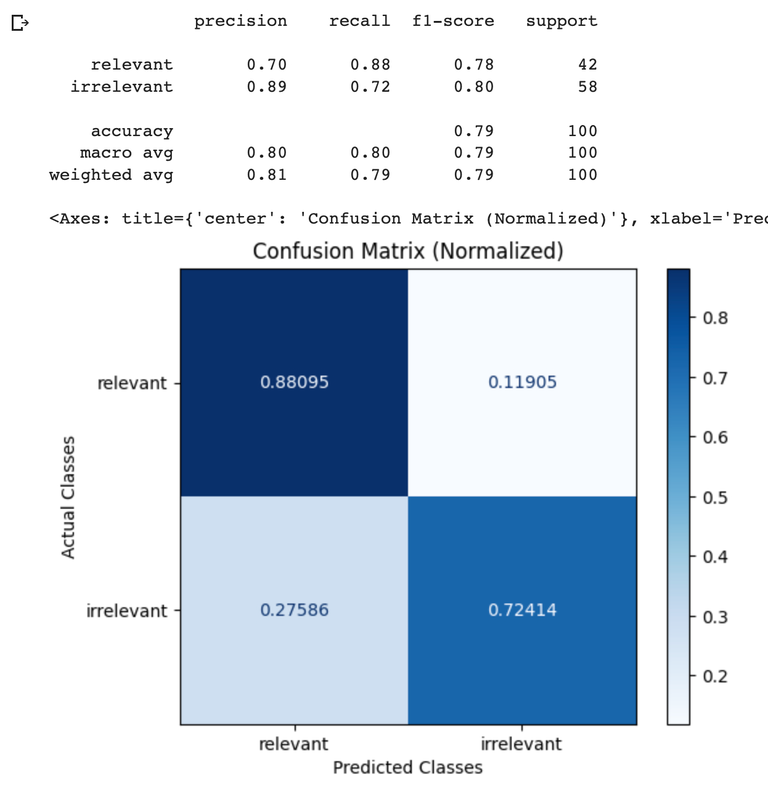 | RAG Eval | GPT-4o | GPT-4 |
| :-------- | :------------------------------------ | :------------------------------------ |
| Precision |
| RAG Eval | GPT-4o | GPT-4 |
| :-------- | :------------------------------------ | :------------------------------------ |
| Precision | 0.60
| 0.70
|
| Recall | 0.77
| 0.88
|
| F1 | 0.67
| 0.78
|
| Throughput | GPT-4 |
| :---------- | :------ |
| 100 Samples | 113 Sec |