> ## Documentation Index
> Fetch the complete documentation index at: https://arizeai-433a7140.mintlify.site/llms.txt
> Use this file to discover all available pages before exploring further.
# Use provider tools
> Use built-in, vendor-specific tools from OpenAI, Anthropic, Google, and Amazon Bedrock with Phoenix prompts
Phoenix prompts support two shapes of tool:
* **Function tools** — normalized, portable tool definitions that work across providers. See [Tools](/docs/phoenix/prompt-engineering/concepts-prompts/prompts-concepts#tools) in the concepts guide.
* **Provider tools** (also called *vendor-specific* or *raw* tools) — opaque JSON payloads that Phoenix forwards to the underlying provider as-is. Use these when you need a built-in capability that the provider hosts (web search, file search, code execution, grounding, computer use) and that doesn't fit the function-tool shape.
This page explains when to reach for a provider tool, how to add one in the Playground, and the JSON shapes for each supported provider.
## Supported provider tools
| Provider | Tools | Jump to |
| -------------------- | ------------------------------------------------------------------------------------------------------------ | --------------------------------------------------------------------------- |
| Anthropic | `web_search`, `web_fetch`, `code_execution`, `tool_search_tool`, `bash`, `text_editor`, `computer`, `memory` | [Built-in tools](#anthropic-%E2%80%94-built-in-tools) |
| OpenAI Responses API | `web_search`, `file_search`, `code_interpreter`, `computer`, `tool_search` | [Built-in tools](#openai-responses-api-%E2%80%94-built-in-tools) |
| Google Gemini | `google_search` | [Google Search grounding](#google-gemini-%E2%80%94-google-search-grounding) |
| Amazon Bedrock | `nova_grounding` | [Nova web grounding](#amazon-bedrock-%E2%80%94-nova-web-grounding) |
## When to use a provider tool
Use a provider tool when:
* You need a built-in capability the provider hosts — for example, search, retrieval, code execution, or computer control.
* You're capturing a span in production that already uses a vendor tool and want Phoenix to round-trip the exact payload back into the Playground.
* You're comfortable being locked to one provider for that prompt version. Provider tools are dropped automatically when you switch the provider or API type, since the JSON shape is provider-specific.
If your tool is a generic function call that any provider could execute, prefer a function tool — it survives provider changes and is portable across SDKs.
## Adding a provider tool in the Playground
1. Open the Playground and select a model that supports the tool you want (Anthropic Claude, an OpenAI Responses-compatible model, Gemini, or Amazon Nova).
2. Click **Add tool**. The JSON editor opens.
3. Paste the provider tool payload (see the per-provider sections below).
4. On save, Phoenix inspects the JSON: if it matches the function-tool shape it's stored as a function tool; otherwise it's stored as a raw provider tool and round-tripped verbatim through the database, GraphQL API, and SDKs.
5. Save the prompt version. You can mix function tools and provider tools on the same prompt.
Switching the provider or API type on a prompt version drops any provider tools attached to it, since the JSON is specific to one provider. Function tools survive provider changes. If you need both, save a new prompt version per provider.
"Open in Playground" on a captured trace preserves provider tools exactly as they were sent to the model — useful when you want to replay a production call and tweak it.
## Anthropic — built-in tools
**Source of truth:** the [Anthropic tool reference](https://platform.claude.com/docs/en/agents-and-tools/tool-use/tool-reference) and per-tool pages linked below. The JSON shapes here mirror those docs — when Anthropic ships a new version, copy the exact payload from their page.
Anthropic exposes a set of hosted (server-executed) and client-executed tools through the Messages API. Phoenix forwards each one as opaque JSON, so any Anthropic tool — current or future — can be attached to a prompt by pasting its definition into the Playground. See the [Anthropic tool reference](https://platform.claude.com/docs/en/agents-and-tools/tool-use/tool-reference) for the full directory and `type`-string versioning rules.
Server tools (executed by Anthropic):
* **`web_search_20250305`** / **`web_search_20260209`** — live web results with citations; the newer version adds dynamic filtering. [Docs](https://platform.claude.com/docs/en/agents-and-tools/tool-use/web-search-tool).
* **`web_fetch_20250910`** / **`web_fetch_20260209`** — retrieve a specific URL and return its content. [Docs](https://platform.claude.com/docs/en/agents-and-tools/tool-use/web-fetch-tool).
* **`code_execution_20250825`** / **`code_execution_20260120`** — sandboxed Python and Bash with file operations; the newer version supports programmatic tool calling. [Docs](https://platform.claude.com/docs/en/agents-and-tools/tool-use/code-execution-tool).
* **`tool_search_tool_regex_20251119`** / **`tool_search_tool_bm25_20251119`** — defer tool loading and let Claude discover tools from a larger catalog at runtime (Anthropic's analogue to OpenAI `tool_search`). [Docs](https://platform.claude.com/docs/en/agents-and-tools/tool-use/tool-search-tool).
Client tools (Anthropic-defined schema; your application executes the call):
* **`bash_20250124`** — shell command execution surface. [Docs](https://platform.claude.com/docs/en/agents-and-tools/tool-use/bash-tool).
* **`text_editor_20250124`** / **`text_editor_20250728`** — file-editing tool; pick the version that matches your model generation. [Docs](https://platform.claude.com/docs/en/agents-and-tools/tool-use/text-editor-tool).
* **`computer_20250124`** / **`computer_20251124`** — screen control via screenshots and actions (beta header required). [Docs](https://platform.claude.com/docs/en/agents-and-tools/tool-use/computer-use-tool).
* **`memory_20250818`** — persistent memory store for long-running agents. [Docs](https://platform.claude.com/docs/en/agents-and-tools/tool-use/memory-tool).
Example: web search with optional fields (`max_uses`, `allowed_domains`, `blocked_domains`, `user_location`):
```json theme={null}
{
"type": "web_search_20250305",
"name": "web_search",
"max_uses": 5
}
```
The bash client tool is added the same way — paste its definition into the Playground tool editor:
```json theme={null}
{
"type": "bash_20250124",
"name": "bash"
}
```
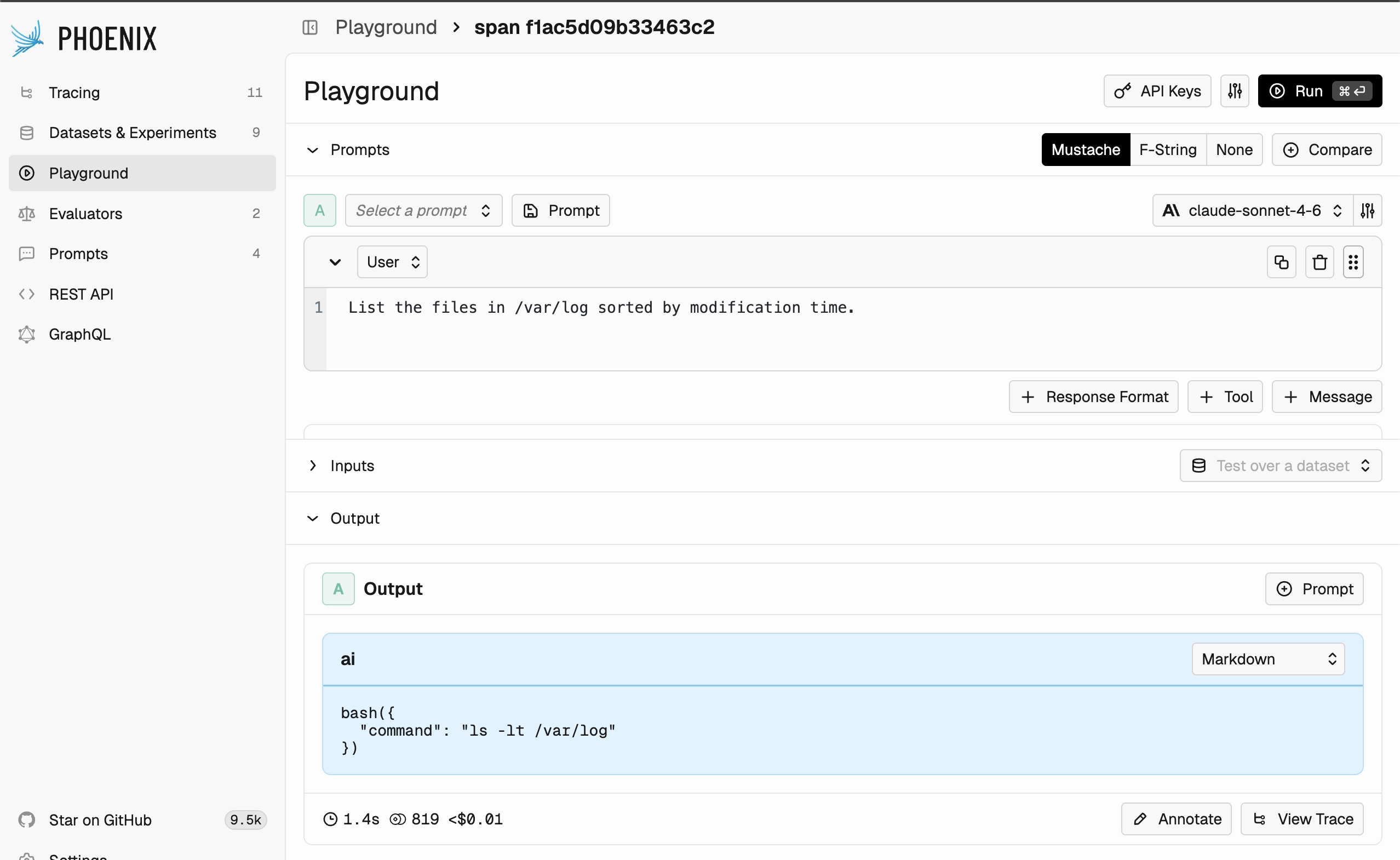 Anthropic's `tool_search_tool_*` works with the `defer_loading: true` flag on individual tool definitions, mirroring OpenAI's `tool_search`. See the [Anthropic tool search guide](https://platform.claude.com/docs/en/agents-and-tools/tool-use/tool-search-tool) for prompt-cache interactions.
## OpenAI Responses API — built-in tools
**Source of truth:** the [OpenAI tools guide](https://platform.openai.com/docs/guides/tools) and per-tool pages linked below. Phoenix only round-trips the JSON — for current fields and model support, consult OpenAI's docs.
The [OpenAI Responses API](https://openai.com/index/new-tools-and-features-in-the-responses-api/) ships a set of hosted tools that the model can invoke without a return trip to your code. Each is added by including a single-key JSON object in the `tools` array.
* **`web_search`** — internet search with citations. [Docs](https://developers.openai.com/api/docs/guides/tools-web-search).
* **`file_search`** — semantic and keyword retrieval over files in a vector store. [Docs](https://developers.openai.com/api/docs/guides/tools-file-search).
* **`code_interpreter`** — sandboxed Python execution for analysis, charts, and math. [Docs](https://platform.openai.com/docs/guides/tools-code-interpreter).
* **`computer`** — UI control through screenshots and actions. [Docs](https://developers.openai.com/api/docs/guides/tools-computer-use).
* **`tool_search`** — defer tool loading and let the model search a larger catalog at runtime. [Docs](https://developers.openai.com/api/docs/guides/tools-tool-search).
Example payload combining two of them:
```json theme={null}
[
{ "type": "web_search" },
{
"type": "file_search",
"vector_store_ids": ["vs_abc123"]
}
]
```
For the full list of hosted tools, see the [OpenAI tools guide](https://platform.openai.com/docs/guides/tools).
### Deferred tool search
`tool_search` lets you attach a large catalog of function tools to a prompt without paying for all of their schemas on every request. Tools you want held back are marked with `"defer_loading": true`; the model then issues a `tool_search` call to pull just the relevant subset into context, preserving the prefix cache by appending the loaded tools at the end. Available on `gpt-5.4` and later Responses-capable models.
Two execution modes are supported:
* **Hosted** (default) — OpenAI matches deferred tools server-side and returns the loaded subset automatically. Add the tool with no extra fields:
```json theme={null}
{ "type": "tool_search" }
```
* **Client** — the model emits a `tool_search_call` and your application returns a `tool_search_output` with the matching tools. Use this when your tool catalog lives outside OpenAI (e.g. an internal registry or MCP server):
```json theme={null}
{
"type": "tool_search",
"execution": "client",
"description": "Find project-specific tools needed to continue the task.",
"parameters": {
"type": "object",
"properties": {
"goal": { "type": "string" }
},
"required": ["goal"],
"additionalProperties": false
}
}
```
To opt a function tool into deferred loading, set `defer_loading` on its definition. Phoenix preserves the field verbatim when round-tripping the prompt:
```json theme={null}
{
"type": "function",
"name": "get_invoice",
"description": "Look up an invoice by ID.",
"defer_loading": true,
"parameters": {
"type": "object",
"properties": { "invoice_id": { "type": "string" } },
"required": ["invoice_id"]
}
}
```
Group deferred tools into namespaces or back them with MCP servers for the largest token savings — OpenAI loads tools at namespace granularity once a search hit lands inside one.
## Google Gemini — Google Search grounding
**Source of truth:** Google's [Grounding with Google Search](https://ai.google.dev/gemini-api/docs/google-search) page. Phoenix passes the tool block through unchanged.
Gemini's [Grounding with Google Search](https://ai.google.dev/gemini-api/docs/google-search) lets the model ground responses in live search results and return `groundingMetadata` with citations. Use the `google_search` tool on current Gemini models; legacy `google_search_retrieval` is only for older Gemini 1.x models.
```json theme={null}
{
"google_search": {}
}
```
The same tool is available on Vertex AI — see [Grounding with Google Search on Vertex AI](https://docs.cloud.google.com/vertex-ai/generative-ai/docs/grounding/grounding-with-google-search).
## Amazon Bedrock — Nova web grounding
**Source of truth:** AWS's [Nova Web Grounding](https://docs.aws.amazon.com/nova/latest/nova2-userguide/web-grounding.html) page. The `systemTool` wrapper is required by Bedrock — Phoenix doesn't add or strip it.
Amazon Nova exposes [Web Grounding](https://docs.aws.amazon.com/nova/latest/nova2-userguide/web-grounding.html) as a built-in tool that retrieves cited public sources. It's wrapped under `systemTool` rather than the regular `toolSpec`.
```json theme={null}
{
"systemTool": {
"name": "nova_grounding"
}
}
```
Anthropic's `tool_search_tool_*` works with the `defer_loading: true` flag on individual tool definitions, mirroring OpenAI's `tool_search`. See the [Anthropic tool search guide](https://platform.claude.com/docs/en/agents-and-tools/tool-use/tool-search-tool) for prompt-cache interactions.
## OpenAI Responses API — built-in tools
**Source of truth:** the [OpenAI tools guide](https://platform.openai.com/docs/guides/tools) and per-tool pages linked below. Phoenix only round-trips the JSON — for current fields and model support, consult OpenAI's docs.
The [OpenAI Responses API](https://openai.com/index/new-tools-and-features-in-the-responses-api/) ships a set of hosted tools that the model can invoke without a return trip to your code. Each is added by including a single-key JSON object in the `tools` array.
* **`web_search`** — internet search with citations. [Docs](https://developers.openai.com/api/docs/guides/tools-web-search).
* **`file_search`** — semantic and keyword retrieval over files in a vector store. [Docs](https://developers.openai.com/api/docs/guides/tools-file-search).
* **`code_interpreter`** — sandboxed Python execution for analysis, charts, and math. [Docs](https://platform.openai.com/docs/guides/tools-code-interpreter).
* **`computer`** — UI control through screenshots and actions. [Docs](https://developers.openai.com/api/docs/guides/tools-computer-use).
* **`tool_search`** — defer tool loading and let the model search a larger catalog at runtime. [Docs](https://developers.openai.com/api/docs/guides/tools-tool-search).
Example payload combining two of them:
```json theme={null}
[
{ "type": "web_search" },
{
"type": "file_search",
"vector_store_ids": ["vs_abc123"]
}
]
```
For the full list of hosted tools, see the [OpenAI tools guide](https://platform.openai.com/docs/guides/tools).
### Deferred tool search
`tool_search` lets you attach a large catalog of function tools to a prompt without paying for all of their schemas on every request. Tools you want held back are marked with `"defer_loading": true`; the model then issues a `tool_search` call to pull just the relevant subset into context, preserving the prefix cache by appending the loaded tools at the end. Available on `gpt-5.4` and later Responses-capable models.
Two execution modes are supported:
* **Hosted** (default) — OpenAI matches deferred tools server-side and returns the loaded subset automatically. Add the tool with no extra fields:
```json theme={null}
{ "type": "tool_search" }
```
* **Client** — the model emits a `tool_search_call` and your application returns a `tool_search_output` with the matching tools. Use this when your tool catalog lives outside OpenAI (e.g. an internal registry or MCP server):
```json theme={null}
{
"type": "tool_search",
"execution": "client",
"description": "Find project-specific tools needed to continue the task.",
"parameters": {
"type": "object",
"properties": {
"goal": { "type": "string" }
},
"required": ["goal"],
"additionalProperties": false
}
}
```
To opt a function tool into deferred loading, set `defer_loading` on its definition. Phoenix preserves the field verbatim when round-tripping the prompt:
```json theme={null}
{
"type": "function",
"name": "get_invoice",
"description": "Look up an invoice by ID.",
"defer_loading": true,
"parameters": {
"type": "object",
"properties": { "invoice_id": { "type": "string" } },
"required": ["invoice_id"]
}
}
```
Group deferred tools into namespaces or back them with MCP servers for the largest token savings — OpenAI loads tools at namespace granularity once a search hit lands inside one.
## Google Gemini — Google Search grounding
**Source of truth:** Google's [Grounding with Google Search](https://ai.google.dev/gemini-api/docs/google-search) page. Phoenix passes the tool block through unchanged.
Gemini's [Grounding with Google Search](https://ai.google.dev/gemini-api/docs/google-search) lets the model ground responses in live search results and return `groundingMetadata` with citations. Use the `google_search` tool on current Gemini models; legacy `google_search_retrieval` is only for older Gemini 1.x models.
```json theme={null}
{
"google_search": {}
}
```
The same tool is available on Vertex AI — see [Grounding with Google Search on Vertex AI](https://docs.cloud.google.com/vertex-ai/generative-ai/docs/grounding/grounding-with-google-search).
## Amazon Bedrock — Nova web grounding
**Source of truth:** AWS's [Nova Web Grounding](https://docs.aws.amazon.com/nova/latest/nova2-userguide/web-grounding.html) page. The `systemTool` wrapper is required by Bedrock — Phoenix doesn't add or strip it.
Amazon Nova exposes [Web Grounding](https://docs.aws.amazon.com/nova/latest/nova2-userguide/web-grounding.html) as a built-in tool that retrieves cited public sources. It's wrapped under `systemTool` rather than the regular `toolSpec`.
```json theme={null}
{
"systemTool": {
"name": "nova_grounding"
}
}
```
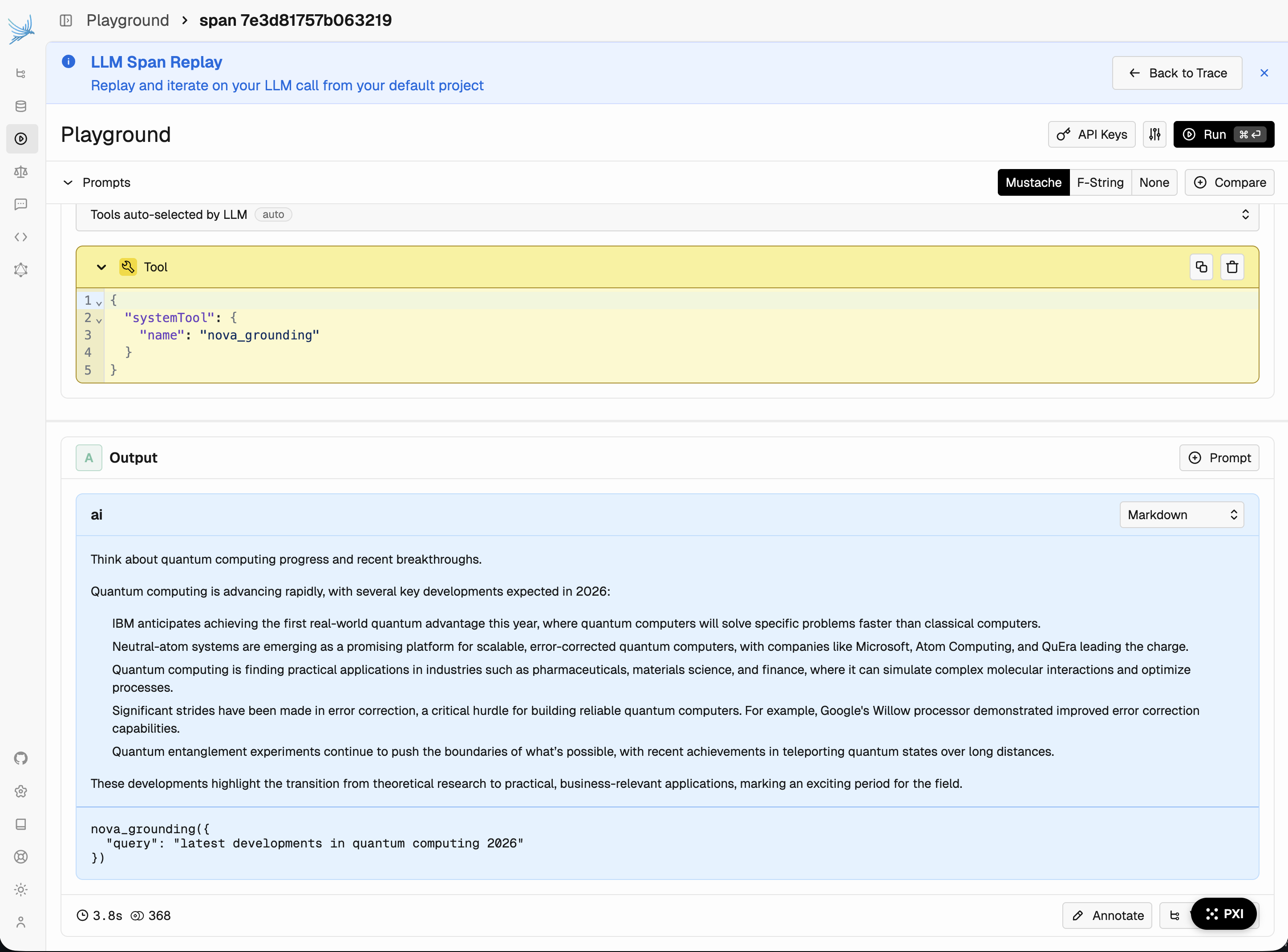 Available on the Amazon Nova model family in `us-east-1`, `us-east-2`, and `us-west-2`. See the [AWS announcement](https://aws.amazon.com/blogs/aws/build-more-accurate-ai-applications-with-amazon-nova-web-grounding/) for capabilities and billing.
Don't include `nova_grounding` as a `toolSpec` entry — Bedrock returns an error. Phoenix preserves your JSON exactly, so the `systemTool` wrapper above is required.
## Pulling and using a prompt with provider tools
The Phoenix client libraries pass provider tools through to the target SDK unchanged. Pull the prompt as you normally would and forward the formatted parameters to the provider client. See [Use a prompt](/docs/phoenix/prompt-engineering/how-to-prompts/using-a-prompt) for the full pull-and-format workflow.
```python theme={null}
from openai import OpenAI
from phoenix.client import Client
client = Client()
prompt = client.prompts.get(prompt_identifier="research-assistant", tag="staging")
formatted_prompt = prompt.format(variables={"question": "What's new in LLM evals?"})
# Provider tools (e.g. {"type": "web_search"}) are forwarded as-is.
oai = OpenAI()
response = oai.responses.create(**formatted_prompt)
```
```typescript theme={null}
import { getPrompt, toSDK } from "@arizeai/phoenix-client/prompts";
import OpenAI from "openai";
const openai = new OpenAI();
const prompt = await getPrompt({
prompt: { name: "research-assistant", tag: "staging" },
});
const params = toSDK({
sdk: "openai",
prompt,
variables: { question: "What's new in LLM evals?" },
});
// Provider tools round-trip through toSDK without modification.
const response = await openai.responses.create(params);
```
## Limitations
* Provider tools are dropped when you change the provider or API type on a prompt version. Function tools are kept.
* Provider tools are not allowed on **evaluator prompts** — evaluators rely on the normalized function-tool output schema.
* Phoenix validates only that the payload is a non-empty JSON object; semantic validity (model support, regional availability, required fields) is delegated to the provider.
Available on the Amazon Nova model family in `us-east-1`, `us-east-2`, and `us-west-2`. See the [AWS announcement](https://aws.amazon.com/blogs/aws/build-more-accurate-ai-applications-with-amazon-nova-web-grounding/) for capabilities and billing.
Don't include `nova_grounding` as a `toolSpec` entry — Bedrock returns an error. Phoenix preserves your JSON exactly, so the `systemTool` wrapper above is required.
## Pulling and using a prompt with provider tools
The Phoenix client libraries pass provider tools through to the target SDK unchanged. Pull the prompt as you normally would and forward the formatted parameters to the provider client. See [Use a prompt](/docs/phoenix/prompt-engineering/how-to-prompts/using-a-prompt) for the full pull-and-format workflow.
```python theme={null}
from openai import OpenAI
from phoenix.client import Client
client = Client()
prompt = client.prompts.get(prompt_identifier="research-assistant", tag="staging")
formatted_prompt = prompt.format(variables={"question": "What's new in LLM evals?"})
# Provider tools (e.g. {"type": "web_search"}) are forwarded as-is.
oai = OpenAI()
response = oai.responses.create(**formatted_prompt)
```
```typescript theme={null}
import { getPrompt, toSDK } from "@arizeai/phoenix-client/prompts";
import OpenAI from "openai";
const openai = new OpenAI();
const prompt = await getPrompt({
prompt: { name: "research-assistant", tag: "staging" },
});
const params = toSDK({
sdk: "openai",
prompt,
variables: { question: "What's new in LLM evals?" },
});
// Provider tools round-trip through toSDK without modification.
const response = await openai.responses.create(params);
```
## Limitations
* Provider tools are dropped when you change the provider or API type on a prompt version. Function tools are kept.
* Provider tools are not allowed on **evaluator prompts** — evaluators rely on the normalized function-tool output schema.
* Phoenix validates only that the payload is a non-empty JSON object; semantic validity (model support, regional availability, required fields) is delegated to the provider.