> ## Documentation Index
> Fetch the complete documentation index at: https://arizeai-433a7140.mintlify.site/llms.txt
> Use this file to discover all available pages before exploring further.
# 08.17.2026: Trace Filter Expressions and Analytics SQL
> Filter the traces table with a full expression language, ask Phoenix arbitrary analytical questions with read-only SQL over MCP, read annotation details on hover, and filter spans by PXI approval decisions.
# Trace Filter Expressions
August 17, 2026
**Available in arize-phoenix 20.3.0+**
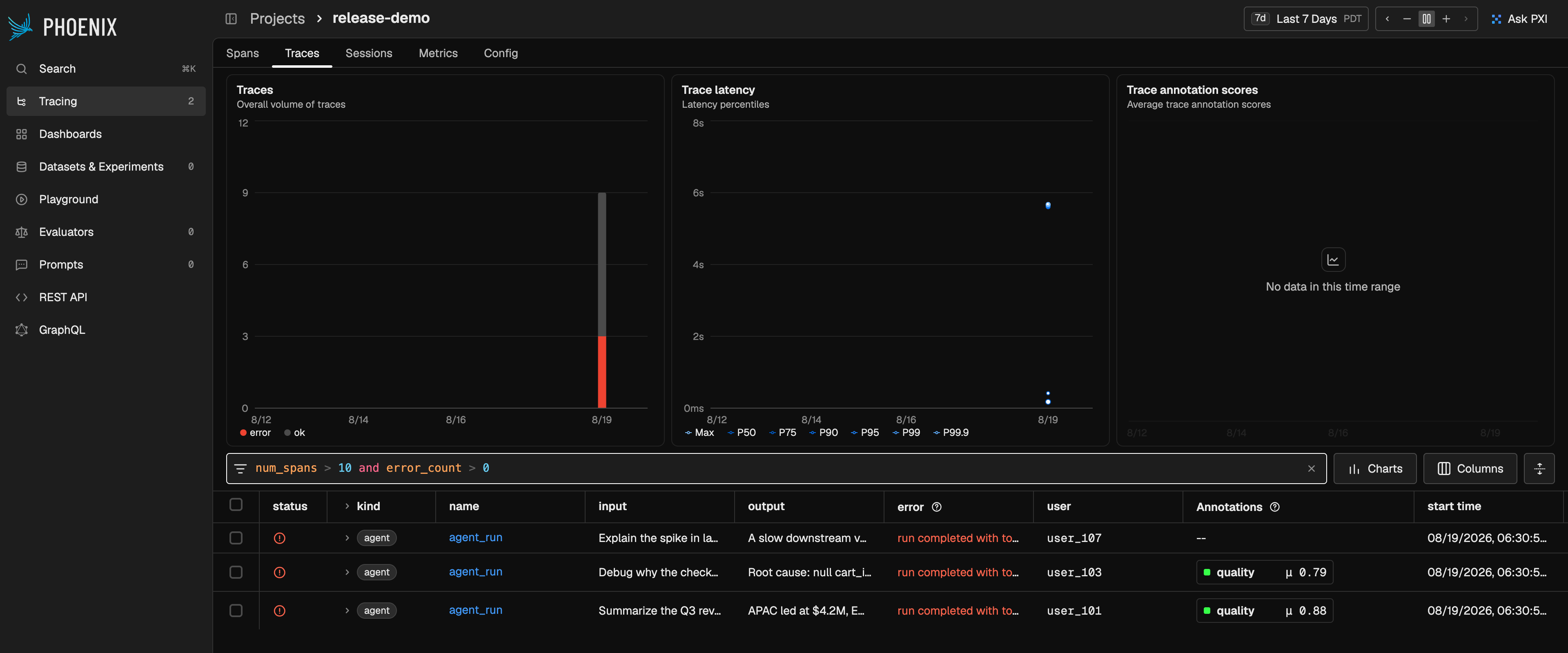
The traces table now takes its own filter expression, joining the span and session filter languages.
Filter on a trace's own fields, on values rolled up from its spans, or on anything inside it with a
comprehension — instead of filtering spans and inferring which traces they belong to.
 * **Trace intrinsics** — `trace_id`, `start_time`, `end_time`, and `latency_ms`.
* **Span rollups, never null** — `num_spans`, `error_count`, `token_count_prompt`,
`token_count_completion`, `token_count_total`, `prompt_cost`, `completion_cost`, `total_cost`,
`tool_span_count`, and `llm_span_count` all read `0` when there is no matching data.
* **Root-span reach-through** — `input`, `output`, `attributes["llm.model_name"]`, `metadata["key"]`,
and `user.id` read the trace's root span.
* **Comprehensions over what's inside** — iterate `spans`, `trace_annotations`, `span_annotations`,
and `span_cost_details` with `any`, `all`, `len`, `max`, `min`, and `sum`.
* **Topology** — a span exposes `children`, `parent_span`, and `siblings`, so parent-child shapes are
expressible directly.
* **Strict names** — unlike span filters, an unknown name is rejected with a "did you mean"
suggestion rather than silently read as an attribute path that matches nothing.
```python theme={"theme":{"light":"github-light-default","dark":"github-dark-default"}}
num_spans > 10 and error_count > 0
```
```python theme={"theme":{"light":"github-light-default","dark":"github-dark-default"}}
max(span.latency_ms for span in spans) > 5_000
```
```python theme={"theme":{"light":"github-light-default","dark":"github-dark-default"}}
any(span.parent_span.span_kind == "LLM" and span.span_kind == "TOOL" for span in spans)
```
```python theme={"theme":{"light":"github-light-default","dark":"github-dark-default"}}
trace_annotations["quality"].score < 0.5 and total_cost > 0.25
```
The filter field completes field names by category and inserts working snippets with the loop
variable already named, so a comprehension arrives ready to edit rather than ready to type.
Links carrying the old span-level filter still work: opening one on the Traces tab raises a notice
that traces now use trace-level filters, and the span filter stays applied on the Spans tab.
The full reference for span, trace, and session filters
# Read-Only Analytics SQL over MCP
August 13, 2026
**Available in arize-phoenix 20.2.0+**
Phoenix's built-in MCP server gains two tools that let an agent answer questions no fixed endpoint
anticipates — which model has the worst p95 latency this week, which prompts produce the most
retries — with one query instead of paging through spans and aggregating them itself.
* **`describeSqlSchema`** publishes the queryable schema as DDL, with the curation a database cannot
supply: which area a table belongs to (`telemetry`, `datasets`, `experiments`), what one row means,
how to reach the project, which JSON paths are populated, and — at `detail="full"` — the running
deployment's expression indexes, read live from the catalog.
* **`executeSql`** runs one read-only statement and returns columns and rows, plus the limits that
applied. `validate_only=True` checks a statement without running it.
* **Bounded by capability, not identity** — read-only statements only, 500 rows by default and 5000
at most, byte caps per row and per response, a statement deadline, and a bounded execution queue.
Admission is an allowlist over the parsed statement tree, so casing, comments, and nesting cannot
smuggle anything past it.
* **Both backends declared, not hidden** — SQLite and PostgreSQL are supported, and a refusal names
the spelling that works on the backend you're on (`percentile(x, p)` on SQLite,
`percentile_cont(p) WITHIN GROUP (ORDER BY x)` on PostgreSQL).
* **Two columns Phoenix adds** — `latency_ms` and `graphql_node_id` are computed per row on both
backends; `graphql_node_id` is the same ID the Phoenix UI and REST API show.
On PostgreSQL:
```sql theme={"theme":{"light":"github-light-default","dark":"github-dark-default"}}
SELECT attributes -> 'llm' ->> 'model_name' AS model,
percentile_cont(0.95) WITHIN GROUP (ORDER BY latency_ms) AS p95_ms,
count(*) AS spans
FROM spans
WHERE span_kind = 'LLM'
AND start_time >= '2026-08-10T00:00:00Z'
GROUP BY 1
ORDER BY p95_ms DESC
```
The tools live on the same `/mcp` endpoint as the rest of the Phoenix MCP surface, which ships
enabled by default. Point any MCP client at it and the tools appear alongside the existing ones.
Connect an MCP client to the Phoenix server's built-in endpoint
# Annotation Details on Hover
August 17, 2026
**Available in arize-phoenix 20.3.0+**
Hover an annotation token anywhere it appears — spans, traces, and sessions tables included — and
Phoenix shows every annotation recorded under that name without leaving the row.
* **Every annotation, not just the summary** — score, label, and explanation for each one, with the
mean score in the header colored by the config's optimization direction.
* **Who wrote it** — the annotator kind (human or LLM) and the author.
* **Filter from the popover** — inline filter chips append the matching condition to the table's
filter, so a suspicious label becomes a filtered table in one press.
* **Reachable without a mouse** — the trigger is a button, so keyboard focus and long press open the
same popover a hover does.
Record and review feedback on spans, traces, and sessions
# Approval Decisions on PXI Tool Spans
August 13, 2026
**Available in arize-phoenix 20.2.0+**
Tool calls that PXI gated behind an approval prompt now record the verdict on the emitted TOOL span
as `pxi.approval.decision` and `pxi.approval.source`, so you can filter for what a user accepted or
rejected instead of fetching every TOOL span and reading its output.
```python theme={"theme":{"light":"github-light-default","dark":"github-dark-default"}}
from phoenix.client import Client
from phoenix.client.types.spans import SpanQuery
query = SpanQuery().where("attributes['pxi.approval.decision'] == 'rejected'")
rejected = Client().spans.get_spans_dataframe(query=query, project_identifier="my-project")
```
The same expression works in the filter bar above the spans and traces tables.
Calls that were cancelled or are still awaiting a decision stay unmarked, so the attribute's absence
is meaningful — consumers can skip them rather than guess.
# Also in This Release
August 13 – August 17, 2026
**Available in arize-phoenix 20.2.0–20.3.0**
* **Dialogs behave the same everywhere** — every viewport dialog dismisses from its backdrop, Escape
closes the innermost overlay first, and focus returns where it started (arize-phoenix 20.3.0+).
* **The PXI assistant stays reachable while a dialog is open**, and pressing its rail never dismisses
the dialog underneath (arize-phoenix 20.3.0+).
* **Tooltips no longer swallow clicks** aimed at the controls beneath them, and menus keep the page
scrollable while open (arize-phoenix 20.3.0+).
* **Refreshed built-in token prices** so cost tracking stays accurate for the current model lineup
(arize-phoenix 20.2.0+ and 20.2.1+).
* **Trace intrinsics** — `trace_id`, `start_time`, `end_time`, and `latency_ms`.
* **Span rollups, never null** — `num_spans`, `error_count`, `token_count_prompt`,
`token_count_completion`, `token_count_total`, `prompt_cost`, `completion_cost`, `total_cost`,
`tool_span_count`, and `llm_span_count` all read `0` when there is no matching data.
* **Root-span reach-through** — `input`, `output`, `attributes["llm.model_name"]`, `metadata["key"]`,
and `user.id` read the trace's root span.
* **Comprehensions over what's inside** — iterate `spans`, `trace_annotations`, `span_annotations`,
and `span_cost_details` with `any`, `all`, `len`, `max`, `min`, and `sum`.
* **Topology** — a span exposes `children`, `parent_span`, and `siblings`, so parent-child shapes are
expressible directly.
* **Strict names** — unlike span filters, an unknown name is rejected with a "did you mean"
suggestion rather than silently read as an attribute path that matches nothing.
```python theme={"theme":{"light":"github-light-default","dark":"github-dark-default"}}
num_spans > 10 and error_count > 0
```
```python theme={"theme":{"light":"github-light-default","dark":"github-dark-default"}}
max(span.latency_ms for span in spans) > 5_000
```
```python theme={"theme":{"light":"github-light-default","dark":"github-dark-default"}}
any(span.parent_span.span_kind == "LLM" and span.span_kind == "TOOL" for span in spans)
```
```python theme={"theme":{"light":"github-light-default","dark":"github-dark-default"}}
trace_annotations["quality"].score < 0.5 and total_cost > 0.25
```
The filter field completes field names by category and inserts working snippets with the loop
variable already named, so a comprehension arrives ready to edit rather than ready to type.
Links carrying the old span-level filter still work: opening one on the Traces tab raises a notice
that traces now use trace-level filters, and the span filter stays applied on the Spans tab.
The full reference for span, trace, and session filters
# Read-Only Analytics SQL over MCP
August 13, 2026
**Available in arize-phoenix 20.2.0+**
Phoenix's built-in MCP server gains two tools that let an agent answer questions no fixed endpoint
anticipates — which model has the worst p95 latency this week, which prompts produce the most
retries — with one query instead of paging through spans and aggregating them itself.
* **`describeSqlSchema`** publishes the queryable schema as DDL, with the curation a database cannot
supply: which area a table belongs to (`telemetry`, `datasets`, `experiments`), what one row means,
how to reach the project, which JSON paths are populated, and — at `detail="full"` — the running
deployment's expression indexes, read live from the catalog.
* **`executeSql`** runs one read-only statement and returns columns and rows, plus the limits that
applied. `validate_only=True` checks a statement without running it.
* **Bounded by capability, not identity** — read-only statements only, 500 rows by default and 5000
at most, byte caps per row and per response, a statement deadline, and a bounded execution queue.
Admission is an allowlist over the parsed statement tree, so casing, comments, and nesting cannot
smuggle anything past it.
* **Both backends declared, not hidden** — SQLite and PostgreSQL are supported, and a refusal names
the spelling that works on the backend you're on (`percentile(x, p)` on SQLite,
`percentile_cont(p) WITHIN GROUP (ORDER BY x)` on PostgreSQL).
* **Two columns Phoenix adds** — `latency_ms` and `graphql_node_id` are computed per row on both
backends; `graphql_node_id` is the same ID the Phoenix UI and REST API show.
On PostgreSQL:
```sql theme={"theme":{"light":"github-light-default","dark":"github-dark-default"}}
SELECT attributes -> 'llm' ->> 'model_name' AS model,
percentile_cont(0.95) WITHIN GROUP (ORDER BY latency_ms) AS p95_ms,
count(*) AS spans
FROM spans
WHERE span_kind = 'LLM'
AND start_time >= '2026-08-10T00:00:00Z'
GROUP BY 1
ORDER BY p95_ms DESC
```
The tools live on the same `/mcp` endpoint as the rest of the Phoenix MCP surface, which ships
enabled by default. Point any MCP client at it and the tools appear alongside the existing ones.
Connect an MCP client to the Phoenix server's built-in endpoint
# Annotation Details on Hover
August 17, 2026
**Available in arize-phoenix 20.3.0+**
Hover an annotation token anywhere it appears — spans, traces, and sessions tables included — and
Phoenix shows every annotation recorded under that name without leaving the row.
* **Every annotation, not just the summary** — score, label, and explanation for each one, with the
mean score in the header colored by the config's optimization direction.
* **Who wrote it** — the annotator kind (human or LLM) and the author.
* **Filter from the popover** — inline filter chips append the matching condition to the table's
filter, so a suspicious label becomes a filtered table in one press.
* **Reachable without a mouse** — the trigger is a button, so keyboard focus and long press open the
same popover a hover does.
Record and review feedback on spans, traces, and sessions
# Approval Decisions on PXI Tool Spans
August 13, 2026
**Available in arize-phoenix 20.2.0+**
Tool calls that PXI gated behind an approval prompt now record the verdict on the emitted TOOL span
as `pxi.approval.decision` and `pxi.approval.source`, so you can filter for what a user accepted or
rejected instead of fetching every TOOL span and reading its output.
```python theme={"theme":{"light":"github-light-default","dark":"github-dark-default"}}
from phoenix.client import Client
from phoenix.client.types.spans import SpanQuery
query = SpanQuery().where("attributes['pxi.approval.decision'] == 'rejected'")
rejected = Client().spans.get_spans_dataframe(query=query, project_identifier="my-project")
```
The same expression works in the filter bar above the spans and traces tables.
Calls that were cancelled or are still awaiting a decision stay unmarked, so the attribute's absence
is meaningful — consumers can skip them rather than guess.
# Also in This Release
August 13 – August 17, 2026
**Available in arize-phoenix 20.2.0–20.3.0**
* **Dialogs behave the same everywhere** — every viewport dialog dismisses from its backdrop, Escape
closes the innermost overlay first, and focus returns where it started (arize-phoenix 20.3.0+).
* **The PXI assistant stays reachable while a dialog is open**, and pressing its rail never dismisses
the dialog underneath (arize-phoenix 20.3.0+).
* **Tooltips no longer swallow clicks** aimed at the controls beneath them, and menus keep the page
scrollable while open (arize-phoenix 20.3.0+).
* **Refreshed built-in token prices** so cost tracking stays accurate for the current model lineup
(arize-phoenix 20.2.0+ and 20.2.1+).