> ## Documentation Index
> Fetch the complete documentation index at: https://arizeai-433a7140.mintlify.site/llms.txt
> Use this file to discover all available pages before exploring further.
# 09.08.2026: Harbor Plugin for Agent Benchmarks
> Record Harbor agent benchmark jobs in Phoenix as datasets and experiments, with verifier rewards as evaluations and ATIF trajectories as traces.
**Available in arize-phoenix-client 3.4.0+, with trajectory traces in 3.5.0+**
Phoenix now ships a job plugin for [Harbor](https://harborframework.com/). Select it on a Harbor run
and the job lands in Phoenix as a dataset, one experiment per resolved agent configuration, a run per
trial, and every verifier reward as a named evaluation. No tracing code goes inside the sandbox.
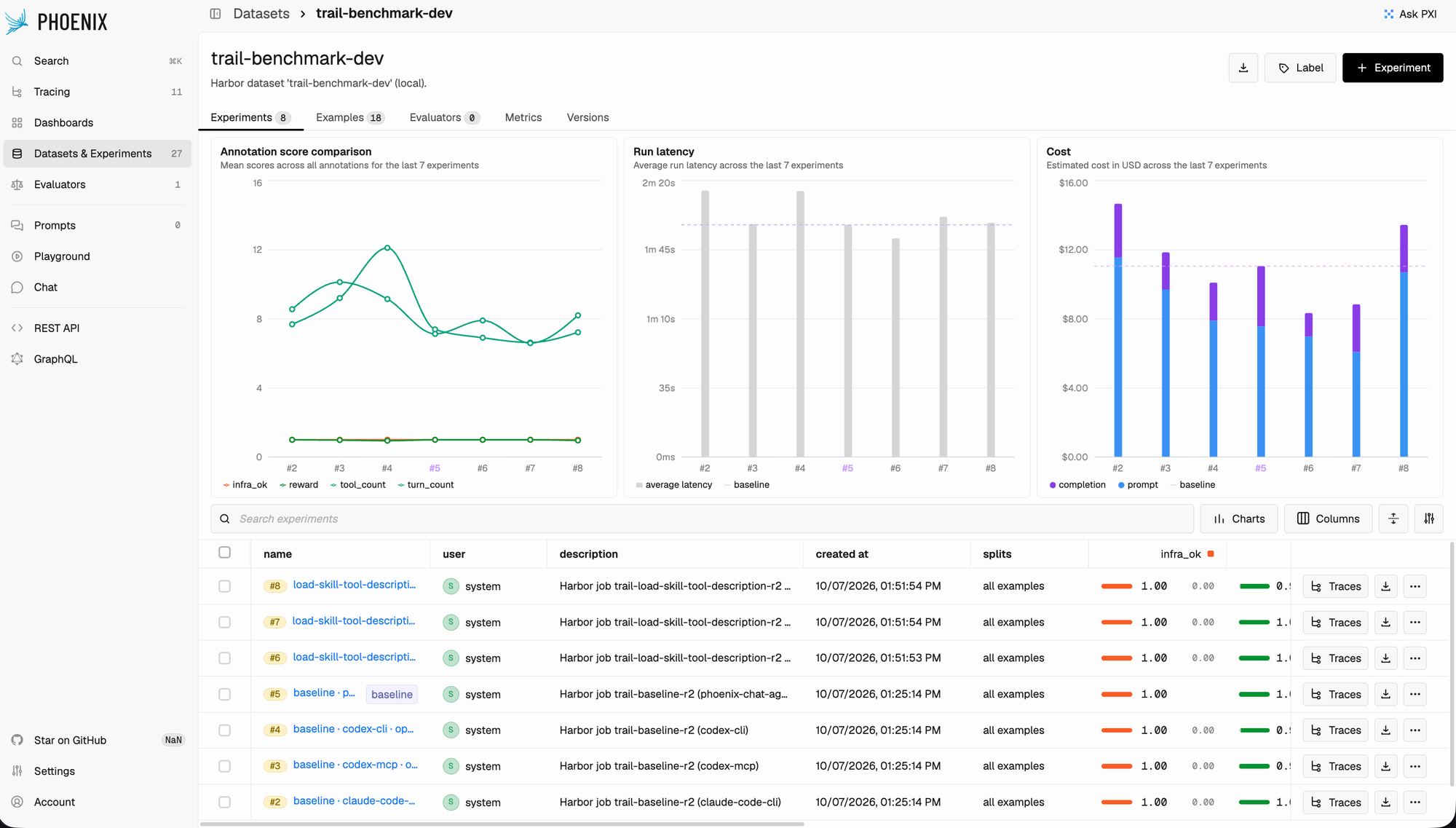 ## Rewards Become Scores
reward distributions show up in experiment comparison. An `infra_ok` evaluation helps distinguish
low task scores from execution errors.
health, which tells a failed agent apart from a broken sandbox.
## Rewards Become Scores
reward distributions show up in experiment comparison. An `infra_ok` evaluation helps distinguish
low task scores from execution errors.
health, which tells a failed agent apart from a broken sandbox.
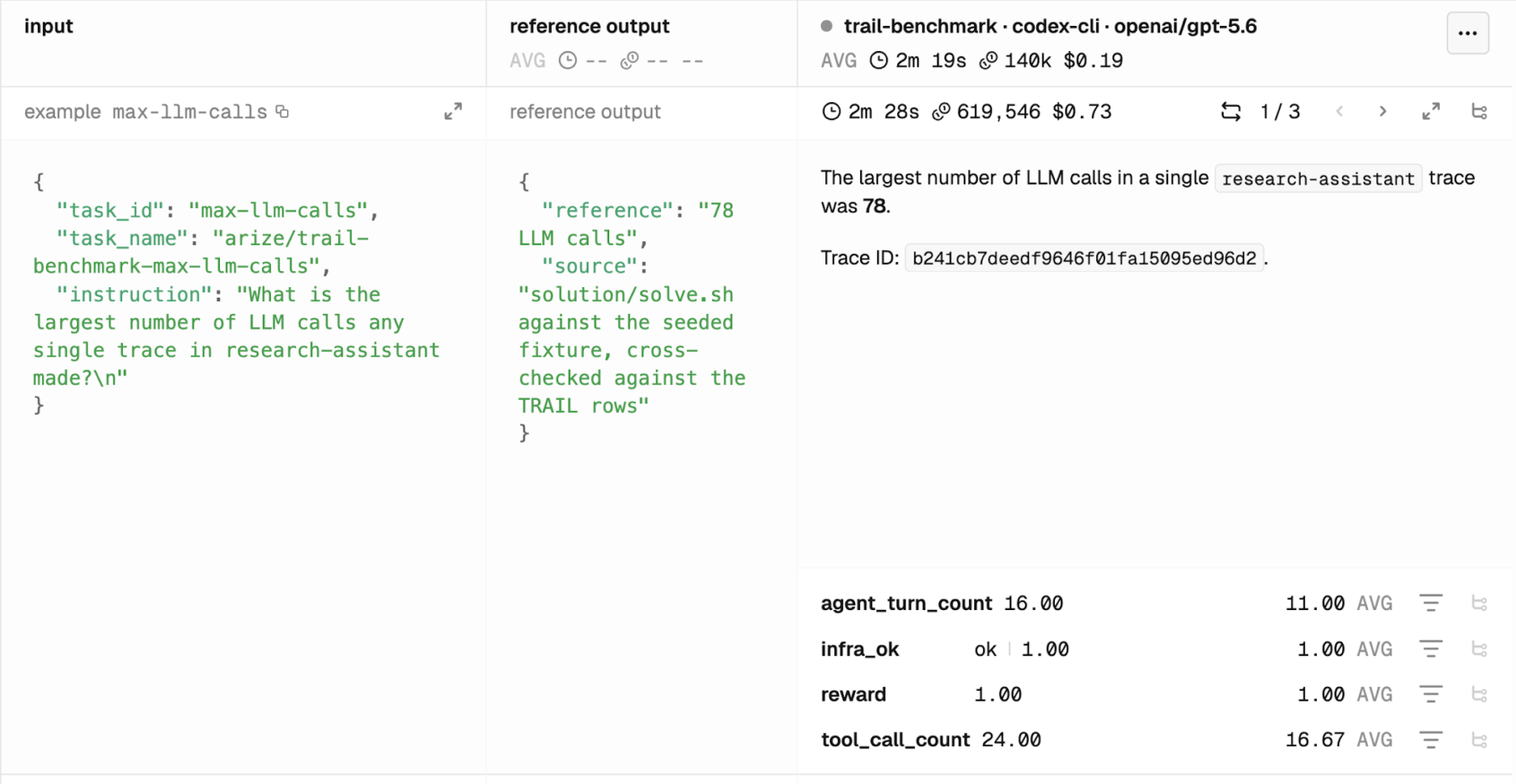 ## Trajectories Become Traces
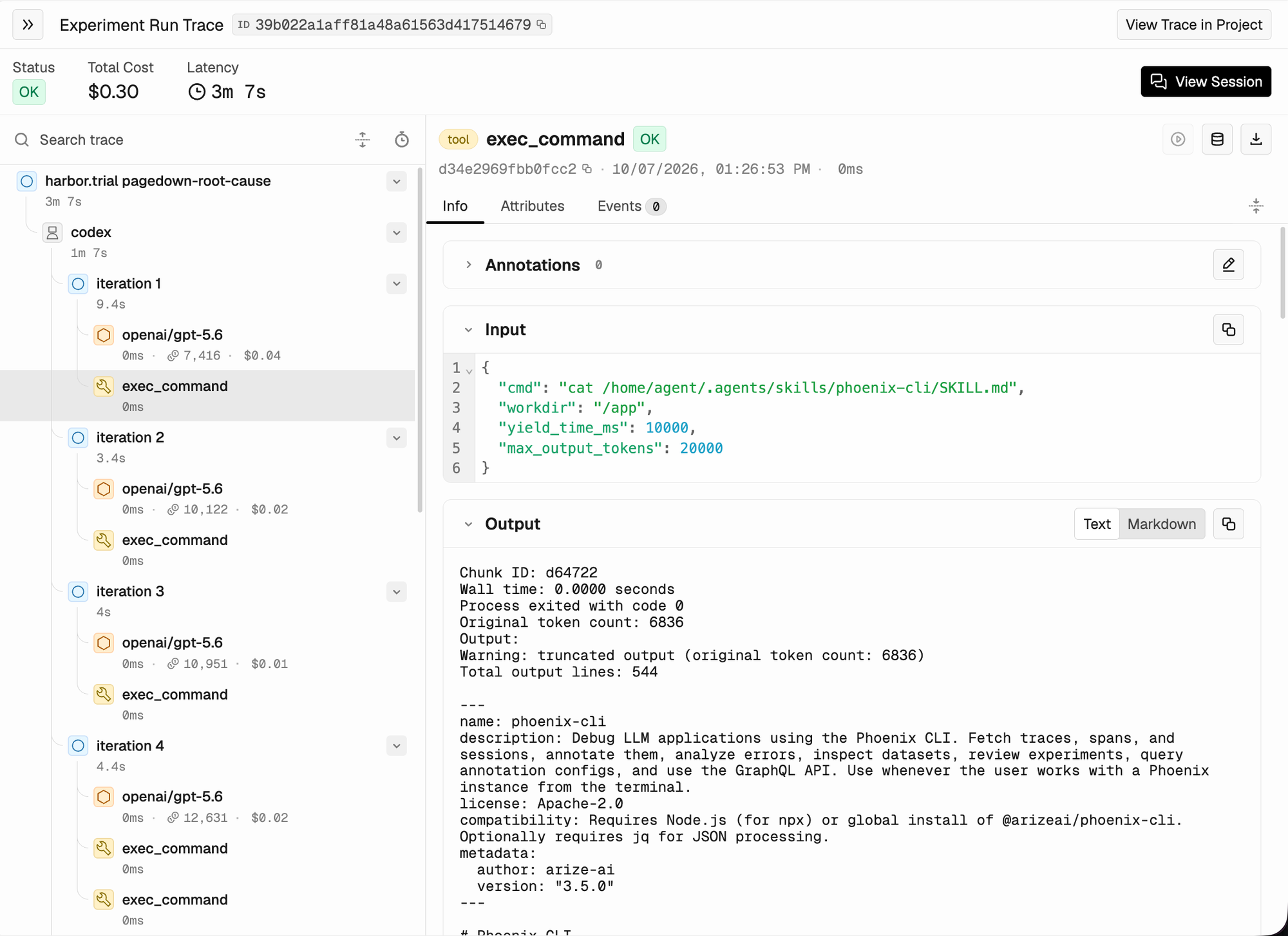 * **`trace_mode="atif"` is the default.** The plugin reads the saved trajectory after the final trial
attempt and converts it into one trace and one session, with AGENT, LLM, and TOOL spans under a
`harbor.trial` root. A multi-step trial adds a span for each attempted step, and
context-management operations appear as `compaction` spans.
* **Tracing never changes a score.** If the agent saves no valid trajectory, the plugin logs a
warning and records the run and its evaluations without a trace. Pass `trace_mode=null` on the
Harbor command line to turn tracing off entirely.
* **The sandbox stays offline.** The plugin converts trajectories after the trial, so the agent's
environment needs no Phoenix endpoint and no Phoenix credentials.
## Run a Job with the Plugin
Install Harbor and the plugin into the same Python environment:
```bash theme={"theme":{"light":"github-light-default","dark":"github-dark-default"}}
uv pip install "arize-phoenix-client[harbor]"
```
The plugin registers under the name `arize-phoenix`, so a Harbor run picks it up directly:
```bash theme={"theme":{"light":"github-light-default","dark":"github-dark-default"}}
harbor run \
-d terminal-bench/terminal-bench-2 \
-a terminus-2 \
-m openai/gpt-5-mini \
--plugin arize-phoenix \
--yes
```
Configure it in Python when you want the dataset name or the naming template under version control:
```python theme={"theme":{"light":"github-light-default","dark":"github-dark-default"}}
from phoenix.client.harbor import PhoenixJobPlugin
plugin = PhoenixJobPlugin(
dataset="terminal-bench",
experiment_name_template="{job.name} · {agent.name} · {agent.model}",
trace_mode="atif",
)
```
* **Experiment names follow a template.** `experiment_name_template` accepts fields like
`{job.name}`, `{agent.name}`, `{agent.model}`, and `{agent.short_digest}`, and
* **Resuming the same Harbor job** reuses its experiments without duplicating recorded runs.
* **Resuming is idempotent**, so a re-run adds to the same experiment instead of duplicating it.
The plugin requires Harbor 0.21.0+, Python 3.12+, and Phoenix server 15.0+. Endpoint and API key fall back to
The plugin requires Harbor 0.21.0+ on Python 3.12+. Endpoint and API key fall back to
`PHOENIX_COLLECTOR_ENDPOINT` and `PHOENIX_API_KEY`.
Install the plugin, map its objects, and read its scores correctly
The trajectory format the plugin converts
* **`trace_mode="atif"` is the default.** The plugin reads the saved trajectory after the final trial
attempt and converts it into one trace and one session, with AGENT, LLM, and TOOL spans under a
`harbor.trial` root. A multi-step trial adds a span for each attempted step, and
context-management operations appear as `compaction` spans.
* **Tracing never changes a score.** If the agent saves no valid trajectory, the plugin logs a
warning and records the run and its evaluations without a trace. Pass `trace_mode=null` on the
Harbor command line to turn tracing off entirely.
* **The sandbox stays offline.** The plugin converts trajectories after the trial, so the agent's
environment needs no Phoenix endpoint and no Phoenix credentials.
## Run a Job with the Plugin
Install Harbor and the plugin into the same Python environment:
```bash theme={"theme":{"light":"github-light-default","dark":"github-dark-default"}}
uv pip install "arize-phoenix-client[harbor]"
```
The plugin registers under the name `arize-phoenix`, so a Harbor run picks it up directly:
```bash theme={"theme":{"light":"github-light-default","dark":"github-dark-default"}}
harbor run \
-d terminal-bench/terminal-bench-2 \
-a terminus-2 \
-m openai/gpt-5-mini \
--plugin arize-phoenix \
--yes
```
Configure it in Python when you want the dataset name or the naming template under version control:
```python theme={"theme":{"light":"github-light-default","dark":"github-dark-default"}}
from phoenix.client.harbor import PhoenixJobPlugin
plugin = PhoenixJobPlugin(
dataset="terminal-bench",
experiment_name_template="{job.name} · {agent.name} · {agent.model}",
trace_mode="atif",
)
```
* **Experiment names follow a template.** `experiment_name_template` accepts fields like
`{job.name}`, `{agent.name}`, `{agent.model}`, and `{agent.short_digest}`, and
* **Resuming the same Harbor job** reuses its experiments without duplicating recorded runs.
* **Resuming is idempotent**, so a re-run adds to the same experiment instead of duplicating it.
The plugin requires Harbor 0.21.0+, Python 3.12+, and Phoenix server 15.0+. Endpoint and API key fall back to
The plugin requires Harbor 0.21.0+ on Python 3.12+. Endpoint and API key fall back to
`PHOENIX_COLLECTOR_ENDPOINT` and `PHOENIX_API_KEY`.
Install the plugin, map its objects, and read its scores correctly
The trajectory format the plugin converts