Follow with Complete Python Notebook

Why Create a Dataset?

In AI application development, quick iteration can mask regressions or blind spots in quality. Prompt tweaks, model swaps, or architectural changes may seem better in isolation, but without systematic evaluation it’s just guesswork. That’s where datasets come in: they act as structured collections of representative examples that you care about and want to systematically test your application against. A dataset is your definition of the test cases that matter as your system evolves. Each example can capture the input that your application will receive, an expected output, and any metadata such as tags, error types, or model parameters. Datasets provide a reliable foundation for evaluating, tracking, and improving your AI workflows.

What Should Your Dataset Contain?

The ideal dataset reflects the core behaviors you want your application to get right. Consider including:
  • Normal-case examples that represent typical user interactions.
  • Edge cases where your application historically struggled.
  • Flagged or failed runs pulled from logs, user feedback, or tracing. These illustrate concrete failure modes you want to improve.
Some useful dataset types you might build include:
  • Golden datasets: Curated examples with human-verified or “ideal” outputs that serve as a reliable benchmark.
  • Regression datasets: Cases that previously failed or revealed a weakness you want to prevent from re-occurring.
  • Real user logs: Production or staging logs captured via Phoenix traces
By intentionally gathering both typical and challenging cases, you set up your experiments to surface meaningful changes when your code or prompts evolve.

Define an Agent

To run experiments, you’ll need an application or agent to evaluate. In the reference notebook, you’ll find a customer support agent we’ve created using the Agno framework. Phoenix integrates with many frameworks and LLM providers for easy tracing and evaluation. See the full list below:

View All Integrations

Create a Golden Dataset

In this tutorial, we’ll create a golden dataset—a dataset that includes reference outputs (also called ground truth) for each example. A golden dataset serves as a benchmark for performance in your experiments, providing a reliable standard against which you can measure and compare your agent’s outputs across iterations. To run experiments in Phoenix, you need a dataset. A dataset provides the structured examples that your experiments use to run and evaluate your agent. Without a dataset, you can’t systematically measure performance, compare different agent versions, or track improvements over time. In our example, each dataset entry contains:
  • Query: The user input that will be sent to the agent
  • Expected Category (Reference Output): The category the agent should classify the query into
When uploading a dataset to Phoenix, map your dataset columns to Phoenix’s expected fields. These mappings tell Phoenix how to interpret your data and at least one mapping is required. You can map columns to the following fields:
  • Input keys: Identify the column(s) that contain the model input (ex: ["query"])
  • Output keys: Identify the column(s) that contain the reference or ground-truth output (ex: ["expected_category"])
  • Metadata keys: Identify column(s) that contain any metadata associated with each record
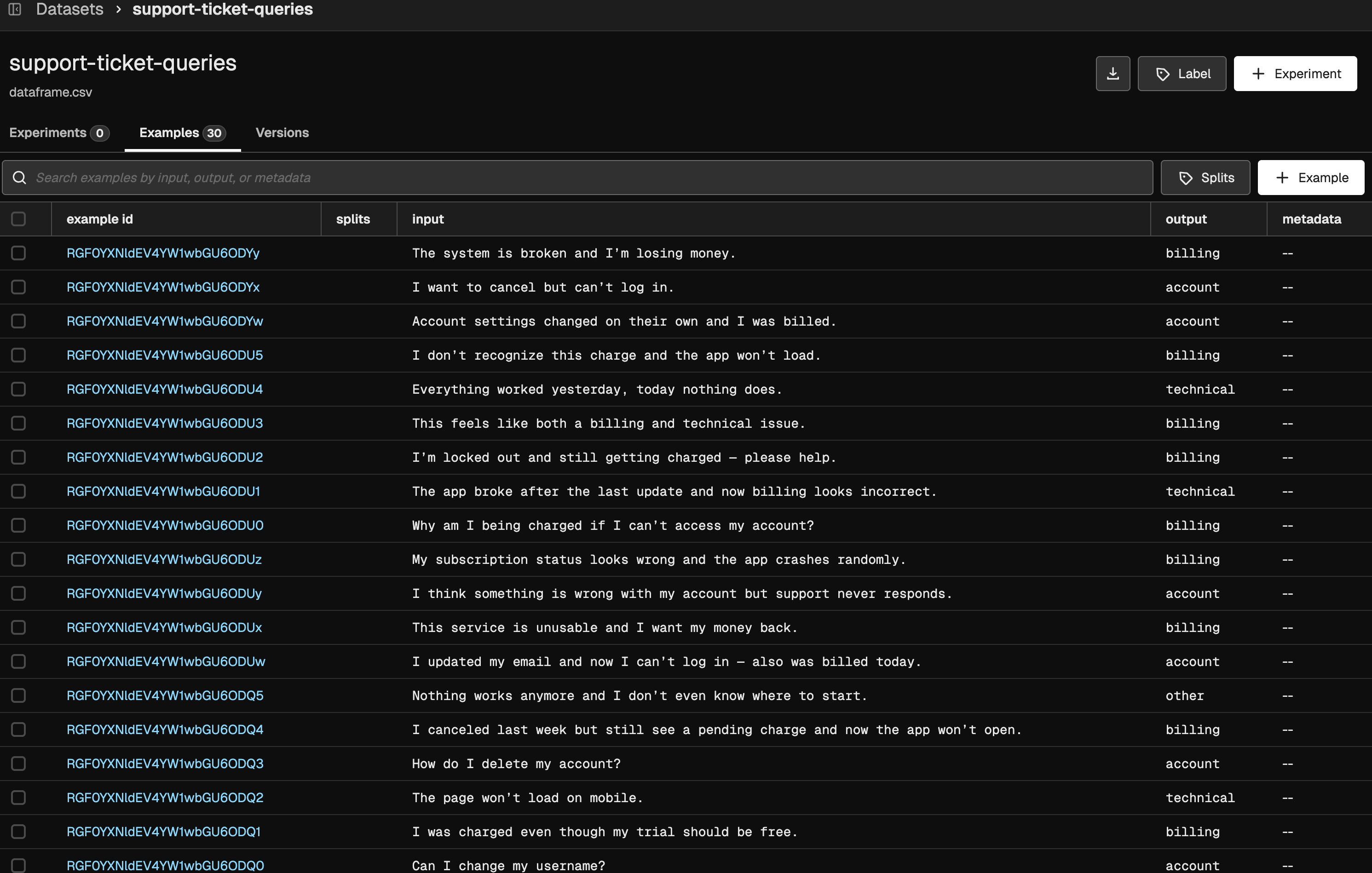
Let’s create our golden dataset and upload it to Phoenix. We’ve constructed 30 examples, each with a reference output in the expected_category field. When uploading, we map query to the input and expected_category to the output.
import pandas as pd

data = [
    {"query": "I was charged twice for my subscription this month.", "expected_category": "billing"},
    {"query": "My app crashes every time I try to log in.", "expected_category": "technical"},
    {"query": "How do I change the email on my account?", "expected_category": "account"},
    {"query": "I want a refund because I was billed incorrectly.", "expected_category": "billing"},
    {"query": "The website shows a 500 error.", "expected_category": "technical"},
    {"query": "I forgot my password and cannot sign in.", "expected_category": "account"},
    {"query": "I was billed after canceling my subscription.", "expected_category": "billing"},
    {"query": "The app freezes on startup.", "expected_category": "technical"},
    {"query": "How can I update my billing address?", "expected_category": "account"},
    {"query": "Why was my credit card charged twice?", "expected_category": "billing"},
    {"query": "Push notifications are not working.", "expected_category": "technical"},
    {"query": "Can I change my username?", "expected_category": "account"},
    {"query": "I was charged even though my trial should be free.", "expected_category": "billing"},
    {"query": "The page won’t load on mobile.", "expected_category": "technical"},
    {"query": "How do I delete my account?", "expected_category": "account"},
    {"query": "I canceled last week but still see a pending charge and now the app won’t open.", "expected_category": "billing"},
    {"query": "Nothing works anymore and I don’t even know where to start.", "expected_category": "other"},
    {"query": "I updated my email and now I can’t log in — also was billed today.", "expected_category": "account"},
    {"query": "This service is unusable and I want my money back.", "expected_category": "billing"},
    {"query": "I think something is wrong with my account but support never responds.", "expected_category": "account"},
    {"query": "My subscription status looks wrong and the app crashes randomly.", "expected_category": "billing"},
    {"query": "Why am I being charged if I can’t access my account?", "expected_category": "billing"},
    {"query": "The app broke after the last update and now billing looks incorrect.", "expected_category": "technical"},
    {"query": "I’m locked out and still getting charged — please help.", "expected_category": "billing"},
    {"query": "This feels like both a billing and technical issue.", "expected_category": "billing"},
    {"query": "Everything worked yesterday, today nothing does.", "expected_category": "technical"},
    {"query": "I don’t recognize this charge and the app won’t load.", "expected_category": "billing"},
    {"query": "Account settings changed on their own and I was billed.", "expected_category": "account"},
    {"query": "I want to cancel but can’t log in.", "expected_category": "account"},
    {"query": "The system is broken and I’m losing money.", "expected_category": "billing"},
]

# Create DataFrame
dataset_df = pd.DataFrame(data)

# -----------------------------
# Upload Dataset
# -----------------------------
import phoenix as px
from phoenix.client import Client 

px_client = Client()

dataset = px_client.datasets.create_dataset(
    dataframe=dataset_df,
    name="support-ticket-queries",
    input_keys=["query"],
    output_keys=["expected_category"],
)
After uploading, the dataset appears in the Phoenix UI like this: Uploaded Dataset

Next Steps

Now that you have a dataset uploaded to Phoenix, you’re ready to run experiments to evaluate your agent’s performance.

Run Experiments with Golden Datasets & Code Evals