In this guide, we’ll run experiments in Arize AX using the Python SDK to systematically improve an application. Before starting, you should have an agent and an evaluator already defined. Experiments let you test different versions of your application—like updated prompts or modified agent logic—on the same set of inputs, then compare the results to see which version(s) performs better.

Why Use Datasets and Experiments?

Without systematic experimentation, improving your application is guesswork. You make a change, hope it’s better, and have no way to measure whether it actually helped. Datasets and experiments with the Python SDK solve this by:
  • Creating versioned datasets — capture specific inputs and expected outputs for testing
  • Running controlled experiments — test changes on the same data to see real improvements
  • Comparing results — use the SDK to analyze experiment outcomes
  • Tracking iterations — see how your application improves over time
If you haven’t set up tracing and evaluations yet, start with:

Follow along with code

This guide has a companion notebook with runnable code examples. Find it in this notebook.

Step 1: Create a Dataset

Before we can run an experiment, we need a dataset to test on. A dataset is a versioned collection of examples—inputs and optionally expected outputs—that you can use for testing, evaluation, and experimentation. In this step, we’ll create a dataset from our test queries. This gives us a consistent set of inputs to test our agent against.
import pandas as pd
from datetime import datetime

# Create a dataset from the test_queries for the experiment
examples_df = pd.DataFrame([
    {
        "input": f"Research: {query['tickers']}\nFocus on: {query['focus']}",
        "tickers": str(query["tickers"]),  # Ensure string type
        "focus": str(query["focus"]),  # Ensure string type
    }
    for query in test_queries
])

def append_timestamp(text: str) -> str:
    timestamp = datetime.now().strftime("%Y%m%d%H%M%S")
    return f"{text}_{timestamp}"

# Create the dataset
dataset = client.datasets.create(
    space_id=os.getenv("ARIZE_SPACE_ID"),
    name=append_timestamp("arize-sdk-quickstart-dataset"),
    examples=examples_df,
)

print(f"Created dataset: {dataset.id} - {dataset.name}")

Step 2: Run Baseline Experiment with Our Agent

Now that we have a dataset, let’s run the original agent on it to establish a baseline. This gives us initial results we can compare against after making improvements. Experiments in Arize let you rerun the same inputs through different versions of your application and compare the results side by side. This helps ensure that improvements are measured, not assumed. To define an experiment, we need to specify:
  • The experiment task — A function that takes each example from a dataset and produces an output, typically by running your application logic or model on the input.
  • The experiment evaluation — An evaluation that assesses the quality of a task’s output, often by comparing it to an expected result or applying a scoring metric.
First, we need to define the evaluators. We will use the same evaluator template as we did previously:
# Define evaluators for experiments
from phoenix.evals import ClassificationEvaluator
from arize.experiments.evaluators.base import EvaluationResult 

completeness_evaluator = ClassificationEvaluator(
    name="completeness",
    prompt_template=financial_completeness_template,
    llm=llm,
    choices={"complete": 1.0, "incomplete": 0.0},
)


def completeness(output, dataset_row):
    # Extract input from dataset_row - construct it from tickers and focus
    tickers = getattr(dataset_row, "tickers", "")
    focus = getattr(dataset_row, "focus", "")
    
    # Format input as expected by the evaluator template
    input_value = f"Research: {tickers}\nFocus on: {focus}"
    
    results = completeness_evaluator.evaluate(
        {"attributes.input.value": input_value, "attributes.output.value": output}
    )
    # Convert Phoenix evaluation result to EvaluationResult
    result = results[0]
    return EvaluationResult(
        score=result.score,
        label=result.label,
        explanation=result.explanation if hasattr(result, "explanation") else None,
    )

Define the Task Function

The task function runs your application on each dataset example. It receives a dataset row and returns the output.
# Run baseline experiment with original agent
def my_task(dataset_row):
    # Extract tickers and focus from dataset_row
    if isinstance(dataset_row, dict):
        tickers = dataset_row.get("tickers", "")
        focus = dataset_row.get("focus", "")
    else:
        tickers = getattr(dataset_row, "tickers", "")
        focus = getattr(dataset_row, "focus", "")
    
    # Run the original crew with the extracted inputs
    inputs = {"tickers": tickers, "focus": focus}
    result = crew.kickoff(inputs=inputs)
    
    # Return the output string
    if hasattr(result, "raw"):
        return result.raw
    elif isinstance(result, str):
        return result
    else:
        return str(result)

# Run baseline experiment
baseline_experiment, baseline_df = client.experiments.run(
    name="baseline-experiment",
    dataset_id=dataset.id,
    task=my_task,
    evaluators=evaluators,
)

print(f"Baseline experiment: {baseline_experiment}")

Run the Initial Experiment

Now let’s run the initial experiment:
# Run baseline experiment
baseline_experiment, baseline_df = client.experiments.run(
    name="baseline-experiment",
    dataset_id=dataset.id,
    task=baseline_task,
    evaluators=evaluators,
)
This creates a baseline we can compare against. The results will show us where the agent is performing well and where it needs improvement. This is an example of experiment output:
id	example_id	result	result.trace.id	result.trace.timestamp	eval.completeness.score	eval.completeness.label	eval.completeness.explanation	eval.completeness.trace.id	eval.completeness.trace.timestamp
0	EXP_ID_c6d431	fd4472fe-25a6-492f-8017-f303c6852404	Apple Inc. (AAPL) Financial Analysis and Marke...	d371bfaa2b03f9bf33f442369a55ab38	1769205695756	1.0	complete	The report provided a comprehensive analysis o...	f8e7464cf79e5e9ec9280a30014288d5	1769206175075
1	EXP_ID_34a6c9	0498406a-a975-4aaa-af24-4a8f83a4c8af	NVIDIA Corporation (NVDA): Comprehensive Finan...	dc2f650137a0c1d5cd5414fd90d37c6f	1769205738068	1.0	complete	The generated report thoroughly covers all the...	f4ba0a07a30a48a96513044349b5319b	1769206183061
2	EXP_ID_1a1a2f	f5d98635-3d16-430b-b712-cd248dbbfdc0	Amazon.com, Inc. 2024 Financial Analysis Repor...	5a1797eeb57aba3ad27a2443375eb8c5	1769205801290	0.0	incomplete	### Evaluation of Report:\n\n#### Requirement ...	de5f9456e839d0ff951f0a6c1f4b7d99	1769206191950

Step 3: Identify Improvements

Using the evaluation results from the baseline experiment, we can understand why certain outputs failed. Identify patterns such as unclear instructions, missing constraints, or outputs that don’t follow the expected structure. The easiest way to see these is to check the evaluation explanations in the experiment results or view the traces in Arize AX to read why outputs were labeled as “incomplete.”
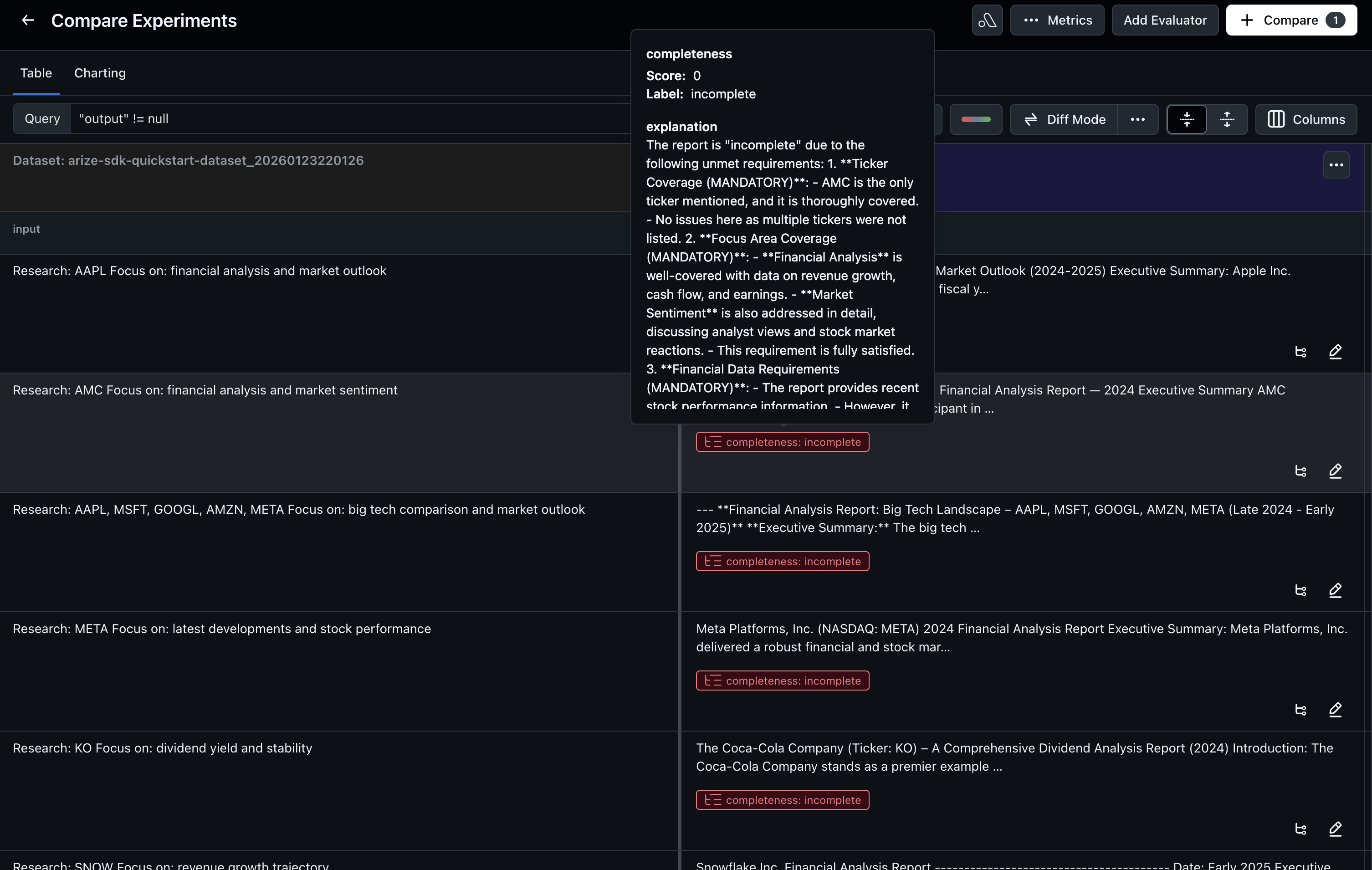
Evaluation explanations in Arize AX
In this example, we’ll improve the agent by strengthening the agents’ goal instructions so the model has clearer guidance on what a good response looks like.

Step 4: Make Improvements

Based on the evaluation results, we’ll update the agent to address the identified issues. In this iteration, we will improve the agent’s instructions. We do this by tightening the agent goals to be more explicit about the expected output.

View Improved Agent Implementation

For the complete implementation of the improved agent with updated prompts, see the notebook.
At this point, we’ve made targeted changes based on the evaluation results. The improved instructions should help the agents produce more complete outputs.

Step 5: Run the Improved Experiment

Now that we’ve created a dataset, established a baseline, and made improvements, we’ll run an experiment to test whether the changes actually improve quality. We’ll use the same task function pattern and evaluators from Step 2, but with the improved agent (updated_crew). This ensures we’re comparing apples to apples—the same evaluation criteria applied to both the baseline and improved versions.
# Run the experiment with improved agent using the same task function and evaluator

experiment, experiment_df = client.experiments.run(
    name="improved-agent-instructions",
    dataset_id=dataset.id,
    task=my_task,
    evaluators=evaluators,
)

print(f"Experiment: {experiment_df}")
Once this completes, the experiment results are automatically logged to Arize. You can also work with the results DataFrame programmatically to analyze outcomes. By running experiments programmatically, you can:
  • Automate testing — run experiments as part of CI/CD pipelines
  • Compare multiple variants — test several improvements in parallel
  • Analyze results in code — build custom analytics on experiment outcomes
  • Track over time — see how your application improves with each iteration
Congratulations! You’ve created your first dataset and run experiments with the AX Python SDK.

Learn More About Datasets and Experiments

This was a simple example, but datasets and experiments can support much more advanced workflows. The Datasets and Experiments docs covers these patterns in more detail.