*This notebook has been sourced and adapted from the original Meta notebook “Building an Intelligent Browser Agent with Llama 4 Scout”** . (Authors_: _**Miguel Gonzalez, Dimitry Khorzov)

Notebook Tutorial

Blog and Demo Video

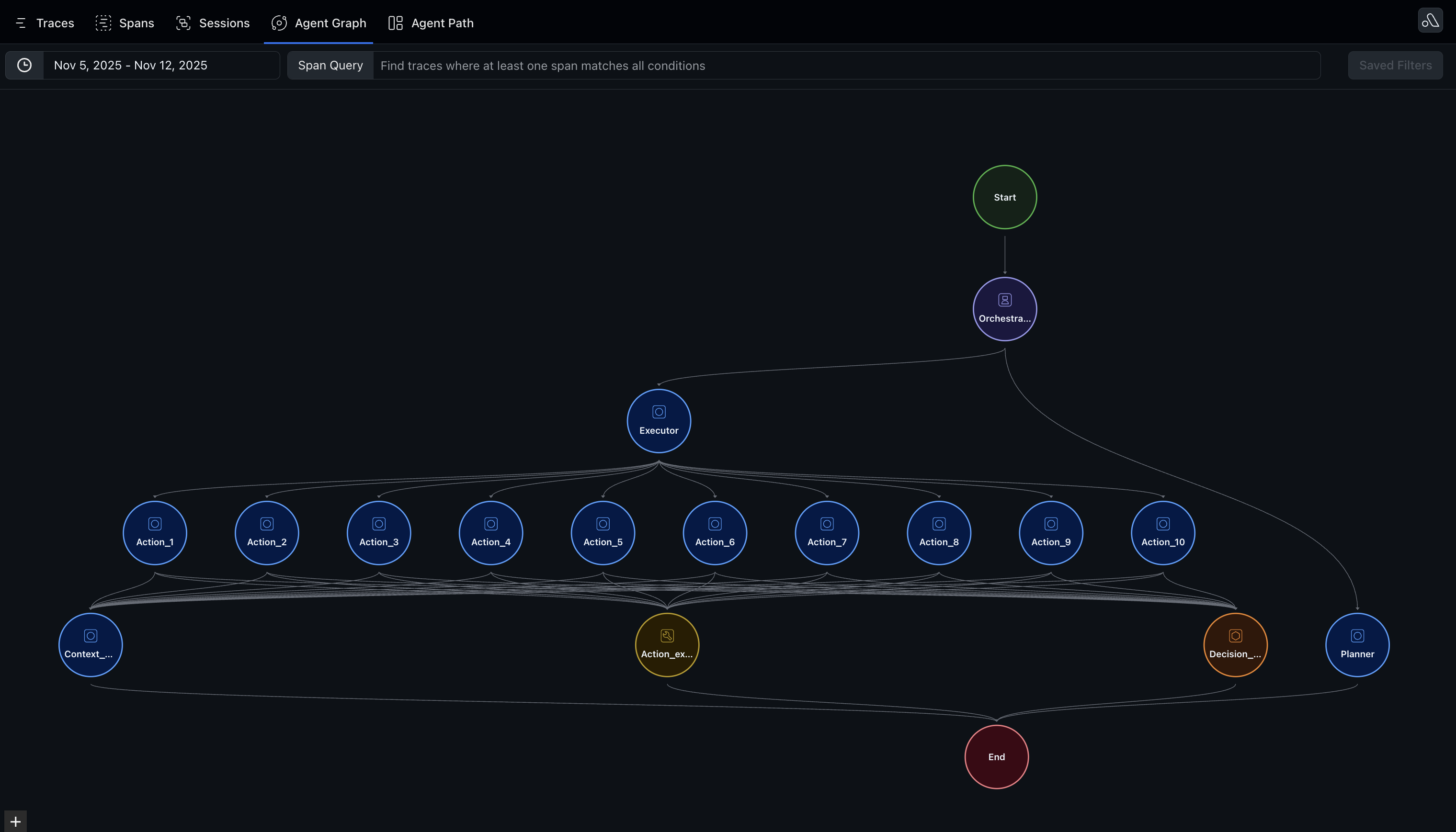
Architecture: The Planning and Execution Framework

System Components

Our browser agent combines four core technologies: Llama 4 Scout is a vision-language model from Meta that provides multi-modal understanding. Unlike traditional LLMs that only process text, Llama 4 Scout analyzes both screenshots and textual descriptions simultaneously. The model reasons about page structure, identifies interactive elements, and makes decisions about how to navigate and interact with web interfaces. Playwright is our browser automation framework. Playwright executes actions like clicking buttons, filling forms, and navigating to URLs. Critically, it also extracts the accessibility tree—a browser-native representation of page elements designed for assistive technologies. Together AI hosts our Llama model, providing fast and reliable API access. Together AI supports multi-modal inputs (text + images), making it ideal for our real-time agent interactions where we need to send both accessibility tree text and screenshot images to the model with each decision. Arize captures distributed traces showing the hierarchical relationship between planning, execution, and individual actions. This visibility is crucial for debugging multi-step workflows, understanding failure points, and optimizing performance in production.

Two-Phase Agent Design

Phase 1: The Planning Agent

The planning agent receives a natural language task and decomposes it into high-level actionable steps. This plan serves as a roadmap, providing context about the overall goal while leaving flexibility in execution. These steps are fed to the execution agent to execute the plan.

Phase 2: The Execution Agent

The executor translates high-level plans into concrete browser actions through an iterative loop:
  1. Context Gathering: At each step, capture the current browser state including a screenshot of the visible page and the accessibility tree. The screenshot provides visual context about layout and content positioning, while the accessibility tree offers a machine-readable map of interactive elements (buttons, text fields, links).
  2. Decision Making: Feed the multi-modal context (screenshot + accessibility tree + task + previous actions) to Llama 4 Scout. The model analyzes this information and decides the next action, returning a structured JSON response with explicit reasoning about its current state and why a particular action is appropriate.
  3. Action Execution: Based on the LLM’s decision, execute the corresponding browser command. This might be navigating to a URL, clicking an element using role-based selectors (e.g., “button=Search”), or filling a text field.
  4. Validation: After executing an action, verify success and capture any errors. Failed actions (selector not found, timeout) are logged with context and included in the next decision cycle, allowing the model to learn from mistakes and try alternative approaches.
  5. State Update: Results are logged to Arize traces, and the agent updates its context with what just happened.
The execution loop continues until the task completes (action type “finished”) or reaches a maximum iteration limit.

Arize Observability

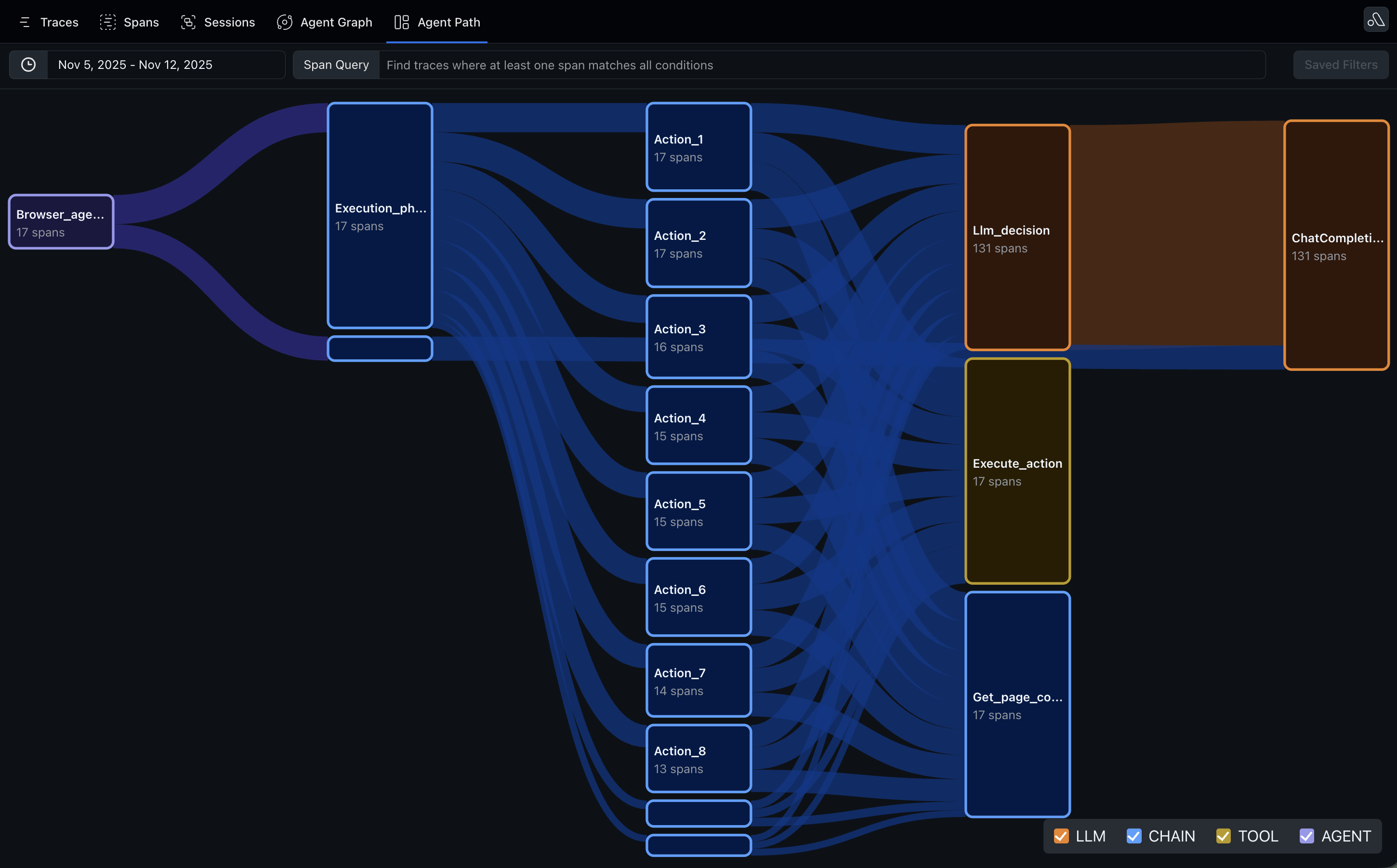
All traces from the browser agent will be captured and viewable in Arize. Below are screenshots of Arize Agent Graph and Sankey visualizations that capture the Planning agent and Execution agent workflows. Agent Graph View alt text Sankey View alt text

Code Walkthrough

Import Libraries + Set up Instrumentation

import os
from dotenv import load_dotenv
from opentelemetry import trace
from arize.otel import register
from openinference.instrumentation.openai import OpenAIInstrumentor
import openai

load_dotenv()

# Configure Arize tracing using register
tracer_provider = register(
    space_id=os.getenv("ARIZE_SPACE_ID"),
    api_key=os.getenv("ARIZE_API_KEY"),
    project_name="browser-agent-llama4"
)

# Instrument OpenAI client for automatic tracing
OpenAIInstrumentor().instrument(tracer_provider=tracer_provider)
client = openai.OpenAI(
    api_key=os.getenv("TOGETHER_API_KEY"), 
    base_url="https://api.together.xyz/v1"
)

# Get a tracer
tracer = trace.get_tracer(__name__)

Helper Functions

Agent uses an accessibility tree to understand the web page components and interact with it
def parse_accessibility_tree(node, indent=0):
    """
    Recursively parses the accessibility tree and prints a readable structure.
    Args:
        node (dict): A node in the accessibility tree.
        indent (int): Indentation level for the nested structure.
    """
    # Initialize res as an empty string at the start of each parse
    res = ""
    
    def _parse_node(node, indent, res):
        # Base case: If the node is empty or doesn't have a 'role', skip it
        if not node or 'role' not in node:
            return res

        # Indentation for nested levels
        indented_space = " " * indent
        
        # Add node's name and role to result string
        if 'value' in node:
            res = res + f"{indented_space}Role: {node['role']} - Name: {node.get('name', 'No name')} - Value: {node['value']}\n"
        else:
            res = res + f"{indented_space}Role: {node['role']} - Name: {node.get('name', 'No name')}\n"
        
        # If the node has children, recursively parse them
        if 'children' in node:
            for child in node['children']:
                res = _parse_node(child, indent + 2, res)  # Increase indentation for child nodes
                
        return res

    return _parse_node(node, indent, res)

Define prompts

planning_prompt = """
You are a planning agent.

Given a user request, define a very simple plan of subtasks (actions) to achieve the desired outcome and execute them iteratively using Playwright.

1. Understand the Task:
   - Interpret the user's request and identify the core goal.
   - Break down the task into a few smaller, actionable subtasks to achieve the goal effectively.

2. Planning Actions:
   - Translate the user's request into a high-level plan of actions.
   - Example actions include:
     - Searching for specific information.
     - Navigating to specified URLs.
     - Interacting with website elements (clicking, filling).
     - Extracting or validating data.

Input:
- User Request (Task)

Output from the Agent:
- Step-by-Step Action Plan:: Return only an ordered list of actions. Only return the list, no other text.

**Example User Requests and Agent Behavior:**

1. **Input:** "Search for a product on Amazon."
   - **Output:**
     1. Navigate to Amazon's homepage.
     2. Enter the product name in the search bar and perform the search.
     3. Extract and display the top results, including the product title, price, and ratings.

2. **Input:** "Find the cheapest flight to Tokyo."
   - **Output:**
     1. Visit a flight aggregator website (e.g. google flights).
     2. Enter the departure city.
     3. Enter the destination city
     4. Enter the departure date
     5. Enter the return date
     6. Click the 'Done' button to confirm departure and return dates.
     6. Click the 'Search' button to find available flights.
     7. Extract and compare the flight options, highlighting the cheapest option.

3. **Input:** "Buy tickets for the next Warriors game."
   - **Output:**
     1. Navigate to a ticket-selling platform (e.g., Ticketmaster).
     2. Fill the search bar with the team name.
     2. Search for upcoming team games.
     3. Select the next available game and purchase tickets for the specified quantity.

"""


execution_prompt = """
You are an execution agent.

You will be given a task, a website's page accessibility tree, and the page screenshot as context. The screenshot is where you are now, use it to understand the accessibility tree. Based on that information, you need to decide the next step action. ONLY RETURN THE NEXT STEP ACTION IN A SINGLE JSON.

When selecting elements, use elements from the accessibility tree.

Reflect on what you are seeing in the accessibility tree and the screenshot and decide the next step action, elaborate on it in reasoning, and choose the next appropriate action.

Selectors must follow the format:
- For a button with a specific name: "button=ButtonName"
- For a placeholder (e.g., input field): "placeholder=PlaceholderText"
- For text: "text=VisibleText"

Make sure to analyze the accessibility tree and the screenshot to understand the current state, if something is not clear, you can use the previous actions to understand the current state. Explain why you are in the current state in current_state.

You will be given a task and you MUST return the next step action in JSON format:
{
    "current_state": "Where are you now? Analyze the accessibility tree and the screenshot to understand the current state.",
    "reasoning": "What is the next step to accomplish the task?",
    "action": "navigation" or "click" or "fill" or "finished",
    "url": "https://www.example.com", // Only for navigation actions
    "selector": "button=Click me", // For click or fill actions, derived from the accessibility tree
    "value": "Input text", // Only for fill actions
}

### Guidelines:
1. Use **"navigation"** for navigating to a new website through a URL.
2. Use **"click"** for interacting with clickable elements. Examples:
   - Buttons: "button=Click me"
   - Text: "text=VisibleText"
   - Placeholders: "placeholder=Search..."
   - Link: "link=BUY NOW"
3. Use **"fill"** for inputting text into editable fields. Examples:
   - Placeholder: "placeholder=Search..."
   - Textbox: "textbox=Flight destination output"
   - Input: "input=Search..."
4. Use **"finished"** when the task is done. For example:
   - If a task is successfully completed.
   - If navigation confirms you are on the correct page.


### Accessibility Tree Examples:

You will be given an accessibility tree to interact with the webpage. It consists of a nested node structure that represents elements on the page. For example:

Role: generic - Name: 
   Role: text - Name: Phoenix
   Role: button - Name: 
   Role: listitem - Name: 
   Role: textbox - Name: Where from?
Role: button - Name: Swap where to and where from
Role: generic - Name: 
   Role: textbox - Name: Where to?
Role: textbox - Name: Return
Role: button - Name: 
Role: textbox - Name: Departure
Role: button - Name: 
Role: button - Name: Done
Role: button - Name: Search

This section indicates that there is a textbox with a name "Where to?" filled with Phoenix. There is also a button with the name "Swap where to and where from". Another textbox with the name "where to?" not filled with any text. There are also textboxes with the names "Departure", "Return", which are not filled with any dates, and a buttons named "Done" and "Search".

Retry actions at most 2 times before trying a different action.

### Examples:
1. To click on a button labeled "Search":
   {
       "current_state": "On the homepage of a search engine.",
       "reasoning": "The accessibility tree shows a button named 'Search'. Clicking it is the appropriate next step to proceed with the task.",
       "action": "click",
       "selector": "button=Search"
   }

2. To fill a search bar with the text "AI tools":
   {
       "current_state": "On the search page with a focused search bar.",
       "reasoning": "The accessibility tree shows an input field with placeholder 'Search...'. Entering the query 'AI tools' fulfills the next step of the task.",
       "action": "fill",
       "selector": "placeholder=Search...",
       "value": "AI tools"
   }

3. To navigate to a specific URL:
   {
       "current_state": "Starting from a blank page.",
       "reasoning": "The task requires visiting a specific website to gather relevant information. Navigating to the URL is the first step.",
       "action": "navigation",
       "url": "https://example.com"
   }

4. To finish the task:
   {
       "current_state": "Completed the search and extracted the necessary data.",
       "reasoning": "The task goal has been achieved, and no further actions are required.",
       "action": "finished"
   }
"""

Define a Task

task = 'Find the cheapest round trip flight from SFO to Istanbul leaving on 11/15/2025 and returning on 11/22/2025'

Execute Planning Agent

# Planning phase - use the parent context
with tracer.start_as_current_span("planning_phase", context=main_context) as planning_span:
    add_graph_attributes(planning_span, "planner", "orchestrator", span_kind="CHAIN")
    planning_span.set_attribute("llm.model", "meta-llama/Llama-4-Scout-17B-16E-Instruct")
    planning_span.set_attribute("llm.prompt", planning_prompt)
    planning_span.set_attribute("user.task", task)
    
    planning_response = client.chat.completions.create(
        model="meta-llama/Llama-4-Scout-17B-16E-Instruct",
        temperature=0.0,
        messages=[
            {"role": "system", "content": planning_prompt},
            {"role": "user", "content": task},
        ],
    )     
    plan = planning_response.choices[0].message.content
    
    planning_span.set_attribute("llm.response", plan)
    planning_span.set_attribute("llm.usage.total_tokens", planning_response.usage.total_tokens if hasattr(planning_response, 'usage') else 0)
    
    print(plan)
    steps = [line.strip()[3:] for line in plan.strip().split('\n')]
    planning_span.set_attribute("plan.steps", str(steps))
    planning_span.set_attribute("plan.num_steps", len(steps))

Create Browser Environment and Run Executor Agent

To create robust observability and agent visualization, we apply custom opentelemetry instrumentation.
from playwright.async_api import async_playwright
import asyncio 
import json
import re
from opentelemetry import trace as otel_trace

previous_context = None

async def run_browser():
    async with async_playwright() as playwright:
        # Launch Chromium browser
        browser = await playwright.chromium.launch(headless=False, channel="chrome")
        page = await browser.new_page()
        await asyncio.sleep(1)
        await page.goto("https://google.com/")
        previous_actions = []
        action_count = 0
        
        # Get the context from the main span (defined in the previous cell)
        main_context = otel_trace.set_span_in_context(main_span)
        
        # Start execution phase span
        with tracer.start_as_current_span("execution_phase", context=main_context) as execution_span:
            add_graph_attributes(execution_span, "executor", "orchestrator", span_kind="CHAIN")
            execution_span.set_attribute("browser.launched", True)
            execution_span.set_attribute("initial_url", "https://google.com/")
            
            try:
                while True:  # Infinite loop to keep session alive, press enter to continue or 'q' to quit
                    action_count += 1
                    
                    # Get execution context
                    exec_context = otel_trace.set_span_in_context(execution_span)
                    
                    # Start action span
                    with tracer.start_as_current_span(f"action_{action_count}", context=exec_context) as action_span:
                        add_graph_attributes(action_span, f"action_{action_count}", "executor", span_kind="CHAIN")
                        
                        # Get action context
                        action_context = otel_trace.set_span_in_context(action_span)
                        
                        # Get Context from page with tracing
                        with tracer.start_as_current_span("get_page_context", context=action_context) as context_span:
                            add_graph_attributes(context_span, "context_extractor", f"action_{action_count}", span_kind="CHAIN")
                            
                            accessibility_tree = await page.accessibility.snapshot()
                            accessibility_tree = parse_accessibility_tree(accessibility_tree)
                            await page.screenshot(path="screenshot.png")
                            base64_image = encode_image(imagePath)
                            previous_context = accessibility_tree
                            
                            context_span.set_attribute("page.url", page.url)
                            context_span.set_attribute("accessibility_tree.length", len(accessibility_tree))
                        
                        # LLM decision making with tracing
                        with tracer.start_as_current_span("llm_decision", context=action_context) as llm_span:
                            add_graph_attributes(llm_span, "decision_maker", f"action_{action_count}", span_kind="LLM")
                            llm_span.set_attribute("llm.model", "meta-llama/Llama-4-Scout-17B-16E-Instruct")
                            llm_span.set_attribute("previous_actions", str(previous_actions))
                            
                            response = client.chat.completions.create(
                                model="meta-llama/Llama-4-Scout-17B-16E-Instruct",
                                temperature=0.0,
                                messages=[
                                    {"role": "system", "content": execution_prompt},
                                    {"role": "system", "content": f"Few shot examples: {few_shot_examples}. Just a few examples, user will assign you VERY range set of tasks."},
                                    {"role": "system", "content": f"Plan to execute: {steps}\n\n Accessibility Tree: {previous_context}\n\n, previous actions: {previous_actions}"},
                                    {"role": "user", "content": 
                                     [
                                        {
                                            "type": "text",
                                            "text": f'What should be the next action to accomplish the task: {task} based on the current state? Remember to review the plan and select the next action based on the current state. Provide the next action in JSON format strictly as specified above.',
                                        },
                                        {
                                            "type": "image_url",
                                            "image_url": {
                                                "url": f"data:image/jpeg;base64,{base64_image}",
                                            }
                                        },
                                     ]
                                    }
                                ],
                            )
                            
                            res = response.choices[0].message.content
                            llm_span.set_attribute("llm.response", res)
                            llm_span.set_attribute("llm.usage.total_tokens", response.usage.total_tokens if hasattr(response, 'usage') else 0)
                        
                        ## to remove invisible characters, whitespaces and commas:
                        # Remove any trailing commas
                        res = res.rstrip(',')
                        # Remove any invisible characters
                        res = ''.join(c for c in res if ord(c) >= 32 or ord(c) == 10 or ord(c) == 13)
                        print('Agent response:', res)
                        
                        try:
                            match = re.search(r'\{.*\}', res, re.DOTALL)
                            if match:
                                output = json.loads(match.group(0))
                                action_span.set_attribute("action.type", output.get("action", "unknown"))
                                action_span.set_attribute("action.reasoning", output.get("reasoning", ""))
                                action_span.set_attribute("action.current_state", output.get("current_state", ""))
                        except Exception as e:
                            print('Error parsing JSON:', e)
                            action_span.set_attribute("error", str(e))
                            continue

                        # Execute action with tracing
                        with tracer.start_as_current_span("execute_action", context=action_context) as exec_span:
                            add_graph_attributes(exec_span, "action_executor", f"action_{action_count}", span_kind="TOOL")
                            exec_span.set_attribute("action.type", output["action"])
                            
                            if output["action"] == "navigation":
                                try:
                                    exec_span.set_attribute("navigation.url", output["url"])
                                    await page.goto(output["url"])
                                    previous_actions.append(f"navigated to {output['url']}, SUCCESS")
                                    exec_span.set_attribute("action.success", True)
                                except Exception as e:
                                    previous_actions.append(f"Error navigating to {output['url']}: {e}")
                                    exec_span.set_attribute("action.success", False)
                                    exec_span.set_attribute("error", str(e))

                            elif output["action"] == "click":
                                try:
                                    exec_span.set_attribute("click.selector", output["selector"])
                                    selector_type, selector_name = output["selector"].split("=")[0], output["selector"].split("=")[1]
                                    res = await page.get_by_role(selector_type, name=selector_name).first.click()
                                    previous_actions.append(f"clicked {output['selector']}, SUCCESS")
                                    exec_span.set_attribute("action.success", True)
                                except Exception as e:
                                    previous_actions.append(f"Error clicking on {output['selector']}: {e}")
                                    exec_span.set_attribute("action.success", False)
                                    exec_span.set_attribute("error", str(e))

                            elif output["action"] == "fill" and output["selector"] == "textbox=outband_date":
                                try:
                                    exec_span.set_attribute("fill.selector", output["selector"])
                                    exec_span.set_attribute("fill.value", output["value"])
                                    # Simulate a click to open the date picker if necessary
                                    await page.click('button=outband_date')
                                    await fill_date(page, 'input[name="outband_date"]', output["value"])
                                    previous_actions.append(f"filled Departure date field with {output['value']}, SUCCESS")
                                    exec_span.set_attribute("action.success", True)
                                except Exception as e:
                                    previous_actions.append(f"Error filling Departure date field with {output['value']}: {e}")
                                    exec_span.set_attribute("action.success", False)
                                    exec_span.set_attribute("error", str(e))
                                    
                            elif output["action"] == "fill" and output["selector"] == "textbox=return_date":
                                try:
                                    exec_span.set_attribute("fill.selector", output["selector"])
                                    exec_span.set_attribute("fill.value", output["value"])
                                    # Simulate a click to open the date picker if necessary
                                    await page.click('button=return_date')
                                    await fill_date(page, 'input[name="return_date"]', output["value"])
                                    previous_actions.append(f"filled Return date field with {output['value']}, SUCCESS")
                                    exec_span.set_attribute("action.success", True)
                                except Exception as e:
                                    previous_actions.append(f"Error filling Return date field with {output['value']}: {e}")
                                    exec_span.set_attribute("action.success", False)
                                    exec_span.set_attribute("error", str(e))
            
                            elif output["action"] == "fill":
                                try:
                                    exec_span.set_attribute("fill.selector", output["selector"])
                                    exec_span.set_attribute("fill.value", output["value"])
                                    selector_type, selector_name = output["selector"].split("=")[0], output["selector"].split("=")[1]
                                    res = await page.get_by_role(selector_type, name=selector_name).fill(output["value"])
                                    await asyncio.sleep(1)
                                    await page.keyboard.press("Enter")
                                    previous_actions.append(f"filled {output['selector']} with {output['value']}, SUCCESS")
                                    exec_span.set_attribute("action.success", True)
                                except Exception as e:
                                    previous_actions.append(f"Error filling {output['selector']} with {output['value']}: {e}")
                                    exec_span.set_attribute("action.success", False)
                                    exec_span.set_attribute("error", str(e))

                            elif output["action"] == "finished":
                                exec_span.set_attribute("task.completed", True)
                                exec_span.set_attribute("task.summary", output.get("summary", "Task completed"))
                                print(output.get("summary", "Task completed"))
                                break

                        await asyncio.sleep(1) 
                        
                        # Or wait for user input
                        user_input = input("Press 'q' to quit or Enter to continue: ")
                        if user_input.lower() == 'q':
                            break
                    
            except Exception as e:
                print(f"An error occurred: {e}")
                execution_span.set_attribute("error", str(e))
            finally:
                # Only close the browser when explicitly requested
                await browser.close()
                execution_span.set_attribute("browser.closed", True)
                execution_span.set_attribute("total_actions", action_count)
                
                # End the main span after execution completes
                main_span.end()
                execution_span.set_attribute("browser.closed", True)
                execution_span.set_attribute("total_actions", action_count)


# Make sure to end main_span if it's still active
try:
    await run_browser()
finally:
    if main_span and not main_span.is_recording():
        pass  # Already ended
    elif main_span:
        main_span.end()
# Run the async function
Resources:
  1. Project repository
  2. Watch the demo video