


Documentation Index

Fetch the complete documentation index at: https://arizeai-433a7140.mintlify.app/llms.txt

Use this file to discover all available pages before exploring further.

npm version @arizeai/openinference-tanstack-ai provides an OpenInference middleware for TanStack AI. It emits OpenTelemetry spans shaped according to the OpenInference specification so TanStack AI runs can be visualized in Phoenix.
This integration is brand new. If you run into issues or have ideas for improvements, please open an issue or discussion in the OpenInference repo.

Install

npm install --save @arizeai/openinference-tanstack-ai @tanstack/ai
You will also need an OpenTelemetry setup in your application. The recommended quick start is to pair it with @arizeai/phoenix-otel:
npm install --save @arizeai/phoenix-otel
Or use a standard OpenTelemetry stack:
npm install --save @opentelemetry/api @opentelemetry/sdk-trace-node @opentelemetry/exporter-trace-otlp-proto
Install the provider adapter you plan to use with TanStack AI as well, for example:
npm install --save @tanstack/ai-openai

Setup

Register your tracer provider before the middleware is applied so that spans are emitted to the configured exporter.
// instrumentation.ts
import { register } from "@arizeai/phoenix-otel";

register({
  projectName: "my-tanstack-ai-app",
  endpoint:
    process.env["PHOENIX_COLLECTOR_ENDPOINT"] ??
    "http://localhost:6006/v1/traces",
  apiKey: process.env["PHOENIX_API_KEY"],
});
Your instrumentation code should run before the middleware is applied. Import instrumentation.ts at the top of your application’s entrypoint, or run with node --import ./instrumentation.ts index.ts.

Usage

@arizeai/openinference-tanstack-ai exports openInferenceMiddleware, which plugs directly into TanStack AI’s middleware option. The middleware works for both streaming and non-streaming TanStack AI calls.
import { chat } from "@tanstack/ai";
import { openaiText } from "@tanstack/ai-openai";
import { openInferenceMiddleware } from "@arizeai/openinference-tanstack-ai";

const stream = chat({
  adapter: openaiText("gpt-4o-mini"),
  messages: [{ role: "user", content: "What is OpenInference?" }],
  middleware: [openInferenceMiddleware()],
});
Non-streaming calls are instrumented the same way:
const text = await chat({
  adapter: openaiText("gpt-4o-mini"),
  stream: false,
  systemPrompts: ["You are a concise technical explainer."],
  messages: [
    { role: "user", content: "Explain OpenInference in one sentence." },
  ],
  middleware: [openInferenceMiddleware()],
});

Chat With Tools

Tool calls are captured as TOOL spans nested under the corresponding LLM span. Here is a complete example using OpenAI and a single weather tool:
import "./instrumentation";

import {
  chat,
  maxIterations,
  streamToText,
  toolDefinition,
} from "@tanstack/ai";
import { openaiText } from "@tanstack/ai-openai";
import { trace } from "@opentelemetry/api";
import { z } from "zod";

import { openInferenceMiddleware } from "@arizeai/openinference-tanstack-ai";

const weatherTool = toolDefinition({
  name: "getWeather",
  description: "Get the weather for a city",
  inputSchema: z.object({ city: z.string() }),
  outputSchema: z.object({
    forecast: z.string(),
    temperatureF: z.number(),
  }),
}).server(async ({ city }) => {
  return {
    forecast: city === "Boston" ? "sunny" : "cloudy",
    temperatureF: city === "Boston" ? 70 : 65,
  };
});

async function main() {
  const tracer = trace.getTracer("tanstack-ai-example");
  const stream = chat({
    adapter: openaiText("gpt-4o-mini"),
    messages: [
      { role: "user", content: "What is the weather in Boston? Use the tool." },
    ],
    tools: [weatherTool],
    agentLoopStrategy: maxIterations(3),
    middleware: [openInferenceMiddleware({ tracer })],
  });

  const text = await streamToText(stream);
  console.log(text);
}

main().catch((error) => {
  console.error(error);
  process.exitCode = 1;
});

Custom Tracer

By default, the middleware uses the global tracer for this package. If your application already has a request-scoped or custom tracer, pass it explicitly:
import { trace } from "@opentelemetry/api";
import { openInferenceMiddleware } from "@arizeai/openinference-tanstack-ai";

const tracer = trace.getTracer("tanstack-ai-request");

const middleware = openInferenceMiddleware({ tracer });
This is useful when you want the middleware to participate in a specific tracer setup without relying on the global default.

What Gets Traced

The middleware emits the following span structure for a TanStack AI run:
  • One AGENT span for the overall chat() invocation
  • One LLM span for each model turn
  • One TOOL span for each executed tool call
For a tool loop, the trace will typically look like:
  • AGENT
    • LLM 1
    • TOOL
    • LLM 2
The AGENT span captures the top-level request and final response. The LLM spans capture provider/model metadata, input messages, output messages, tool definitions, and token counts. The TOOL spans capture tool names, arguments, outputs, and errors.

Observe

Once instrumented, all TanStack AI runs — including streaming calls, tool loops, and multi-turn conversations — show up in Phoenix with full input, output, and token detail.
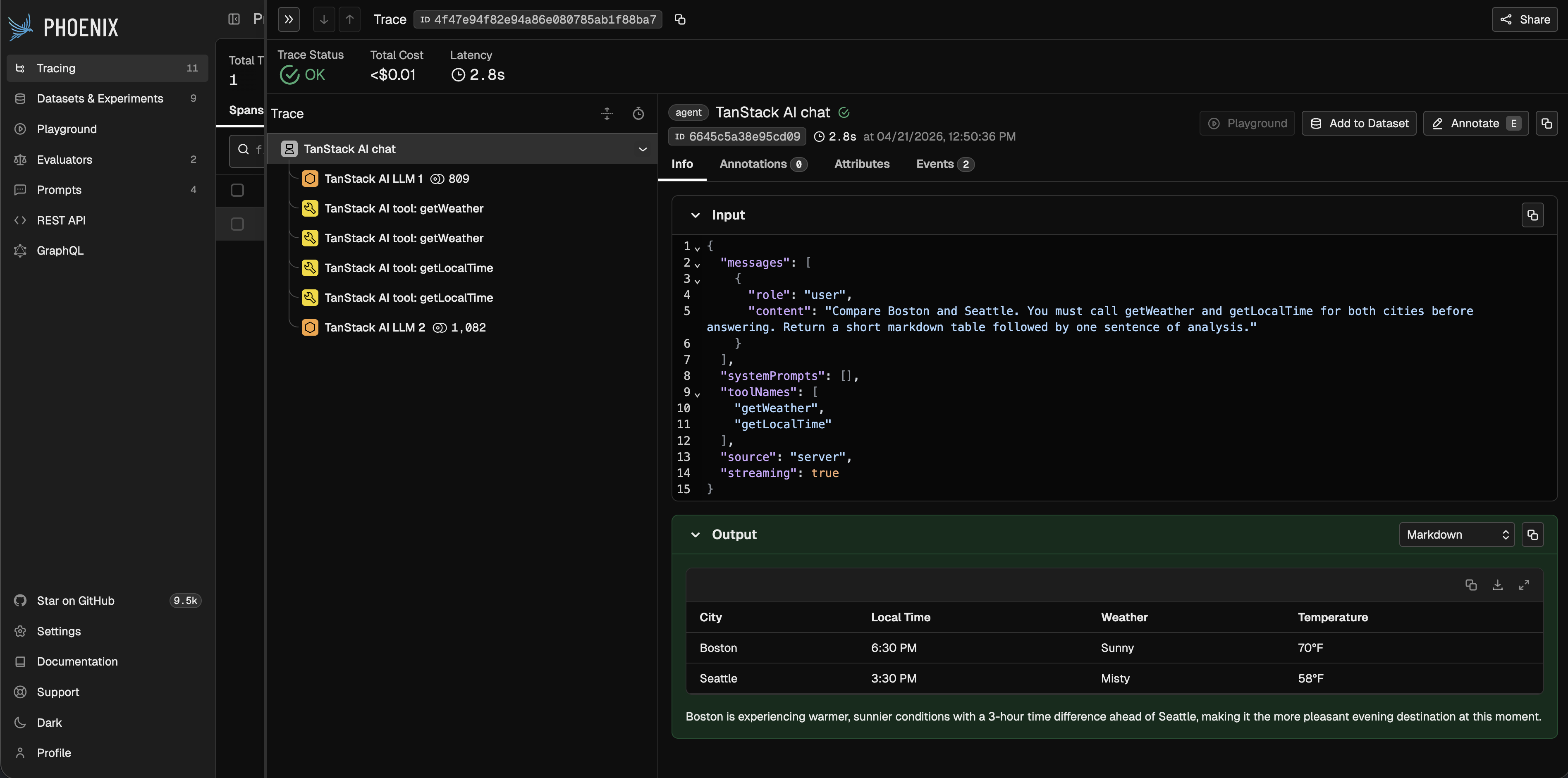
TanStack AI traces in Phoenix

Notes

  • This package is ESM-only because TanStack AI is ESM-only.
  • The middleware works in both server and client environments, but client/server trace stitching depends on your application’s context propagation setup.

Resources