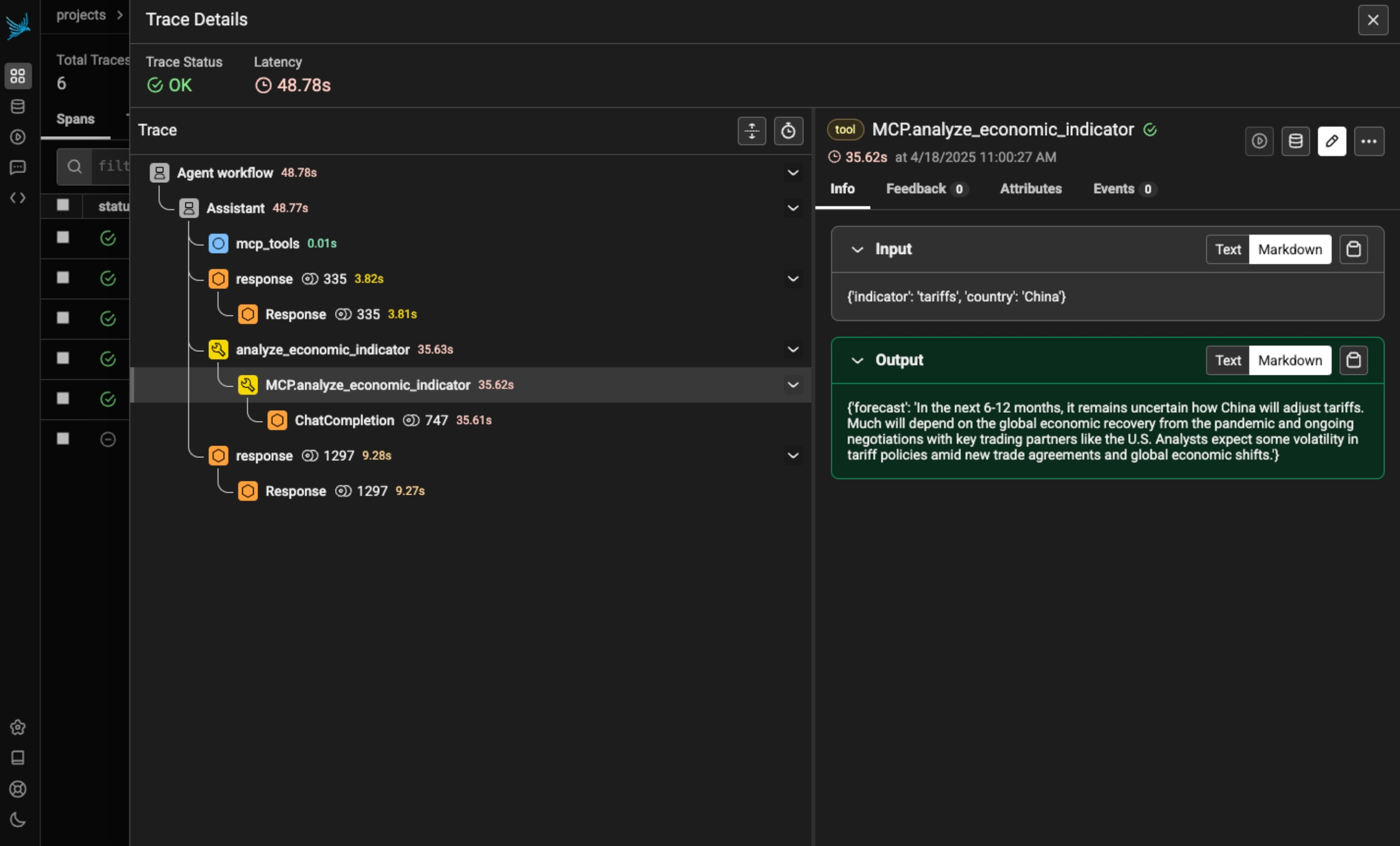

openinference-instrumentation-mcp instrumentor is unique compared to other OpenInference instrumentors. It does not generate any of its own telemetry. Instead, it enables context propagation between MCP clients and servers to unify traces. You still need generate OpenTelemetry traces in both the client and server to see a unified trace.
Install
pip install openinference-instrumentation-mcp \
  openinference-instrumentation-openai openai openai-agents fastmcp python-dotenv \
  arize-phoenix-otel
Because the MCP instrumentor does not generate its own telemetry, you must use it alongside other instrumentation code to see traces.
Setup
from phoenix.otel import register

tracer_provider = register(auto_instrument=True, verbose=False)
Run MCP Client
import asyncio
import os

from agents import Agent, Runner
from agents.mcp import MCPServer, MCPServerStdio
from dotenv import load_dotenv

load_dotenv()


async def run(mcp_server: MCPServer):
    agent = Agent(
        name="Assistant",
        instructions="Use the tools to answer the users question.",
        mcp_servers=[mcp_server],
    )
    result = await Runner.run(
        starting_agent=agent,
        input="Analyze the stock ticker AAPL briefly.",
    )
    print(result.final_output)


async def main():
    async with MCPServerStdio(
        name="Financial Analysis Server",
        params={
            "command": "fastmcp",
            "args": ["run", "./server.py"],
            "env": {
                "OPENAI_API_KEY": os.environ["OPENAI_API_KEY"],
                "PHOENIX_COLLECTOR_ENDPOINT": os.environ["PHOENIX_COLLECTOR_ENDPOINT"],
                "PHOENIX_PROJECT_NAME": os.environ["PHOENIX_PROJECT_NAME"],
                "PHOENIX_API_KEY": os.environ.get("PHOENIX_API_KEY", ""),
            },
        },
        client_session_timeout_seconds=30,
    ) as server:
        await run(server)

if __name__ == "__main__":
    asyncio.run(main())
MCP Server
import json
import os
from datetime import datetime, timedelta

import openai
from dotenv import load_dotenv
from fastmcp import FastMCP
from pydantic import BaseModel

from phoenix.otel import register

load_dotenv()

# You must also connect your MCP server to Phoenix
tracer_provider = register(auto_instrument=True, verbose=False)

# Get a tracer to add additional instrumentattion
tracer = tracer_provider.get_tracer("financial-analysis-server")

# Configure OpenAI client
client = openai.OpenAI(api_key=os.environ.get("OPENAI_API_KEY"))
MODEL = "gpt-5.6-luna"

# Create MCP server
mcp = FastMCP("Financial Analysis Server")


class StockAnalysisRequest(BaseModel):
    ticker: str
    time_period: str = "short-term"  # short-term, medium-term, long-term


@mcp.tool()
@tracer.tool(name="MCP.analyze_stock") # this OpenInference call adds tracing to this method
def analyze_stock(request: StockAnalysisRequest) -> dict:
    """Analyzes a stock based on its ticker symbol and provides investment recommendations."""

    # Make LLM API call to analyze the stock
    prompt = f"""
    Provide a detailed financial analysis for the stock ticker: {request.ticker}
    Time horizon: {request.time_period}

    Please include:
    1. Company overview
    2. Recent financial performance
    3. Key metrics (P/E ratio, market cap, etc.)
    4. Risk assessment
    5. Investment recommendation

    Format your response as a JSON object with the following structure:
    {{
        "ticker": "{request.ticker}",
        "company_name": "Full company name",
        "overview": "Brief company description",
        "financial_performance": "Analysis of recent performance",
        "key_metrics": {{
            "market_cap": "Value in billions",
            "pe_ratio": "Current P/E ratio",
            "dividend_yield": "Current yield percentage",
            "52_week_high": "Value",
            "52_week_low": "Value"
        }},
        "risk_assessment": "Analysis of risks",
        "recommendation": "Buy/Hold/Sell recommendation with explanation",
        "time_horizon": "{request.time_period}"
    }}
    """

    response = client.chat.completions.create(
        model=MODEL,
        messages=[{"role": "user", "content": prompt}],
        response_format={"type": "json_object"},
    )

    analysis = json.loads(response.choices[0].message.content)
    return analysis

# ... define any additional MCP tools you wish

if __name__ == "__main__":
    mcp.run()
Observe
Now that you have tracing setup, all invocations of your client and server will be streamed to Phoenix for observability and evaluation, and connected in the platform.