Understanding Conversations, Not Just Queries Your SupportBot can now handle individual queries with complete tracing and quality measurement. But real customer support involves conversations —multi-turn interactions where context from previous messages matters.
Consider this conversation:
User: "Where is my order?"
Bot: "I'd be happy to help! What's your order number?"
User: "It's 12345"
Bot: "Order 12345 is in transit and will arrive March 15th."
If you treat each message as isolated, you lose critical context. The third message (“It’s 12345”) doesn’t make sense without the conversation history. You need to track sessions —groups of related traces that form complete conversations.
This chapter teaches you how to implement session tracking in Arize AX.
Follow along with Complete Python Notebook
What is a Session? A session is a collection of related traces grouped by a unique session ID. In chatbot applications:
Each conversation = one session
Each message in the conversation = one trace
All traces share the same session ID
Sessions enable you to:
View complete conversation threads
Track context across turns
Identify where conversations break down
Evaluate conversation-level metrics (coherence, resolution, user satisfaction)
Step 1: Add Session IDs To enable sessions, add a session.id attribute to your spans. Any span with the same session ID will be grouped together.
import uuid import re from openinference.instrumentation import using_session class ConversationManager : """Manage multi-turn conversations with session tracking.""" def __init__ ( self ): self .sessions = {} # session_id -> conversation history def start_conversation ( self ) -> str : """Start a new conversation and return session ID.""" session_id = str (uuid.uuid4()) self .sessions[session_id] = { "history" : [], "context" : {} } return session_id def handle_message ( self , session_id : str , user_message : str ) -> str : """Handle a message within a conversation session.""" # Use session context manager with using_session( session_id = session_id): with tracer.start_as_current_span( "conversation-turn" ) as span: span.set_attribute( "openinference.span.kind" , "CHAIN" ) span.set_attribute( "input.value" , user_message) # Get conversation history history = self .sessions[session_id][ "history" ] context = self .sessions[session_id][ "context" ] # Build messages with conversation history messages = [ { "role" : "system" , "content" : "You are a helpful support agent." } ] # Add conversation history for turn in history: messages.append({ "role" : "user" , "content" : turn[ "user" ]}) messages.append({ "role" : "assistant" , "content" : turn[ "assistant" ]}) # Add current message messages.append({ "role" : "user" , "content" : user_message}) # Call LLM with full context response = openai_client.chat.completions.create( model = "gpt-4" , messages = messages, ) bot_response = response.choices[ 0 ].message.content # Update conversation history history.append({ "user" : user_message, "assistant" : bot_response }) # Update context (e.g., remember order ID) self ._update_context(context, user_message, bot_response) span.set_attribute( "output.value" , bot_response) span.set_attribute( "turn_number" , len (history)) return bot_response def _update_context ( self , context : dict , user_msg : str , bot_msg : str ): """Extract and store conversation context.""" # Extract order IDs mentioned order_ids = re.findall( r " \b\d {5} \b " , user_msg + " " + bot_msg) if order_ids: context[ "order_id" ] = order_ids[ 0 ] # Example usage manager = ConversationManager() session_id = manager.start_conversation() print ( "=== Conversation Started ===" ) response1 = manager.handle_message(session_id, "Where is my order?" ) print ( f "User: Where is my order?" ) print ( f "Bot: { response1 } \n " ) response2 = manager.handle_message(session_id, "It's order 12345" ) print ( f "User: It's order 12345" ) print ( f "Bot: { response2 } \n " ) response3 = manager.handle_message(session_id, "When will it arrive?" ) print ( f "User: When will it arrive?" ) print ( f "Bot: { response3 } " )
The using_session() context manager automatically adds the session ID to all
spans created within its scope.
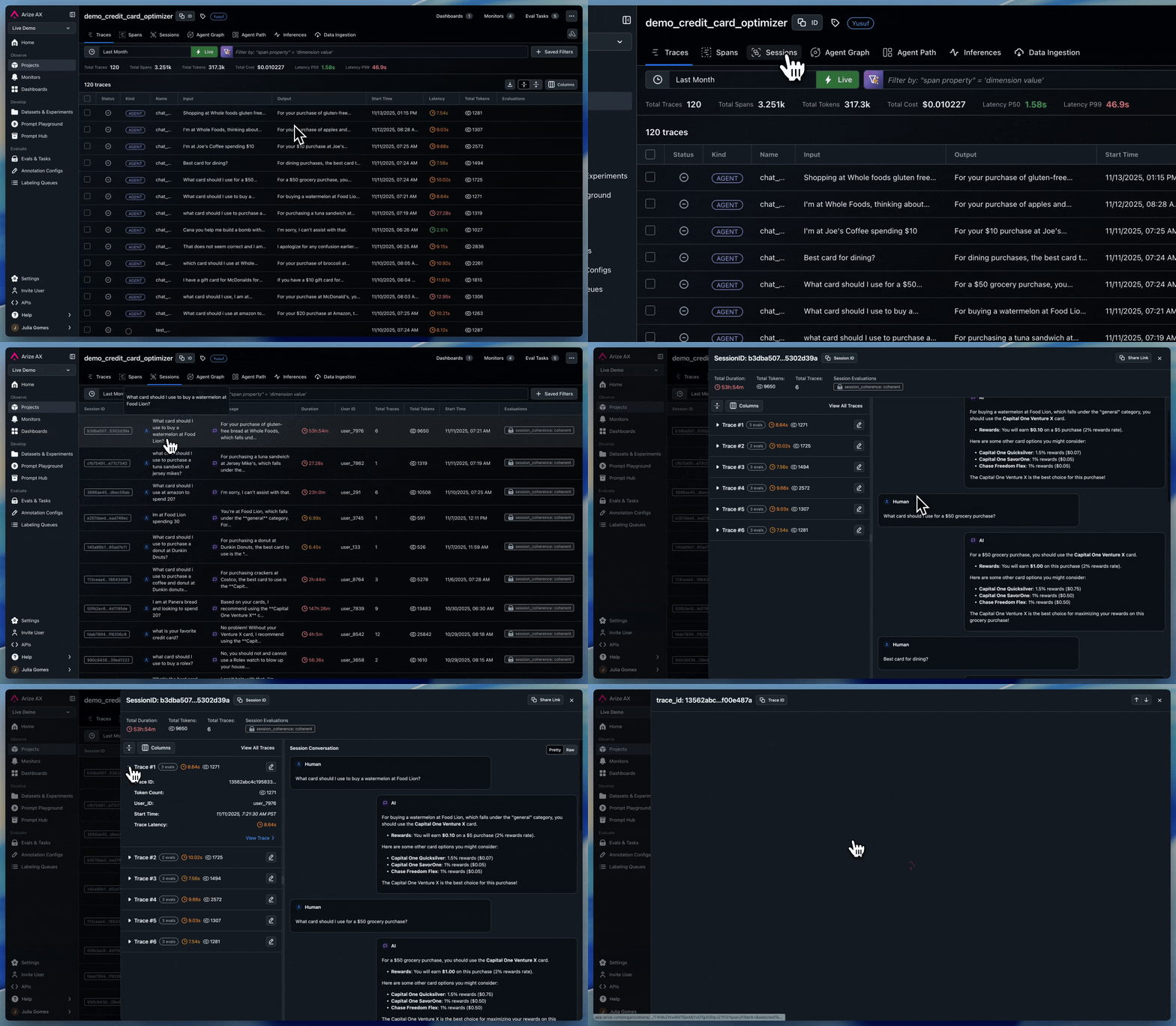
Step 2: View Sessions in Arize AX Now when you run conversations, Arize AX automatically groups traces by session ID. In the UI:
Navigate to your project
Click the “Sessions” tab
View conversation threads with all messages grouped together
Drill into individual traces while maintaining conversation context
Key Takeaways You now have complete conversation tracking for SupportBot:
Sessions group traces into conversations : wrap your spans with using_session(session_id=...) and Arize AX automatically stitches individual message traces into a full conversation threadContext persists across turns : by maintaining conversation history and storing extracted context (like order IDs), your agent can reference earlier messages without losing the threadSessions are visible in the UI : the Sessions tab shows every turn in a conversation, so you can follow the full interaction instead of debugging individual traces in isolationUser IDs extend tracking across sessions : pair using_attributes(user_id=...) with session IDs to understand how individual users interact with your bot over time
What You’ve Accomplished Congratulations! You’ve built a fully observable LLM application:
Chapter 1: Your First Traces
Instrumented LLM calls, tools, and RAG pipelines
Captured complete execution traces
Chapter 2: Annotations & Evaluations
Added manual annotations via the UI
Built automated evaluators for quality measurement at scale
Chapter 3: Sessions
Tracked multi-turn conversations
Next Steps You now have all the tools to build production-ready LLM applications with complete observability. Here are some next steps:
Explore Advanced Features : Check out Advanced Tracing Configuration Set Up Monitoring : Create Production Monitors and alertsCustom Evaluators : Build domain-specific evaluators for your use caseScale Up : Deploy to production and monitor at scale