

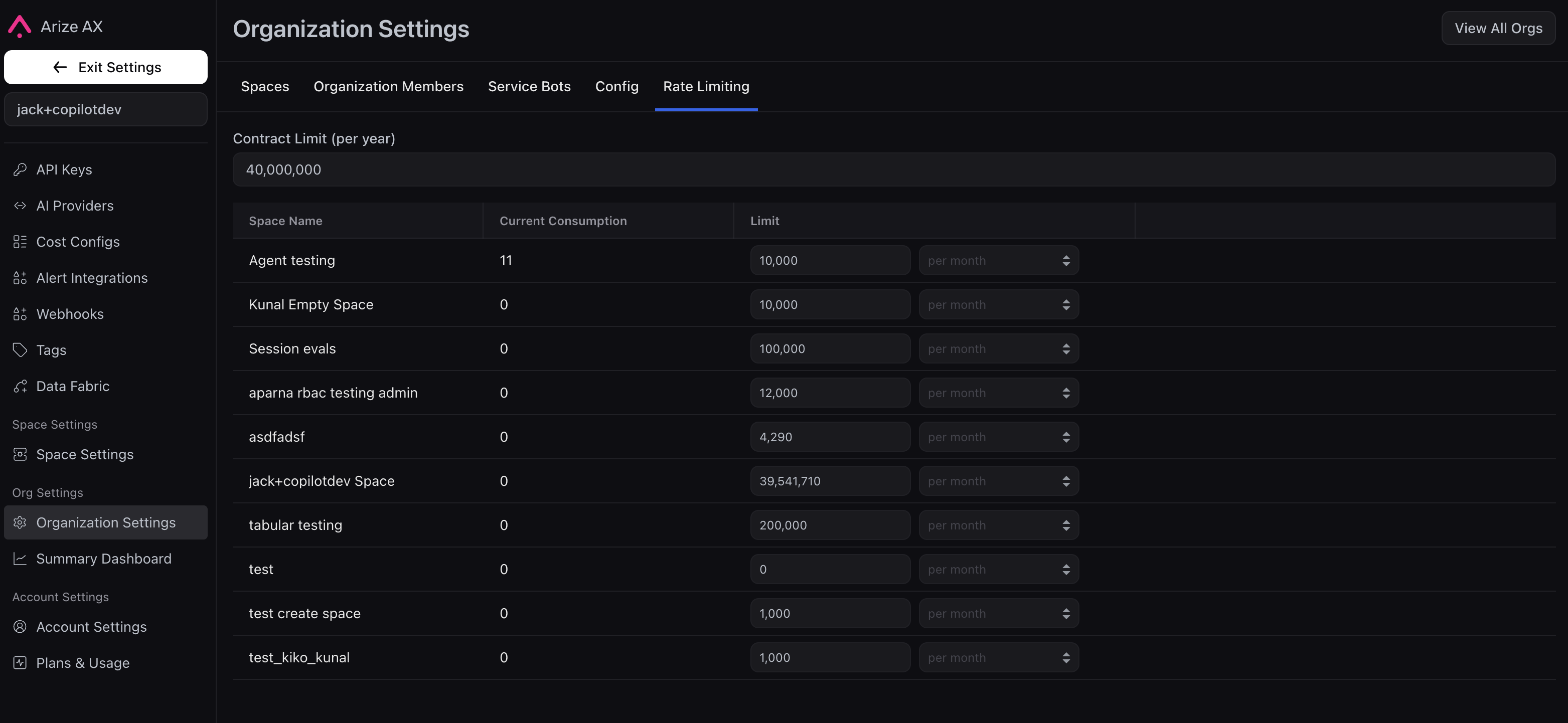
Organization settings → Rate Limiting tab, with contract limit per year and per-space consumption and limits.
Rate Limiting is an enterprise, opt-in feature. If you do not see the tab, email support@arize.com or contact your support team. They can explain which ingestion paths feed these totals. If usage looks wrong, include your account name, organization, and spaces involved.
Open the Rate Limiting tab
- Open Organization settings for the organization you care about (org-wide settings, not a single space).
- Select Rate Limiting.
Read the table
Contract limit (per year) — Total annual ingestion for this org under your agreement. Arize sets and maintains this number; it is not editable in the product. To raise your overall contract budget, work with your support team. Each row is one space:- Current consumption — How much of that space’s budget has been used in the current monthly window.
- Limit — The monthly cap for that space (often labeled per month). Account and organization administrators can change these values to redistribute volume across spaces, as long as the splits stay within your contract.
When a space nears or hits its cap
You get warnings in the UI as usage approaches the monthly limit and when the limit is reached. After the cap is hit, ingestion that is gated by these quotas may fail until the window resets or a space limit (or contract) is updated. Exact client errors depend on your integration; see Python SDK, TypeScript SDK, and REST API.See also
- Cost tracking — token and model spend in traces
- API keys — keys your services use to send data
- Arize Community Slack