

The Resilience Model
Storage Holds Your Data; the Cluster Is Replaceable
Most application pods are stateless. Most in-cluster persistent volume claims (PVCs) hold scratch space or regenerable caches (for example, the ADB historical segment cache) rather than the authoritative source of data. Durable data resides in two locations:- PostgreSQL, which stores configuration data: users, monitors, dashboards, API keys, and related settings. This may be the built-in database running within the cluster, or an externally managed instance provided by the customer.
- Object storage (S3, GCS, or Azure Blob), which stores observability data: traces, predictions, and evaluations.
Two Categories of Data With Distinct Recovery Characteristics
Configuration data and observability data follow different rules during failure scenarios and should be planned for independently.
Observability data is largely protected by object storage once replication is in place. The configuration data loss figure that is most directly controllable is determined by how PostgreSQL is deployed; see Choosing Your Setup below.
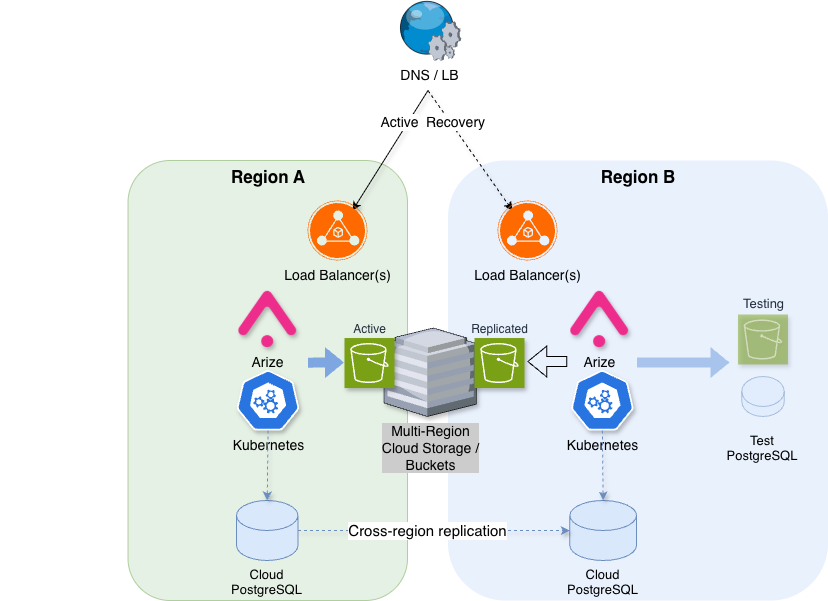
Arize AX operates as a single-writer system. Only one cluster should own the shared object storage at any given time. A lock file on the buckets records the owning cluster and is checked during installation prechecks (not continuously at runtime), helping prevent a second cluster from being deployed against the same buckets. Cross-region disaster recovery is therefore implemented as active-passive: one live cluster and one standby cluster, rather than two concurrently active writers.
Choosing Your Setup
Select the simplest configuration that addresses the failure scenarios relevant to your requirements. Each row assumes the configurations described in the preceding rows are also in place.
For production environments, multi-zone should be treated as the baseline configuration. When a zone fails, Kubernetes reschedules pods to healthy zones and rebuilds ephemeral PVCs automatically. A secondary region should be added only when the organization has a genuine requirement to withstand a regional outage. The primary cluster serves all traffic until a guided failover is executed, so this introduces meaningful additional cost and operational overhead, and should therefore be a deliberate decision driven by regulatory, contractual, or tier-1 availability requirements.
How Database Choice Affects Configuration Data Loss
PostgreSQL stores configuration data. The deployment method chosen for PostgreSQL directly determines the configuration RPO.- External managed database with a cross-region replica (recommended for minimal configuration data loss). The replica is promoted during failover. No
pg_restorestep is required if the replica is current. Examples include RDS or Aurora with a cross-region replica, Cloud SQL with a cross-region read replica, and Azure Flexible Server with a read replica. See External PostgreSQL Requirements. - Built-in database with scheduled backups. Configuration data loss is bounded by the backup schedule. The default schedule runs once daily, resulting in a worst-case loss of up to 24 hours. The schedule can be adjusted if needed. This approach is suitable for smaller deployments but is not recommended where configuration RPO must remain low.
Availability During Upgrades
A common question during evaluation concerns the extent of downtime incurred during a version upgrade. For most releases, taking the platform fully offline is not required. Upgrades roll through the cluster sequentially, with pods restarting in sequence rather than simultaneously. Ingestion, the UI, and APIs run with multiple replicas, so at least one replica typically remains available while others are updated. SDK and OpenTelemetry senders may experience brief retries during pod restarts. Data accepted by Arize continues to be written to object storage throughout. Users already active in the UI generally continue working without interruption, though an individual request may need to retry if it is routed to a pod that is restarting. Single-replica deployments may experience brief service interruptions during the rollout.Recovery Targets
The figures below apply to a regional failover to a standby cluster. Actual recovery times will also depend on DNS propagation, automation, and data volume. These figures are intended for planning purposes and do not constitute a service-level agreement (SLA).
Potential data loss during a regional failover depends on your PostgreSQL deployment and bucket replication lag; see Choosing Your Setup.
In-Flight Data During a Failover
During a regional outage, data in transit to Arize falls into one of three categories:
To minimize this risk window further, deploy an OpenTelemetry Collector with disk-based buffering between applications and Arize. If Arize becomes briefly unavailable, the collector retains the data on disk and transmits it once the secondary region is operational. This allows the ingestion pipeline to withstand a regional failover without relying on Arize’s internal buffering.
How a Regional Failover Works
Regional failover follows a guided process. The Arize team provides the specific steps according to the customer’s environment. The stages below outline the process for planning purposes.- Confirm the outage - Verify that the primary region is down and notify stakeholders of the expected recovery time.
- Promote the database - Bring up PostgreSQL in the secondary region and promote the external managed replica, or restore the built-in instance from backup.
- Redirect traffic - Update DNS to point to the secondary region.
- Activate the standby cluster - Bring up the standby cluster so that storage ownership transfers safely.
- Validate functionality - Send a test trace, log in, and confirm that dashboards and monitors load correctly.
 Returning to the original region constitutes a separate, planned failback process, to be executed during a scheduled maintenance window. It does not occur automatically and requires following the same guided process in reverse.