

Chapter summary
Your evals said your agent was ready. Production showed it wasn’t. You fixed the agent. But the next one probably has the same problem. Why? Your evals don’t loop back to production, and production doesn’t loop back to retraining. This is the AI ROI crisis hiding in plain sight.
Why AI ROI measurement fails
You can’t see what you’re spending
Your AI workflows burn tokens. Your dashboard shows latency numbers. But you can’t answer this: “Did the agent actually solve the customer’s problem?”
That gap is the ROI problem.
Companies are tracking AI ROI like they track cloud spend. But most are flying blind. Without LLM observability, you can’t tell whether your agents are working or burning budget.
The traditional dashboard is useless
Traditional dashboards show uptime and traffic. They don’t show whether the system was useful. They don’t tell you:
- Did the agent answer correctly?
- Did it use the right documents?
- Did the tool call succeed?
- Did the customer reach their outcome?
That’s where LLM evaluation and AI observability become non negotiable.
In this article, we’ll look at why AI evaluation is becoming central to AI ROI, and how teams can use an observability and evaluation layer like Arize AX to control loosely governed AI pipelines before they overwhelm budgets and break brittle internal workflows.
Your evals don’t match production
Stanford HAI’s 2026 AI Index examined LLM evaluation benchmarks and found invalid test items in standard benchmarks. This included things like questions with wrong answer labels, missing context, ambiguous wording, impossible conditions, or formatting issues that change what is being tested.
Invalid-question rates ranged from 2% on MMLU Math to 42% on GSM8K.
If public LLM evals can contain flawed test items, your company’s AI workflows need tighter measurement. Internal workflows are messier than exam-style benchmarks. They involve:
- Private documents
- Retrieval accuracy
- Permissions and policies
- Tool calls and handoffs
- Latency and cost
- Real user outcomes
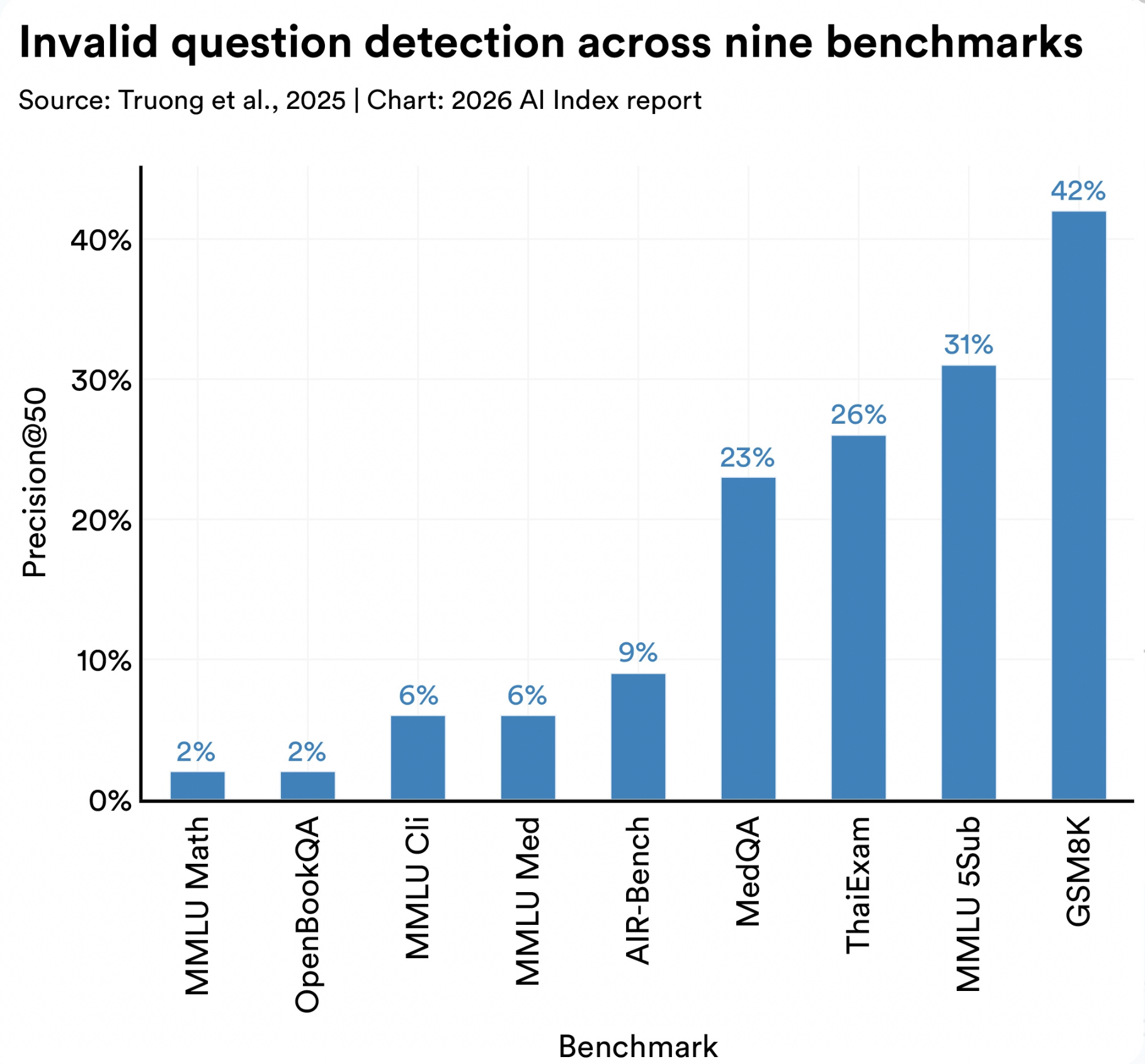
Source: Stanford HAI, AI Index Report 2026, Technical Performance, section 5. (hai.stanford.edu)
AI ROI starts with measurement. You need to:
- Inspect what the system did
- Score whether it worked
- Trace how quality, cost, latency, and outcomes changed across the workflow
Building LLM evaluation into production AI
The measurement problem gets urgent with agents
You shipped three new agents last quarter. Token usage jumped 40%. Your CEO asked: “Are we getting faster? Cheaper? Better?” You couldn’t answer.
That’s a measurement problem.
Agents make LLM evaluation urgent. Here’s why:
- A bad answer is one failure
- A hallucinated tool call can route the customer to the wrong system
- Agents trigger bad handoffs or send users down useless loops
- LLM evals make that behavior visible before customers find it
Without production AI evaluation, you find out when your customer does.
What gets measured gets managed
LLM evaluation stops being a nice-to-have once it becomes how you measure your ROI.
AI-ready platforms now track metrics that actually matter:
- Correctness: Is the answer accurate?
- Faithfulness: Is the answer grounded in real documents?
- Retrieval relevance: Did the search find the right docs?
- Tool-call accuracy: Did the agent call the right API?
- Latency: How fast did the workflow complete?
- Cost: What was the cost per completed task?
- Escalation rate: How often did humans need to take over?
- Regressions: Are new versions breaking old capabilities?
These are production AI signals that tell you whether your agent moved work forward or just consumed tokens.
Build better agents with Arize
Trace, evaluate, and learn. Build agents that work with Arize AX and start tracing your runs today.
Prefer open source? Try Arize Phoenix for self-hosted, open source agent observability.

LLM observability: end-to-end agent visibility
Why workflow-level visibility matters
A single customer request to your support agent can move through:
- Routing (which model?)
- Retrieval (which docs?)
- Generation (what answer?)
- Evaluation (is it safe?)
- Tool calling (which API?)
- Logging (what happened?)
- And then, back to the user
Each layer is a failure point. In multi-vendor stacks, each layer may come from a different provider, which makes it hard to see where quality drops, latency grows, or cost increases.
The hidden cost table: where ROI breaks
| Workflow step | What can go wrong | ROI pressure |
|---|---|---|
| Prompt/Routing | Expensive model used for simple requests; context appended instead of compressed; retries triggered by weak routing | $$ |
| Retrieval | Plausible document retrieved instead of the right one; stale policy used; permissions ignored; key source missing | $$$ |
| Model Response | Answer sounds complete but misses the user’s decision; unsupported claim included; formatting blocks action | $$$$ |
| Judge/Evaluator | Fluency rewarded over task success; rubric misses edge cases; false pass accepted; scoring drifts across releases | $$ |
| Tool Call | Right API called at the wrong time; repeated call made; write action triggered too early; timeout hidden from user | $$$$ |
| Infrastructure | Batch jobs backed up; GPUs idle; queue spikes; traces missing; failed jobs retried without control | $$$ |
| User Outcome | User escalates anyway; task gets abandoned; request repeats in another channel; rework lands on a human team | $$$$$ |
The business value comes from connecting those signals. But here’s the thing: a workflow isn’t “working” because your LLM generated a response.
It’s working when:
- The response is grounded in real documents
- The tool call was correct
- The chain completed within budget
- The user actually reached their outcome
Production LLM evals: from inference to evidence
There are many evaluation frameworks for LLMs. The useful split is this: evaluate the answer, the context, the actions, and the cost.
Answer evaluations: is the response correct?
Answer evals ask: Is this response factually correct and grounded in the right source?
- Correctness: Does the response answer the question accurately?
- Faithfulness: Is the answer supported by the retrieved documents?
- Relevance: Does the response match what the customer asked for?
Context evaluations: Did retrieval find the right documents?
Context evals ask: Did the retrieval system return the right source material?
- Document relevance: Are the retrieved documents actually useful?
- Precision: How many of the top results were relevant?
- Coverage: Did we retrieve enough relevant documents?
Action evaluations: Did the agent call the right tools?
Action evals ask: Did the agent make the right decisions in the workflow?
- Tool selection: Was the right API called?
- Argument correctness: Were the API arguments correct?
- Trajectory efficiency: Did the agent take the shortest path?
- Safety: Did the agent avoid unsafe write actions?
A arXiv paper on human-centered agent evaluation by Google analyzed 91 sets of user-defined rules for enterprise software-engineering agents. The authors found that users define agent quality through process behavior:
- When the agent should ask for clarification
- How it should follow project conventions
- When it should use tools
- How it should collaborate inside the workflow
This shifts the evaluation target from final answer quality to workflow behavior.
Cost evaluations: Did the workflow stay within budget?
Cost evals ask: Is this AI workflow spending the right amount to complete the task?
The metric is cost per completed task: resolved ticket, completed search, approved draft, closed workflow, or finished agent task.
| Cost area | What to evaluate |
|---|---|
| Model Routing | Are simple tasks being sent to expensive models? |
| Token Volume | Are prompts and retrieved context larger than the task needs? |
| Retries | Are weak routing, bad retrieval, or failed calls repeating the same work? |
| Tool Calls | Are agents calling tools only when the workflow requires it? |
| GPU Utilization | Is infrastructure spend turning into completed work? |
| Cost Per Task | Does the completed workflow justify the full AI cost? |
In platforms like Arize AX, teams can inspect traces, run evals across spans, traces, and sessions, and compare how changes to prompts, models, parameters, or workflows affect cost and quality together.
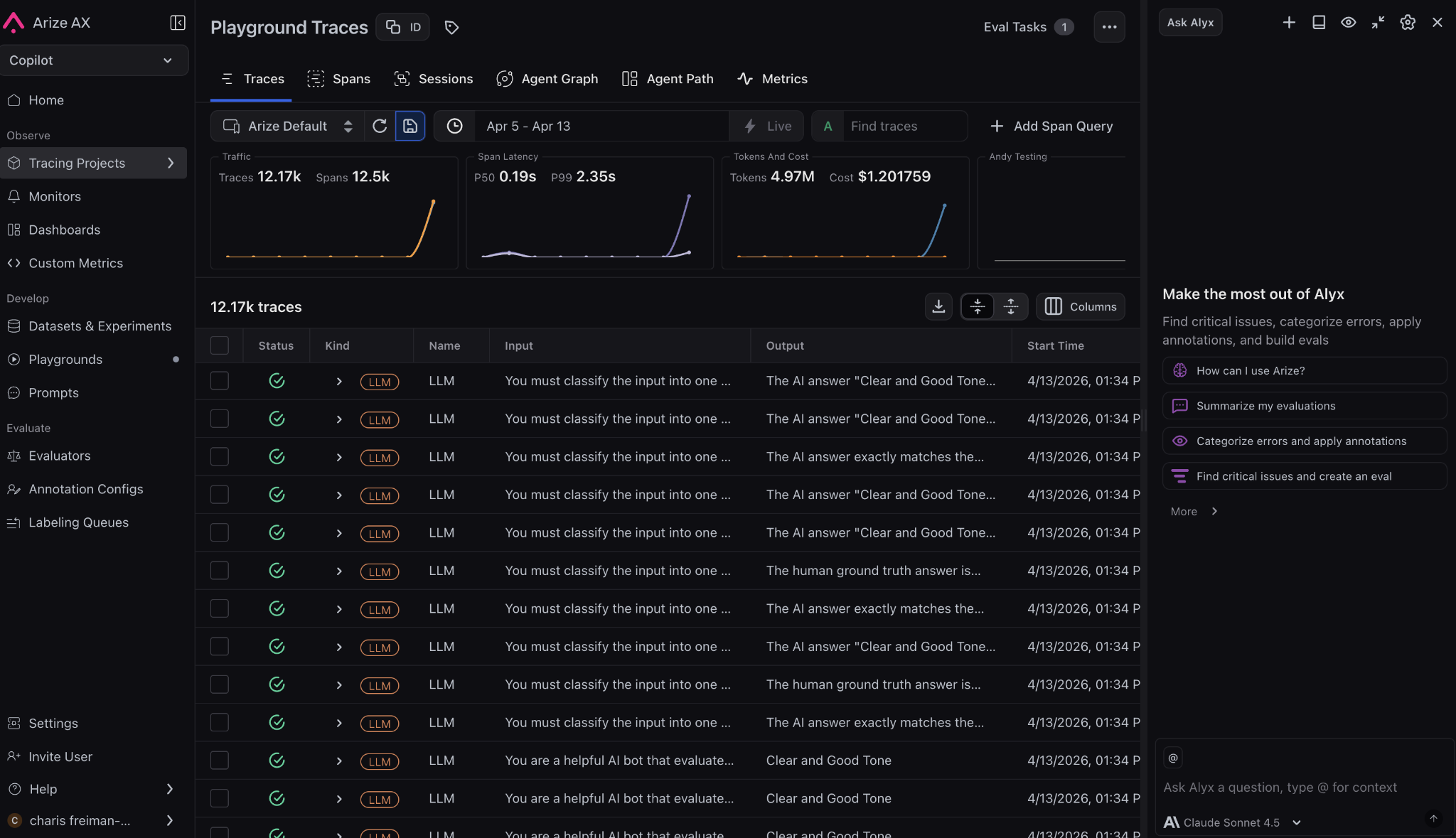
Arize AX trace views show workflow-level efficiency signals such as trace volume, span count, latency percentiles, token usage, and cost, Arize AX
Agent efficiency: LLM observability and latency optimization
Quality assurance for LLM applications: beyond benchmarks
Quality prediction evals ask: Can the system tell when an output is ready to use, when it needs review, and when it should be blocked?
This is where AI ROI depends on judgment, not just generation.
Teams can start with predefined LLM evaluation templates for:
- Faithfulness checks
- Correctness scoring
- Document relevance
- Tool selection quality
- Refusal behavior
- Toxicity detection
- Summarization accuracy
- SQL generation quality
- RAG relevancy scoring
Quality failures usually create compounding downstream costs:
- A wrong support answer becomes an escalation
- A weak document-relevance score becomes a bad RAG answer
- A bad tool-selection decision sends an agent into the wrong workflow
Evaluating quality prediction metrics helps teams decide:
- Which outputs can ship directly
- Which need human review
- Which should be regenerated
- Which should be blocked before they reach a customer
Measuring workflow efficiency with LLM observability
Workflow efficiency evaluations measure whether the AI system is moving work forward without slowing users down or inflating operating cost.
A workflow can produce a correct answer and still hurt ROI if it:
- Takes too long
- Burns too many tokens
- Creates queue pressure
- Needs repeated attempts to complete
Trace views can show traffic, spans, latency percentiles, token volume, and cost together. This lets teams look at efficiency as a full-chain problem instead of treating latency, usage, and spend as separate dashboards.
For your users: Track whether the AI helps them finish faster with lower friction
- P50 and P99 latency
- Time to first response
- Repeated requests
- Abandonment rate
- Escalation rate
- Task reformulation
For your operations: Track whether the workflow moves work through the system cleanly
- Completion rate
- Resolution time
- Handoff lag
- Review time
- Queue depth
- Human takeover rate
- Throughput per workflow
Agent evaluation: Tool use and multi-agent workflows
Why agent ROI depends on the path, not the answer
Agent ROI depends on the path users are forced through before they get an answer.
A customer updating billing information needs the agent to:
- Use the right systems
- Respect the right rules
- Avoid unnecessary steps
- Finish cleanly
An employee searching an internal policy needs the agent to:
- Find the exact policy document
- Apply it to their specific situation
- Avoid suggesting contradictory policies
- Know when to escalate
A sales rep asking for account context needs the agent to:
- Query the right CRM fields
- Format data for quick decisions
- Respect access permissions
- provide ROI-relevant metrics
Separating knowledge, planning, and action quality
The expensive failures often happen inside the trace:
- Wrong tool
- Wrong argument
- Skipped clarification
- Repeated lookup
- Ignored timeout
- Write action triggered before the workflow was ready
Evaluation shape matters here. Some checks should be binary because the rule is absolute:
- Valid JSON response format
- Required field present
- No unsafe write action
Other checks need a score because quality is directional:
- Trajectory efficiency
- Helpfulness
- Grounding strength
- How well the agent handled ambiguity
For rules that don’t need judgment, use code evaluators. A Python check can verify:
- Valid JSON
- Required fields
- Argument shape
- Missing IDs
- Repeated tool calls
- Blocked terms
- Unsafe write actions
- Timeouts
Use the judge where behavior needs interpretation. Use code where the rule is mechanical. That split protects AI ROI: subjective review stays available for trajectory quality, while basic failures get caught cheaply, consistently, and close to the workflow.
Maximizing AI ROI: Production LLM evaluation strategies
Build a culture of AI performance review
LLM evals need a weekly performance review, the same way cloud spend, incident trends, and product funnels get reviewed.
The goal is to turn telemetry into operating decisions:
- Faster workflows
- Cheaper model routes
- Better user outcomes
- Fewer repeated failures
These meetings should focus on questions that change the business result:
- Can a smaller model handle this low-risk task?
- Can Qwen or Kimi handle this without hurting quality?
- What’s the cost savings if quality stays the same?
- Can we reduce latency?
- Would switching providers help?
- Can we trim retrieval context?
- Should we change routing?
- Are users seeing slowdowns in specific patterns?
- During specific hours?
- In specific regions?
- For specific workflows?
- During batch windows?
- Which failures repeated this week?
- Should they become regression tests before release?
- What’s the root cause?
- Did tool calls, retries, or human takeovers increase?
- For workflows that were supposed to be automated?
- What changed last release?
The meeting should end with owners and experiments. LLM evals create ROI when they drive these small operating decisions every week.
Run short internal AI sprints
Internal AI sprints help teams test where AI can create measurable value without turning the rollout into a vague adoption campaign.
Each sprint should have:
- A workflow owner (who runs the business process?)
- An evaluation owner (who measures success?)
- An operations owner (who runs the experiment?)
Start with one workflow, one department, one outcome. Define success before the test begins:
- Lower review time?
- Fewer escalations?
- Better retrieval quality?
- Faster drafting?
- Lower latency?
- Reduced cost per completed task?
The sprint should also test the reporting layer:
- Can the team see which model was used?
- Which documents were retrieved?
- Where latency increased?
- Which tool calls repeated?
- Did users complete the task?
If the answer is unclear, the sprint has exposed the next infrastructure problem to fix.
A good sprint gives responsible teams enough evidence to decide:
- What improved?
- What broke?
- Whether the workflow deserves more budget?
Keep the scope narrow, keep ownership clear, and use the results to improve the next deployment.
Deploy LLM evals vertically, not everywhere at once
LLM evals work best when they’re tied to one team, one workflow, and one shared context.
A project team using an internal Slackbot or documentation assistant should know:
- What the system should answer
- Which sources it should trust
- Where it should stop
Check whether the bot deviates:
- Did it answer the actual question?
- Did it pull from the right Slack channel or doc?
- Did it preserve project context?
- Did it avoid inventing status?
Small teams can spot failure modes faster because they know the work. Start there, then scale the eval pattern to other departments once it proves useful.
Tie AI budgets to workflow evidence
AI spend should move toward workflows with proof.
TheFork is a good example. With Arize AX LLM observability and tracing, the team found:
- Duplicate embedding calls on a critical path
- Removed wasted work
- Improved p95 latency
- Tracked cost per 1K queries
That is a budget conversation leaders can act on.
The funding rule:
- Put more money behind workflows that show measurable improvement
- Repair workflows with clear failure points
- Pause workflows that keep consuming budget without moving the operational metric
Ask these questions:
- Did p95 latency improve?
- Did resolution time fall?
- Did the cheaper model hold quality?
- Did repeated retrieval failures drop?
- Did human review shrink?
Those answers decide where the next AI dollar should go.
The same evidence can also stop bad scaling. A finance assistant that saves drafting time but creates review risk needs tighter evals. LLM evaluation gives leaders a way to promptly fund what works, fix what is close, and pause what keeps failing.
Common LLM evaluation mistakes (and how to avoid them)
Mistake #1: Evaluating answer quality without grounding
The problem: Your eval says “Is the answer correct?” but doesn’t check “Is it grounded in a real document?”
A chatbot can produce a fluent answer that sounds authoritative but isn’t backed by any source.
The fix: Always pair answer quality with source verification. Your LLM evaluation should check both:
- Was the answer factually correct?
- Did it cite the document?
- Was the document actually relevant?
Mistake #2: Ignoring workflow behavior
The problem: You measure final answer quality but ignore the path the agent took.
An agent might produce the right answer but make 5 API calls instead of 1, timeout twice, skip safety checks, or ignore user preferences.
The fix: Score trajectory quality separately. Your agent evaluation should measure:
- Is the path efficient?
- Are all steps necessary?
- Were safety checks applied?
- Did it respect user constraints?
In Arize AX, teams can use agent trajectory evaluations to inspect the path across LLM calls and function calls, while trace views show inputs, outputs, timing, and metadata for each step.
Check out this article on Testing Binary vs Score Evals on Different LLMs to learn more.
Mistake #3: Benchmarking against static test sets
The problem: You evaluate your AI workflow against a fixed benchmark, but production is dynamic.
New documents arrive daily. New policies change behavior. New edge cases emerge.
The fix: Build continuous LLM evaluation pipelines that test against production data. Monthly regression tests aren’t enough. You need weekly (or daily) eval runs that:
- Include new production cases
- Catch drift in older workflows
- Spot edge cases before users do
Mistake #4: Using expensive judge models for everything
The problem: You pay for a judge model to score “is this valid JSON?” (spoiler: you don’t need a judge.)
The fix: Use code for deterministic rules, judges for interpretation:
- Code evals for format, structure, safety, boundaries
- Judge evals for nuance, quality, helpfulness, tone
This cuts your LLM evaluation costs in half.
Mistake #5: Not connecting evals to budget decisions
The problem: You run production LLM evals every week, but the results don’t inform spending.
The fix: Make evals the input to budget decisions. Every month, ask:
- Which workflows improved in quality? → Increase budget
- Which workflows broke? → Pause or fix
- Which workflows optimized cost? → Scale them
Evals without budget impact are just dashboards.
AI ROI belongs in the operating system
AI ROI improves when LLM evaluation becomes part of the operating rhythm. The useful question is simple: Did the workflow become faster, cheaper, safer, or easier to trust?
That requires an evidence layer around every serious AI workflow:
- Traces to show what happened
- LLM evals to score behavior
- Datasets to preserve failures
- Experiments to compare changes
- Dashboards that connect quality with cost and latency
Teams need an LLM observability platform that lets them:
- Inspect traces and spans
- Run online and offline LLM evals
- Compare model or prompt changes
- Debug agent paths
- See how workflow behavior changes cost, latency, and quality
Getting started: Implementing LLM evals in your stack
- Start with one workflow. Pick your highest-value or highest-pain AI application.
- Define success metrics. What would “improved ROI” look like for this workflow? (cost per task? escalation rate? latency?)
- Baseline your current performance. Run LLM evaluation templates against your production data for a week. Document what’s working and what’s breaking.
- Pick 2-3 high-impact evals. Don’t try to evaluate everything. Focus on your biggest failure modes.
- Automate the eval pipeline. Daily or weekly AI observability runs, not manual spot-checks.
- Connect evals to decisions. Make your weekly team meeting about “which evals improved, which broke, where’s our budget going?”
- Scale to other workflows. Once you have pattern and evidence from the first workflow, replicate the eval framework.
The goal: LLM evaluation stops being a pre-launch checklist and becomes how you operate production AI.
What Arize does
If you take one thing from this guide, it’s this: AI ROI doesn’t come from the model. It comes from whether the workflow actually works.
That means you need to move from outputs to evidence:
- What did the system do?
- Did it work?
- Did it improve cost, latency, or outcomes?
This is where Arize fits.
Arize gives you the layer this article describes: traces to see what happened, evals to measure whether it worked, and a feedback loop to improve it. Not as separate tools, but as one system tied to real production data.
The shift is simple but non-optional: AI stops being a demo when evaluation becomes how you operate.
If you want to improve ROI, start there.
FAQs: LLM evaluation and AI observability
What is the best way to measure AI ROI?
Measure AI ROI at the workflow level. Track whether a specific task became faster, cheaper, safer, or easier to complete. Strong metrics include:
- Cost per resolved ticket
- Time to completed report
- Escalation rate
- Review time
- Rework rate
What is cost per outcome in AI?
Cost per outcome is the full cost required to complete a useful task. It includes:
- Model calls and tokens
- Retrieval operations
- Tool calls and retries
- Infrastructure overhead
- Human review and rework
Cost per outcome is more useful than cost per call because the workflow is what creates value, not individual API calls.
What is time to value for an AI workflow?
Time to value measures how quickly an AI system creates measurable improvement after deployment.
For internal tools, that could mean:
- Faster reporting
- Fewer repeated questions
- Lower review time
For customer-facing tools, it could mean:
- Faster resolution
- Higher conversion
- Lower churn risk
Should companies build or buy AI evaluation infrastructure?
Buy the common layer. Build the domain layer.
Tracing, dashboards, online LLM evals, experiments, cost views, and dataset workflows are expensive to maintain internally.
Company-specific rubrics, policy checks, and failure cases should come from the teams closest to the workflow.
What is soft ROI in AI?
Soft ROI is business value that doesn’t show up immediately as direct revenue or cost savings. Examples include:
- Lower burnout (humans reviewing less)
- Faster decision-making (agents answer immediately)
- Better knowledge access (retrieval surfaces the right docs)
- Stronger customer trust (fewer failures)
- Fewer manual handoffs (agents complete tasks end-to-end)
- Improved work quality (less rework)
LLM evals make soft ROI easier to defend with proxy metrics. Track:
- Time humans spent on review (should decrease)
- Customer escalation rate (should decrease)
- Knowledge base search volume (may decrease if agents answer better)
- Employee satisfaction on tools using agents (should increase)

