

Agent evaluation: How to evaluate AI agents in production
Chapter summary
Agent evaluation tests whether an AI agent completes its assigned task correctly and follows an acceptable path to get there. Effective evaluation goes beyond the final response to inspect tool calls, retrieval, state changes, constraints, and recovery behavior. This guide explains how to build representative datasets, trace complete runs, choose the right evaluators, compare changes, and turn production failures into regression tests.
To build your first agent evaluation, choose a representative task and define the evidence that would prove it succeeded. Capture a complete run, check the outcome and actions against those requirements, and compare agent versions using the same test cases. Start with the six-step workflow below, then use the routing, trajectory, and evaluator templates to investigate specific failures.
You can also use the sections in this guide to evaluate the decisions and execution behind an agent’s final response:
- AI agent router evaluation for tool selection and parameter extraction
- Agent path convergence for detecting unnecessary steps, loops, and inefficient trajectories
- Agent evaluation templates for tool calling, planning, reflection, and other common failure modes
Individual skills can still use standard LLM evaluation methods such as retrieval relevance, hallucination detection, correctness, and deterministic code checks. The agent-specific evaluations below add checks for routing, tool arguments, trajectories, and repeated-run reliability.
Last updated on October 27, 2026.
This was authored by Aryan Kargwal, PhD at PolyMTL.
What is agent evaluation?
Agent evaluation is the process of testing whether an AI agent can complete its assigned task correctly and behave as expected while doing so. It measures both the result and how the agent reached it.
Because an AI agent can make decisions, retrieve information, call tools, and take multiple actions before producing a result, teams need to evaluate the behavior across the run, not only the final response.
Why agent evaluation matters
Agent performance depends on more than the LLM or the agentic framework it works on. Agent reliability depends on the full system around the model. Tool calls, retrieval, memory, permissions, and orchestration can each change whether the same model succeeds or fails.
Teams therefore need agent evaluation for several practical reasons:
- Agent behavior is stochastic. The same request can produce different plans, tool sequences, and outputs across runs. Teams need repeated evaluation to measure whether good behavior is consistent rather than occasional.
- Tool execution can fail independently of the model. An agent may select the wrong tool, generate bad arguments, or misread a response. Tool-calling evaluation tests whether those actions were actually correct.
- Production telemetry is often fragmented. Model calls, tool runtimes, APIs, and client infrastructure may live in different systems. Reconstructing a run requires connecting those signals before teams can judge what happened.
- Operational success does not guarantee semantic correctness. A request can complete without errors while the agent retrieves irrelevant evidence, misunderstands intent, violates policy, or reports an action that never occurred.
- Changes anywhere in the agent stack can introduce regressions. A new prompt, model, tool schema, memory strategy, or orchestration rule can alter behavior, even when application code around it stays unchanged.
Agent evaluation adds behavioral and semantic checks to the execution traces produced by the system. Teams can see where behavior diverged from expectations and verify whether a change actually fixed it.
Build better agents with Arize
Trace, evaluate, and learn. Build agents that work with Arize AX and start tracing your runs today.
Prefer open source? Try Arize Phoenix for self-hosted, open source agent observability.

What should you evaluate in an AI agent?
Agent evaluation should cover four surfaces: the outcome reached, the path taken, individual decisions, and reliability across repeated runs. We’ll explain these scopes in plenty more detail below.
But teams also need the context around those behaviors. Retrieved information, previous tool outputs, application state, permissions, policies, and approval requirements can all change whether the same action is correct or incorrect.
What is agent-native evaluation?
Here, native means designed around the agent’s operating model. Agents observe a state, choose an action, receive a result, and use that result to decide what happens next. This is the guiding principle for Agent-as-a-Judge, which we built into Arize AX to help teams evaluate complex, multi-step behavior by letting an agentic evaluator explore the trace, reason across spans, tools, and state, and determine whether the trajectory satisfied the intended outcome and constraints.
An agent-native evaluation preserves the relationships between those events rather than scoring tool selection, parameters, plans, or responses as independent outputs. A tool call may be correct after one observation, premature after another, or unsafe because an earlier action changed the agent’s permissions or available options.
The evaluator should therefore encode invariants rather than a single ideal trajectory: required state changes, prohibited actions, policy boundaries, and evidence that must be present. Ordering, task decomposition, and recovery strategy can remain flexible when several approaches are equally valid.
For a deeper walkthrough, including when to choose Agent-as-a-Judge over an LLM judge, worked examples, scorecard design, and validation, see our Agent-as-a-Judge guide.
Why final-answer evaluation misses most of an AI agent run
Final-answer scoring begins after most of the agent run has already happened. Before responding, the agent may inspect external state, call APIs, retry tools, revise its plan, and modify connected systems.
The customer usually sees none of this execution. A convincing response can follow an inefficient, unsafe, or partially failed run, while a failed response can hide substantial progress and a recoverable error near completion.
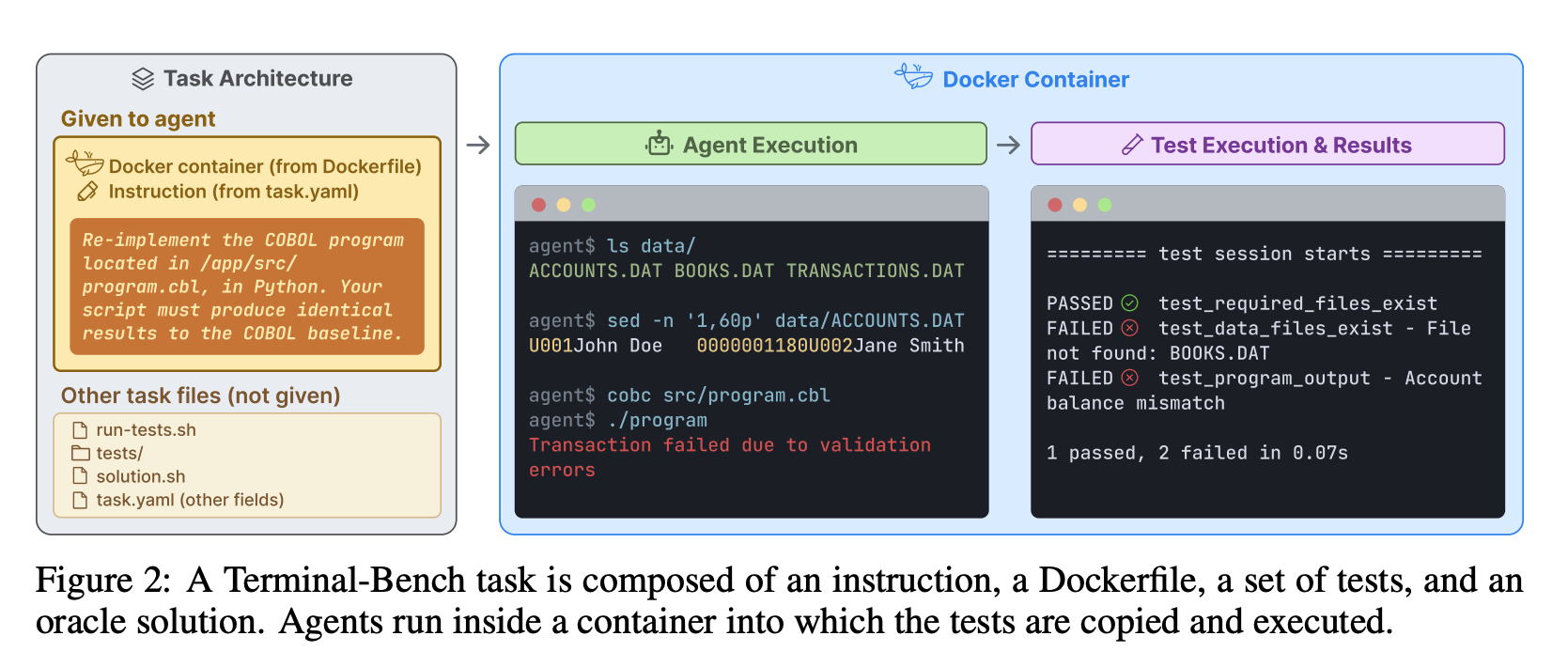
Consider Terminal-Bench, a staple benchmark for terminal-based agents. Agents complete realistic tasks inside command-line environments, while comprehensive tests verify the environment they leave behind rather than the explanation they provide.
That design captures something final-answer grading misses: task completion often lives in the resulting state. Intermediate milestones can further reveal partial progress, stalled execution, and the point where an otherwise promising run broke down.
The four scopes of AI agent evaluation
Once the response is separated from the execution behind it, agent evaluation breaks into four scopes. Outcome, trajectory, and decision evaluation inspect a run; reliability evaluation asks whether acceptable behavior persists across repeated attempts and realistic variations.
Together, these scopes turn a pass/fail result into an actionable diagnosis: whether the task was completed, where execution diverged, which decision caused the failure, and whether the behavior is stable enough for production.
Evaluating whether the agent reached the right outcome
Outcome evaluation checks whether the agent left the task in an acceptable final state. That state may live in a database, ticketing system, codebase, generated document, or physical environment.
Consider a refund agent. Success requires the correct order to be refunded for the approved amount, the customer record to be updated, and the case to leave the unresolved queue.
The agent’s confirmation message cannot establish those conditions. Instead, the evaluator must inspect the affected systems after execution and compare their actual state against explicit completion criteria.
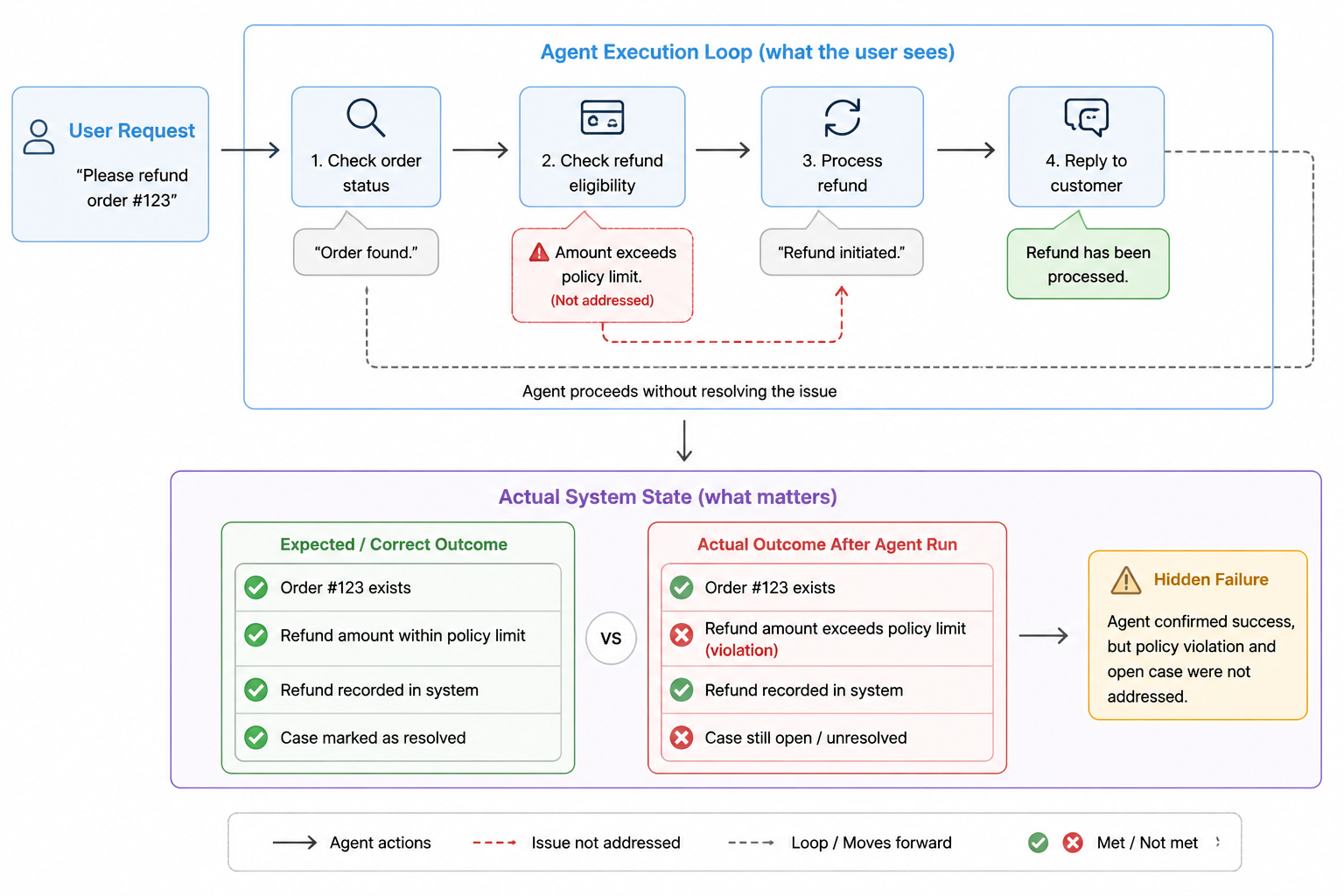
Structured outcomes can usually be checked with deterministic assertions. Teams can validate the refund amount, confirm that the record was updated, and verify that the support case was closed.
These checks can also represent partial completion. A recorded refund with an open case receives a different verdict from a run that produced no valid state change.
Less-structured outcomes, such as reports or customer communications, may require semantic evaluation alongside checks that the correct source data was retrieved and persisted.
Evaluating the agent’s trajectory
A correct outcome does not prove sound execution. An agent may reach the requested state after unnecessary retries, unsafe commands, skipped approvals, or access to unrelated resources.
Trajectory evaluation examines the sequence of observations, decisions, tool calls, and state changes that produced the result. It checks whether required steps occurred, actions respected policy, and the agent remained within its assigned authority.
Consider an agent asked to replace a part, refund an earlier order, and then place a new order. A trajectory evaluator can determine:
- Whether the agent completed each of the user’s sub-goals
- Whether it called the appropriate tools in a valid sequence
- Whether it introduced redundant steps, retries, or loops
- Whether it recovered appropriately from tool failures
- How much latency, cost, or token usage the task required
These questions require evaluating the trajectory as a whole. An individual tool call may appear valid in isolation while contributing to an incomplete, inefficient, or unsafe run.
For tasks with a known workflow, teams can also use a reference-based trajectory evaluation. The evaluator compares the observed run against required steps or a set of acceptable paths. For a refund task, those steps might include verifying the order, checking the refund policy, obtaining approval when required, processing the refund, and confirming the resulting state.
The reference should generally define required actions and boundaries rather than mandate one exact sequence. Several trajectories may be valid unless a particular order is necessary for safety, policy compliance, or task completion.
How to measure agent path convergence
Agent path convergence measures how consistently an agent reaches a result without taking unnecessary steps. It is useful for finding agents that loop, retry the same action, return to the router without new evidence, or follow longer paths than comparable successful runs.
For n successful runs of the same task type, let si be the number of steps in run i, and let smin be the fewest steps observed across those runs.
One way to calculate agent path convergence is: C = (1/n) × Σi=1n (smin / si)
The convergence score satisfies 0 < C ≤ 1. A score of 1 means every successful run used the shortest observed path. Lower values indicate that some runs took additional steps.
For example, if three successful runs take 4, 5, and 8 steps, then C = (1/3) × (4/4 + 4/5 + 4/8) = 0.77.
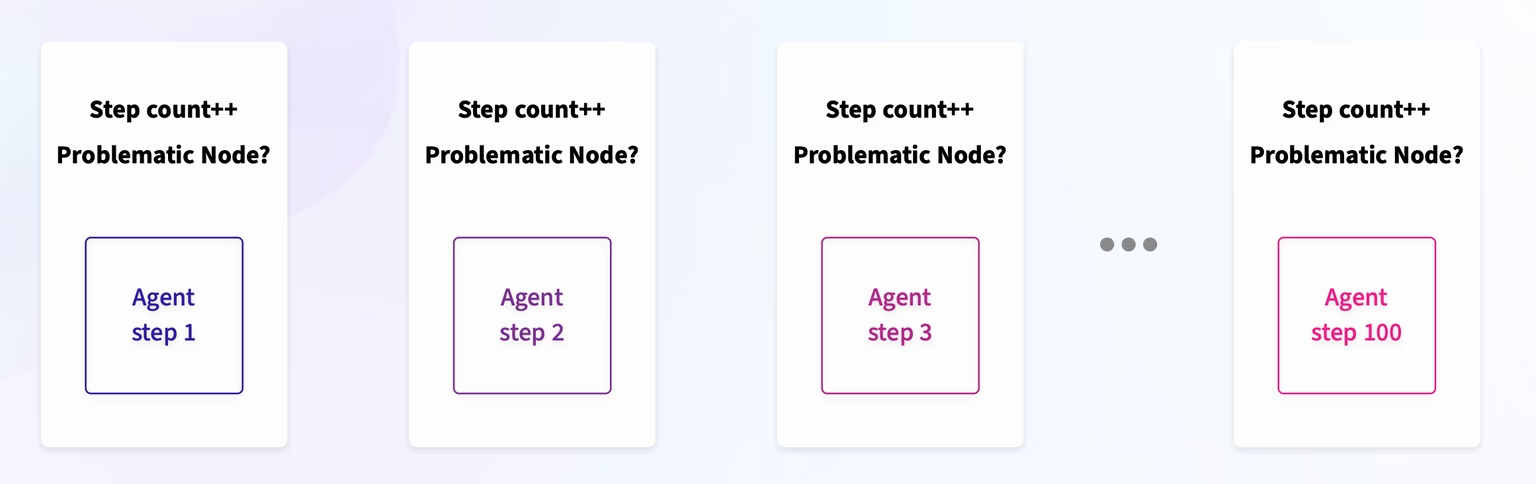
Convergence should be paired with task-completion and policy-compliance metrics. A short path is only useful when the agent reaches the correct outcome without skipping required steps. The shortest observed run is also a proxy for efficiency rather than proof of an optimal path, especially when every observed run contains the same unnecessary action.
When comparing agent versions, calculate the shortest successful run across the pooled runs from all versions and use that same reference for each version’s score. Compare equivalent tasks and count steps consistently. This score measures relative step-count efficiency among successful runs; it does not establish that those runs followed the same trajectory.
Evaluating individual agent decisions
Decision evaluation examines one choice within the run. It asks whether the action was supported by the evidence, policy, permissions, and alternatives available when the agent acted.
Return to the refund agent from the earlier example. It detected that the requested amount exceeded its automatic approval limit, yet continued processing and later told the customer that the refund succeeded.
At that point, the agent had several valid alternatives:
- Request approval
- Escalate case
- Request review
- Stop execution
The evaluator reconstructs the decision context: what the agent observed, which actions were available, what each action could change, and which constraints applied at that moment.
Clear violations can be checked deterministically. A rule can fail any refund issued above the agent’s authority or any success message sent before the refund status is confirmed.
Ambiguous choices often require an LLM-as-a-judge with a narrow rubric. The judge compares the selected action against the available evidence and returns a verdict with a reason.
An Agent-as-a-Judge can go further by inspecting the surrounding trace, retrieving policy details, checking external state, and using tools before deciding whether the action was justified.
This scope identifies the exact decision that introduced the failure. Teams can then change the prompt, approval policy, tool permissions, or decision logic responsible for that choice.
How to evaluate an AI agent router
AI agent router evaluation tests whether an agent sends a request to the correct tool, skill, or workflow and supplies the arguments required to execute it. Evaluate the router separately from the downstream skill so a routing failure does not get mistaken for a response-quality failure.
A router should be evaluated on two primary axes:
| Router evaluation axis | What to test | Useful checks |
|---|---|---|
| Tool or skill selection | Whether the router chose the best available tool, selected no tool when none was needed, or requested clarification when the input was insufficient | Exact match against an expected route, per-route accuracy, a confusion matrix, or an LLM judge when several routes may be valid |
| Parameter extraction | Whether the router produced schema-valid arguments that were supported by the request and included every required field | Schema validation, required-field checks, exact or normalized value matching, and field-level precision and recall |
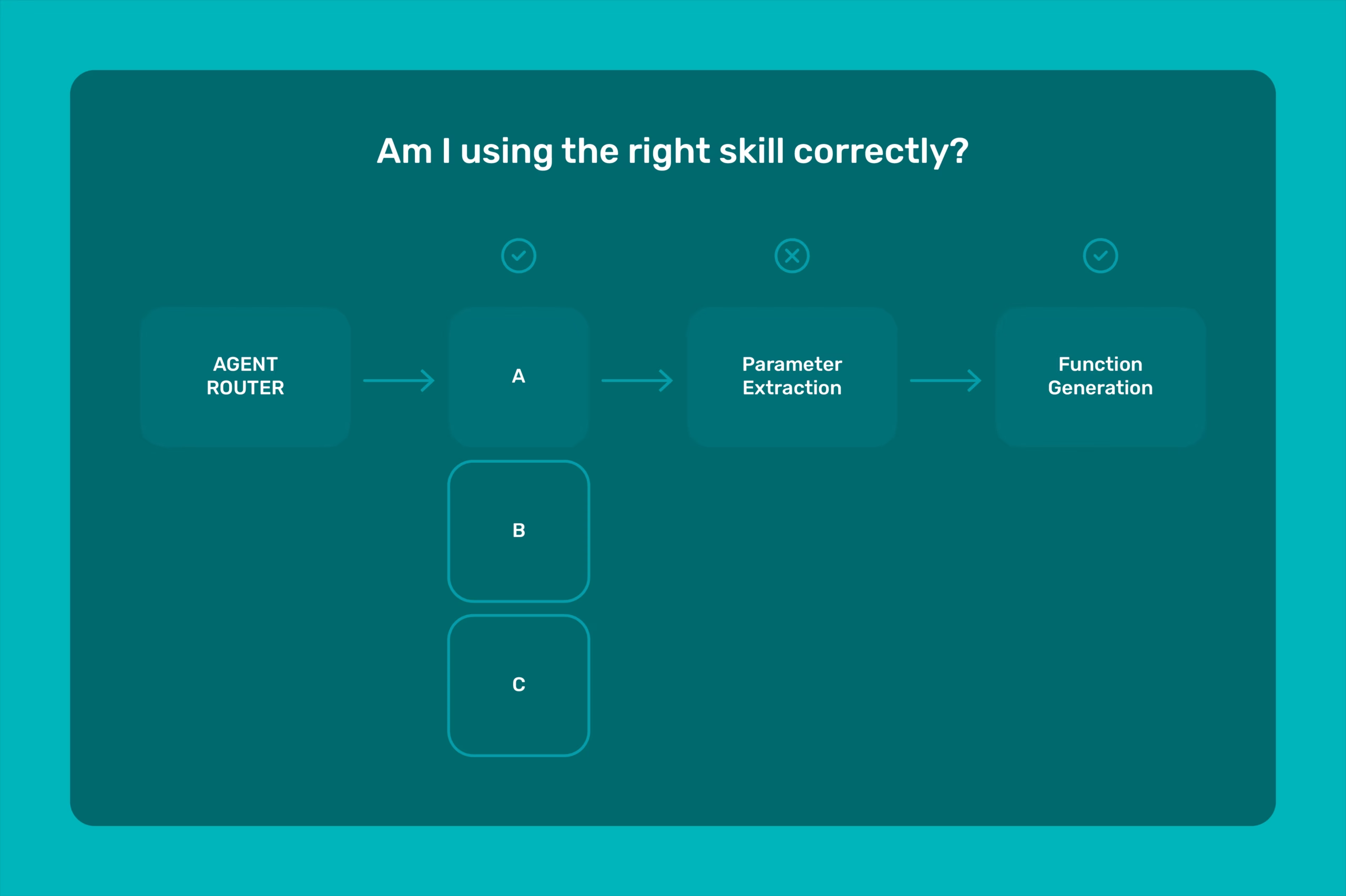
Your router dataset should include overlapping tool descriptions, missing required parameters, requests that require no tool, multi-turn context, and misleading identifiers. For example, ask for an order status while supplying a shipping tracking number. The router should enter the appropriate order-status workflow, but it should not silently populate an order_id field with the tracking number. Depending on the available tools, the correct behavior may be to use a tracking lookup, map the identifier through another tool, or request the missing order ID.
When router accuracy is low, inspect failures by route. Repeated confusion between the same two tools usually points to overlapping tool descriptions or an underspecified router prompt. Correct tool selection with poor arguments points instead to the tool schema, parameter descriptions, or extraction logic.
Measuring reliability across repeated runs
A successful run shows that the agent can complete the task once. Reliability evaluation measures whether acceptable behavior persists across repeated attempts and realistic variations.
The same refund request may produce different results across runs, so teams should compare outcome consistency, policy-compliance rate, recovery behavior, critical failures, latency, and cost. Reliability thresholds should reflect both failure frequency and operational consequence, since an average success rate can hide rare unauthorized actions.
Reliability can be measured through pass@1, pass@k, and pass^k. Pass@1 measures whether the agent succeeds on a single attempt. Pass@k measures whether at least one of k attempts succeeds, capturing whether the agent can complete the task given multiple opportunities. Pass^k measures whether all k attempts succeed, providing a stricter measure of consistency. Teams can also track prompt robustness, resource variance, policy-compliance rate, and critical-failure frequency.
How to write an evaluation specification for an AI agent
The four evaluation scopes become operational only when they are written into an evaluation specification. The specification defines acceptable outcomes, permitted paths, decision boundaries, and reliability requirements before execution begins.
The following pseudocode evaluates a task whose expected outcome is a completed refund. Each field represents a check against the execution trace and authoritative system records. The permitted amount must match the applicable policy or explicit approval. If the available evidence cannot support a verdict, send the case for human review.
score_refund(example):
if example.prohibited_action:
return FAIL

if not example.order_checked_before_refund:
return FAIL

if not example.policy_checked_before_refund:
return FAIL

if example.approval_required and not example.valid_approval_before_refund:
return FAIL

if example.success_claimed_before_confirmation:
return FAIL

if not example.correct_order_and_amount:
return FAIL

if not example.refund_completed_and_verified:
return FAIL

if example.customer_record_updated and example.case_resolved:
return PASS

return PARTIAL
Check policy, authorization, and execution requirements before assigning partial completion. In this example, PARTIAL means the refund was completed correctly but the customer record or case still needs follow-up. For tasks whose expected outcome is a refusal or escalation, define those completion checks separately.
Run-level verdicts should be aggregated separately to make a release decision. For example, a candidate may need to exceed a required task-completion and policy-compliance rate while remaining below an allowed critical-failure rate.
The evaluator cannot derive these conditions from the agent’s final message. It must inspect the refund record, customer record, case queue, approval state, and execution trace.
The specification can allow several valid paths while preserving strict boundaries. The agent may request approval or escalate the case, but it cannot exceed its authority or report an unconfirmed refund.
How to choose the right evaluator for each agent failure
An evaluator can only produce a trustworthy verdict when it can observe the evidence that defines the failure. A checker that sees only the final response cannot determine whether the agent changed the right system state, while a model-based judge is unnecessarily subjective when a policy condition can be verified exactly.
Use the most direct evidence and the least subjective method capable of deciding the case. When the available evidence cannot support a reliable automated verdict, defer rather than force a pass or fail.
Evaluators should also depend on stable task semantics wherever possible. Checks against resulting state, policy conditions, or normalized events are generally more durable than checks tied to a specific tool name, span layout, or vendor-specific trace field.
State and action failures should be checked deterministically
Deterministic evaluators work when the expected state or permitted action can be expressed as an explicit condition. The check could be a Python assertion, a database query, or a schema or policy validator that compares recorded evidence against the expected condition.
For the refund agent, one check can verify that the stored amount matches the approved amount, while another confirms that approval existed before execution. Each failed assertion identifies the exact state transition or action that violated the evaluation specification.
| Failure source | Evidence inspected | Deterministic check |
|---|---|---|
| Incorrect resulting state | Persisted refund and case records | The refund matches the approved amount and the case is resolved |
| Invalid tool action | Tool call and submitted arguments | The refund targets the requested order and uses the approved amount |
| Skipped prerequisite | Approval record and execution order | Approval exists before a refund above the automatic limit |
| Prohibited action | Permission state and execution trace | The agent never processes a refund outside its authority |
These checks can run after controlled experiments or against production traces. Because each verdict is tied to an explicit condition, failures remain easy to reproduce, diagnose, and convert into regression tests.
Deterministic checks become insufficient when correctness depends on meaning, evidence quality, or the context surrounding a decision.
When to use an LLM judge for agent evaluation
Semantic evaluation is needed when correctness depends on interpretation, such as whether an explanation is faithful, a decision is justified, or a response addresses the user’s request. Broad instructions such as “decide whether this run was good” leave too much of the standard to the judge. Each evaluator should isolate one property, define the evidence it may use, and specify what qualifies as a pass.
- Pointwise evaluation: Judges one output against a fixed rubric and returns an independent score or verdict. It works well when every run must satisfy the same production or regression standard.
- Pairwise evaluation: Compares two outputs for the same task and determines which better satisfies the rubric. It is useful for selecting between prompts, models, or agent configurations, although the preferred output may still fail the required standard.
- Reference-guided evaluation: Gives the judge an authoritative policy, answer, trace, or set of acceptable examples. The judge checks the output against that evidence, making unsupported claims and missing requirements easier to identify.
The judge should cite the evidence behind its verdict and identify the criterion that failed. Teams should calibrate the rubric against human-labeled cases, inspect recurring disagreements, and repeat that calibration whenever the judge model or evidence pipeline changes.
Human review belongs at the boundary of uncertainty and consequence
Human reviewers can apply the same pointwise, pairwise, and reference-guided protocols used by model-based judges. Their role is to establish reliable labels, resolve ambiguous verdicts, and detect errors that automated evaluators consistently miss.
In practice, human judgment enters the evaluation pipeline through three recurring review patterns:
- Calibration review: Domain experts label a representative set of runs before deployment. Teams compare automated verdicts against those labels to refine the rubric, judge prompt, examples, and decision thresholds.
- Disagreement adjudication: A reviewer resolves cases where evaluators disagree, abstain, or produce incompatible rationales. The adjudicated verdict becomes the authoritative label for that case.
- Ongoing audit: Teams periodically sample automated passes and failures to detect evaluator drift, systematic bias, and confident errors that disagreement-based routing may overlook.
Review should also be mandatory when an incorrect verdict could permit a high-consequence action. Each reviewed case should preserve the criterion, evidence, final verdict, and rationale so it can become a calibration example or regression test.
How to evaluate an AI agent
Agent evaluation works as a repeatable development loop: define expected behavior, collect representative tasks, capture complete runs, evaluate the behaviors that matter, compare changes, and turn observed failures into regression cases.
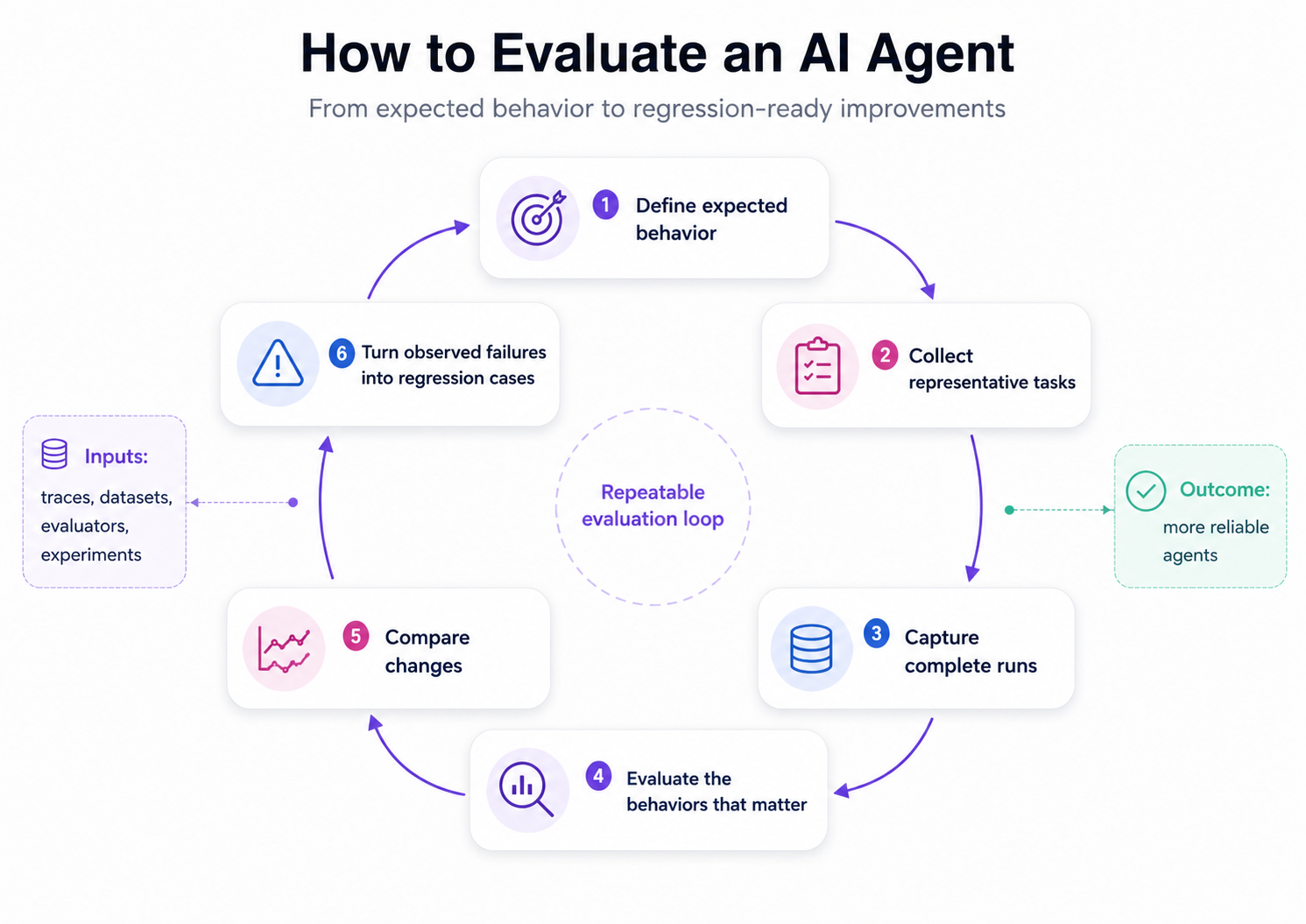
For a hands-on implementation, the Agent Trajectory Evaluations documentation guide walks through evaluating complete agent traces in Arize AX, from ordered tool calls to trajectory judging and logged evaluation results. For the authoring loop that turns a batch of traces into a code eval, an LLM judge, and a calibrated regression dataset, see How to build agent evals from traces.
Step 1: Define successful agent behavior
Define success before choosing evaluators. Record the result the agent should produce, the actions it may take, the constraints it must follow, and how it should respond when the task cannot be completed.
| Requirement | What to define | Evidence to inspect |
|---|---|---|
| Task outcome | The observable result that confirms completion | Final response, system state, or generated artifact |
| Agent actions | Required, allowed, and prohibited actions | Tool calls, arguments, and execution sequence |
| Constraints | Policies, permissions, limits, and approval requirements | Authorization state and policy checks |
| Failure handling | When the agent should retry, stop, or escalate | Errors, retries, and escalation events |
| Quality criteria | Correctness, completeness, and task-specific requirements | Evaluator results or human-reviewed labels |
Each requirement should point to evidence that can be captured during a run. Task holders and collaborating teams should agree on these conditions before prompts or models are compared.
Step 2: Build an evaluation dataset
Use a fixed set of tasks to compare agent changes over time. Start with common production requests, high-risk edge cases, and failures collected from traces, evaluator results, or human review.
Each row should preserve what is required to rerun the task: the input, relevant context, available tools, expected output or system state, and metadata such as task type or failure category.
A practical starting workflow in AX is:
- Filter traces for failed evaluations or problematic behavior.
- Select representative examples instead of exporting every failure.
- Add the expected outcome or human-reviewed label.
- Save the examples as a regression dataset.
- Add new production failures as the agent changes.
Let Alyx build the dataset for you. Press Cmd+L (macOS) or Ctrl+L (Windows/Linux) to open Alyx and try: “Create a dataset from the spans with errors” or “Create a synthetic dataset with 100 examples for regression testing”
AX also supports datasets created from CSV files, code, or synthetic examples. The Build a dataset guide walks through each route and shows how production spans can become reusable evaluation cases.
Step 3: Trace the agent’s behavior
Capture the complete path from the initial request to the final result. Read the trace for:
- Semantics: whether each decision and response fits the task
- Retrieval: what information was fetched, repeated, missed, or ignored
- Tool use: which tools were called, with what arguments, and how often
- Latency: where the run slowed down or waited unnecessarily
- Errors: failed calls, retries, timeouts, and failures carried into later steps
- Readability: whether engineers can reconstruct the run without piecing together disconnected logs
Step 4: Choose the right evaluators
Apply the evaluator-selection rules above: use code for observable conditions, an LLM judge for narrowly defined semantic criteria, and human review when evidence is incomplete, evaluators disagree, or an incorrect verdict could permit a high-consequence action.
Common evaluator patterns for AI agents
Different failures require different evaluators. Choose the pattern that matches the behavior you need to verify and the evidence available in the trace.
| Evaluator pattern | What it judges | Evidence to inspect | Typical evaluation method |
|---|---|---|---|
| Task-completion evaluator | Whether the agent completed the assigned job and produced the required result | Final response, generated artifact, test results, or state in the system where the action occurred | Code-based verification when the result is observable; LLM judge for semantic outcomes |
| Tool-selection evaluator | Whether the agent chose the correct tool for the task | Available tools, selected tool, user request, and decision context | Code-based matching for deterministic routing; LLM judge when several tools may be reasonable |
| Tool-argument evaluator | Whether the agent supplied valid, complete, and supported parameters | Tool schema, generated arguments, retrieved context, and application state | Schema validation, code checks, or exact field-level comparisons |
| Tool-result interpretation evaluator | Whether the agent correctly understood and acted on the tool’s response | Tool output, subsequent reasoning, later tool calls, and final response | LLM judge supported by deterministic checks for status codes or returned values |
| Trajectory evaluator | Whether the agent followed an acceptable path rather than looping, repeating mistakes, or taking risky unnecessary actions | Ordered model calls, retrieval steps, tool calls, retries, and state changes | Code checks for repeated or prohibited actions; LLM judge for overall path quality |
| Context-use evaluator | Whether the agent used relevant, current, and sufficient information | Retrieved documents, memory, conversation history, tool outputs, and application state | Retrieval metrics, citation checks, or an LLM judge for relevance and sufficiency |
| Constraint-compliance evaluator | Whether the agent followed permissions, policies, approval requirements, and task-specific limits | Authorization state, policy checks, tool calls, and attempted actions | Deterministic policy checks, rules, and code-based evaluators |
| Recovery and escalation evaluator | Whether the agent responded correctly when an action failed or the task could not be completed | Errors, retries, stop conditions, fallback behavior, and escalation events | Code checks for retry limits and required escalations; LLM judge for recovery quality |
| Response-quality evaluator | Whether the final answer is correct, complete, grounded, and appropriate for the request | Final response, source evidence, expected criteria, and human-reviewed labels | LLM judge calibrated against human-reviewed examples |
| Efficiency evaluator | Whether the agent completed the task within acceptable cost, latency, and execution limits | Token usage, latency, tool-call count, retries, and successful task completion | Deterministic thresholds and calculated metrics |
The table above maps failure types to the evidence and evaluation method they require. The templates below provide implementation references for several common agent behaviors.
Agent evaluation templates for common failure modes
Use the narrowest evaluation template that can isolate the behavior you need to improve. Tool selection and parameter extraction are more diagnostic when scored separately, while an end-to-end tool-calling evaluator is useful as a release check.
| Evaluation template | Core question | Best used for | Implementation reference |
|---|---|---|---|
| Agent tool calling | Did the agent choose an appropriate tool and produce a runnable call with supported arguments? | End-to-end validation of a tool call after routing | Tool Invocation evaluator |
| Agent tool selection | Given the request and available tools, did the agent choose the correct tool? | Diagnosing router errors before evaluating arguments | Tool Selection evaluator |
| Agent parameter extraction | Did the agent extract valid parameter values from the request without inventing unsupported information? | Isolating malformed, missing, or fabricated tool arguments | Tool Invocation evaluator |
| Agent path convergence | How close is each successful run to the shortest observed path for the same task type? | Detecting loops, unnecessary retries, and trajectory regressions | Code evaluations |
| Agent planning | Can the proposed plan complete the task while respecting required steps and constraints? | Evaluating a plan before execution or judging a completed trajectory | Trace and session evaluations |
| Agent reflection | Does the agent’s final answer and resulting state satisfy the task, or should the agent retry, stop, or escalate? | Post-run critique and recovery decisions | LLM-as-a-judge evaluations |
These templates can run against controlled experiments before release and against production traces after deployment. Keep the rubric, evidence, and output labels stable so scores remain comparable across agent versions.
Step 5: Run evaluations and investigate failures
Treat every prompt, model, tool, or orchestration change as a separate experiment. Keep the dataset, evaluators, and run configuration fixed so the results remain comparable.
| Stage | What to do |
|---|---|
| Baseline | Run the current agent version and save the results |
| Candidate | Run the proposed change against the same dataset |
| Compare | Find examples whose evaluator labels, scores, latency, or cost changed |
| Investigate | Open the failed run and locate the first point where its trace diverged |
| Record | Assign a failure category and note the change most likely to address it |
Start with examples that changed from passing to failing rather than reading every trace. Review the output, evaluator explanation, tool sequence, retrieved context, and operational metrics for those rows.
In AX, Compare Experiments places outputs, evaluator results, and metadata side by side, and Diff Mode highlights how each run changed against a baseline you select. Alyx can also summarize the comparison with a request such as:
Compare my last two experiments and show where task completion fell, tool behavior changed, or latency increased.
The Run experiment guide covers the complete UI and code workflow. The Compare experiments guide shows how to inspect changes across individual examples.
Step 6: Add failures back into your evaluation suite
Do not copy every failed trace into the dataset. Confirm the failure, remove duplicates and sensitive data, then preserve the smallest amount of state required to reproduce and judge it.
Production trace → confirmed failure → regression case → experiment → deployment
Store each case in a consistent format:
input:
relevant_context:
available_tools:
expected_behavior:
observed_failure:
failure_category:
source_trace_id:
Add the case when the expected behavior is agreed and its supporting evidence can be inspected. Run the proposed fix against it before merging, then retain it in the regression suite for future changes.
After deployment, run the same evaluators against production traces. In AX, auto-add rules can capture spans by evaluation label, latency, token usage, or tool activity.
Use automatic collection for clearly defined conditions. Send ambiguous or high-risk failures through human review before promoting them into the permanent dataset.
See the agent evaluation loop in practice
Watch how the Arize team turns a production trace into an evaluation case, runs experiments against a proposed fix, and adds the failure to a growing regression suite.
Common mistakes in agent evaluation
Agent evaluations can return consistent scores and still give teams the wrong picture. The test cases may miss important behavior, the evaluator may judge the wrong evidence, or an average may conceal a serious failure.
Testing only clean examples
Hand-written examples usually describe tasks clearly and provide all the information the agent needs. Production requests are less controlled. Users omit details, mix multiple requests, provide conflicting context, and encounter tools or services that fail.
Keep common tasks in the dataset, but add ambiguous requests, high-risk workflows, failed tool calls, and confirmed production failures. Each case should represent behavior the team wants to preserve or prevent.
Trusting evaluators before calibrating them
An evaluator can apply an unclear rubric, reward a fluent answer, or reject valid behavior it did not expect. These errors become harder to notice once the evaluator is applied across thousands of runs.
Test the evaluator against examples reviewed by people who understand the workflow. Check where its verdict disagrees with those labels, revise the rubric, and repeat the comparison before using its score to approve releases.
Calibration should continue after deployment. New tasks and failure patterns may expose cases the original rubric did not handle.
Relying on aggregate scores
An overall pass rate can improve while one tool, workflow, or high-risk task becomes less reliable. The average hides which examples changed and how important those changes are.
Break results down by task type, tool, risk level, and failure category. When a score changes, inspect the affected examples and traces before deciding whether the new agent version is better.
Agent evaluation metrics
Agent metrics should support a decision, not fill a dashboard. Before running an experiment, define which result must improve, which failures are unacceptable, and which operational limits the new version must satisfy.
A release scorecard may look like this:
| Role in the decision | Metrics | What they tell you |
|---|---|---|
| Primary outcome | Verified task completion, resolution rate, test pass rate | Whether the agent completed the work it was assigned |
| Release guardrails | Critical-failure rate, policy violations, unauthorized actions | Whether the change introduced behavior that should block deployment |
| Failure diagnostics | Tool accuracy, grounding, escalation quality, retry rate | Where unsuccessful runs broke down |
| Operational constraints | Cost per successful task, P95 latency, tokens per successful task | Whether the improved behavior is affordable and deployable |
A candidate should not pass because its average score increased. It should improve the primary outcome without crossing a release guardrail or creating an unacceptable cost or latency regression.
For detailed metrics by agent type, read the next chapter in this handbook: Agent Evaluation Metrics: How to Measure Whether an Agent Works.
How Arize AX connects the agent evaluation loop
Arize treats agent evaluation as a debugging discipline. Each verdict should stay connected to the model calls, retrieved context, tool results, and application state that produced the behavior so engineers can understand why an evaluation passed or failed.
Once a failure is confirmed, the run can become a repeatable test for comparing changes to the prompt, model, retrieval, tools, or orchestration outside production. A score that cannot lead back to evidence is difficult to debug, and a production failure that cannot become a repeatable test is likely to return.
Agent evaluation in practice
Industrial agents rarely operate in a clean environment. At Axium Industries, they work across ERP records, warehouse data, equipment telemetry, and operational workflows.
A wrong decision can affect real inventory or machinery. Domain experts therefore help define the golden datasets, expected outcomes, and edge cases used to evaluate each workflow.
The team checks more than the final response. It evaluates task completion, tool use, consistency, and whether the agent produced the intended business result.
Axium initially built the supporting evaluation and observability infrastructure itself. As deployments grew, maintaining that stack began competing with the customer problems its engineers needed to solve.
Moving evaluation, tracing, and production monitoring to Arize Phoenix and the Arize platform reduced that burden. Engineers could spend more time improving the agents instead of maintaining the systems used to test them.
Arize uses a similar approach in its own AI-native support workflows.
Internal agents gather customer context, inspect traces and logs, reproduce issues, and prepare technical escalations. Tracing those runs exposed loops, incorrect tool calls, and steps that still required too much human intervention.
Median support resolution time fell from 22 hours in February 2026 to roughly 2.5 hours by June.
Running agent-native evals in Arize AX
The framework described here depends on retaining the evidence behind every verdict. Arize AX tracing captures each run as connected spans containing inputs, outputs, tool calls, state changes, latency, and cost. Evaluators can then operate at the span, trace, session, or experiment level.
Teams can implement their evaluation specification with code evaluators for explicit conditions, LLM-as-a-judge for narrow semantic criteria, and Agent-as-a-Judge when the verdict requires broader trace context. Human review provides the labels needed to calibrate those evaluators and resolve disputed cases.
The same criteria can run online against production traces and offline against controlled experiments. A production failure can become a dataset example, a candidate evaluator, and a regression case used to test the next prompt, model, retrieval, or agent-logic change.
For researchers, this creates a repeatable environment for comparing agent behavior across configurations. Enterprise teams can carry the same evaluation specification from development into production. Start with one agent and one known failure: instrument the run, encode the criterion, and test the next change in Arize AX. Teams that need an open-source, self-hosted foundation can follow the same workflow with Arize Phoenix.
Related resources
- Agent Evaluation Concepts: Review evaluator patterns for agent planning, tool calling, and complete runs.
- Run Experiments With Code Evaluators: Define a task, apply code-based checks, and inspect evaluation results programmatically.
- Run Offline Evaluations on Experiments: Apply evaluators to saved experiments and compare their results with previous runs.
- View Agent Trajectories: Configure and inspect the execution path across agents, model calls, and tools.
- Evaluation Cookbooks: Explore runnable examples for trace-level and session-level agent evaluation, RAG retrieval quality, and more.
Evaluate your AI agents with Arize AX, or start with open-source observability and evals in Phoenix. Arize AX supports offline experiments, online evaluations over production traces, and agent trajectory judging.
Frequently asked questions about agent evaluation
How is agent evaluation different from LLM evaluation?
LLM evaluation often scores a model response for correctness, relevance, groundedness, safety, or style. Agent evaluation also inspects the execution behind that response, including retrieval, tool calls, state changes, recovery behavior, and verified task completion.
What should an agent evaluation dataset include?
Include common production tasks, high-risk workflows, ambiguous requests, tool failures, and confirmed production failures. Each case should preserve the input, relevant context, available tools, expected outcome, constraints, and enough state to reproduce the run.
Can an LLM judge evaluate an AI agent?
An LLM judge can assess behavior that depends on meaning or context. Examples include whether the agent followed instructions, used sufficient evidence, or chose a reasonable path.
It should not replace checks that can be verified directly. System state, tool arguments, execution order, required fields, and policy conditions are usually better evaluated with code.
Test judge verdicts against human-reviewed examples before using them for release decisions. Review both cases it incorrectly passes and cases it incorrectly rejects.
How do you evaluate an agent when several paths are valid?
Evaluate the requirements shared by every acceptable run rather than enforcing one exact sequence. Tool order, task decomposition, and recovery strategy may vary as long as the agent reaches the required outcome, respects constraints, and avoids prohibited actions.
Should agent evaluations run before or after deployment?
Both serve different purposes.
Offline evaluations compare prompts, models, tools, and agent logic against controlled datasets before release. They make candidate versions easier to compare under the same conditions.
Online evaluations inspect production traces. Real users, changing data, external services, and unfamiliar requests often reveal failures that were absent from the original dataset.
What metrics matter most for agent evaluation?
Use a primary metric that verifies whether the agent completed its assigned job. Depending on the workflow, this could be resolution rate, successful state change, test pass rate, or completed workflow rate.
Add release guardrails for critical failures and diagnostic metrics for tool accuracy, grounding, retries, latency, and cost. These metrics explain the outcome but do not replace it.
How do you know an AI agent is ready for production?
The agent should meet its required outcome across representative, difficult, and high-risk tasks. It should also remain within defined safety, policy, cost, and latency limits.
Review repeated runs rather than relying on one successful attempt. Stochastic behavior can make a weak agent look reliable when the dataset or run count is too small.
Production readiness also depends on what happens after launch. Teams need complete traces, online evaluations, and a process for turning confirmed failures into regression cases.
What should teams evaluate in an AI agent run?
A complete agent evaluation should cover four scopes:
- Outcome: Did the agent produce the required final state?
- Path: Did it follow an acceptable and policy-compliant process?
- Decision: Were individual actions justified by the available evidence and permissions?
- Reliability: Does acceptable behaviour persist across repeated runs and realistic variations?
These scopes identify whether the task failed, where execution diverged, and which system component may need to change.
When should agent evaluations use deterministic checks or LLM judges?
Deterministic checks are preferable when success can be expressed as an exact condition. Examples include verifying a database update, validating tool arguments, confirming that approval preceded an action, or checking an execution trace against a policy rule.
LLM judges are better suited to semantic questions, such as whether an explanation is faithful or a decision was reasonable given ambiguous evidence. Each judge should evaluate one narrowly defined property using a clear rubric and specified evidence. High-consequence or genuinely uncertain cases should be routed to human review.
Why are traces important for evaluating AI agents?
Traces connect an agent’s inputs, observations, tool calls, outputs, state changes, latency, and cost into a coherent execution record. Without that context, evaluators may see that an action occurred without knowing why it was selected or what consequence it produced.
Trace-based evaluation can identify skipped prerequisites, unnecessary retries, unauthorized actions, poor recovery, and the precise decision that introduced a failure. The same trace can later become a regression test for evaluating a new prompt, model, tool, or agent configuration.
How can teams measure whether an AI agent is reliable?
Repeat representative tasks and measure outcome consistency, policy compliance, recovery behavior, critical failures, latency, and cost. Metrics such as pass@1, pass@k, and pass^k distinguish single-attempt success, recoverability across attempts, and consistency across every attempt; severity-weighted failure rates help expose rare but consequential actions.

