

Chapter summary
Last updated on September 5, 2026.
Traditionally, evaluating LLM and generative AI systems has been slow, expensive, and subjective. Human annotators are expensive. LLM-as-a-Judge uses large language models themselves to evaluate outputs from other models.
What is LLM-as-a-Judge?
LLM-as-a-Judge is an evaluation method that uses a language model to assess AI-generated responses or agent behavior against a defined rubric. The judge returns labels, scores, or comparisons for criteria such as correctness, relevance, and groundedness, using the task input and any reference material needed to assess the result.
Arize created Phoenix Evals to help developers put LLM-as-a-Judge into practice, introducing an open-source library of tested evaluation templates in 2023. Today, Arize AX and Phoenix offer pre-built evaluators for response quality, retrieval, and agent tool use, so you don’t need to write every judge prompt from scratch.
A customer support answer can sound helpful while contradicting your documentation. An LLM judge can help flag that failure when it receives the relevant source material and clear evaluation criteria. This guide explains how to choose a pre-built judge, customize its rubric, validate its judgments, and use the results in development and production.
TL;DR
- Start with the failure you need to catch. Use code for deterministic checks and an LLM judge when the evaluation requires interpreting meaning.
- Choose a pre-built evaluator before writing a custom prompt. Review its criteria and required inputs, then adapt it to your application.
- Validate the judge before relying on its scores. Compare it with reviewed examples, inspect missed failures, and keep the evaluator version and evaluation data in view when comparing results.
For a worked example of turning production failures into an evaluator, read how to build agent evals from traces.
Example: detecting an unsupported claim in a RAG response
| User query: “What is our refund policy?”
Retrieved context: “Customers can request a refund within 30 days of purchase.” Model response: “You can request a refund within 60 days.” |
In this case, we’ll use the following judge prompt: “Does the response accurately reflect the retrieved context? Answer YES or NO and explain.”
And when we run it, the judge’s output says: “NO — the response contradicts the context. The policy states 30 days, not 60.”
The judge compares the response with the supplied evidence and applies the rubric. Before relying on the result, test whether it catches incorrect answers and accepts correct ones across representative examples.

Build better agents with Arize
Trace, evaluate, and learn. Build agents that work with Arize AX and start tracing your runs today.
Prefer open source? Try Arize Phoenix for self-hosted, open source agent observability.

How does LLM-as-a-Judge work?
A judge call typically includes the user’s request, the response or agent trace being evaluated, evaluation instructions, and any required reference material. The judge applies the rubric and returns a result that you can inspect, aggregate, or compare across experiments.
Whether you’re prototyping your first prompt chain or running agents in production, one question never goes away: is this actually working?
The evaluation problem doesn’t start at production. It starts the moment you begin building. Teams that treat evals like tests that they write early and run continuously iterate faster and catch regressions before they compound.
This matters more as AI systems grow more autonomous.
Anthropic analyzed millions of agent interactions and found that the longest-running sessions nearly doubled in length from under 25 minutes to over 45 minutes at the 99.9th percentile. Agents are doing more, running longer, and making more decisions on their own.
That means more surface area for things to go wrong from the first dev build to the thousandth production session.
LLM-as-a-Judge fits naturally here. It lets you run semantic evaluations at scale, whether you’re testing a prompt locally or monitoring live traffic. Build the eval framework once, then carry it through the rest of the lifecycle.
How reliable is LLM-as-a-Judge?
Reliability depends on the task, rubric, judge model, and evidence provided. A judge that performs well on one dataset may miss failures in another application.
Compare its decisions with trusted labels, test consistency across repeated judgments, and inspect false positives and false negatives. For pairwise comparisons, also check whether changing the answer order changes the result. Repeating the same decision does not establish that the decision is correct.
Online vs. offline evaluation
Offline evaluation scores a defined dataset for experiments, benchmarks, or release checks. Keeping the dataset and evaluator version fixed helps you compare application changes.
Online evaluation scores production traffic to identify failures and track quality over time. It can run asynchronously after a response, without adding a judge call to the user’s request path. Choose sampling and execution frequency based on your monitoring needs and budget.
Trace vs. span level evaluation
LLM-as-a-judge can be used for span-level scoring of individual steps in a workflow and trace-level LLM evaluations of an entire workflow end-to-end:
- Span-level evaluation focuses on individual steps within an LLM application (like a single model call, retrieval, or use of a tool), letting teams pinpoint where errors or hallucinations occur in a multi-step workflow.
- Trace-level evaluations examine the entire chain of operations triggered by a user request to judge whether the overall workflow achieved a correct and coherent end result.
Including explanations in evaluations
Rather than simply asking an LLM-as-a-judge to output a score or label, it can be valuable instead to require an explicit explanation or reasoning trace in addition. These chain-of-thought (COT) explanations tend to improve alignment with human judgements while increasing transparency because you can see the why behind a particular model decision.
Importantly, you should have the explanation produced before the final label or score, as this makes it easier to review the reasoning independently, thereby aiding in debugging, auditing, and so forth.
It’s also worth pointing out that explanations don’t always yield improvements, as there are many tasks for which a well-structured prompt already provides enough context for the judge, especially when the model has been optimized for reasoning. In such cases, explanations add costs associated with longer prompts and slower inference, so use discretion when deciding whether a model-generated explanation will actually help in a particular case.
Binary vs. multi-categorical scoring
When you use LLM-as-a-judge, you must decide on the format of the output, which often involves selecting between a simple binary verdict (e.g., pass/fail, yes/no) or a richer multi-categorical/numeric scoring scale (e.g., 1-5, letter grades). In our experience, binary outputs tend to produce more stable and reliable evaluations than more subtle numeric scoring. For this reason, many practitioners have gravitated towards binary or discrete categorical judgements, which force clearer, more reproducible decisions that make it easier to perform robust comparisons.
LLM-as-a-Judge vs. code-based evaluation and human review
Use code-based evaluators when you can test the requirement directly, such as validating a schema, checking an exact match, or running a unit test. These checks do not require a judge-model call, although they still consume compute and execution time.
Use an LLM judge when the evaluation requires interpreting meaning, such as whether an answer addresses the question or accurately summarizes a source. Keep human review involved in defining the rubric, resolving ambiguous cases, and checking whether the judge’s decisions match your quality standards.
For a more detailed selection framework, read when to use LLM-as-a-Judge, including the prerequisites for a useful judge and the tasks better handled by deterministic checks.
Real-world applications
Today, teams use LLM-as-a-Judge techniques to evaluate everything from LLM summarization to chatbots, retrieval to RAG pipelines, and even agentic systems. These evaluations are powering dashboards, tracking performance regressions, guiding fine-tuning, and informing go-to-market.
Some examples of what this looks like in practice:
- Evaluate chatbot answers vs. ground-truth
- Track hallucination rates across model versions
- Score retrieved document relevance in RAG pipelines
- Assess output toxicity or bias
- Diagnose failures of agentic tool-use behavior and planning
Pre-built LLM-as-a-Judge evaluators from Arize
Arize provides pre-built judges for common evaluation tasks. Start with a template that matches the failure you need to detect, then review its inputs and criteria before running it on your data.
Pre-built LLM judges in Arize AX
Arize AX templates include a starting prompt, labels, scoring configuration, and default evaluation scope. Examples include:
| Evaluation area | Example templates | What they assess |
|---|---|---|
| Response quality | Hallucination, Q&A, Summarization | Grounded answers, correct responses, and source-faithful summaries. |
| Retrieval | RAG Relevancy, Reference Link Correctness | Relevant retrieved context and answers that reflect linked documentation. |
| Code quality | SQL Generation, Code Functionality, Code Readability | Generated SQL, intended code behavior, and readability. |
| Agent workflows | Tool Calling, Task Completion, Step Efficiency | Tool use, task outcomes, and unnecessary steps. |
| Conversations | Session Resolution, Session Completion, Session Frustration | Outcomes and user frustration across a conversation. |
| Safety and sensitive data | Toxicity, PII Detection, Secrets Detection, Prompt Injection | Harmful content, sensitive information, and adversarial inputs. |
Browse Arize AX evaluator templates and configuration instructions.
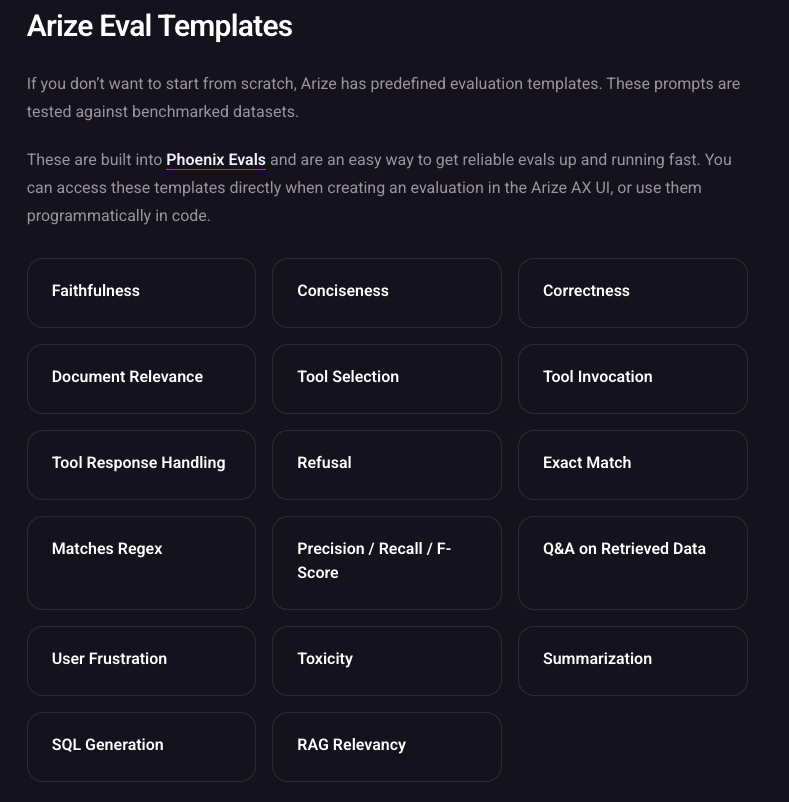
Pre-built LLM judges in Phoenix
Phoenix Evals includes judges for Faithfulness, Correctness, Retrieval Relevance, Conciseness, Refusal, Tool Selection, Tool Invocation, and Tool Response Handling. Browse the Phoenix pre-built evaluator catalogue for the full list and input requirements.
The catalogue also includes code-based evaluators such as Exact Match and Matches Regex. These use deterministic checks rather than a judge model.
Which pre-built judge should you use?
If a RAG application retrieves irrelevant material, start with Retrieval Relevance. If it retrieves the right material but produces an unsupported answer, use Faithfulness. These evaluators inspect different failures, so one score cannot substitute for the other.
For agents, Tool Invocation assesses how the agent calls a tool, while Tool Response Handling assesses how it uses the result. Use execution-based checks for requirements you can verify directly, such as schema validity or passing unit tests.
Evaluation metrics for LLM-as-a-Judge
Separate the quality of your application from the quality of its judge. Groundedness, relevance, and task completion describe application behavior. Precision, recall, and agreement with reviewed labels help you assess whether the judge detects the failures you care about.
Track operational measures such as latency, token usage, and retries alongside semantic evaluations. The LLM evaluation guide explains how these checks fit together.
Validate templates on your own data. A template’s benchmark results describe a particular dataset and model configuration. Test it on representative passing and failing examples before relying on its scores.
Accelerating evals with agents
A pre-built evaluator gives you a starting rubric. When your failure modes require more specific criteria, Alyx can help create and refine a custom evaluator from your data.
Alyx is Arize’s AI engineering agent, available throughout the platform and adapting to whichever surface you’re on. The fastest way to see what it can do is to watch it work end to end.
Starting from a blank Prompt Playground, Alyx can:
- generate a synthetic dataset for your use case
- write and AB test multiple prompt variants
- build a correctness eval
- and run the full experiment without you having to coordinate each step manually.
When it creates a dataset or attaches an eval they’re immediately available in the interface. You don’t need to wire them up manually.
It’s particularly powerful at error analysis. If you have free-text annotations describing what’s going wrong in your traces, Alyx can read them, extract categories, identify your most critical failure modes, and map those labels back to your spans. From there it can create an eval template built around those exact categories and set up a continuous online task so evaluation keeps running on new data automatically.
The output isn’t a generic template you then have to customize; it reflects the actual failure patterns in your data.
Evaluating multi-step agent behavior with LLM-as-a-Judge
LLM judges can also assess multi-step agent behavior, including plans, tool calls, and the use of tool results. Use a pre-built judge when its criteria fit, or write a custom rubric for application-specific behavior. The table below describes possible evaluation dimensions, rather than a one-to-one list of built-in templates.
| Evaluation Type | Description | Evaluation Criteria |
| Agent Planning | Assesses the quality of an agent’s plan to accomplish a given task using available tools. | Does the plan include only valid and applicable tools for the task? Are the tools used sufficient to accomplish the task? Will the plan, as outlined, successfully achieve the desired outcome? Is this the shortest and most efficient plan to accomplish the task? |
| Agent Tool Selection | Evaluates whether the agent selects the appropriate tool(s) for a given input or question. | Does the selected tool align with the user’s intent? Is the tool capable of addressing the specific requirements of the task? Are there more suitable tools available that the agent overlooked? |
| Agent Parameter Extraction | Checks if the agent correctly extracts and utilizes parameters required for tool execution. | Are all necessary parameters accurately extracted from the input? Are the parameters formatted correctly for the tool’s requirements? Is there any missing or extraneous information in the parameters? |
| Agent Tool Calling | Determines if the agent’s tool invocation is appropriate and correctly structured. | Is the correct tool called for the task? Are the parameters passed to the tool accurate and complete? Does the tool call adhere to the expected syntax and structure? |
| Agent Path Evaluation | Analyzes the sequence of steps the agent takes to complete a task, focusing on efficiency and correctness. | Does the agent follow a logical and efficient sequence of actions? Are there unnecessary or redundant steps? Does the agent avoid loops or dead-ends in its reasoning? |
| Agent Reflection | Assesses whether an agent identifies mistakes and proposes useful corrections in its self-review. | Can the agent identify errors or suboptimal decisions in its process? Does the agent propose viable alternatives or corrections? Is the reflection process constructive and leads to better outcomes? |
LLM-as-a-Judge vs. Agent-as-a-Judge
LLM-as-a-Judge evaluates the evidence you supply. Agent-as-a-Judge can use tools to gather and inspect the evidence it needs before making a judgment. Both apply evaluation criteria, and both can assess agent behavior, including tool calls and complete execution traces.
The choice depends on whether you can reliably assemble the necessary context upfront or whether finding the relevant evidence is part of the evaluation.
| Comparison | LLM-as-a-Judge | Agent-as-a-Judge |
|---|---|---|
| How it receives evidence | Evaluates the response, reference material, or trace supplied to it. | Uses an agentic workflow to locate and examine available evidence. |
| When to use it | The required inputs are predictable and can be supplied with the rubric. | The relevant evidence varies between runs or requires investigating several related operations. |
| Example | Checks whether an answer is supported by the supplied documents or tool results. | Finds the operation behind a completion claim, inspects its result, and checks whether a later retry succeeded. |
For example, a support agent might tell a customer that it updated their delivery address even though the update failed. An LLM judge can catch that contradiction when you provide the response and the relevant tool result. An agent judge becomes useful when the evaluator must first find the correct operation among several calls, follow retries, and determine which result supports or contradicts the claim.
Start with an LLM judge when you can reliably supply the evidence needed to evaluate the task. Consider Agent-as-a-Judge when evidence gathering requires investigation, then compare its results with a simpler evaluator on reviewed examples. Measure missed failures, incorrect flags, latency, and cost before deciding whether the additional investigation is worthwhile.
Want to learn more about Agent-as-a-Judge?
The role of an LLM-as-a-Judge in pipelines
Picture a team that ships a customer support agent after weeks of prompt tuning. It works great in demos. But two weeks into production, ticket escalations spike. The agent is confidently routing billing complaints to the wrong department, and nobody catches it until a VP asks why resolution times doubled.
An evaluator tested on examples of incorrect routing could help catch this failure before release. Build evaluation around realistic failure cases early, then keep reviewing its coverage as the application changes.
This applies well beyond chatbots and RAG pipelines. Any organization trying to measure how effectively its people or systems use AI runs into the same problem. Whether you’re evaluating how a sales team leverages AI-drafted outreach or whether an internal copilot is actually reducing engineering toil, the question is identical: is the AI output meeting the bar, and how do you know?
The evaluator you build answers that question at every stage.
- During development: it tells you whether your last prompt change made things better or worse before you carry that change forward.
- Before release: it gives stakeholders a concrete quality score to weigh against their risk tolerance instead of a demo and a handwave.
- In production: it runs the same rubric against live traffic so that any degradation is obvious against the baseline you already established.
The alternative (and what most teams still do) is implementing different quality checks at every stage and not necessarily comparable to one another. That’s a recipe for scrambled and potentially unusable data.
Reusing a versioned evaluator keeps the rubric consistent. For score comparisons, also account for changes in task mix, sampling, and available context, and use a fixed benchmark to isolate application changes.
Custom LLM-as-a-Judge evaluators: why & how to build your own
In specialized domains such as medical research, finance, or agriculture, off-the-shelf evaluators often miss domain-specific criteria, so teams build custom LLM-as-a-Judge evaluators with datasets tailored to their tasks.
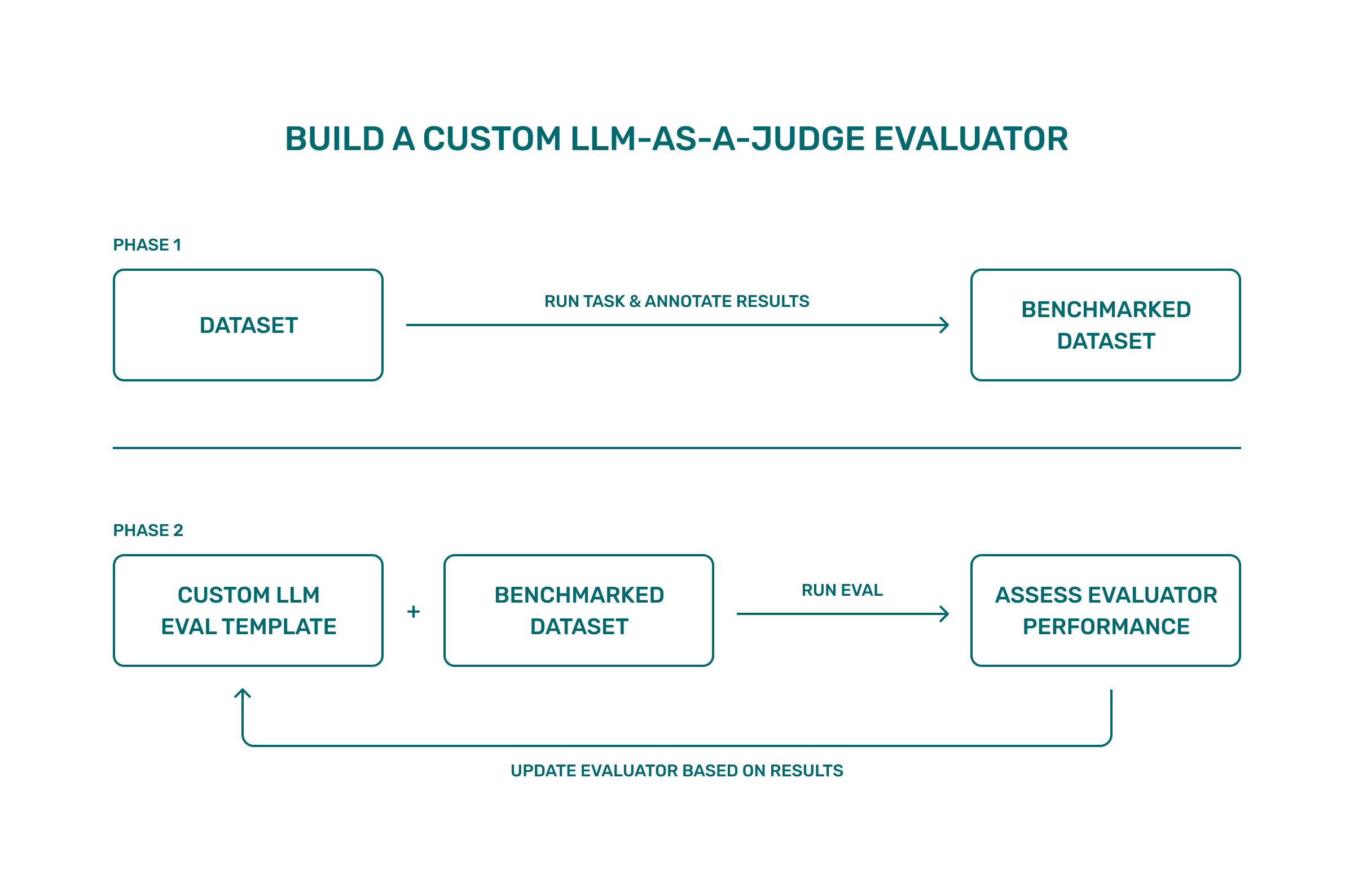
The approach is straightforward:
- Start with a small benchmark dataset built from realistic examples
- Add annotations with clear label definitions (for example: “accurate,” “almost accurate,” “inaccurate,” with a brief explanation of each)
- Use that as ground truth (more information on using human-annotated data can be found in the next section)
- Write an evaluation template that states the judging criteria plainly and constrains the judge to your label definitions. If the task mixes modalities, structure the prompt accordingly (e.g., text followed by an image)
- Run the judge on your dataset and compare its labels to your annotations to measure evaluator performance
- Then iterate:
- Examine cases where the judge disagrees
- Clarify the instructions or add a short, concrete example
- Re-run.
Many improvements come from making the label definitions explicit; the video below, for instance, walks you through the process of creating an image classification model that works on receipts. One way it could be improved would be to require that “total,” “itemized list,” and “category” all be correct to assign an ‘accurate’ label, which has the added benefit of keeping the task model and judge model separate.
| Phase | Inputs | What you do | Result |
|---|---|---|---|
| Build benchmark dataset | A small set of realistic outputs and references (e.g., receipt images with generated expense summaries) | Produce traces and annotate them using a categorical accuracy configuration with short explanations | A labeled benchmark dataset (inputs, outputs, labels, notes) |
| Create evaluation template | Fixed label definitions and the inputs the judge should see (e.g., text + image URL) | Write a structured evaluation template (prompt parts such as text → image → instructions) with unambiguous label definitions | A reusable template that restricts outputs to your labels |
| Run experiment | Benchmark dataset + template; a separate judge model | Apply the template to each example, then compare the judge’s label to the annotated label to compute evaluator performance | Baseline results with per-case outputs and rationales |
| Iterate on template | Disagreements between judge and annotations | Tighten instructions (e.g., require correct total, itemized list, and category for accurate), optionally add a brief example, then re-run | Better alignment between judge labels and annotations, reflected in updated scores |
For a deeper code walkthrough, see this Arize-Phoenix custom evals tutorial and companion Colab notebook.
LLM-as-a-Judge and its basis in research
Several academic papers establish the legitimacy, efficacy and limitations of LLM as a judge.
| Paper | Authors & Affiliations | Year | Why It Matters |
| Judging LLM-as-a-Judge with MT-Bench | Lianmin Zheng et al. (UC Berkeley) | 2023 | Demonstrated GPT-4’s evaluations closely align with humans. |
| From Generation to Judgment: Survey | Dawei Li et al. (Arizona State University) | 2024 | Comprehensive overview identifying best practices and pitfalls. |
| G-Eval: GPT-4 for Better Human Alignment | Yang Liu et al. (Microsoft Research) | 2023 | Provided methods for structured evaluations that outperform traditional metrics. |
| GPTScore: Evaluate as You Desire | Jinlan Fu et al. (NUS & CMU) | 2024 | Allowed flexible, tailored evaluations through natural language prompts. |
| Training an LLM-as-a-Judge Model: Pipeline & Lessons | Renjun Hu et al. (Alibaba Cloud) | 2025 | Offered practical insights into effectively training custom LLM judges. |
| Critical Evaluation of AI Feedback | Archit Sharma et al. (Stanford & Toyota Research Institute) | 2024 | Explored replacing humans with LLMs in RLHF pipelines. |
| LLM-as-a-Judge in Extractive QA | Xanh Ho et al. (University of Nantes & NII Japan) | 2025 | Showed LLM judgments align better than EM/F1 with human evaluation. |
| A Survey on LLM-as-a-Judge | Jiawei Zhang et al. (University of Illinois Urbana-Champaign) | 2025 | Offers a comprehensive taxonomy of LLM-as-a-Judge frameworks, benchmarks, and use cases across NLP and multi-modal domains. Emphasizes challenges like bias, calibration, and evaluation reproducibility. |
How to write an LLM-as-a-Judge prompt
The quality of a prompt plays a large part in the quality of a language model’s eventual output, and the same is true for using LLM-as-a-Judge. The way you pose the evaluation task matters, and your best shot at success is to start with clear and well-structured prompts. Here are a few commonly used formats.
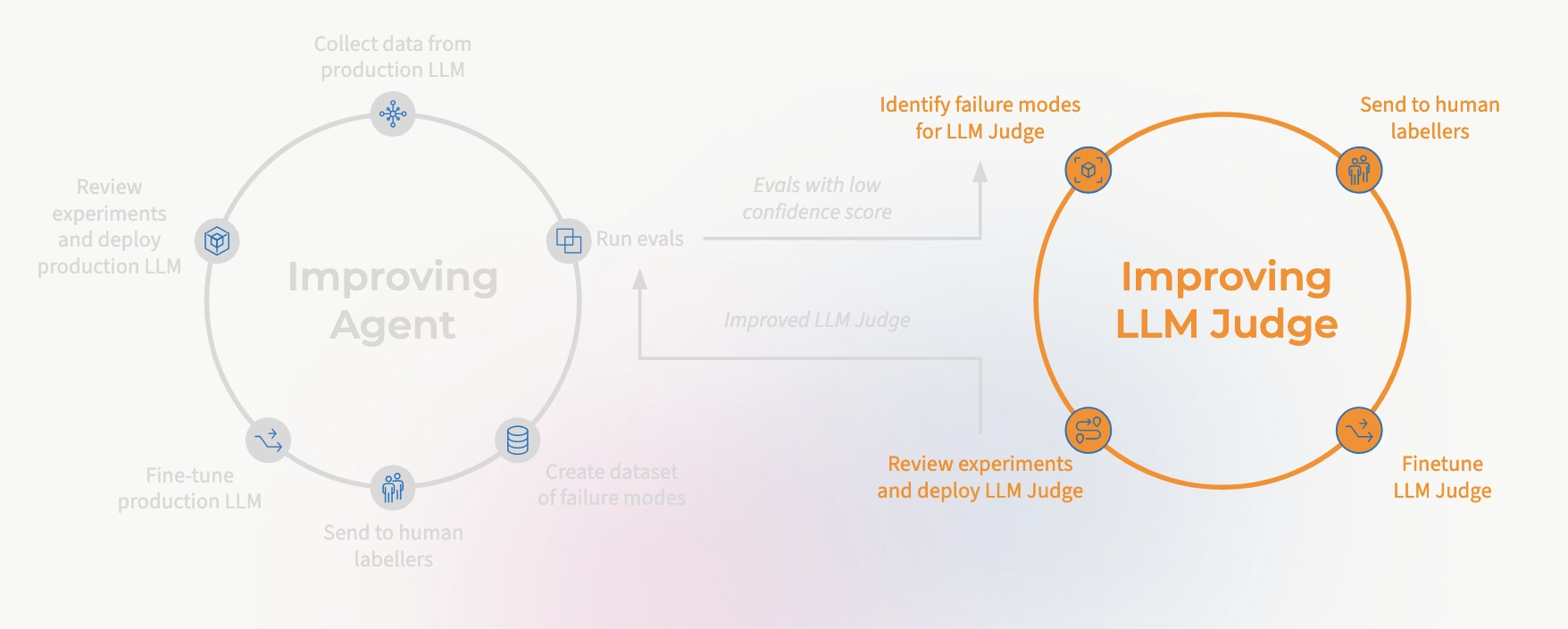
Common LLM-as-a-Judge prompt formats
- Single-answer evaluation: Present a user input and a single model response. Ask the LLM to rate it on specific criteria like correctness, helpfulness, or fluency.
- Pairwise evaluation: Provide two outputs for the same input and ask the LLM to select the better one, explaining its choice.
Prompting best practices
- Include explicit criteria (e.g., “Rate based on helpfulness, factual accuracy, and completeness.”)
- Request a brief explanation tied to the evidence when it helps you review judgments; test the effect on accuracy, latency, and cost.
- Request structured outputs (e.g., a JSON format or bullet points)
- Randomize candidate order and evaluate both permutations to reduce position bias.
Example prompt:

You are an expert AI evaluator. Given a user question and two model answers, select which response is better and explain why.

Question: ...
Answer A: ...
Answer B: ...
Evaluation Criteria: helpfulness, factuality, coherence.

Respond in this format:
Better Answer: A or B
Explanation: ...
How to build and validate an LLM judge
Start with examples of the failure you need to detect, then choose a pre-built evaluator or create a custom rubric when the available templates do not fit.
The workflow is the same in either case: identify the relevant data, define the criteria, configure the judge, and compare its decisions with reviewed examples. A pre-built template saves prompt-writing work, but it still needs validation on your application.
Step 1: Look at your data first
This applies whether you’re looking at early dev traces or live production data.
Before you write a single eval, you need to know what problem you’re actually solving — whether you’re looking at synthetic dev traces or early integration runs.
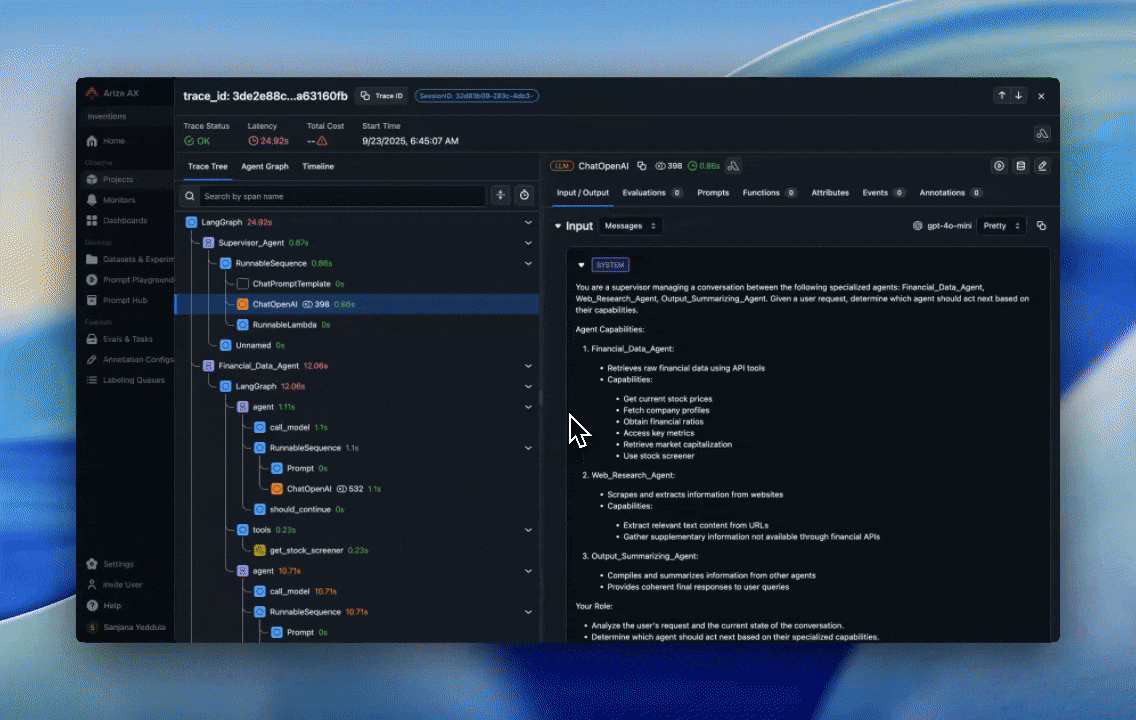
Open your traces in Arize AX and look at the Spans view to find where things are breaking. Are users rephrasing the same question repeatedly? Is the agent returning confident responses that contradict the source document? Is a tool call succeeding at the HTTP level but returning empty data?
Each failure pattern maps to a different eval setup. A hallucination problem needs the model response and the retrieved context as inputs. A tool calling failure needs the agent’s function call payload and the expected schema.
Defining your inputs upfront determines whether your judge is scoring the right thing. A judge evaluating the wrong data gives you precise measurements of nothing (and you’re still incurring costs).
Step 2: Define the metrics that matter
Once you know the problem and the inputs, decide what output you need from the evaluator. For most use cases, a binary label with an explanation is enough to act on. More granular numeric scoring makes sense when you’re comparing prompt versions or running experiments across model configurations.
But before you decide on the output format, you need to define what “good” actually means for your application. A RAG pipeline and a tool-calling agent have completely different failure surfaces. For RAG, good means the answer is grounded in the retrieved context. For an agent, good might mean the task was completed in the fewest steps with no hallucinated parameters. Trying to use the same metric for both is how teams end up with evals that pass while the system visibly degrades.
This is also where the LLM evaluation metrics Arize covers come in: matching the metric to the failure mode rather than picking whatever seems most intuitive.
Step 3: Choose a pre-built judge or write a custom prompt
Check the pre-built evaluator catalogue first. When a template covers your use case, review its rubric, map your data to the required inputs, and configure a supported judge model.
Create a custom prompt when the decision depends on requirements the template does not capture, such as your escalation policy or a domain-specific definition of a complete answer. Keep each criterion specific enough that a human reviewer could apply it.
For example, the following rubric checks only whether an answer is grounded in the supplied context:
You are evaluating whether a support response is grounded in its reference context.

User query: {query}
Reference context: {context}
Response: {response}

Criteria:
- Every factual claim in the response must be supported by the reference context.
- A claim that contradicts the context or adds unsupported information fails this check.
- Do not assess tone or completeness in this evaluation.
In Arize AX, define the result labels, such as “supported” and “unsupported,” as evaluator Choices. AX handles the output format and parsing, so you do not need to duplicate those instructions in the prompt.
Give the judge enough context to apply the rubric and remove irrelevant material. Test the effect of context selection rather than imposing a universal token limit.
Choose the judge model by testing candidate models on examples labeled with your rubric. Compare missed failures, incorrect flags, repeatability, latency, and cost. A different model from the one generating responses can provide a useful comparison, but it does not guarantee independent or more accurate judgments.
Reasoning models may help with difficult correctness assessments; simpler tasks may meet your requirements with a smaller, faster model.
Step 4: Validate your evaluator
Once you’ve written your prompt, test it in Arize’s Evaluator Playground, where you can load your golden dataset and run your evaluator against specific spans from your project. The playground shows you both the evaluation label (like “factual” or “hallucinated”) and the judge’s explanation for each example.
Validate the judge on held-out examples that were not used to refine the prompt. Include both passing and failing cases, and measure performance separately for the failures you need to catch.
Overall agreement can hide a weak evaluator. For example, if 90% of your examples pass, a judge that labels every example as passing achieves 90% accuracy while missing every failure. Inspect false positives and false negatives, measure precision and recall for failure detection, and set acceptance criteria based on the consequences of those errors.
Also, make sure to read the disagreements. Look at examples where the judge labeled it one way and you labeled it another. Read the judge’s explanation. What’s it missing? Is your rubric unclear? This signal tells you exactly what to fix. Refine your prompt based on those patterns, tighten your criteria, add negative examples. Run the eval again. Did accuracy improve? Keep iterating until alignment is strong.
The better your eval becomes, the better signal you have to improve your application.
Deploying your evaluator across the development lifecycle
While you’re still building
Slot the evaluator into your prompt iteration loop from this point forward. Every time you test a new variant, adjust retrieval, or modify a system prompt, run the eval and compare scores against your last run.
When a change causes hallucination rate to tick up or agent path convergence to drop, you catch it in the same session you introduced it. The earlier you run it, the more regressions you catch before they become load-bearing assumptions baked into your application.
This is also where the evaluator earns trust with your team. An engineer, for instance, might see their prompt tweak drop correctness by 8% in a five-minute eval run. That’s useful information.
The evaluator becomes part of how the team thinks about quality, which matters more than any single score it produces.
For a Python walkthrough, see how to run experiments with LLM-as-a-Judge in Arize AX. The tutorial covers defining a task, attaching an evaluator, running the experiment, and inspecting scores and traces.
Before you ship
Run your evaluator across a representative sample of outputs and bring those scores into the release conversation. A hallucination rate above your established threshold or a sustained drop in Q&A correctness is a concrete, defensible reason to hold.
Stakeholders get something to weigh against risk tolerance. You also leave with an audit trail: this version shipped at this quality level, against this rubric, on this dataset. That baseline matters the moment something degrades later.
In production
Reuse a versioned evaluator in production so the evaluation criteria remain consistent. However, production scores are not automatically comparable to development scores: traffic mix, task difficulty, sampling, and available context may differ. Track those differences and rerun a fixed benchmark when you need to isolate whether an application change improved quality.
When a production score changes, inspect the affected traces and compare similar task groups before attributing the change to a regression. Reusing a validated evaluator gives you a starting point for monitoring, while sampling and execution frequency determine how much traffic it covers.
How much does LLM-as-a-Judge cost?
Judge cost depends on the model, input and output tokens, and the number of evaluations you run. A single agent trace can trigger several judge calls when you evaluate individual steps as well as the final result. Human review, trace retention, and repeated experiments add to the overall evaluation budget.
Estimate both how much traffic you will evaluate and how deeply you will score each trace. For budgeting examples and ways to control spend, read our guide to LLM evaluation costs.
LLM-as-a-Judge limitations and common mistakes
Getting your judge set up is one thing. But getting a reliable signal out of it is another. These habits matter whether you’re running evals on a staging environment or monitoring a live system.
Build your evaluators around your specific failure modes.
Pre-built metrics for helpfulness and coherence are a useful starting point, but high scores on them don’t mean your system is working. A customer support bot that confidently gives wrong answers can score well on coherence.
Validate your judge before you scale it.
The most expensive version of this mistake is running an unvalidated judge at scale, whether across dev experiment runs or production traces, and making decisions based on the scores.
Make sure your judge is receiving the right inputs.
A hallucination evaluator that doesn’t receive the retrieved context isn’t measuring hallucination. Define your inputs before you write your prompt, and sanity check that the data flowing into the judge at runtime actually matches what you designed it to evaluate.
Check whether your judge catches known failures
A perfect pass rate may reflect a strong application, an easy dataset, or an evaluator that misses failures. Include known failures and difficult boundary cases in your validation set, then check whether the judge distinguishes them from acceptable results. A lower pass rate is not inherently evidence of a better evaluator.
Start with a pre-built LLM judge
Choose one recurring failure from your traces and select a pre-built evaluator that matches it. Review the rubric, connect the required inputs, and run it on examples you have already checked, including known failures.
Compare the judge’s decisions with your labels, refine the rubric on development examples, and validate on a separate held-out set. Once its performance meets your requirements, use the evaluator in experiments and production monitoring, while continuing to review disagreements.
To get started, follow the documentation for LLM-as-a-Judge evaluators in Arize AX or LLM-as-a-Judge in Phoenix.
LLM-as-a-Judge FAQ
How accurate is LLM-as-a-Judge?
There is no single accuracy level that applies to every LLM judge. Performance depends on the task, rubric, reference material, model, and evaluation dataset. Measure agreement with trusted labels, inspect missed failures and incorrect flags, and test repeatability before using judge scores to make release or operational decisions.
Can you use the same model to generate and judge responses?
Yes, but test for correlated errors and self-preference. A different model can provide a useful comparison, although switching models or providers does not guarantee better judgments. Choose the evaluator based on measured performance against your rubric and labeled examples.
Does an LLM judge need a reference answer?
Not always. Some criteria, such as tone, can be assessed from the response and instructions. Groundedness requires the source material the answer should follow. Correctness often benefits from a trusted reference answer or another way to verify the claims being evaluated.
Can LLM-as-a-Judge replace human evaluation?
LLM judges can automate parts of response review, but people still need to define quality criteria, create validation examples, resolve ambiguity, and review consequential errors. Treat human evaluation as part of the judge’s development and ongoing validation process.
Does a 100% pass rate mean the evaluator is working?
A perfect pass rate is not enough to tell. It may reflect a strong application, an easy dataset, a permissive rubric, or an evaluator that misses failures. Test the judge against known failing examples and confirm that it can distinguish them from acceptable results.

