TL;DR
- What we did: we put a decision model in front of a shopping agent’s tools. It picks the tool and returns a probability for every option, and the chat model fills in the arguments. Each pick lands on its own span in Phoenix.
- What the score caught: on 100 test messages, a pick with a confidence below about 0.7 led to a wrong turn one time in three. Between 0.7 and 0.8 it was about one in six, and above 0.8 it was fewer than one in ten. That threshold is ours, and the post shows how to find yours.
- What we did with it: when the decision model’s confidence was below 0.7, we ignored its pick and let the chat model choose the tool itself. Replies that came back empty or unfinished dropped from 21 to 3, and the judge rated the tool calls as correct as often as before.
- How to use it: Phoenix shows each pick as its own span, lets you write grades next to it, and lets you filter on them. The last section shows how, and how to run the same check on an agent of your own.
Most agents pick their tools the same way. The chat model reads the conversation, chooses a tool, and writes the arguments for it, all in one call. The trace shows the call the model made, with its arguments and its result. What the trace does not show is the choice. You never see which other tools the model weighed, or how close the call was.
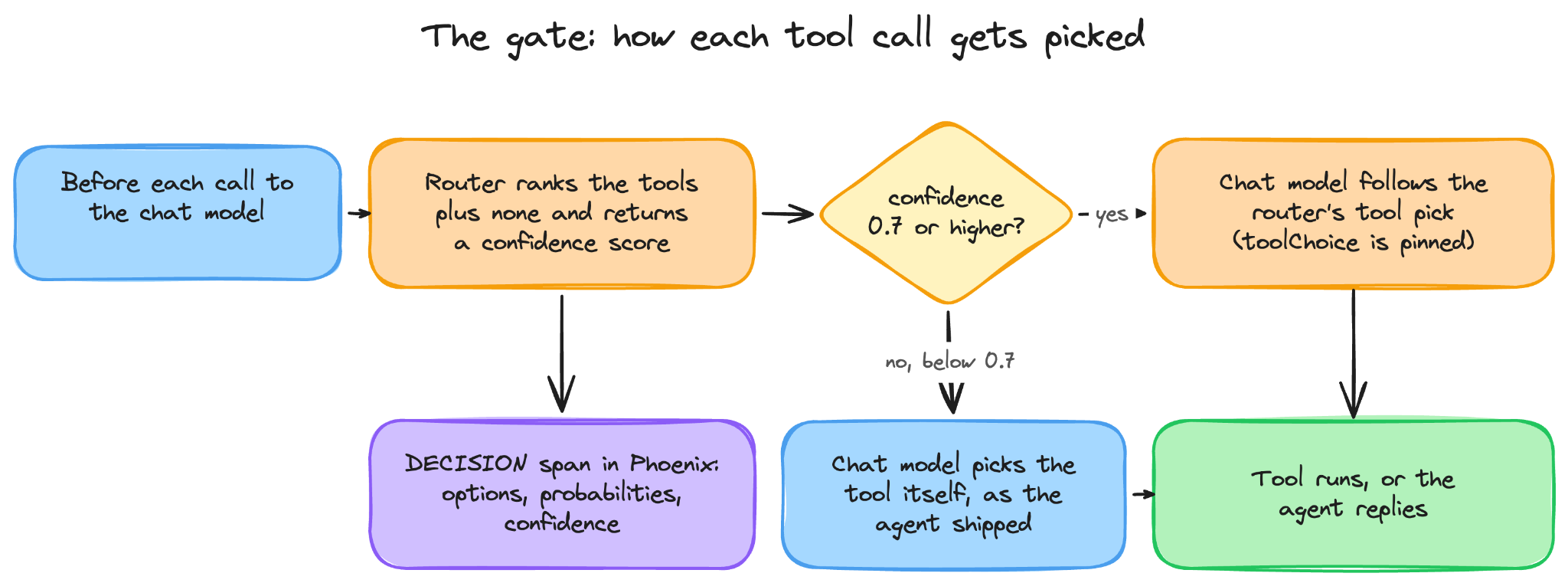
We tried a different split. We gave the picking job to a decision model, in our case OpenAI’s Decisions API. A decision model that takes a list of options and returns a probability for each one and writes no text. The chat model keeps the other job, calling that tool and filling in the arguments. Phoenix now supports decision tracing, with a new span kind called DECISION for exactly this. Each pick lands on one of those spans, with a probability for every option the model rejected.
Then we wrote 100 messages of the kind a shopper would type, ran each one through our demo agent, and graded every turn. The picks the decision model was least sure about, the ones with a confidence below 0.7, went wrong far more often than the rest.
So we added one rule: when the confidence is below 0.7, the chat model chooses the tool itself, the way it did before we added the decision model. Compared with always enforcing the router’s choice, the confidence gate reduced empty or unfinished replies from 21 to 3 across 300 turns per version. The original agent, which chose its own tools, had no empty or unfinished replies in this test.
If your agent calls tools, this blog is for you. By the time you finish reading, you will know how to read the confidence score the decision model gives each tool choice, how to find the right threshold for your own agent, and what to do with the choices that fall below the threshold you have set.
Build better agents with Arize
Trace, evaluate, and learn. Build agents that work with Arize AX and start tracing your runs today.
Prefer open source? Try Arize Phoenix for self-hosted, open source agent observability.

What changed when a decision model handled tool selection?
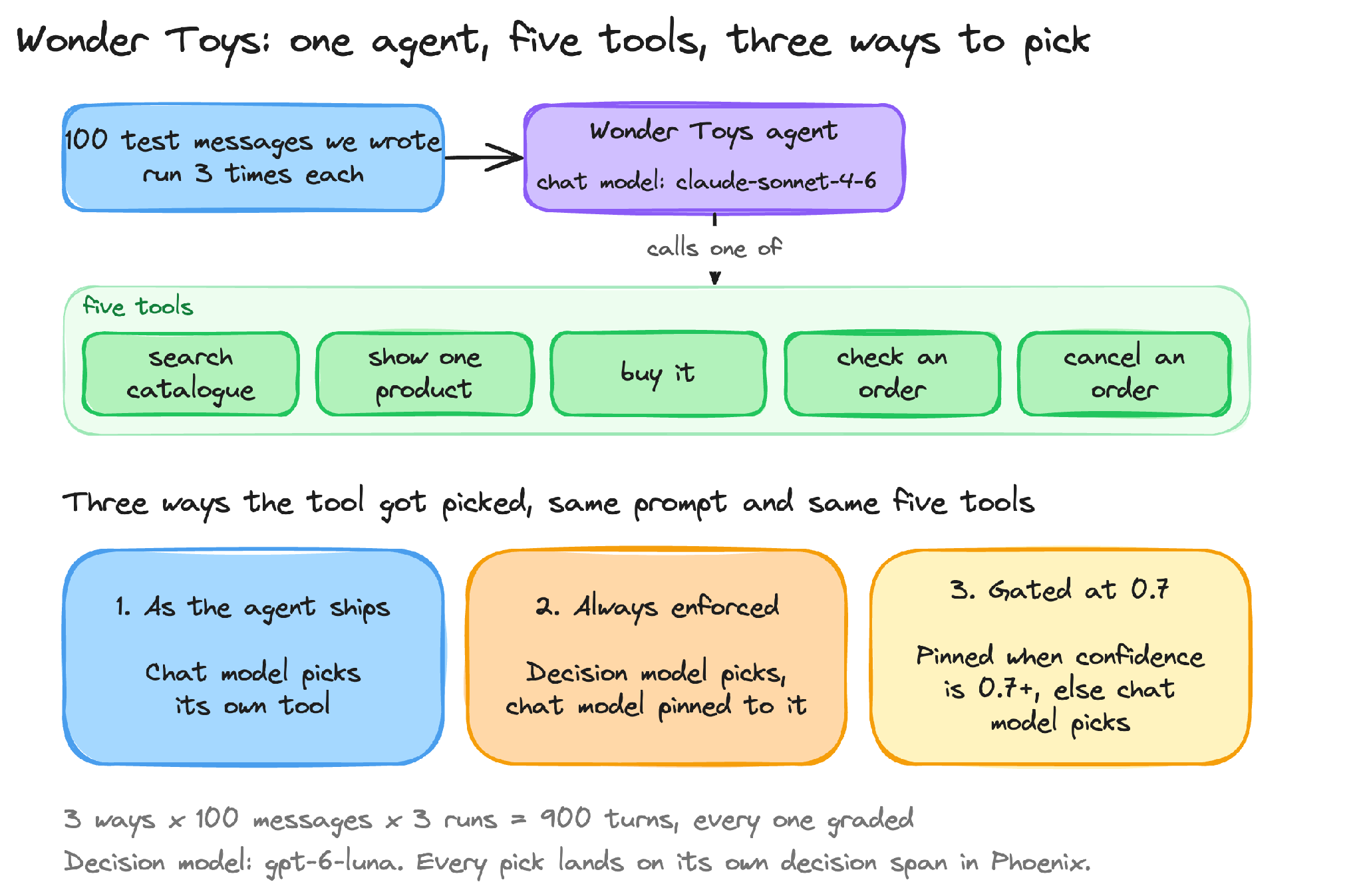
Our test agent is Wonder Toys, a demo toy store. A shopper types a message, and the agent has five tools to answer with. It can search the catalogue, show one product, buy it, check an order, or cancel one. We ran the same 100 test messages through three versions of the agent. All three versions share the same prompt, the same five tools and the same chat model. The only difference is who picks the tool.
- As shipped: the chat model picks its own tool, and no decision model is involved.
- Always enforced: the decision model picks, and the chat model must call that tool.
- Gated at 0.7: the decision model’s tool call pick is used only when its confidence is 0.7 or higher. Below that, the chat model picks for itself.
Each version saw every message three times, so 900 turns in all. The decision model is OpenAI’s gpt-6-luna. We call it the router from here on, because that is what it does: it routes each turn to a tool.
By the headline numbers, the split improved the agent on every metric we tracked.
| Measure | Chat model picks its own tools (no decision model) | Decision model picks, always enforced | Decision model picks above 0.7 confidence, below that the chat model picks |
|---|---|---|---|
| First tool matched our label | 78% | 95% | 91% |
| Judge said the tool calls were right | 79% | 89% | 92% |
| Median time per turn | 6.5 s | 5.6 s | 7.1 s |
| Cost per turn | $0.0217 | $0.0210 | $0.0220 |
Part of the enforced pick’s lead comes from how we scored purchases, and we take that apart later in the post. Here is what the score bought us on single turns.
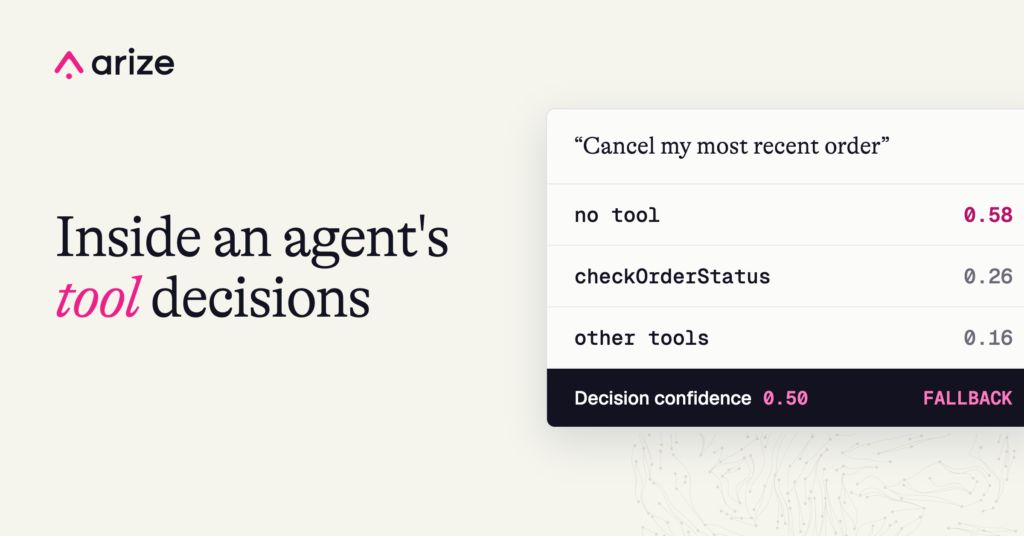
One test message read “Cancel my most recent order”. The router leaned towards replying with no tool at all, none at 0.58, with the order lookup at 0.26, and its confidence was 0.50. The two versions that use the router handled that pick differently.
In the always-enforced version, the chat model was held to the router’s pick, so it could not call a tool. It wrote “Let me look up your orders first” and stopped there, three times out of three. The shopper got a promise and no order.
In the gated version, 0.50 is below 0.7, so the pick was dropped and the chat model chose for itself. It called checkOrderStatus, found the order, and went on to report or cancel it. The judge graded all three runs right.
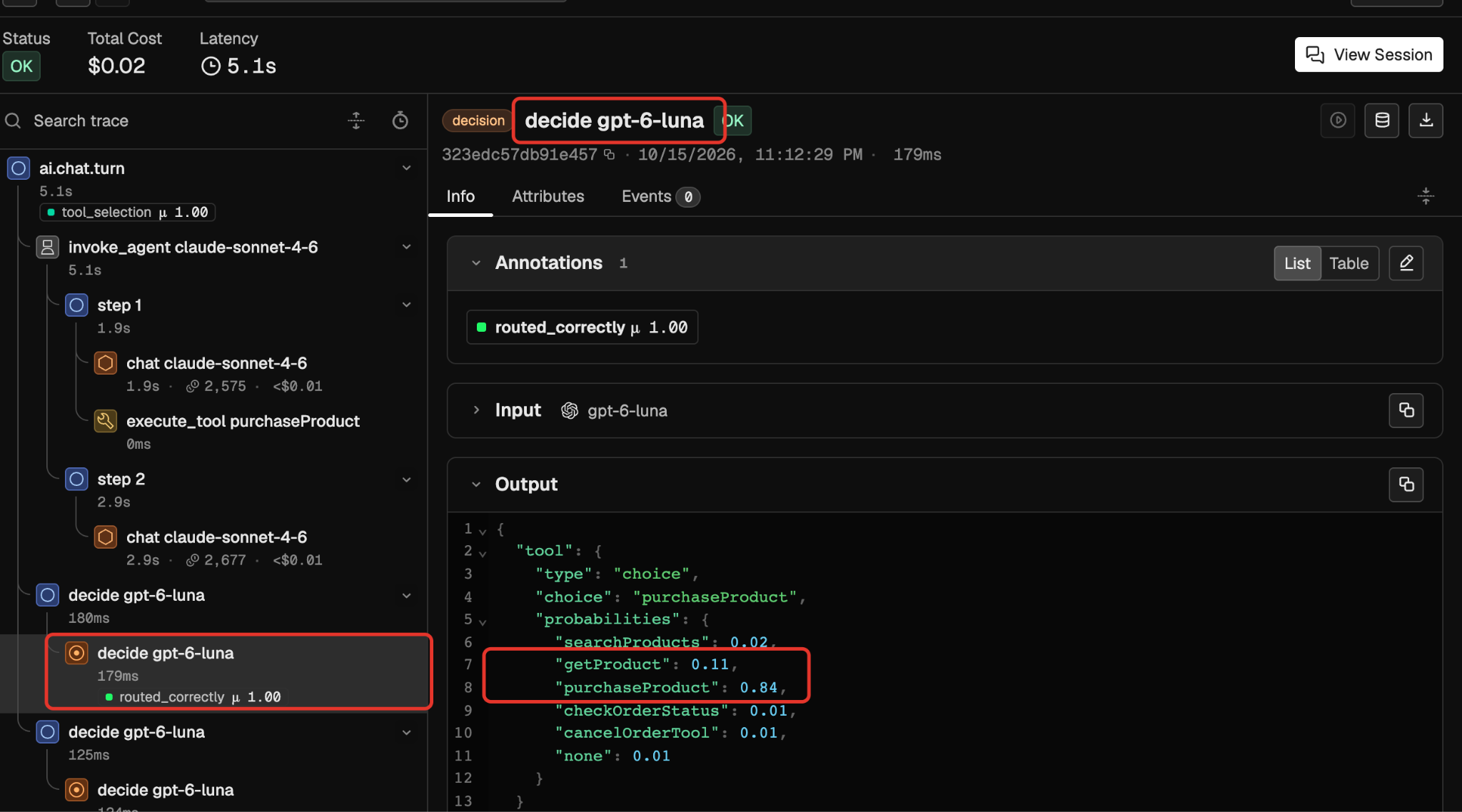
A second message shows the opposite case, a pick the decision model was sure about. It read “Purchase toy-076 for delivery to Raj Patel, 19 Ring Rd, Pune, MH 411001, India”. The decision model picked purchaseProduct with a confidence of 0.81, well above 0.7, so the gate stayed shut and the chat model was pinned to that tool. It filled in the product ID and the address, placed the order, and the judge graded the turn right every time.
How do decision confidence and tool probabilities differ?
Option probabilities score each available choice and add up to one. Confidence is a separate score for the decision as a whole. In this example, purchaseProduct has a probability of 0.84, while the decision’s confidence is 0.81. Every threshold in this post uses confidence.
How to evaluate tool selection with Phoenix annotations
A score tells you how sure the router was, not whether the turn went well. So we graded every turn and wrote the grades onto the trace as annotations, next to the spans they judge. Phoenix supports three kinds of annotation: a human reading the trace and labelling it in the UI, an LLM judge, and a code check. We used the last two here, and you can see their kind badges in the screenshot below.
If you want to run this comparison on your agent, Phoenix’s datasets and experiments do it in one place. Put your inputs and tools you expect for each in a dataset, run each version of the agent against it as an experiment, and let the evaluators score every run.
Our two grades were these.
- An LLM judge. Phoenix’s tool-selection evaluator reads the request, the tools available, and the calls the agent made, then says whether they were right, with a sentence of explanation. To smooth out its own randomness, the judge graded each turn three times and we took the verdict at least two of them agreed on.
- A code check against a label. Before the run, we wrote down the tool we expected the agent to call first for each of the 100 messages. “Cancel my most recent order”, for example, should start with an order lookup. The check passes when the first tool the agent actually called matches the one we expected. In the two versions that use the router, we also wrote this grade onto the decision span, so it sits next to the pick it judges.
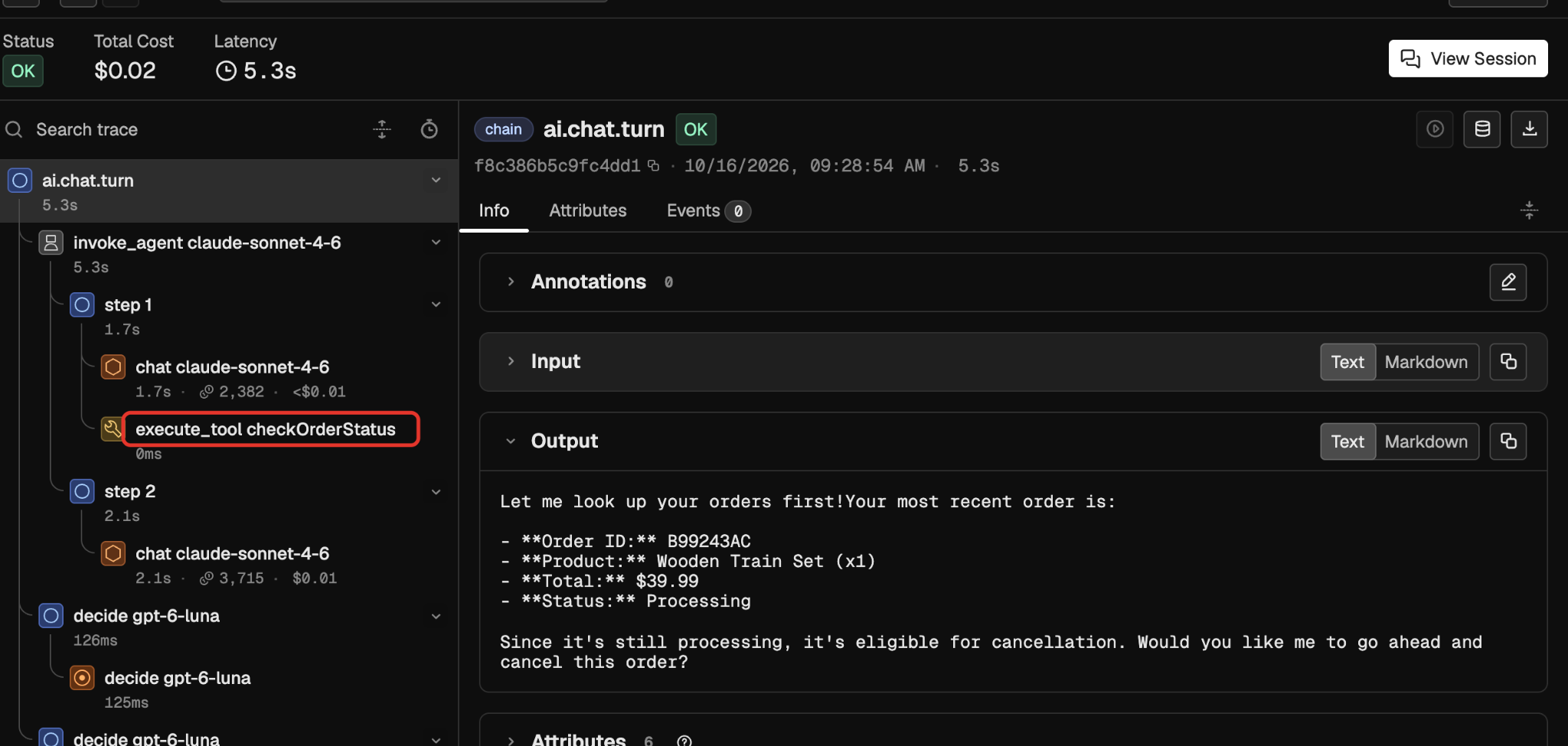
Here is what both grades look like on a real turn. It is the “Cancel my most recent order” message from earlier, in the version where the chat model had to follow the router’s pick. That is the run where the reply stopped at a promise. Each grade is written onto the span it judges. The judge’s verdict is on the chat turn, and the code check’s verdict is on the decision span.
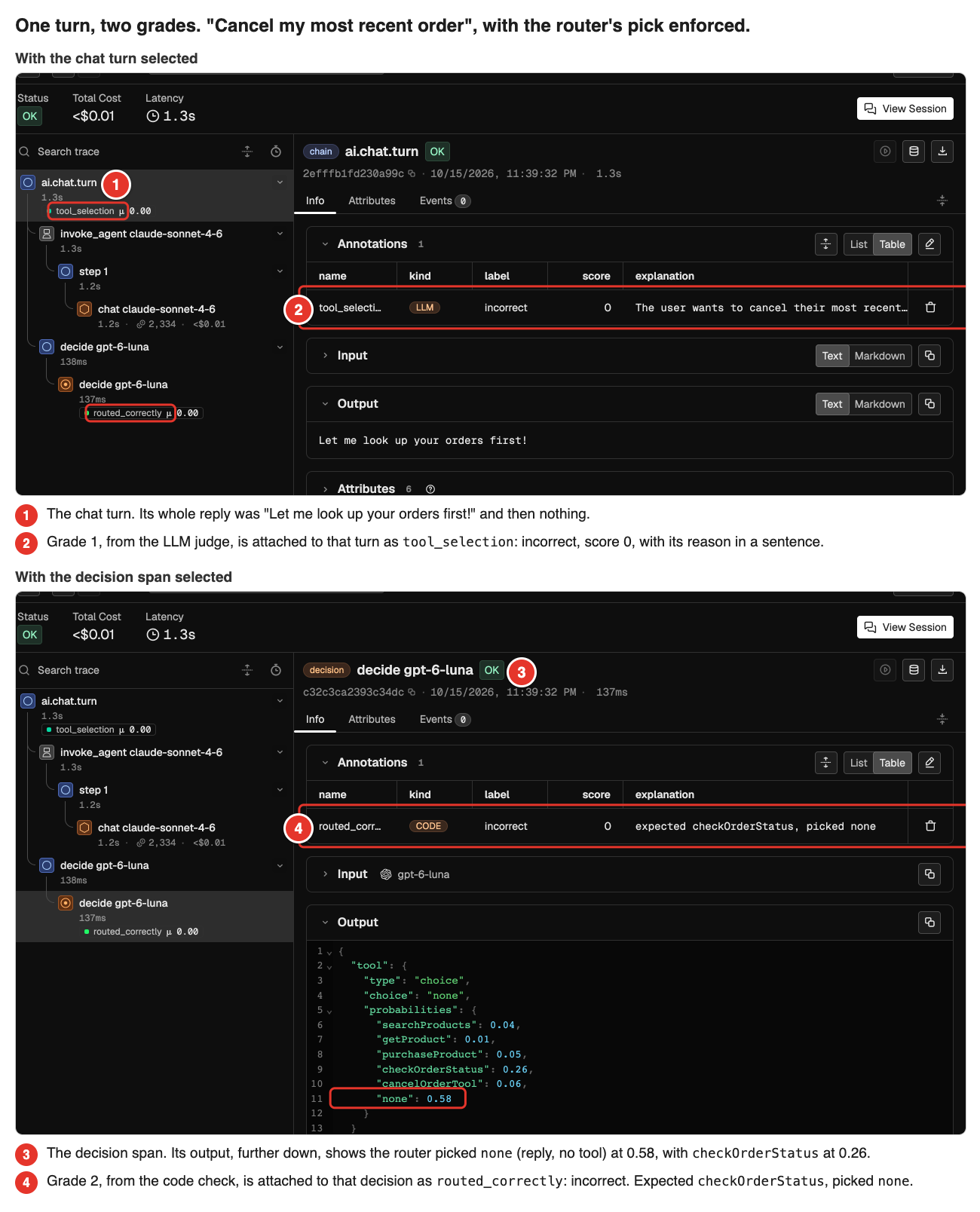
The takeaway from grading this way is that a failed turn comes with its own diagnosis. If both grades say no, as they did here, the pick was the problem. If only the judge says no, the pick was fine and the fault is in the arguments or the reply. And because both grades are annotations, you can filter the project on either one and pull up every turn with the same problem. A human annotation is how you would check either grade, or build the labels in the first place, and it lands on the span the same way.
How to set a confidence threshold for tool selection
A confidence score is only worth having if it predicts something, so we checked. When the router was unsure, the turn did go worse. Below about 0.7, one turn in three was graded wrong, while above 0.8 fewer than one in ten was. That gave us a threshold. For any pick under it, we let the chat model choose the tool itself, as it did before we added the router. That one rule cut empty or unfinished replies from 21 to 3 without hurting correctness. Here is how we checked both claims, so you can do the same.
Step 1: Check whether low confidence predicts failed turns
- Set the pass criterion before you run the test. If you choose it after seeing the results, you can always find a cut that passes. We fixed ours in advance. The least confident third of decisions had to be graded correct at least 20 points less often than the most confident third. Each third holds 195 decisions, but those decisions come from only about 55 messages each, so a smaller gap could easily be noise.
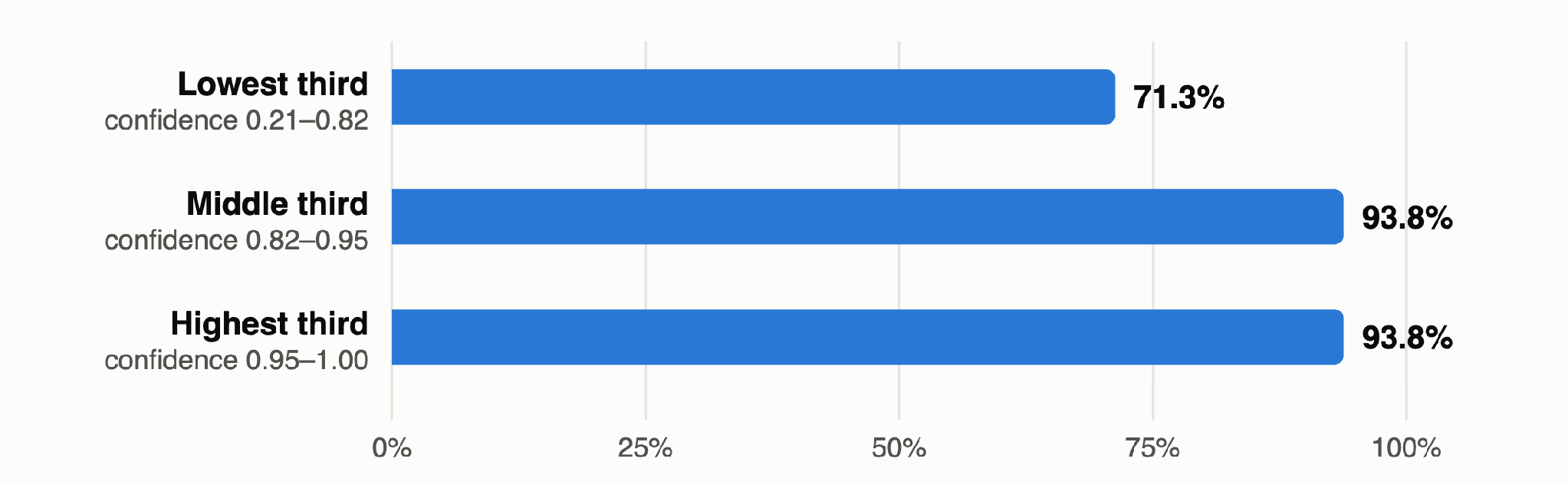
- Read where the drop is. Our least confident third was graded correct 71% of the time and the other two 94%. Most of the drop sits below 0.7, where one turn in three went wrong. The band from 0.7 to 0.8 was still about one in six wrong, and above 0.8 the rate was flat at fewer than one in ten. So the score behaves like a threshold rather than a dial, and we drew ours at 0.7.
- Your threshold will be somewhere else. 0.7 belongs to this router, these five tools and our 100 messages. More tools, a different model or different traffic all move it, so find it from your own data. In production you will have far more decisions than we did, which makes this easier, not harder.
Step 2: Fall back to the chat model below the confidence threshold
- The rule. When the router’s confidence is under the threshold, ignore its pick and let the chat model choose the tool, as it did before the router existed. Above the threshold, use the router’s pick. The worst a gated step can do is what your agent already did.
- Set the pass criteria first, again. We wanted empty or unfinished replies down from 21 to 10 or fewer. Correctness had to stay no worse than when the router’s pick was always used. Both happened.
| Measure | Chat model picks its own tools (no decision model) | Decision model picks, always enforced | Decision model picks above 0.7 confidence, below that the chat model picks |
|---|---|---|---|
| Replies that came back empty or unfinished | 0 | 21 | 3 |
| Judge said the tool calls were right, on the 74 messages that were not purchases or cancellations | 91% | 86% | 90% |
- Know what the headline numbers hide. In the first table of this post, always using the router’s pick looked best. Most of that lead came from purchase and cancellation requests. The router acted on them at once, while the original agent paused to look the product or order up first, and our grading counted that pause as a mistake. On every other kind of request the chat model’s own picks were better, 91% against 86%. The gate ends up with the best of both. It keeps the router’s speed where the router is sure and the chat model’s caution where it is not.
- Do not read 89% to 92% as a gain. The difference is seven turns out of 300, which is within noise. The gate does not lose any correctness, and it costs about a second and a half more per turn.
- At volume, grade with what you already log. You do not need an LLM judge to find turns like these in production. The signal we measured was simple, a reply that came back empty or stopped on a promise, and that is the signal the gate moved. In a live system, user retries and handoffs to a human tell you the same thing, and most teams already record them.
Try decision tracing on your own agent in Arize Phoenix
Everything in this post came from three things Phoenix already does, and none of them needed anything new installed.
- Trace the pick. Put a decision model in front of your tool calls. Each pick then shows up as its own DECISION span, with the options, the choice and a probability for each. Arize AX reads the same spans. The tracing docs show how to make sure your SDK sends them.
- Grade it where it happened. Write your judge’s verdict and your label check back as annotations, and each one sits on the span it judges.
- Find the cases. Filter on an annotation, or sort by confidence, to pull up every unsure pick or every failed turn instead of reading traces one by one.
Then try it on your own agent.
- Pick one whose tools have side effects, and put a decision model in front of its tool calls.
- Run a hundred of your own messages and see where the low scores sit.
- Grade the outcome you care about, not only the tool choice.
- Set the threshold from your data, hand everything below it back to the chat model, and measure again.
Wonder Toys has only a few tools, and even then the router was not always sure which one to pick. A coding agent with several MCP servers attached can have a few hundred tools, and that changes the picture in three ways. The chat model has to read every tool schema on every step, so the prompt gets longer and slower as tools are added. Many of those tools do similar things, so the router will often be torn between two plausible picks. The threshold we found here will probably not be the right one there. And the biggest saving is a step we did not take in this post. Once the router has picked a tool, the chat model only needs to see that one tool rather than all of them. We want to measure what that does to latency, cost and the quality of the picks, and that will be the next post.
Thanks for reading. If you try this on your own agent, or have questions about decision spans, the Phoenix team is in the community Slack. We would like to hear what your threshold turned out to be.

