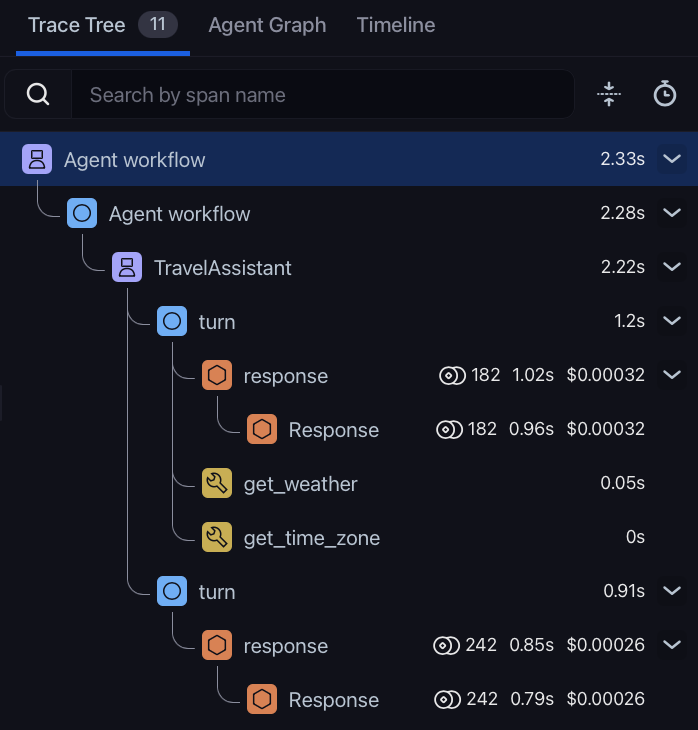
SERVER, CLIENT, PRODUCER, …). OpenInference adds an AI-specific set: LLM, Tool, Agent, Chain, Retriever, and more.
Span kind is what drives the span-kind icons in the Arize AX UI. It’s also how Arize AX knows which attributes to expect — an LLM span gets a different visual treatment from a tool span.
Setting the Span Kind
Span kind is set via theopeninference.span.kind attribute. The value is ALL CAPS — "TOOL", not "Tool". Casing matters: the canonical OpenInference Python enum is OpenInferenceSpanKindValues.TOOL = "TOOL".
Arize AX UI behavior: span-kind icons in the Arize AX trace tree come directly from the
openinference.span.kind attribute. A span without that attribute renders with a blank icon. Auto-instrumentors set this for you — set it explicitly on every manual span.The Twelve Span Kinds
OpenInference defines twelve span-kind values. The first four (LLM, Chain, Agent, Tool) are the ones you’ll encounter most often:| Icon | Span kind | Description |
|---|---|---|
 | LLM | A call to a large language model. |
 | CHAIN | A starting point or a link between different LLM application steps. |
 | AGENT | A span that encompasses calls to LLMs and tools — typically the top-level wrapper for an agent loop. |
 | TOOL | A span that represents a call to an external tool, API, or function on behalf of an LLM. |
 | RETRIEVER | A data retrieval query for context from a datastore (e.g., a vector DB query). |
 | EMBEDDING | An encoding of unstructured data into a vector. |
 | RERANKER | A relevance-based re-ordering of documents. |
 | GUARDRAIL | A validation of LLM input or output for safety, policy, or compliance. |
 | EVALUATOR | An evaluation process — the type, configuration, and results. |
| PROMPT | A span representing prompt construction or templating. |
| DECISION | A call to a decision model, which scores or selects among caller-supplied options instead of generating text. |
| UNKNOWN | Default when no kind is set explicitly. |
Common Attributes Across All Kinds
These attributes apply to every span kind. Auto-instrumentors set them automatically; set them yourself on every manual span:Arize AX UI behavior: Arize AX reads the trace-level input and output from the root span’s
input.value and output.value. If your root span doesn’t set them, the trace list view shows those columns as blank even if child spans have data.Per-Kind Attributes
The four most-used kinds, and decision spans, have a richer attribute set. The full list lives in the OpenInference semantic conventions — the tables below are a summary.LLM
A call to a large language model.TOOL
A call to an external tool, API, or function on behalf of an LLM.Tool calls are one of the clearest cases where you must instrument manually when making an LLM calls directly, instead of via a framework. When you call OpenAI directly, the auto-instrumentor traces the model’s request for a tool call — but the actual execution of the tool function happens in your Python code, where the instrumentor can’t see it. Wrap the function in a tool span yourself.
AGENT
A span that encompasses calls to LLMs and tools — typically the top-level wrapper for an agent loop.CHAIN
A starting point or a link between different application steps. Use a chain span to group pre/post-processing logic that doesn’t fit any of the more specific kinds. Chain spans use only the common attributes —input.value, output.value, metadata, session.id, etc.
DECISION
A call to a decision model: a model that answers a fixed set of typed questions about some input, such as a yes/no condition, a choice among labeled options, or a score against a rubric, and returns a probability or confidence for each answer instead of generated text. Examples are TypeSafe AI’s Jev model and the OpenAI Decisions API. Use a decision span for routing, classification, guardrail, and scoring calls made to these models. Decision models are not language models, so a decision span identifies the model and its token usage underdecision.* instead of llm.*, and doesn’t set any llm.* model or token attributes. This keeps decision model usage from being counted as LLM usage. The request (including the questions and candidate options) and the response (including the answers and probabilities) are recorded as JSON in input.value and output.value.
See the decision span specification for the full conventions.
Other Kinds
The remaining seven span kinds — RETRIEVER, EMBEDDING, RERANKER, GUARDRAIL, EVALUATOR, PROMPT, UNKNOWN — each have their own attribute schemas. Consult the canonical source for the full per-kind attribute list. Some auto-instrumentors also emit additional kinds that aren’t (yet) in the canonical enum — see Voice Extensions below for the AUDIO and USER kinds used by the realtime/voice tracing path.Voice Extensions
The OpenAI Agents realtime instrumentor introduces two additional span-kind values for voice tracing —AUDIO and USER — that aren’t (yet) in the canonical OpenInferenceSpanKindValues enum. They’re set as string-literal values on openinference.span.kind, and Arize AX renders them with audio-aware UI: a play button, waveform, and the input/output transcripts inline.
A single conversational turn in a Realtime API session produces this span tree:
AUDIO
The parent span for one conversational turn. Wraps the USER input span, the assistant LLM span, and any TOOL spans the turn calls into.USER
A single user utterance inside an AUDIO turn — emitted when server-side VAD detects the user has finished speaking.
The corresponding assistant span inside an AUDIO turn uses the canonical
LLM kind, with the standard LLM attributes plus a few realtime-specific extras:
AUDIO and USER are emitted as string-literal
openinference.span.kind values rather than via the OpenInferenceSpanKindValues enum. Treat them as instrumentor-introduced extensions used by the realtime/voice tracing path, pending promotion into the canonical enum.Multimodal Message Content
Inputs and outputs in modern AI applications aren’t always plain text. OpenInference defines amessage_content attribute family for multimodal content:
Each non-text modality nests its own leaves under the matching
message_content.* key. The sections below list those leaves.
Images
See
ImageAttributes in the canonical source for the full definition.
For an end-to-end example that traces receipt images and scores them with an image-aware judge, see Evaluate receipt agents with an image judge.
Audio
See
AudioAttributes in the canonical source for the full definition.
Arize AX surfaces audio through the realtime voice attributes rather than through message contents — input.audio.url, output.audio.url, and their transcripts, covered in Voice Extensions above. For an end-to-end example, see the voice tracing guide.
Video
See
VideoAttributes in the canonical source for the full definition.
GenAI semantic convention mapping
Arize AX ingests spans instrumented with the OpenTelemetry GenAI conventions (gen_ai.*) and normalizes them into the OpenInference attributes documented above, so they render with the correct span kind, messages, token counts, tool I/O, and retrieved documents. Raw gen_ai.* attributes are preserved on the span, and any explicit OpenInference attribute already present always wins. For the conceptual overview and the normalization rules, see How Arize AX ingests GenAI spans.
The tables below are the exact mapping applied at ingestion.
Span kind
Arize AX derives the OpenInference span kind fromgen_ai.operation.name:
When
gen_ai.operation.name is absent, Arize AX falls back to inferring the kind from which attributes are present:
Core attributes
Request parameters
These are collected into a single JSONllm.invocation_parameters object (embedding.invocation_parameters on EMBEDDING spans):
Token usage
Messages and tool definitions
Messages are flattened into the standard indexed OpenInference message attributes, including text content, multimodal content parts, tool calls, and tool-call responses.LLM response
OnLLM spans:
When
gen_ai.response.finish_reasons contains more than one entry, none is written. OpenInference has a single finish-reason field, so Arize AX leaves it unset rather than choosing one arbitrarily.Tool spans
OnTOOL spans (execute_tool):
Retriever spans
OnRETRIEVER spans (retrieval):
Provider and system
gen_ai.provider.name (or gen_ai.system when the provider name is absent) is mapped to the OpenInference llm.provider and llm.system attributes:
Cost tracking uses a finer-grained alias. The
llm.provider value above is intentionally collapsed — for example, both Vertex AI and Gemini map to google. For per-model cost lookups, Arize AX resolves a separate cost provider from the raw gen_ai.provider.name: aws becomes bedrock, gcp.vertex_ai becomes vertex_ai, and gcp.gemini becomes gemini. This lets GenAI spans match the correct pricing even though the displayed provider stays collapsed.How a Trace Tree Uses Span Kinds
A typical agent trace nests span kinds inside each other: