

Two access patterns
Most applications use the tag-based pattern in steady state. The version-hash pattern shows up in tests, CI runs, and during a controlled rollout when you don’t want a tag move to silently change behavior.
Why not fetch from the Hub in the inference path
Calling the Hub directly inside your inference handler is a reliability anti-pattern:- Latency. A network hop to the Hub adds tens to hundreds of milliseconds to every request.
- Availability coupling. If the Hub is unreachable for any reason — network blip, maintenance window, regional outage — your application stops serving inferences. Your runtime now depends on the Hub being up to serve.
- Rate and cost pressure. Every inference call becomes a Hub API call. At even moderate volume that’s a lot of traffic against a service that doesn’t need to be called per request.
The local-cache-fallback pattern
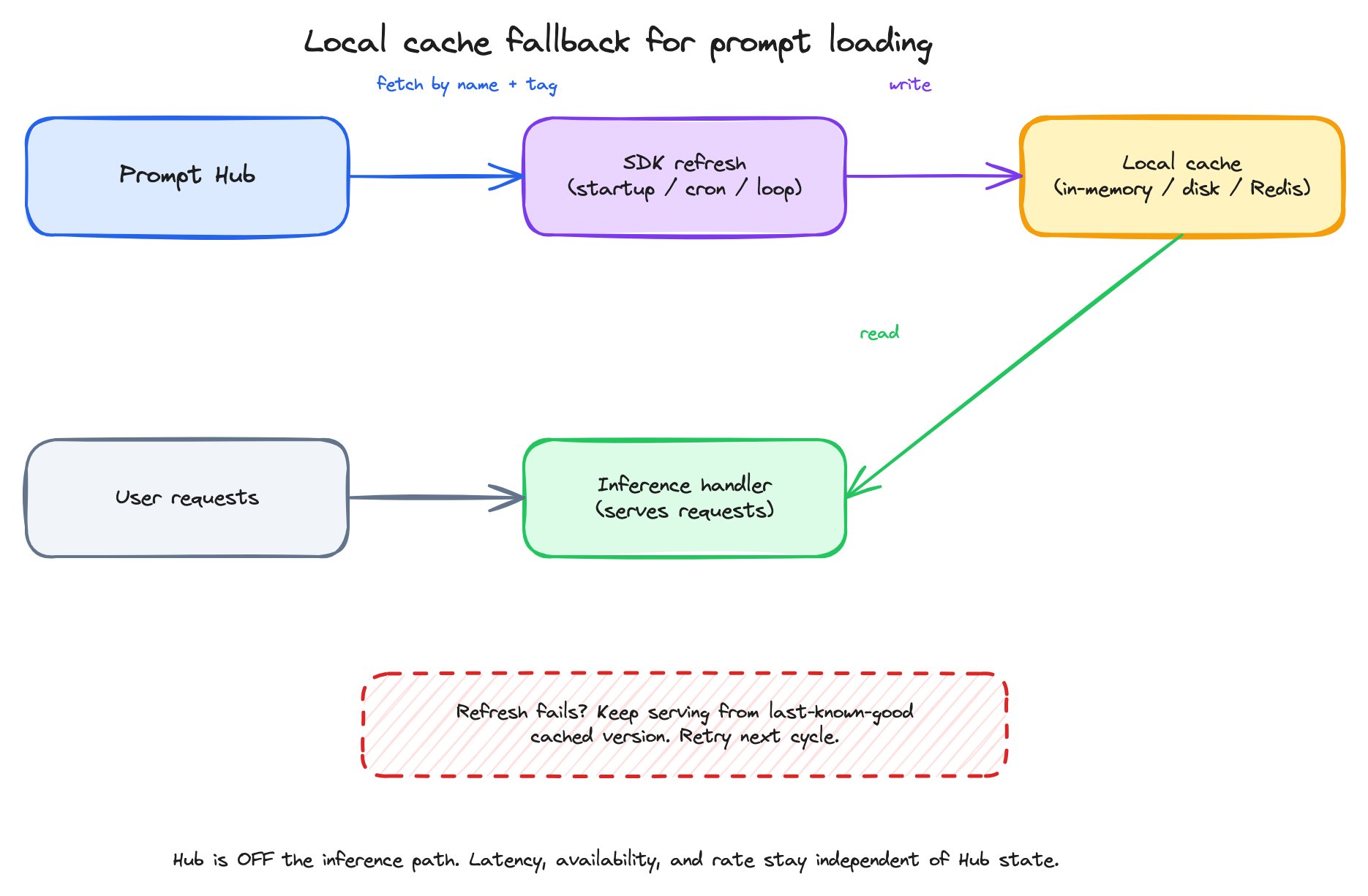
The local-cache-fallback pattern — fetch on a refresh cadence, cache locally, serve inference from the cache, fall back to the last-known-good copy if a refresh fails.
- On a refresh cadence — application startup, a periodic cron, a background loop — fetch the prompt you need by name + tag.
- Write the fetched Prompt Object to a local cache. The cache lives in memory, on disk, or in a shared store like Redis, depending on your deployment.
- Inference reads only from the cache. The Hub is not in the request path.
- If a refresh fails (network error, Hub unreachable), keep serving from the last-known-good cached version. The next successful refresh updates the cache.
- On a successful refresh, if the fetched version differs from the cached one, log the change. You want to know when a tag move took effect.
The shape of an SDK fetch
Conceptually, fetching a prompt looks the same across every SDK. In Python:get(prompt, label=...)returns the whole Prompt Object — template, model, invocation parameters, tools, response format — bundled into aPromptWithVersionwhose.versionholds the snapshot. You don’t fetch each part separately.- Variables are applied to the template yourself — Python f-string-style
.format(**values)on each message’scontent. The SDK doesn’t render messages for you, but the templating is a single-line idiom. - The model is part of what you fetched. If a tag move swapped the model from
gpt-5.4togpt-5.4-mini, your code picks up the new model on the next refresh without code changes.
What this gives your application
- Decoupled prompt deploys. Promote a new prompt by moving the
productiontag in the Hub. No code redeploy. - Resilience to Hub blips. Cached prompts keep serving while a refresh retries.
- Observable rollouts. Refresh logs make tag moves visible to your application’s operators.
- Pin-when-you-need-to. Tests can pin to a version hash to assert behavior; production reads the tag.