

Why evaluate
LLM applications fail in ways traditional software doesn’t. The common failure modes:
None of these surface as errors. Your application returns a 200, the trace looks fine, and the user gets a bad answer. Evaluators are how you detect this class of failure quantitatively.
What evaluators enable, once they’re running:
- Safe prompt iteration. Change a prompt and see whether eval scores improved or regressed across thousands of traces, not three you read by hand.
- Model comparison. Try a new model and measure the delta against your existing one on the same population.
- Regression detection. Catch silent quality drops the moment they show up in production.
- Production monitoring. Track quality over time alongside latency and cost.
- Continuous improvement. Feed labeled failures back into prompts, fine-tuning data, and the evaluators themselves.
The two-cycle improvement loop
The whole point of evaluators is to enable an improvement cycle. There are actually two cycles, not one — and they share data.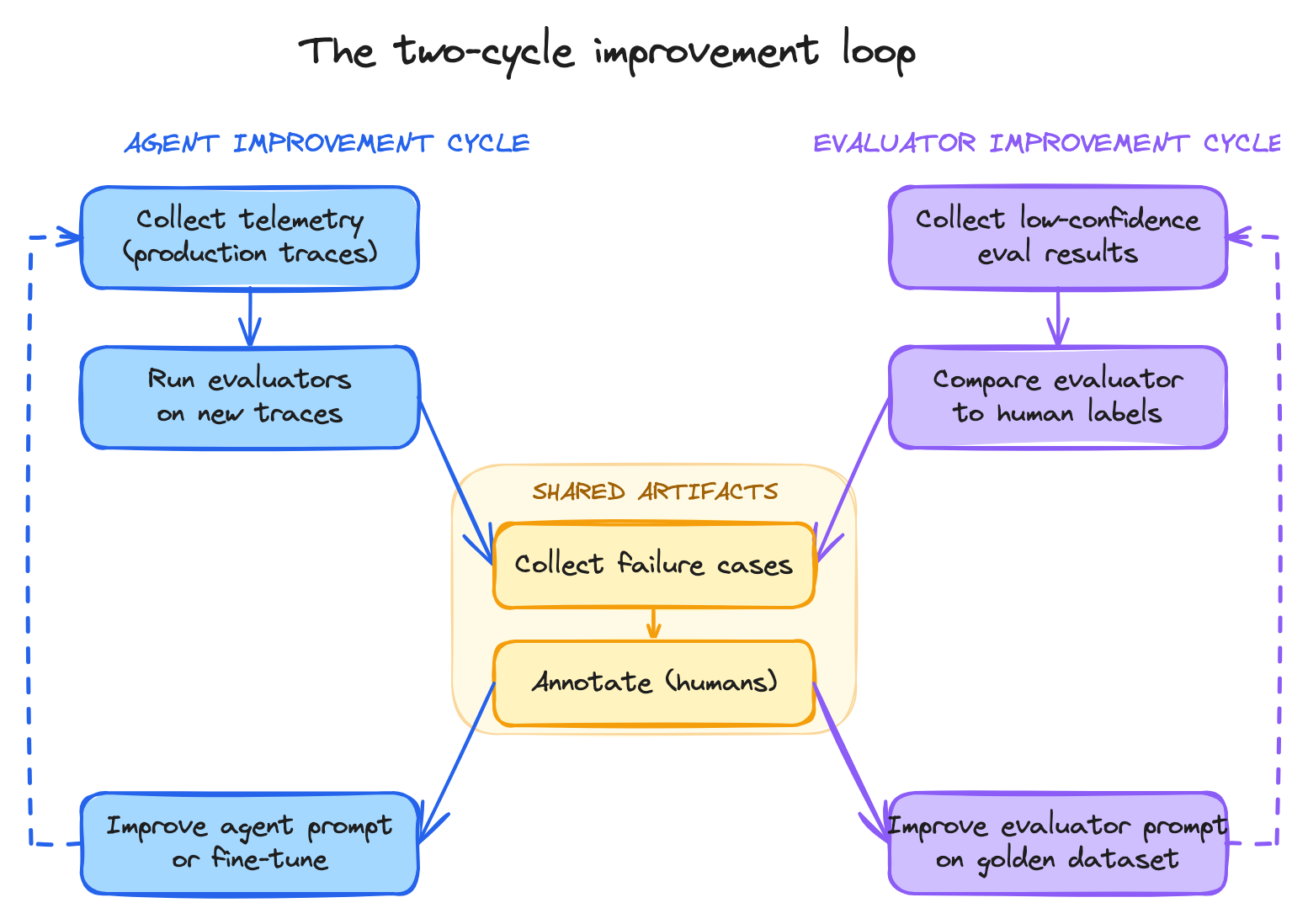
The two improvement cycles — agent on the left, evaluator on the right — sharing the golden dataset in the middle.