

correct is technically running; an evaluator that systematically over-scores verbose responses is technically running. Knowing the evaluator is doing the right thing is its own problem, separate from getting it to run.
This page covers two related ideas: how to know your evaluator is any good (validation against humans), and how to make it better over time (the evaluator improvement cycle).
The evaluator improvement cycle
The overview page introduced the two-cycle improvement loop. The agent improvement cycle uses evaluators to find bad agent responses. The evaluator improvement cycle does the same thing, one level up — it uses human ground-truth labels on failure cases to find bad evaluator judgments, and feed those back into improving the evaluator.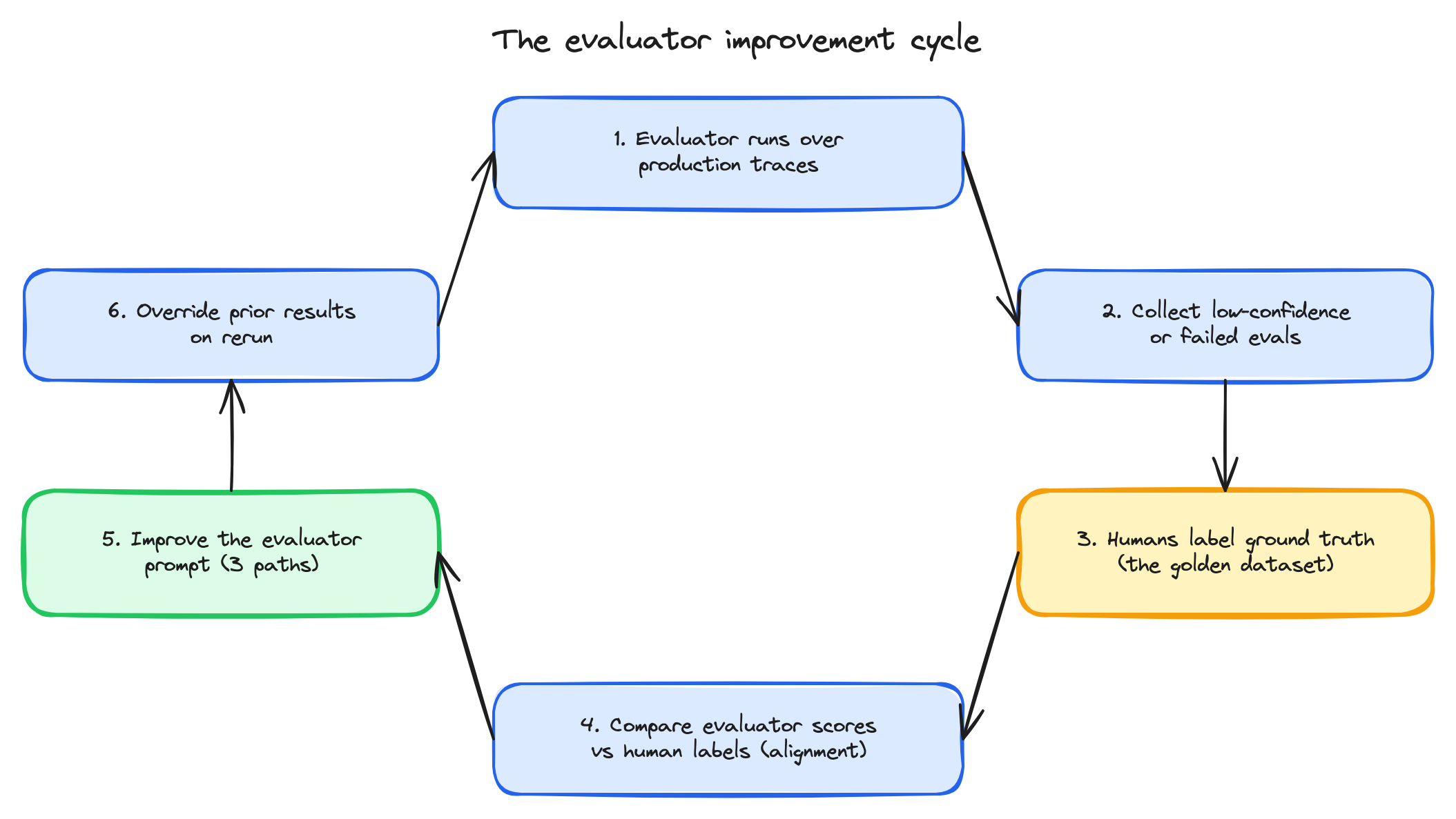
The six-step evaluator improvement cycle — production runs surface failures, humans label, alignment is measured, the prompt is improved, and the cycle loops.
Golden datasets
A golden dataset is a small set of input/output pairs with human-labeled ground truth. It’s how every other piece of validation works. What goes in a golden dataset:- 20–200 examples spanning the score range you care about — clear positives, clear negatives, and edge cases.
- Human labels for each example, from someone with domain knowledge.
- The same input structure your evaluator will see in production — same attribute paths, same context shape.
- Initial validation. Before deploying a new evaluator, run it over the golden dataset and compare to the human labels. If alignment is poor, iterate the prompt before the evaluator ever sees production traffic.
- Regression detection. When you change the evaluator prompt, the model, or the model provider, rerun against the golden dataset to confirm scores haven’t drifted on known cases.
- Optimization input. All three optimization paths below use the golden dataset as the target — improve the prompt to better match these human labels.
eval."<name>".label = 'incorrect' to find every span the evaluator flagged:
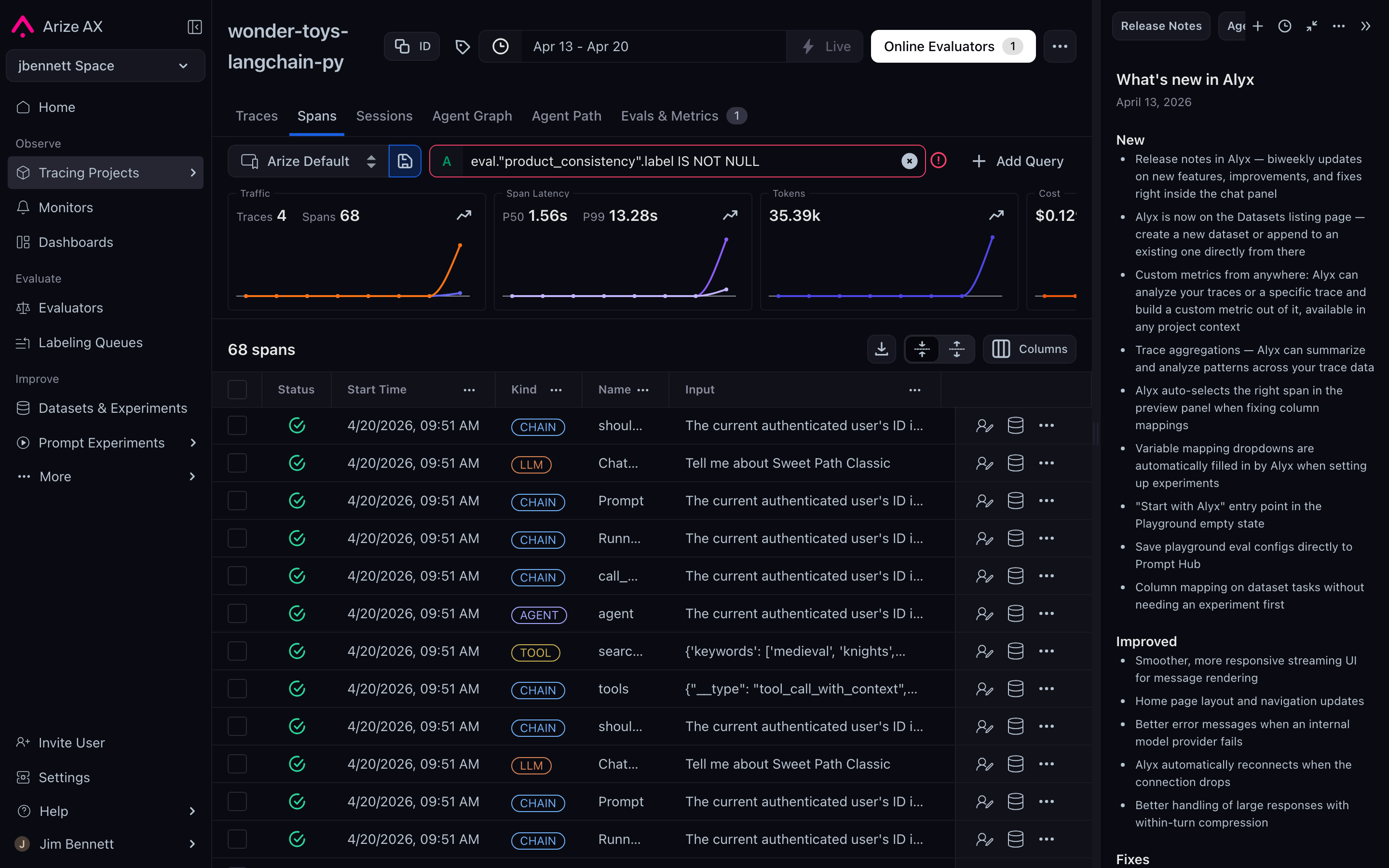
Eval results are first-class span attributes — filter for them the same way you filter for any other attribute.
Human alignment is the validation gate
The metric that matters for an evaluator is agreement with humans on the golden dataset. Accuracy, precision/recall, F1 — pick whatever fits your label structure. The principle is the same: an evaluator that doesn’t match well-calibrated humans isn’t measuring what you think it is. For canonical methodology, Chiang & Lee, 2023 — Can Large Language Models Be an Alternative to Human Evaluations? — covers what good human-vs-judge comparison looks like. The headline finding: LLM judges can substitute for humans in many settings, but the substitution is prompt-sensitive, which is why the validation step is not optional. For the in-product version of this comparison, see Align evals to human feedback.Three paths for improving the evaluator
Once you have a golden dataset and you know the evaluator isn’t aligned well enough, there are three ways to improve it. They aren’t mutually exclusive — most teams use all three at different points.1. Alyx
Alyx is the AI agent built into Arize AX. For evaluator improvement, the workflow is direct: ask Alyx to optimize the prompt against a stated goal. Examples of prompts to Alyx that work:- “Optimize my prompt to better catch hallucinations against this golden dataset.”
- “My evaluator is scoring verbose responses higher than concise ones. Fix it.”
- “Make the rubric more explicit about what counts as on-topic.”
2. Prompt Playground + Experiments
The Prompt Playground is the Arize AX surface for iterating on prompts directly. Combined with experiments — which let you compare multiple prompt variants quantitatively against a dataset — it’s the rigorous version of evaluator optimization. The shape is load golden dataset → try candidate prompts → save each as an experiment → compare side-by-side, using mean score, distribution, and per-row human agreement as the comparison metric. This path is slower than Alyx but produces a defensible comparison. When you’re picking between several candidate evaluator prompts and want to know which one is actually better — not just which one Alyx happened to land on — this is the workflow. For the click-by-click walkthrough, see Run experiments and the Prompt playground.3. Prompt Optimizer task
When the evaluator prompt is saved in the Arize AX Prompt Hub, you can attach a Prompt Optimizer task to it. The optimizer runs an automated optimization loop — it generates prompt variants, scores them against a target metric (alignment with your golden dataset, in this case), and converges on the best variant. This is the most hands-off path. You point the optimizer at your golden dataset and your starting prompt; it returns an improved prompt. The optimization mechanics get their own future Arize concepts section; this concept page just notes the path exists. For the optimizer task, see the Prompt Hub and Prompt Optimization docs.Override on rerun
A practical detail that matters for iteration. When you update an evaluator and rerun the task, Arize AX exposes an option to override the prior eval results for any span that gets re-scored. Use this every time you iterate — it’s what keeps the trace history clean. Without the override, you’d accumulate multiple eval columns per span (one per iteration), which makes downstream analysis painful. With the override, the evaluator’s history is what does the latest version say about each span. The override doesn’t lose the old data permanently if you need it — but for normal iteration, you want it on.When to declare the evaluator done
You don’t, really. The evaluator improvement cycle is ongoing, like the agent improvement cycle. Application behavior drifts. New failure modes emerge. Models update. The evaluator that was well-aligned in March might be drifting by October. A reasonable baseline for production:- Run the evaluator against the golden dataset on a schedule (monthly, quarterly).
- When alignment drops below a threshold, treat it as a signal to iterate.
- When a new failure mode shows up in production that the evaluator misses, add it to the golden dataset and iterate.
You’ve reached the end of this section
You now have the conceptual on-ramp:- Why evaluators exist and the two-cycle improvement loop they enable.
- The three levels (span, trace, session) and the three types (human, code, LLM-as-a-judge).
- The anatomy of every evaluator — inputs, outputs, and where the outputs land.
- The online-vs-offline split and what each path gives you.
- The two filter slots, sampling, cadence, and variable mapping.
- Agent-specific evaluation across router, planner, skills, memory, and reflection.
- The best practices and the academic citations behind them.
- How to validate and improve evaluators over time.