

The components
An evaluator is a function from three inputs to three outputs:
Every evaluator is a function from three inputs to three outputs.
Inputs
Eval prompt
The eval prompt is the instruction the evaluator follows. For an LLM-as-a-judge it’s a literal prompt template; for a code evaluator it’s the body of the scoring function. Either way, it answers two questions: what are we judging? and what shape should the answer take? A well-formed eval prompt:- Describes the criteria explicitly. “Judge whether the response is factually correct, given the retrieved context” is better than “score the response”.
- Names the data fields it expects. Templates use
{variable}placeholders, in the UI and on theaxCLI’s--templateflag, that get filled in from the span attributes at evaluation time. - Specifies the output shape. “Output only
correctorincorrect” is better than “give your assessment”. The shape constrains the judge’s freedom and makes the output machine-parseable.
Eval model
The eval model is what runs the prompt. For LLM-as-a-judge, it’s a configured LLM provider — OpenAI, Anthropic, Bedrock, Vertex AI, etc. For code evaluators, the “model” is implicit — your Python function is both the prompt and the model. The model is independent of the data being judged. An LLM-as-a-judge evaluating agpt-5.4 application doesn’t have to use gpt-5.4; you can (and often should) use a different model for the judge — see Evaluator best practices for the don’t use the same model rule and the perplexity-bias reason behind it.
Models are registered once as AI integrations in Arize AX and referenced by name from any evaluator. The underlying knob on the CLI is --ai-integration-id and --model-name.
Data to evaluate
The data is whatever the evaluator reads in order to make its judgment. The shape depends on the evaluation level:- A span-level evaluator sees one span’s attributes.
- A trace-level evaluator sees all spans in a trace.
- A session-level evaluator sees all traces in a session.
{summary} = attributes.llm.output_messages.0.message.content and {original} = attributes.llm.input_messages.1.message.content. The platform fills these in at evaluation time.
This is where filters come in — they decide which spans, traces, or sessions actually get passed to the evaluator.
Outputs
The three outputs every evaluator emits:Label
The label is the categorical answer. It can be binary (correct / incorrect, relevant / irrelevant, good / bad) or multi-class (fully_relevant / partially_relevant / not_relevant).
Labels are arbitrary strings — you choose them when you create the evaluator. The CLI flag is --classification-choices, which takes a JSON object mapping each label to its numeric score (see below).
Score
The score is the numerical representation of the label. A binarycorrect / incorrect evaluator typically maps to 1 / 0. A multi-class evaluator might map to 1.0 / 0.5 / 0.0. Custom mappings are supported — you can weight labels however you want.
Why scores matter even when you also emit labels:
- Aggregation. “Average score over the last 24 hours” requires numbers, not categories.
- Weighted combinations. When you combine multiple evaluators, you combine scores.
- Filtering. Filtering for spans where
score < 0.5is a common debugging pattern.
--direction flag tells Arize AX whether higher scores are better (maximize) or worse (minimize). This shapes how the UI surfaces aggregates — for an evaluator measuring toxicity, lower is better; for correctness, higher is better.
Although optional in principle, scores are strongly encouraged. Many of the most useful workflows depend on them.
Explanation
The explanation is a paragraph of free-text reasoning describing why the evaluator gave the label it did. For LLM-as-a-judge it comes from the model. For code evaluators it can be set programmatically. Explanations are off by default but worth turning on for almost every evaluator — they’re how you debug a wrong score. “Why did this span get labeled hallucination?” is unanswerable without one. The CLI flag is--include-explanations.
The token cost of generating explanations is non-trivial — they roughly double the cost of an LLM-as-a-judge eval. For high-volume production evaluators, a common pattern is to enable explanations during development and validation, then disable them once the evaluator is stable.
Where evaluator outputs land
Evaluator outputs are written back to the span they were run against as a triplet of attributes:
Trace- and session-level evaluators use slightly different prefixes (
trace_eval.<eval-name>.* and session_eval.<eval-name>.* respectively) so the Arize AX UI can disambiguate scope at a glance. Span-level evaluators use the plain eval.* prefix. The triplet structure is the same in all three cases.
In the Arize AX UI, eval results appear inline on every span — surfaced as their own columns in the Spans tab and as a dedicated Evaluations tab on the span detail drawer:
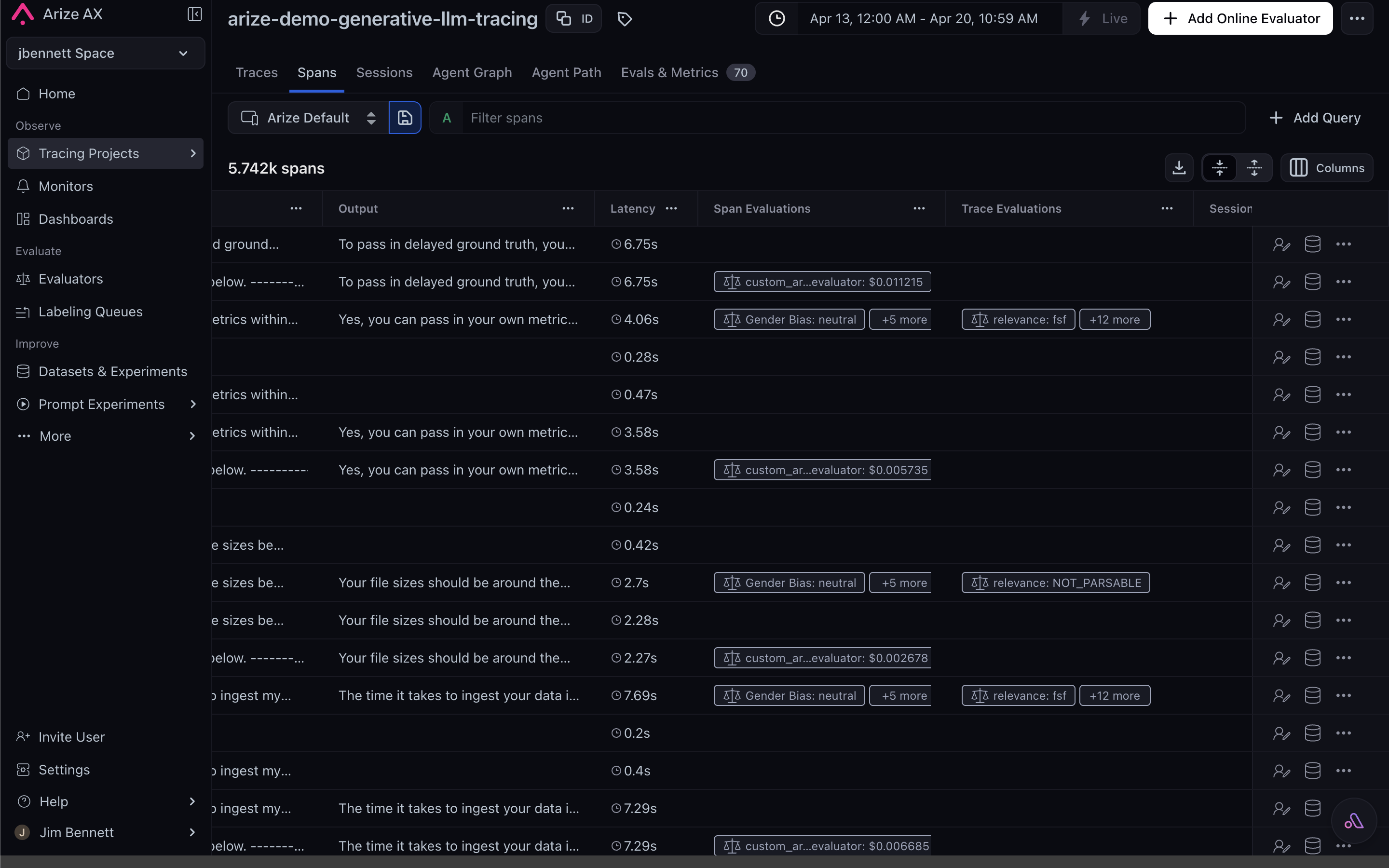
Eval scores attach to each span as standard attributes, visible inline in the Spans tab.
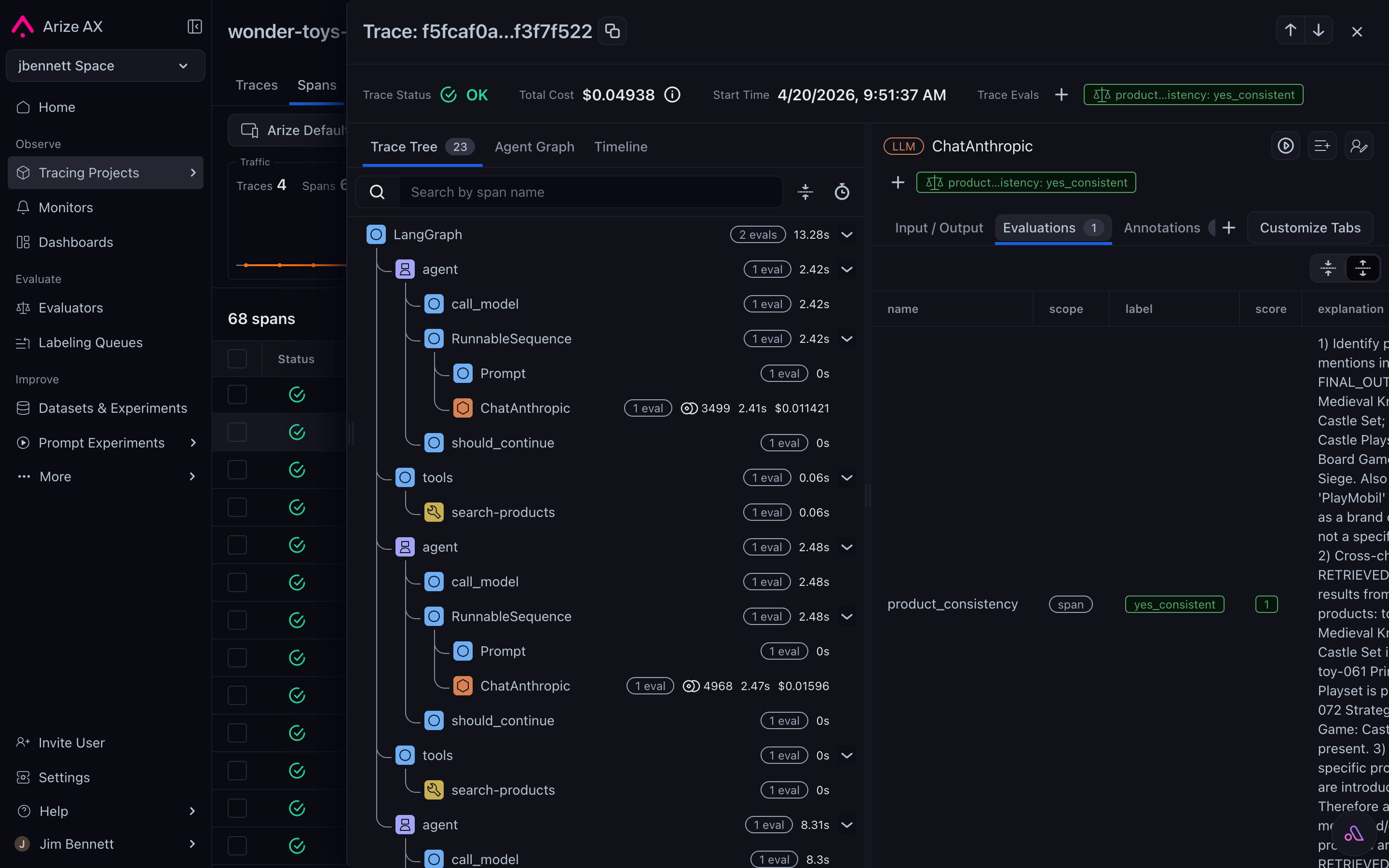
The Evaluations sub-tab on the span detail drawer shows label, score, and explanation for every evaluator that ran on the span.
The flexibility lives in the inputs
The whole pipeline is flexible because the inputs are. For LLM-as-a-judge:- The prompt is a natural-language template you control.
- The model is any provider you have configured.
- The data is any combination of span attributes addressed via placeholders.