

What a dataset is, in this context
A dataset is a table. Each row is one example you want your prompt to handle. Each column is either:- An input column that maps to a
{variable}in the prompt template, or - A reference column (ground truth) used to score the prompt’s output, or
- A metadata column carried along for filtering or grouping.
The three origins
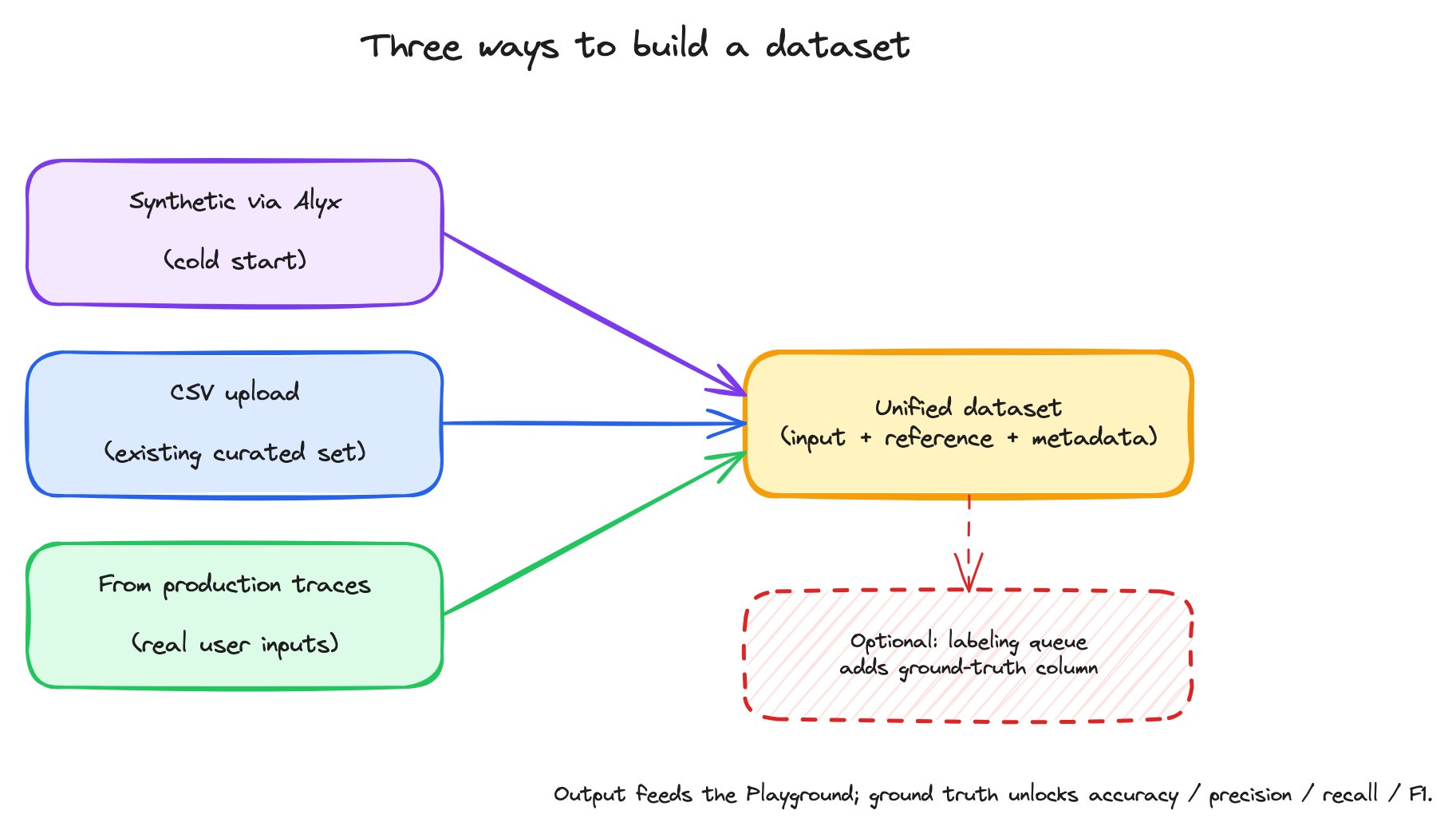
Three ways to build a dataset for prompt iteration, all funneling into the same downstream workflow.
The three paths produce the same artifact. Once a dataset exists, the rest of the workflow is identical regardless of origin.
Cold start with Alyx
When you don’t have real data yet, Alyx is the unblock. Tell Alyx what kind of examples you want and how many, and it generates them. For a tool-selection router, that might be “10 example user queries that should each route to one of these four tools.” Alyx considers the prompt context, asks clarifying questions if needed, and writes the dataset into Datasets and Experiments where you can use it like any other. This is more useful than it sounds. Most prompt work starts before there’s real traffic — synthetic data lets you start iterating on day one and replace it with real data later.CSV upload
When you already have a curated test set — exported from a benchmark, written by a domain expert, or shaped in a spreadsheet — uploading the file directly is the fastest path. Each CSV column becomes a dataset column, and the column headers become the names the prompt’s{placeholders} bind to at run time.
You can upload from any of:
- The UI — under Datasets & Experiments, create a new dataset and drop the CSV in.
- The CLI —
ax datasets create --name my-set --space <space> --file examples.csv. JSON, JSONL, and Parquet files are accepted by the same flag. - The SDK — load the file into a pandas DataFrame (or a list of dicts) and call
client.datasets.create(space=..., name=..., examples=df). The Python client takes the parsed data, not a file path.
From production traces
Once you have an application sending traces to Arize AX, those traces are your most valuable dataset source. They’re real user inputs, including the long tail you wouldn’t think to write by hand. The workflow:- Open the Spans tab of the project that contains the data you want.
- Apply filters — by span kind, by span name, by input-contains expression, by date range — to narrow to the spans relevant to the prompt you’re iterating on.
- Multi-select the rows and add them to a dataset.
- The span’s input attributes become dataset columns; you can choose which to include.
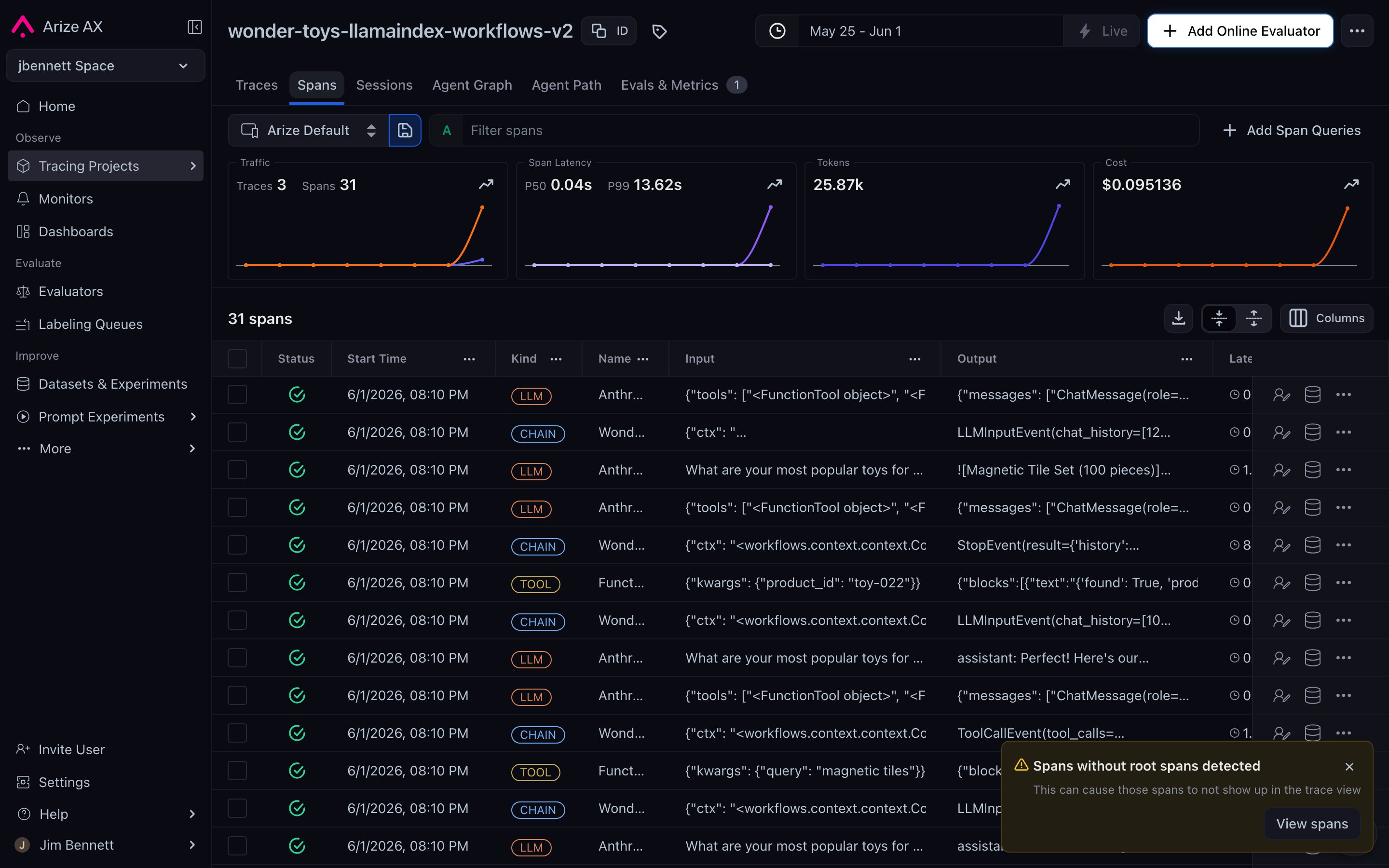
A project's Spans tab — every row is one production span, with kind / name / input / output columns. Filter, multi-select, and add to a dataset to turn real traffic into prompt-iteration data.
Ground truth and the reference column
A dataset can carry a reference column — the “correct” answer for each row. When set, the reference column unlocks a different class of evaluation:
Setting the reference column is done from Edit Dataset → Metric Settings in the dataset detail view. You pick which dataset column is the ground truth, which column holds the prompt’s output, and (for classification metrics) the positive class.
Ground truth is optional but high-leverage. A prompt without a reference column gets you “this output looks plausible.” A prompt with a reference column gets you “this output is correct (or it isn’t).” For any classification-shaped task, the difference is meaningful.
Labeling queues for subject-matter experts
Where does ground truth come from? Sometimes the dataset already has it (you exported a benchmark). Sometimes you generate it (a strong baseline LLM). And sometimes you need humans — subject-matter experts who know what “correct” means for your domain. A labeling queue is a dataset-attached workflow that assigns rows to specific annotators for labeling. Annotators can be scoped to see only their labeling queue — useful when SMEs shouldn’t have full platform access. The annotator’s task is shaped by annotation configs. Three flavors are supported:
Multiple configs can stack on the same dataset — categorical label plus a free-form explanation, for instance. The annotator sees both prompts and supplies both signals per row.
Once the queue is complete, the labels land as additional columns on the dataset. You can then point Metric Settings at the label column as the reference and unlock the full set of comparison metrics.
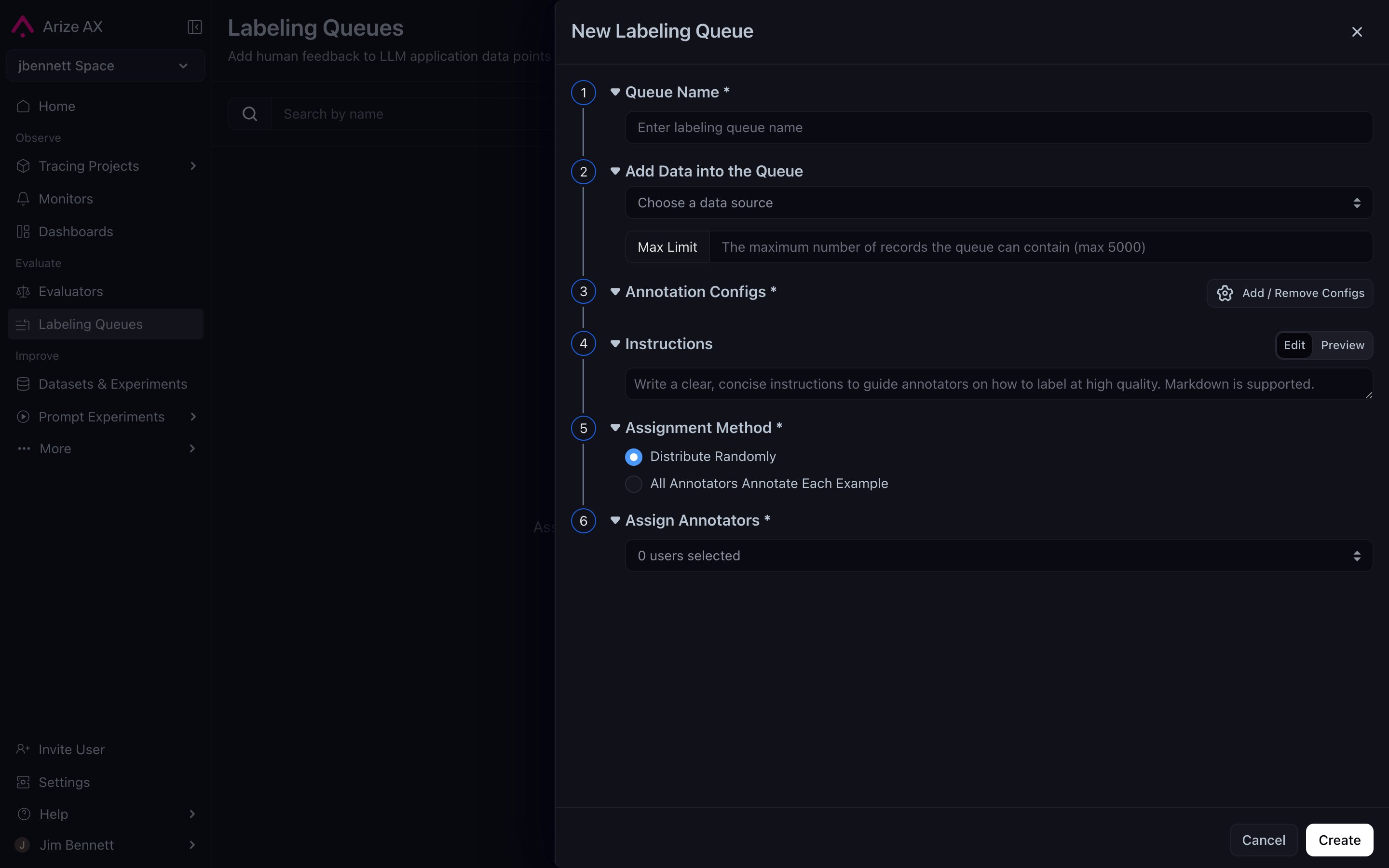
The New Labeling Queue modal — six numbered sections walk you from naming the queue through assigning annotators, with the Annotation Configs section supporting categorical, continuous, and free-form text configs that can stack.
Why this matters for prompt iteration
The dataset is half the iteration loop. The prompt is the variable you’re changing; the dataset is the constant you’re measuring against. Two implications:- Dataset quality bounds eval quality. A dataset that only covers easy cases will say every prompt is great. A dataset that covers the hard cases — including edge cases drawn from production failures — is what catches regressions.
- Datasets are reusable. A well-built dataset works across many prompts, model swaps, and over time. Investing in dataset coverage pays back for every prompt iteration after it.