Documentation Index
Fetch the complete documentation index at: https://arize-ax.mintlify.dev/docs/llms.txt
Use this file to discover all available pages before exploring further.
From human review to automated evaluation
Once you understand your failure modes through human review, the next step is automating those checks. Evaluators let you measure quality at scale, turning subjective judgments into measurable results so you can track improvements over time and catch regressions early.
Once you create an evaluator, you run it over your data using a task. Task setup is covered on the next page.
What is an evaluator
An evaluator looks at your data and returns a structured result, including some combination of label (e.g. correct / incorrect), a numeric score, and an explanation.
LLM evaluators also have an optimization direction. Maximize when higher scores are better, minimize when lower scores are better. This tells Arize how to color results so you can see at a glance what is performing well and what needs attention.
Evaluators are versioned so every change is tracked. When you create an evaluator you also set its scope (span, trace, session, or experiment), which determines what unit of data it sees and where results appear.
What kind of eval do I need?
Start with what you learned in error analysis. For each failure mode, ask: is this subjective or deterministic?
Subjective or nuanced criteria: use an LLM-as-a-judge evaluator. Examples: helpfulness, tone, correctness, whether a response addresses the user’s concern.
Objective and rule-based criteria: use a code evaluator. Examples: JSON validation, regex matching, keyword presence.
Most applications use both. You can attach multiple eval tasks of different types to the same project for layered coverage.
LLM-as-a-Judge
Use an LLM to assess outputs based on a prompt and criteria you define. You can create one from wherever you are in your workflow:
- Evaluator Hub: Create and manage evaluators to reuse across any project or experiment.
- Tracing: Create an eval directly from a trace, span, or session when you spot something worth measuring.
- Build a dataset and Set up an experiment: set up an eval to score experiment runs against your golden dataset.
- Prompt Playground: Test and iterate on your eval or run an eval on your prompt experiments.
Setup Instructions
Set up an AI provider integration, write your eval template, map variables to your data, and save to the Evaluator Hub.
By Arize Skills
By Alyx
By UI
Use the Arize skills plugin in your coding agent and the arize-evaluator skill to create evaluators via the ax CLI without leaving your editor. See the skill doc for supported commands. Then ask your agent:
- “Create a hallucination evaluator for my project”
- “Create an evaluator from blank with correct/incorrect labels”
- “Update the prompt on my correctness evaluator”
Describe what you want to measure in plain language and Alyx will write the evaluator prompt for you, generate the labels and score mapping, and save it to the Evaluator Hub.
- “Create an evaluator that checks if customer support responses are empathetic and provide actionable next steps”
- “Write a hallucination evaluator for my RAG pipeline”
- “Create a correctness evaluator for my project”
From a trace or span
In the tracing UI, open a trace and use Add Trace Eval in the trace header to score the full trace, or select a span and use Add Span Eval in the span details panel for span-level judges.Use a pre-built template
Use a pre-built template if a generic quality dimension covers your needs. Arize includes tested templates for common scenarios:| Template | What it measures |
|---|
| Hallucination | Outputs containing information not supported by the reference |
| Relevance | Whether responses address the input question |
| Toxicity | Harmful or inappropriate content |
| Helpfulness | How useful the response is to the user |
| Q&A Correctness | Answer accuracy given reference documents |
| Summarization | Whether summaries capture the source material |
| User Frustration | Signs of frustration in conversations |
| Code Generation | Code correctness and readability |
| SQL Generation | SQL query correctness |
| Tool Calling | Function call accuracy and parameter extraction |
- Navigate to New Eval Task and select LLM-as-a-Judge
- Click Add Evaluator and select a template
- Set the scope — span, trace, or session
- Configure your judge model and AI provider (use a different model than the one you’re evaluating)
- Map your trace or dataset attributes to the template variables
- Click Create
Granularity
| Scope | Use when |
|---|
| Span | The evaluation target is self-contained in one operation—for example, whether this retrieval returned relevant results |
| Trace | You need to assess reasoning quality or context retention across the full request flow |
| Session | You want to evaluate the overall effectiveness of a multi-turn conversation |
Create from blank
Create from blank if your application has specific criteria that generic templates can’t capture.
- Navigate to New Eval Task and select LLM-as-a-Judge
- Click Add Evaluator, then Create From Blank
- Name the evaluator and write a prompt template using variables like {input} and {output}
- Define output labels (e.g. correct / incorrect) and scores
- Configure the judge model and save
Code evaluators
Code evaluators run deterministic Python logic against your trace data. Faster, cheaper, and more consistent than LLM evals for objective checks.
By Arize Skills
By Alyx
By UI
By Code
Use the Arize skills plugin in your coding agent and the arize-evaluator skill to create code evaluators and tasks via the ax CLI without leaving your editor. See the skill doc for supported commands. Then ask your agent:
- “Create a code evaluator that checks if the output is valid JSON”
- “Set up a regex evaluator that checks for a phone number in the response”
Ask Alyx to create a code evaluator for you:
- “Create a code evaluator that checks if the output is valid JSON”
- “Set up a regex evaluator that checks for a phone number in the response”
Arize includes managed code evaluators for common patterns:| Evaluator | What it checks | Parameters |
|---|
| Matches Regex | Whether text matches a regex pattern | span attribute, pattern |
| JSON Parseable | Whether the output is valid JSON | span attribute |
| Contains Any Keyword | Whether any specified keywords appear | span attribute, keywords |
| Contains All Keywords | Whether all specified keywords appear | span attribute, keywords |
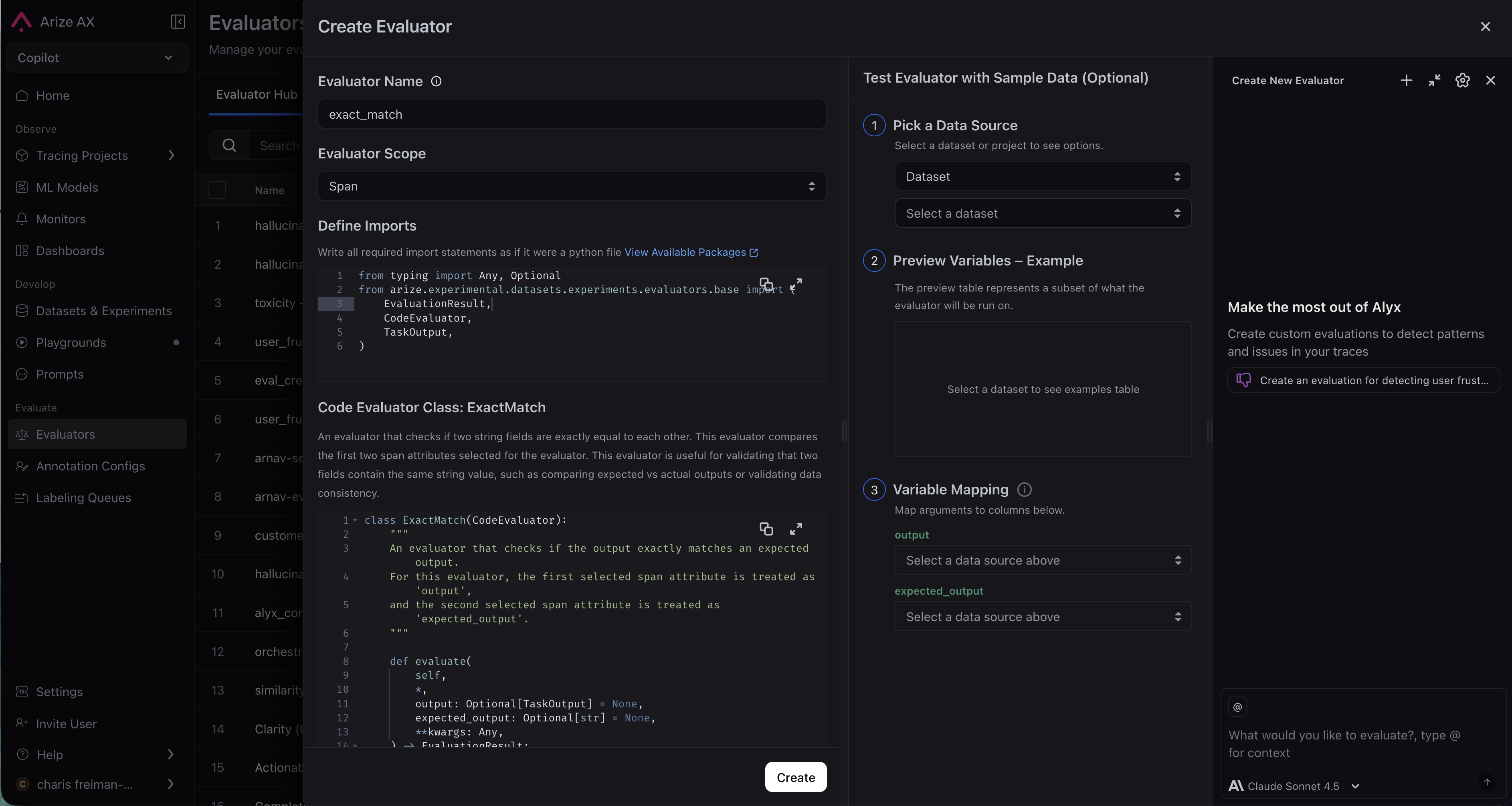
- Navigate to the Evaluators page and click New Evaluator, then select Code Evaluator.
- Enter an evaluator name and set the scope.
- Define imports and write your evaluator class.
- Configure variable mapping.
- Expand Advanced Options if needed.
- Click Create.
Custom code evaluators are available on Arize AX Enterprise.
A custom code evaluator is a Python class that extends CodeEvaluator and implements a single evaluate method.# Note: This example uses Python SDK v7
from typing import Any, Mapping, Optional
from arize.experimental.datasets.experiments.evaluators.base import (
EvaluationResult,
CodeEvaluator,
JSONSerializable,
)
class ContainsHelloEvaluator(CodeEvaluator):
def evaluate(
self,
*,
dataset_row: Optional[Mapping[str, JSONSerializable]] = None,
**kwargs: Any,
) -> EvaluationResult:
output = dataset_row.get("attributes.output.value") if dataset_row else None
text = str(output or "").lower()
if "hello" in text:
return EvaluationResult(
label="pass",
score=1.0,
explanation="Output contains 'hello'"
)
return EvaluationResult(
label="fail",
score=0.0,
explanation="Output does not contain 'hello'"
)
dataset_row dictionary contains span attributes. Common keys include attributes.output.value, attributes.input.value, and attributes.llm.token_count.total. Access values using .get() to handle missing keys gracefully.Your evaluate method must return an EvaluationResult with a label (e.g. “pass” / “fail”), an optional score (e.g. 1.0 / 0.0), and an explanation.You can import any of the following supported packages: numpy, pandas, scipy, pydantic, jellyfish. Contact support to request additional packages.While it’s possible to write code directly in the UI, it’s easier to iterate in a Python script or Colab notebook first. Use the Test in Code button in the task creation interface to get starter code, then copy-paste your evaluator into the UI when ready. Evaluator Hub
LLM-as-a-judge evaluators are saved to the Evaluator Hub, your centralized place for managing, versioning, and reusing evaluators. The Evaluators page has two tabs:
Eval Hub is where evaluators are defined and managed. Create an evaluator once and attach it to any task: online monitoring, offline batch runs, or dataset experiments, without rewriting prompts or reconfiguring models. Every change is tracked with a version history and commit messages so you know what changed and why.
Running Tasks is where evaluation tasks execute evaluators against your data. A task connects an evaluator to a data source and runs it on a schedule or as a one-time batch.
When you attach an evaluator to a task, you map its template variables to your datasource columns. This is what makes evaluators portable. The same evaluator works across datasets and projects with different schemas, just update the column mappings.
Eval best practices
Should I Use the Same LLM for my Eval as My Agent?
Further reading