


Co-Authored by Venu Kanamatareddy, AI Startups Solutions Architect, AWS & Nolan Chen, Partner Solutions Architect, AWS & Richard Young, Director, Partner Solutions Architecture.
Building an AI agent in a notebook is straightforward. Getting that agent to run reliably at scale is a different challenge entirely. Most teams hit the same production walls: agents that work locally fail when traffic spikes, debugging production issues takes days without proper traces, and managing infrastructure becomes a constant distraction from improving the actual agent logic.
AWS Bedrock AgentCore Runtime solves the infrastructure problem. Arize AX solves the observability problem. Together, they create a complete production system where you can deploy agents with confidence and improve them continuously based on real data.
This post walks through deploying a practical travel planning agent to production infrastructure, with complete visibility into every decision it makes.
The Production Reality Gap
The path from working prototype to production system exposes several hard truths:
Local development doesn’t match production reality. Your agent handles a dozen test queries perfectly. Then production traffic reveals edge cases you never considered — different phrasings, unexpected tool failures, queries that trigger infinite reasoning loops.
Infrastructure becomes a bottleneck. Containerizing your agent, setting up auto-scaling, managing secrets, handling deployment pipelines—all of this takes time away from making your agent better.
Debugging without visibility is guessing. When an agent fails in production, you need to know exactly what happened. Which tools were called? What did the model see? Where did the reasoning go wrong? Without traces, you’re debugging blind.
You need two things: managed infrastructure that scales without manual intervention, and comprehensive observability that shows you exactly what your agent is doing. AWS Bedrock AgentCore Runtime and Arize AX provide exactly that.
AWS Bedrock AgentCore Observability: Better Together Story
What AWS Bedrock AgentCore Runtime Brings
AgentCore Runtime is a managed service for hosting AI agents at scale. It handles the infrastructure complexity so you can focus on agent logic:
- Managed container hosting with automatic scaling and load balancing
- Native Bedrock integration for Claude and other foundation models
- Simplified deployment via starter toolkit — from code to production endpoint in minutes
- Enterprise security with IAM roles, VPC support, and compliance controls
- HTTP endpoints for production access with built-in authentication
You write your agent code. AgentCore handles deployment, scaling, and infrastructure management.
What Arize AX Brings
Arize AX is an enterprise AI engineering platform that provides observability, evaluation, and experimentation from development through production:
- OpenTelemetry-based tracing that works with any framework or language
- Complete execution visibility into agent reasoning, tool calls, and model interactions
- Real-time monitoring of quality, cost, and latency metrics
- LLM evaluation framework supporting custom evaluators and LLM-as-judge patterns
- Experimentation for A/B testing improvements before full rollout
- Alyx AI assistant that analyzes traces, identifies bottlenecks, and suggests optimizations
You deploy your agent. Arize shows you exactly how it behaves in production.
Why This Matters
This combination delivers several benefits that neither platform provides alone:
No framework lock-in. Both platforms use open standards: Docker containers, OpenTelemetry, standard HTTP. You can swap components as your needs evolve.
Deploy once, monitor continuously. AgentCore provides the runtime. Arize provides continuous visibility. Changes to your agent flow through the same pipeline.
Debug with speed. Complete trace context means you can identify root causes in minutes instead of days. Replay failed requests. Compare successful and failed executions side by side.
Improve with confidence. Track quality metrics over time. Run controlled experiments. Use production data to make your agent better.
Architecture Overview

The architecture is straightforward: build your agent with any framework, package it as a container, deploy to AgentCore Runtime, and observe everything in Arize AX.
The data flow:
- Agent code runs in a managed container on AgentCore Runtime
- OpenTelemetry instrumentation captures spans for every operation
- A custom processor converts framework-specific spans to OpenInference format
- Spans flow to Arize AX via standard OTLP protocol (OpenTelemetry Protocol)
- Arize AX provides real-time dashboards, trace exploration, and evaluation
AgentCore is OTEL compliant and built to integrate seamlessly with Arize. This gives you an easy integration pattern and a single pane of glass for all agent metrics, regardless of which AWS service hosts your infrastructure.
Code Walkthrough: Deploying a Travel Agent
For the full code example, please refer to the notebook.
Let’s walk through a complete example: a travel planning agent that uses web search to provide current information about destinations. The agent uses Claude Sonnet on Amazon Bedrock and searches the web via DuckDuckGo when it needs real-time information.
This example builds on the Strands framework, but the same pattern works with any framework including LangChain, LlamaIndex, CrewAI or custom implementations. The key is OpenTelemetry instrumentation and proper configuration of both platforms.
Step 1: Configure Arize AX Credentials
First, set up your Arize AX credentials as environment variables:
import os
# Arize configuration
os.environ["ARIZE_API_KEY"] = ""    # Your Arize API key
os.environ["ARIZE_SPACE_ID"] = ""   # Your Arize space ID
os.environ["ARIZE_ENDPOINT"] = "otlp.arize.com:443"
Step 2: Create your Agent with Arize AX Integration
This creates a file called strands_claude.py that contains your agent code with full OpenTelemetry instrumentation. This is the complete agent that will run on AgentCore Runtime:
This code example has been abbreviated for brevity.
%%writefile strands_claude.py

..........

strands_processor = StrandsToOpenInferenceProcessor()
resource = Resource.create({
  "model_id": "agentcore-strands-agent"})
provider = TracerProvider(resource=resource)
provider.add_span_processor(strands_processor)
otel_exporter = OTLPSpanExporter()
provider.add_span_processor(BatchSpanProcessor(otel_exporter))
trace.set_tracer_provider(provider)

logging.basicConfig(level=logging.ERROR, format="[%(levelname)s] %(message)s")
logger = logging.getLogger(__name__)
logger.setLevel(os.getenv("AGENT_RUNTIME_LOG_LEVEL", "INFO").upper())
@tool
def web_search(query: str) -> str:
    """
    Search the web for information using DuckDuckGo.
    Args:
        query: The search query
    Returns:
        A string containing the search results
    """
    try:
        results = DDGS().text(query, max_results=5)
        formatted_results = []
        for i, result in enumerate(results, 1):
            formatted_results.append(
                f"{i}. {result.get('title', 'No title')}\n"
                f"   {result.get('body', 'No summary')}\n"
                f"   Source: {result.get('href', 'No URL')}\n"
            )
        return "\n".join(formatted_results) if formatted_results else "No results found."
    except Exception as e:
        return f"Error searching the web: {str(e)}"

# Function to initialize Bedrock model
def get_bedrock_model():
    region = os.getenv("AWS_DEFAULT_REGION", "us-west-2")
    model_id = os.getenv("BEDROCK_MODEL_ID", "us.anthropic.claude-3-7-sonnet-20250219-v1:0")
    bedrock_model = BedrockModel(
        model_id=model_id,
        region_name=region,
        temperature=0.0,
        max_tokens=1024
    )
    return bedrock_model

# Initialize the Bedrock model
bedrock_model = get_bedrock_model()
# Define the agent's system prompt
system_prompt = """You are an experienced travel agent specializing in personalized travel recommendations
with access to real-time web information. Your role is to find dream destinations matching user preferences
using web search for current information. You should provide comprehensive recommendations with current
information, brief descriptions, and practical travel details."""

app = BedrockAgentCoreApp()
def initialize_agent():
    """Initialize the agent with proper telemetry configuration."""
    # Create and cache the agent
    agent = Agent(
        model=bedrock_model,
        system_prompt=system_prompt,
        tools=[web_search]
    )

    return agent

@app.entrypoint
def strands_agent_bedrock(payload, context=None):
    """
    Invoke the agent with a payload
    """
    user_input = payload.get("prompt")
    logger.info("[%s] User input: %s", context.session_id, user_input)

    # Initialize agent with proper configuration
    agent = initialize_agent()

    response = agent(user_input)
    return response.message['content']
[0]
['text']

if __name__ == "__main__":
    app.run()
The key component here is StrandsToOpenInferenceProcessor. This custom processor converts Strands framework spans into OpenInference format, which Arize understands natively. OpenInference is a standard semantic convention for AI/ML traces that provides consistent structure for agent spans, tool calls, and model interactions. This standardization provides complete transparency into agent logic and enables Arize AX to analyze traces and suggest optimizations automatically.
Step 3: Configure AgentCore Deployment
Use the AgentCore starter toolkit to configure your deployment. This handles Docker configuration, ECR repository creation, and IAM role setup:
from bedrock_agentcore_starter_toolkit import Runtime
from boto3.session import Session
boto_session = Session()
region = boto_session.region_name

agentcore_runtime = Runtime()
agent_name = "strands_agentcore_arize_observability"
response = agentcore_runtime.configure(
    entrypoint="strands_claude.py",
    auto_create_execution_role=True,
    auto_create_ecr=True,
    requirements_file="requirements.txt",
    region=region,
    agent_name=agent_name,
    memory_mode='NO_MEMORY',
    disable_otel=True,
)
response
The disable_otel=True parameter enables all observability data to be redirected from CloudWatch to Arize AX’s specialized AI observability platform, giving you production-grade insights without losing any trace context. The starter toolkit generates a Dockerfile automatically based on your entrypoint and requirements.
Step 4: Launch to AgentCore Runtime
Deploy your agent to production with full environment configuration:
# Set the Space and API keys as headers for authentication
import os
headers = f"space_id={os.environ['ARIZE_SPACE_ID']},api_key={os.environ['ARIZE_API_KEY']}"
launch_result = agentcore_runtime.launch(
    env_vars={
        "BEDROCK_MODEL_ID": "us.anthropic.claude-3-7-sonnet-20250219-v1:0",
        "OTEL_EXPORTER_OTLP_ENDPOINT": os.environ["ARIZE_ENDPOINT"],
        "OTEL_EXPORTER_OTLP_HEADERS": headers,
        "DISABLE_ADOT_OBSERVABILITY": "true",  # Disable CloudWatch observability
    }
)
launch_result
Behind the scenes, AgentCore:
- Builds your Docker container
- Pushes it to Amazon ECR
- Creates the runtime endpoint
- Configures auto-scaling policies
- Sets up IAM permissions
- Provisions compute resources
Wait for the deployment to complete:
import time

status_response = agentcore_runtime.status()
status = status_response.endpoint['status']
end_status = ['READY', 'CREATE_FAILED', 'DELETE_FAILED', 'UPDATE_FAILED']
while status not in end_status:
    time.sleep(10)
    status_response = agentcore_runtime.status()
    status = status_response.endpoint['status']
    print(status)

status
Once the status shows READY, your agent is live and ready to handle production traffic.
Step 5: Invoke the Deployed Agent
With your agent running on AgentCore, invoke it like any HTTP endpoint:
invoke_response = agentcore_runtime.invoke({
    "prompt": "I'm planning a weekend trip to Los Angeles. What are the must-visit places and local food I should try?"
})
The agent processes this request by:
- Analyzing the user’s query
- Deciding it needs current information about Los Angeles
- Calling the
web_searchtool with relevant queries - Receiving search results from DuckDuckGo
- Synthesizing the information into personalized recommendations
- Returning a comprehensive response
Display the response:
from IPython.display import Markdown, display
display(Markdown("".join(invoke_response['response'])))
The agent returns recommendations covering attractions, restaurants, neighborhoods, and practical tips — all based on current web data.
Step 6: Observe Everything in Arize AX
Navigate to your Arize AX dashboard at app.arize.com to see complete visibility into your agent’s execution.
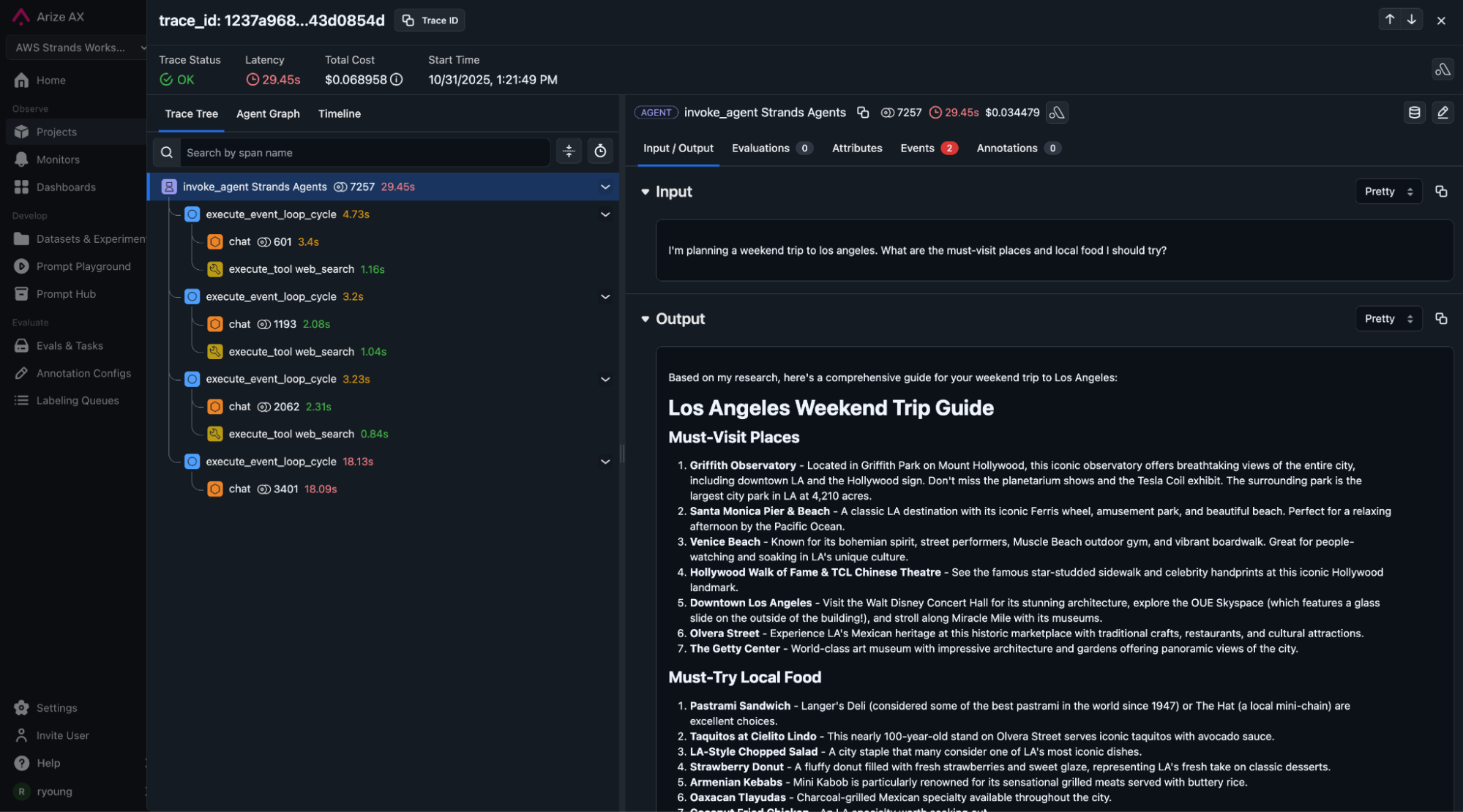
Trace View shows the full execution path:
- The top-level agent span captures the entire request lifecycle
- Tool call spans show each web search with timing and results
- Model interaction spans reveal token usage, latency, and costs
- Request and response payloads are captured at each step
Agent Graph View provides aggregate analytics:
- Span-level statistics across all invocations
- Success and failure rates by component
- Latency distributions to identify bottlenecks
- Cost breakdowns by model calls and token usage

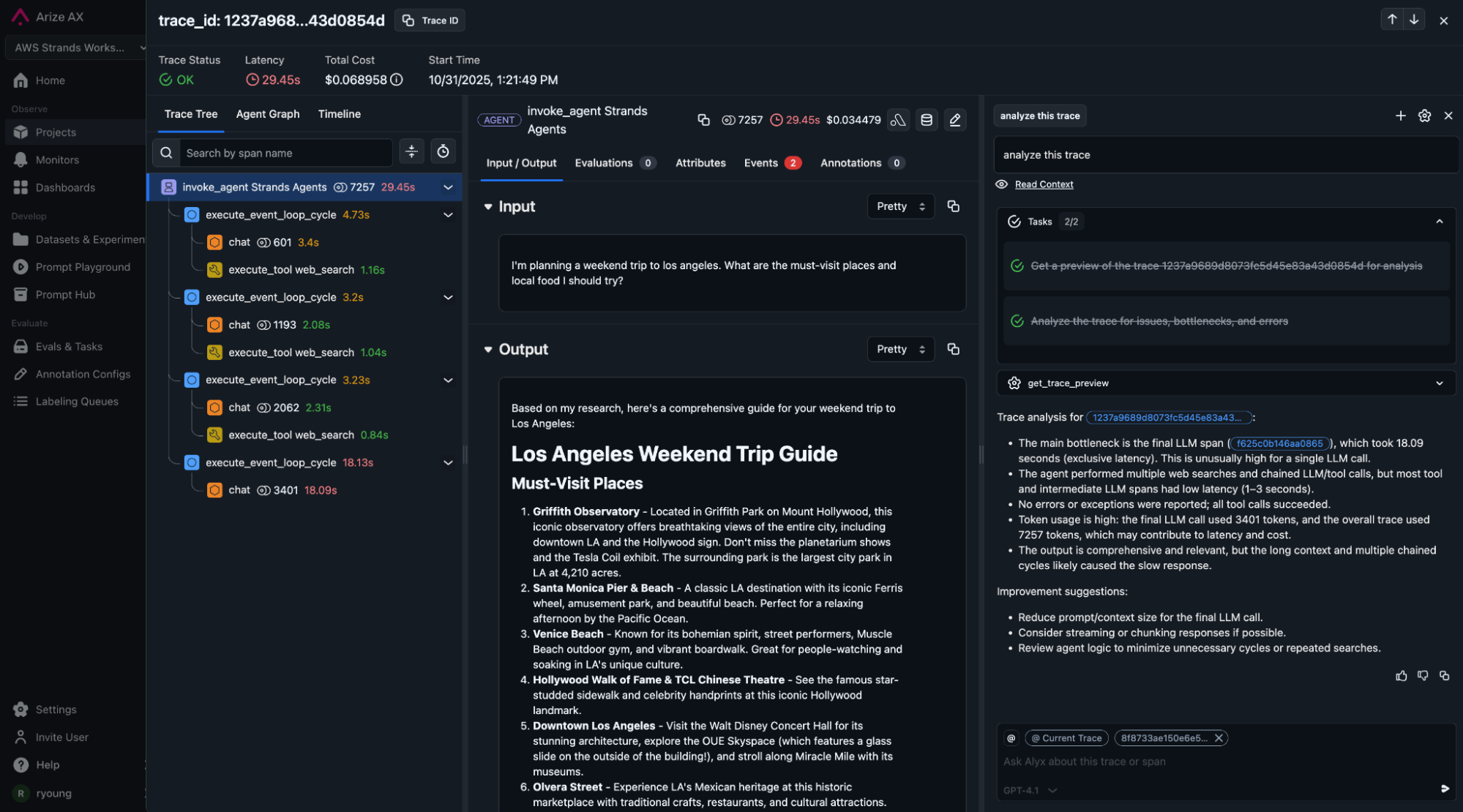
Alyx AI Assistant analyzes your traces:
- Identifies expensive patterns (redundant tool calls, verbose outputs)
- Suggests optimizations (prompt improvements, tool consolidation)
- Explains failures with actionable recommendations
- Answers questions about agent behavior in natural language
Bringing It All Together
Production Value You Can Measure
Complete observability transforms how you operate AI agents in production. Instead of wondering why an agent behaved a certain way, you see exactly what happened.
Track what matters. Every agent’s decision is captured. You can measure success rates, identify which tool calls fail most often, and spot patterns in user queries that lead to poor responses. Cost tracking happens automatically—you know exactly how many tokens each request consumed and which model calls drove expenses.
Debug with context. When something goes wrong, you have the full trace. Replay the exact sequence of events. Compare successful executions with failures side by side. Root cause analysis takes minutes instead of days because you’re working with data, not guesses.
Improve continuously. Production data drives improvement. Use Arize AX’s evaluation framework to measure quality over time. It’s data driven visibility that turns production data into your feedback loop. Run experiments comparing different prompts or models. Set up alerts when metrics degrade. Your agent gets better based on real user interactions, not synthetic test cases.
Framework Flexibility
This example uses Strands, but the architecture works with any agent framework. The key is OpenTelemetry instrumentation, which exists for every major framework:
LangChain agents use openinference.instrumentation.langchain for automatic tracing.
LlamaIndex workflows integrate via openinference.instrumentation.llamaindex.
Custom Python implementations can instrument directly with the OpenTelemetry SDK.
AgentCore Runtime is framework-agnostic. It runs any containerized application. Arize AX works with any system that produces OpenTelemetry spans. This means you’re not locked into specific tools or vendors. You can adopt new frameworks as they emerge without rewriting your infrastructure or observability layer.
Why This Combination Works
AWS and Arize AX solve different problems, which is exactly why they work well together.
AWS handles infrastructure complexity. You don’t manage containers, scaling policies, load balancers, or deployment pipelines. AgentCore provides production-grade infrastructure as a managed service. Your team focuses on agent logic, not DevOps.
Arize AX handles observability complexity. You don’t build custom logging, assemble traces manually, or write evaluation frameworks from scratch. Arize AX provides comprehensive visibility through standard protocols. Your team focuses on improving agents, not building monitoring tools.
Both use open standards. Containers are universal. OpenTelemetry is vendor-neutral. You’re not locked in. If your needs change, you can swap components while keeping the overall architecture intact.
Scale happens automatically. AgentCore scales your runtime based on traffic. Arize AX scales observability based on trace volume. You move from prototype to production to thousands of requests per second without architectural changes.
Getting Started
Start with the complete implementation notebook provided in the resources below. Deploy the travel agent example to see the entire flow in action.
Once deployed, explore traces in Arize. See how the agent reasons through requests. Identify patterns in tool usage. Check cost and latency metrics.
From there, add evaluations specific to your use case. Set up monitoring dashboards tracking your key metrics. Configure alerts for quality degradation or cost spikes. Run experiments testing improvements before full rollout.
The infrastructure scales as you need it. AgentCore handles runtime capacity automatically. You focus on making your agent better based on real production data.