Most production AI features don’t need a frontier model. Here’s how I used capability evals and prompt engineering to ship a local 3B model that matches Claude Sonnet on quality, runs twice as fast, and costs nothing per call.
I’ve been building Mima, a social and news app that uses AI to summarize conversations, detect toxicity, and add other touches that make navigating the connected web smoother. Of course, I built it using my favorite Large Language Model (LLM), Claude. But now two things were blocking the beta:
- Keeping the user’s Personally Identifiable Information (PII) on their device and off of third-party servers. This is a skunkworks app, not a funded business with money to throw at GDPR compliance!
- Keeping costs low. Every call to an Anthropic server is money I could be spending on other things, like a designer or Amazon gift cards for product testers.
In London’s startup scene, I’ve watched many AI-heavy products eat their founders out of house and home on inference costs alone. And Gartner expects total inference spend to keep rising even as per-token prices fall, because agentic workloads consume tokens faster than prices drop. Anthropic itself introduced new rate limits in 2025 after acknowledging that Claude Code usage was growing faster than expected. Today’s prices are subsidized by VC, not unit economics, and when the subsidy ends, every cloud LLM call in your stack becomes a cost center you can’t control.
So I went looking for a way to do most of this work locally. Most production AI features do one narrow task (classify, summarize, extract, translate), and that’s a fraction of what an LLM is capable of. You’re paying for the rest in latency, tokens, and dependency on a service you don’t control.
But small language models (SLMs) sit between 2-16 GB on disk, run on the user’s device, don’t go down when the Wi-Fi does, and cost nothing per call. Foundation models are still best for long-context reasoning or open-ended creative work. But for summarization, extraction, classification, and most of the actual production AI surface, today’s SLMs are more than enough.
Which raises the question: if SLMs are this capable, why isn’t every product using them?
Because picking the right one and proving it’s the right one has been a skill reserved for ML engineers until recently: evals.
Evals are a skill every AI engineer worth their salt needs to learn, and this is how to do it.
Build better agents with Arize
Trace, evaluate, and learn. Build agents that work with Arize AX and start tracing your runs today.
Prefer open source? Try Arize Phoenix for self-hosted, open source agent observability.

Just enough inference with evals
No matter their size, different models are better and worse at different tasks, as we can see from any benchmark comparison. There’s no perfect model, only models of varying capability for your specific task. But most of us look to benchmarks or ask our friends, “What’s the best new model?”
What we really should be asking is “which model is good enough to accomplish my task quickly, accurately, and cheaply?” We need to measure their differing capabilities so we can make an educated trade-off, such as opting for a slower model that offers more accurate results, or vice versa.
To measure a model’s capabilities, you’ll need evals.
Evals are to models what tests are to code. Well, not quite. With code, we’re testing for specific outcomes. 2 + 2 = 4, always. With evals, we’re testing acceptable outcomes. The eval for “What’s the capital of France?” would accept “Paris,” “The capital of France is Paris,” “It’s Paris!” and possibly even geographic coordinates! This makes evals more appropriate for non-deterministic code. You’re asking, “Across a representative set of inputs, does this model produce outputs that meet our bar often enough to ship?”
Finding a SAGE (Small And Good Enough) model
In the “prototype big, ship small” framework, you prototype any AI feature or product with a SOTA (state of the art) model, just to make sure what you’re trying to do is physically possible. It will also give you the results with the least effort. In four steps, you’ll be able to select the smallest model capable of performing within the larger model’s range of expected outcomes:
- Prove it’s possible. Use the best model you can to prototype the outcome you are looking for (like Gemini for translating French comic scans because it’s multimodal).
- Set success criteria. Collect a set of inputs and ideal outputs (the comic scripts in French and their correct translations in English, for instance).
- Test from small to large. Compare the outputs of smaller models against your test criteria. Work your way up from the smallest model until you get “close enough” to your baseline LLM. (What counts as “close enough” depends on your use case.)
- Select the smallest model that gives acceptable responses for your use case.
This is your SAGE model: Small and Good Enough.
Each step matters and skipping any of them is how you end up with a model that “kind of works” or falls apart in an edge case you didn’t consider.
Step 1: Proving the feature with Claude
I had already built two conversation summarization features to make calls to Claude Sonnet, and I was satisfied with the results. These were my baseline, the measuring stick against which all other models needed to measure up to.
Sonnet’s summarization was impeccable, but the cost was high: 28 summaries ~ $0.44 USD. Manageable for testing, but untenable for scaling. This performance formed the baseline for my golden dataset.
Step 2: Building the rubric and creating the golden dataset
A “golden dataset” is a set of ideal outcomes to measure your model’s generated outputs against. Without one, you don’t have a measuring stick to compare different outputs against. You’ll just be going on vibes, which don’t seem problematic when you’re prototyping, but become troublesome when you can’t hand-test every impacted surface later on in the product cycle, after upgrading a model, or changing a prompt.
I curated my golden dataset from 14 real, public conversations and their Sonnet-generated summaries. Each input (a conversation thread) is paired with two outputs, summaries, one for a list view, and another for recapping long chats in a thread.
I chose Arize Phoenix for my eval harness. It’s open-source, local-first, and OpenAI-compatible. It’s maintained by the core engineers at Arize, who I just so happen to work with as well!
To kick things off, I made a baseline trace recording these metrics using Claude and the golden dataset. A trace is a log of everything that happened during one model call: the input prompt, the output, intermediate steps (if the model used tools or made sub-calls), timing, token counts, and any errors. It’s a complete log of one execution that you can replay, inspect, and reason about after the fact.
I chose the following metrics to weigh:
- JSON validity (code): Does the output parse?
- Reference structural validity (code): Do citations point to real messages?
- Factual consistency (LLM-as-judge): Does the summary stay faithful to the thread?
- Length compliance (code): Does it stay in the target word range?
- p50 latency (code): typical case
- p95 latency (code): worst case
To decide whether an output is good or not, you’ll need an evaluator. There are three kinds of evaluators:
- Human: the oldest kind—humans have been evaluating code outputs since the beginning of AI research! (Also the most expensive evaluator.)
- Code-based: Deterministic, fast, free, reproducible. You use these in unit testing all the time. Was the output formatted correctly? Was it the right type? Did foo === foo ?? The cheapest evaluator.
- LLM-as-judge: Good for subjective qualities a regex can’t capture (tone policing, faithfulness). You give a (usually larger) model the input, the output, and a rubric, and ask it to score. LLM-as-judge is slower and more expensive, so look for ways to measure “good enough” with code.
Notice that most of these metrics can be validated with code alone. But for equivalence, I needed an LLM-as-judge to compare outputs to the baseline traces.
To find the best model for the job, you’ll need to collect traces from experiments with other models and the golden dataset.
Step 3: Testing all the models

My first instinct was to ask the ML engineers I respect and admire if there were any smaller models they thought might be a good starting place. Almost all recommended Gemma 4, a more than capable small model that’s been getting a lot of praise. And if I didn’t have evals, I might have chosen Gemma 4 and saddled my users with a less-than-ideal experience. This is why it’s important to run experiments on a range of models.
I chose Gemma 4 E4B-it with 4-bit quantization, weighing in at a hefty 5 GB on disk. This was the upper end of what I could expect a user to voluntarily download on a desktop. To round out the scale from smallest to largest and add vendor diversity, I chose the following models to compete:
- Qwen 2.5 1.5B was already shipping in the app as a backup when Anthropic was offline.
- Qwen 3 1.7B is in the same family, same footprint, no architecture change, but an upgrade over the incumbent.
- Llama 3.2 3B is the most battle-tested model in node-llama-cpp, so it tells you what “fully baked, definitely works” looks like at this size class.
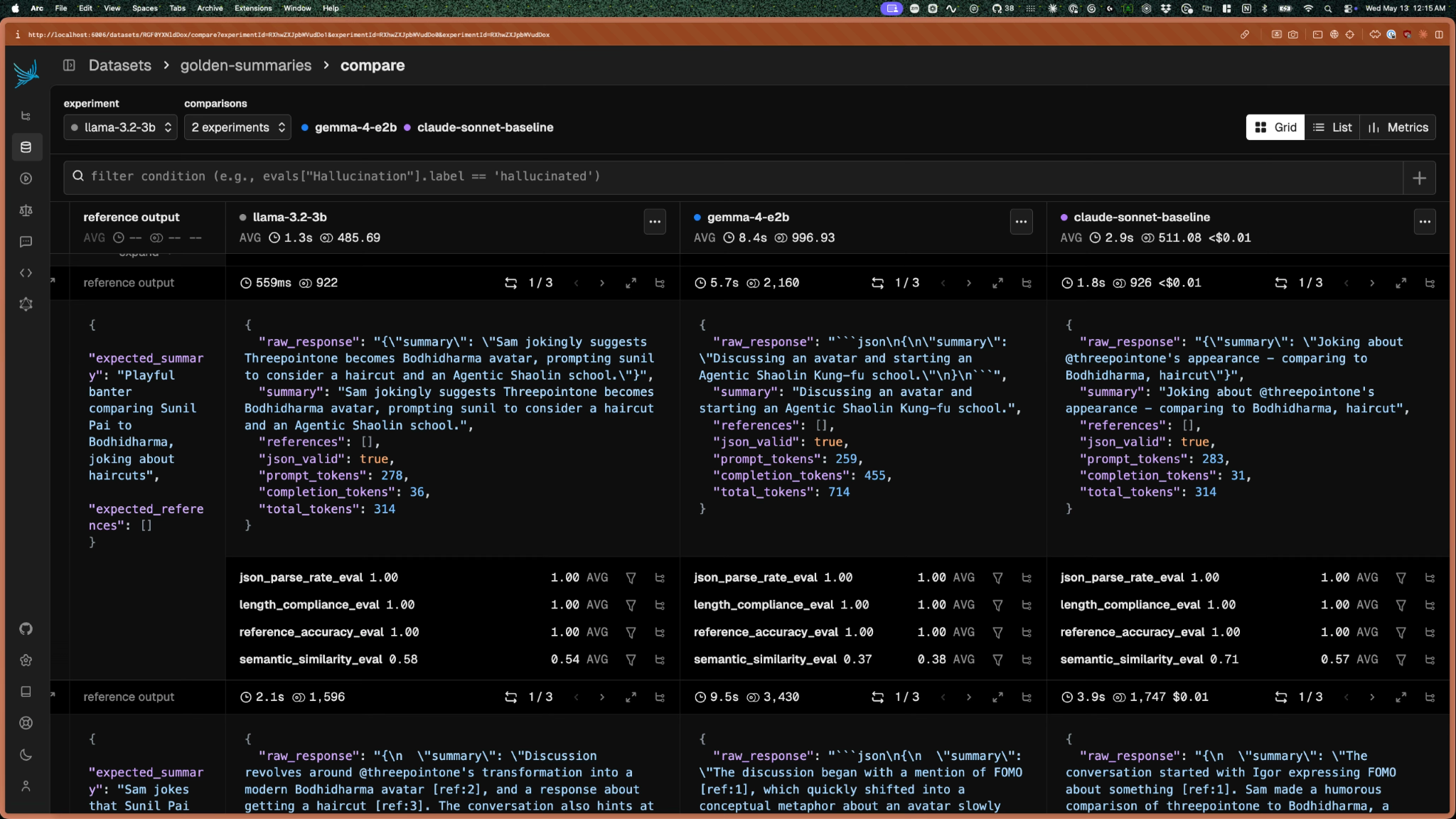
In Phoenix, I set up each model as its own experiment to test its capability. This is called a “capability eval,” and you usually run these at the start of a project or when you’re otherwise determining which prompt or model to use for a feature.
I ran the evals three times for every input and model combination to help iron out any outliers, so each model collected 84 evals (3*28 summaries). Each experiment used the same golden dataset and the same evaluators. The only variable was the model.
Step 4: Choose the SAGE (Small and Good Enough)
One of the challenges with measuring models is that there are rarely clear winners. Often, you end up trading accuracy vs latency.
This chart is called a Pareto scatter. Each dot is a model, plotted on two axes: accuracy and latency. The Pareto frontier is the curve traced by models that are both faster and more accurate than any other model. Anything below the frontier is irrelevant because there’s a better option available. Anything on the frontier represents a real tradeoff. There’s no “best” model on the frontier without first specifying what you’re willing to trade, which is exactly what setting success criteria in Step 2 forces you to do.
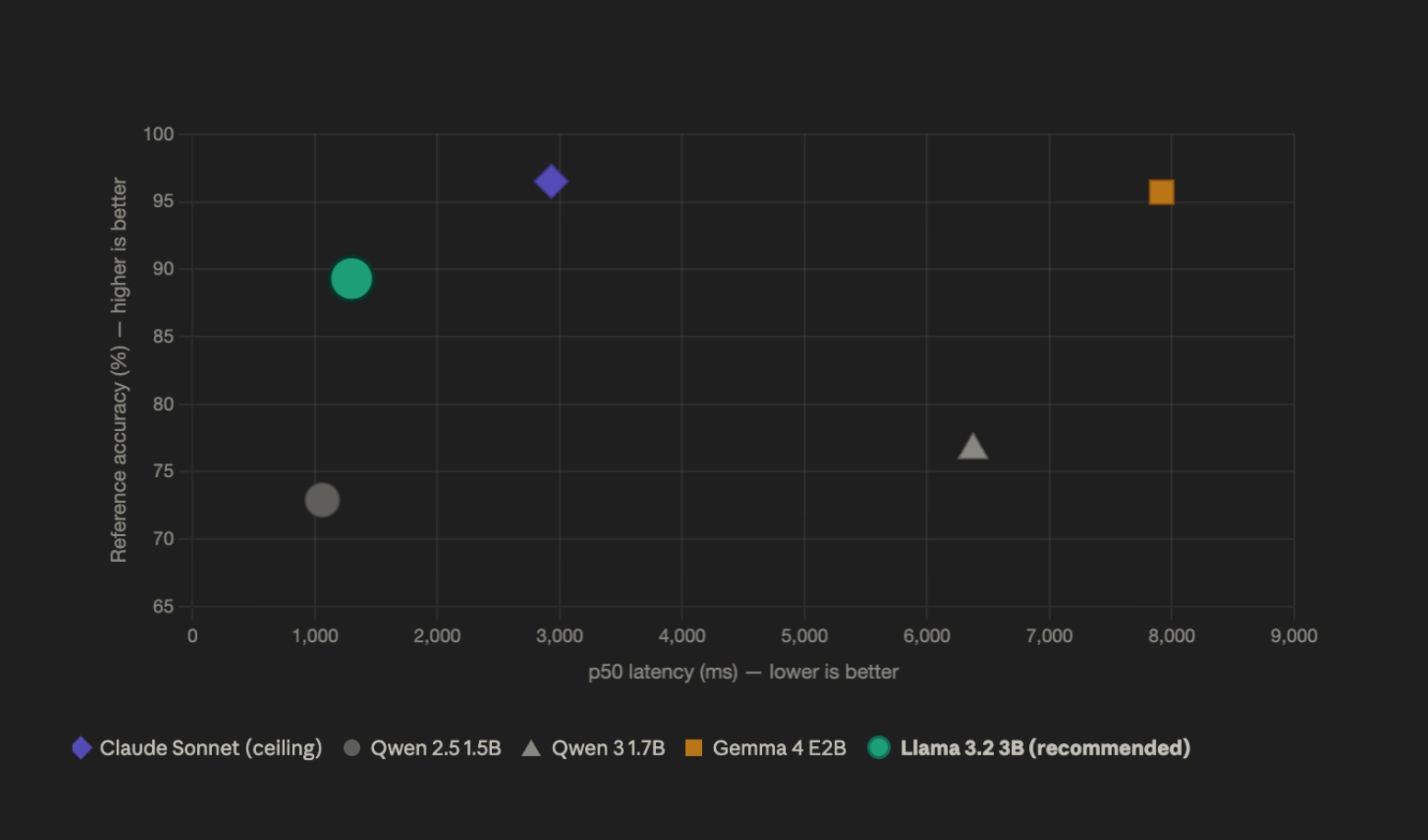
Looking at this chart, only Sonnet, Llama 3.2, and Gemma 4 are worth comparing. The two Qwens were soundly surpassed.
Even though Qwen 2.5 was the fastest at p50 (the median or 50th percentile), it hallucinated references to nonexistent messages 27% of the time, vs. Llama’s 11%. Speed was important, but a fast feature that doesn’t work correctly is just a fast bug.
One way to mitigate this would be to run the inference several times and pick the accurate output, but that would eliminate the speed advantage, as comparison adds latency to the equation.
Gemma 4 was the quality outlier (95% reference accuracy), but it was disqualified due to latency at 7+ seconds. It was worse than Sonnet by multiple seconds, which users are more than sensitive to.
That left Llama 3.2b as the best “good enough” alternative to Claude Sonnet 4.6. Without evals, comparing these models would have been impossible. I would likely have chosen Gemma 4 because of its popularity and reputation. The lesson learned: Don’t trust. Evaluate.
Close the gap between SLMs and LLMs with prompt engineering
Llama 3.2 was almost my SAGE model, but that 11% hallucination rate had to be snuffed out. This is where prompt engineering comes in.
Remember when everyone thought we were going to be prompt engineers? Well, prompt engineering, like evals, is one of a set of skills you need to wrangle models.
If fine-tuning really is dead, as per Anthropic’s Emmanuel Ameisen, prompt engineering has taken its place. Fine-tuning changes what the model knows by updating the model’s weights through retraining, creating a more specialized model. Prompt engineering changes what the model does with what it knows by changing only the inputs (data, prompts) you give the model.
The techniques that work also depend on the model class. Reasoning models like GPT-o1 and Claude with extended thinking now handle the chain-of-thought work internally, which has retired a lot of the in-context-learning tricks people used in 2022-2024. But on a 3B local model, those tricks still have impact. The model needs help structuring its output that a reasoning model gives itself.
Revisit “what is good enough”
At this point, you’ve narrowed your competition to two models, and you should have a sense of which metrics are deal breakers and which are nice-to-haves. For me, I learned that smaller models consistently failed to conform to word counts, so I accepted that I’d have to use truncation on the UI side for some outputs.
You should also have an idea of what the bar is for metrics you’re still tracking:
| Metric | Bar | Why it matters |
|---|---|---|
| JSON and Reference structural validity | ≥99% | The outputs must be parseable or it will introduce bugs to the system |
| Factual consistency | ≥95% | anti-hallucination bar; the 5% slack accounts for genuine ambiguity and reasonable inference rather than outright invention |
| p50 latency | ≤1500ms | Feels “instant enough” on M-series Mac |
| p95 latency | ≤3500ms | Comes in under the 4s mark in a worst case scenario. |
One variable per variant
Rather than generating a bunch of different prompts and hoping for the best, come up with some theories about what might drive the outputs in the right direction. I needed to reduce the references to conversations that didn’t exist.
I could do this by reformatting the input or showing the model “how it’s done” with examples. I could tell it what not to do. I could make it think long and hard before giving a response. Then I created four variants plus a control to run as experiments with Phoenix:
| Variant | Lever pulled | What changed |
|---|---|---|
| Baseline | (control) | Minimal instruction. Establishes the floor. |
| Reformatted input | Format | Same instructions, but the thread was reformatted from JSON array to natural-language numbered messages. |
| Few shot | Demonstration | Same instructions, plus three worked input/output examples embedded in the prompt. |
| Explicit rules | Constraint | Same instructions, plus literal prohibitions (“no preamble,” “count words before responding,” “never invent messages”). |
| Chain of Thought | Process | Same instructions, restructured so the model identified key moments before writing the summary. |
This isolation allowed me to measure how each prompt impacted each “definition of good.” Phoenix’s compare view lets you compare the same dataset, same evaluators, with the prompt as the variable.
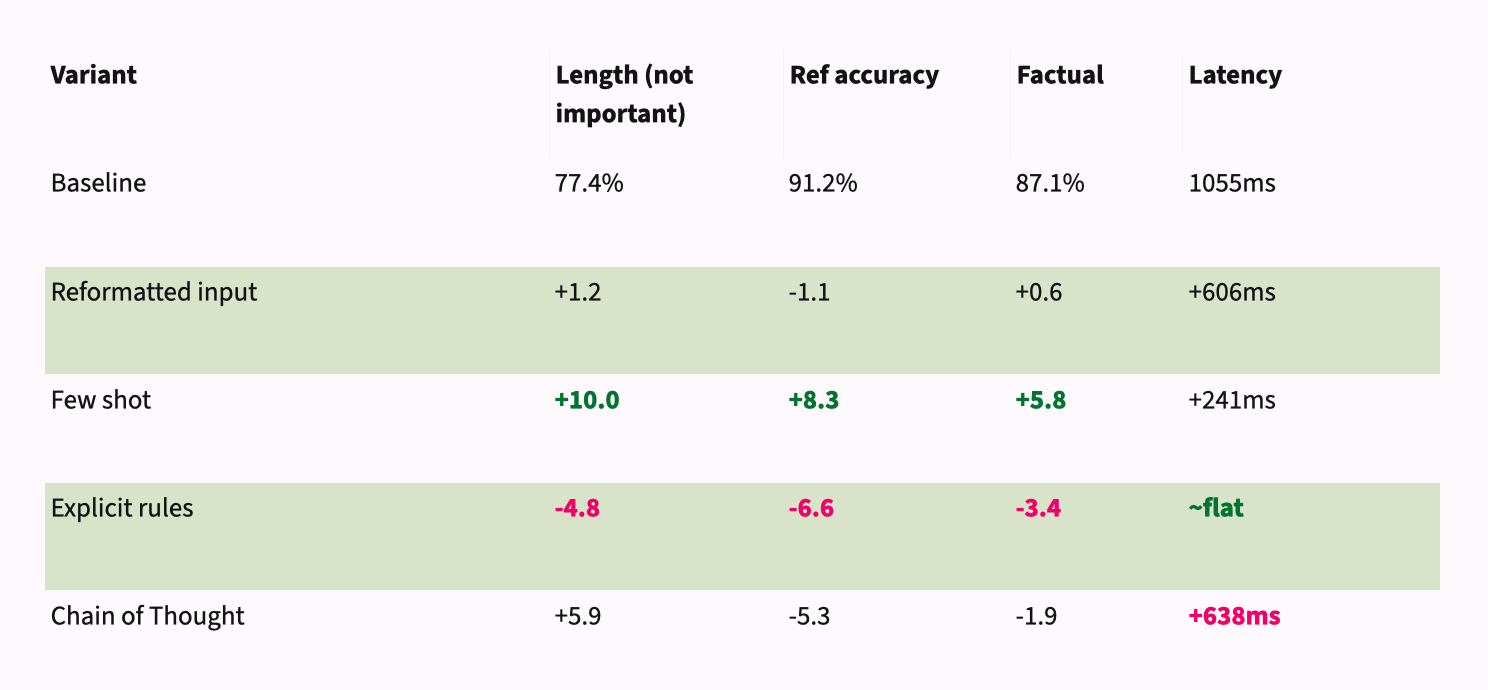 All but one of the prompts were noise or actively harmful. If you were going on pure vibes, you might try to “improve” your prompt by explicitly telling the model what not to do without realizing how much it was degrading the outputs.
Few-shot was the standout, with quality improving across every metric. Llama3.2b might not be good at following instructions, but it’s pretty good at imitating examples.
The new prompt got me closer, but there was still work to do to meet the bar.
Code is cheaper than inference
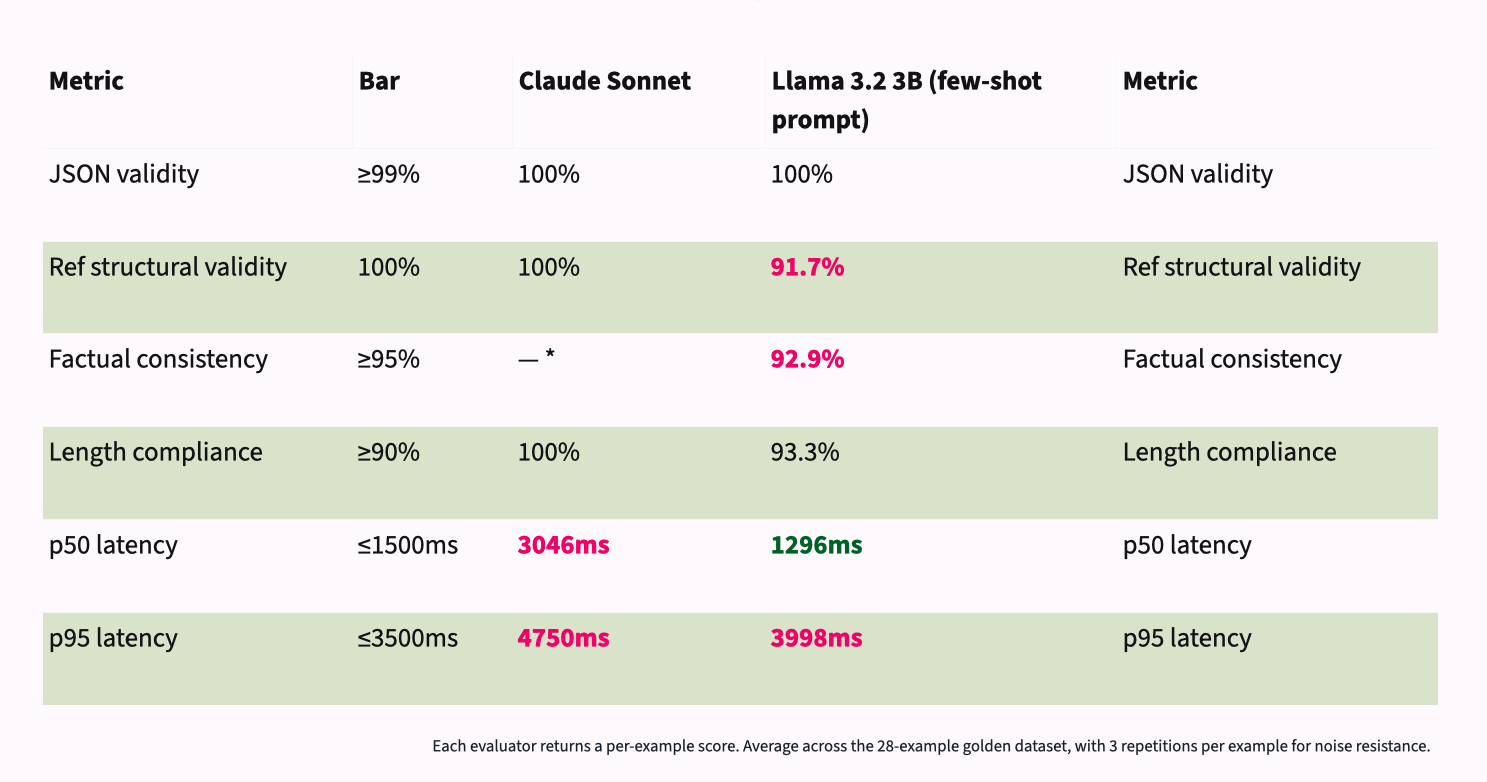
Claude Sonnet was capable of meeting my bar for everything but latency. Llama 3.2B was 16-25% faster, likely because of the time saved roundtripping to a remote server. However, even with the few-shot prompt, it still fell short on structural validity and length compliance.
Since code is cheaper than inference, I looked for deterministic solutions to these problems.
- I used CSS truncation to lop off any stray words at the end of a summary. No one will miss them in the context they’re in.
- The few-shot approach did bloat input tokens, putting the p95 latency over budget, but I was able to claw that back using a KV cache.
- I added a post-hoc validator to strip any [ref:N] outside the valid message range.
It’s important to check a sampling of traces yourself. The 92.9% vs. Claude’s near 100% was dismissed because human review confirmed the gap is an overly strict judge, not actual hallucination. The SLM phrased things differently, but not factually incorrectly.
In this way, I was able to get the model to a place where it performed as well or better than Claude Sonnet across the board, shaving almost 2 seconds off the p50 latency and saving myself a monthly bill:
![Two-column comparison titled "Claude vs the shipped local configuration" — Claude Sonnet (cloud, left) against Llama 3.2 3B with the V3 few-shot prompt plus post-hoc safety nets (local, right). JSON validity: both 100%. Reference structural validity: both 100% — Llama achieves this via a post-hoc validator that strips any [ref:N] tokens outside the valid message range. Factual consistency: Llama 92.9%; Claude has no score because it's the LLM-as-judge and can't fairly score itself. Length compliance: both 100% — Llama achieves this via post-hoc word-count truncation enforcing the length spec deterministically. p50 latency: Claude 3046ms, Llama 1296ms — Llama more than twice as fast. p95 latency: Claude 4750ms, Llama under 3500ms — achieved with KV cache reuse on the few-shot prefix; V3 alone measured 3998ms. The shipped local config matches or beats Claude on every metric, with code closing the gaps the model couldn't.](https://arize.com/wp-content/uploads/2026/05/slm-frontier-model-blog-image-6.png)
The eval tells you where a model is capable. Use engineering to close the gap on what the model can’t do.
Life after capability evals
Now that the system was working, the next steps involved setting up mechanisms to get the model onto the user’s device, building features with progressive enhancement in mind (what happens while the model is MIA?), and setting up regression evals. These are what alert you when a new user input, a prompt edit, or a model change affects the model’s output. You can add them to your CI/CD to catch these shifts before they reach your customers.
Capability evals are often run once, but regression evals live with your testing suites forever. (Let me know if you’d like to hear about that side of the story, too.)
It’s dangerous expensive out there. Take this with you.
Every time you call a SOTA model in your stack, you should ask: does this really need a frontier model, or is it a vestige of Prototyping Big? Have you been using LLMs as placeholders for smaller models in your codebase? Can you tighten and streamline your inference?
I challenge you to audit one feature in your app this week. Could it run on a local instead of a more expensive frontier model?
Set up Arize Phoenix, then run some of your own prompts and models against lighter ones using llama.cpp. The results might surprise you.