Where to find Alyx
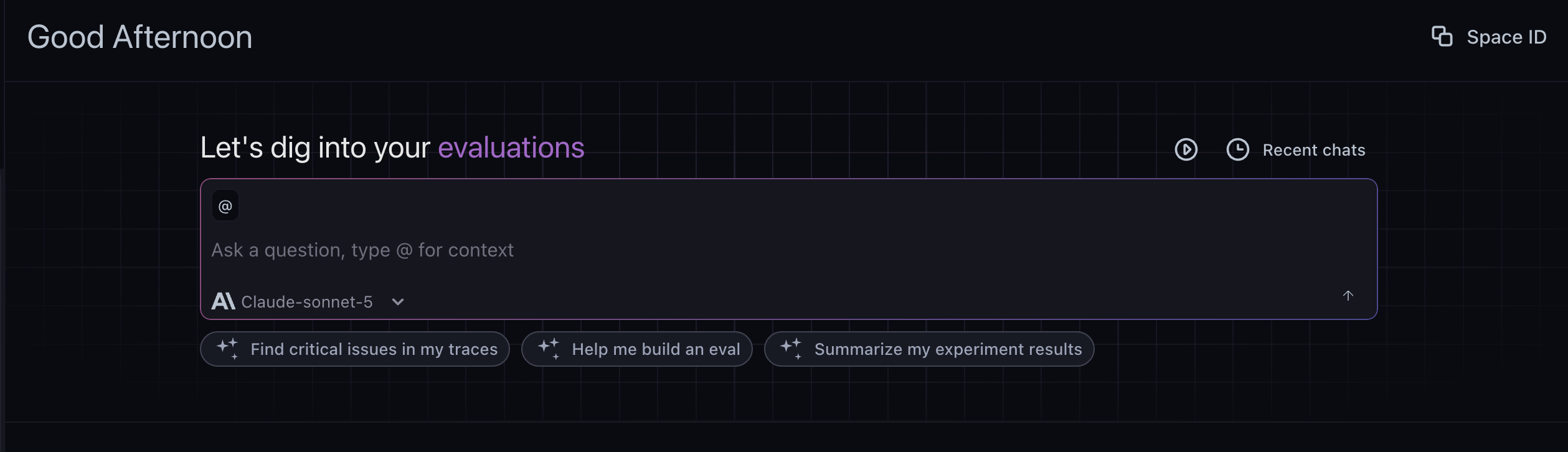
Alyx is a built-in AI agent that works wherever you are in the platform. Your conversation carries over between pages and tasks, so you can go from a trace to the playground to an experiment without losing context. Behind the scenes, Alyx loads the right skills, instructions, and tools on demand for the surface you’re on, which keeps responses fast and focused as its capabilities grow. Alyx appears in two forms that share the same conversation:- Home view: the full-page experience on the Arize AX home page. Use it to start or resume a conversation, browse suggested workflows, and pick up a previous thread from your history. It is the place to begin broad or return to earlier work.
- Side chat: a panel you open over any page with the keyboard shortcut. It inherits the context of whatever you are viewing, such as a project, trace, dataset, or experiment, so you can ask about the data in front of you and let Alyx act on it without leaving the page. Dock it to the right as a resizable sidebar or detach it as a floating window. When you open it from a trace, it scopes to that trace and its spans.
Getting started
Open Alyx
Use the keyboard shortcut to open or close the side chat from anywhere in the app.- macOS: Cmd+L
- Windows / Linux: Ctrl+L

Add context to Alyx
Alyx works best when it knows exactly what you’re looking at. There are three ways to give it context:- Highlight: Select any text on the page, such as a span attribute, an error message, or a prompt snippet, then press Cmd+L on macOS or Ctrl+L on Windows and Linux. Alyx opens and adds the selected text to your message. If nothing is selected, the shortcut opens or closes Alyx.
- Mention: Type
@in the Alyx input to open a menu. Mention a dataset, experiment, project, or span, and Alyx receives the IDs so it can scope the conversation to that data. - Type it: Include context directly in your message. Reference a trace, dataset, or experiment by ID, or start with “Additional context:” and add what Alyx needs to know.
Settings
Open Settings from the menu in the top-right corner of the Alyx chat to configure your keyboard shortcut, Auto Accept, and documentation preferences. Additional settings will be added over time. Keyboard shortcut: Change the shortcut used to open and close Alyx, as described in Open Alyx. Auto Accept: By default, Alyx proposes changes as cards that you review and accept before anything is applied. Turn on Auto Accept for a category to let Alyx apply those changes without a confirmation step. Each category is controlled independently:- Eval and task updates: Apply evaluator and task configuration changes automatically.
- Annotations: Apply annotation configs and span annotations automatically.
- Dataset creation and appends: Create datasets and append rows automatically.
- Prompt changes: Apply prompt edits in the playground automatically.
Chat experience
Edit and resend a message
Hover over a message you have sent and select Edit & resend, or click the message to edit it in place. Change the text and adjust the attached context, then press Enter to send or Escape to cancel. If that message previously produced results, such as a dataset, evaluation, or experiment, Alyx asks you to confirm before resending, because resending rewrites the conversation from that point on. Everything after the edited message is replaced, the turns above it stay in place, and the original turn is archived.Queue a message
If Alyx is still responding, you can line up your next message instead of waiting. Type it and send, and it appears as Queued beneath the conversation. Alyx sends it automatically once the current response finishes. Send it right away with Send Now, or remove it from the queue.Alyx across your workflow
- Observe
- Evaluate
- Improve
A single trace tells you something failed. It doesn’t tell you why or how widespread it is. Alyx is grounded in live trace and span context including inputs, outputs, tool calls, errors, and your selected time range, so you can go from noticing a problem to understanding its scope in one conversation.

Skills
Use your own integrations with Alyx
You can run Alyx on your own LLM providers. Configure them in Settings, then Account Settings, then Integrations, and select a configured model from the model selector in the Alyx chat. For setup details see AI provider integrations. Alyx supports the following providers:- OpenAI
- Anthropic
- Gemini
- Azure OpenAI
- Vertex AI
- AWS Bedrock
- NVIDIA NIM
- Custom endpoints, for any OpenAI-compatible model endpoint
Data privacy
Alyx is built on Arize-hosted models (Azure OpenAI and Claude) for their security and compliance features, keeping your data protected and away from third-party providers. Data processing: Azure OpenAI and Anthropic act as data processors for prompts and outputs sent to and generated by Alyx, depending on which Arize-hosted model is used. The models are stateless, meaning no prompts or outputs are stored. No data sharing or model improvement: Your inputs and outputs are not used to improve OpenAI models, any Microsoft or third-party products, Azure OpenAI models, or Anthropic models. Microsoft and Azure OpenAI: The Azure OpenAI Service is fully controlled by Microsoft and hosted in Microsoft’s Azure environment. It does not interact with any other OpenAI-operated services such as ChatGPT or the OpenAI API. Anthropic and Claude: When Alyx uses Claude, Anthropic processes requests on Anthropic infrastructure under Anthropic’s security and data commitments for enterprise API use, separate from unrelated consumer products. Security and compliance: Azure OpenAI and Anthropic help Arize meet industry-standard security and compliance measures throughout the process.
For more detail see Azure OpenAI Service data, privacy, and security in Microsoft’s documentation, Anthropic’s trust and privacy documentation, or contact support@arize.com.