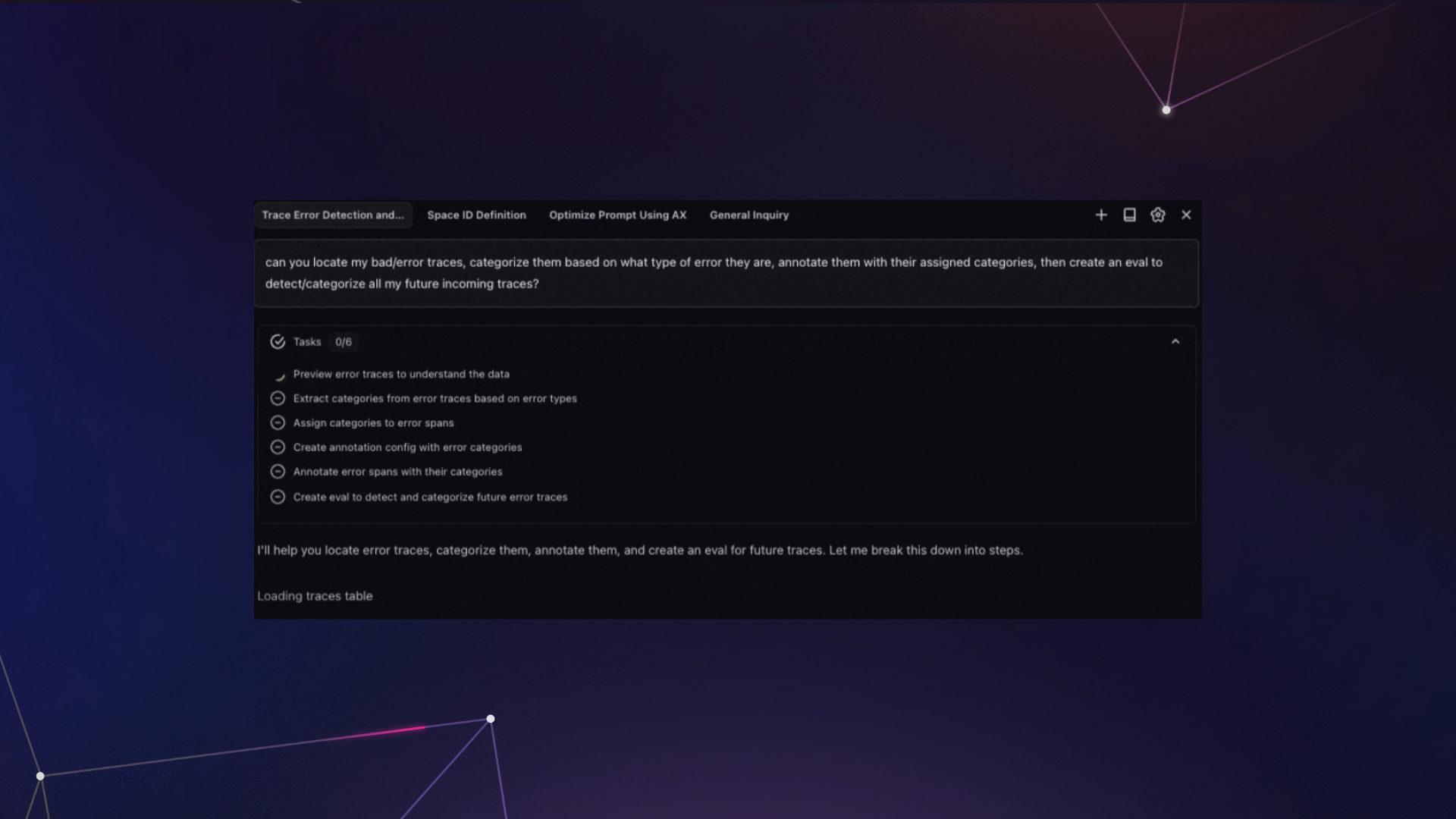
2025 was supposed to be the year of agents. And for the most part, it wasn’t. The industry was full of hype, demos looked incredible, but when you actually tried to get an agent to do something meaningful, it would fall apart.
As we started digging into the few systems that did handle complex workflows (like Claude Code and Cursor in late 2025), one pattern kept showing up: planning.
This post walks through how we built planning into Alyx 2.0. We cover the iterations that failed, the architectural decisions that made the difference, and the specific patterns you can apply to your own agents.
To try Alyx, check out our docs or book a meeting for a custom demo
TL;DR — the four things that made planning work:
- Planning as a structured tool call, not a prompt instruction
- A dedicated
PlanMessageinjected at a fixed position in every iteration - Four task statuses (not two) —
pending,in_progress,completed,blocked - A hard enforcement gate that prevents the agent from finishing with incomplete tasks
The problem we kept running into
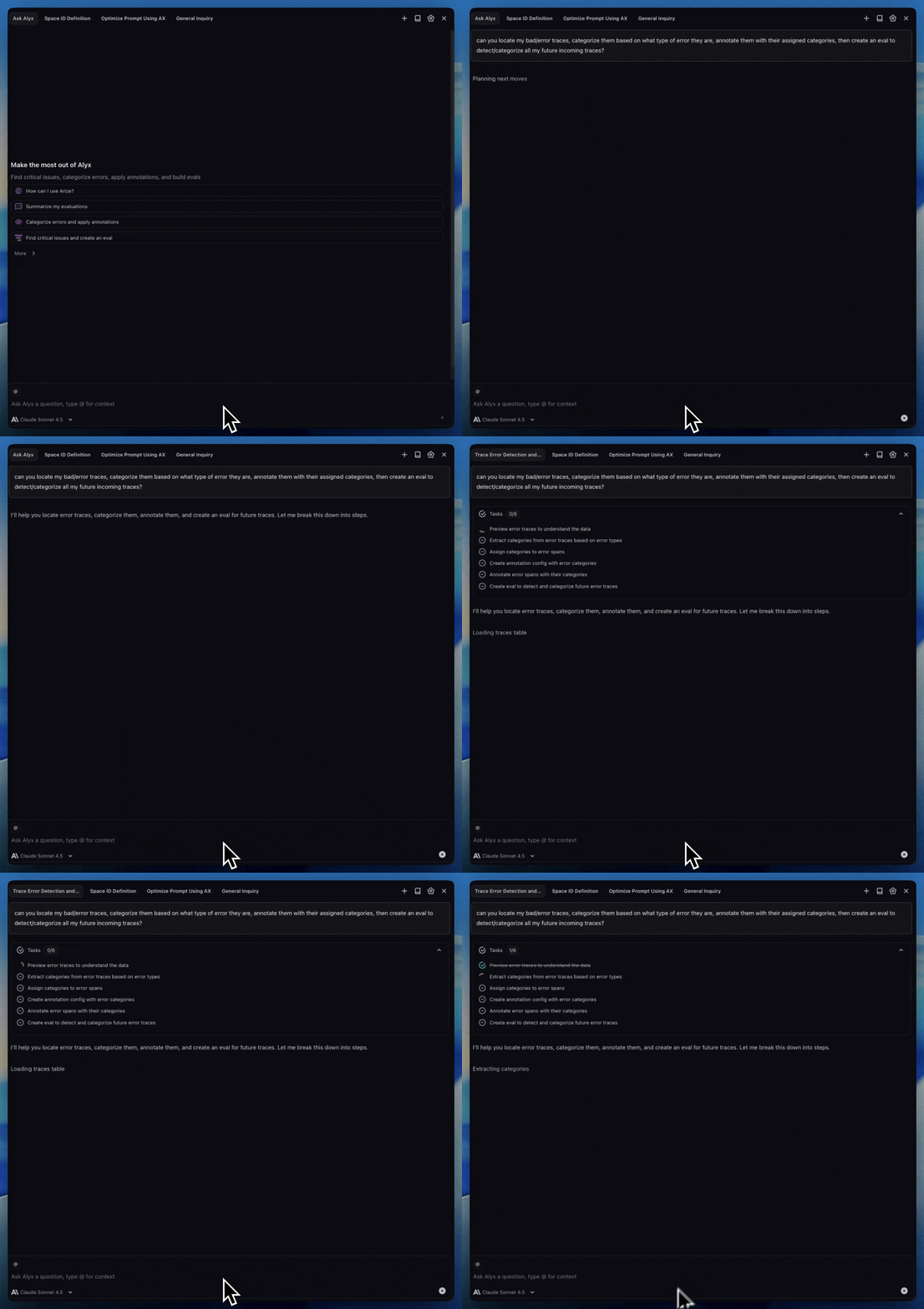
Before we added planning to Alyx, we hit the same wall over and over again. A user would ask something like “sort the LLM spans by latency, identify bottlenecks, and suggest improvements for my agent” and Alyx would return a beautifully sorted table… and then call finish. Two thirds of the request just evaporated.
This wasn’t a capability issue. Alyx had the tools. It had access to the data. The problem was attention and working memory. As the context window filled up with tool call results and API responses and pages of JSON, the original request got buried. By the time the model was deciding what to do next, it had effectively forgotten what “next” was supposed to be.
We tried to fix this with hardcoded tool sequences. Do this first, then this, then this. It technically worked, but it had zero flexibility. If the user wanted to go off script at all, the whole thing broke down. We were building an on-rails experience when what we needed was an actual agent.
We also tried prompt engineering – “always plan before executing,” few-shot examples of good planning behavior, chain-of-thought instructions. Academic work like Plan and Solve and Reflexion showed real gains on benchmarks, but when we tried applying those ideas in production with real tool calls generating real data flooding the context window, prompting alone wasn’t enough. The problem is that prompt-based planning produces free-form text the system can’t inspect, persist, or enforce.
How Claude Code and Cursor changed our thinking
When we started studying how Claude Code and Cursor were architecting their agents, we noticed both agents have a planning stage – where the agent pre-emptively builds itself a plan for larger requests. This allows the agent to continuously monitor its progress and hit intended goals. Claude Code, for example, uses over 40 prompts that are dynamically strung together, with dedicated tools for planning and the ability to spin up sub-agents. Cursor takes a similar approach with a lot of sophistication around when and how to plan.
That was the unlock for us. We realized planning could let Alyx handle the kind of complex, multi-step workflows that had been completely out of reach.
How to build it: structured planning tools
We expose three tools to the LLM for planning: todo_write, todo_update, and todo_read. Simple names, simple concepts. todo_write creates the plan. todo_update changes the status of individual tasks. todo_read lets the agent review where things stand.
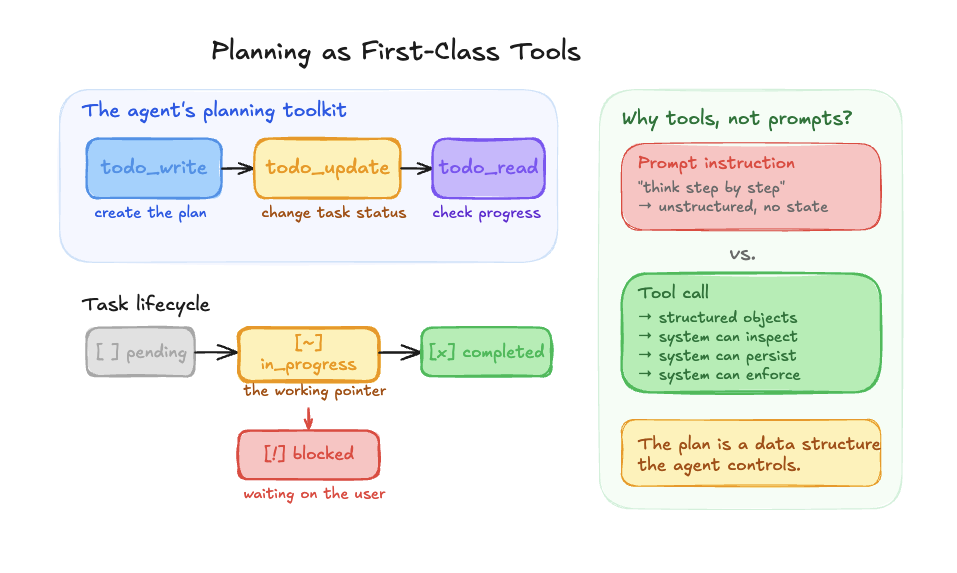
Each task carries one of four statuses: pending, in_progress, completed, or blocked. That might sound like an implementation detail, but the jump from two statuses to four was one of the most impactful changes we made. In our original version we only had pending and completed, which meant the agent had no way to say “I’m currently working on this.” Adding in_progress gave it a working pointer, a concrete anchor for “what am I doing right now?” And blocked came later when we needed to handle human-in-the-loop scenarios where the agent needs user input before it can move forward.
One important design decision: planning is a first-class tool call, not a prompt instruction. We’re not telling the model to “think step by step.” We’re giving it structured tools that produce structured objects the system can inspect, persist, and enforce. That distinction matters a lot.
Keeping the plan visible on every iteration
Giving Alyx tools to write, read, and update plans was a big step forward. But early on, even with structured planning tools, Alyx would still drift off-plan after a handful of tool calls.
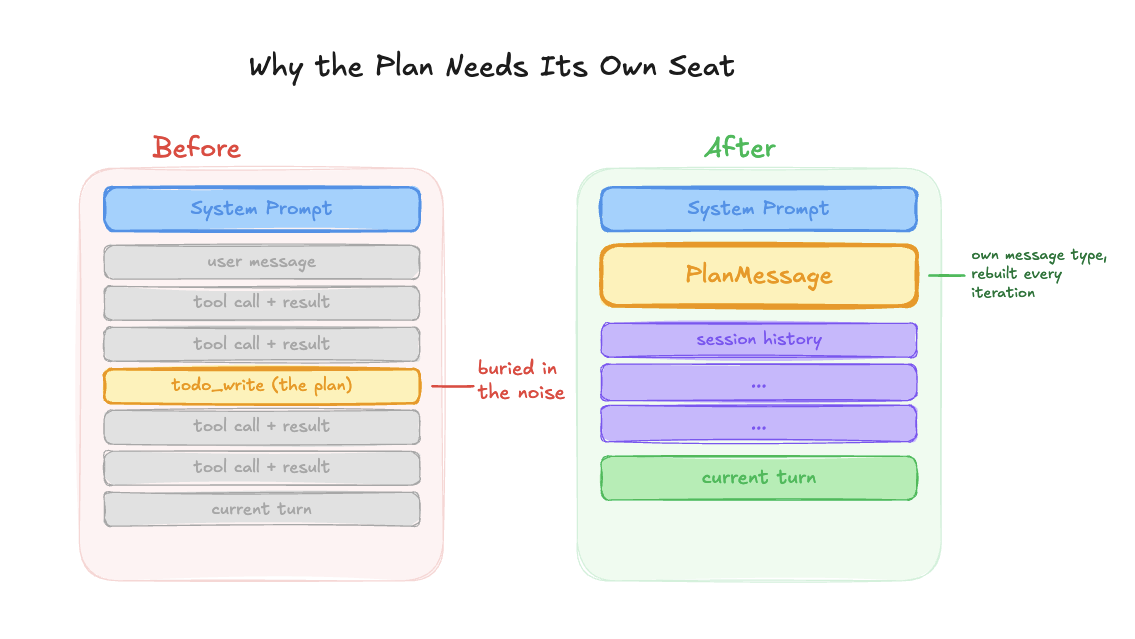
The issue was subtle. Because Alyx calls todo_write and we store all tool calls, the plan was already in the session history. As more tool results piled into the conversation, the plan got pushed further and further from the model’s attention. It was technically there, but buried under JSON and API responses.
We made three changes:
- We extracted the plan into its own dedicated message type, separate from the session history entirely.
- We wrapped it with instructions explaining what the plan is and that Alyx needs to follow it.
- And we pinned it to a fixed position right after the system prompt, instead of letting it float somewhere in the middle of the conversation.
After that, Alyx started following and updating its plan much more reliably.
The PlanMessage
On every single iteration of the agent loop, the plan is injected into the context window. We call this the PlanMessage, and it sits right after the system prompt, before any conversation history.
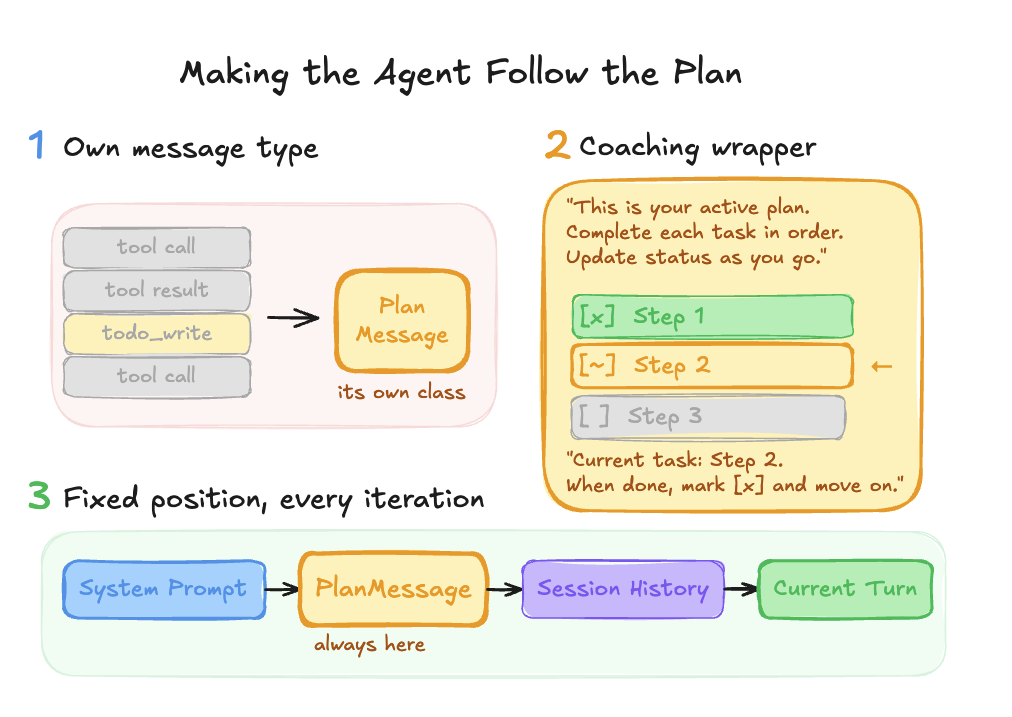
The ordering looks like this: [System prompt] → [Plan] → [Session history] → [Current turn]. This gives Alyx a clear progression of context.
System prompt: here’s what you can do
Plan: here’s what you need to do to accomplish the user’s task
Session history: here’s how you’ve helped the user so far
Current Turn: here’s what you are doing for the user right now
No matter how much tool output has accumulated, the plan is always right there, always current.
And the plan message does more than just display a checklist. It actively coaches the agent. It shows visual status markers, tells the agent exactly which API call to make next, and reminds it which task is in progress and what to do when it finishes. It looks something like this:
[x] Review the trace data and sort LLM spans by latency
[~] Identify bottlenecks and suggest changes  ← CURRENT
[ ] Generate a summary report for the user
Those little markers, the [x] and [~] and [ ], give the LLM an instant visual read on progress. The contextual reminders create natural forward momentum through the plan.
You can’t finish until you’re actually finished
The other critical piece is enforcement. We have a hard gate on the finish tool: if the agent tries to finish with pending or in-progress tasks, it gets bounced back with an error that lists exactly which tasks are incomplete.
This came from a very specific frustration. We kept finding that when Alyx had a three-step plan, it would execute all three steps but forget to mark off the last one before calling finish. The user still got what they asked for, but the experience felt incomplete because there was this hanging task that looked like it was never done.
We enforced this through code. The agent has to either complete every task before it can end the loop. If Alyx wants to end the loop before every task is completed, we inform Alyx that it still has incomplete tasks and should look back at its plan. The one exception is that Alyx can mark tasks as “blocked” if it cannot continue. For example, this might happen if the task requires user input or some missing information. This ensures Alyx reviews every task and explicitly decides whether to complete it or mark it as blocked.
Using tool-level validation to enforce behavioral contracts, rather than relying on prompts alone, is one of the most powerful patterns in our system. The LLM might want to finish early, but the architecture prevents it.
Knowing when to plan (and when not to)
One thing we learned is that you don’t want planning on every interaction. If a user just asks “find me these spans,” you don’t need a todo list for that. It feels overengineered. Answer the question, check off the one-item todo, announce that you checked it off. Nobody wants that.
So we use a heuristic: when the user’s prompt includes two or more action steps or verbs, that automatically triggers the planning step. Simple queries get handled directly. This keeps the experience feeling fast and natural for straightforward requests while still bringing the full planning machinery to bear on complex ones.
Human in the loop
Things get interesting when the agent needs to pause and ask for user input mid-plan. This happens a lot in our playground, where Alyx might need permission before changing a prompt or running a specific action.
We went back and forth on implementation here. We had the todos in the database, so it would have been easy to just hardcode a flag and restore from whatever task number the agent left off at. But we ultimately went with a prompt-based approach instead.
Why? Because rigid plan restoration breaks the natural flow of a conversation. We took a lot of inspiration from how Cursor handles this. When Cursor asks permission to run a bash command and you look at it and realize the whole approach is going in the wrong direction, you just type something else. You don’t have to formally reset the plan or explicitly cancel the previous todos. You just redirect.
We wanted that same flexibility for Alyx. If a user says “actually, do something else,” Alyx should be smart enough to realize those incomplete todos are no longer relevant. The user is taking a different path. That flexibility makes the interaction feel natural instead of robotic.
What planning unlocked
The results have been significant. Before planning, Alyx would complete only the first step of multi-step requests, get confused after five or more tool calls, and sometimes burn through 20+ iterations calling todo tools in circles without actually making progress.
After planning, those same complex requests complete successfully within our iteration budget.
But the most exciting part has been the emergent capabilities. We set out to build prompt optimization. We knew Alyx needed to interact with the playground, run experiments, and build datasets. What we didn’t expect was that Alyx could chain prompts together on its own. It could build a prompt from a dataset, run it, get the output, and feed that into a second prompt. This was a product feature we were planning to build manually. Instead, Alyx just… did it, because it could plan.
Planning is what turned Alyx from a tool executor into a workflow orchestrator. And that opened up an entire class of capabilities that simply weren’t possible before.
The pattern, summarized
If you’re building agents and struggling with multi-step task completion, here’s the playbook:
- Give the agent structured tools for planning:
todo_write,todo_update,todo_read. Not prompt instructions. Tool calls that produce structured objects the system can enforce. - Use four statuses:
pending,in_progress,completed,blocked. Thein_progressstatus is the one most people miss and it matters the most. - Inject the plan at a fixed position on every iteration: right after the system prompt, before session history. Rebuild it from in-memory state every time so it’s always current.
- Put a hard gate on finish: if there are incomplete tasks, bounce the agent back. Make completion a structural requirement, not a behavioral suggestion.
That’s what makes the difference between an agent that handles one-shot questions and one that can orchestrate genuinely complex workflows.
This is part one of a deep dive series on how we built Alyx. We’re dropping three more deep dives over the coming weeks:
How we keep the context window useful as tool outputs pile up. Compression strategies, what to prune, what to keep, and how to avoid the “lost in the middle” problem that kills agent performance after 10+ iterations.
Testing and eval for agents
How do you write tests for a system that’s non-deterministic by design? Our framework for evaluating planning quality, task completion, and tool selection accuracy across hundreds of runs.
Using Alyx to debug Alyx
The meta one. How we use Arize AX to trace Alyx’s planning behavior, catch regressions, and close the loop between what the agent does and what it should have done.
If you want to follow along, subscribe to our blog in the sidebar to the right or come find us on our community slack. If you’re building agents and running into the same problems we did, we’d love to hear what’s working and what isn’t.

