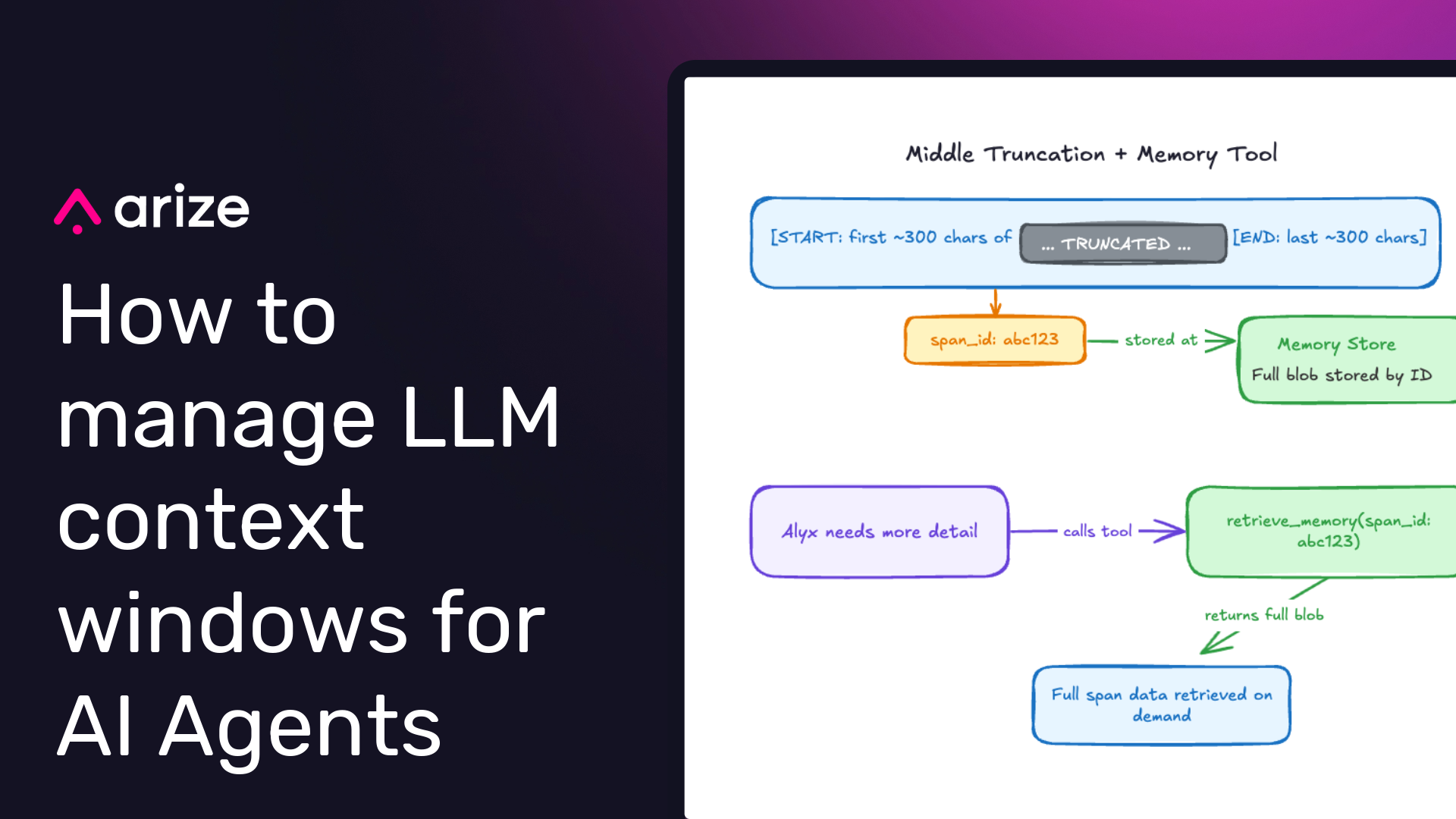
This is part two of our deep dive series on how we built Alyx 2.0, our AI engineering agent. Watch us discuss it above, or keep reading for the full breakdown. Part one covered how we built planning into Alyx: the structured tools, the PlanMessage, and the enforcement gates that turned it from a task executor into a workflow orchestrator. If you haven’t read that one, it’s worth starting there.
This post is about what happens after the plan starts executing.
Once Alyx is running—pulling traces, reading spans, calling tools across multiple turns—it generates a massive amount of data. And all of that data has to fit somewhere. The context window is finite. How you manage what goes in, what gets trimmed, and what gets forgotten entirely determines whether your agent actually works.
Alyx is live — sign up to try it, check out our docs or book a meeting for a custom demo.
TL;DR
The four strategies that helped:
- Middle truncation with IDs, not head/tail cuts
- Emulated file system in memory that Alyx can reference
- Deduplication and message hygiene to stop obvious waste
- Sub-agents to isolate high-volume data tasks entirely
One thing we tried that didn’t work: using an LLM to summarize and compress message history. We’ll get to that too.
The problem starts early
The irony of Alyx’s context problem is that it eats its own cooking. Alyx runs on Arize trace and span data. That data is often enormous: long text blobs, deeply nested JSON, repeated information across adjacent rows. And Alyx doesn’t just read that data once. It analyzes it, writes spans back, references them in subsequent calls. Context pressure builds fast.
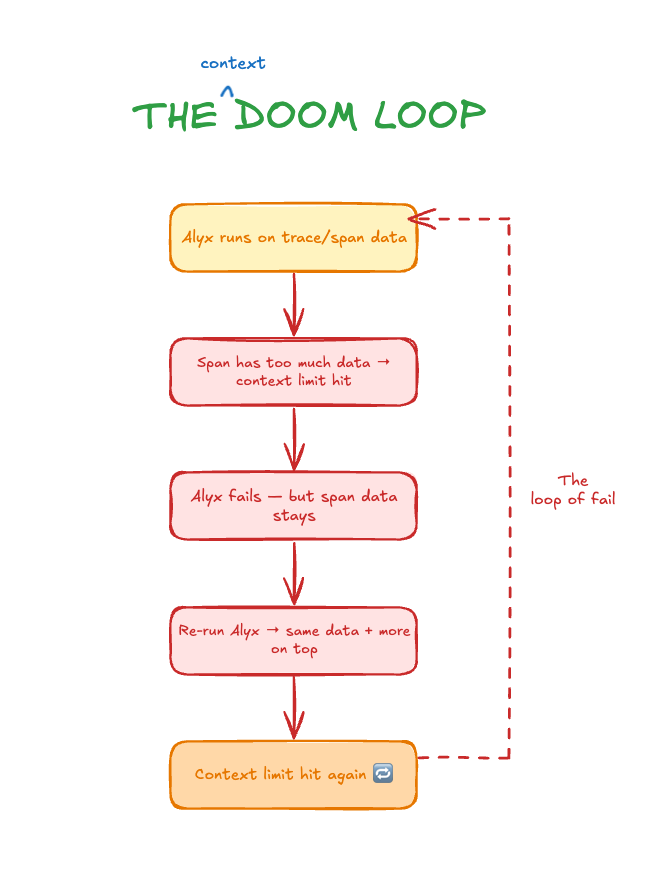
What made it especially painful was the failure mode. We’d construct a context that blew past the provider’s limit. Alyx would error out. But the span that caused the problem? Still in the session. So when we ran Alyx again on the same data, we got the same oversized context, plus whatever we added on top. We weren’t making progress. We were just re-entering the loop.
The naive fix, and why it broke things
The first thing we tried was brute-force truncation. Cap every input at 100,000 characters. Cap individual rows at 100 characters. Simple. Cheap. Fast.
It worked, kind of, until it didn’t. The problem with naive truncation is that it trades one failure for another. When you cut too aggressively, the agent loses continuity. You’d ask Alyx something, then ask a follow-up, and it would respond as if the first question never happened. Because effectively, we had deleted that information from the message history. The conversation was still open, but the context was gone.
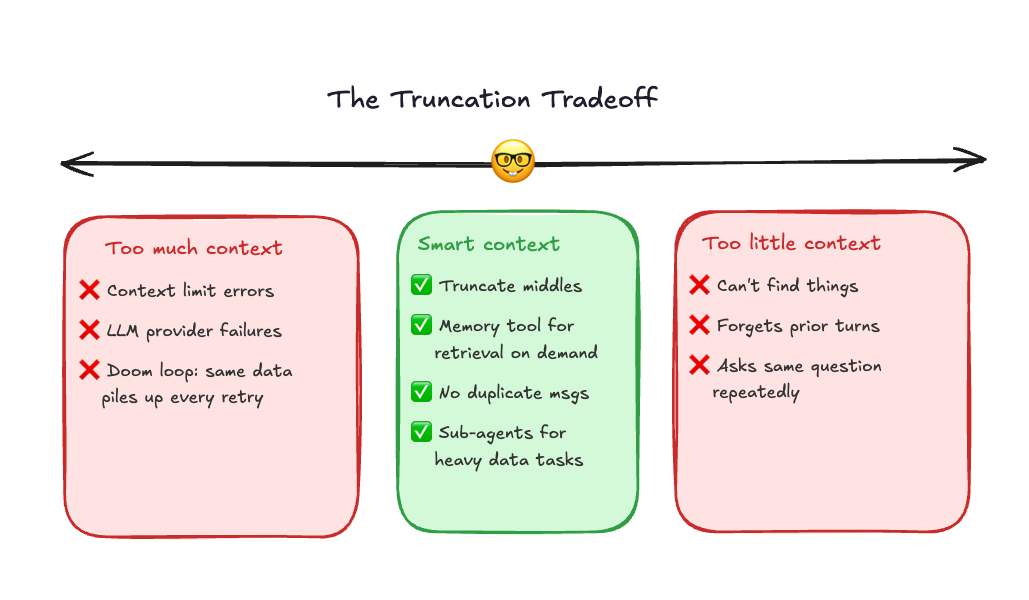
That experience gave us a useful calibration point. We knew what “too much” looked like. Now we knew what “too little” looked like. The answer had to be somewhere in between, but specifically, it had to be intelligent about what got dropped.
What helped: a few obvious things first
Before getting to the more architectural solutions, a few simple changes had real impact.
Don’t send duplicate messages
If a tool is called twice with the same inputs, only keep the last result. No reason to carry two copies of the same output through every subsequent turn.
Don’t resend the system prompt on every iteration
The system prompt only needs to be sent once per session. After that, it’s already in context. Re-injecting it on every agent loop iteration wastes tokens without adding anything.
Prune tool results after they’ve been used
Once a tool result has been incorporated into the plan, the raw response doesn’t need to stay in message history. The information is already reflected in what the agent did next.
Middle truncation and the memory tool
The real architectural shift was how we handled large text blobs inside spans. Taking the first 100 characters is better than nothing, but it’s not actually useful. You get the opening of a log trace with zero context about what’s in the rest. Taking the last 100 characters is equally useless for different reasons.
What we landed on: truncate the middle, not the edges. Keep a meaningful chunk from the start and a meaningful chunk from the end. That gives Alyx enough signal to understand what kind of data this is, where it begins, and where it resolves, without blowing up the context.
But here’s the catch: sometimes the important information really is in the middle. You can’t just throw it away. So we didn’t. We assigned every truncated blob an ID and stored the full version in a memory store. Then we gave Alyx a retrieval tool. If it genuinely needed more from a particular span, it could ask for it.
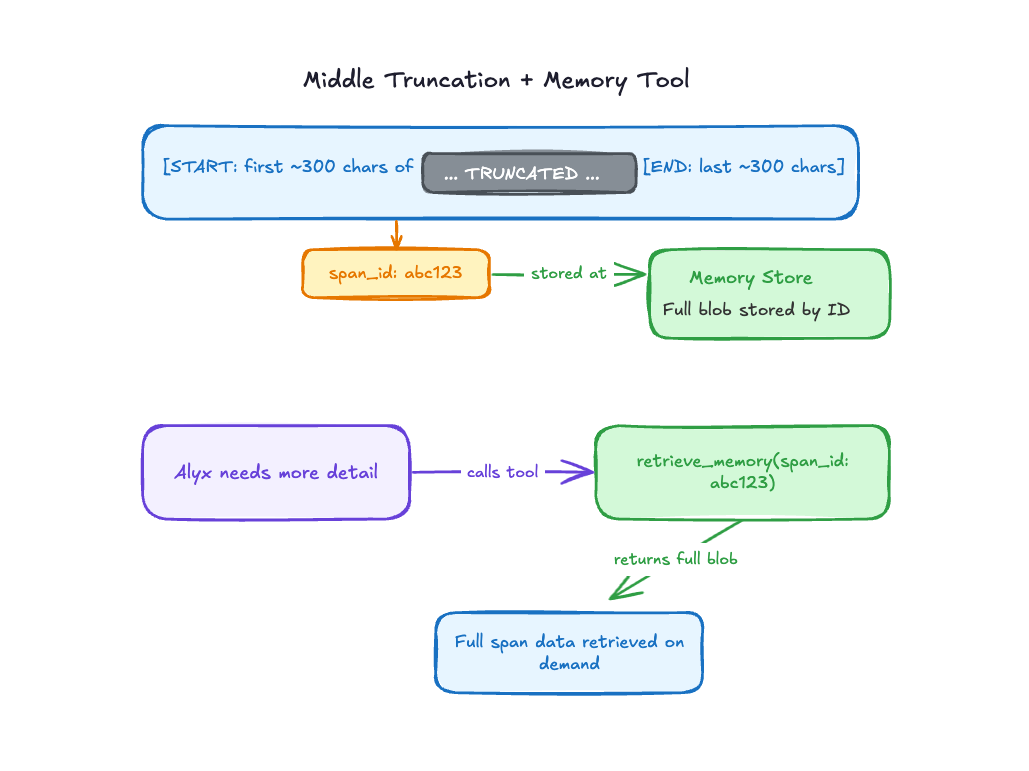
In practice, Alyx doesn’t call the memory tool constantly. Most of the time, the start and end of a blob are enough to answer the question. But when it’s not—when a user asks something that requires deeper detail—the tool is there. The data isn’t lost. It’s just not in the way.
The file-system memory decision
One of the most important architectural decisions we made was to stop treating large data blobs as something that needed to live inside the context window.
The mental model that unlocked this came from tools like Cursor and Claude Code.
When you ask Cursor to read 10 files and find a bug, it doesn’t dump everything into context. It reads previews, runs grep, jumps to specific lines. The files live on disk. The agent just holds references and pulls what it needs.
That’s the pattern we needed for data.
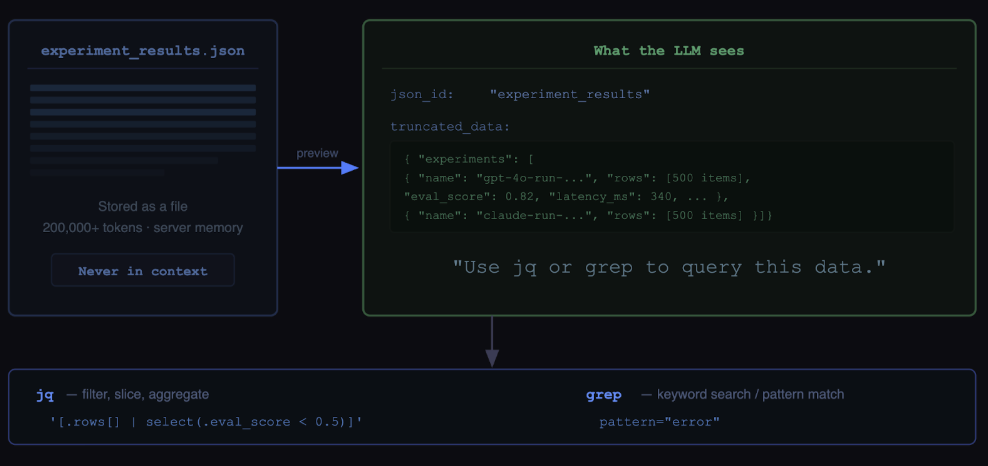
We built an abstraction called LargeJSON. When a tool returns huge traces or spans that can be hundreds of thousands of tokens, Alyx doesn’t put them in context. It stores the full data server-side and gives the model two things: a preview and a json_id, a stable handle.
The preview is important. It’s not just truncation, it’s a small, structured glimpse of the data so the model can understand what it’s looking at and decide what to query next. It gives enough signal to reason, without overwhelming the context.
From there, the agent can carry the json_id across the session and fetch targeted slices as needed.
The querying layer is simple and composable:
jqfor structured JSON querying and transformationgrepfor fast regex search across the data
This shifts the model from “hold everything” to “know how to retrieve.” Less context pressure, and more precise reasoning because Alyx only pulls in what it actually needs.
Managing long-running conversations
The truncation and memory strategy handles the data volume problem. But Alyx also has to manage something harder: long conversations.
If you use Cursor, you know what this looks like. You start in one direction, shift to something else, come back to an earlier thread three messages later. You never restart the tab. You just keep going. We want Alyx to support that same experience, which means we can’t aggressively truncate old turns without risking the agent forgetting context the user fully expects it to remember.
This is where evals became critical. The tricky thing about context management bugs is that they’re hard to reproduce. Something works fine on a fresh conversation. It breaks on turn 11. You’d never catch that in a live demo. “It works on my machine” is a real problem here.
We extended our eval framework to support long-running session simulation. You can preload a conversation with 10 turns, then run the eval on turn 11. That let us actually test what the context management was doing under realistic conversation pressure and catch regressions before they reached users.
Sub-agents: the cleanest solution we’ve found
The most powerful context management technique we’ve landed on is also the most architectural: move heavy data out of the main conversation entirely.
The search sub-agent is the clearest example. A search task might involve reading through a dozen web pages, running multiple keyword queries, scraping content, and evaluating relevance. That’s a huge amount of data, and almost none of it needs to live in the main conversation thread. It doesn’t help Alyx answer the user’s actual question. It was just passing through.
With sub-agents, we can offload all of that to a separate context. The search sub-agent does its thing, consumes as much data as it needs, and returns a summary back to the main conversation. Two findings, not 40 pages of scraped text. When the sub-agent is done, its context is gone. It doesn’t accumulate in the main thread at all.
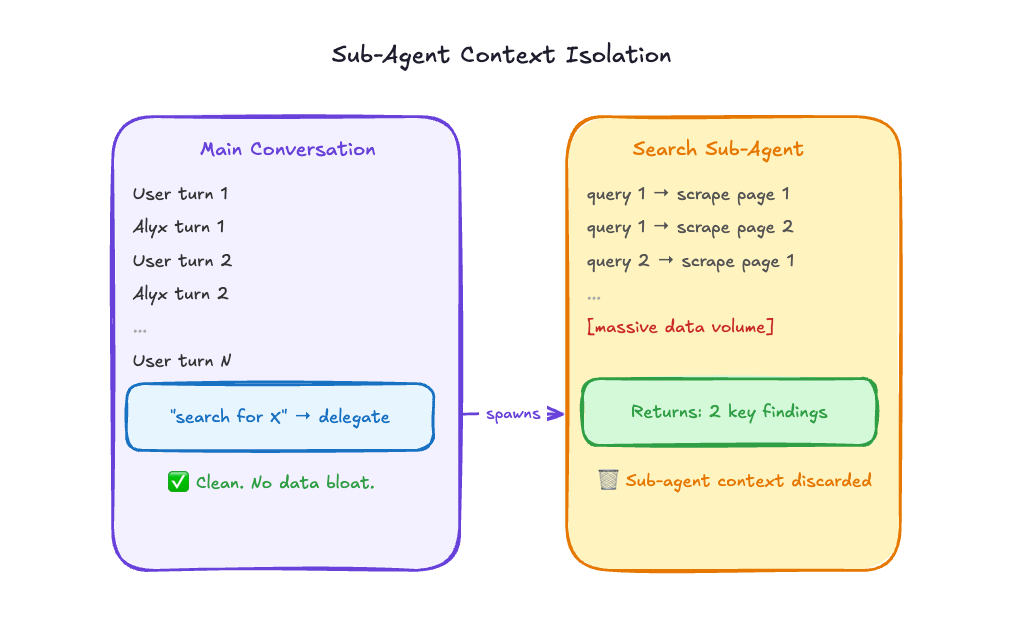
This is still a relatively new addition to how we’re architecting Alyx, but it’s already clear it’s the right direction for any task that’s data-heavy and well-defined. Search fits perfectly. Classification tasks fit well. Anything where you can describe the inputs and outputs cleanly is a good candidate.
One thing we tried that didn’t work
We want to be honest about this one. LLM-based summarization for context compression looked extremely promising in theory and didn’t hold up in practice.
The idea is intuitive. As the conversation gets long, just ask the model to summarize what’s happened so far and replace the full history with the summary. Compression via abstraction. Elegant.
The problem is that it’s inherently lossy, and the losses are unpredictable. The model doesn’t consistently identify what information will matter later. It makes reasonable-sounding judgments that turn out to be wrong. You end up with a compressed history that looks complete but is missing something specific the user references three turns later. The experience feels broken in a way that’s hard to diagnose.
We haven’t fully abandoned the idea. As models get better at long-range reasoning, it might become viable. But for now, structural approaches—middle truncation, memory tools, sub-agent isolation—are far more reliable than probabilistic compression.
What we’re still figuring out
Context management is an ongoing engineering problem, not a solved one. The strategies we’ve described are where we’ve landed after a lot of iteration, but iteration is still happening.
A few things we’re actively thinking about: smarter heuristics for which turns are safe to compact versus which need to be preserved verbatim, better tooling for inspecting context state at runtime (this is where Arize AX traces have been hugely valuable for us), and deeper sub-agent patterns for other data-heavy tasks beyond search.
If you’re building agents and running into the same walls we did, come find us in our community Slack. We’d genuinely love to hear what’s working for you and what isn’t.
What’s next in the series
This is part two of a four-part deep dive series on how we built Alyx. Part one is here if you missed it:
Coming up:
Testing and eval for agents
How do you write tests for a system that’s non-deterministic by design? Our framework for evaluating planning quality, task completion, and tool selection accuracy across hundreds of runs.
Using Alyx to debug Alyx
How we use Arize AX to trace Alyx’s planning behavior, catch regressions, and close the loop between what the agent does and what it should have done.

