Manual review doesn’t scale forever. At some point, if you’re building an LLM app or agent, you need a way to evaluate more than a handful of examples at a time. That’s where LLM-as-a-Judge can help.
But an LLM judge only works if you’re clear about what it’s judging.
Here’s the failure mode teams run into: a support agent tells a user their refund was processed. The judge marks the answer as “helpful.” Your dashboard shows a passing score. But when you open the trace, the agent never called the refund tool, never checked the customer account, and never verified the refund policy.
The answer sounded fine, but the system still failed. That’s the gap you’re trying to close.
In this guide, we will walk through how to build LLM-as-a-Judge evaluators that are useful in production: when to use code instead of a judge, how to define evaluation criteria, why fixed labels are often better than open-ended scores, how to compare judge results against human review, how to evaluate agent trajectories, and how to keep cost and latency under control.
TL;DR
- Use code evaluators for deterministic checks: schema validity, exact match, regex match, latency, token count, tool name, and required fields.
- Use LLM judges for semantic checks: correctness, faithfulness, helpfulness, safety, tone, user frustration, task completion, and tool-call appropriateness.
- Treat the evals as the product. The judge model only applies the evals.
- Prefer boolean or categorical labels when the decision is discrete. If the judge may not have enough evidence to decide, add a third category if necessary such as insufficient_evidence or needs_review rather than forcing a binary label.
- Validate the judge against human labels before using it for gates, dashboards, or automated routing.
- For agents, evaluate both the final answer and the trajectory: tool choice, tool arguments, redundant steps, recovery behavior, and session outcome.
- Keep eval results close to traces, spans, sessions, datasets, and experiments. Phoenix Evals is designed for that workflow.
- Track judge behavior over time. A judge can drift just like the application it evaluates.
Build better agents with Arize
Trace, evaluate, and learn. Build agents that work with Arize AX and start tracing your runs today.
Prefer open source? Try Arize Phoenix for self-hosted, open source agent observability.

What is LLM-as-a-Judge?
LLM-as-a-Judge is an evaluation pattern where a language model grades another model’s output, trace, or session against a set of criteria.
The judge might return:
- a boolean label, like correct or incorrect
- a category, like resolved, partially_resolved, or unresolved
- an ordinal rating, like A through E or 1 through 5 with anchored definitions
- an explanation
- structured evidence
If you want the primer version before going deeper, start with Arize’s LLM-as-a-Judge overview. If you need to author the first judge from a batch of agent traces, including error analysis and calibration, use How to build agent evals from traces.
A judge that can produce a grade is useful. But the real value comes when you can apply the same evaluation criteria across many examples, compare results over time, and route failures back into your engineering loop.
That’s where observability and evaluation work together.
Observability shows you what happened while evaluation tells you whether what happened was good enough. The improvement loop connects the two: observe the behavior, measure the failure, change the system, and verify that the fix worked.
That’s the bar. A judge that produces labels without enough context to inspect, calibrate, or act on them is not doing the job.
Use code when the check is deterministic
Okay, let’s start with the obvious question: do you need an LLM judge at all?
Because a lot of evals don’t.
If the output must be valid JSON, use a parser. If the answer must include a known ID, check the ID. If the agent must call lookup_customer_profile before refund_order, programmatically inspect the trace. If latency is above three seconds, no model needs to reason about that.
Code is cheaper, faster, and more predictable.
LLM judges are useful when the evaluation depends on meaning:
- Did the answer actually address the user’s question?
- Is the answer grounded in the retrieved context?
- Did the model cite a source that supports the claim?
- Is the response safe without being needlessly evasive?
- Did the agent choose a reasonable tool sequence for the task?
- Did the conversation end with the user getting what they needed?
Those are hard to express as rules. They’re also the questions that decide whether your system works.
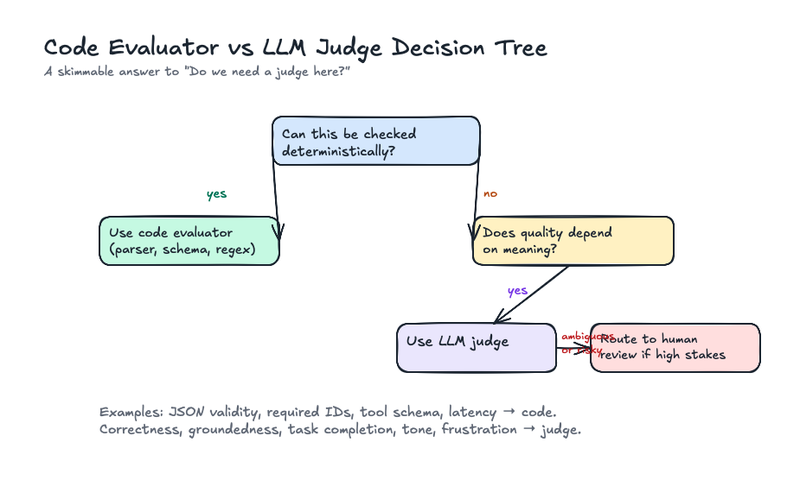
A common mistake is treating code evals and judge evals like they’re competing options when they’re not.
A support agent might use code evaluators for JSON validity, tool-call schema, latency, and escalation policy. It might also use LLM judges for answer correctness, tone, frustration, and task completion.
A RAG system might use code to check citation format, then use a judge to decide whether the cited source actually supports the answer.
Here’s a practical rule: if the answer can be checked without interpretation, use code. If the answer depends on meaning, use a judge. If the result will drive an automated action, attach the judge output to trace context so someone can inspect why it fired.
Here’s the kind of evaluator that should stay in code:
import json

from jsonschema import ValidationError, validate

TOOL_CALL_SCHEMA = {
    "type": "object",
    "required": ["tool_name", "arguments"],
    "properties": {
        "tool_name": {"type": "string"},
        "arguments": {"type": "object"},
    },
}

ALLOWED_TOOLS = {"lookup_customer_profile", "refund_order"}


def valid_tool_call(output: str) -> bool:
    try:
        payload = json.loads(output)
        validate(payload, TOOL_CALL_SCHEMA)
        return payload["tool_name"] in ALLOWED_TOOLS
    except (json.JSONDecodeError, ValidationError, KeyError):
        return False
This is a parser and schema problem, so there’s no need for a judge. Instead, you can save the LLM judge for the question the parser can’t answer: did the agent call the right tool for the user’s actual request?
Design the evaluation criteria before you write the prompt
Most bad judges fail before the model is called.
The prompt says “rate helpfulness from 1 to 5” or “determine whether the answer is good.” The model returns a confident score, and everyone moves on.
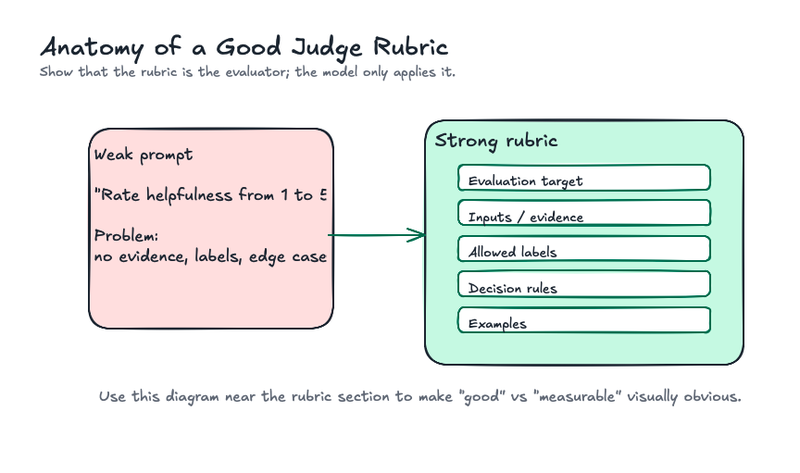
That score is not meaningful because “good” “helpful” and “correct” aren’t an evaluation criteria until you define what evidence counts, which edge cases matter, and how to resolve ambiguity.
(This is why Arize’s guide to building a custom LLM evaluator with a benchmark dataset starts with label definitions and annotated examples instead of model choice.)
A strong evaluation criteria usually includes five pieces:
- The evaluation target: what quality are you measuring?
- Inputs: what evidence can the judge use?
- Labels or scores: what outputs are allowed?
- Decision rules: how should the judge handle edge cases?
- Examples: what does each label look like in practice?
For a customer support agent, a task completion evaluation criteria might look like this:
Evaluation target: Did the agent resolve the user's support request?

Allowed labels:

- resolved: The user received a correct, actionable answer or the requested action was completed with the required supporting evidence.
- partially_resolved: The agent made progress but left a required step incomplete.
- unresolved: The agent failed to answer, gave incorrect guidance, skipped required evidence, or created a loop.
- insufficient_evidence: The trace does not contain enough evidence to score task completion.

Decision rules:
- Do not mark "resolved" if the user had to repeat the same request.
- Do not mark "resolved" unless required tool evidence is present.
- Do not mark "unresolved" just because the agent escalated; evaluate escalation quality separately.
- If the final answer is correct but the agent used an unnecessary tool, mark task completion separately from efficiency.
- If the answer is plausible but unsupported by tool results, mark unresolved.
- If required tool results or session history are missing, mark insufficient_evidence rather than guessing.
The key is that this evaluation criteria measures one thing: task completion.
Escalation quality should be a separate evaluator. A correct escalation can be the right product behavior, but it answers a different question from whether the agent itself resolved the request. Likewise, insufficient_evidence is a data-quality or review-routing outcome, not a task-completion score.
Good eval design keeps those dimensions separate: task completion, escalation quality, evidence availability, and efficiency may all matter, but they should not be averaged into one ambiguous score.
Start with the decision the eval will drive
The output format is more than an implementation detail, and changes the reliability of the evaluator.
In practice, teams tend to use four output types:
- Boolean: true or false
- Categorical: failure_type, escalation_reason, or support_intent
- Ordinal categorical: resolved, partially_resolved, unresolved
- Numeric: a continuous score such as 0.0 to 1.0 or 1 to 10
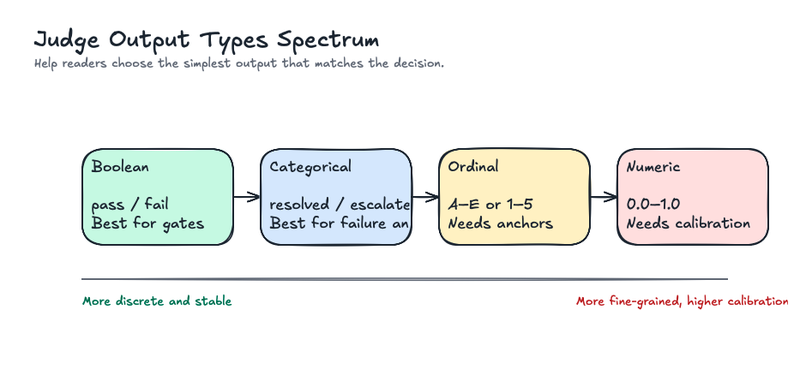
Use the simplest output type that matches the decision.
Boolean labels work well for policy checks and gates: hallucinated or factual, valid or invalid, in scope or out of scope, user frustrated or not frustrated. They’re easier to calibrate, easier to aggregate, and easier to turn into deployment gates.
Boolean labels don’t work when the judge might lack enough evidence to decide. In that case, don’t force true or false. Add uncertain, insufficient_evidence, or needs_review. (Forced binary labels make dashboards look cleaner while making the measurement worse.)
Categorical labels work when there are a few distinct states. They’re useful for failure analysis because they preserve more information than pass/fail without pretending to be continuous.
Ordinal labels work when gradation matters, but each level needs an anchor. resolved, partially_resolved, and unresolved can be treated as ordered labels if they all describe the same underlying dimension. Do not add a label like escalated to that same scale unless escalation is explicitly defined as a resolution state in your product logic.
Open numeric scores are the most tempting and the easiest to misuse.
In our own testing at Arize, numeric scores produced plateaus, discontinuous jumps, and model-specific scale drift. A judge could separate clean text from badly corrupted text, but fail to distinguish medium levels of corruption. Changing the scale from 1-to-10 to 0-to-1 changed the distribution without improving the measurement. Reasoning models reduced variance in some cases, but they did not magically turn token outputs into calibrated instruments. (We wrote more about this in Testing binary vs score evals on the latest models.)
That doesn’t mean numeric scores are always wrong. Instead, it means they need more discipline. Use them when you have a clear underlying continuum, a calibrated validation set, and a reason to preserve fine-grained differences. Otherwise, boolean and categorical labels are usually more stable.
Run the evaluator where developers can inspect the trace
A judge label is only useful if the team can inspect the execution record behind it.
If a judge says an answer was unsupported, you need to see the retrieved documents, prompt version, model output, tool calls, intermediate steps, and final response. If a judge says an agent failed to complete a task, you need to see whether the issue came from planning, retrieval, tool selection, tool arguments, tool results, or final response generation.
That’s why eval results should live near traces, spans, sessions, datasets, and experiments.
Our open source AI observability project Phoenix makes this workflow concrete. Phoenix Evals gives teams a starting point without building every evaluator from scratch, and the Phoenix Evals documentation covers the core primitives. For common tasks, you can use built-in evaluators such as faithfulness, correctness, document relevance, refusal, tool invocation, tool selection, and tool response handling.
For application-specific behavior, try building a custom evaluator from real traces:
- Pull a representative set of examples from production or pre-production traces.
- Annotate those examples with the labels your team actually uses.
- Write an evaluation criteria with fixed labels and decision rules.
- Run the judge on the labeled set.
- Inspect disagreements in Phoenix.
- Tighten the evaluation criteria or add examples.
- Log eval results back to traces, spans, sessions, datasets, or experiments.
In production, the evaluator should run against examples pulled from traces, not hand-written examples in a notebook.
Once the eval is running, the workflow isn’t “look at the average score.” Instead, it’s:
- Filter failed examples.
- Inspect the trace and judge explanation.
- Group failures by cause.
- Add representative failures to a dataset.
- Re-run the dataset before prompt, model, retrieval, or tool changes.
- Track whether the fix improved the target failure without introducing a new one.
That’s how an LLM judge becomes part of the engineering loop.
Choose the judge model after the evaluation criteria is stable
Here’s something you may find counterintuitive: the strongest model isn’t always the best judge.
- A frontier model may improve agreement on complex reasoning tasks, but it can be too slow or expensive for broad online monitoring.
- A smaller model may be enough for binary labels with clear evidence.
- An open model may be necessary when data cannot leave a controlled environment.
- A cross-family judge may reduce self-preference when you are comparing outputs from one model provider.
- Open evaluator models such as Prometheus 2 are useful to know because they show a separate path: train or choose a model specialized for evaluation rather than using a general assistant model for everything.
You should validate your model choice the same way you validate the prompt:
- Run each candidate judge on the same labeled validation set.
- Compare agreement with human labels, not just average score.
- Inspect disagreements by failure type.
- Measure latency, token usage, and cost per evaluated example.
- Re-run a fixed canary set when the judge model changes.
If a stronger judge improves agreement by one point but doubles latency and cost, it may still be the wrong choice. If it catches the exact failure that would block a release, it may be worth it. The decision depends on the action tied to the eval.
Ask for explanations, but don’t confuse them with truth
A judge’s explanation is useful for debugging, but it’s not proof.
Many LLM-as-a-Judge workflows ask the model to return both a label and an explanation. That is a good default. Explanations help reviewers see why a judge failed, identify ambiguous evaluation criteria language, and build better calibration examples.
They also make it easier to inspect patterns across failures. The judge may be overweighting tone, ignoring context, or treating missing citations as hallucinations.
But explanations can rationalize a bad label. The model may produce a plausible reason after making the wrong call. That’s why the output contract should separate fields:
{
  "label": "unsupported",
  "explanation": "The answer says the refund will arrive in 24 hours, but the policy context only says refunds are usually processed within 5 business days.",
  "evidence": ["refunds are usually processed within 5 business days"]
}
For simple checks, brief reasoning is enough. But for complex checks, you should ask for evidence. If the judge claims an answer is unsupported, have it identify the unsupported claim and the relevant source text. If it says a tool call was wrong, have it name the tool that should have been used and why.
Research such as G-Eval and the MT-Bench and Chatbot Arena judge paper shows that structured evaluation steps can improve alignment with human judgments in some settings. But the lesson isn’t “always ask the judge to think step by step.” Explicit chain-of-thought increases tokens, latency, and complexity. It can help when the judge must reason through multiple dependent criteria, but it’s often unnecessary for simple classification tasks.
You should use reasoning because it improves auditability, and measure whether it improves agreement.
Calibrate against humans before scaling
The first version of a judge should always be treated as a hypothesis.
In practice, the first judge rarely fails because the model’s weak. Instead, it often fails because the evaluation criteria is underspecified. Reviewers disagree on edge cases, the judge rewards fluent unsupported answers, or a single aggregate score hides the distinction between correctness, grounding, and task completion.
Build a small validation set from real examples. Include obvious passes, obvious failures, and the cases that triggered disagreements among your team. Label them with human reviewers. If the task is ambiguous, collect more than one human label per example and keep the disagreements.
Human disagreement is often the signal that your evaluation criteria is underspecified. Phoenix’s annotation workflow is built around this idea: use human labels where they matter most, then turn them into reusable evaluator and experiment data.
After that, you should run the judge and compare:
- Accuracy for boolean or categorical labels
- Precision, recall, and F-score for failure detection
- Cohen’s kappa or weighted kappa when measuring agreement beyond chance
- Confusion matrices to see which labels collapse into each other
- Rank correlation when the output is ordinal
- Disagreement slices by domain, prompt version, model, user segment, and trace type
(Arize’s paper reading on Judging the Judges is a good companion here because it walks through percent agreement and Cohen’s kappa for LLM judges.)
A judge with 85% overall agreement may still be unusable if it misses the failures you care about. A hallucination judge that catches obvious unsupported answers but misses overconfident extrapolations will look better than it is. A safety judge that over-flags harmless edge cases may be acceptable for review routing but too noisy for deployment gating.
Suppose you label 100 support-agent sessions for task completion:
- 55 are resolved
- 20 are partially_resolved
- 15 are unresolved
- 10 do not contain enough trace evidence to judge
The first judge agrees with humans on 82 examples. That sounds good until you inspect the 18 disagreements. It marked 9 partially_resolved sessions as resolved because the final answer sounded helpful, even though the agent never completed the required account lookup. It marked 4 incomplete traces as unresolved because the evaluation criteria did not explain when escalation is the right outcome. And it marked 5 examples differently because the trace was missing a tool result.
Those are three different fixes:
- Add a decision rule that a request is not resolved unless required tool evidence is present.
- Treat missing trace evidence as insufficient_evidence, not as an agent failure.
- Add examples where the final answer sounds plausible but is unsupported by the trace.
The point of calibration is to learn how the judge fails before you use it to gate a release or monitor production.
Ideally, calibration should be an iteration loop that consists of the following:
- Label a representative set.
- Run the judge.
- Review disagreements.
- Update the evaluation criteria, examples, or output labels.
- Re-run on the same set and a holdout set.
- Track agreement over time.
And remember: some labels are genuinely indeterminate. A 2025 paper on validating LLM-as-a-Judge systems under rating indeterminacy shows why forced-choice labels can make judge validation look cleaner than it is. In practice, that is another argument for needs_review, multi-label annotations, and keeping human disagreements visible.
That’s the difference between an eval and an improvement loop.
Design for known judge biases
LLM judges have failure modes, and ignoring them doesn’t make them go away.
Here are some common LLM failure modes:
- Position bias: in pairwise comparisons, the judge may prefer the first or second answer because of placement.
- Verbosity bias: the judge may reward longer answers even when the extra text is redundant or wrong.
- Self-preference bias: a judge may prefer outputs that resemble its own model family or style.
- Authority bias: confident language may be rewarded over calibrated uncertainty.
- Evaluation criteria drift: the judge’s behavior changes when prompts, models, or input distributions change.
- Hallucinated reasoning: the explanation sounds plausible but cites evidence incorrectly.
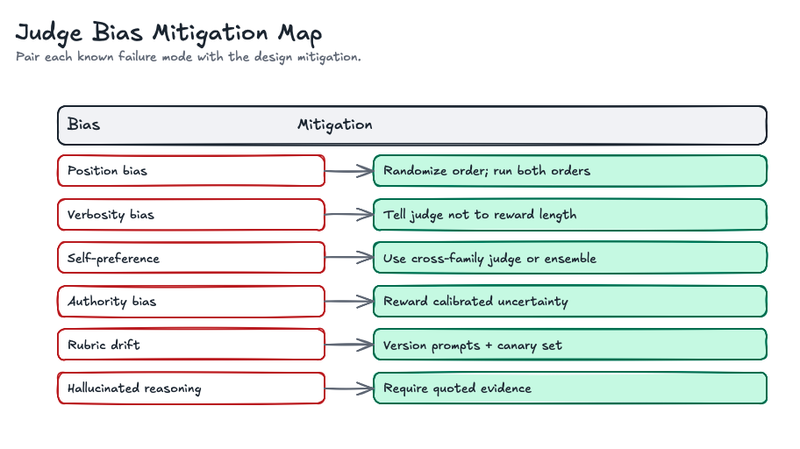
Treat the judge like production code and production measurement infrastructure: version it, test it, and monitor it.
Evaluate agent trajectories, not just final answers
Agents fail in ways single-turn LLM apps do not.
A chatbot can be judged mostly on the final answer, but an agent has a path. It plans, calls tools, observes results, updates state, retries, escalates, or loops. The final response may look fine while the trajectory is wasteful, risky, or unsupported.
That’s why Arize has spent so much time on tracing and evaluating agents, not just scoring final text.
In our experience, we’ve found that it’s best to evaluate agents at multiple levels:
Final answer quality
Did the answer solve the user’s problem? Was it correct, grounded, and complete?
Tool selection
Did the agent choose the right tool for the task? Did it call tools it did not need?
Tool arguments
Were the arguments valid, safe, and specific? Did the agent hallucinate IDs, dates, filters, or customer attributes?
Tool response handling
Did the agent correctly interpret the result? Did it ignore an error? Did it retry intelligently?
Trajectory efficiency
Did it take the shortest reasonable path, or did it loop through redundant calls?
Session outcome
Across the full conversation, did the user reach the goal?
Some of these can be code evaluators. If the reference trajectory requires search_docs and lookup_policy, you can check whether those calls occurred. Trajectory evaluators usually need several matching modes for exactly this reason: strict, unordered, subset, and superset. If order matters, use strict matching. If the same tools can be called in different orders, use unordered matching. If extra tools are acceptable, use superset. If extra tools are risky, use subset.
And use an LLM judge when the trajectory is reasonable, but not exact.
For multi-turn systems, session-level analysis matters too. Arize’s guide to agent session summaries shows how summarizing trajectories can make review and eval workflows easier to scale.
Common mistakes to avoid
Most LLM-as-a-Judge failures come from design shortcuts, not model limitations.
With that said, avoid these mistakes:
- Using 1-to-10 scores without anchored definitions. The judge will invent its own scale, and the scale may change across models or prompts.
- Judging final answers without trace context. You may miss the tool call, retrieval, or policy failure that caused the issue.
- Treating judge explanations as ground truth. Explanations are debugging aids, not proof that the label is correct.
- Skipping human calibration. Without human labels, you do not know whether the judge agrees with the standard your team actually uses.
- Using the same judge for every job. Monitoring, gating, routing, curation, and prompt comparison have different precision and recall requirements.
- Running expensive judges everywhere. Route by risk, uncertainty, and decision value.
- Collapsing multiple failure modes into one score. Correctness, grounding, task completion, safety, and efficiency should often be separate evals.
- Forcing binary decisions when evidence is missing. Add needs_review rather than making the judge guess.
Here’s an uncomplicated fix: define the decision, write the eval, use fixed labels, calibrate against humans, inspect failures in context, and keep measuring the judge over time.
Validate the judge against the job it performs
A judge is good when it supports better engineering decisions.
That sounds obvious, but it changes what you measure. You aren’t trying to prove that the judge is intelligent, but instead prove it’s reliable enough for a specific job.
For a deployment gate, tune the judge to the action it drives. If the judge automatically blocks a release, false positives slow teams down and false negatives ship regressions.
For monitoring, the judge needs stable trend detection. Individual labels can be imperfect if aggregate shifts are meaningful.
For dataset curation, the judge needs useful disagreement routing. It should surface examples your team will need to inspect.
For prompt iteration, the judge needs paired comparison reliability. It should detect whether version B is actually better than version A on the examples that matter.
Measure the judge against that job.
Here are some useful questions to consider:
- Does the judge agree with humans on the examples we care about?
- Where does it disagree, and are those disagreements acceptable?
- Does agreement hold across user segments, domains, and model versions?
- Does the judge produce stable labels across repeated runs?
- Does changing the judge model change historical trends?
- Does the judge catch known regressions in a canary set?
- Does the judge explanation point to the fix?
- Does the metric correlate with user feedback, escalation rate, retention, or another downstream signal?
The last question is easy to skip. But pro tip: don’t.
An eval can agree with human reviewers and still be irrelevant to the product. If the judge says “helpfulness improved” but users abandon the flow more often, the eval is measuring the wrong thing or weighting the wrong criteria.
This is why production evals should live near traces, sessions, experiments, and user feedback. The judge label is useful, but the context around the label is what makes it actionable.
The pattern to remember
LLM-as-a-Judge works best when it’s treated as measurement infrastructure, and not a magic grader or a replacement for human judgment. (Or worse, a single score that decides whether your agent is good.)
The strongest systems combine deterministic checks, LLM judges, human calibration, and trace context. Code catches what code can catch, judges handle semantic judgment, and humans calibrate the judges and resolve ambiguity. Observability shows where the judgment came from and what to fix next.
Manual evaluation doesn’t scale. But neither does trusting an untested judge.
That makes the work to design the judge, calibrate it, and keep watching it after it ships critical.
That’s how evals become more than a dashboard number. When done right, they should become part of the agent feedback loop: observe the behavior, measure the failure, fix the system, and verify that the fix held.

