If you’ve ever shipped an LLM-powered application to production, you know the real work starts after deployment.
Evaluations need to run on fresh data, prompts need to be tested against baselines before promotion, and your datasets need to stay current with production traffic. When a model changes, retrieval quality might drop or a prompt regression may slip in. And that means you need your evaluation workflow to run automatically before the issue reaches users.
Most teams cobble this together with cron jobs, custom scripts, and Slack reminders. That works for a prototype, but breaks down once evals become part of your release process.
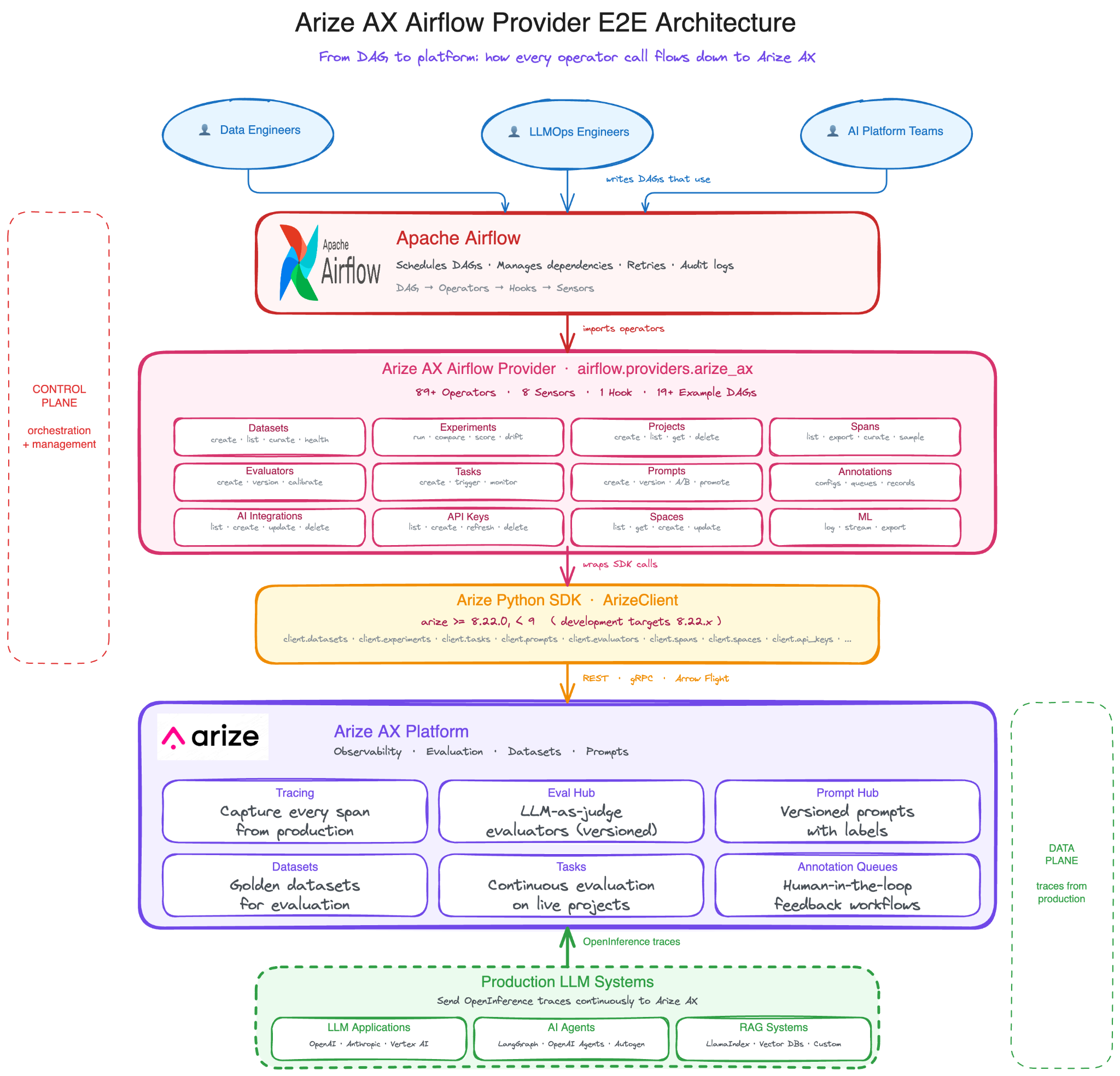
Today, we’re releasing the Arize AX Airflow Provider, an open-source Apache Airflow provider that brings Arize AX into your orchestration layer.
The provider includes 95+ operators, 8+ sensors, and 19+ example DAGs for common workflows including span export, dataset refresh, experiment comparison, prompt promotion, drift detection, annotation queues, and CI/CD gates.
Instead of building custom glue code between your evaluation platform and orchestration system, you can define these workflows directly in Airflow.
Let’s jump in.
Build better agents with Arize
Trace, evaluate, and learn. Build agents that work with Arize AX and start tracing your runs today.
Prefer open source? Try Arize Phoenix for self-hosted, open source agent observability.

Why production AI (and self-learning agents) need feedback loops
The industry is moving toward AI agents that improve themselves through production experience. Not in a hand-wavy “AGI will figure it out” way, but in a concrete, engineering-driven way where every production trace becomes a learning opportunity.
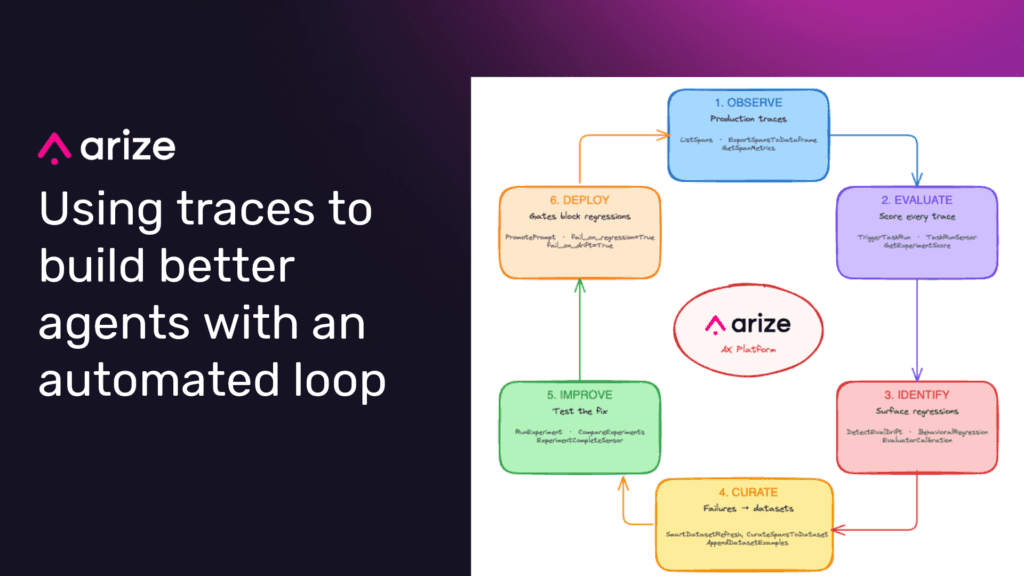
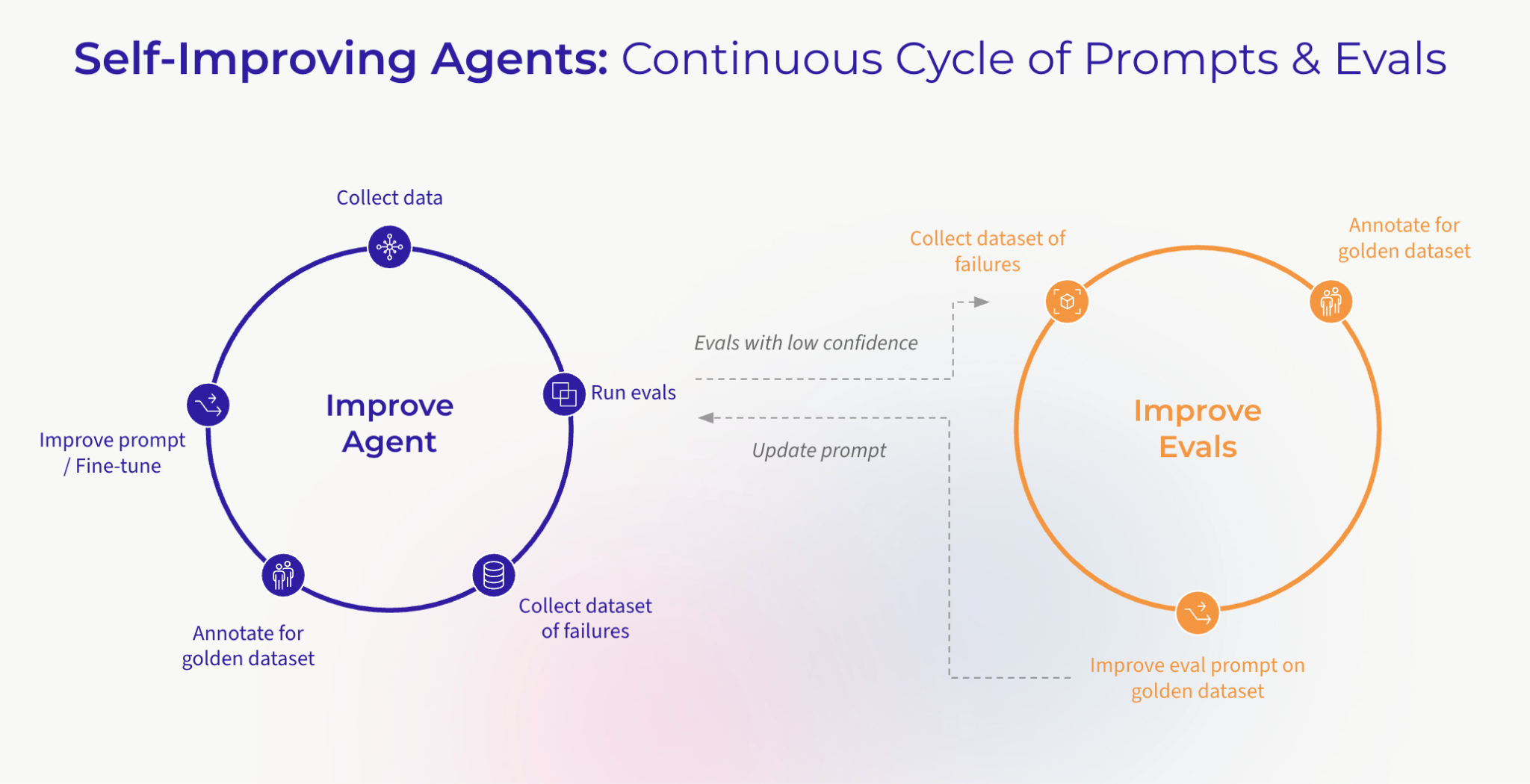
Yet even as we build towards this goal, we also know that today’s production AI systems improve when teams can turn real failures into eval coverage. That requires a concrete loop: observe behavior in traces, evaluate it, identify failures, add representative examples to datasets, test candidate changes, and gate deployment.
Here is the feedback loop this provider is designed to automate (and that makes self-learning agents practical):
- Observe: Agents run in production, generating traces across every tool call, reasoning step, and LLM interaction. Arize AX captures these as structured spans with full context.
- Evaluate: Automated evaluators score each trace on dimensions that matter: accuracy, tool-calling correctness, goal achievement, hallucination risk. The Eval Hub in Arize AX runs these evaluations continuously instead of just at deploy time.
- Identify failures: When evaluations surface regressions, a retriever returning irrelevant context, a planner choosing the wrong tool, a response contradicting source material, those failures become test cases.
- Curate datasets: Failed traces and edge cases get promoted into evaluation datasets. The
ArizeAxSmartDatasetRefreshOperatorautomates this, pulling diverse production examples into your golden dataset so it stays representative of real traffic. - Improve: Updated prompts, fine-tuned models, or revised tool configurations are tested against the enriched dataset before deployment. The comparison operators verify that the fix actually works and doesn’t regress other dimensions.
- Deploy with gates: Only changes that pass evaluation gates make it to production. The CI/CD gate operators enforce this programmatically with fewer manual handoffs and no unvalidated changes reaching production.
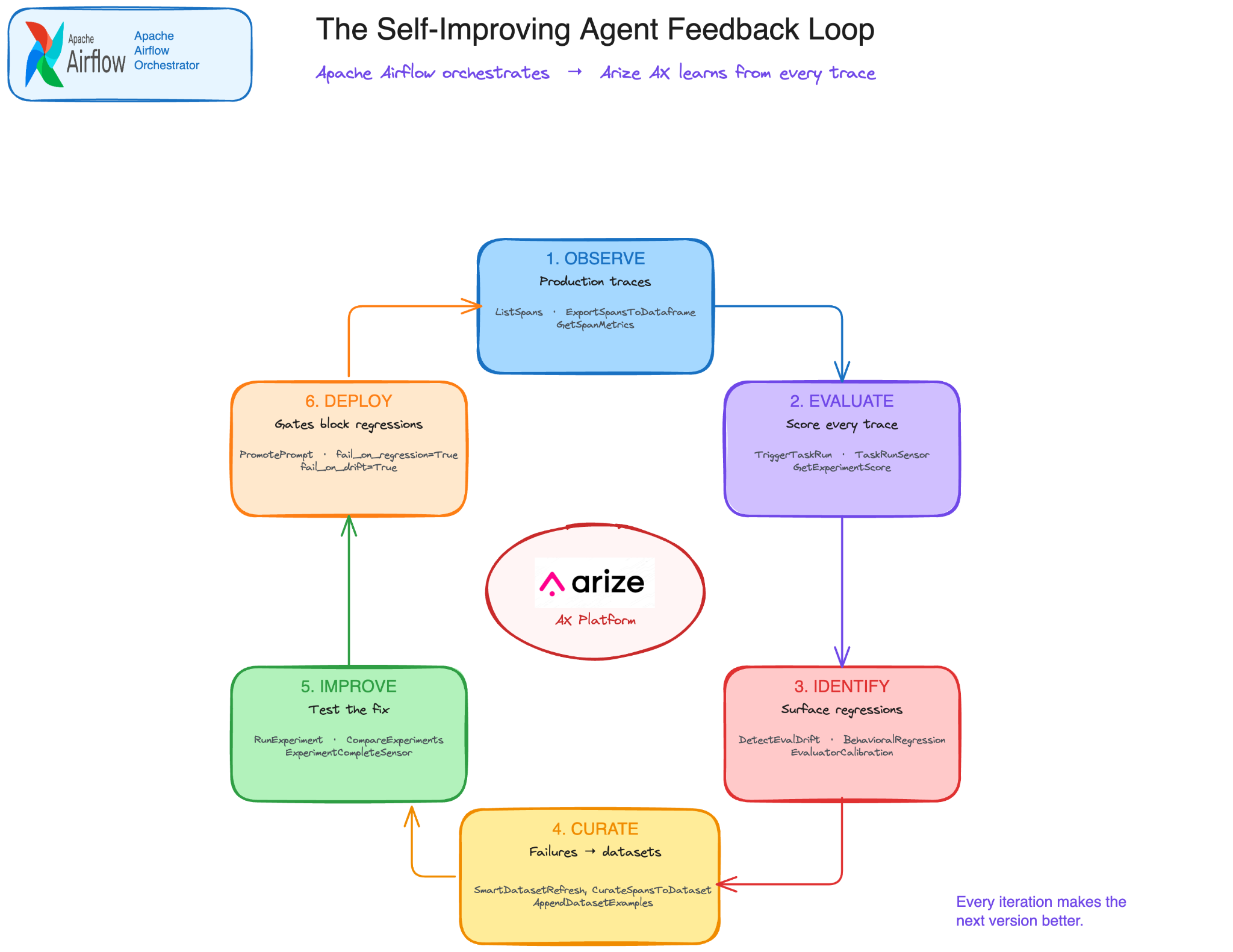
This isn’t a one-time workflow; it’s a continuous loop. And the key insight is you can’t run this loop manually at scale.
When you have dozens of agents, hundreds of prompts, and millions of daily traces, the evaluation-improvement cycle needs to be automated. That’s where Airflow comes in.
Production AI traces are the raw material for better evals
Traditional Application Performance Monitoring (APM) systems surface infrastructure signals like 500 errors, latency spikes, and timeouts. They tell you when something is slow or broken, but they don’t tell you whether the system is actually doing its job.
LLM observability data is different. A trace can capture the user request, retrieved context, model response, intermediate tool calls, latency, token usage, evaluator scores, and final outcome. For AI systems, that trace is more than a health signal. It is evidence of how the system behaved.
There’s also a structural reason this data matters more for agents than for traditional software. With code, the source of truth is the code itself, every decision point is written down, every path is visible, and you can predict behavior by reading the file. But agents don’t work that way.
At runtime, the agent decides which tool to call, whether to retry, when to hand off, and how to interpret what came back. The same question can take a different path on Tuesday than it did on Monday. You cannot read an agent the way you read a program; its real behavior only shows up after the fact in the trace. The trace is the new source of truth, and the only place the actual system behavior is visible.
That changes what a “bug report” looks like. When an evaluator flags a hallucination, you don’t just get an alert, you get the exact input, the insufficient context that was retrieved, the flawed output, and an assessment of why it went wrong. Feed that failure into your evaluation dataset and the next version of your agent is tested against the precise error that hit production.
Repeat this cycle enough times and your system genuinely learns from its mistakes not through any clever self-improving architecture, but because you’re treating observability data for what it really is: the most specific training signal your team will ever access. APM tells you the house is on fire; but LLM observability data can tell you how to build a fireproof house.
Why Airflow for LLMOps?
The same properties that make Apache Airflow useful for data pipelines also apply to LLMOps: dependency management, scheduling, retries, alerting, audit trails, are exactly what LLMOps workflows need.
For instance, consider this: your nightly evaluation pipeline is a DAG. Your prompt promotion workflow and drift detection loop are DAGs, too. And the agent self-improvement cycle described above? That’s a DAG too.
The Arize AX Airflow Provider closes this gap. Instead of building custom integrations, you get operators that plug directly into your existing Airflow infrastructure and speak natively to the Arize AX platform. The feedback loop that makes agents self-improving becomes a scheduled, retried, monitored, auditable pipeline, not a hope.
There’s a deeper reason this combination works, and it’s about open source. Open source wins. It always has, and the projects that survive, Linux, Kubernetes, PostgreSQL, Kafka, become the substrate everything else gets built on. Apache Airflow is that substrate for orchestration, maintained by the Apache Software Foundation with thousands of contributors and a battle-tested core.
This aligns directly with how Arize thinks about the AI stack more broadly.
- Arize Phoenix, Arize’s open-source LLM observability platform, drives the developer experience of tracing and evaluation across the OSS community.
- OpenInference, the open instrumentation spec for capturing agent and LLM traces, is built on OpenTelemetry and adopted across the AI tooling ecosystem.
- The Arize AX Airflow Provider, extends that same philosophy into the orchestration layer.
Instrumentation, observability, evaluation, and now orchestration, the full LLMOps stack is open by default. You can adopt any piece independently or wire the whole thing together. Either way, nothing about how you operate your pipeline is locked behind a proprietary box.
Why Arize AX for LLMOps?
If Airflow runs the workflow, Arize AX defines and manages the evaluation system: what gets evaluated, how it is scored, where results are reviewed, and which actions happen next.
This topic is well described in the post: What Is An Evaluation Harness is the standardized infrastructure that turns evaluation from one-off scripts into a repeatable operational system. It’s the difference between a team eyeballing model outputs in a notebook and a team that systematically catches regressions before they ship.
Arize AX is built around exactly that pattern with three stages that map directly to operators in this provider.
- Inputs flow in from production traces (captured via OpenInference), dataset examples, and experiment runs, available through operators like
ArizeAxListSpansOperator,ArizeAxExportSpansToDataframeOperator, and the full dataset suite. - Execution: happens through LLM-as-judge evaluators in Eval Hub, code based checks, or custom evaluation functions, triggered via
ArizeAxTriggerTaskRunOperatorand managed through the evaluator and task operators. - Actions route to annotation queues for humans, threshold alerts, CI/CD gates, or downstream experiments, expressed through built-in flags like
fail_on_regression=Trueandmin_score=0.7, plus operators likeArizeAxPromotePromptOperatorand the annotation queue operators.
Airflow doesn’t replace this. It operationalizes it. The eval harness defines what “good” looks like and how to measure it. Airflow makes that measurement run on a schedule, retry on transient failures, gate releases, and feed results back into the next iteration.
Arize AX is the harness and the provider is the connective tissue. Together they turn evaluation from a development-time exercise into a production system that runs whether you’re paying attention or not.
A real example: the LLM CI/CD gate
Let’s walk through a concrete workflow that most production LLM teams need: a CI/CD gate that blocks deployment if evaluation scores regress.
The workflow is simple: before a prompt version receives the production label, run an experiment against the evaluation dataset and compare it with the current baseline. If the candidate regresses on required metrics, the Airflow task fails and the promotion task never runs.
With the Arize AX Airflow Provider, this entire workflow is a handful of operators:
from datetime import datetime
  from typing import Any
  from airflow import DAG
  from airflow.models import Variable
  from airflow.providers.standard.operators.python import PythonOperator
  from airflow.providers.arize_ax.operators.experiments import (
      ArizeAxCompareExperimentsOperator,
  )
  from airflow.providers.arize_ax.operators.prompts import (
      ArizeAxGetPromptOperator,
      ArizeAxPromotePromptOperator,
  )
  from airflow.providers.arize_ax.operators.tasks import (
      ArizeAxCreateRunExperimentTaskOperator,
      ArizeAxGetTaskRunOperator,
      ArizeAxTriggerTaskRunOperator,
  )
  from airflow.providers.arize_ax.sensors.arize_ax import ArizeAxTaskRunSensor
  def build_run_config_from_prompt(**ctx) -> dict[str, Any]:
      """Materialize a Prompt Hub prompt version into a server-side run config."""
      prompt = ctx["ti"].xcom_pull(task_ids="fetch_candidate_prompt")
      version = prompt["version"]
      return {
          "experiment_type": "llm_generation",
          "ai_integration_id": Variable.get("arize_ax_ai_integration_id"),
          "model_name": version["model"],
          "messages": version["messages"],
          "input_variable_format": version["input_variable_format"],
          "invocation_parameters": version.get("invocation_params") or {},
          "provider_parameters": version.get("provider_params") or {},
      }
  with DAG(
      dag_id="llm_cicd_gate",
      start_date=datetime(2026, 1, 1),
      schedule="@daily",
      catchup=False,
      render_template_as_native_obj=True,  # required: dict XCom must stay a dict
  ) as dag:

      # 1. Fetch the candidate prompt version from Prompt Hub.
      fetch_candidate_prompt = ArizeAxGetPromptOperator(
          task_id="fetch_candidate_prompt",
          prompt_name="{{ var.value.arize_ax_prompt_name }}",
          version_label="staging",
      )
      # 2. Translate the prompt into a server-side run config.
      build_run_config = PythonOperator(
          task_id="build_run_config",
          python_callable=build_run_config_from_prompt,
      )

      # 3. Create the Eval Hub task — Arize executes the LLM, not the worker.
      create_task = ArizeAxCreateRunExperimentTaskOperator(
          task_id="create_candidate_task",
          name="candidate-{{ ds_nodash }}",
          dataset_id="{{ var.value.arize_ax_eval_dataset_id }}",
          run_configuration="{{ ti.xcom_pull(task_ids='build_run_config') }}",
          if_exists="skip",
      )
      # 4. Trigger the run.
      trigger_run = ArizeAxTriggerTaskRunOperator(
          task_id="trigger_candidate_run",
          task_id_param="{{ ti.xcom_pull(task_ids='create_candidate_task') }}",
          experiment_name="candidate-{{ ds_nodash }}",
      )
      # 5. Wait until the run completes.
      wait_for_run = ArizeAxTaskRunSensor(
          task_id="wait_for_candidate_run",
          run_id="{{ ti.xcom_pull(task_ids='trigger_candidate_run') }}",
          poke_interval=15,
          timeout=900,
          mode="reschedule",
      )
      # 6. Fetch the resulting experiment_id.
      get_result = ArizeAxGetTaskRunOperator(
          task_id="get_candidate_result",
          run_id="{{ ti.xcom_pull(task_ids='trigger_candidate_run') }}",
      )
      # 7. Gate: compare against the production baseline.
      compare = ArizeAxCompareExperimentsOperator(
          task_id="compare_to_baseline",
          baseline_experiment_id="{{ var.value.arize_ax_baseline_experiment_id }}",
          candidate_experiment_id="{{ ti.xcom_pull(task_ids='get_candidate_result')['experiment_id'] }}",
          metric_names=["accuracy"],
          pass_threshold=0.0,
          fail_on_regression=True,
      )

      # 8. Promote the same prompt to production (only on gate-pass).
      promote = ArizeAxPromotePromptOperator(
          task_id="promote_to_production",
          prompt_name="{{ var.value.arize_ax_prompt_name }}",
          label="production",
      )
      fetch_candidate_prompt >> build_run_config >> create_task >> trigger_run
      trigger_run >> wait_for_run >> get_result >> compare >> promote
Beyond CI/CD: what the example DAGs cover
The Arize team provided 19+ example DAGs that cover the most common LLMOps patterns we see teams building. Here are a few worth highlighting:
Drift detection with auto-rollback: Run a daily evaluation experiment, compare metrics against a stable baseline, and if drift is detected, automatically roll the prompt back to the last known good version. The ArizeAxDetectEvalDriftOperator computes per-metric drift and the fail_on_drift=True flag triggers the rollback branch.
Prompt lifecycle management: Version your prompts through a proper staging-to-production pipeline. The prompt lifecycle DAG runs evaluation experiments at each stage, compares candidate scores against the baseline, and only promotes when the gate passes. No manual approvals, just data-driven decisions enforced by ArizeAxCompareExperimentsOperator with fail_on_regression=True.
Behavioral regression testing: Mean scores can hide problems. Two models might have the same average accuracy, but one refuses 30% of questions while the other gives verbose, off-topic answers. The ArizeAxBehavioralRegressionOperator compares output length distributions, refusal rates, format compliance, and sentence counts between a candidate and baseline, catching regressions that aggregate metrics miss.
RAG evaluation pipeline: Export retriever and generator spans from a production RAG application, build a focused evaluation dataset, then run faithfulness and relevance evaluations with LLM-as-judge evaluators. The RAG DAG chains span export, dataset creation, dual experiment runs, and score aggregation into a single scheduled pipeline.
Automated dataset curation: Evaluation datasets go stale as production traffic evolves. The dataset curation DAG filters, deduplicates, and appends high-quality production spans to your evaluation dataset daily keeping it representative without manual effort.
Fine-tuning data preparation: Export high-quality spans as OpenAI-compatible JSONL, validate the file structure, and stage the results in an Arize dataset ready for fine-tuning. The ArizeAxExportSpansToFineTuningOperator handles the format conversion; the DAG handles the pipeline.
Evaluation tasks with continuous scoring: The tasks DAG demonstrates attaching LLM-as-judge evaluators to live production projects, create an evaluator in Eval Hub, wire it to a project via an evaluation task, trigger an on-demand run, wait for completion, and gate deployment on the scores. All with override_evaluations=True so previously scored spans get re-evaluated when the evaluator improves.
Each example DAG is self-contained and ready to run. Copy it into your Airflow dags/ folder, set a few Airflow Variables, and you’re running production LLMOps pipelines.
Putting it all together: from production traces to a fine-tuned SLM
The real value of this provider isn’t any single operator. It’s what happens when you chain them across the full LLMOps lifecycle from the first production trace to a fine-tuned model running cheaper, faster, and better on your domain than the frontier LLM you started with.
Here’s what that looks like as a single, end-to-end Airflow pipeline:
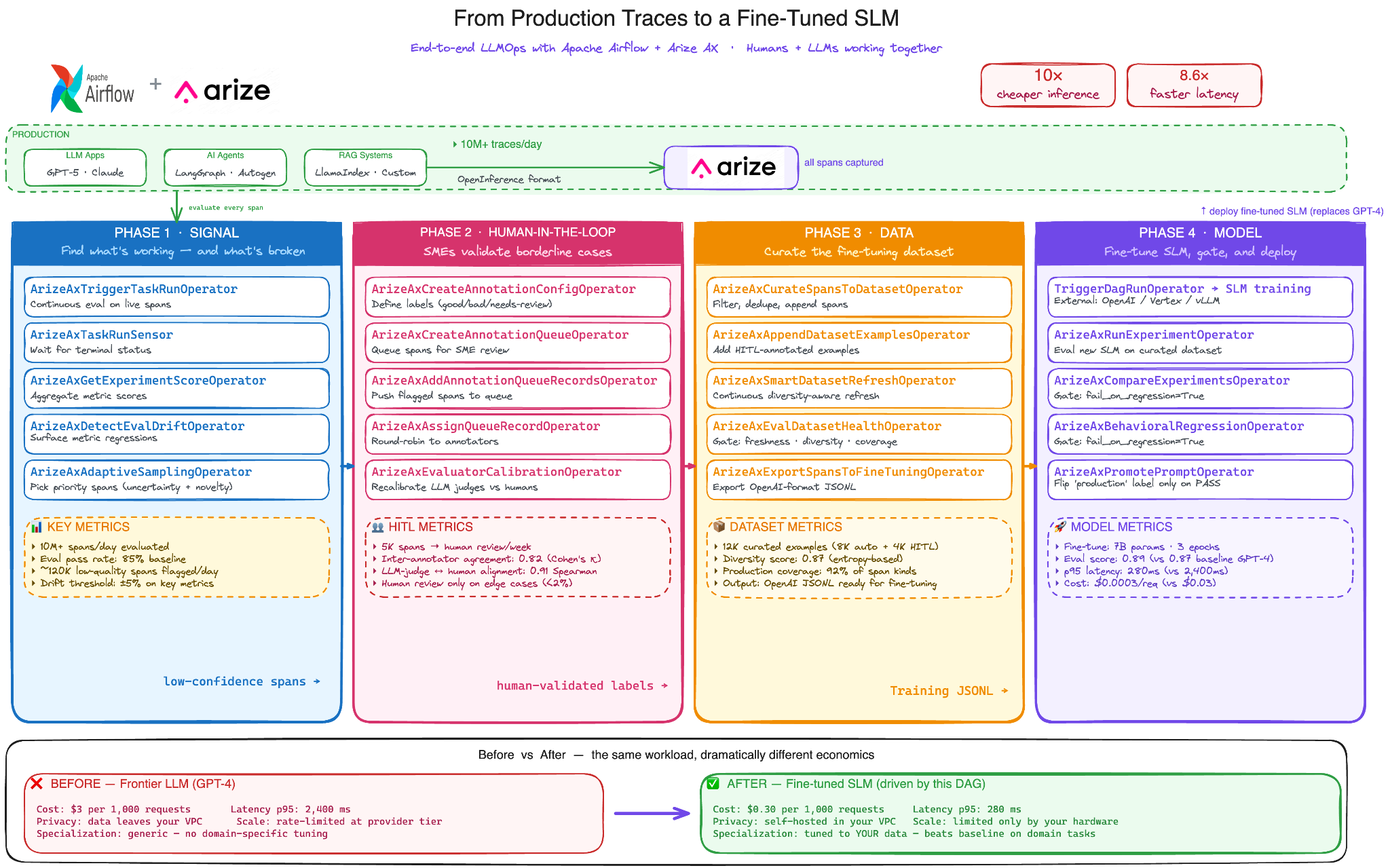
The flow has four phases. Each one chains operators we’ve already talked about, but seeing them together is where the picture clicks.
Phase 1 – Signal: Production traffic flows in millions spans a day, maybe more. You can’t evaluate all of it, and you don’t need to. ArizeAxTriggerTaskRunOperator runs continuous evaluation on live spans through Eval Hub. ArizeAxDetectEvalDriftOperator surfaces metric regressions before users notice them. ArizeAxAdaptiveSamplingOperator picks the priority spans worth deeper review of the ones with high uncertainty, novel inputs, or anomalous outputs. The output of this phase isn’t a dataset. It’s a signal: here are the spans worth your attention.
Phase 2 – Human-in-the-loop: This is where most LLM evaluation pipelines either skip a step or build their own brittle version of it. The provider treats it as a first-class phase. ArizeAxCreateAnnotationQueueOperator routes flagged spans to your SMEs. ArizeAxAssignQueueRecordOperator distributes review work across your team. And critically, ArizeAxEvaluatorCalibrationOperator measures how well your LLM-as-judge evaluators agree with the humans closing the loop. If the LLM judge is drifting away from human judgment, you find out and recalibrate before it poisons everything downstream. In practice, only about 5-10% of spans need human review, the LLM judges handle the rest with measurable accuracy.
Phase 3 – Data: Now you have something that matters: a stream of high-quality, human validated examples. ArizeAxCurateSpansToDatasetOperator filters and deduplicates. ArizeAxAppendDatasetExamplesOperator merges in the HITL annotations. ArizeAxSmartDatasetRefreshOperator keeps the dataset diverse and current as production evolves. Before training, ArizeAxEvalDatasetHealthOperator is a gate that checks freshness, diversity, and coverage. If your dataset is stale or skewed,
training stops here, not after burning the compute. Finally, ArizeAxExportSpansToFineTuningOperator produces an OpenAI-format JSONL file ready for fine-tuning.
Phase 4 – Model: Fine-tuning itself happens outside Airflow TriggerDagRunOperator kicks off your training pipeline, whether that’s the OpenAI fine-tuning API, Together AI, or your own self-hosted vLLM cluster. When training finishes, the rest of the loop is built-in operators again. ArizeAxRunExperimentOperator evaluates the new SLM on your curated dataset. ArizeAxCompareExperimentsOperator with fail_on_regression=True is the gate does the SLM match or beat the baseline GPT-4?. ArizeAxBehavioralRegressionOperator checks that output distribution didn’t shift in unexpected ways. And ArizeAxPromotePromptOperator only flips the production label if every gate passes. No ungated SLM ever reaches users.
None of this requires a custom platform. It’s an Airflow DAG. It runs on the orchestration infrastructure your team already operates, with the retry logic, observability, and audit trails you already trust.
The Arize AX Airflow provider just makes the operators feel native so the DAG that drives a self-improving SLM looks like the DAGs your team is already writing.
The bigger picture: tighter production agent feedback loops
We built these providers because we believe the next phase of LLM adoption isn’t about getting agents to work, but getting them to keep working and keep getting better.
The teams that win will be the ones with the tightest feedback loop between production behavior and system improvement. They’ll be the ones who treat every trace as training data, every evaluation as a test case, and every regression as an opportunity to make the system more robust.
These feedback loops can’t be manual. They’ll need infrastructure and heavy automation.
In our model:
- Arize AX provides the observability, evaluation, and dataset management.
- Airflow provides the scheduling, orchestration, and operational guarantees.
- The provider connects the two so you can build agents that genuinely learn from their own production experience, on a schedule, with retries, with audit trails, and with gates that prevent regressions from reaching users.
Getting started
Install the Arize AX Airflow provider:
pip install arize-ax-airflow-providerConfigure your Arize connection in Airflow:
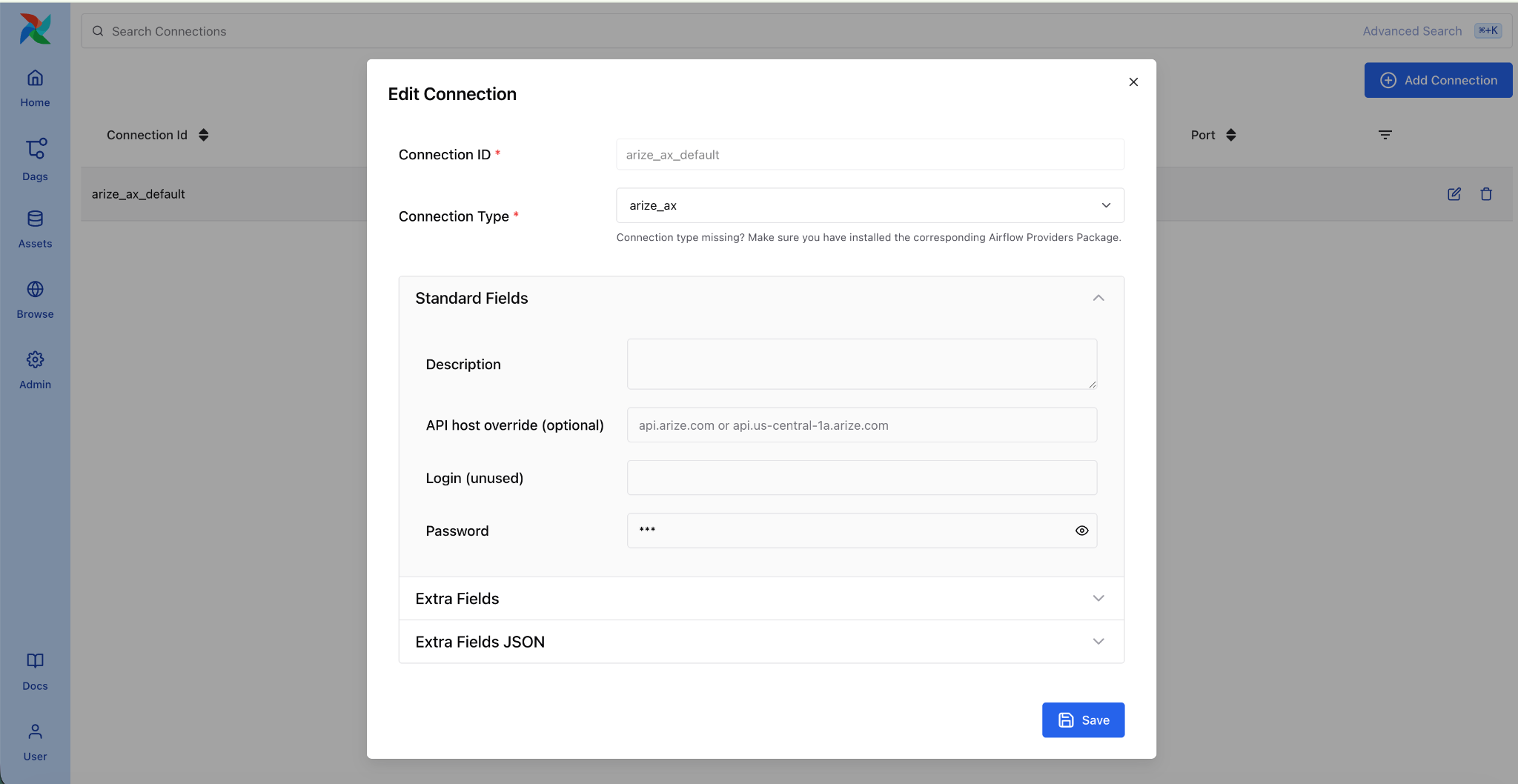
- Go to Admin > Connections > Add
- Set Connection Id to
arize_ax_default - Set Password to your Arize API key
- Set Extra to
{"space_id": "your-space-id"}
Set your Airflow Variables:
airflow variables set arize_ax_space_id "your-space-id"
airflow variables set arize_ax_project_id "your-project-id"
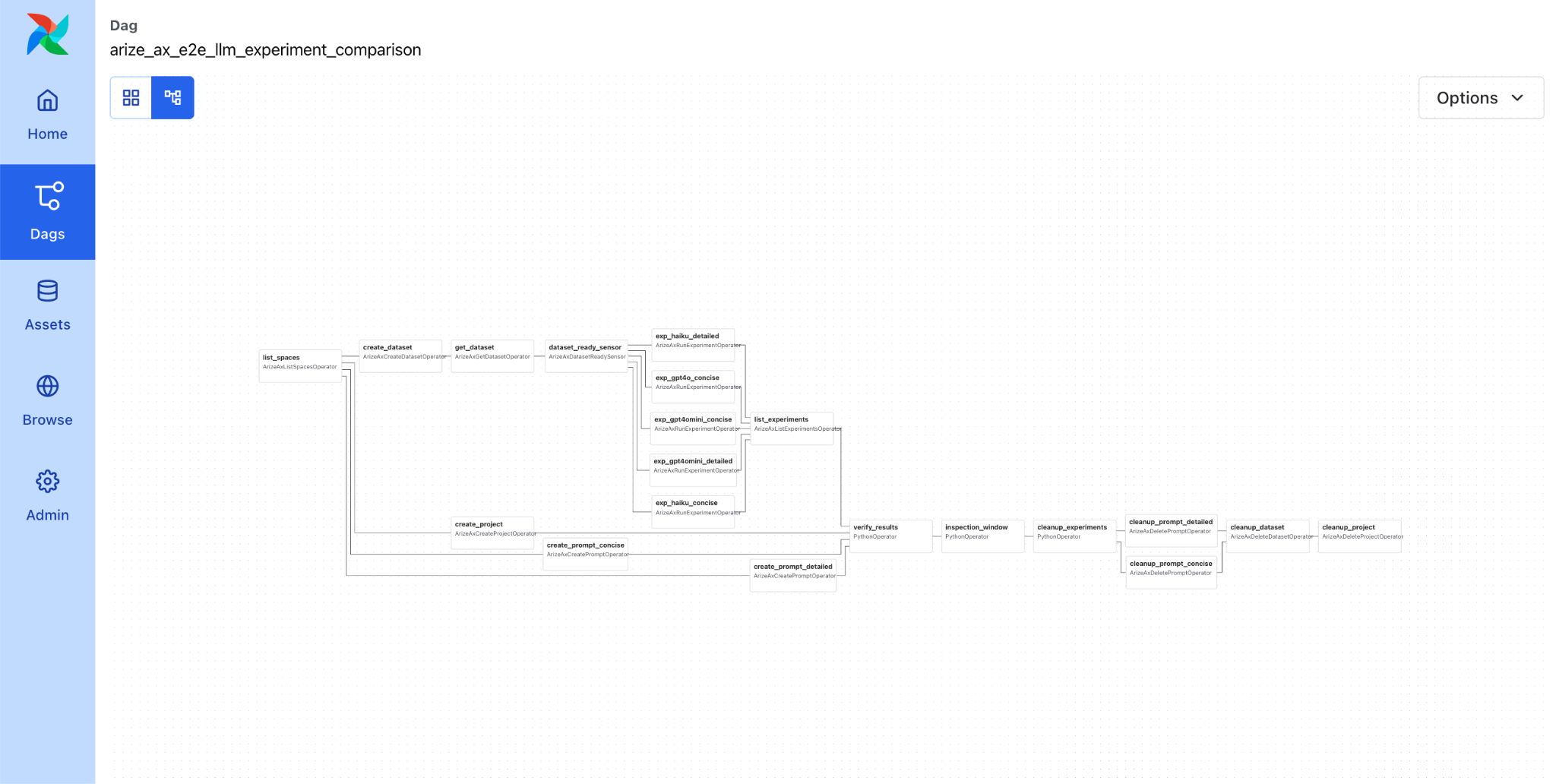
Copy any example DAG from the provider into your DAGs folder and trigger it. The E2E test DAG (example_arize_ax_e2e_dag) is a good place to start, it exercises every major operator and sensor in a single self-contained run.
What’s next
This is the 1.4.x Pre-GA release. We’re actively developing and welcome feedback on the operator APIs, example DAGs, and any LLMOps patterns you’d like to see covered.
If you’re new to Arize AX, the documentation covers the platform features, and the provider’s more information on the operators, sensors, hooks and example DAGs are a practical way to see what’s possible when you bring LLMOps into your orchestration layer.
The Arize AX Airflow Provider requires Python 3.10+, Apache Airflow 2.4+, and Arize SDK v8+

