

- Run continuous evaluations. Attach LLM judges to live projects and gate deployments on eval scores.
- Manage the prompt lifecycle. Create, version, compare, label, and promote prompts in Prompt Hub.
- Curate and refresh evaluation datasets. Append production examples, score dataset health, evolve datasets as your traffic changes.
- Run and compare experiments. Pre-computed or platform-executed, with regression and drift detection.
- Export spans by trace, session, or time window into DataFrames or Parquet for downstream pipelines.
- Orchestrate human-in-the-loop workflows. Annotation queues, agreement metrics, and feedback back into evaluators.
Apache Airflow Example DAGs (GitHub)
Architecture
The provider sits between Airflow and the Arize AX platform. Operators wrap the Arize Python SDK, so every DAG task ends up as a typed call against the same APIs the SDK exposes. Production LLM systems continue to send OpenInference traces to Arize directly; the DAGs you build with this provider read and act on that data.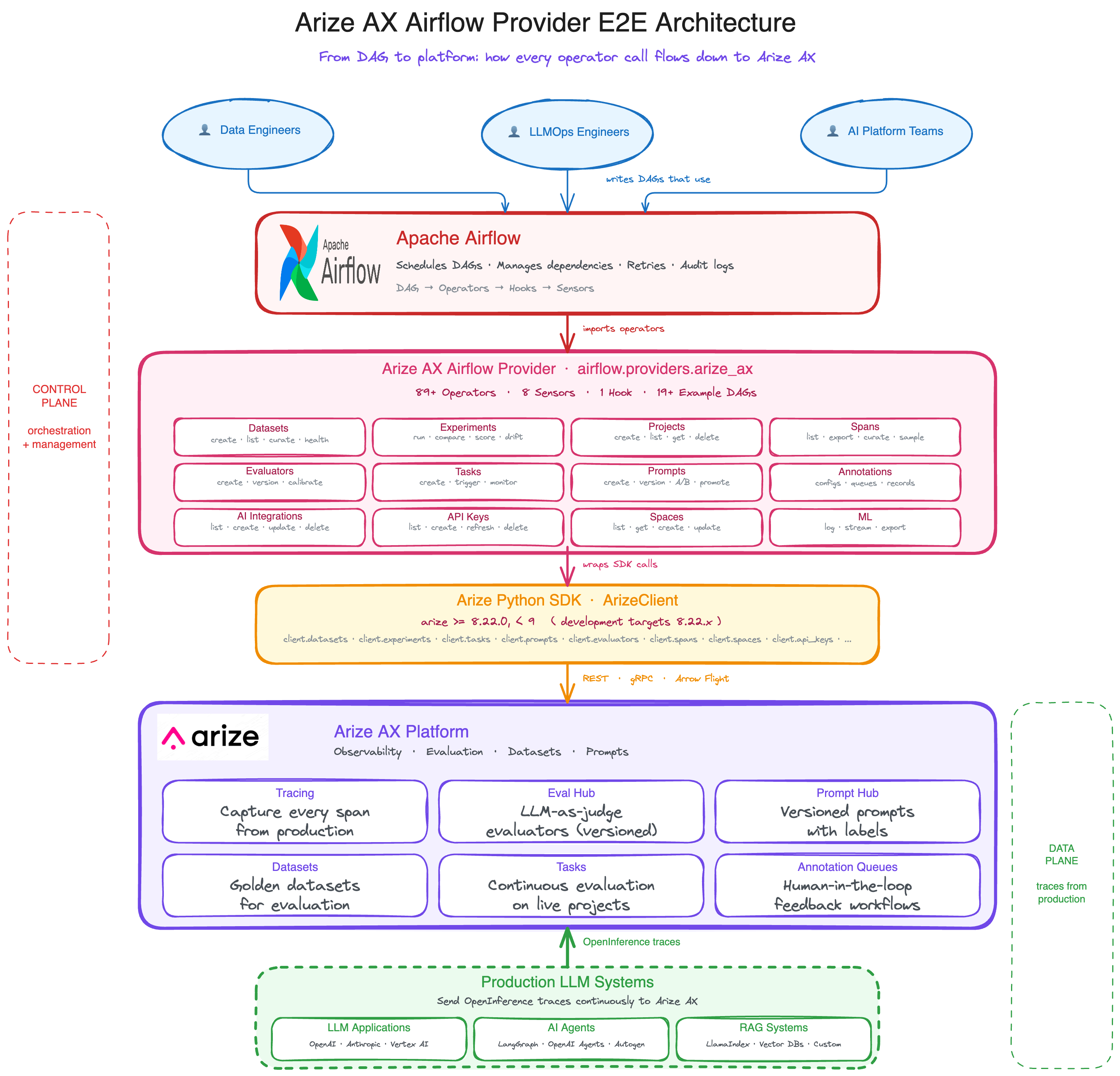
From DAGs down to Arize AX: how operator calls flow through the provider, the SDK, and into the platform.
Prerequisites
- Apache Airflow 2.4+
- Python 3.10+
- An Arize AX account
- An Arize AX API key with read/write permissions for the resources your DAGs manage
Launch Arize
- Sign in to your Arize AX account.
- From Space Settings, copy your Space ID and API Key. You will set them as the password and
default_spaceof the Airflow connection below.
Install
Configure credentials
All operators authenticate through a single Airflow connection. The default connection ID isarize_ax_default.
1
Add an Airflow connection
In Airflow, create a new connection:The provider also exposes custom UI fields for
Extra
space_id, region, and api_scheme, so you can fill them in without editing the Extra blob.2
(Optional) Set Airflow Variables
Operators resolve
space_id in this order: the operator argument, then the connection’s extra.default_space, then the Airflow Variable arize_ax_space_id.If you set arize_ax_space_id as a Variable, you can template space_id="{{ var.value.get('arize_ax_space_id', None) }}" once and reuse it across DAGs.Run a DAG
This DAG creates a dataset and lists its examples. Both operators are idempotent, so you can re-run it safely.Expected output
Verify in Arize
- Open your Arize AX space and navigate to Datasets.
- You should see the
quickstart-datasetdataset with 2 examples within ~30 seconds of the DAG completing. - If the dataset doesn’t appear, see Troubleshooting.
Troubleshooting
- Connection
arize_ax_defaultnot found. Confirm the Airflow connection was created with that exact ID, or overridearize_ax_conn_idon each operator. 401 Unauthorizedfrom Arize. The API key is missing, revoked, or doesn’t have the resource permission the operator requires. Regenerate the key in Space Settings → API Keys.- Tasks succeed but the resource doesn’t appear in Arize. The connection is pointing at the wrong region. Match the Host field (for example
api.us-central-1a.arize.com) to the region of the space you copied the API key from. space_idresolution error. Operators resolvespace_idfrom the operator argument first, then the connection’sextra.default_space, then thearize_ax_space_idAirflow Variable. Set one of these.- Sensor times out. Either the upstream task never produced the resource the sensor is watching, or the
timeoutis shorter than the real latency. Increasetimeoutor check upstream task logs.
Design patterns
A handful of patterns show up across every example DAG. Knowing them is most of what makes a DAG safe to re-run and easy to gate.Idempotent creates
EveryCreate* operator accepts if_exists="skip" (the default is "fail"). On a 409 Conflict, the operator looks up the existing resource by name and returns its ID, so a re-run doesn’t error out and doesn’t require manual cleanup.
Delete* operators take the inverse flag, ignore_if_missing=True (also the default). A 404 becomes a no-op.
Built-in eval gates
Comparison and scoring operators raiseAirflowException when a quality bar isn’t met, and Airflow’s normal failure semantics block downstream tasks. You don’t need a ShortCircuitOperator.
XCom output shape
List operators push a normalized payload to XCom and expose convenience keys, so downstream tasks don’t have to unpack the response.Create* and RunExperiment operators return the new resource ID as a scalar, so you can pull it directly with ti.xcom_pull(task_ids='...').
Wait with sensors, not sleep
Use sensors to gate downstream work on real Arize state instead of fixed delays:ArizeAxExperimentRunCountSensorblocks until N runs complete.ArizeAxEvaluationScoreSensorblocks until a metric mean clears a threshold.ArizeAxSpanCountSensorblocks until ingestion produces enough spans to evaluate.ArizeAxTaskRunSensorblocks until an evaluation task run reaches a terminal state.
poke_interval, timeout, mode, and soft_fail.
Templating with Jinja
Every operator declarestemplate_fields for its runtime-resolved parameters: space_id, project_name, dataset_id, start_time, end_time, and the like. Use Jinja to pull from Variables, XCom, or the DAG context:
Re-evaluate existing spans
ArizeAxTriggerTaskRunOperator accepts override_evaluations=True. When you change an evaluator template, you can re-score the same time window without manually clearing spans first.
Example DAGs
The provider ships a library of example DAGs covering common LLMOps patterns end to end. Three representative ones are below.LLM CI/CD gate
Run a candidate experiment, score it against a stored baseline, and fail the DAG if the candidate doesn’t beat the baseline by a configured threshold. The failure blocks the downstream promotion task.example_arize_ax_llm_cicd_gate_dag.py.
Prompt lifecycle
Pull a prompt by ID, run a staging evaluation, score it, label itstaging, run a production-environment evaluation, compare against the live production version, and promote on pass.
Key operators: ArizeAxGetPromptOperator, ArizeAxRunExperimentOperator, ArizeAxGetExperimentScoreOperator, ArizeAxPromotePromptOperator, ArizeAxCompareExperimentsOperator.
Full DAG: example_arize_ax_prompt_lifecycle_dag.py.
Dataset curation from production spans
On a daily schedule, export production spans that match a quality filter, deduplicate them, and append them to a long-running evaluation dataset. Key operators:ArizeAxSpansExportToDataframeOperator, ArizeAxCurateSpansToDatasetOperator, ArizeAxAppendDatasetExamplesOperator. Pair them with ArizeAxEvalDatasetHealthOperator to track freshness, diversity, and coverage drift.
Full DAG: example_arize_ax_dataset_curation_dag.py.
More patterns
Other DAGs cover drift detection with auto-rollback, behavioral regression checks, prompt A/B testing, RAG evaluation, fine-tuning data export, and HITL annotation queues. Browse them inairflow_example_dags/.
Resources
Operator reference
Every operator, sensor, and hook, grouped by domain.
Example DAGs
Runnable DAGs covering CI/CD gating, prompt lifecycle, dataset curation, and more.
Apache Airflow
Apache Airflow documentation and project homepage.
Python SDK v8
The underlying
ArizeClient API the provider wraps.