Most conversations about agents center on coding. Whether you use an agent to build software or just clean up a spreadsheet, agents’ ability to write code has unlocked a vast set of capabilities. Coding agents are no longer just for engineers; they’re also for marketers, designers, and analysts. They’re being rapidly adopted across white-collar jobs because they help people get real work done, and this adoption is driving the pace of growth. The proof is in the market: Claude Code and Codex now have non-engineering variants in Claude Design and Codex Work, and Anthropic’s revenue has been growing 10x year over year.
So why do we use coding agents for non-coding work? What is the secret capability that coding unlocks?
The simple answer is that code is currently the right tool for most agent tasks. LLMs can use programming languages to solve problems through code rather than needing to be trained in some other modality. This has clearly been the focus of the frontier labs: ever since coding agents took off, the latest frontier models have been trained and evaluated primarily on software engineering benchmarks.
You may have heard terms like code mode, dynamic workflows, and sandboxes, and wondered why they’re so popular right now. After all, it’s just an LLM calling a tool. How can that differ from calling a function?
In this post I’ll explain why code mode matters, where simple tool calling breaks down, and what to look out for when adding a sandboxed execution environment to your own agent harness.
Build better agents with Arize
Trace, evaluate, and learn. Build agents that work with Arize AX and start tracing your runs today.
Prefer open source? Try Arize Phoenix for self-hosted, open source agent observability.

Tool calling basics: how it works
Before we dive into code mode, we need to understand what tool calling is. Tools let you extend an LLM’s capabilities. For example, many LLMs are bad at math. Hand the LLM a calculator and it will most likely get the answer right.
At a very basic level, the loop works like this: an LLM is given a list of tools and a user asks a question. The model either answers directly or decides it doesn’t have enough information and chooses a tool instead. If the LLM picks a tool, it generates JSON that satisfies the tool’s parameters and stops generating. The harness executes the tool for the LLM and feeds the response back to the model so it can reason about what to do next. With the result in its context window, the model either produces a response to the user or decides it still lacks sufficient information and picks another tool. It’s the agent harness’s job to keep this loop going until the requested task is complete.
This loop is at the core of every agent, and it works under many circumstances. But what happens when the agent is given too many tools?
The too many tools problem
As agents connect to more and more tools (often through multiple MCP servers), several costs compound quickly.
- Tool definitions flood the context window. Most LLMs load tool definitions up front so the model knows what’s at its disposal. But as tool counts grow, those definitions crowd out the tokens available for reasoning, and models tend to degrade as their context window fills.
- Every intermediate result flows through the model. Ask an agent to “download the meeting transcript and attach it to the Salesforce lead,” and the full transcript may pass through the context window twice: once as a tool result, and again as the model copies it into the next tool call. For a long meeting, that’s tens of thousands of extra tokens, plus a real chance the model garbles the data in transcription.
- Latency and cost add up across turns. Every tool call is another model turn, and every turn resends the entire growing context. A workflow with 30 small steps means 30 rounds of token generation, tool execution, and context reconstruction. That is slow and expensive: You pay for 30 LLM calls, each with a longer prompt than the last. Prompt caching softens the bill but doesn’t eliminate it, since cached tokens still cost something and every turn adds new ones.
Tool calling is vital for building agents. But as the number of tools, records, and intermediate artifacts grow, having the “model in the middle of every step” becomes expensive and limits the agent’s ability to solve long-horizon tasks. The context window simply can’t handle the load.
What is code mode?
Code mode is one way to solve the “too many tools” problem. Let’s work up to it step by step.
Say you have 100 tools and you don’t want them loaded into the context window up front. One tempting solution is to expose just two tools: search and execute. The search tool lets the LLM find the tool it needs using natural language, and execute lets it run any tool in the catalog. Just like that, 100 tools become 2. We fixed the problem!
But wait. This only solves the upfront cost of loading 100 definitions. To actually get work done, the model still has to search and execute over and over, and now every step carries an extra search call it didn’t need before. We’ve traded a leaner upfront prompt for even more round trips, so we still have a latency and cost problem.
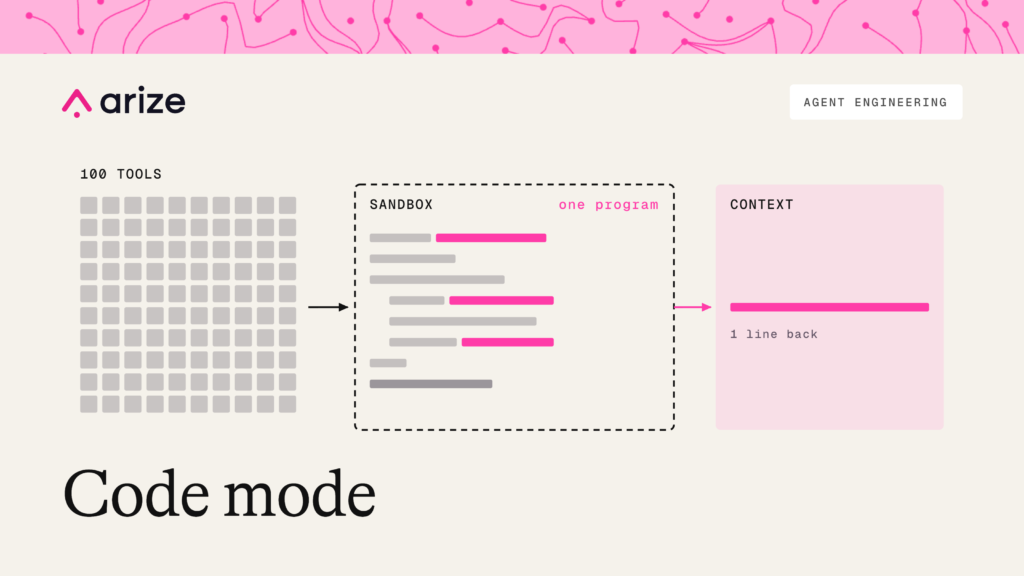
That’s where a coding sandbox comes in. Instead of exposing every tool directly to the model, you give the agent a sandbox and expose your tools as functions inside it. Rather than calling tools one at a time, the agent writes a small program that combines them with loops and conditionals, performs the task, and returns only the useful final output.
Now we have two tools, fewer turns, and far better token efficiency. This is code mode at its core.
Code mode in practice
Code mode doesn’t just make tool use more efficient. It’s a powerful pattern because the agent can now write code to do work that no tool was ever built for.
Let’s work through a concrete example. Say you accidentally let credit card numbers slip into one of your datasets, and you ask an agent to scrub them. With plain tool calling, the agent has to loop through three tools by hand:
list_datasets()
  → get_dataset_examples("dataset-1")
  → [model reads every example, rewrites each one with the card number masked]
  → update_examples("dataset-1", redacted)
  → get_dataset_examples("dataset-2")
  → ...
Every example passes through the context window twice, once on the way in and once on the way out. The model does the redaction itself, token by token, on possibly thousands of records. It’s slow, expensive, and every rewrite is a chance to garble the data, miss a card number, or leak one into the transcript.
In code mode, the agent writes one program. Notice that redactPII isn’t a tool anyone gave it. The model wrote it on the spot:
const CARD_NUMBER = /\b(?:\d[ -]?){13,16}\b/g

function redactPII(example) {
  return {
    ...example,
    input: example.input.replace(CARD_NUMBER, "[REDACTED]"),
    output: example.output.replace(CARD_NUMBER, "[REDACTED]"),
  }
}

const datasets = await list_datasets()
let redacted = 0

for (const dataset of datasets) {
  const examples = await get_dataset_examples(dataset.id)
  const cleaned = examples.map(redactPII)
  redacted += cleaned.filter((e, i) => e !== examples[i]).length
  await update_examples(dataset.id, cleaned)
}

console.log(`redacted ${redacted} examples across ${datasets.length} datasets`)
The agent still uses the same underlying tools. What changes is the interface. Rather than N tool schemas and N round trips, the model sees a code API and makes one tool call to execute the program.
As a bonus, the credit card numbers never enter its context and the only thing the model sees is a one-line summary of what happened.
Code mode isn’t a niche trick; it’s the pattern the frontier labs are building around at every layer. Coding harnesses like Claude Code are, at their core, a model with a shell, a filesystem, and a sandbox to run programs in. It is this coding capability that largely contributes to harnesses outperforming LLMs with tools in a loop.
The newest generation of models are explicitly trained to thrive in this type of setting, and many MCP servers are moving the same direction, increasingly exposing their tools as code APIs. Companies are making this bet because code is the grain along which model capabilities are advancing the fastest.
The tradeoffs of code mode
Code mode is not all upside. It trades a set of well-understood problems for a set of newer ones, and some of them are serious.
You are now running LLM-generated code.
Running LLM-generated code demands real sandboxing, and where the code runs matters a lot. Generated code needs to execute in isolation (a container, micro-VM, or interpreter-level sandbox) with hard caps on CPU, memory, execution time, and filesystem access. Network access needs careful thought: a prompt-injected agent with an open connection can exfiltrate data just by writing code. The sandbox should expose only the functions and data the user is allowed to access, and you need a record of what the agent ran, not just what it said. None of this is easy to retrofit, so you need to design it in from the start. The good news is that isolation is a problem you can mostly buy rather than build; providers like Vercel Sandboxes and Daytona exist precisely because so many teams hit this wall at once.
It’s harder to debug.
A failing tool call is a discrete event with a clear input and output. A failing program is subtler: the bug might be in the agent’s logic, in how it composed the tools, or in an intermediate result you never saw because it never left the sandbox. Traces get harder to read and evaluate.
You may be reinventing what the model or harness already does.
Code mode needs more than a sandbox. The agent also needs a way to find the right functions and learn their API, which means some form of tool search.
But foundation models and coding harnesses are increasingly shipping with tool search and code execution built in. If you build your own inside, say, an MCP server, you may be duplicating what the harness already provides, in a layer that shouldn’t own it. Best practices here are still evolving, so treat this as a caution rather than a rule.
You may not need code mode at all.
The problems that motivate code mode are real, but they’re less severe than a year ago. Models handle larger tool lists better and harnesses are smarter about what they load.
For a product with a modest number of tools, plain tool calling may be the simpler, safer choice. Code mode earns its complexity when tool count, data volume, or task horizon grows past what tool calling handles gracefully.
What code lets agents do
Giving agents the ability to write code unlocks capabilities that natural-language reasoning alone couldn’t reach. An agent can now generate a workflow on the fly, transform data at scale, and orchestrate dozens of tools in a single program. With newer patterns like dynamic workflows, it can even spin up and coordinate sub-agents through code rather than a rigid orchestration layer.
At Arize, we lean on code mode heavily. Our agents use code mode to manage their own context window, keeping large payloads like experiment results in the sandbox, and use them to filter results down before anything reaches the model’s context.
When something goes wrong in a trace, our agents write and run SQL in a sandbox to pinpoint the problem via aggregation queries instead of paging through results one tool call at a time.
Tool calling made agents useful, but code has undoubtedly helped them scale. The models are being tuned for it, the infrastructure has matured around it, and the pattern is converging across the ecosystem.
Every new interface we hand an LLM expands what it can do, and code is the most general-purpose interface we’ve found. An agent that can write its own software isn’t limited to the tools it was given; it can build whatever the problem calls for. Whether or not this pattern is the path to AGI is yet to be seen, but it’s hard not to see it as a real step forward in autonomy.

