

Iterative Evaluation & Experimentation Workflow (TypeScript)

Phoenix Tracing, Evaluating, and Experimentation Walkthrough

This tutorial covers the complete workflow for building a movie recommendation agent with Mastra, from initial setup to running experiments and iterating on improvements.

In this tutorial, you will:

  • Build a movie recommendation agent using the Mastra framework and OpenAI models

  • Instrument and trace your agent with Phoenix

  • Create a dataset and upload it to Phoenix

  • Define LLM-based evaluators to assess agent performance

  • Run experiments to measure performance changes

  • Iterate on the agent and re-run experiments to observe improvements

⚠️ Prerequisites: This tutorial requires:

  • A free Arize Phoenix Cloud account or local Phoenix instance

  • An OpenAI API key

  • Node.js and npm installed\

Walkthrough

We will go through key code snippets on this page. The full implementation is available here:

This tutorial uses two primary files for running the experiments, located in src/experiments


Agent Overview

The movie recommendation agent is built with Mastra and provides personalized movie recommendations using three specialized tools:

  1. MovieSelector: Finds recent popular streaming movies by genre

  2. Reviewer: Reviews and sorts movies by rating

  3. PreviewSummarizer: Provides concise summaries for movies

The agent orchestrates these tools in sequence to provide comprehensive movie recommendations based on user queries.

Agent Structure

The agent is configured with clear instructions to use all three tools in sequence:

export const movieAgent = new Agent({
  name: "Movie Recommendation Assistant",
  instructions: `You are a helpful movie recommendation assistant with access to three tools:
    1. MovieSelector: Given a genre, returns a list of recent streaming movies.
    2. Reviewer: Given one or more movie titles, returns reviews and sorts them by rating.
    3. PreviewSummarizer: Given one or more movie titles, returns 1-2 sentence summaries for each movie.

    Your workflow should be:
    1. First, use MovieSelector to get movies for the user's requested genre
    2. Then, use Reviewer to get reviews and ratings for those movies
    3. Finally, use PreviewSummarizer for additional details on movies. You can pass multiple movies at once to PreviewSummarizer for efficiency.

Always use multiple tools in sequence to provide comprehensive recommendations. Don't stop after just one tool call.`,
  model: openai("gpt-4o-mini"),
  tools: { movieSelectorTool, reviewerTool, previewSummarizerTool },
});

Setup and Running the Agent

1

Install Dependencies

npm install

This installs all required dependencies including:

  • @ai-sdk/openai - OpenAI SDK for AI SDK

  • @mastra/core - Mastra core framework

  • @mastra/arize - Arize Phoenix Tracing integration

  • @arizeai/phoenix-evals - Arize Phoenix Evals TS Library

  • @arizeai/phoenix-client - Arize Phoenix Client library

2

Configure Environment

Create a .env file in the root directory:

# OpenAI API Key
OPENAI_API_KEY=your-openai-api-key-here

# Phoenix Configuration
PHOENIX_ENDPOINT=http://localhost:6006/v1/traces
PHOENIX_PROJECT_NAME=mastra-project
PHOENIX_API_KEY=your-api-key  # Required for Phoenix Cloud
3

Run the Agent

Start the Mastra dev server:

npm run dev

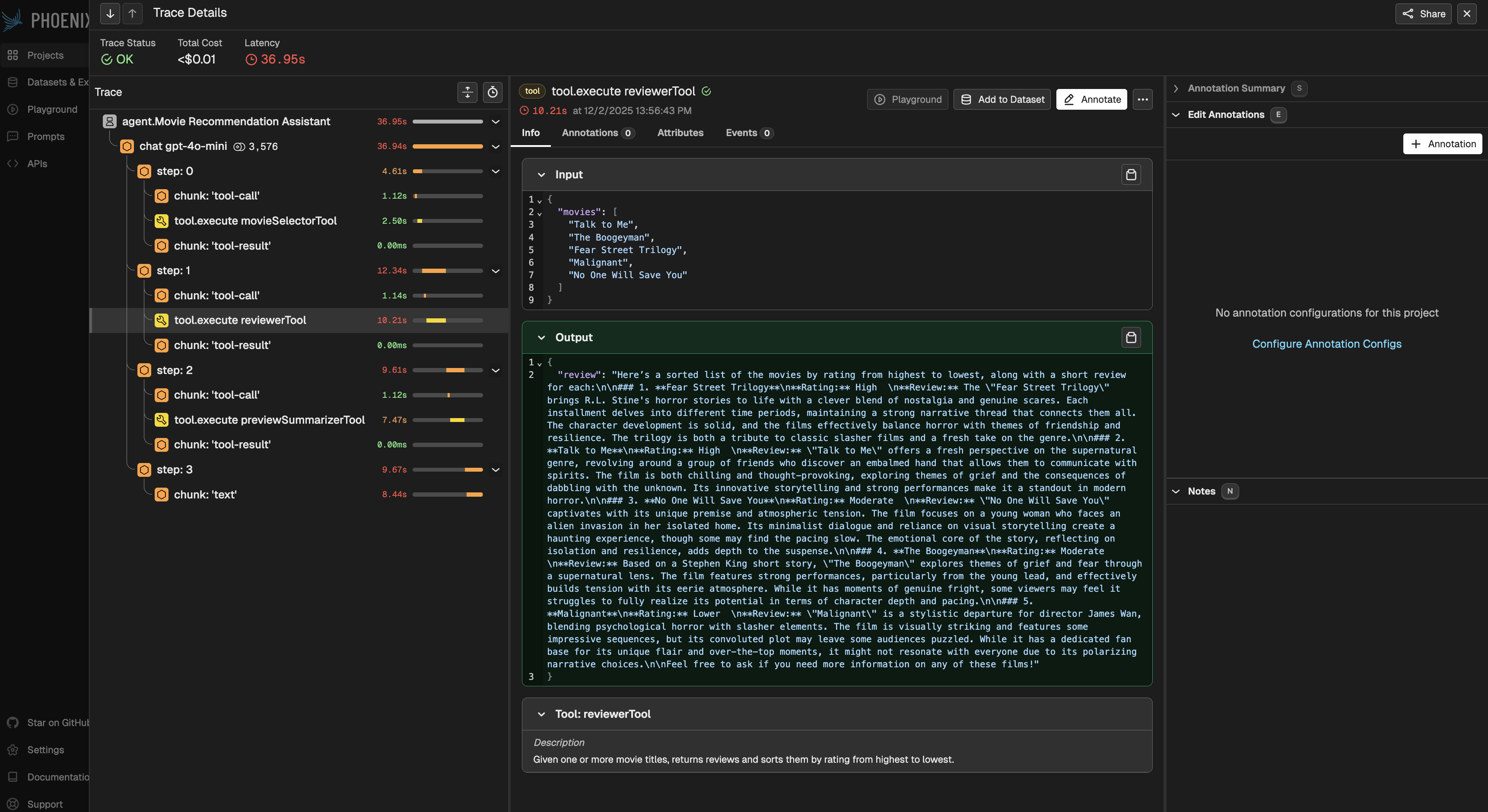
Navigate to the Mastra Playground to interact with the movie recommendation agent. All agent runs, tool calls, and model interactions are automatically traced and sent to Phoenix.
Setting Up Experiments

To systematically evaluate and improve the agent, we'll set up experiments using Phoenix. This involves three main components:

  1. Task Function: Wraps the agent to execute on dataset examples

  2. Dataset: Collection of inputs to test the agent

  3. Evaluators: Metrics to measure agent performance

Step 1: Define the Task

The task function takes a dataset example and returns the agent's output:

import { movieAgent } from "../mastra/agents/movie-agent";
import type { Example } from "@arizeai/phoenix-client/types/datasets";

// Step 1: define the task to run (we call the agent with the question)
export async function task(example: Example): Promise<string> {
    const question = example.input.question as string;

    // Call the movie agent with the question
    const result = await movieAgent.generate(question);

    // Extract the text response from the result
    return result.text || "";
}

Step 2: Create the Dataset

In order to experiment with our agent, we first need to define a dataset for it to run on. This provides a standardized way to evaluate the agent's behavior across consistent inputs.

We will use a small dataset for demo purposes:

import { createOrGetDataset } from "@arizeai/phoenix-client/datasets";

// Step 2: define the dataset of questions to ask the agent
const DATASET = [
    "Which horror movie should I watch next?",
    "Give me a good comedy movie to watch tonight.",
    "Recommend a comedy that is also a musical",
    "Show me a popular movie that didn't do well at the box office",
    "What horror movies are not too violent",
    "Name a feel-good holiday movie",
    "Recommend a musical with great songs",
    "Give me a classic drama from the 90s",
    "Name a movie that is a classic action movie",
    "Which Batman movie should I watch?"
]

export const dataset = await createOrGetDataset({
    name: "movie-rec-questions",
    description: "Questions to ask a movie recommendation agent",
    examples: DATASET.map(question => ({
      input: {
        question: question,
      },
    })),
});

The createOrGetDataset function will either retrieve an existing dataset by name or create a new one, making it safe to re-run the setup code.

Step 3: Define Evaluators

Next, we need a way to assess the agent's outputs. This is where Evals come in. Evals provide a structured method for measuring whether an agent's responses meet the requirements defined in a dataset—such as accuracy, relevance, consistency, or safety.

In this tutorial, we will be using LLM-as-a-Judge Evals, which rely on another LLM acting as the evaluator. We define a prompt describing the exact criteria we want to evaluate, and then pass the input and the agent-generated output from each dataset example into that evaluator prompt. The evaluator LLM then returns a score along with a natural-language explanation justifying why the score was assigned.

This allows us to automatically grade the agent's performance across many examples, giving us quantitative metrics as well as qualitative insight into failure cases.

import { createClassificationEvaluator } from "@arizeai/phoenix-evals";
import { openai } from "@ai-sdk/openai";

// Step 3: Define the evaluators
const RECOMMENDATION_RELEVANCE = `
  You are evaluating the relevance of movie recommendations provided by an LLM application.

  You will be given:
  1. The user input that initiated the trace
  2. The list of movie recommendations output by the system

  ##
  User Input:
  {{input.question}}

  Recommendations:
  {{output}}
  ##

  Respond with exactly one word: \`correct\` or \`incorrect\`.
  1. \`correct\` →
  - All recommended movies match the requested genre or criteria in the user input.
  - The recommendations should be relevant to the user's request and shouldn't be repetitive.
  2. \`incorrect\` → one or more recommendations do not match the requested genre or criteria.
  `;

export const recommendationRelevanceEvaluator = createClassificationEvaluator({
    name: "Relevance",
    model: openai("gpt-4o"),
    promptTemplate: RECOMMENDATION_RELEVANCE,
    choices: {
      correct: 1,
      incorrect: 0,
    },
});

The evaluator uses double curly braces {{variable}} for template variables, which Phoenix will automatically populate with the input and output from each experiment run.

Running the Experiment

With the task, dataset, and evaluators defined, we can now set up the experiment. This code is found in src/experiments/run-experiments.ts :

import { runExperiment } from "@arizeai/phoenix-client/experiments";
import { dataset } from "./configure-experiments";
import { task } from "./configure-experiments";
import { recommendationRelevanceEvaluator } from "./configure-experiments";

// Step 4: Run the experiment
await runExperiment({
    experimentName: "movie-rec-experiment",
    experimentDescription: "Evaluate the relevancy of movie recommendations from the agent",
    dataset: dataset,
    task: task,
    evaluators: [recommendationRelevanceEvaluator],
});

Run the experiment with this command:

npx tsx src/experiments/run-experiments.ts

The experiment will:

  1. Run the task function on each example in the dataset

  2. Execute the evaluators on each task output

  3. Record all traces, spans, and evaluation results in Phoenix

  4. Provide aggregate metrics across all examples

Viewing Results in Phoenix

Once the experiment completes, open Phoenix to explore the results. You'll be able to:

  • View Full Traces: Step through each agent run, including all tool calls and model interactions

  • Review Aggregate Metrics: Understand overall performance across the dataset

  • Examine Evaluation Results: See the LLM-as-a-Judge explanations for each eval

Iterating on the Agent

After analyzing the experiment results, you may identify areas for improvement. Let's walk through an iteration cycle.

1. Error Analysis

Review the traces and evaluation results to identify patterns:

  • Are certain types of queries performing poorly?

  • Are tool calls being made correctly?

  • Are the recommendations relevant to user requests?

For example, you might notice that the MovieSelector tool isn't returning movies that are highly relevant to the user's specific criteria.

2. Make Improvements

Based on your analysis, update the agent code. In this case, let's enhance the MovieSelector tool's prompt to provide more relevant recommendations. Navigate to the file, src/mastra/tools/movie-selector-tool.ts , and find the prompt:

Before:

const promptText = `List up to 5 recent popular streaming movies in the ${genre} genre. Provide only movie titles as a list of strings.`;

After:

const promptText = `You are a movie recommendation expert. List exactly 5 highly-rated, recent (released within the last 3 years) movies in the ${genre} genre that are currently available on major streaming platforms (Netflix, Hulu, Amazon Prime, Disney+, HBO Max, etc.).

Requirements:
- Movies must be currently available on at least one major streaming platform
- Movies must be strong examples of the ${genre} genre

Format your response as a simple list of exactly 5 movie titles, one per line, with no numbering or bullet points. Only include the movie titles.`;

3. Re-Run the Experiment

After making changes, re-run the experiment with a new name to track the improvement:

await runExperiment({
    experimentName: "movie-rec-experiment-improved-prompt",
    experimentDescription: "Evaluate the relevancy with improved MovieSelector prompt",
    dataset: dataset,
    task: task,
    evaluators: [recommendationRelevanceEvaluator],
});

In Phoenix, you can now compare the two experiments side-by-side:

  • Did the relevance scores improve?

  • Are there fewer incorrect recommendations?

  • What patterns changed in the evaluation explanations?

From here, we can continue the iterative process by forming a new hypothesis, applying changes based on what we've learned, and running another experiment. Each cycle helps refine the agent's behavior and moves us closer to outputs that consistently meet the desired criteria.

Last updated

Was this helpful?