

LLM as a Judge
An LLM as a Judge refers to using an LLM as a tool for evaluating and scoring responses based on predefined criteria. While LLMs are powerful tools for evaluation, their performance can be inconsistent. Factors like ambiguity in the prompt, biases in the model, or a lack of clear guidelines can lead to unreliable results. By fine-tuning your LLM as a Judge prompts, you can improve the model’s consistency, fairness, and accuracy, ensuring it delivers more reliable evaluations. In this tutorial, you will:- Generate an LLM as a Judge evaluation prompt and test it against a dataset
- Learn about various optimization techniques to improve the template, measuring accuracy at each step using Phoenix evaluations
- Understand how to apply these techniques together for better evaluation across your specific use cases

Google Colab
colab.research.google.com
Set Up Dependencies and Keys
phoenix serve; for a deployment running elsewhere, use its hostname instead.
Load Dataset into Phoenix
Phoenix offers many pre-built evaluation templates for LLM as a Judge, but often, you may need to build a custom evaluator for specific use cases. In this tutorial, we will focus on creating an LLM as a Judge prompt designed to assess empathy and emotional intelligence in chatbot responses. This is especially useful for use cases like mental health chatbots or customer support interactions. We will start by loading a dataset containing 30 chatbot responses, each with a score for empathy and emotional intelligence (out of 10). Throughout the tutorial, we’ll use our prompt to evaluate these responses and compare the output to the ground-truth labels. This will allow us to assess how well our prompt performs.Generate LLM as a Judge Template using Meta Prompting
Before iterating on our template, we need to establish a prompt. Running the cell below will generate an LLM as a Judge prompt specifically for evaluating empathy and emotional intelligence. When generating this template, we emphasize:- Picking evaluation criteria (e.g., empathy, emotional support, emotional intelligence).
- Defining a clear scoring system (1-10 scale with defined descriptions).
- Setting response formatting guidelines for clarity and consistency.
- Including an explanation for why the LLM selects a given score.
Testing Our Initial Prompt
Instrument the application to send traces to Phoenix:- Task: The LLM as a Judge evaluation, where the model scores chatbot responses based on empathy and emotional intelligence.
- Evaluator: A function that compares the LLM as a Judge output to the ground-truth labels from our dataset
Iteration 1: Improve Accuracy
If you find that your LLM as a Judge prompt has low accuracy, we can make adjustmenets to the prompt to improve that. In this section, we explore 2 techniques for this: few shot examples and keeping a human in the loop.Technique 1: Few Shot Examples
Few-shot examples help improve the accuracy of an LLM as a Judge prompt by providing clear reference points for evaluation. Instead of relying solely on general instructions, the model learns from labeled examples that demonstrate correct scoring and reasoning. By including a mix of high, medium, and low-scoring responses, we help the model:- Understand nuanced criteria like empathy and emotional intelligence.
- Reduce inconsistencies by aligning with real-world judgments.
Technique 2: Human in the Loop
Keeping a human in the loop improves the accuracy of an LLM as a Judge by providing oversight, validation, and corrections where needed. In Phoenix, we can do this with annotations. While LLMs can evaluate responses based on predefined criteria, human reviewers help:- Catch edge cases and biases that the model may overlook.
- Refine scoring guidelines by identifying inconsistencies in LLM outputs.
- Continuously improve the prompt by analyzing where the model struggles and adjusting instructions accordingly.

Human Annotation
Iteration 2: Reduce Bias
Style Invariant Evaluation
One common bias in LLM as a Judge evaluations is favoring certain writing styles over others. For example, the model might unintentionally rate formal, structured responses higher than casual or concise ones, even if both convey the same level of empathy or intelligence. To reduce this bias, we focus on style-invariant evaluation, ensuring that the LLM judges responses based on content rather than phrasing or tone. This can be achieved by:- Providing diverse few-shot examples that include different writing styles.
- Testing for bias by evaluating responses with varied phrasing and ensuring consistent scoring.
Iteration 3: Reduce Cost and Latency
Longer prompts increase computation costs and response times, making evaluations slower and more expensive. To optimize efficiency, we focus on condensing the prompt while preserving clarity and effectiveness. This is done by:- Removing redundant instructions and simplifying wording.
- Using bullet points or structured formats for concise guidance.
- Eliminating unnecessary explanations while keeping critical evaluation criteria intact.
Iteration 4: Self-Refinement (Iterative LLM as Judge)
Self-refinement allows a Judge to improve its own evaluations by critically analyzing and adjusting its initial judgments. Instead of providing a static score, the model engages in an iterative process:- Generate an initial score based on the evaluation criteria.
- Reflect on its reasoning, checking for inconsistencies or biases.
- Refine the score if needed, ensuring alignment with the evaluation guidelines.
Iteration 5: Combining Techniques
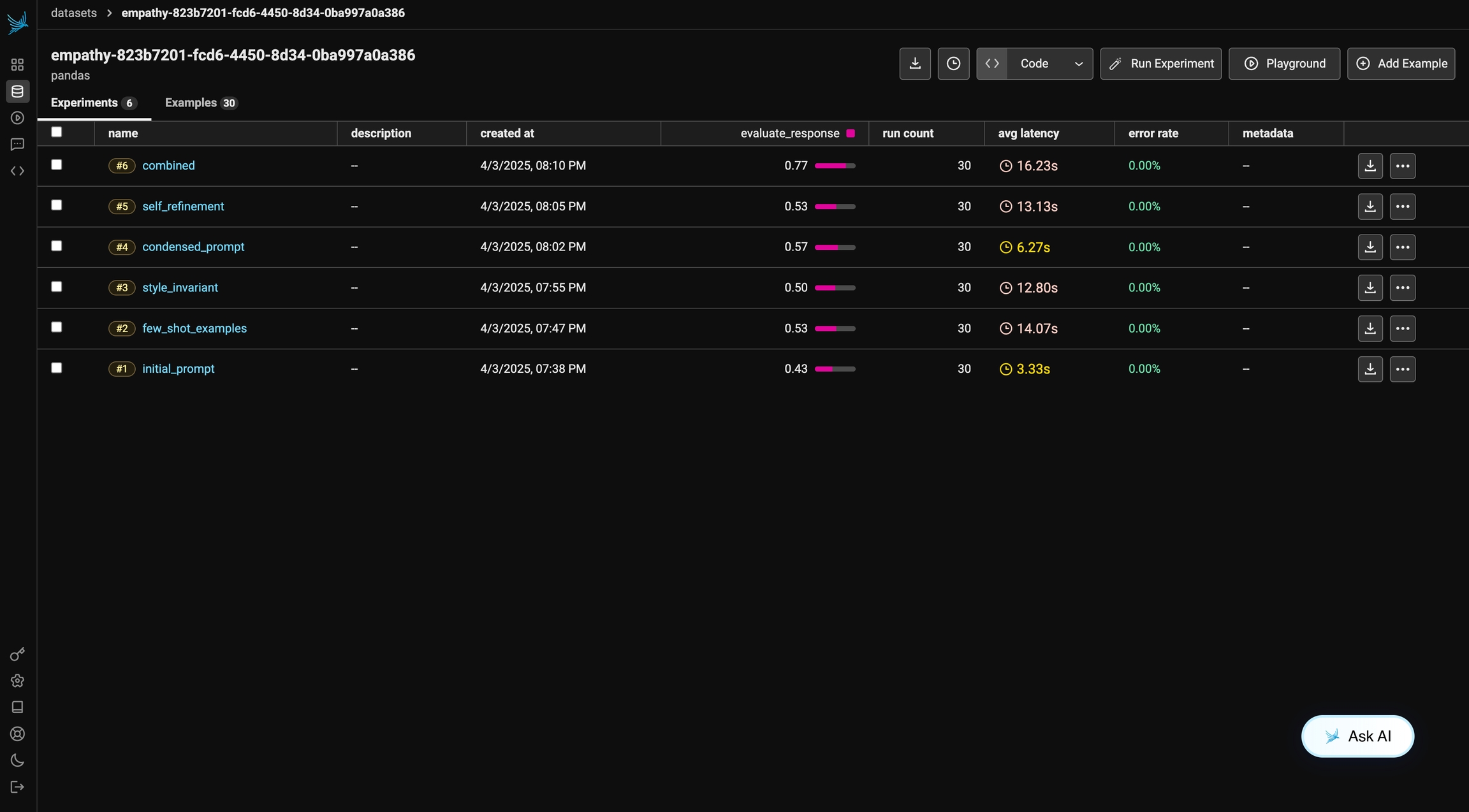
To maximize the accuracy and fairness of our Judge, we will combine multiple optimization techniques. In this example, we will incorporate few-shot examples and style-invariant evaluation to ensure the model focuses on content rather than phrasing or tone. By applying these techniques together, we aim to create a more reliable evaluation framework.Final Results
Techniques like few-shot examples, self-refinement, style-invariant evaluation, and prompt condensation each offer unique benefits, but their effectiveness will vary depending on the task.Note: You may sometimes see a decline in performance, which is not necessarily “wrong.” Results can vary due to factors such as the choice of LLM and other inherent model behaviors.
Final Results