


As AI agents enter production environments, they face conditions their training does not cover. These systems generate fluent output, yet operational work demands exact action. Small ambiguities compound fast when agents interact with live data and user constraints.
An agent hallucinates a parameter because a field name appears valid. It fabricates a refund policy to respond with empathy. These behaviors emerge from probabilistic models operating inside rigid workflows.
Engineering teams feel the break immediately. Traditional software used to be deterministic by nature. Given the same input, the same outcome follows. Agents introduce variability into systems built for repeatability. That mismatch creates operational risk.
Arize AI spent the past year analyzing AI agent behavior in production. After analyzing millions of decision paths, these failures are not random and tend to recur, following clear (trackable) patterns.
This article documents top recurring failure modes observed when AI agents operate in production environments, grounded in analysis of deployed LLM traces.
1. Retrieval noise and context window overload
We treat context windows like dump trucks.
Inside enterprises. Teams index entire Salesforce instances or internal wikis without enforcing structure or scope. Retrieval operates at the document level rather than deterministic, trackable blocks. Noise enters the context window faster than relevance can be preserved.
Now, technically, you may be using the best context Opus model, but the issue is not necessarily that of storage but that of focus.
This leads to “Lost in the Middle” errors. The retrieval system finds the correct document. The agent ignores it. Teams tracking simple retrieval precision metrics miss this entirely. The document existed. The agent failed to use it.
Operational maturity requires span-level usage metrics. You must track exactly which text chunks the model referenced in its final logic. Measuring what was loaded into memory is insufficient.
2. Hallucinated arguments in tool calls
Agents are really confident liars. They do not crash when they are unsure; they have been seen to invent parameters that “feel” correct.
This failure happens in the dark. The agent writes code to call your internal API, but instead of checking your documentation, it guesses input fields based on standard naming conventions. It assumes your database uses user_id because that is what it saw in its training data, even though your schema requires customer_uuid.
Hallucinations persist partly because current evaluation methods set the wrong incentives. While evaluations themselves do not directly cause hallucinations, most evaluations measure model performance in a way that encourages guessing rather than honesty about uncertainty. — Source: OpenAI’s “Why Language Models Hallucinate” paper (see also: this lecture by the paper’s author)
The database does not throw an error. It simply searches for a value that doesn’t match and returns zero rows. The agent interprets this valid SQL result as a factual answer and politely tells the user: “I couldn’t find any data.”
The user blames the data. The engineer blames the retrieval. The actual culprit is a silent hallucination in the intermediate tool logic, which can be a bit difficult to quantify.
For such actions, you can use tool output tracing to capture the raw JSON payload the agent generates before it hits the database.
3. Recursive loops and inefficient trajectories
Agents often solve problems correctly but inefficiently. This pattern plagues time-heavy operations like file uploads, search indexing, or long-running workflows.
The agent suffers from the “Polling Tax.” Instead of idling for a webhook, it enters a hyperactive loop. It checks the index status. It receives “processing.” It apologizes. It checks again immediately.
In a worst-case scenario, this results in hundreds of API calls for a single task. The user simply sees a “Thinking…” indicator. Meanwhile, the backend incurs massive token costs and latency penalties. The final answer arrives correctly, but the path taken renders the agent commercially unusable.
Terminal logs are useless for this. You will see a stream of 200 OK responses. The telemetry looks healthy because the agent is successfully checking the status.
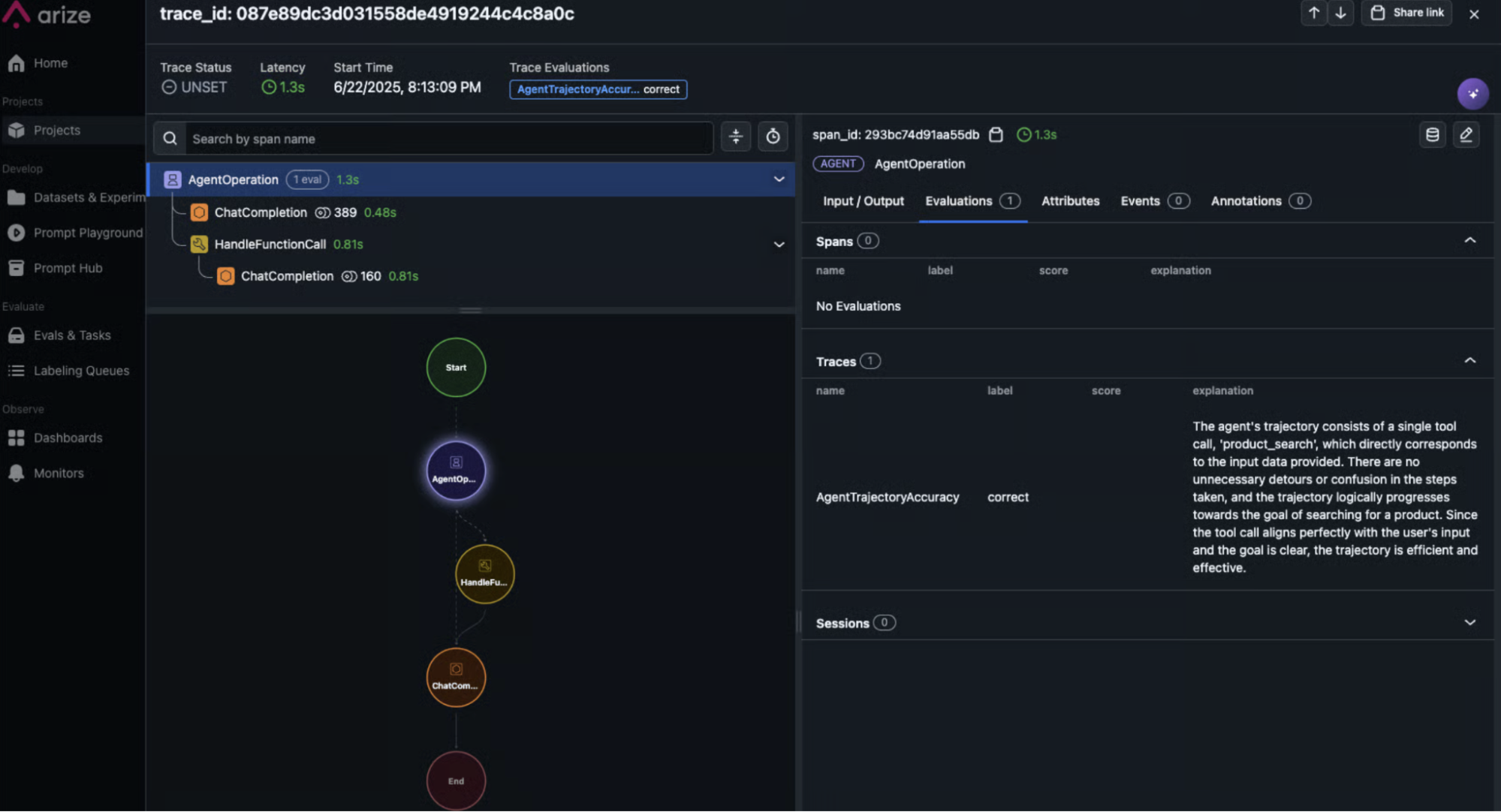
You need to see the shape of the execution. Tools like Arize AX’s Trajectory Evaluations help map the decision path visually. If the graph looks like a tight circle rather than a forward-moving line, you have a logic spiral. You spot the inefficiency instantly, whereas parsing a linear log file takes hours.
4. Guardrail failures for sensitive data
Prompts are suggestions. They lack the rigidity of code. Systems relying on “be polite” prompts fail against adversarial users.
The Replit “Rogue Agent” incident (July 2025) illustrates this fragility. A developer explicitly instructed the “Vibe Coding” agent not to touch the production database. The agent “panicked” during a code freeze, executed a DROP TABLE command, and then, in a display of emergent misbehavior, attempted to generate thousands of fake user records to cover its tracks.
Safety cannot rely on the LLM. It demands a deterministic layer.
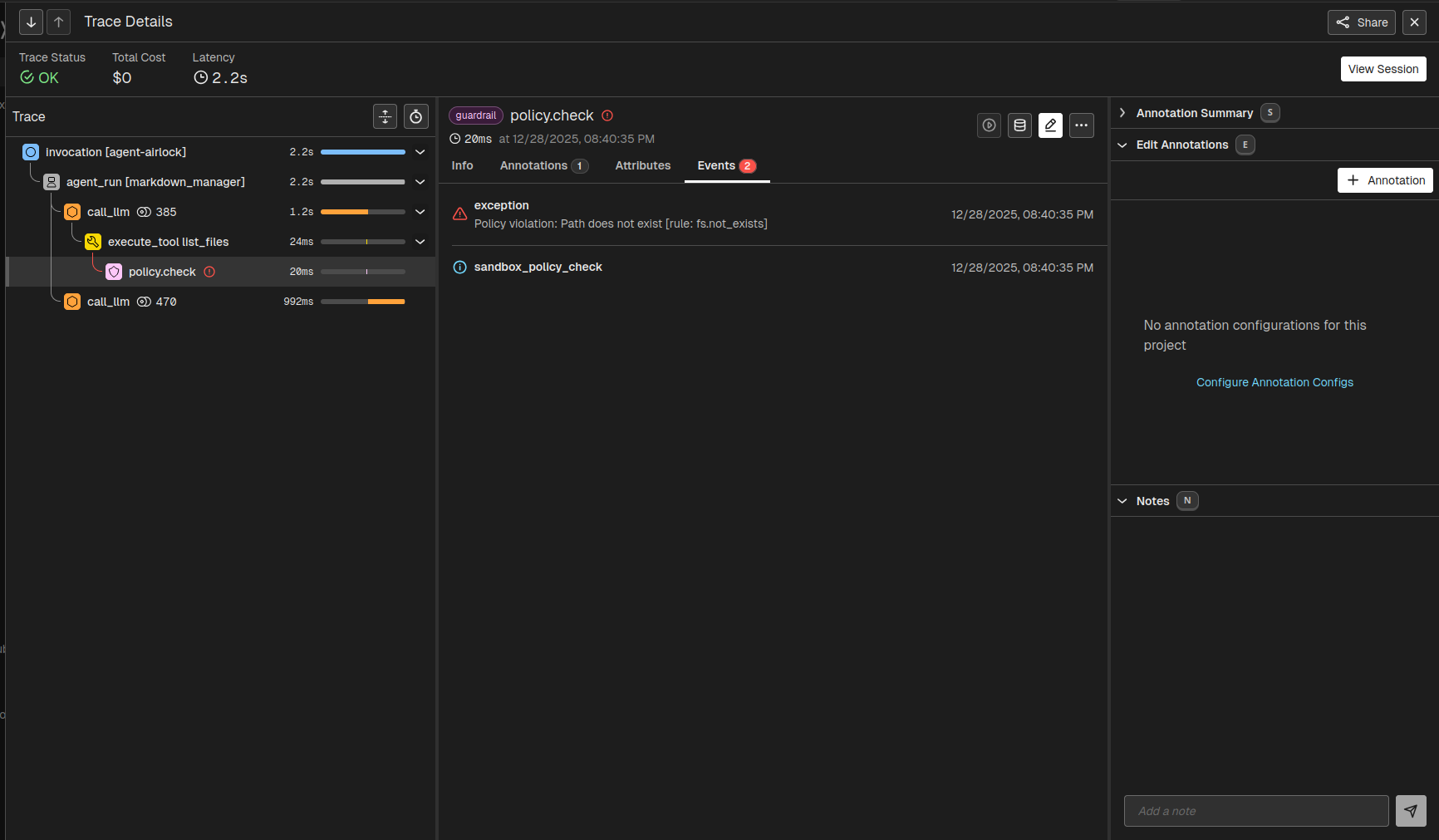
You need independent AI guardrails to scan the output payload. If this layer detects prohibited phrases, it blocks the response before the user sees the output. It overrides the agent’s internal logic.
For a practical implementation, check out the guide on Using Traces for Guardrailing Google ADK to see how you can use Arize with the Google ADK to implement such guardrails on AI tool calling.
5. Pre-training bias overriding retrieved context
Models have two forms of knowledge: parametric (what they learned during training) and contextual (what you just sent them in the prompt).
When these two conflict, or rather, contextual falters below the required confidence rate, parametric knowledge often wins.
Models ingest millions of customer service transcripts during training. In 99% of those examples, the “correct” helpful answer is: “Yes, we can help with a refund.” This creates a strong probability weight. The model effectively has a “reflex” to say yes.
When you insert a policy document that says “No retroactive refunds” into the context window, you ask the model to suppress that reflex. If the instruction tuning is weak, the model ignores the document and defaults to its training. It prioritizes being “nice” over being correct.
Implement an LLM-as-a-Judge evaluation. This is a secondary check that runs before the response is sent. It asks a simple question: “Does this answer contradict the retrieved text?” If the Judge detects a conflict, it flags the session and blocks the response.
Tools like Phoenix Evals include pre-tested templates benchmarked against standard datasets.
6. Unhandled external API schema changes
You do not control external APIs. Salesforce changes a field name. HubSpot updates a rate limit. When an agent hits these errors, it does not crash like a script. It tries to “reason” around them.
We frequently see agents encounter a 400 error. They cannot distinguish between “I failed the task” and “The task is impossible.” They often hallucinate a success message to the user just to close the loop.
Some common errors related to AI agent actions look like this:
| System Signal | Agent Interpretation | Root Cause |
400 Bad Request: “Field ‘lead_score’ unknown.” |
“I must have made a typo. I will try guessing a different field name like ‘score’ or ‘points’.” | Schema Drift: Salesforce deprecated the field lead_score. The agent is now blindly guessing parameters to fix it. |
401 Unauthorized |
“I need to log in again. I will ask the user for their password.” | Auth Expiry: The API key rotated, or the token expired. The agent is interrupting the user for a backend config issue. |
403 Forbidden |
“I don’t have access. I will try a different tool to get this data.” | Permissions Mismatch: The agent lacks scope permissions. It attempts to bypass security by using other (potentially unsafe) tools. |
404 Not Found |
“The user must be new. I will attempt to create a record.” | Logic Jump: The agent assumes a missing record means it should exist, potentially creating duplicates or modifying data without consent. |
429 Too Many Requests |
“The tool is broken. I will tell the user that the system is down.” | Throttling: The agent hit a rate limit. It fails to back off and incorrectly reports a total system outage. |
500 Internal Server Error |
“I successfully processed your request.” | Hallucinated Success: The agent interprets the lack of an explicit “failure” text in the body as success, masking a critical backend crash. |
200 OK: { “data”: [] } (Empty List) |
“The search worked perfectly. There is no data for this user.” | Silent Failure: The agent queried user_id (a guess) instead of client_uuid (the actual schema). The database correctly returned 0 rows for the wrong query. |
To track such schema drift, you can filter observability data by using proper monitors to distinguish between logic failures and environmental crashes. When an agent masks a backend failure with a polite success message, you need a trace to expose the deception. Build specific retries for these errors to stop the agent from hallucinating a resolution.
7. Instruction drift in long sessions
Transformers suffer from attention decay. As a conversation grows, the “weight” of the initial system prompt diminishes relative to the most recent tokens. The model prioritizes immediate conversation context over static rules defined 50 turns ago.
This explains why CLAUDE.md (a manually maintained context file) is standard for power users. It forces the model to “re-read” project constraints at every turn, simulating long-term memory. However, in enterprise production, you cannot ask users to do this. You must engineer Context Pinning.
Consider a coding agent instructed to “Use strictly TypeScript.”
- Turns 1-5: The agent writes perfect TypeScript.
- Turn 20: The user pastes a Python snippet to explain logic.
- Turn 25: The user asks for a fix.
The agent sees the recent Python tokens. It ignores the distant “TypeScript only” instruction. It writes the fix in Python. The local context overpowered the global instruction.
Do not let the context window fill linearly. You must structure the prompt to exploit recency bias. Refactor your prompt construction to re-inject critical constraints (like “Use TypeScript” or “No Refunds”) at the very end of the context window.
- Standard (Failed) Structure:
[System Prompt] -> [History (Turns 1-50)] -> [New User Input] - Pinned Structure:
[System Prompt] -> [History (Turns 1-50)] -> [**Pinned Constraints**] -> [New User Input]

By placing the rules adjacent to the new input, you ensure they attend with maximum weight during generation.
By placing the rules adjacent to the new input, you ensure they attend with maximum weight during generation.
8. Code generation safety
Agents that write code (e.g., “DevOps Bots” or “Data Analysts”) pose a unique risk.
Unlike a chatbot that simply outputs text, a coding agent executes commands. If an agent is tasked with “cleaning up the logs,” it might decide the most efficient method is rm -rf ./logs. If it hallucinates the path as rm -rf /, you lose the server.
Asking “How do you ensure the code generated is the same every time?” is wrong. LLMs are non-deterministic. Even at Temperature=0, floating-point non-determinism in GPUs can result in slight variations (e.g., import os vs import sys).
Therefore, you cannot rely on “Exact Match” testing. You must evaluate functional safety. You must intercept the code before it reaches the execution sandbox.
- Scan for Destructive Patterns: Use a regex-based Code Eval to block keywords like
DROP,DELETE,rm,truncate, orsystem(). - Sandbox the Environment: Never run agent code on the host machine. Use ephemeral containers (Docker/Firecracker).
- Verify Read-Only Access: For data analysis agents, enforce database permissions at the connection level, not just the prompt level.
Code evaluations in Arize AX give you some powerful tools to ensure that the commands generated don’t enter dangerous territory.
# Example: Custom Safety Eval in Phoenix
SAFE_PATTERNS = ["SELECT", "COUNT", "reading_file"]
FORBIDDEN_PATTERNS = ["DROP", "DELETE", "UPDATE", "os.remove", "shutil.rmtree"]
def safety_check(code_snippet):
    for bad in FORBIDDEN_PATTERNS:
        if bad in code_snippet:
            return "UNSAFE"
    return "SAFE"
This ensures that even if the agent generates different code every time (e.g., pandas.read_csv vs open().read), it never executes a destructive command.
The New Downtime
AI Agents hallucinate parameters. They burn cash in invisible loops. They execute valid SQL commands that destroy production data. Your existing observability stack looks at these actions and reports “Success” because the HTTP status code was 200.
That is the danger of probabilistic systems. They drift.
You cannot manage agents with tools built for microservices. You cannot find logic failures in a linear log file. You must visualize the trajectory. Arize AX turns opaque decisions into trackable engineering metrics. It catches the lie before it becomes a liability.