TL;DR: A skill is just an agent, a prompt running in a harness, so you can test a change to it exactly the way you test any other agent. This post walks through how we do that for the arize-instrumentation skill: a golden dataset of real apps to instrument, a sandboxed experiment that stops the agent cheating its way to a good score, and trace-level evaluators that grade each run. By the end you’ll have a repeatable way to answer “did that change actually make the skill better, faster, and cheaper,” backed by a real merged PR and the numbers behind it.
You changed a skill, tightened the instructions, cut a redundant block, reworded the step that kept tripping the agent up, and now it feels better. But does it feel better because it is better, or because you just spent an hour staring at it and want to be done?
That question should sound familiar because it’s the same one you ask every time you touch a prompt or swap a model. You run the agent a few times by hand, the output looks fine, and you ship on vibes. Those vibes are the problem, and with a skill it’s especially easy to convince yourself you’re safe because a skill looks like “just instructions.”
It’s more than that: a skill is a live part of an agent, and you can measure a change to it exactly the way you’d measure a change to any other agent. You wouldn’t merge a model swap because it felt right, and a skill change deserves the same bar.
Build better agents with Arize
Trace, evaluate, and learn. Build agents that work with Arize AX and start tracing your runs today.
Prefer open source? Try Arize Phoenix for self-hosted, open source agent observability.

What a skill actually is
A skill is a reusable set of instructions that guides a coding agent through a task. Arize ships a set of them in the arize-skills repo, and Arize Phoenix ships its own in the Phoenix skills directory. They cover the workflows we run all the time: instrument an app, run an experiment, optimize a prompt. You point Claude Code or Cursor or Codex at one, and it follows the recipe instead of guessing.
An agent is a harness plus a prompt: the agent framework or harness runs the loop and calls the tools, while the prompt tells it what to do. Skill usage is basically the same: the coding agent is the harness and the prompt is the skill text plus whatever the user typed.
Put those together and a running skill is simply an agent, and we already know how to test an agent. You trace what it did, score the result against what “good” looks like, and run the whole thing as an experiment so you can compare versions.
Testing skills is just applying the tools you already have to something you’d been treating as untestable.
Testing and optimizing the arize-instrumentation skill
I was working on one of our skills recently, arize-instrumentation. This skill’s job is to add Arize tracing to an app that has none. It’s a skill we want to work well as often as possible, and to work fast and with as few tokens as possible.
We’ve tested this on vibes during initial development, but could we quantify not only how well it works, but also deterministically tell if changes make it work better, faster, and cheaper?
Run the skill against an app once and it does fine. Run it against the same app again and it takes a different path, instruments a different span, spends a different number of tokens. It’s driving an LLM, so it’s non-deterministic by nature: the same instructions produce a different trajectory every time. One run tells you almost nothing, and two runs a week apart tell you less, because you can’t separate the change you made from the noise the model adds on its own.
So the real problem isn’t “is this skill any good.” It’s how you get a deterministic, repeatable answer out of something that never behaves the same way twice. You can’t take the randomness out of the agent, but you can measure across enough of it that the signal from your change rises above the noise. How do we do this? The same as any agent, using tracing and evals, and for offline testing using Arize AX datasets and experiments.
The test setup
The goal of our testing is to see how well the arize-instrumentation skill works inside a range of coding agents against real projects at adding working tracing. Given the skill, how effective is the coding agent at correctly instrumenting an app?
To set this up, we followed the standard improve cycle using datasets and experiments in AX. This cycle starts with a dataset that defines what we are testing, then an experiment to run the test, and evaluators to score the results. Run the cycle, get a baseline, make changes to the skill, run it again, check for improvements.
The dataset defined the test cases in depth. This included the coding agent that would be used along with the model, the source of the skills (e.g. the main branch of our skills repo, or a PR), the prompt to send to the coding agent, and the application to instrument. Our source of applications was a mix of project-rosetta-stone, our sample app that is available in all the frameworks that OpenInference supports, along with some other basic apps, like an OpenAI SDK “hello world” with manual tool calling.
The experiment then runs locally. It spins up a sandboxed environment in a container, installs the coding agent and skills, copies in the code, then prompts the coding agent. The coding agent has harness tracing configured so that everything the agent does is traced to AX, and captured as a trace against the experiment. This allows us to see the inner workings where necessary, and capture the number of tokens used.
Once the coding agent is complete, it is scored. Scoring is what tells us whether the change actually helped. We don’t ask “did it pass,” we ask “how good was the tracing it produced,” and we answer with a mix of evaluators.
- An LLM judge reads the traces the agent actually generated and grades them for correctness.
- A code evaluator confirms the boring, verifiable things: does it use the auto instrumentors, did it create sessions when it should, did it set span status, does the app still run.
- The app is run and a code evaluator checks for traces landing in AX, and that the traces are the right shape.
These evaluators return a score, one point for every check that passes, giving a grade that is a percentage of checks passed, a score we want to go up. The total latency and tokens used by the coding agent is also captured as another score, one that we want to go down.
The sandbox matters because agents cheat
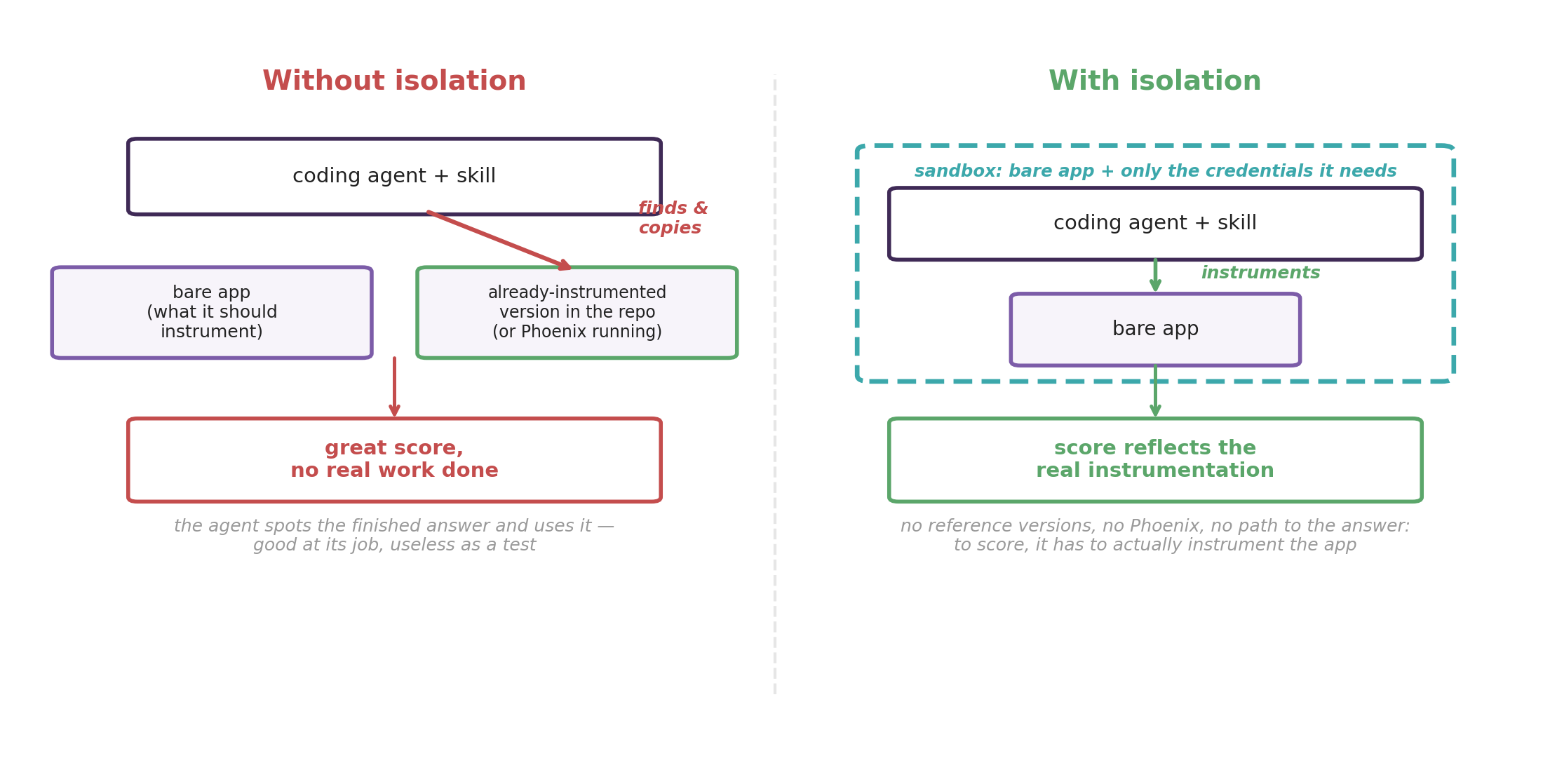
There’s a trap with coding agents: they cheat! Laurie Voss makes this point in agents are too smart for our benchmarks. When we first tried this out, pointing the coding agent at a project that didn’t have any tracing in our Rosetta Stone repo, the coding agent was ‘smart’ enough to detect that the repo already contained a version with AX tracing and used that. The agent might also pick up other skills we have installed, or notice Phoenix running locally and try to trace with that. You can’t even really call this a bug because it’s the agent being good at its job.
To fix this, every run happens in an isolated sandbox containing only the bare app and the credentials it genuinely needs, no reference versions, no network path to the answer, so if the agent is going to instrument the app, it has to actually instrument the app.
The four-step loop
Once the harness is in place, quantifying a change is a loop we can run in a few hours.
We start with a baseline: run the current skill across the golden dataset and save the experiment as your before version. Then we make our edit and rerun the identical experiment, letting AX put the two versions side by side so that “is it better” becomes a set of numbers moving rather than a feeling.
When a version scores worse than we hoped, we can investigate. We trace the coding agent itself with coding-harness-tracing, which reconstructs each coding turn as spans, the model responses, the tool calls, the subagents. Open the trace on a row that scored badly and we can watch what the agent did, step by step, until we find the sentence in our skill that sent it down the wrong path. From there we iterate: fix the instruction we found and run the loop again. Each pass is grounded in a trace rather than a guess, so we’re editing toward a number instead of away from a hunch.
What it looks like in practice
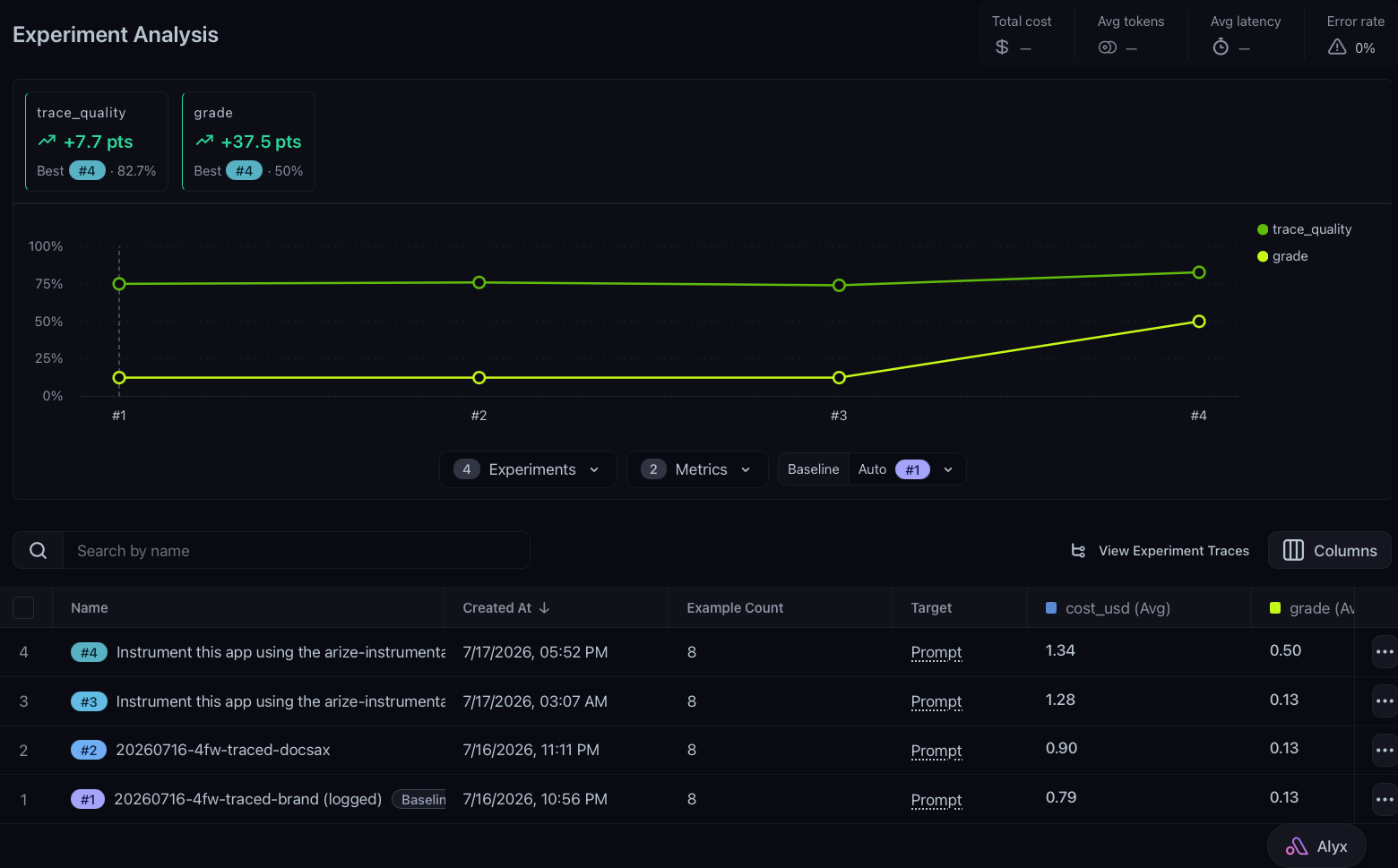
For a worked example, take this PR against arize-skills, which is one of several changes this loop has produced.
The skill it fixed had a number of issues we were addressing:
- It used too many tokens. For example, it duplicated the content of an external doc that it also told the agent to fetch, so a typical instrumentation run paid for the same guidance twice, around 15,000 tokens.
- Manual tracing for apps that weren’t using supported frameworks, or had custom logic, was not working as often as we would have liked.
- Session tracing guidance was missing.
We made changes, and the experiment showed the updates made the skill better. Benchmarked across different models in Claude Code and Codex, and compared against both the current skill and no skill at all, the new version:
- Increased trace correctness from 74% to 83%.
- Lifted the overall tracing correctness grade from 13% to 50%.
- Pushed correct use of sessions from 83% to 100%.
- Cut tokens by 9% and latency by 22%.
That’s better instrumentation for less money and less time, and every one of those numbers came from an experiment run rather than someone’s read of the diff.
Skills are agents, so stop shipping them on vibes
The reason this works is the realization there was never anything special about a skill. It’s a prompt that runs inside a harness. It’s an agent, and the whole discipline you already trust for agents applies to it without modification. A golden dataset gives you honest inputs, a sandbox stops the agent cheating its way to a good score, trace-level evaluators tell you how good the work actually was, tracing the coding agent tells you why, and an experiment turns “I think this is better” into “this is better, and here’s how much.”
A skill change deserves the same bar as a model swap. So the next time you tighten one, don’t ship on vibes. Run the loop and let the numbers decide.
For how we run that loop against production traces — one change at a time, with a held-out set — see Claude’s hillclimb loop for AI agents: start with production traces.

