

Decision Judge is an experimental feature. The in-product UI and workflow may change as we continue to improve the experience. It was previously called Jev-as-a-Judge.
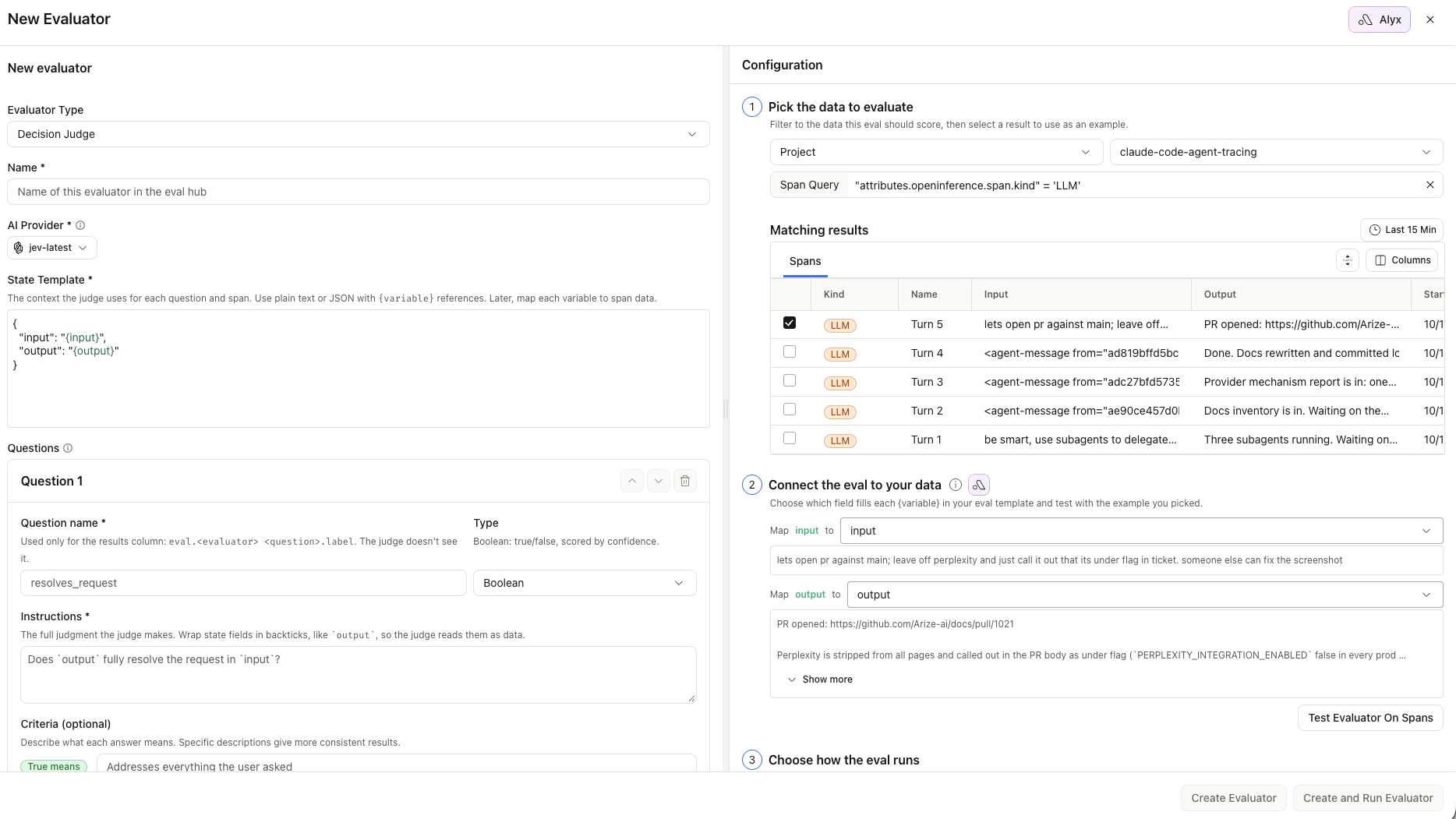
Creating a Decision Judge evaluator: evaluator type, AI provider, shared state template, a typed boolean question, and the span mapping step
Supported providers
Each provider exposes one decision model. The AI Provider dropdown in the evaluator editor lists only the integrations in your space that can run Decision Judge evaluations. Each result row records the serving model in its metadata, so you can tell which provider scored it.
TypeSafe AI integrations are restricted-use: they power Decision Judge evaluators only and do not appear in the prompt playground, LLM-as-a-judge model pickers, or the
/v2/ai-integrations REST API. OpenAI keys keep all their other uses.
Question types
Each question needs a name (used for the published column only) and instructions (what the model actually judges). An evaluator can hold up to 64 questions. Results land on:eval.<evaluator name> <question name>.{label,score,...}
Create a Decision Judge evaluator
1
Connect a decision model provider
Go to Settings → AI Providers and add a TypeSafe AI key, or confirm you already have an OpenAI integration with
gpt-6-luna enabled. You can also add a TypeSafe AI provider inline from the evaluator form.2
Create the evaluator
Go to Evaluators → Create → Decision Judge. In the AI Provider dropdown, select the integration and decision model to use.
3
Write the state and questions
Define the shared state (plain text or JSON with
{variables}), map variables to span columns, then add one or more boolean, choice, or score questions. Put the full judgment in instructions; the question name is not sent to the model.When you refer to a state field in a question, wrap it in backticks (for example `output`) so the model treats it as data, not as part of the instruction text.4
Test and save
Optionally run Test Evaluator On Spans, then Create Evaluator or Create and Run Evaluator. Attach it to an online eval task like any other evaluator.
Start from a template
Most Arize eval templates have a Decision Judge version, including Hallucination, Q&A Correctness, User Frustration, Toxicity, Profanity, Prompt Injection, Jailbreak, RAG Relevancy, Summarization, and Code Readability. Open a template card and pick a TypeSafe AI model in its model dropdown to load the Decision Judge version; pick a chat model to return to the LLM-as-a-judge version. Template versions currently run on TypeSafe AI only.Decision Judge evaluators run on project spans only: they cannot run in the prompt playground, on datasets, or at trace or session granularity. A task holds a single Decision Judge evaluator, and you cannot mix it with LLM, code, or remote evaluators on the same task. Decision Judge calls are not traced, so runs do not produce eval traces.