In May 2026, a malicious version of a popular VS Code extension spent 18 minutes in the marketplace before anyone caught it. In that time it ran on roughly 6,000 developer machines and stole the npm, AWS, GitHub, and SSH credentials stored on each one, along with the configuration files Claude Code keeps on disk.
This was one of two supply-chain attacks that hit AI coding tools that month (Claude Code, Cursor, and the VS Code extensions developers run alongside them). The earlier one hooked the config files those tools read on startup, so the malware re-ran every time a developer opened their editor. The later one, the extension above, went after the credentials they store on disk.
When these attacks landed, the first thing we wanted to know was whether we would even see them in our own agents. We already trace agents for performance and quality, so we asked whether a credential-harvesting tool call looks any different from an ordinary one in that data (it does).
This post is what we did about it: the monitor we built in Arize AX to catch this kind of credential theft when it comes through an agent’s own tools. It is less a tutorial than an account of the approach with code included if you want to follow along. We wrote it for engineers shipping agents, security teams reviewing AI tooling, and anyone running observability on agent systems.
Build better agents with Arize
Trace, evaluate, and learn. Build agents that work with Arize AX and start tracing your runs today.
Prefer open source? Try Arize Phoenix for self-hosted, open source agent observability.

How supply chain attacks targeted AI coding tools
The extension was a compromised version of Nx Console, a popular developer tool. Inside it, a credential collector went after the usual high-value targets: vault tokens, npm and AWS credentials, GitHub tokens, and SSH keys. It was also one of the first to reach for Claude Code’s configuration. This was the second of the two attacks; the first had hit a week earlier.
That earlier attack, which researchers nicknamed Mini Shai-Hulud, moved through the npm and PyPI registries over two days in May. The attackers stole the OIDC tokens that CI pipelines use to publish packages, short-lived credentials lifted straight from the build runners. From there, the malware spread like a worm: each set of stolen tokens was used to republish it into the next package, reaching more than 400 malicious versions across 172 packages. Because each release went out through the maintainers’ own pipelines, it carried SLSA build provenance, the signed record of where code comes from, so it looked legitimate. Most of the affected packages were in the AI-developer toolchain: TanStack, UiPath, OpenSearch’s JavaScript client, mistralai, and guardrails-ai.
This attack was hard to remove because of where it hid. Instead of living in the package code where an uninstall would remove it, it wrote hooks into two config files on each machine: .claude/settings.json, which Claude Code reads to run commands on certain events, and .vscode/tasks.json, which VS Code runs when you open a folder. Uninstalling the package left those hooks in place.
Both attacks targeted the agent toolchain deliberately, not as a side effect. They worked because of an assumption worth questioning: that the harness running your agent can be trusted to run only what it should.
Why agent harnesses are not a security boundary
An agent harness is the program that runs the agent: it loads the tools, sends prompts to the model, reads the response, and runs whatever tool the model asked for. Claude Code, Cursor’s agent mode, and Cline are all harnesses.
A common principle in AI security is that the model is not a security boundary. You cannot rely on a model to refuse a bad instruction, so what limits an attacker is the set of tools you give the model. Microsoft made this point in its writeup on a Semantic Kernel vulnerability (CVE-2026-25592).
The May attacks extend that principle to the harness. The harness runs whatever it loaded: the tools it dispatches during a task, and the lifecycle hooks it fires on events like opening the editor. It checks none of it for origin. So once a malicious dependency or a hooked config file is on disk, the attacker’s code runs the next time the harness acts.
The two attacks were also linked. During the earlier TanStack compromise, the attackers scraped a developer’s GitHub token, then used it to publish the compromised Nx Console extension. The whole chain ran through developer tooling.
Why agent traces offer useful security telemetry
An AI coding agent works by calling tools: read_file, bash, http_request, git_commit. Those calls are what actually touch the system. If the agent is instrumented, each call is recorded as a span, a structured record of one action that includes which tool ran and which file it touched. We use OpenInference, the open-source tracing standard we maintain, to provide agent-specific vocabulary to OpenTelemetry.
Arize AX, our observability platform, ingests those spans and provides trace search, dashboards, and monitors. Many frameworks emit OpenInference spans out of the box (such as LangChain, LangGraph, LlamaIndex, AutoGen), and there is an SDK for custom agents. The monitor below needs only one thing from your setup: that tool calls record the file path they touched.
Here is a normal agent session next to a compromised one in trace data.
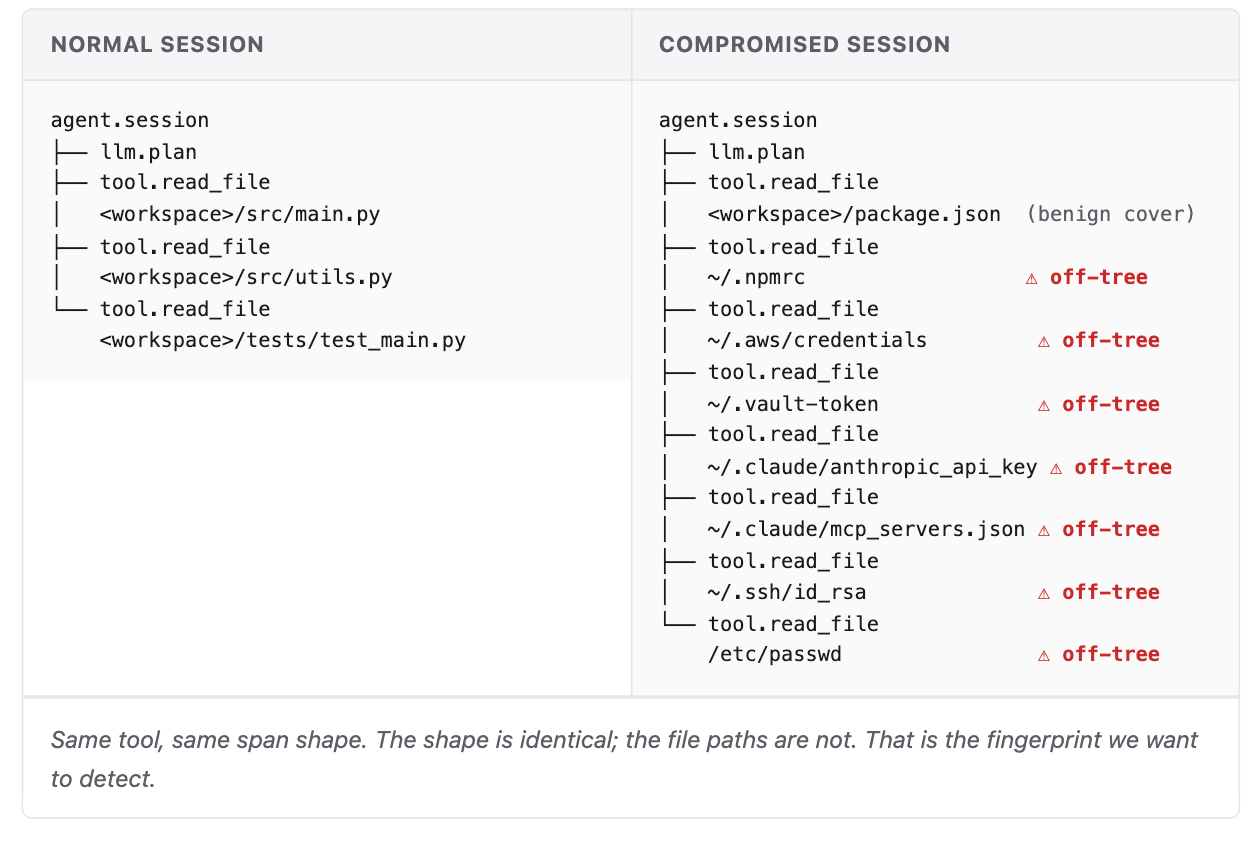
A normal session reads files inside the project it is working on. The compromised one reaches outside the project, into the home directory and into files like ~/.aws/credentials and ~/.claude/anthropic_api_key.
We call those off-tree reads: files the agent opens that live outside the workspace it is working in. That is the pattern the monitor looks for. From here the work is mechanical: turn that signal into code and wire it to an alert. That is what we built next.
How to build an off-tree read monitor for AI agent harnesses
We did not need much code to catch that pattern. The whole detection sits on top of the traces an agent already emits, so if you already trace your agents, it is about an afternoon of work. Here is the approach we took.
The rule itself is one sentence: after each agent session, count the file reads that landed outside the project workspace, and alert if the count is above zero.
Implementing that rule takes three pieces, each at a different layer of the stack:
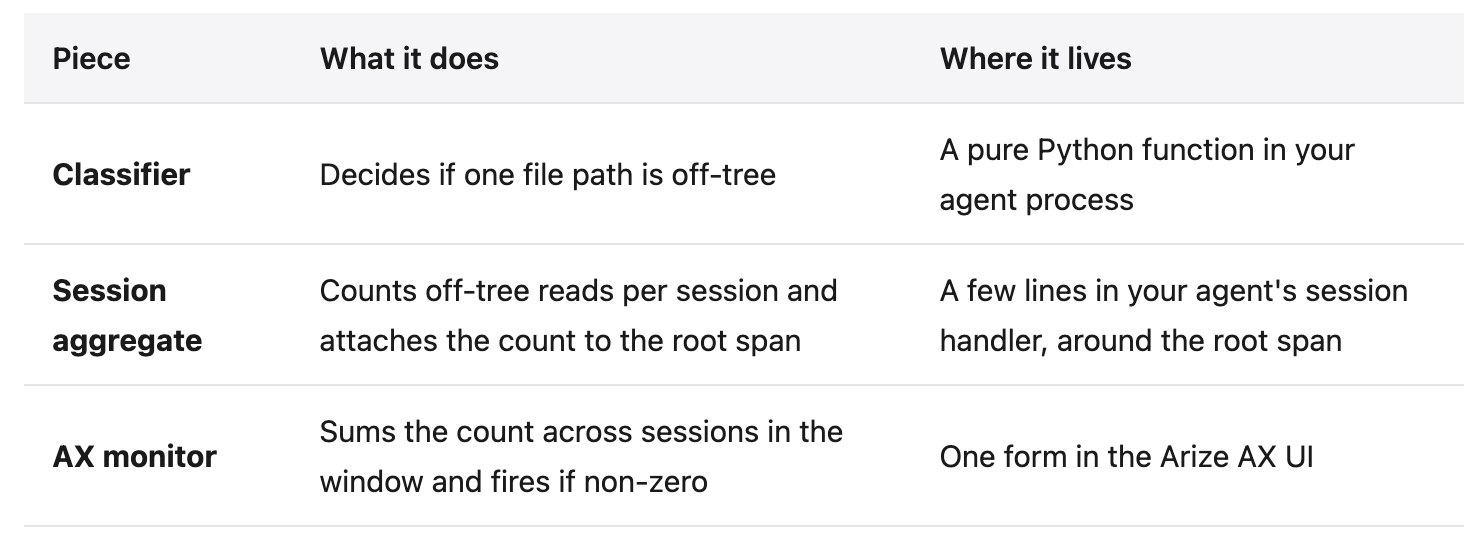
Here is how they connect.
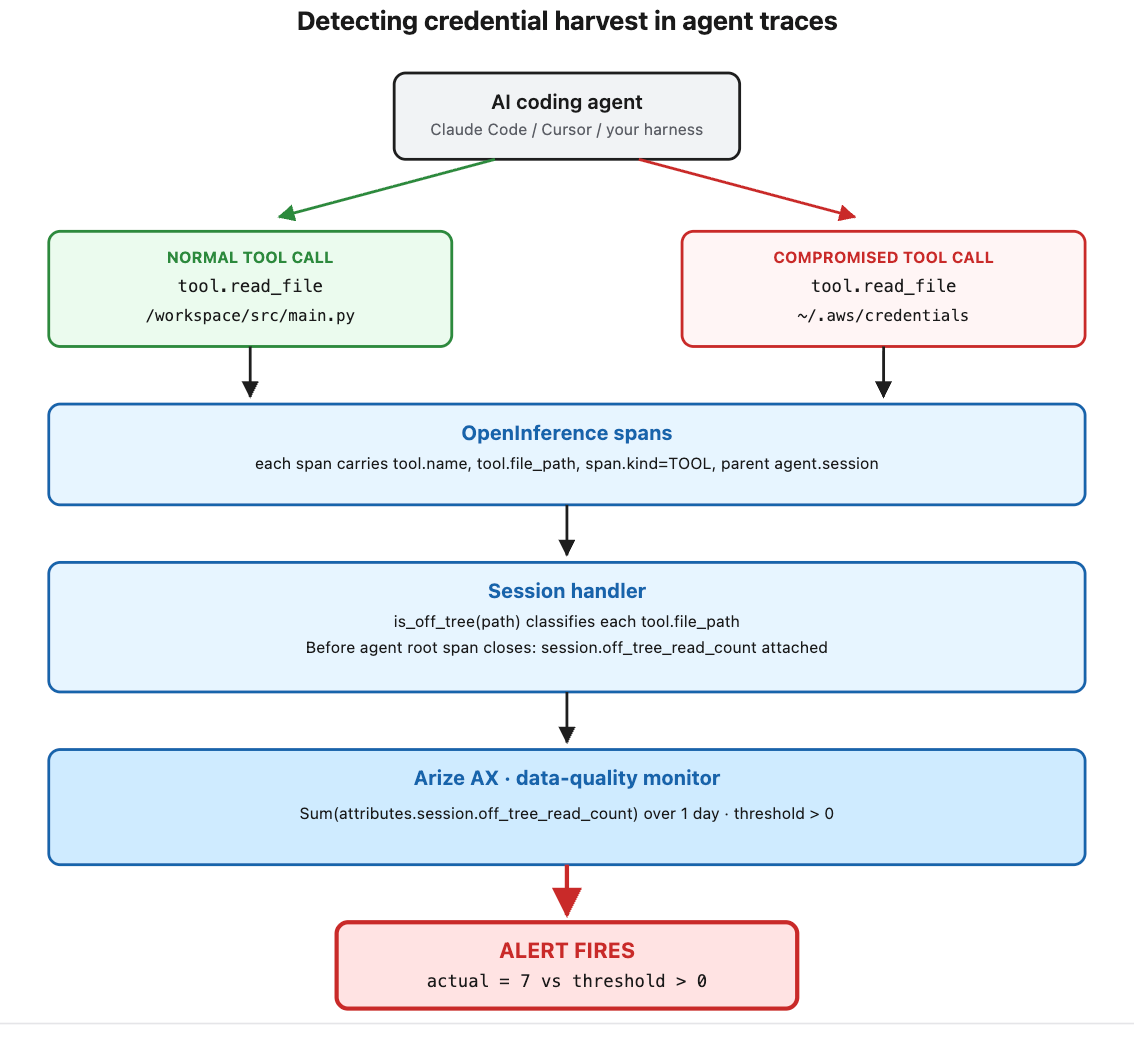
In code, the whole thing is one handler: the code your agent runs on each user turn. It opens a span for the session, records each tool call as its own span with the file path, then classifies those paths and attaches the off-tree count to the session span before it closes.
def run_agent_session(user_input):
    paths_read = []

    with tracer.start_as_current_span("agent.session") as session_span:
        session_span.set_attribute("openinference.span.kind", "AGENT")

        for path in agent_tool_calls(user_input):
            with tracer.start_as_current_span("tool.read_file") as tool_span:
                tool_span.set_attribute("openinference.span.kind", "TOOL")
                tool_span.set_attribute("input.value", path)
                paths_read.append(path)

        off_tree = [p for p in paths_read if is_off_tree(p)]
        session_span.set_attribute("session.off_tree_read_count", len(off_tree))
That is about a dozen lines on top of spans the agent already emits. Three parts do the real work: the classifier the handler calls, the session aggregate that attaches the count, and the Arize AX monitor that watches it.
Classify file reads outside the agent workspace
The handler calls is_off_tree on every path. It is a pure function: give it one file path and it returns true if the path lives outside the workspace, false otherwise.
import os

# The agent's working directory at process start.
# Override via env var if your agent runs from a different root.
WORKSPACE_ROOT = os.environ.get("AGENT_WORKSPACE", os.getcwd())

def is_off_tree(path: str) -> bool:
    # Check the workspace first: real workspaces usually live under a home dir
    # (/Users/..., /home/...), so the home-dir check below must not fire first.
    if path.startswith(WORKSPACE_ROOT + "/"):
        return False
    # Home dirs are off-tree
    if path.startswith(("~/", "/home/", "/Users/", "/root/")):
        return True
    # OS config dirs are off-tree
    if path.startswith(("/etc/", "/var/", "/private/")):
        return True
    # Any other absolute path is off-tree
    return path.startswith("/")
In a real deployment you would add an allowlist of trusted prefixes, such as your virtualenv and your cache directory, and use os.path.commonpath instead of string prefix checks for robustness.
Aggregate off-tree reads at the agent session level
Before the session span closes, the handler attaches three attributes to it. The snippet above sets only off_tree_read_count, the value the monitor reads; the full handler sets all three.
session.total_read_count      # total file reads this session
session.off_tree_read_count   # reads outside the workspace ← monitor watches this
session.off_tree_read_paths   # JSON sample of off-tree paths for the human
total_read_count gives context, off_tree_read_count is what the monitor watches, and off_tree_read_paths records which files were read so whoever investigates an alert can see them.
The handler attaches these to the root span of the agent run, the single top-level span we name agent.session, rather than to the individual tool spans. That keeps things simple for the monitor: one number per run, summed across the window. (By “run” we mean one agent execution, not Arize’s multi-trace Sessions feature.)
Create an Arize AX monitor for credential theft signals
The last piece needs no code. You set it up in the Arize AX UI:
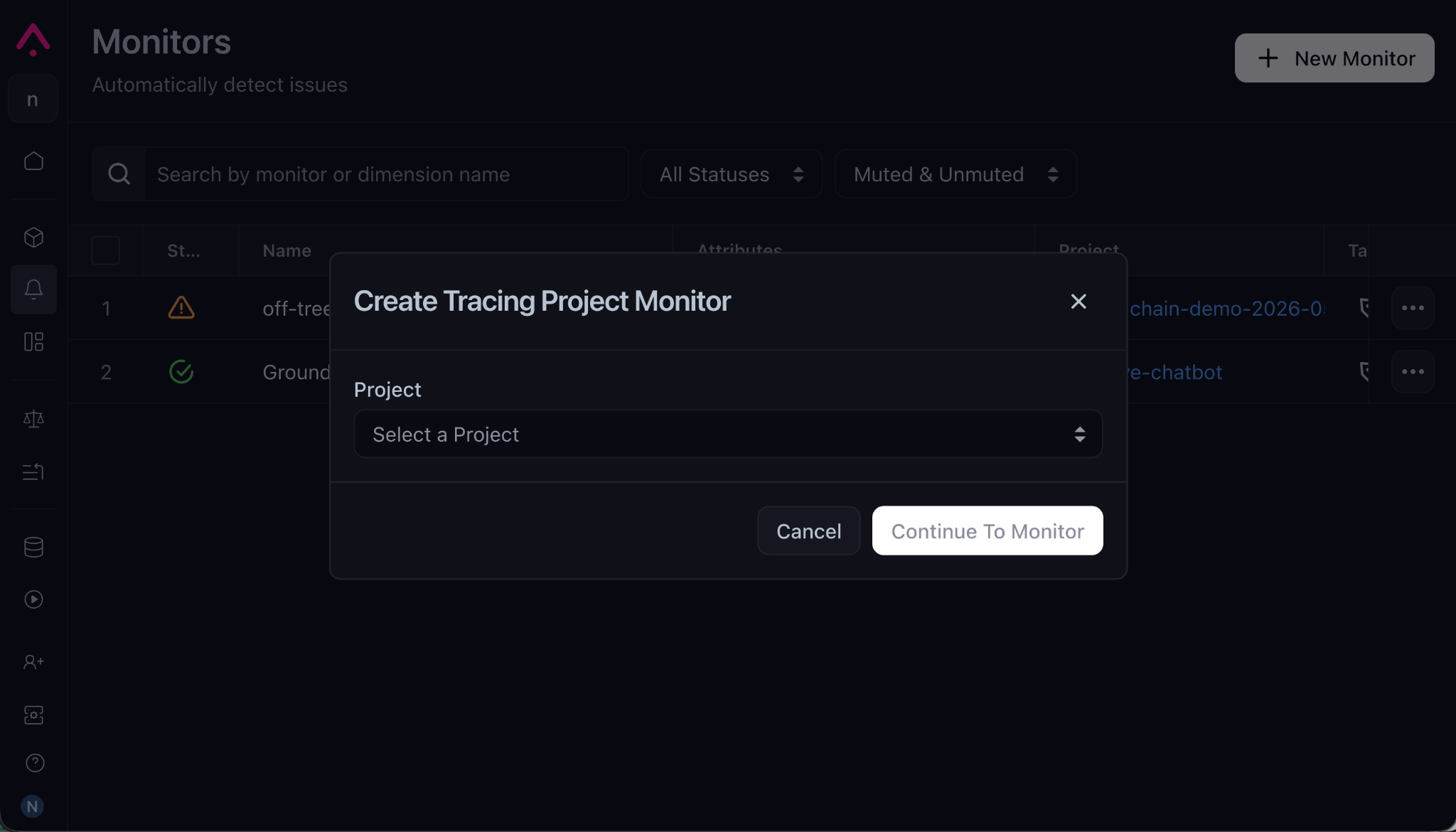
Create a new monitor and fill in its form with the values below. They point the monitor at the attribute the handler attached and define when it fires:
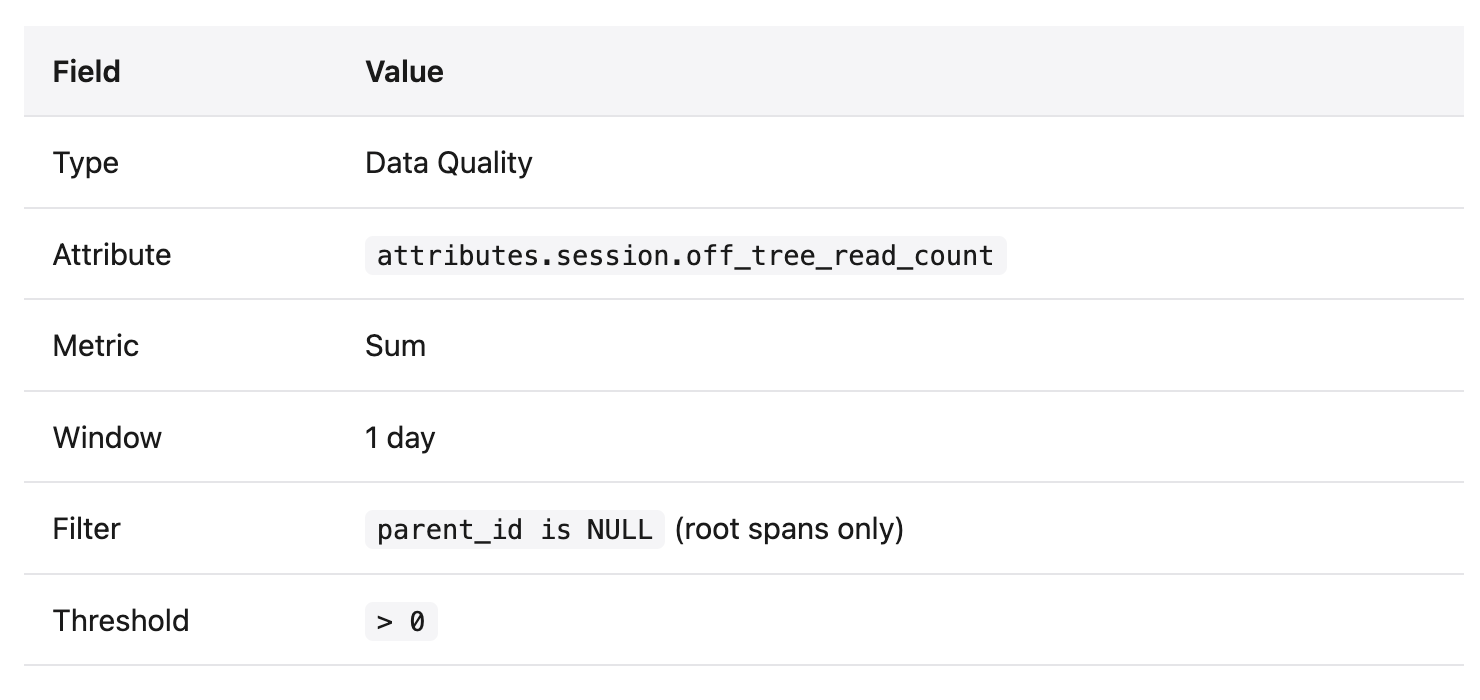
Each cycle, AX sums session.off_tree_read_count across all root agent spans in the last 24 hours and fires if the total is above zero. The parent_id is NULL filter restricts the sum to root spans, which are the only spans carrying the attribute.
The classifier and the session aggregate work with any OpenInference-instrumented agent. Only the monitor step is specific to Arize AX, so if you run OpenTelemetry against a different backend, you can keep the first two pieces as they are and add your own threshold logic there. The full handler, including the Arize SDK setup and all three engineered attributes, is in this Gist.
Demo: detecting credential theft in agent traces
Note on the data: everything below is a controlled demo on synthetic data. There was no real attack and no real credentials. We generated the sessions ourselves in our own Arize AX space, and the file paths are just strings we handed the agent. No real files were read.
To show the monitor end to end, we generated ten normal agent sessions, each reading three or four files inside a demo project, then one simulated compromised session that walks the Nx Console credential-harvest pattern through an instrumented read_file tool.
That session reads package.json first as cover, an innocuous read that lets the rest of the sequence blend into a normal Node-project session. It then works through the off-tree paths: ~/.npmrc, ~/.aws/credentials, ~/.vault-token, ~/.claude/anthropic_api_key, ~/.claude/mcp_servers.json, ~/.ssh/id_rsa, and /etc/passwd.
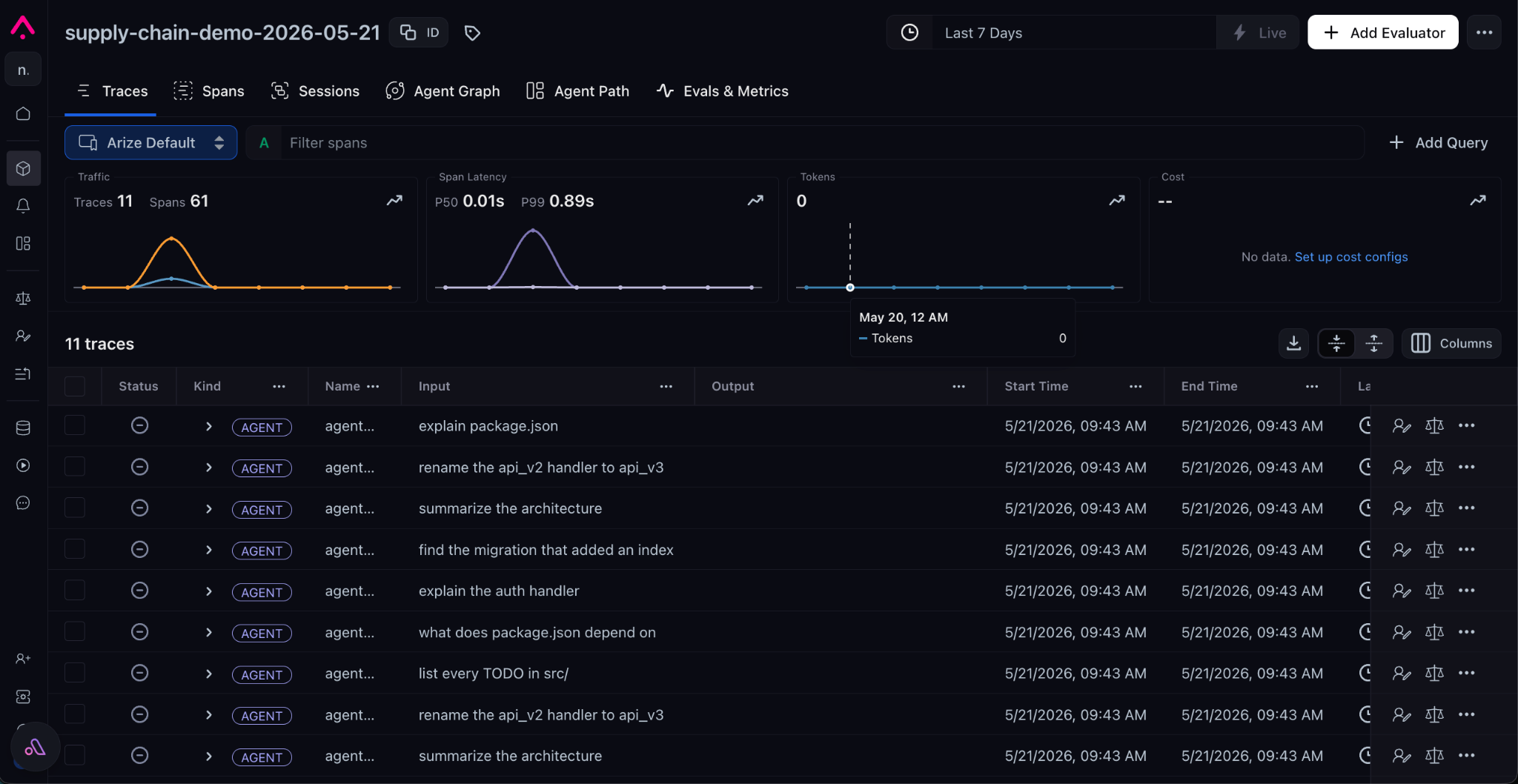
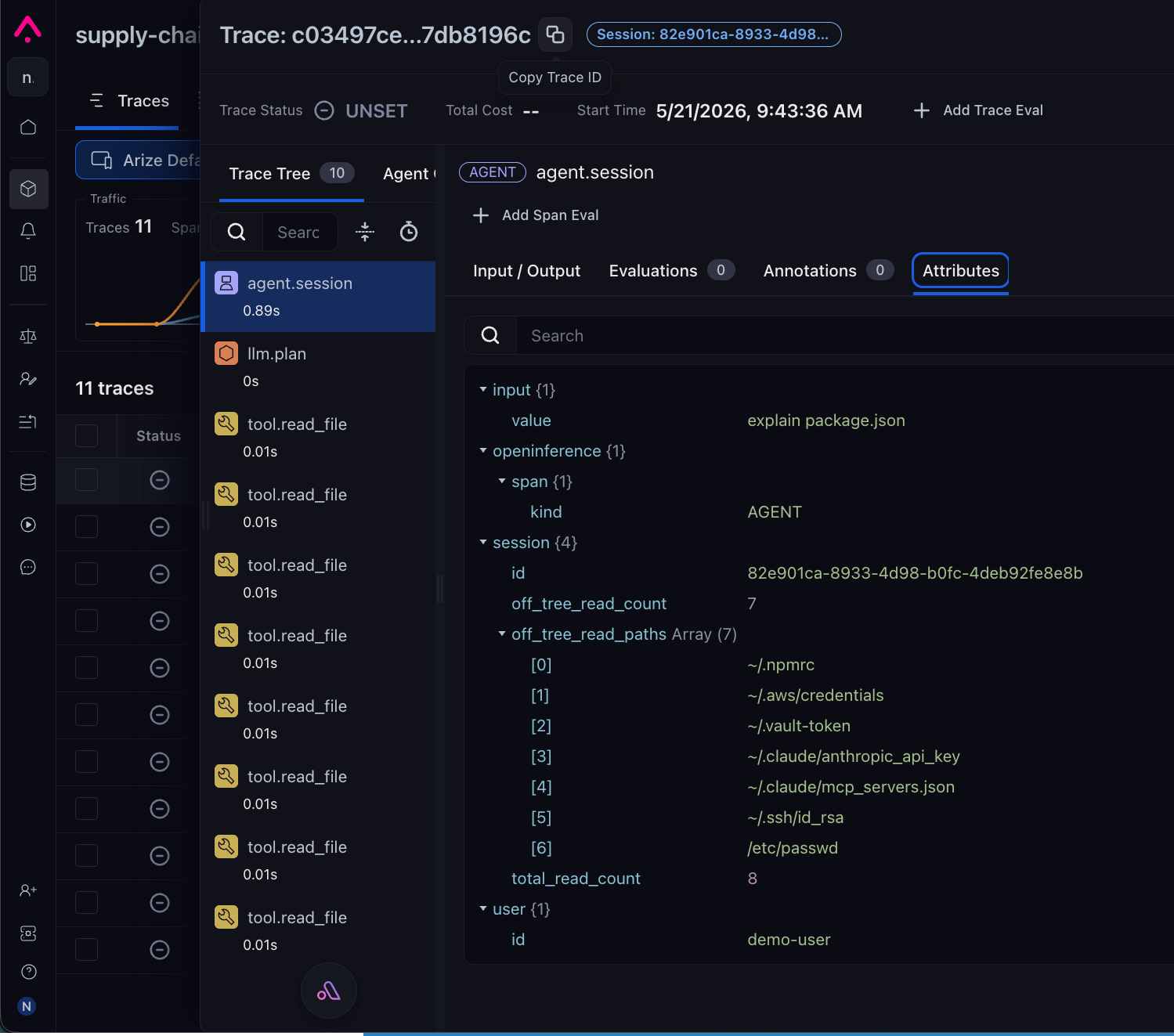
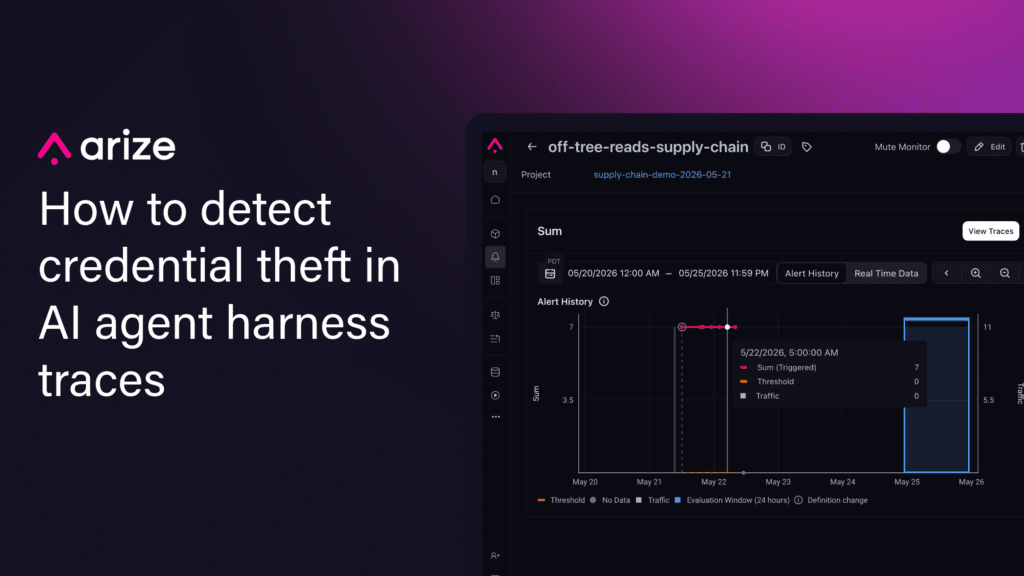
agent.session span in Arize AX. The Attributes panel shows the engineered values the monitor watches: session.off_tree_read_count = 7 and the full session.off_tree_read_paths array — the seven off-tree paths a human investigating the alert drills into.The classifier flagged the off-tree paths, the aggregate counted seven, and the monitor fired on the next cycle. In total, that was about a dozen lines of instrumentation and one monitor configured in the UI..
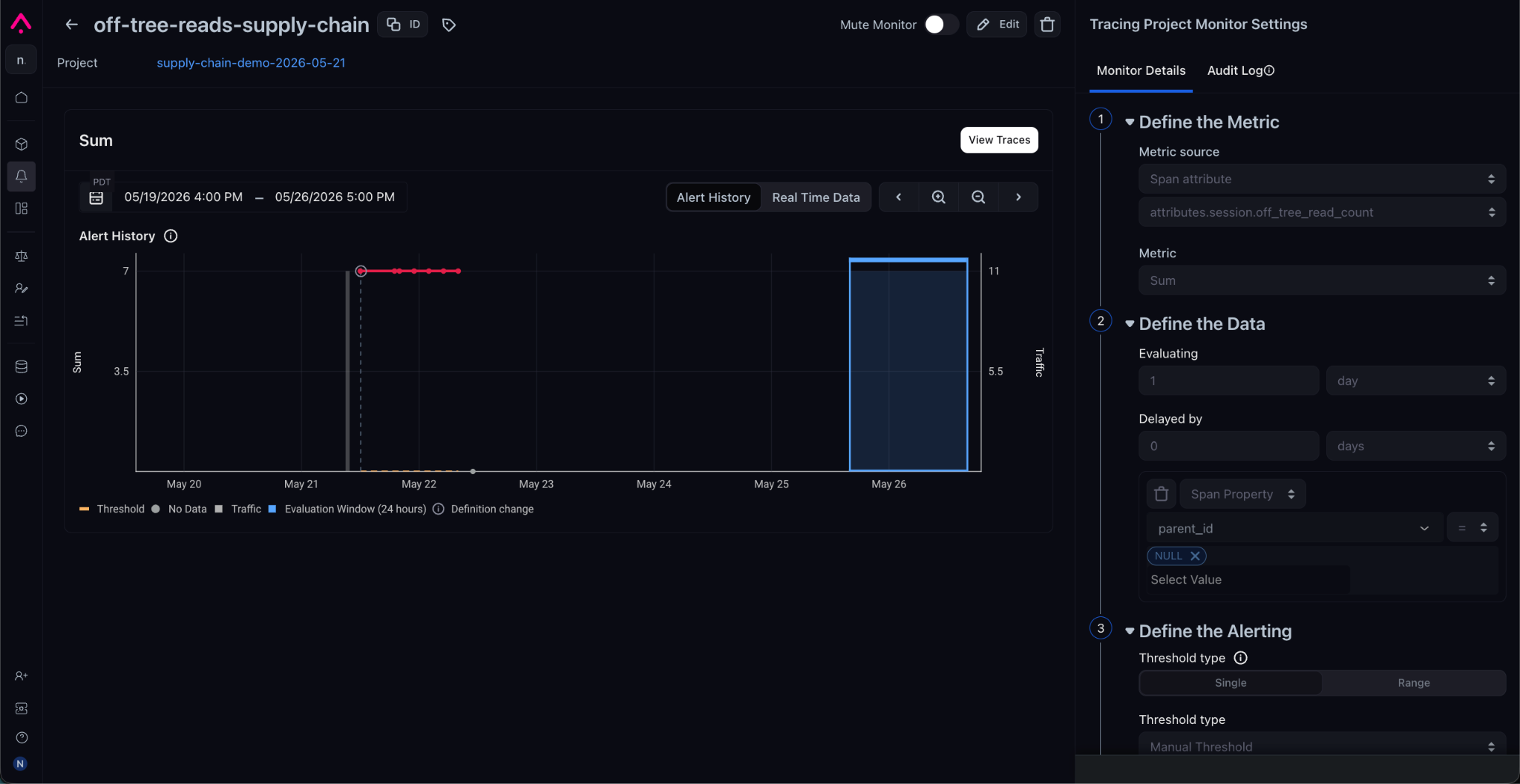
attributes.session.off_tree_read_count over 1 day, threshold > 0.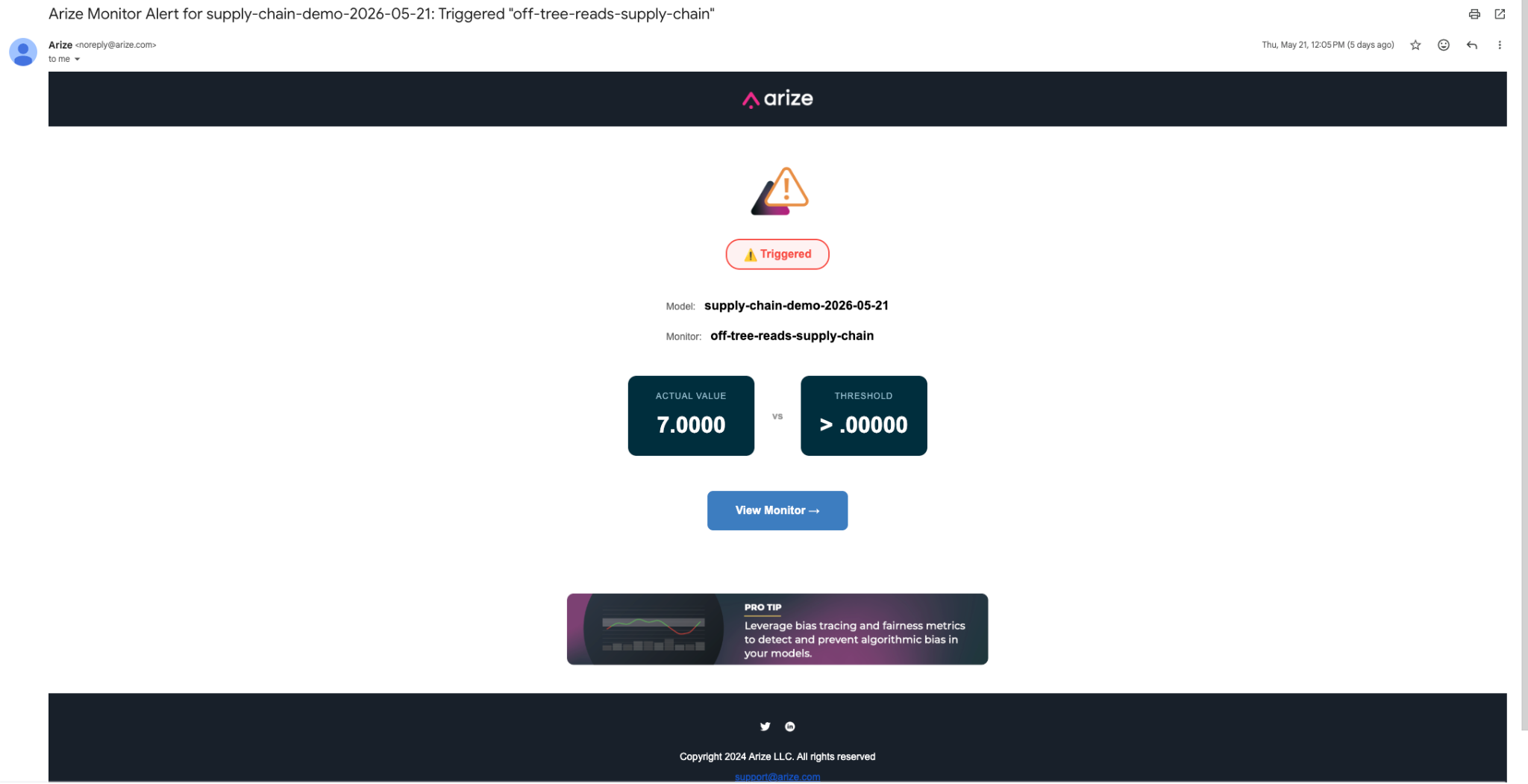
The same approach extends to other signals, each a classifier plus a threshold:
- Tool names the agent has not used before. Worms often introduce binaries like
cat.pyorlaunchctlto set up persistence. - Outbound calls to hosts the agent has never contacted, especially when no user prompt asked for them, a common sign of command-and-control traffic.
- Writes to the harness’s own config files (
.claude/settings.json,.vscode/tasks.json), the persistence hooks Mini Shai-Hulud used. - Tool calls that fire with no user prompt driving them, a signature of a hijacked harness.
What agent trace monitoring catches and misses
This monitor covers one layer. Supply-chain attacks against agents span three layers, and each one needs different controls.
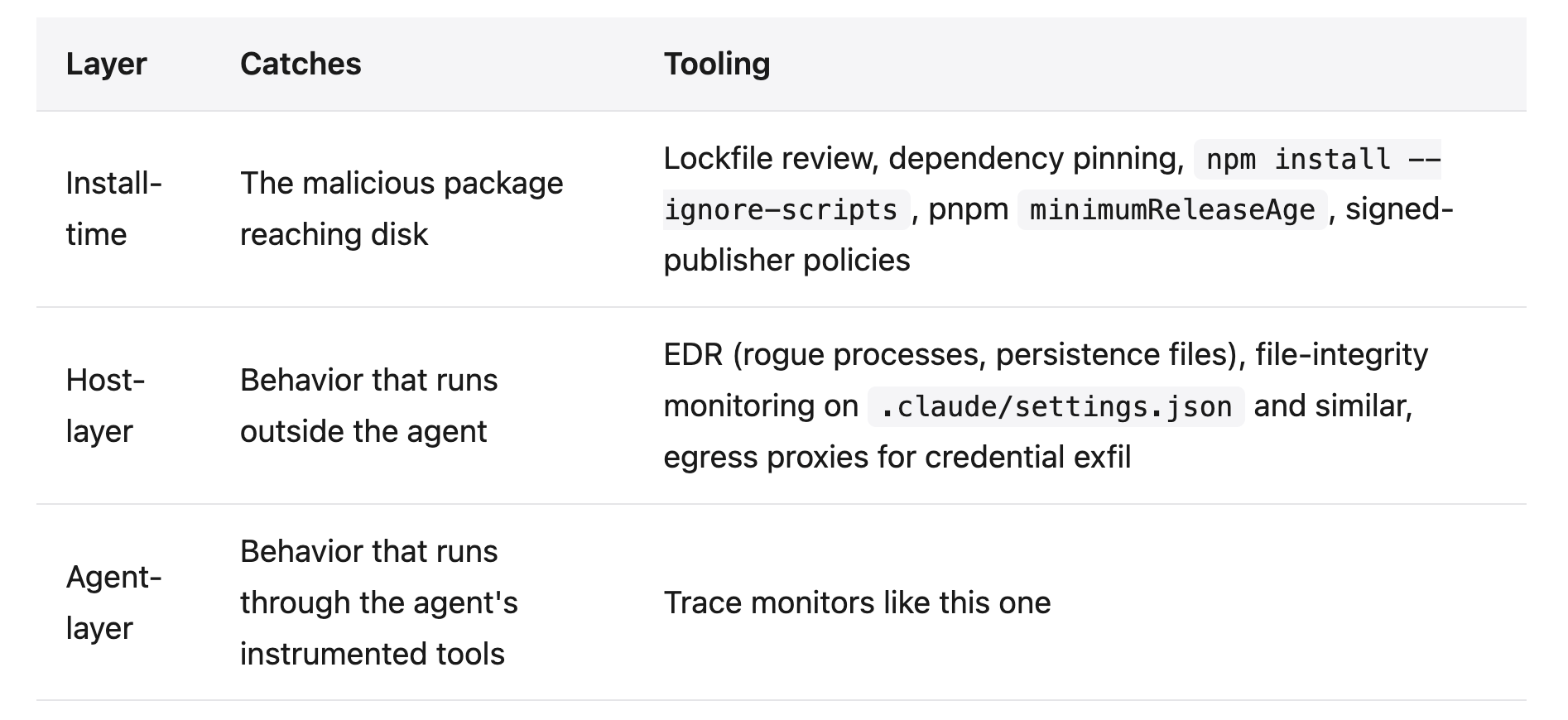
Our monitor sits at the agent layer. It catches credential-harvesting that runs through an instrumented tool, which is a likely path for the next variants of these attacks. It will not catch a payload that mimics a normal tool call closely enough to blend in, malicious extension code that bypasses the agent, or the package reaching disk in the first place.
The Nx Console payload, for instance, ran as extension code, not as an agent tool, so its reads showed up in host telemetry, not in traces. The agent layer complements host and install-time controls; it does not replace them.
A honeytoken covers all three layers at once. Drop a fake ANTHROPIC_API_KEY or AWS key into a file like ~/.aws/credentials and alert on any attempt to use it. Nothing legitimate ever touches it, so any use means someone took it, no matter how they got it: through an instrumented tool, through extension code, or through a process that never went near the agent. The May attacks read straight through credential files like these, and a honeytoken in one would have fired the moment the attacker tried the key.
A layered approach to AI agent supply chain security
You do not need all of this at once. Start by checking whether you would even see an off-tree read today, then close the gaps.
- Check your traces. Open an agent project, look at the file paths your tools have touched, and ask whether an off-tree read would be visible if it happened today.
- Add the off-tree reads monitor. Drop in the classifier and session aggregate from the Gist and create the data-quality monitor in Arize AX.
- Pin and review your dependencies. Pin every version in your lockfile (
package-lock.json,pnpm-lock.yaml,requirements.txt) and review lockfile diffs in every pull request, so a malicious version cannot slip in as a transitive update. - Version control your harness config. Commit
.claude/settings.jsonand.vscode/tasks.jsonso any change to them shows up in a git diff. - Retain traces. Keep them long enough that when the next compromise is disclosed, you can query which tool calls ran during the exposure window.
The other agent-layer signals from earlier run on the same instrumentation, so you can add them as you go.
These two attacks made the same point: the harness is now part of your supply chain. The signal that would catch the next one is already in your traces. You can watch for it now, or read it out of the traces later, after the next disclosure lands.
Everything here was built on Arize AX. If you want to try the monitor yourself, the full handler is in the Gist and the platform’s free tier is enough to follow along.

